67
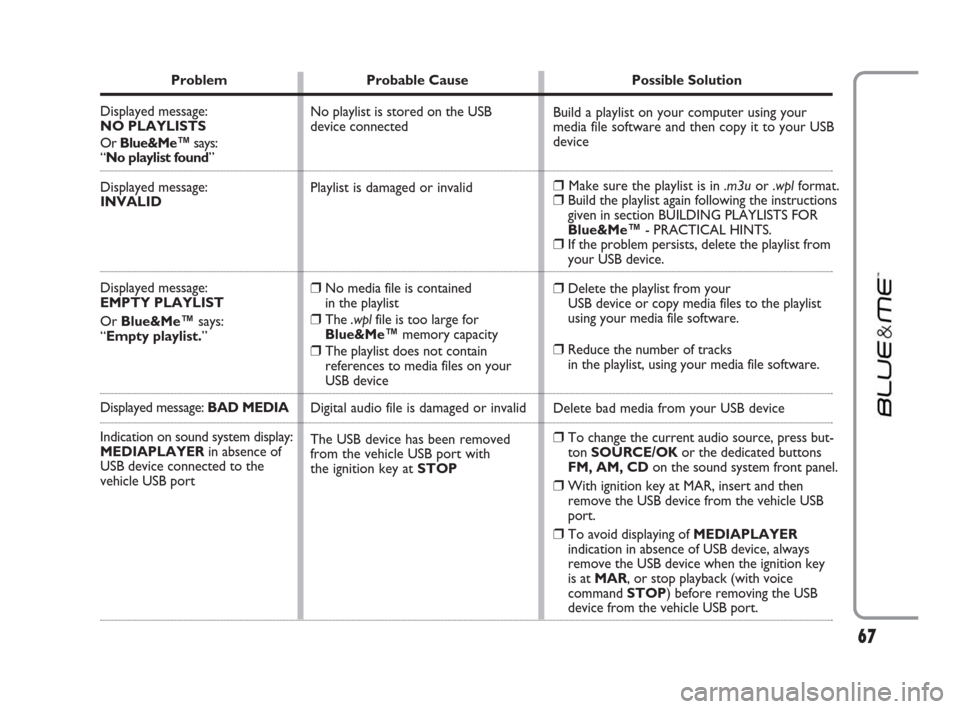
Problem Probable Cause Possible Solution
Displayed message:
NO PLAYLISTS
Or Blue&Me™says:
“No playlist found”
Displayed message:
INVALID
Displayed message:
EMPTY PLAYLIST
Or Blue&Me™says:
“Empty playlist.”
Displayed message: BAD MEDIA
Indication on sound system display:
MEDIAPLAYERin absence of
USB device connected to the
vehicle USB port
Build a playlist on your computer using your
media file software and then copy it to your USB
device
❒Make sure the playlist is in .m3uor .wplformat.❒Build the playlist again following the instructions
given in section BUILDING PLAYLISTS FOR
Blue&Me™- PRACTICAL HINTS.
❒If the problem persists, delete the playlist from
your USB device.
❒Delete the playlist from your
USB device or copy media files to the playlist
using your media file software.
❒Reduce the number of tracks
in the playlist, using your media file software.
Delete bad media from your USB device
❒To change the current audio source, press but-
ton SOURCE/OK or the dedicated buttons
FM, AM, CDon the sound system front panel.
❒With ignition key at MAR, insert and then
remove the USB device from the vehicle USB
port.
❒To avoid displaying of MEDIAPLAYER
indication in absence of USB device, always
remove the USB device when the ignition key
is at MAR, or stop playback (with voice
command STOP) before removing the USB
device from the vehicle USB port. No playlist is stored on the USB
device connected
Playlist is damaged or invalid
❒No media file is contained
in the playlist
❒The .wplfile is too large for
Blue&Me™memory capacity
❒The playlist does not contain
references to media files on your
USB device
Digital audio file is damaged or invalid
The USB device has been removed
from the vehicle USB port with
the ignition key at STOP
603_97_223 DUCATO BLUE&ME PACK8.2 GB 1ed 5-08-2009 15:36 Pagina 67
71
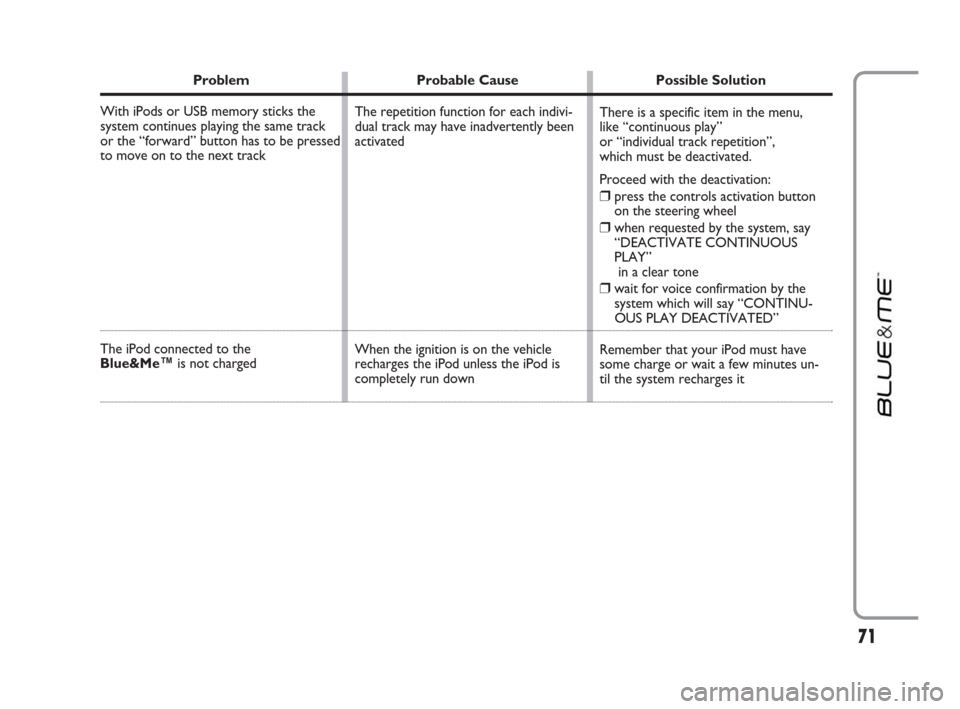
Problem Probable Cause Possible Solution
With iPods or USB memory sticks the
system continues playing the same track
or the “forward” button has to be pressed
to move on to the next track
The iPod connected to the
Blue&Me™is not charged
There is a specific item in the menu,
like “continuous play”
or “individual track repetition”,
which must be deactivated.
Proceed with the deactivation:
❒press the controls activation button
on the steering wheel
❒when requested by the system, say
“DEACTIVATE CONTINUOUS
PLAY”
in a clear tone
❒wait for voice confirmation by the
system which will say “CONTINU-
OUS PLAY DEACTIVATED”
Remember that your iPod must have
some charge or wait a few minutes un-
til the system recharges it The repetition function for each indivi-
dual track may have inadvertently been
activated
When the ignition is on the vehicle
recharges the iPod unless the iPod is
completely run down
603_97_223 DUCATO BLUE&ME PACK8.2 GB 1ed 5-08-2009 15:36 Pagina 71