2009 FIAT DUCATO 250 audio
[x] Cancel search: audioPage 2 of 82

The innovating Windows Mobile™-based Telematic
Solution for the vehicule
CONTENTS
OVERVIEW .............................................................................. 3
The hands-free kit.................................................................... 3
Message reader......................................................................... 5
Media Player ............................................................................. 6
Road safety ............................................................................... 7
DISPLAY AND BUTTONS ON Blue&Me™FRONT
PANEL, SOUND SYSTEM AND STEERING WHEEL ..... 8
HANDS-FREE KIT QUICK REFERENCE GUIDE............. 10
Prepare your mobile phone phonebook ............................ 10
Try out the voice commands ............................................... 11
Pair your mobile phone ......................................................... 11
Make a phone call .................................................................... 12
MESSAGE READER QUICK REFERENCE GUIDE............ 13
MEDIA PLAYER QUICK REFERENCE GUIDE ................ 13
HOW TO USE Blue&Me™ ................................................ 14
Blue&Me™ front panel buttons ....................................... 14
Voice commands ..................................................................... 14Display ....................................................................................... 17
Audio ......................................................................................... 17
Blue&Me™ function menu ................................................. 18
HANDS-FREE KIT FUNCTIONS ......................................... 19
Making a phone call ................................................................. 19
Incoming calls ........................................................................... 23
Managing phone calls .............................................................. 23
Conference call function ........................................................ 24
MESSAGE READER FUNCTIONS ....................................... 25
How to read the last SMS text received............................. 25
Inbox........................................................................................... 26
Managing messages................................................................... 26
Deleting all messages............................................................... 27
Signal types................................................................................. 27
MEDIA PLAYER FUNCTIONS ............................................ 28
How to connect the USB device to Blue&Me™ ............ 28
How to manage the media library ....................................... 28
- Selection by folder ............................................................... 29
- Selection by artist ................................................................. 29
- Selection by genre ................................................................ 30
603_97_223 DUCATO BLUE&ME PACK8.2 GB 1ed 5-08-2009 15:36 Pagina 1
Page 3 of 82

- Selection by album ............................................................... 30
- Selection by playlist .............................................................. 31
Playing audio tracks ................................................................ 31
- Shuffle playback of the whole media library..................... 31
- Now playing (track data) .................................................... 32
- Audio play .............................................................................. 32
- Pause ....................................................................................... 32
- Play ........................................................................................... 32
- Stop ......................................................................................... 32
- Next track .............................................................................. 32
- Previous track ....................................................................... 32
- Changing audio source ........................................................ 33
Media Player settings .............................................................. 33
- Autoplay ................................................................................. 33
- Shuffle ...................................................................................... 34
- Loop ........................................................................................ 34
Exit the settings menu ............................................................ 34
Practical hints for using the Media Player........................... 35
- Scrolling .................................................................................. 35
- Organizing media files .......................................................... 35
- Building the media library on Blue&Me™ .................... 35
- Building playlists for Blue&Me™ .................................... 35
SETTINGS FUNCTIONS....................................................... 36
Pairing a mobile phone ........................................................... 36
Managing user data .................................................................. 39
Advanced options ................................................................... 42
- Accessing the device ID ....................................................... 42
- Changing the GPRS code .................................................... 42
Exit the settings menu ............................................................ 43Blue&Me™ SUPPORTED MOBILE PHONES ............... 44
Mobile phones with Bluetooth®wireless technology...... 44
- “Pull” phones
(phonebook automatically downloaded) ......................... 44
- “Push” phones
(phonebook not automatically downloaded) ................. 44
- Mobile phones with message reader................................. 44
Supported USB memory devices ......................................... 45
- USB memory devices ........................................................... 45
- Management of audio files from iPod devices ................ 45
- Supported digital audio files ............................................... 46
- Supported playlist formats................................................... 47
VOICE COMMANDS (KEYWORDS) - SUMMARY ...... 48
Always available voice commands......................................... 48
Hands-free phone kit voice commands ............................... 49
Message reader voice commands (keywords)................... 51
Media Player voice commands............................................... 52
Settings function voice commands........................................ 55
TROUBLESHOOTING........................................................... 56
Hands-free kit .......................................................................... 56
- General - display screen ...................................................... 56
Message reader......................................................................... 64
Media Player.............................................................................. 66
iPod ............................................................................................ 70
PERSONAL DATA PROTECTION .................................... 72
SYSTEM SOFTWARE USE NOTICE .................................. 73
603_97_223 DUCATO BLUE&ME PACK8.2 GB 1ed 5-08-2009 15:36 Pagina 2
Page 7 of 82

❒ To read again the messages received
and stored
❒ To call the SMS text sender using the
buttons on the steering wheel or voice
commands
❒ To delete individual messages or the
entire inbox using the buttons on the
steering wheel or voice commands.
The Blue&Me™system can also recog-
nize and read abbreviations, if any (e.g.
“ILUVU” will be read like “I love you”) and
interpret the most usual emoticons (e.g.
:-) will be read like “Smile”), adopted
nowadays to write SMS texts.MEDIA PLAYER
With the Blue&Me™Media Player you
can play, via the vehicle sound system, the
digital audio files stored on a USB device by
simply connecting it to the USB port lo-
cated in the vehicle.
In this way, while you are driving you can
play your favourite personal music collec-
tions.
❒iPodplayer - see dedicated paragraph.
The Media Player enables the following
operations:
❒Digital audio playback- you can play
all your digital audio files (.mp3, .wma,
.wav, .aac) or play a customized playlist
(.m3uor .wplformat).
❒Audio file selection by category-
you can play all audio files of a certain
category, e.g.: album, artist or genre.
❒Playback options- while playing tracks
you can select the following options: Play,
Stop, Next track, Previous track, Shuffle and
Loop track.Note
The Media Player does not support audio
files compressed with other formats and
DRM (Digital Right Management) pro-
tected audio files. Non-supported audio
files that may be present on the USB de-
vice will be ignored.
To use the Media Player, you have to
simply connect (directly or by an exten-
sion lead) your USB device to the vehicle
USB port. Turning the ignition key to
MAR, Blue&Me™will start building
your
media library. Once the operation is
completed, you can browse the whole
library and scroll through the categories
by either using the steering wheel con-
trols, voice controls or the radio controls.
Blue&Me™will then play your selection
via the vehicle sound system.
6
603_97_223 DUCATO BLUE&ME PACK8.2 GB 1ed 5-08-2009 15:36 Pagina 6
Page 10 of 82

9
Short press function
(less than 1 second)
– Launch Blue&Me™Main Menu
– Confirm selected menu option
– Accept an incoming phone call
– Switch between two ongoing phone conversations (call waiting)
– Select displayed message
– Cancel voice recognition
– Cancel a voice announcement
– Interrupt message reading
– Exit Blue&Me™Main Menu
– Exit the sub-menu and return to the previous menu option
– Exit current menu option without storing settings
– Turn the microphone on/off during a phone conversation
– Mute the ring tone of an incoming call
– Activate voice recognition
– Interrupt voice announcement to provide a new voice command
– Confirm manually selected menu option
– Switch phone conversation from the hands-free phone to your
mobile phone and vice versa
– Select audio sources (Radio, CD, CD Changer, Media Player)
– Select displayed message
– Scroll Blue&Me™menu items
– Select Media Player tracks
– Scroll inbox messages
– Select folder/artist/genre/previous/next album according to the
selected mode
– Play previous/next track (Media Player mode)
– Media Player Pause on/off
– Adjust the volume of Blue&Me™functions: hands-free kit,
message reader and Media Player, voice announcements
– Media Player Pause on/off
– Adjust the volume of Blue&Me™functions: hands-free kit,
message reader and Media Player, voice announcementsLong press function
(more than 1 second)
– Reject an incoming phone call
– End a phone call (hang up)
–
– Repeat the last utterance
in a voice interaction
–
–
–
–
–
–Controls Button
˜MAIN
ESC ˆ
Blue&Me™
FRONT PANEL
‘
OK ı
NO
MUTE
SOUND SYSTEMVOL+
VOL–
ON STEERING ^WHEEL
(for versions/markets,
+where provided)–
Note- For many tasks, the buttons OK
ıand
˜MAINcan be used interchangeably, and you can use the key that is more convenient for you to press.
❒For both operating modes of steering wheel buttons (short or long press), the function chosen will be activated when you release the button.
603_97_223 DUCATO BLUE&ME PACK8.2 GB 1ed 5-08-2009 15:36 Pagina 9
Page 14 of 82

MESSAGE READER
QUICK REFERENCE
GUIDE
(with compatible
mobile phones only)
If your mobile phone with Bluetooth®
wireless technology supports the message
reader function, at the arrival of a new
SMS text, Blue&Me™plays a tone and it
will ask if you would like to read it.
❒pronounce “Yes” or press ˜MAINor
OK
ıto read the last message received
❒pronounce “No” or press ESC ˆ, the
system will store the message so you
can read it later
For further details on the message read-
er SMS, refer to section “MESSAGE
READER FUNCTIONS”.
ÂIf you encounter difficulties with any of
the message reader settings, consult sec-
tion “MESSAGE READER – TROUBLE-
SHOOTING”To start playing the digital audio files
stored on your USB device, proceed as
follows:
❒Copy tracks to your USB device
(Blue&Me™recognizes .wma, .mp3
.wav and aacformats for audio files and
.wpland .m3uformats for playlists).
❒USB devices without USB wire: just
connect the USB device (directly or by
an extension lead) to the USB port on
the vehicle (see fig. 1).
❒USB devices with USB wire: use the
wire to connect the USB device to the
USB port on the vehicle (see fig. 1).
❒Turn the ignition key to MAR.
Blue&Me™will start automatically to
play your digital tracks selecting them
from the library built at the moment the
USB device is connected.
❒After Blue&Me™has built the library
containing your digital audio files, you can
select and play tracks, albums, artists and
playlists by interacting manually or ver-
bally with Blue&Me™. Building the li-
brary may require a few minutes if your
USB device contains several files.
❒iPod player - see dedicated paragraph.
❒You can also decide whether to play au-
dio files automatically when connecting
the USB device or to play them upon
your command.
For further details on Media Player, refer
to section MEDIA PLAYER FUNCTIONS.
ÂIf you encounter difficulties with any of
the voice recognition operations, consult
section MEDIA PLAYER - TROU-
BLESHOOTING.
MEDIA PLAYER QUICK REFERENCE GUIDE
13
603_97_223 DUCATO BLUE&ME PACK8.2 GB 1ed 5-08-2009 15:36 Pagina 13
Page 16 of 82
To issue a voice command to the system,
press
‘and wait for the tone indicating
that voice recognition is active. Then,
speak the command in your natural voice
at a moderate pace. When the system rec-
ognizes the command, it will acknowledge
your command by speaking a response or
acting on your command.
Voice commands are organized according
to three increasing levels: 1
stlevel, 2ndlev-
el and 3rdlevel.
When a valid* 1
stlevel keyword is pro-
nounced, the system will activate 2ndlev-
el keywords; when a valid 2ndlevel key-
word is pronounced, the system will ac-
tivate 3
rdlevel keywords.
If the user pronounces a valid 1
stlevel key-
word, then the submenu relevant to that
command will remain active until a key-
word leading to another level is given or
the interaction is interrupted; the same
rule applies for the other lower levels (2
nd
and 3rdlevel).
ÂFor the list of available keywords, re-
fer to section VOICE COMMANDS
(KEYWORDS) - SUMMARY.To repeat the last system voice an-
nouncement, press
‘for longer than 1
second or press shortly
‘and pro-
nounce “Repeat”.
The system can issue voice announce-
ments. A voice announcement is a spoken
message initiated by the system. To can-
cel a voice announcement, press ESC
ˆ,
or press
‘and pronounce “Cancel”.
A voice interaction is a two-way commu-
nication/spoken exchange between system
and user. To initiate a voice interaction,
press
‘and issue a command. To inter-
rupt a conversation and start a new one,
press
‘at any time during the conver-
sation and pronounce a vocal command.
To stop an ongoing interaction press
ESC
ˆ. You will hear a tone indicating
when voice recognition is deactivated.The hands-free kit help option can speak
the list of commands available to you at
any time, depending on the keyword lev-
el that you are currently on. To use the
help system, say “HelpListen to the list
of currently available commands and de-
cide on which command you’d like to is-
sue to the system.
Adjust the volume of phone calls to a lev-
el that is comfortable and safe while the
vehicle is in motion. To adjust the default
volume of Blue&Me™, see paragraph
“EXTERNAL AUDIO VOL function” in
the sound system owner handbook. To
temporarily adjust the volume of the cur-
rent phone call, press VOL+or VOL–.
After the phone call is disconnected, the
volume will revert back to the original lev-
el.
You can press VOL+or VOL–also to
adjust the volume of the current
Blue&Me™voice announcement.
Please remember that to interrupt a voice
announcement, you can always press
‘at any time during a voice interaction and
give a new voice command.
15
* Validmeans that the keyword pronounced is included in the Blue&Me™“dictionary” and that can therefore be recognized by
the system for the concerned level.
603_97_223 DUCATO BLUE&ME PACK8.2 GB 1ed 5-08-2009 15:36 Pagina 15
Page 18 of 82
DISPLAY
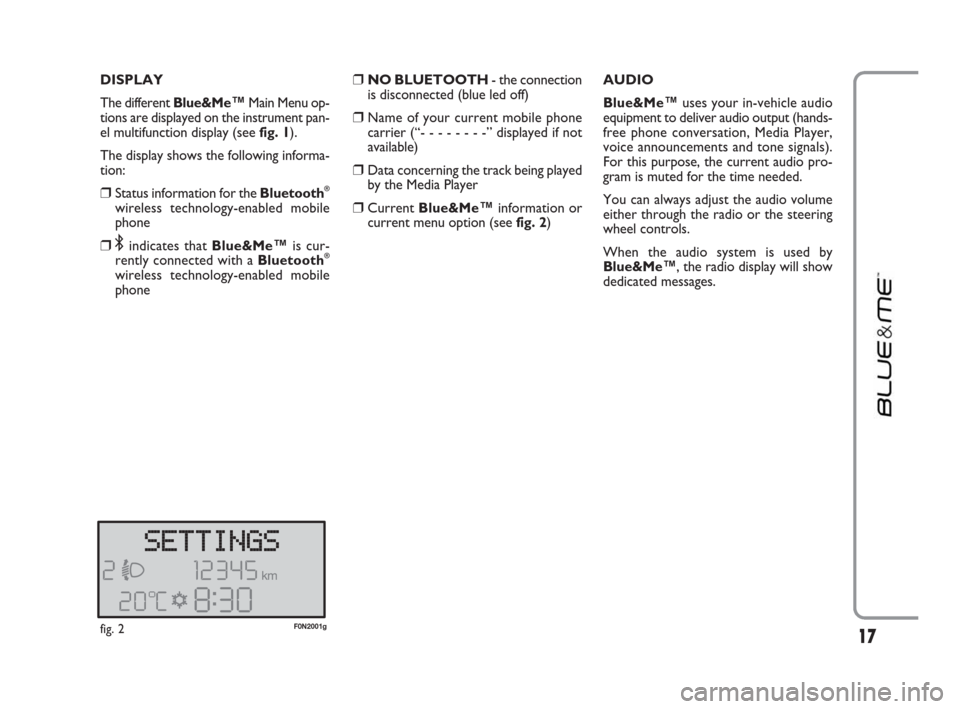
The different Blue&Me
™Main Menu op-
tions are displayed on the instrument pan-
el multifunction display (see fig. 1).
The display shows the following informa-
tion:
❒Status information for the Bluetooth®
wireless technology-enabled mobile
phone
❒;indicates that Blue&Me™is cur-
rently connected with a Bluetooth®
wireless technology-enabled mobile
phone
❒NO BLUETOOTH - the connection
is disconnected (blue led off)
❒Name of your current mobile phone
carrier (“- - - - - - - -” displayed if not
available)
❒Data concerning the track being played
by the Media Player
❒CurrentBlue&Me™information or
current menu option (seefig. 2)AUDIO
Blue&Me™uses your in-vehicle audio
equipment to deliver audio output (hands-
free phone conversation, Media Player,
voice announcements and tone signals).
For this purpose, the current audio pro-
gram is muted for the time needed.
You can always adjust the audio volume
either through the radio or the steering
wheel controls.
When the audio system is used by
Blue&Me™, the radio display will show
dedicated messages.
17fig. 2F0N2001g
603_97_223 DUCATO BLUE&ME PACK8.2 GB 1ed 5-08-2009 15:36 Pagina 17
Page 19 of 82
Blue&Me™ FUNCTION MENU
Blue&Me™Main Menu displays options
within a structured list. Each option (item)
in the menu can be viewed on the instru-
ment panel multifunction display. Available
options enable to activate the different
functions or to change the settings of your
Blue&Me™system.
Note
It is possible to navigate in the menu using
the front panel buttons only when the ve-
hicle is not moving.
The Main Menu includes the following op-
tions:
❒LAST CALLS- this submenu allows
you to view a list of the recent calls
made or received. This list is either
downloaded from your mobile phone
memory, or accumulated via use of the
hands-free phone, or both.
❒PHONEBOOK- this submenu allows
you to view the phone numbers in
your phonebook and to select one to
dial. If there is a large amount of entries
in your phonebook, then the items will
be contained in groups within alpha-
betical submenus indicating the contacts
within that group. The number of con-
tacts within a group depends on the
amount of entries in your phonebook.
❒MESSAGE READER
(with compatible mobile phones
only)- This submenu enables to read
the last message received, to call the
message sender or to delete the last
message received. It is possible to store
up to 20 received messages in the ded-
icated inbox and to play them later, to
call the message sender or to delete the
messages. It is possible to select noti-
fication signals for the arrival of a new
SMS text.
❒MEDIA PLAYER- this submenu al-
lows to scroll the digital audio tracks in
the library by folder, artist, genre, al-
bum or by playlist. This sub-menu is to
be used to select and play tracks.
iPod player- see dedicated paragraph.
❒SETTINGS- this submenu allows you
to perform tasks such as managing your
phonebook entries, creating a pairing
relationship, or setting a connection ID.Launching the Main Menu
To launch the Blue&Me™Main Menu,
press
˜MAIN, you can then interact with
the system through the buttons on the
front panel.
Navigating the menu options
To navigate through the items in a menu,
press
NorO.
When the number of characters in a dis-
play message is too long for the allowable
number of display characters, the text in
the display message will be cut to fit the
display size.
To select the option shown on the display,
press OK
ıor ˜MAIN.
To quit the selected option or to exit a
submenu, press ESC
ˆ.
18
603_97_223 DUCATO BLUE&ME PACK8.2 GB 1ed 5-08-2009 15:36 Pagina 18