Page 78 of 532

DefrosterCheck operation by selecting the defrost mode and place
the blower control on high speed. You should be able to
feel the air directed against the windshield. See your
authorized dealer for service if your defroster is
inoperable.Periodic Safety Checks You Should Make Outside
the Vehicle
TiresExamine tires for excessive tread wear and uneven wear
patterns. Check for stones, nails, glass, or other objects
lodged in the tread. Inspect the tread and sidewall for
cuts and cracks. Check the wheel nuts for tightness.
Check the tires (including spare) for proper pressure.
LightsHave someone observe the operation of exterior lights
while you work the controls. Check turn signal and high
beam indicator lights on the instrument panel.Door LatchesCheck for positive closing, latching, and locking.Fluid LeaksCheck area under vehicle after overnight parking for fuel,
engine coolant, oil, or other fluid leaks. Also, if gasoline
fumes are detected or if fuel, power steering fluid, or
brake fluid leaks are suspected, the cause should be
located and corrected immediately.
76 THINGS TO KNOW BEFORE STARTING YOUR VEHICLE
Page 81 of 532

�Windshield Wipers And Washers ......... 138
▫ Intermittent Wiper System ............. 138
▫ Windshield Washers ................. 139
� Tilt Steering Column .................. 140
� Driver Adjustable Pedals — If Equipped .... 141
▫ Adjustment ....................... 141
� Electronic Speed Control — If Equipped .... 142
▫ To Activate ....................... 143
▫ To Set a Desired Speed ............... 143
▫ To Deactivate ...................... 143
▫ To Resume Speed ................... 143
▫ To Vary The Speed Setting ............. 143
▫ To Accelerate For Passing ............. 144�
Overhead Console — If Equipped ......... 145
▫ Courtesy/Reading Lights ............. 145
� Overhead Console With Compass/Temperature
Mini-Trip Computer — If Equipped ......... 146
▫ US/M Button ...................... 147
▫ Reset Button ...................... 147
▫ Global Reset ...................... 148
▫ Step Button ....................... 148
▫ Average Fuel Economy (AVG ECO) ...... 148
▫ Distance To Empty (DTE) ............. 149
▫ Trip Odometer (ODO) ................ 150
▫ Elapsed Time (ET) .................. 150
▫ C/T Button ....................... 150
UNDERSTANDING THE FEATURES OF YOUR VEHICLE 79
3
Page 90 of 532
The uconnect�phone can be used with any Hands-Free
Profile certified Bluetooth� cellular phone. See the
uconnect� website for supported phones. If your cellular
phone supports a different profile (e.g., Headset Profile)
you may not be able to use any uconnect� phone
features. Refer to your cellular service provider or the
phone manufacturer for details.
The uconnect� phone is fully integrated with the vehi-
cle’s audio system. The volume of the uconnect� phone
can be adjusted either from the radio volume control
knob or from the steering wheel radio control (right
switch), if so equipped.
The radio display will be used for visual prompts from
the uconnect� phone such as �CELL�or caller ID on
certain radios.
OperationVoice commands can be used to operate the uconnect �
phone and to navigate through the uconnect� phone
menu structure. Voice commands are required after most
uconnect� phone prompts. You will be prompted for a
specific command and then guided through the available
options.•
Prior to giving a voice command, one must wait for
the beep, which follows the �Ready�prompt or another
prompt.
•
For certain operations, compound commands can be
used. For example, instead of saying �Setup�and then
�Phone Pairing,� the following compound command
can be said: �Setup Phone Pairing.�
•
For each feature explanation in this section, only the
combined form of the voice command is given. You
can also break the commands into parts and say each
part of the command when you are asked for it. For
88 UNDERSTANDING THE FEATURES OF YOUR VEHICLE
Page 132 of 532
Press the switch once to select High-level heat-
ing. Press the switch a second time to select
Low-level heating. Press the switch a third time
to shut the heating elements Off.
WARNING!
•
Persons who are unable to feel pain to the skin
because of advanced age, chronic illness, diabetes,
spinal cord injury, medication, alcohol use, ex-
haustion or other physical condition must exercise
care when using the seat heater. It may cause burns
even at low temperatures, especially if used for
long periods of time.
•
Do not place anything on the seat that insulates
against heat, such as a blanket or cushion. This
may cause the seat heater to overheat.
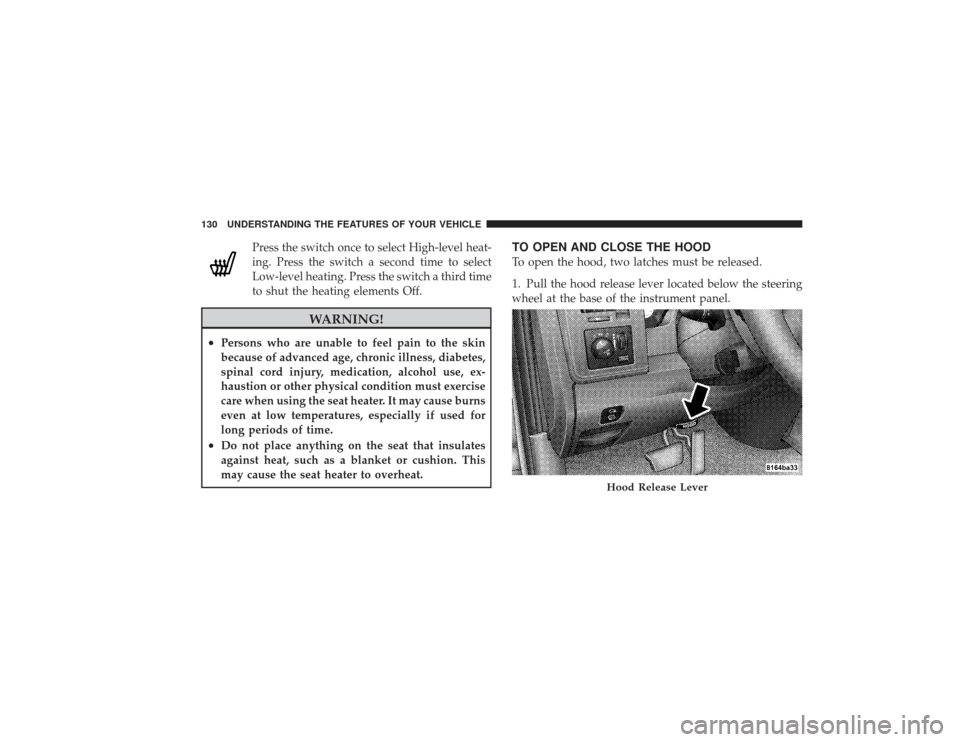
TO OPEN AND CLOSE THE HOODTo open the hood, two latches must be released.
1. Pull the hood release lever located below the steering
wheel at the base of the instrument panel.
Hood Release Lever
130 UNDERSTANDING THE FEATURES OF YOUR VEHICLE
Page 134 of 532

LIGHTSThe headlight switch is located on instrument panel to
the left of the steering wheel.Interior LightsCourtesy and dome lights are turned on when the front
doors are opened, when the dimmer control (rotatingwheel on the right side of the switch) is rotated to the
upward detent position, or by pressing the UNLOCK
button on the Remote Keyless Entry (RKE) transmitter (if
equipped).
When a door is open and the interior lights are on,
rotating the dimmer control all the way down to the off
detent will cause all the interior lights to go out. This is
also known as the
�Party�mode because it allows the
doors to stay open for extended periods of time without
discharging the vehicle’s battery.
The brightness of the instrument panel lighting can be
regulated by rotating the dimmer control up (brighter) or
down (dimmer). When the headlights are on you can
supplement the brightness of the odometer, trip odom-
eter, radio and overhead console by rotating the control
up until you hear a click. This feature is termed the
“Parade” mode and is useful when headlights are re-
quired during the day.
Headlight Switch Location
132 UNDERSTANDING THE FEATURES OF YOUR VEHICLE
Page 138 of 532
Multifunction LeverThe multifunction lever, located on the left side of the
steering column, is used to activate the turn signals and
high beams headlights.Turn SignalsMove the lever up or down to signal a right-hand or
left-hand turn.
The arrow on either side of the instrument cluster flashes
to indicate the direction of the turn and proper operation
of the front and rear turn signal lights. If a defective bulb
or wiring circuit is detected for the turn signal system, the
arrow indicators will flash at a faster rate. If an indicator
fails to light when the lever is moved, see your autho-
rized dealer.
Turn Signal Lever
136 UNDERSTANDING THE FEATURES OF YOUR VEHICLE
Page 139 of 532
Lane Change AssistTap the lever up or down once and the turn signal (left or
right) will flash three times then automatically turn off.Flash-to-PassYou can signal another vehicle with your headlights by
partially pulling the multifunction lever toward the steer-
ing wheel. This will turn on the high beam headlights
until the lever is released.High Beam/Low Beam Select SwitchPull the multifunction lever fully toward the steering
wheel to switch the headlights from high or low beam.
High Beam/Low Beam
UNDERSTANDING THE FEATURES OF YOUR VEHICLE 137
3
Page 142 of 532
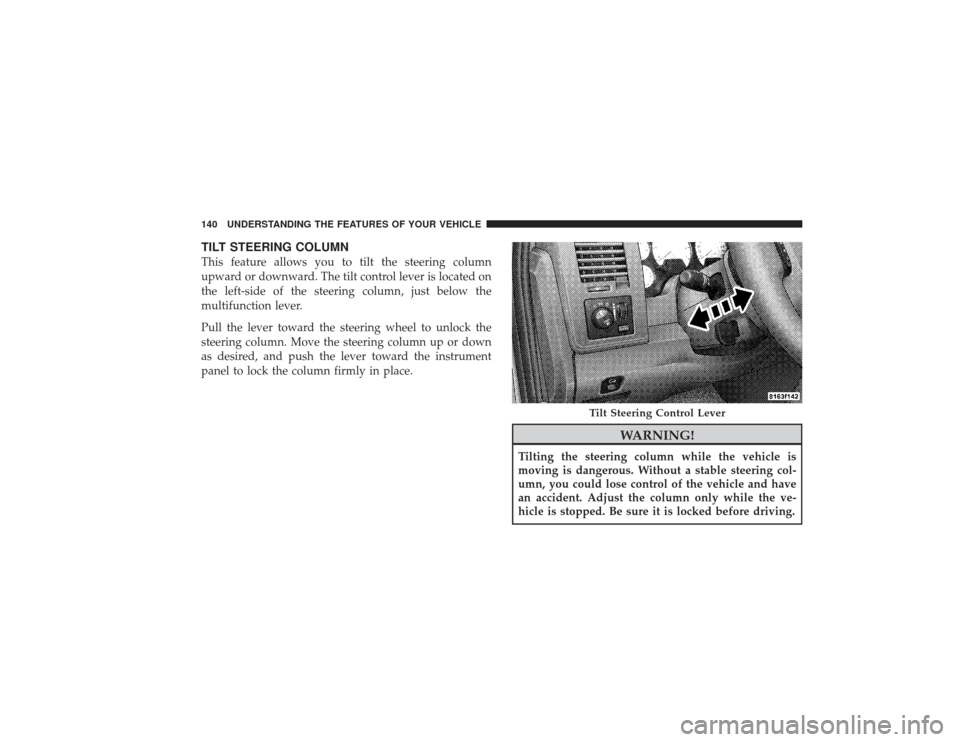
TILT STEERING COLUMNThis feature allows you to tilt the steering column
upward or downward. The tilt control lever is located on
the left-side of the steering column, just below the
multifunction lever.
Pull the lever toward the steering wheel to unlock the
steering column. Move the steering column up or down
as desired, and push the lever toward the instrument
panel to lock the column firmly in place.
WARNING!
Tilting the steering column while the vehicle is
moving is dangerous. Without a stable steering col-
umn, you could lose control of the vehicle and have
an accident. Adjust the column only while the ve-
hicle is stopped. Be sure it is locked before driving.
Tilt Steering Control Lever
140 UNDERSTANDING THE FEATURES OF YOUR VEHICLE