Page 143 of 532
DRIVER ADJUSTABLE PEDALS — IF EQUIPPEDThe adjustable accelerator and brake pedal allow the
driver to establish a comfortable position relative to the
steering wheel and pedals.
Adjustment1. Position the driver seat so that you are at least 10 in
(254 mm) away from the airbag, located in the center of
the steering wheel.
2. Fasten and adjust the seatbelts.
3. Move the adjustable pedal switch, located to the left of
the steering column near the parking brake release, in the
direction you desire to move the pedals.
NOTE:The pedals cannotbe adjusted when the vehicle
is in REVERSE or when the Electronic Speed Control is
set.
Adjustable Pedals Switch
UNDERSTANDING THE FEATURES OF YOUR VEHICLE 141
3
Page 144 of 532
CAUTION!
Do not place any article under the adjustable pedals
or impede its ability to move as it may cause damage
to the pedal controls. Pedal travel may become lim-
ited if movement is stopped by an obstruction in the
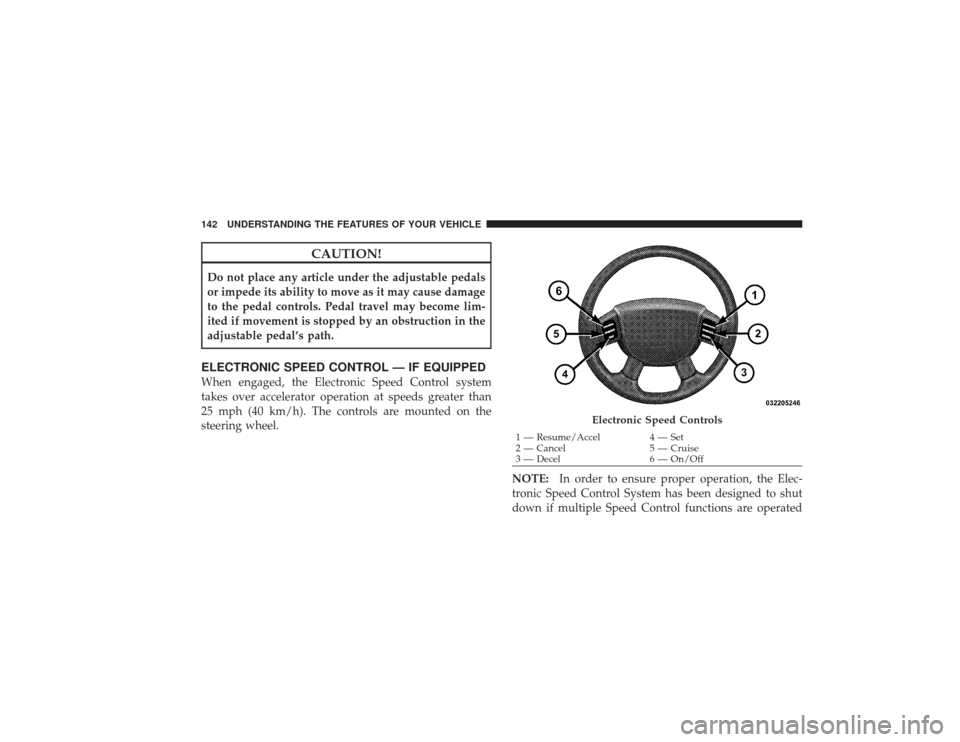
adjustable pedal’s path.ELECTRONIC SPEED CONTROL — IF EQUIPPEDWhen engaged, the Electronic Speed Control system
takes over accelerator operation at speeds greater than
25 mph (40 km/h). The controls are mounted on the
steering wheel.NOTE:In order to ensure proper operation, the Elec-
tronic Speed Control System has been designed to shut
down if multiple Speed Control functions are operated
Electronic Speed Controls
1 — Resume/Accel 4 — Set
2 — Cancel 5 — Cruise
3 — Decel 6 — On/Off
142 UNDERSTANDING THE FEATURES OF YOUR VEHICLE
Page 233 of 532
VIDEO ENTERTAINMENT SYSTEM (VES)™ — IF
EQUIPPEDThe optional Video Entertainment System (VES)™ con-
sists of a DVD player and LCD (liquid crystal display)
screen, a battery-powered remote control, and two head-
sets. The system is located in the headliner behind the
front row seat. Refer to your VES™ User’s Manual for
detailed operating instructions.
REMOTE SOUND SYSTEM CONTROLS — IF
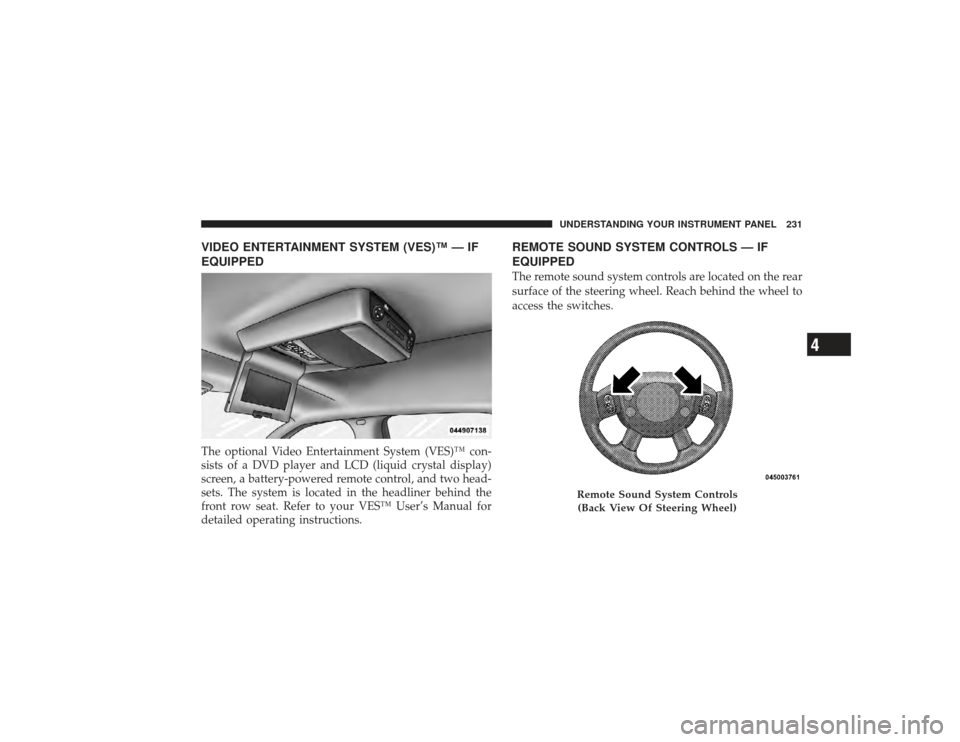
EQUIPPEDThe remote sound system controls are located on the rear
surface of the steering wheel. Reach behind the wheel to
access the switches.
Remote Sound System Controls(Back View Of Steering Wheel)
UNDERSTANDING YOUR INSTRUMENT PANEL 231
4
Page 251 of 532
▫Understanding The Features Of Your
Winch ............................ 310
▫ Winch Accessories .................. 312
▫ Operating Your Winch ............... 313
▫ Rigging Techniques .................. 325
� Power Steering ...................... 327
▫ Power Steering Fluid Check ........... 328
� Parking Brake ....................... 329
� Brake System ....................... 330
▫ 3500 Dual Rear Wheel Models Only ...... 331
▫ Four-Wheel Anti-Lock Brake System ..... 331
� Electronic Brake Control System —
If Equipped .......................... 333
▫ Anti-Lock Brake System (ABS) .......... 333▫
Traction Control System (TCS) .......... 334
▫ Brake Assist System (BAS) ............. 335
▫ Hill Start Assist (HSA) ............... 336
▫ Electronic Roll Mitigation (ERM) ........ 339
▫ Electronic Stability Program (ESP) ....... 340
▫ TSC (Trailer Sway Control) ............ 345
� Tire Safety Information ................ 346
▫ Tire Markings ..................... 346
▫ Tire Identification Number (TIN) ........ 349
▫ Tire Loading And Tire Pressure ......... 350
� Tires — General Information ............ 354
▫ Tire Pressure ...................... 354
▫ Tire Inflation Pressures ............... 355
STARTING AND OPERATING 249
5
Page 257 of 532
WARNING!
It is dangerous to move the shift lever out of PARK or
NEUTRAL if the engine speed is higher than idle
speed. If your foot is not firmly on the brake pedal,
the vehicle could accelerate quickly forward or in
reverse. You could lose control of the vehicle and hit
someone or something. Only shift into gear when the
engine is idling normally and when your right foot is
firmly on the brake pedal.Automatic Transmission with OverdriveThe gear shift lever display located in the instrument
panel cluster indicates the transmission gear range (the
selector is illuminated for night driving). The shift lever is
mounted on the right side of the steering column. You
must depress the brake pedal to pull the shift lever out of
PARK position (Brake Interlock System). To drive, move
the shift lever from PARK or NEUTRAL to the desiredDRIVE position. Pull the shift lever toward you when
shifting into REVERSE, SECOND, FIRST or PARK, or
when shifting out of PARK.
Gear RangesDO NOT race the engine when shifting from PARK or
NEUTRAL position into another gear range.
PARK
This gear position supplements the parking brake by
locking the transmission. The engine can be started in
this range. Never use PARK while the vehicle is in
motion. Apply the parking brake when leaving the
vehicle in this range. Always apply parking brake first,
then place the shift lever into the PARK position. On
four-wheel drive vehicles be sure that the transfer case is
in a drive position!
STARTING AND OPERATING 255
5
Page 283 of 532
NOTE:Left to right wheel speed difference may be
necessary to allow the axle to fully lock. If the indicator
light is flashing after placing the switch in the REAR
LOCK or FRONT/REAR LOCK position, drive the ve-
hicle in a turn or on loose gravel to expedite the locking
action.
WARNING!
Do not use the locked axle position for normal
driving. A locked front axle is intended for off-road
driving only. Locking the front axle during on-road
driving will reduce the steering ability. This could
cause an accident and you may be seriously injured.
To lock the front axle; move the axle locker switch to
FRONT/REAR LOCK while traveling less than 3 mph
(5 km/h). The indicator light will be solid when the front
axle is locked. NOTE:
The rear axle must be locked before the front
axle will lock.
To unlock the front axle; move the axle locker switch to
REAR LOCK. The FRONT/REAR LOCK indicator light
will go out when the axle is unlocked.
NOTE: The axle lockers could be torque locked due to
side to side loads on the axle. Driving slowly while
turning the steering wheel from a left hand turn to a right
hand turn or driving in REVERSE for a short distance
may be required to release the torque lock and unlock the
axles.
To unlock the rear axle; move the axle locker switch to
AXLE UNLOCK. The REAR LOCK indicator light will go
out when the rear axle is unlocked.
STARTING AND OPERATING 281
5
Page 286 of 532
WARNING!
If the stabilizer/sway bar will not return to On-Road
mode, vehicle stability is greatly reduced. Do not
attempt to drive the vehicle over 18 mph (29 km/h).
Driving faster than 18 mph (29 km/h) may cause loss
of control of the vehicle, which could result in
serious injury. Contact your local service center for
assistance.SAFE OFF-ROAD DRIVING — POWER WAGON
ONLY
Off-Road Driving Tips and Vehicle CharacteristicsYour vehicle has excellent on and off-road capabilities.
These off-road capabilities will allow you to explore
those wilderness trails where few travel, providing a
source of exciting and satisfying recreation. Before youventure out, you should contact your local governmental
agency to determine the designated off-road vehicle
(ORV) trails or recreation areas. You should always tread
lightly and only use established roads, trails or ORV
recreational areas. The National Forest Service, Bureau of
Land Management or local Department of Natural Re-
sources are a wealth of information and usually have
maps with marked trails.
Skid Plates And Underbody ProtectionSteel skid plates protect the major driveline components
of the truck including the fuel tank, transfer case and
steering damper. In addition, this vehicle is equipped
with boxed cross members and fore/aft rails. This addi-
tional protection allows the vehicle to be utilized in
severe off-road situations that would be considered im-
passable by a normal truck.
284 STARTING AND OPERATING
Page 290 of 532
using light brake pressure with light throttle will keep the
vehicle from jerking or lurching. This technique is also
used when you need to stop and restart a vehicle on a
steep incline.The Basics Of Off-Road DrivingYou will encounter many types of terrain driving off-
road. You should be familiar with the terrain and area
before proceeding. There are many types of surface
conditions: hard packed dirt, gravel, rocks, grass, sand,
mud, snow and ice. Every surface has a different effect on
your vehicle’s steering, handling and traction. Control-
ling your vehicle is one of the keys to successful off-road
driving, so always keep a firm grip on the steering wheel
and maintain a good driving posture. Avoid sudden
accelerations, turns or braking. In most cases there are no
road signs, posted speed limits or signal lights. Therefore
you will need to use your own good judgment on what is
safe and what isn’t. When on a trail you should always be
looking ahead for surface obstacles and changes interrain. The key is to plan your future driving route while
remembering what you are currently driving over.
CAUTION!
Never park your vehicle over dry grass or other
combustible materials. The heat from your vehicle
exhaust system could cause a fire.
WARNING!
Always wear your seat belt and firmly tie down
cargo. Unsecured cargo can become projectiles in an
off-road situation.When To Use Low RangeWhen driving off-road, shift into 4L (Low Range) for
additional traction or to improve handling and control on
slippery or difficult terrain. Due to the lower gearing, low
range will allow the engine to operate in a higher power
288 STARTING AND OPERATING