Page 112 of 484
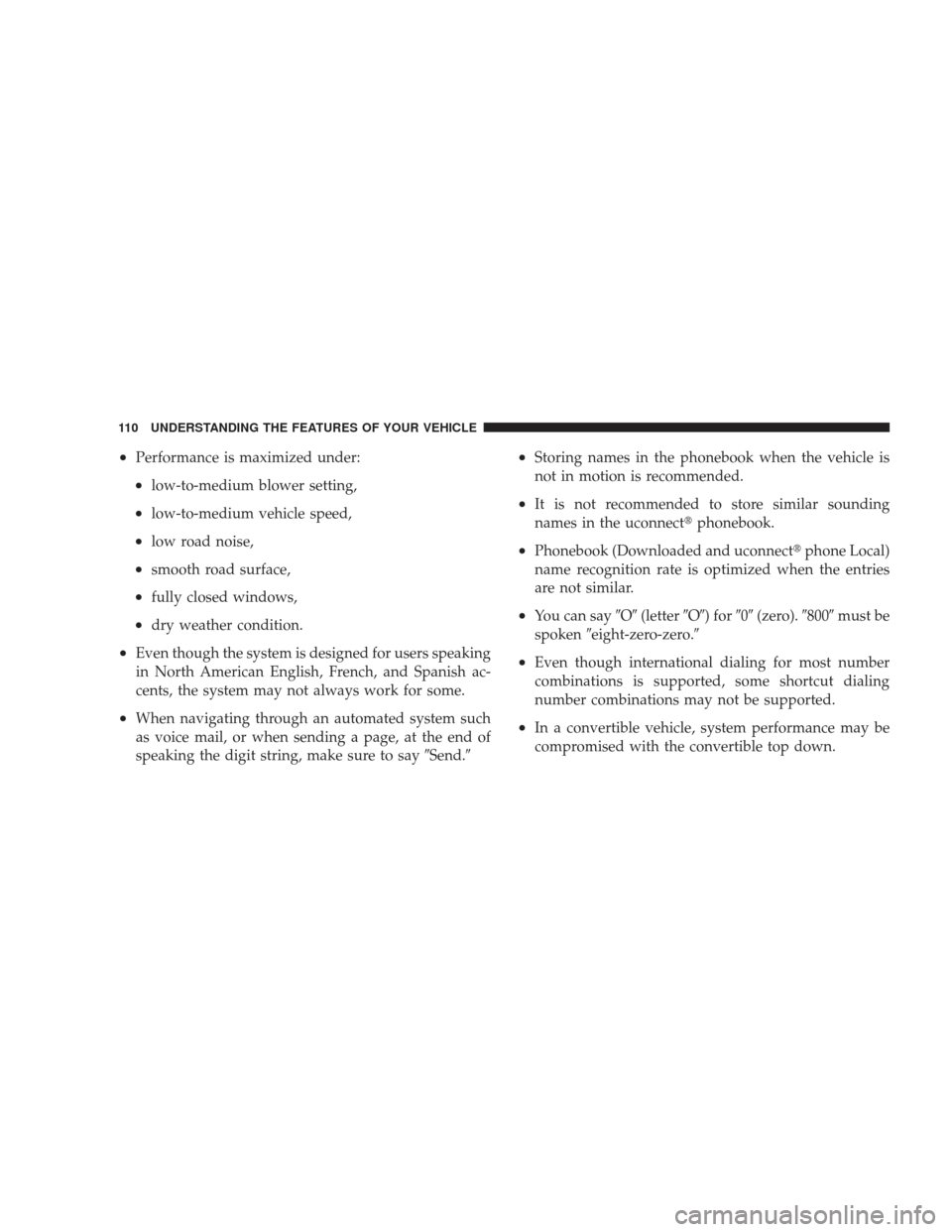
•Performance is maximized under:
•low-to-medium blower setting,
•low-to-medium vehicle speed,
•low road noise,
•smooth road surface,
•fully closed windows,
•dry weather condition.
•Even though the system is designed for users speaking
in North American English, French, and Spanish ac-
cents, the system may not always work for some.
•When navigating through an automated system such
as voice mail, or when sending a page, at the end of
speaking the digit string, make sure to say�Send.�
•Storing names in the phonebook when the vehicle is
not in motion is recommended.
•It is not recommended to store similar sounding
names in the uconnect�phonebook.
•Phonebook (Downloaded and uconnect� phone Local)
name recognition rate is optimized when the entries
are not similar.
•You can say �O�(letter �O�) for �0�(zero). �800�must be
spoken �eight-zero-zero.�
•Even though international dialing for most number
combinations is supported, some shortcut dialing
number combinations may not be supported.
•In a convertible vehicle, system performance may be
compromised with the convertible top down.
110 UNDERSTANDING THE FEATURES OF YOUR VEHICLE
Page 113 of 484
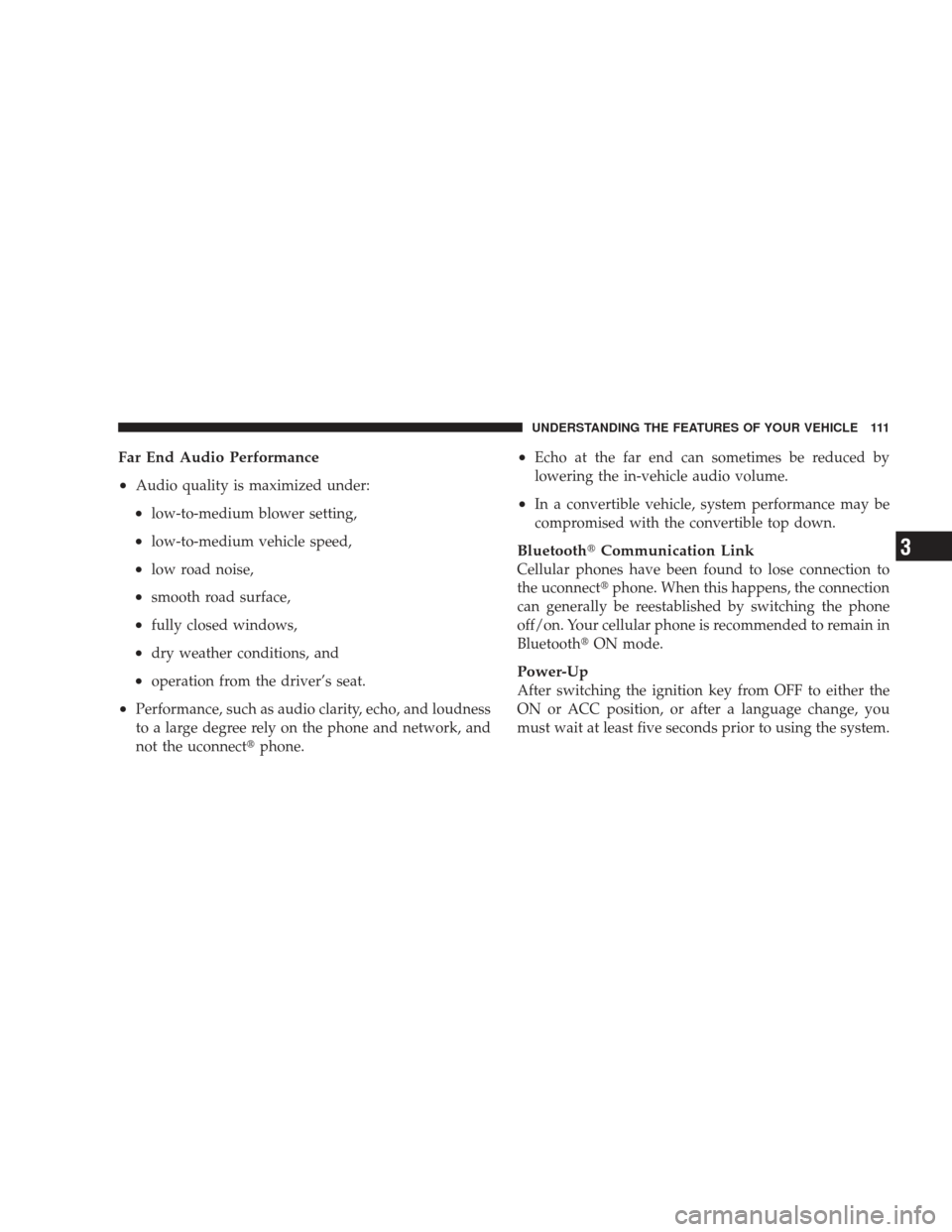
Far End Audio Performance
•
Audio quality is maximized under:
•low-to-medium blower setting,
•low-to-medium vehicle speed,
•low road noise,
•smooth road surface,
•fully closed windows,
•dry weather conditions, and
•operation from the driver’s seat.
•Performance, such as audio clarity, echo, and loudness
to a large degree rely on the phone and network, and
not the uconnect�phone.
•Echo at the far end can sometimes be reduced by
lowering the in-vehicle audio volume.
•In a convertible vehicle, system performance may be
compromised with the convertible top down.
Bluetooth�Communication Link
Cellular phones have been found to lose connection to
the uconnect� phone. When this happens, the connection
can generally be reestablished by switching the phone
off/on. Your cellular phone is recommended to remain in
Bluetooth� ON mode.
Power-Up
After switching the ignition key from OFF to either the
ON or ACC position, or after a language change, you
must wait at least five seconds prior to using the system.
UNDERSTANDING THE FEATURES OF YOUR VEHICLE 111
3
Page 118 of 484
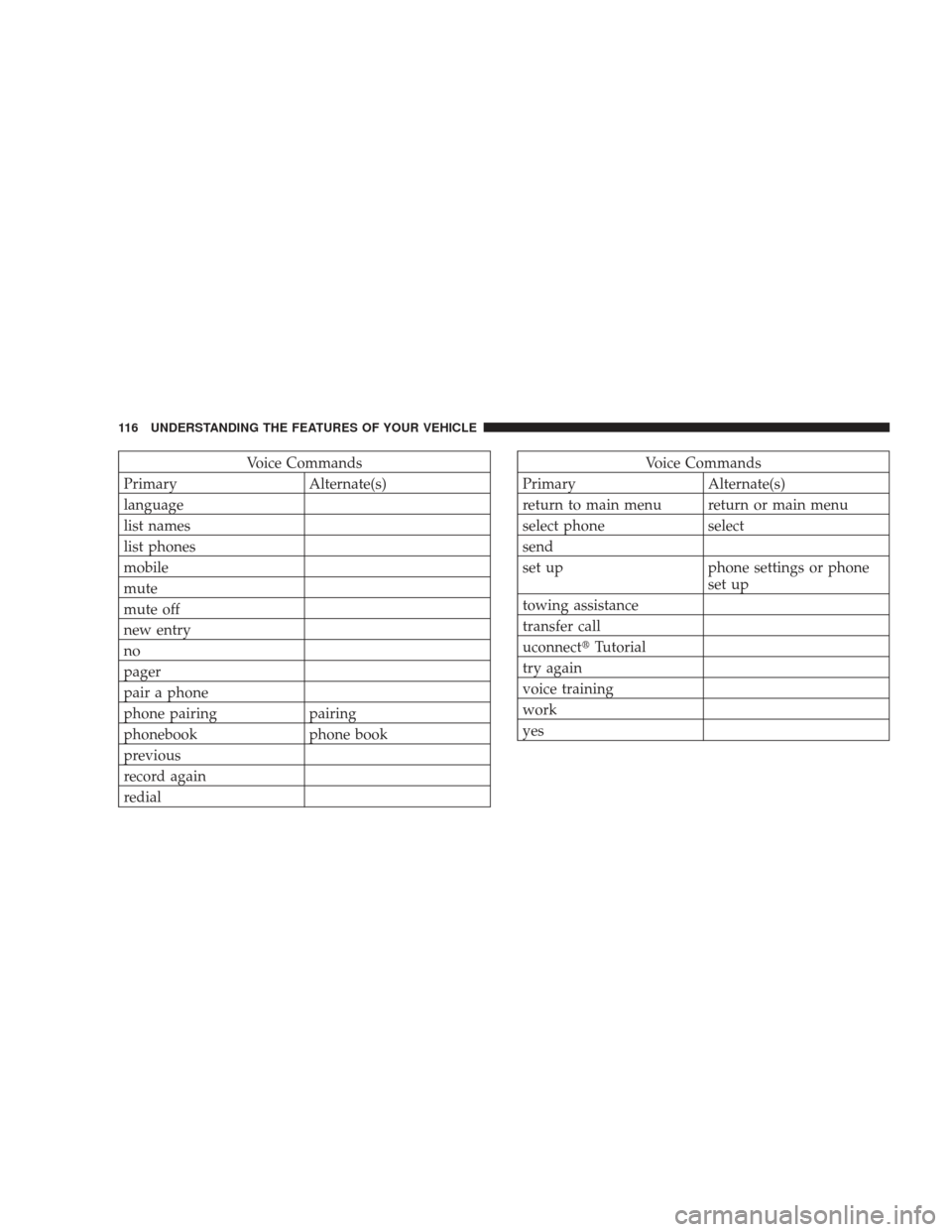
Voice Commands
Primary Alternate(s)
language
list names
list phones
mobile
mute
mute off
new entry
no
pager
pair a phone
phone pairing pairing
phonebook phone book
previous
record again
redialVoice Commands
Primary Alternate(s)
return to main menu return or main menu
select phone select
send
set up phone settings or phone set up
towing assistance
transfer call
uconnect� Tutorial
try again
voice training
work
yes
116 UNDERSTANDING THE FEATURES OF YOUR VEHICLE
Page 124 of 484

NOTE:Keep in mind that you have to press the VR
button first and wait for the beep before speaking the
“Barge In” commands.
Voice Training
For users experiencing difficulty with the system recog-
nizing their voice commands or numbers, uconnect �
phone Voice Training feature may be used.
1. Press the VR button, say “System Setup” and once you
are in that menu then say “Voice Training.” This will train
your own voice to the system and will improve recogni-
tion.
2. Repeat the words and phrases when prompted by
uconnect� phone. For best results, the Voice Training
session should be completed when the vehicle is parked,
engine running, all windows closed, and the blower fan
switched off. This procedure may be repeated with a new
user. The system will adapt to the last trained voice only.
SEATS
Manual Seats — If Equipped
Seat Adjustment
The adjusting bar is at the front of the seat, near the floor.
Pull the bar upward to move the seat forward or rear-
ward. Release the bar once the seat is in the position
desired. Then, using body pressure, move forward and
rearward on the seat to be sure that the seat adjusters
have latched.
122 UNDERSTANDING THE FEATURES OF YOUR VEHICLE
Page 159 of 484
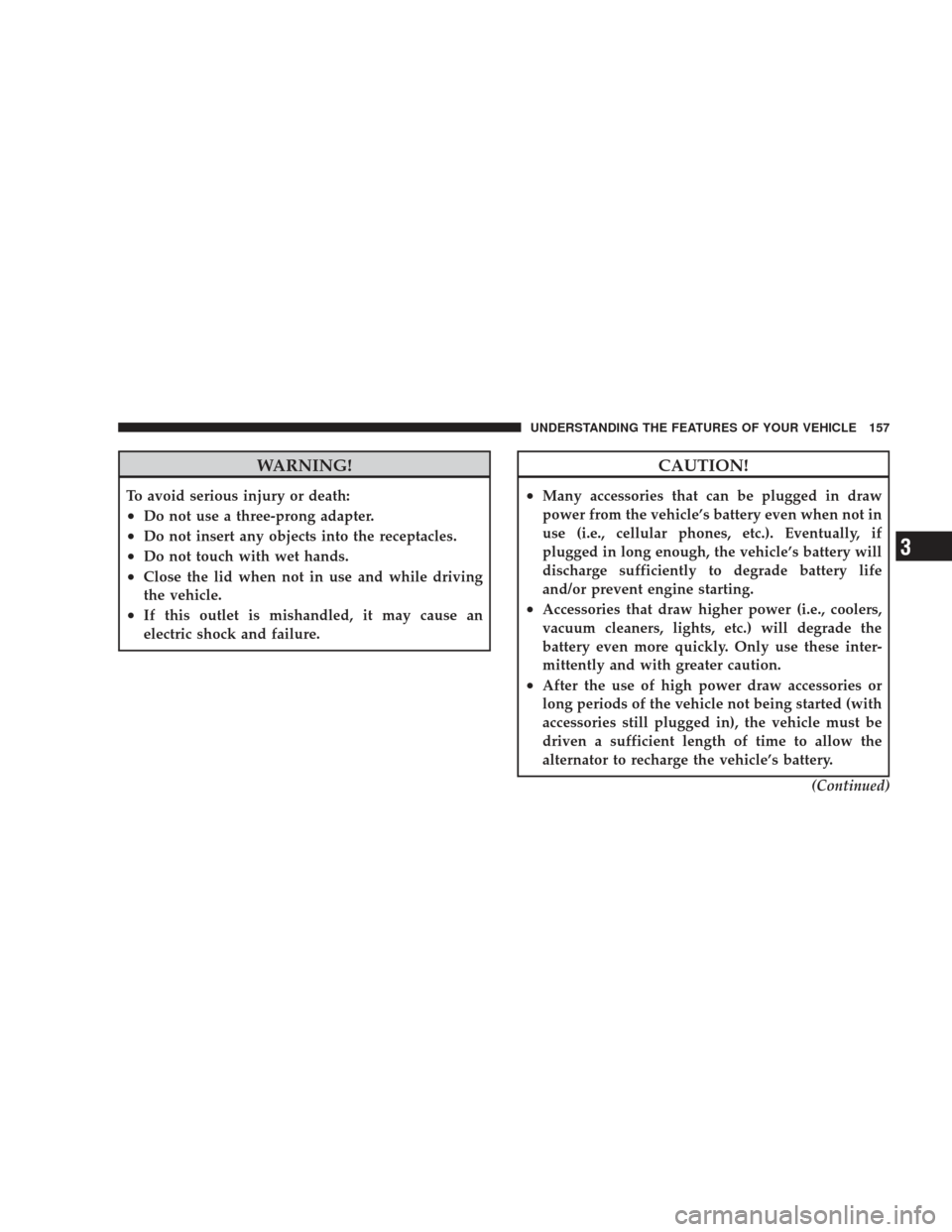
WARNING!
To avoid serious injury or death:
•Do not use a three-prong adapter.
•Do not insert any objects into the receptacles.
•Do not touch with wet hands.
•Close the lid when not in use and while driving
the vehicle.
•If this outlet is mishandled, it may cause an
electric shock and failure.
CAUTION!
•Many accessories that can be plugged in draw
power from the vehicle’s battery even when not in
use (i.e., cellular phones, etc.). Eventually, if
plugged in long enough, the vehicle’s battery will
discharge sufficiently to degrade battery life
and/or prevent engine starting.
•Accessories that draw higher power (i.e., coolers,
vacuum cleaners, lights, etc.) will degrade the
battery even more quickly. Only use these inter-
mittently and with greater caution.
•After the use of high power draw accessories or
long periods of the vehicle not being started (with
accessories still plugged in), the vehicle must be
driven a sufficient length of time to allow the
alternator to recharge the vehicle’s battery.(Continued)
UNDERSTANDING THE FEATURES OF YOUR VEHICLE 157
3
Page 163 of 484
The top compartment holds small items, such as a pen
and note pad, while the larger bottom compartment will
hold CDs and alike. The bottom compartment also con-
tains a 12-Volt power outlet and a molded-in coin holder
(designed to hold various size coins). A slot in the left and
right side of the top compartment provides clearance for
power cords to pass conveniently out of the bin with the
lid closed. This feature is ideal for games, laptop’s,
cellular phones, or other electrical equipment. The con-
sole’s front opening lid allows for easy access to these
compartments.
With Vehicle Entertainment System (VES�)
The center console contains a large storage compartment.
The storage compartment contains a 12-Volt power outlet
and a molded-in coin holder (designed to hold various
size coins). A slot in the top left and right side of the
storage compartment provides clearance for power cords
to pass conveniently out of the compartment with the lid
closed. This feature is ideal for games, laptop’s, cellular phones, or other electrical equipment. The console’s
front-opening lid allows for easy access to the storage
compartment for both the driver and the front passenger.
Cargo Area — Vehicles Equipped with 60/40
Split-Folding Rear Seat
The 60/40 split-folding rear seat provides cargo-carrying
versatility. The seatbacks fold down easily by pulling
nylon tabs between the seatbacks and the bolsters. When
the seats are folded down, they provide a continuous,
nearly-flat extension of the load floor.
When the seatback is folded to the upright position, make
sure it is latched by strongly pulling on the top of the
seatback above the seat strap.
UNDERSTANDING THE FEATURES OF YOUR VEHICLE 161
3
Page 168 of 484
▫Operating Instructions - Radio Mode ...... 198
▫ Operation Instructions - (Disc Mode For CD
And MP3/WMA Audio Play, DVD-Video) . . . 206
▫ Notes On Playing MP3/WMA Files ....... 208
▫ List Button (Disc Mode For
MP3/WMA Play) .................... 210
▫ Info Button (Disc Mode For MP3/WMA
Play) ............................. 210
� AM/FM/CD/DVD Radio (RER/REN) – If
Equipped ............................ 213
▫ Operating Instructions — Voice Recognition
System (VR) — If Equipped ............. 213
▫ Operating Instructions — uconnect� phone
— If Equipped ...................... 213
▫ Clock Setting Procedure ............... 213 �
Sales Code RES — AM/FM Stereo Radio With
CD Player (MP3 AUX Jack) ............... 215
▫ Operating Instructions — Radio Mode ..... 216
▫ Operation Instructions — CD Mode For CD
And MP3 Audio Play ................. 219
▫ Notes On Playing MP3 Files ............ 221
▫ Operation Instructions - Auxiliary Mode .... 223
� Sales Code RES/RSC — AM/FM Stereo Radio
With CD Player (MP3 AUX Jack) And Sirius
Radio ............................... 224
▫ Operating Instructions — Radio Mode ..... 225
▫ Operation Instructions — CD Mode For CD
And MP3 Audio Play ................. 230
▫ Notes On Playing MP3 Files ............ 232
▫ List Button (CD Mode For MP3 Play) ...... 235
166 UNDERSTANDING YOUR INSTRUMENT PANEL
Page 169 of 484
▫Info Button (CD Mode For MP3 Play) ...... 235
� Universal Consumer Interface (UCI) — If
Equipped ............................ 236
▫ Connecting The iPod� ................. 237
▫ Using This Feature ................... 237
▫ Controlling The iPod� Using Radio
Buttons ........................... 237
▫ Play Mode ......................... 238
▫ List Or Browse Mode ................. 239
� uconnect� studios (Satellite Radio) — If
Equipped (REN/REQ/RER/RES/REU Radios
Only) ............................... 241
▫ System Activation .................... 241
▫ Electronic Serial Number/Sirius
Identification Number (ESN/SID) ......... 242▫
Selecting uconnect� studios
(Satellite) Mode ..................... 243
▫ Satellite Antenna ..................... 243
▫ Reception Quality .................... 243
▫ Operating Instructions — uconnect� studios
(Satellite) Mode ..................... 243
▫ Operating Instructions — uconnect� phone
(If Equipped) ....................... 246
▫ Operating Instructions — Video
Entertainment System (VES)™
(If Equipped) ....................... 246
� Kicker� High Performance Sound System With
Driver-Selectable Surround (DSS) –
If Equipped .......................... 246
� uconnect studios� (Sirius Backseat TV™) —
If Equipped .......................... 247
UNDERSTANDING YOUR INSTRUMENT PANEL 167
4