Page 141 of 484
The “Headlights On with Wipers” feature can be turned
on or off through the Electronic Vehicle Information
Center (EVIC) (if equipped). Refer to ”Headlights On
with Wipers,” under “Personal Settings (Customer-
Programmable Features)” under “Electronic Vehicle In-
formation Center (EVIC)” in Section 4.
TILT/TELESCOPING STEERING COLUMN
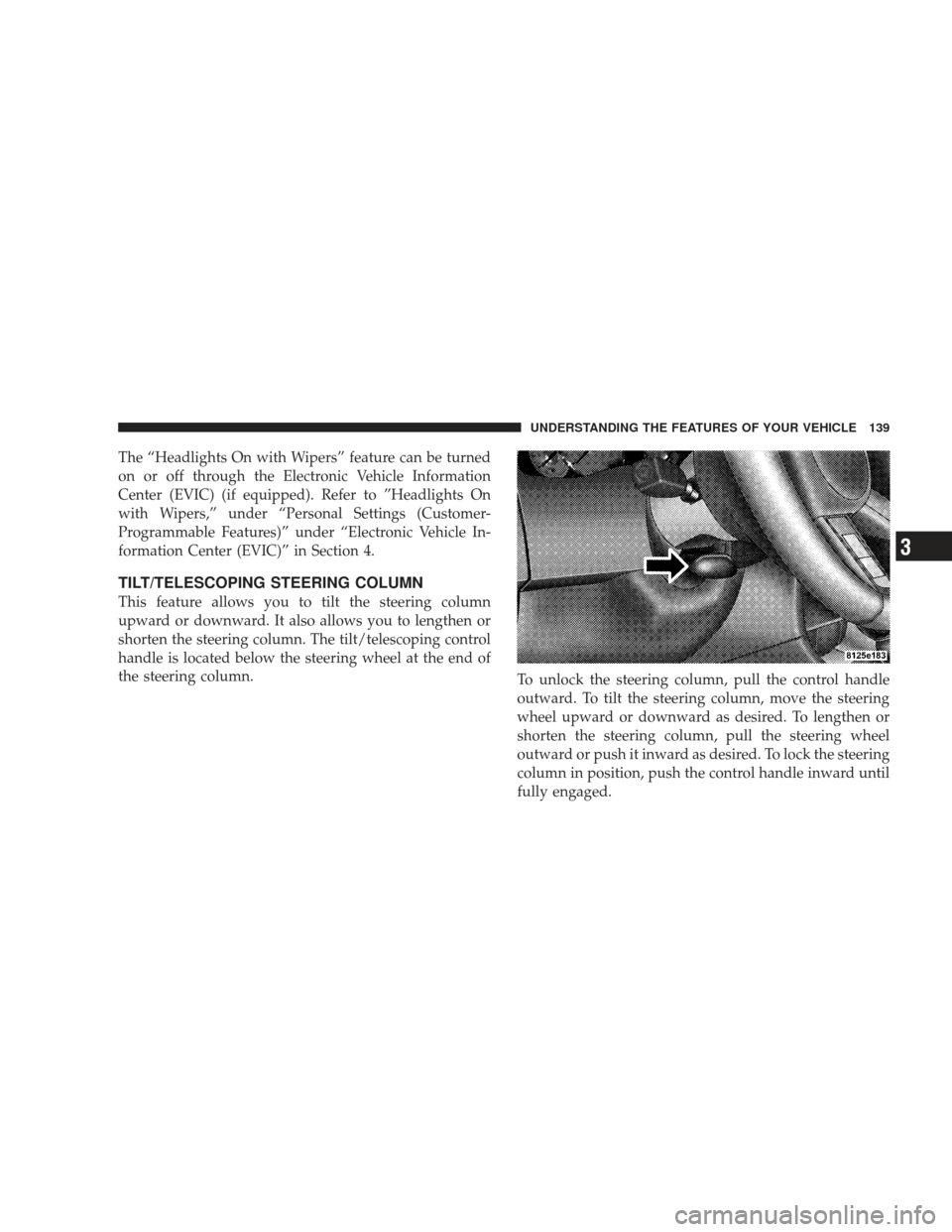
This feature allows you to tilt the steering column
upward or downward. It also allows you to lengthen or
shorten the steering column. The tilt/telescoping control
handle is located below the steering wheel at the end of
the steering column.To unlock the steering column, pull the control handle
outward. To tilt the steering column, move the steering
wheel upward or downward as desired. To lengthen or
shorten the steering column, pull the steering wheel
outward or push it inward as desired. To lock the steering
column in position, push the control handle inward until
fully engaged.
UNDERSTANDING THE FEATURES OF YOUR VEHICLE 139
3
Page 142 of 484
WARNING!
Do not adjust the steering wheel while driving. The
telescoping adjustment must be locked while driv-
ing. Adjusting the steering wheel while driving or
driving without the telescoping adjustment locked
could cause the driver to lose control of the vehicle.
ADJUSTABLE PEDALS — IF EQUIPPED
The adjustable pedals system is designed to allow a
greater range of driver comfort for steering wheel tilt and
seat position. This feature allows both the brake and
accelerator pedal to move toward or away from the
driver to provide improved position with the steering
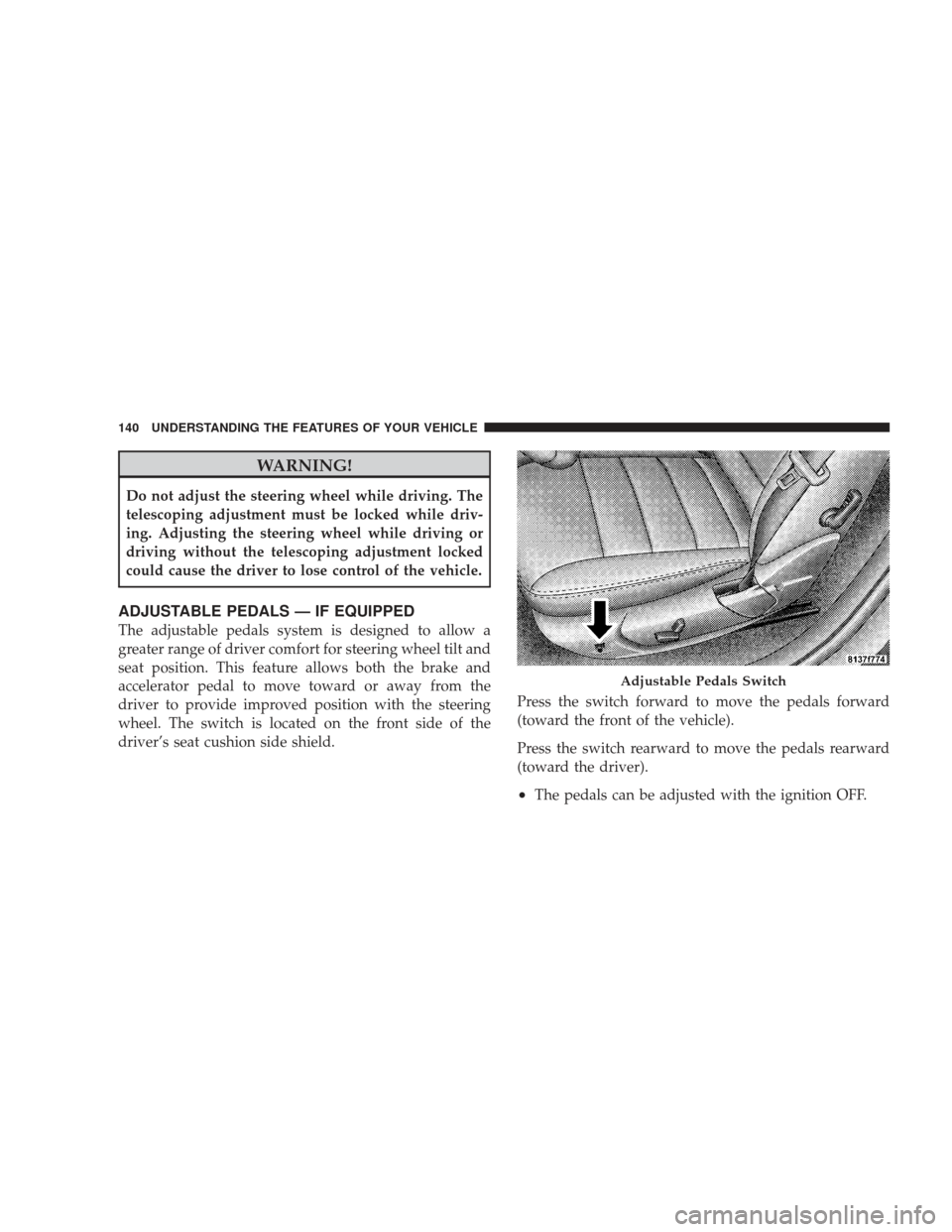
wheel. The switch is located on the front side of the
driver’s seat cushion side shield.Press the switch forward to move the pedals forward
(toward the front of the vehicle).
Press the switch rearward to move the pedals rearward
(toward the driver).
•The pedals can be adjusted with the ignition OFF.
Adjustable Pedals Switch
140 UNDERSTANDING THE FEATURES OF YOUR VEHICLE
Page 143 of 484
•The pedals can be adjusted while driving.
•The pedalscannotbe adjusted when the transmission
is in REVERSE or when the speed control is on.
CAUTION!
Do not place any article under the adjustable pedals
or impede its ability to move as it may cause damage
to the pedal controls. Pedal travel may become lim-
ited if movement is stopped by an obstruction in the
adjustable pedal’s path.
ELECTRONIC SPEED CONTROL
When engaged, Electronic Speed Control takes over the
accelerator operation at speeds greater than 25 mph
(40 km/h).
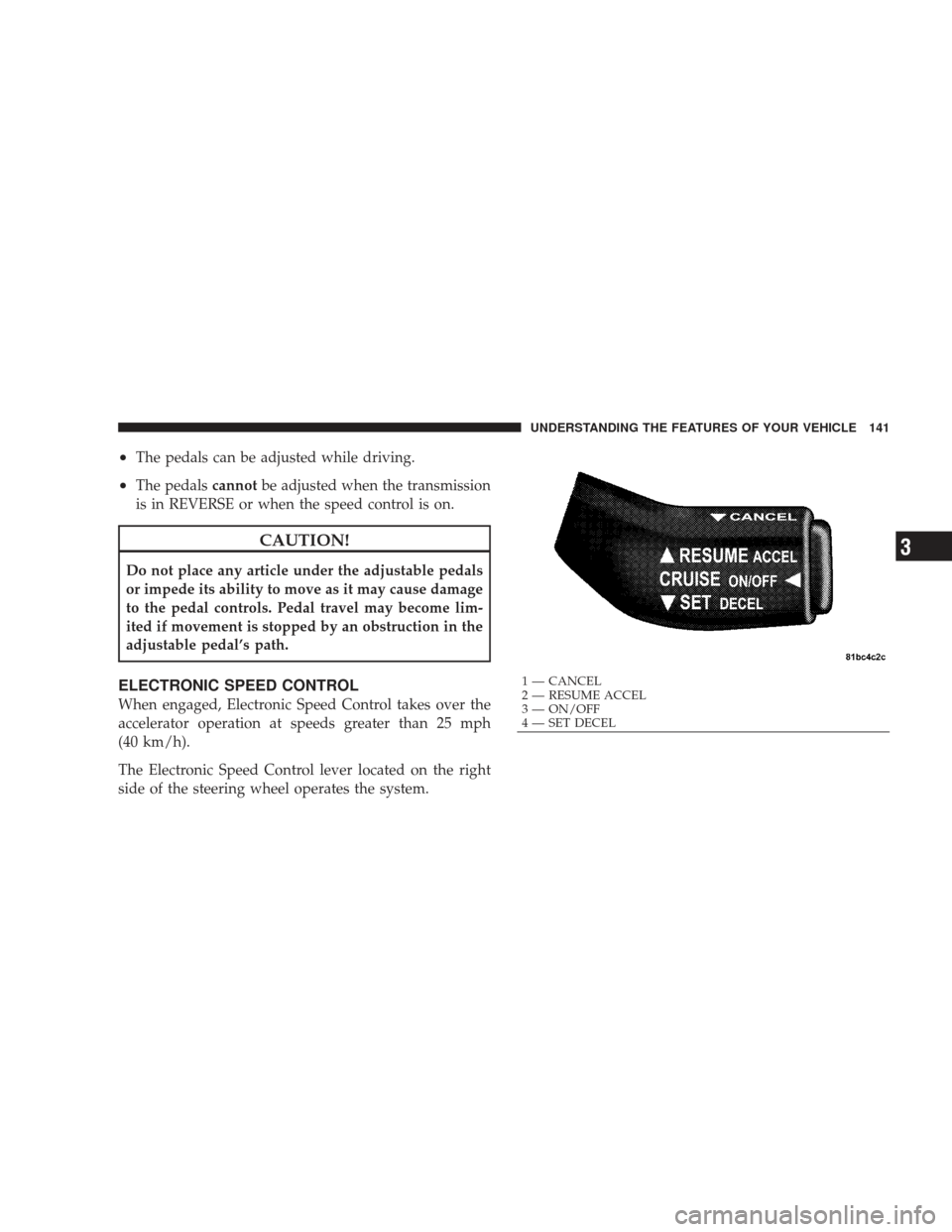
The Electronic Speed Control lever located on the right
side of the steering wheel operates the system.
1 — CANCEL
2 — RESUME ACCEL
3 — ON/OFF
4 — SET DECEL UNDERSTANDING THE FEATURES OF YOUR VEHICLE 141
3
Page 144 of 484
To Activate
Push and release the ON/OFF button located
on the end of the Electronic Speed Control
lever. The indicator light in the instrument
cluster will illuminate to show that the speed
control system is on. To turn the system off, push and
release the ON/OFF button again. The system and the
indicator light will turn off.
WARNING!
Leaving the Electronic Speed Control system on
when not in use is dangerous. You could accidentally
set the system or cause it to go faster than you want.
You could lose control and have an accident. Always
leave the Electronic Speed Control system off when
you are not using it.
To Set At A Desired Speed
When the vehicle reaches the speed desired, push the
lever downward to SET DECEL and release. Remove
your foot from the accelerator pedal and the vehicle will
operate at the selected speed.
NOTE:
•Electronic Speed Control will only function in 3rd, 4th,
or 5th gear when in the Autostick� mode (if
equipped).
•The Electronic Speed Control may not engage if a
different size tire is installed on one wheel, such as the
compact spare tire.
To Deactivate
The system will disable Electronic Speed Control without
erasing the memory if you:
•Softly tap the brake pedal,
•Depress the brake pedal, or
142 UNDERSTANDING THE FEATURES OF YOUR VEHICLE
Page 167 of 484
UNDERSTANDING YOUR INSTRUMENT PANEL
CONTENTS
�Instrument Panel Features ............... 169
� Instrument Cluster – Base ............... 170
� Instrument Cluster – Premium ............ 171
� Instrument Cluster Descriptions ........... 172
� Electronic Vehicle Information Center (EVIC) –
If Equipped .......................... 183
▫ Electronic Vehicle Information Center (EVIC)
Displays ........................... 185
▫ Oil Change Required .................. 186
▫ Trip Functions ...................... 187 ▫
Automatic All Wheel Drive (AWD) Displays
— If Equipped ...................... 189
▫ Compass Display .................... 190
▫ Driver-Selectable Surround Sound (DSS) – If
Equipped .......................... 192
▫ uconnect� gps (Navigation) — If Equipped . . 193
▫ Personal Settings (Customer-Programmable
Features) .......................... 193
� Sales Code REQ — AM/FM Stereo Radio And
6–Disc CD/DVD Changer (MP3/WMA AUX
Jack) ............................... 1974
Page 178 of 484
14. Oil Pressure Warning LightThis light indicates low engine oil pressure. The
light should turn on momentarily when the engine
is started. If the light turns on while driving, stop the
vehicle, and shut OFF the engine as soon as possible. A
single chime will sound when this light turns on.
Do not operate the vehicle until the cause is corrected.
This light does not show how much oil is in the engine.
The engine oil level must be checked using the procedure
shown in Section 7.
15. High Beam Light This light will turn on when the high beam
headlights are ON. Push the multifunction lever
away from the steering wheel to switch the headlights to
high beam. 16. Seat Belt Reminder Light
This light will turn on for five to eight seconds as
a bulb check when the ignition switch is first
turned ON. A chime will sound if the driver’s seat
belt is unbuckled during the bulb check. The Seat Belt
Reminder Light will flash or remain on continuously if
the driver’s seat belt remains unbuckled after the bulb
check or when driving.
17. Shift Lever Indicator
This indicator shows the automatic transmission shift
lever selection.
18. Front Fog Light Indicator — If Equipped This light will turn on when the front fog lights are
ON.
176 UNDERSTANDING YOUR INSTRUMENT PANEL
Page 179 of 484
19. Odometer/Trip Odometer Display / Electronic
Vehicle Information Center (EVIC) Display — If
Equipped
The odometer shows the total distance the vehicle has
been driven. The trip odometer shows individual trip
mileage. Refer to “Trip Odometer Button” for additional
information.
NOTE:U.S. Federal regulations require upon transfer of
vehicle ownership, the seller certify the mileage the
vehicle has been driven. Therefore, if the odometer
reading is changed because of repair or replacement, be
sure to keep a record of the reading before and after the
service so that the correct mileage can be determined.
Rear Wheel Drive (RWD) / All Wheel Drive (AWD)
Displays (Base Cluster)
On vehicles equipped with a Base Instrument Cluster, the
odometer will display “2drivE” when the vehicle is in
Rear Wheel Drive (RWD), and “4drivE” when All Wheel
Drive (AWD) is activated. If the odometer displays the “tCASE” warning message
after engine start up, or during driving, the AWD system
is not functioning properly and service is required.
NOTE:
Vehicles equipped with Electronic Vehicle Infor-
mation Center (EVIC) will display SERVICE AWD SYS-
TEM if the system is not functioning properly and service
is required. Refer to Electronic Vehicle Information Cen-
ter (EVIC) in this section for more information.
Change Oil Message (Base Cluster)
Your vehicle is equipped with an engine oil change
indicator system. The “Change Oil” message will flash in
the instrument cluster odometer for approximately
12 seconds after a single chime has sounded to indicate
the next scheduled oil change interval. The engine oil
change indicator system is duty cycle based, which
means the engine oil change interval may fluctuate
dependent upon your personal driving style.
UNDERSTANDING YOUR INSTRUMENT PANEL 177
4
Page 183 of 484
As an added safety feature, your vehicle has been
equipped with a Tire Pressure Monitoring System
(TPMS) that illuminates a low tire pressure telltale when
one or more of your tires is significantly under-inflated.
Accordingly, when the low tire pressure telltale illumi-
nates, you should stop and check your tires as soon as
possible, and inflate them to the proper pressure. Driving
on a significantly under-inflated tire causes the tire to
overheat and can lead to tire failure. Under-inflation also
reduces fuel efficiency and tire tread life, and may affect
the vehicle’s handling and stopping ability.
Please note that the TPMS is not a substitute for proper
tire maintenance, and it is the driver ’s responsibility to
maintain correct tire pressure, even if under-inflation has
not reached the level to trigger illumination of the TPMS
low tire pressure telltale.
Your vehicle has also been equipped with a TPMS
malfunction indicator to indicate when the system is notoperating properly. The TPMS malfunction indicator is
combined with the low tire pressure telltale. When the
system detects a malfunction, the telltale will flash for
approximately one minute and then remain continuously
illuminated. This sequence will continue upon subse-
quent vehicle start-ups as long as the malfunction exists.
When the malfunction indicator is illuminated, the sys-
tem may not be able to detect or signal low tire pressure
as intended. TPMS malfunctions may occur for a variety
of reasons, including the installation of replacement or
alternate tires or wheels on the vehicle that prevent the
TPMS from functioning properly. Always check the
TPMS malfunction telltale after replacing one or more
tires or wheels on your vehicle, to ensure that the
replacement or alternate tires and wheels allow the TPMS
to continue to function properly.
UNDERSTANDING YOUR INSTRUMENT PANEL 181
4