Page 226 of 469
bikes should be placed as far rearward as possible, within
the loading design of the rack. Do not place items directly
on or above the antenna.
Reception Quality
Satellite reception may be interrupted due to one of the
following reasons:
•The vehicle is parked in an underground parking
structure or under a physical obstacle.
•Dense tree coverage may interrupt reception in the
form of short audio mutes.
•Driving under wide bridges or along tall buildings can
cause intermittent reception.
•Placing objects over or too close to the antenna can
cause signal blockage.
Operating Instructions - uconnect�studios
(Satellite) Mode
NOTE:The ignition switch must be in the ON or ACC
position to operate the radio.
SEEK Buttons
Press and release the SEEK buttons to search for the next
channel in Satellite mode. Press the right switch to seek
up and the left switch to seek down. The radio will
remain tuned to the new channel until you make another
selection. Holding either button will bypass channels
without stopping until you release it.
SCAN Button
Pressing the SCAN button causes the tuner to search for
the next channel, pausing for eight seconds before con-
tinuing to the next. To stop the search, press the SCAN
button a second time.
224 UNDERSTANDING YOUR INSTRUMENT PANEL
Page 227 of 469
INFO Button
Pressing the INFO button will cycle the display informa-
tion between Artist, Song Title, and Composer (if avail-
able). Also, pressing and holding the INFO button for an
additional three seconds will make the radio display the
Song Title all of the time (press and hold again to return
to normal display).
RW/FF
Pressing the RW (Rewind) or FF (Fast Forward) buttons
causes the tuner to search for the next channel in the
direction of the arrows.
TUNE Control (Rotary)
Turn the rotary Tune/Scroll control knob clockwise to
increase or counterclockwise to decrease the channel.
MUSIC TYPE Button
Pressing this button once will turn on the Music Type
mode for five seconds. Pressing the MUSIC TYPE button
or turning the Tune/Scroll control knob within five
seconds will allow the program format type to be se-
lected.
Toggle the MUSIC TYPE button again to select the music
type.
By pressing the SEEK button when the Music Type
function is active, the radio will be tuned to the next
channel with the same selected Music Type name.
If a preset button is activated while in the Music Type
(Program Type) mode, the Music Type mode will be
exited and the radio will tune to the preset channel.
4
UNDERSTANDING YOUR INSTRUMENT PANEL 225
Page 228 of 469
SETUP Button
Pressing the SETUP button allows you to select the
following items:
•Display Sirius ID number — Press the AUDIO/
SELECT button to display the Sirius ID number. This
number is used to activate, deactivate, or change the
Sirius subscription.
SET Button – To Set the Pushbutton Memory
When you are receiving a channel that you wish to
commit to pushbutton memory, press the SET button.
The symbol SET 1 will now show in the display window.
Select the button (1-6) you wish to lock onto this channel
and press and release that button. If a button is not
selected within five seconds after pressing the SET but-
ton, the channel will continue to play but will not be
stored into pushbutton memory.You may add a second channel to each pushbutton by
repeating the above procedure with this exception: Press
the SET button twice and SET 2 will show in the display
window. Each button can be set for SET 1 and SET 2. This
allows a total of 12 Satellite channels to be stored into
pushbutton memory. The channels stored in SET 2
memory can be selected by pressing the pushbutton
twice.
Every time a preset button is used, a corresponding
button number will display.
Buttons1-6
These buttons tune the radio to the channels that you
commit to pushbutton memory (12 Satellite stations).
Operating Instructions - uconnect�phone (If
Equipped)
Refer to “uconnect�phone” in Section 3.
226 UNDERSTANDING YOUR INSTRUMENT PANEL
Page 230 of 469
When in “Audio Surround” mode, balance is set auto-
matically. Fader control is available to add more sur-
round audio if desired.
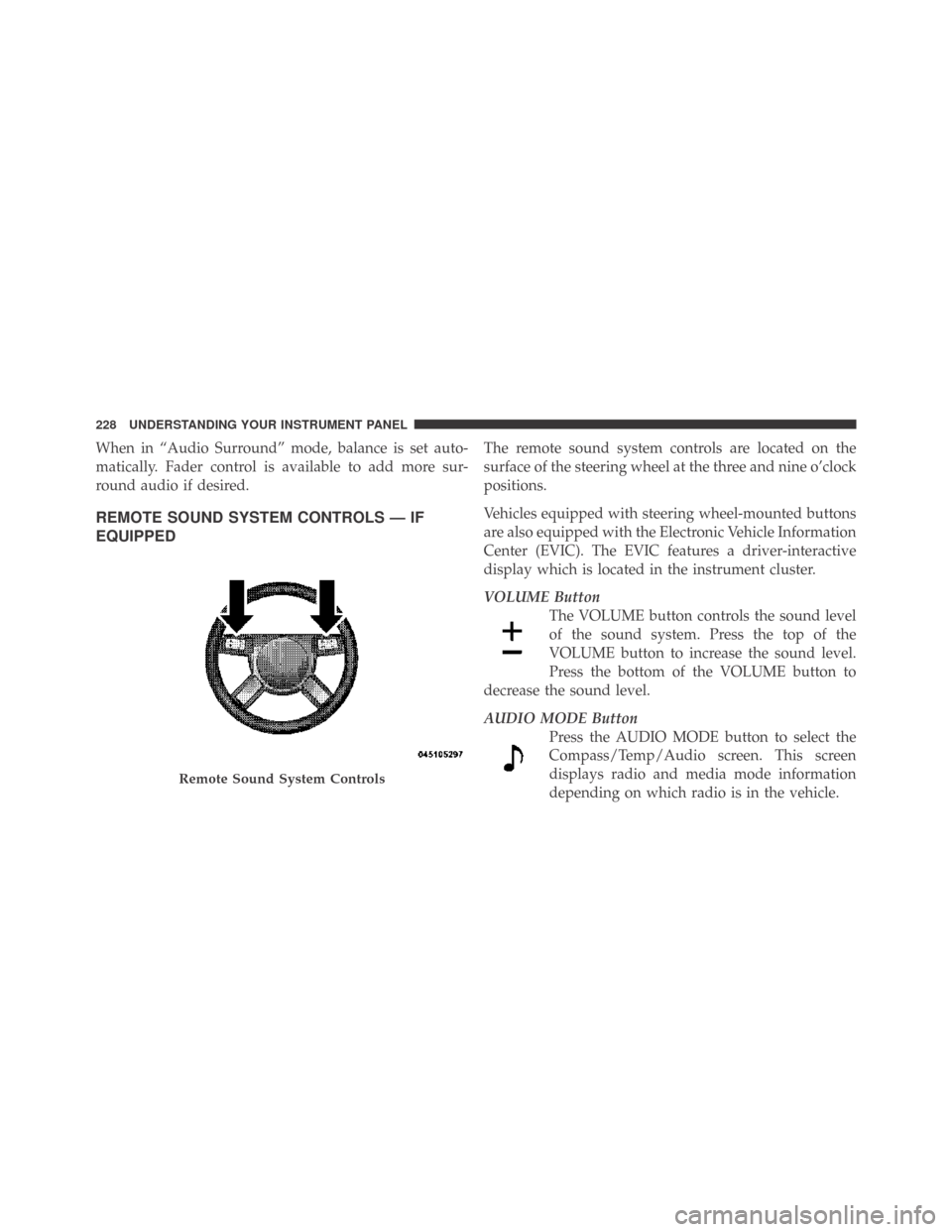
REMOTE SOUND SYSTEM CONTROLS — IF
EQUIPPED
The remote sound system controls are located on the
surface of the steering wheel at the three and nine o’clock
positions.
Vehicles equipped with steering wheel-mounted buttons
are also equipped with the Electronic Vehicle Information
Center (EVIC). The EVIC features a driver-interactive
display which is located in the instrument cluster.
VOLUME Button
The VOLUME button controls the sound level
of the sound system. Press the top of the
VOLUME button to increase the sound level.
Press the bottom of the VOLUME button to
decrease the sound level.
AUDIO MODE Button
Press the AUDIO MODE button to select the
Compass/Temp/Audio screen. This screen
displays radio and media mode information
depending on which radio is in the vehicle.
Remote Sound System Controls
228 UNDERSTANDING YOUR INSTRUMENT PANEL
Page 235 of 469
•Defrost
Air is directed through the windshield and side
window demist outlets. Use this mode with maxi-
mum blower and temperature settings for best wind-
shield and side window defrosting.
NOTE:The air conditioning compressor operates in
Mix, Defrost, and Floor or a blend of these modes, even
if the Air Conditioning Snowflake button is not pressed.
This dehumidifies the air to help dry the windshield. To
improve fuel economy, use these modes only when
necessary.
•Recirculation Control
Use this button to block the flow of outside air
from coming into the passenger compartment.
A light will illuminate when the system is in
recirculation mode. Use the recirculation mode
to provide maximum A/C performance in hot ambient
conditions, or to block outside odors, dust, etc.NOTE:
•Continuous use of the recirculation mode may make
the inside air stuffy and window fogging may occur.
Extended use of this mode is not recommended.
•The use of the recirculation mode in cold or damp
weather may cause windows to fog on the inside,
because of moisture build-up inside the vehicle. Select
the Outside Air position for maximum defogging.
•The A/C will engage automatically to prevent fogging
when the recirculation button is pressed.
•The A/C can be deselected manually without disturb-
ing the mode control selection.
Air Conditioning Control
Use this button to engage the Air Conditioning. A
light will illuminate when the Air Conditioning
System is engaged.
4
UNDERSTANDING YOUR INSTRUMENT PANEL 233
Page 236 of 469
NOTE:The air conditioning compressor will not engage
until the engine has been running for a few seconds.
•MAX A/C
For maximum cooling use the A/C and recirculation
buttons at the same time and set the temperature control
to full cool by rotating the temperature control knob full
counterclockwise.
•Economy Mode
If economy mode is desired, press the A/C button to turn
off the indicator light and the A/C compressor. Then,
move the temperature control to the desired temperature.
Remote Start – If Equipped
During remote start operation, the climate control soft-
ware may override the climate control settings depend-
ing on the outside ambient temperature. The table below
explains the different scenarios that could occur during
remote start operation.
Once the driver enters the vehicle, the control will return
to the customer selected settings. This feature was de-
signed to ensure maximum comfort during extreme
conditions. To enable the feature, customers must park
their vehicles with the blower control set in any of the
four blower speeds.
If Outside Ambient
Temperature IsMode Overrides To Temperature Overrides To Rear Window Defroster
Active
Less than 40°F Mix Full Heat Yes
Between 40°F and 80°F No Override No Override No
More than 80°F Bi-Level Full Cool No
234 UNDERSTANDING YOUR INSTRUMENT PANEL
Page 237 of 469
NOTE:
•The feature can be disable by parking the vehicle with
the blower control set to the “O” (or OFF) position.
•For maximum performance, it is recommended that
the vehicle is parked with the blower control set to the
“High” (full clockwise) position.
Operating Tips
NOTE:Refer to the chart at the end of this section for
suggested control settings for various weather condi-
tions.
Summer Operation
The engine cooling system in air-conditioned vehicles
must be protected with a high-quality antifreeze coolant
to provide proper corrosion protection and to protect
against engine overheating. A solution of 50% ethylene
glycol antifreeze coolant and 50% water is recommended.
Refer to “Maintenance Procedures” in Section 7 of this
manual for proper coolant selection.
Winter Operation
Use of the air Recirculation mode during winter months
is not recommended because it may cause window
fogging.
Vacation Storage
Anytime you store your vehicle, or keep it out of service
(i.e., vacation) for two weeks or more, run the air
conditioning system at idle for about five minutes in the
fresh air and high blower settings. This will ensure
adequate system lubrication to minimize the possibility
of compressor damage when the system is started again.
Window Fogging
Interior fogging on the windshield can be quickly re-
moved by turning the mode selector to Defrost. The
Defrost/Floor mode can be used to maintain a clear
windshield and provide sufficient heating. If side win-
dow fogging becomes a problem, increase blower speed.
Vehicle windows tend to fog on the inside in mild but
rainy or humid weather.
4
UNDERSTANDING YOUR INSTRUMENT PANEL 235
Page 241 of 469
STARTING AND OPERATING
CONTENTS
�Starting Procedures.................... 243
▫Manual Transmission — If Equipped...... 243
▫Automatic Transmission — If Equipped.... 244
▫Keyless Go — If Equipped.............. 245
▫Normal Starting..................... 246
▫Extremely Cold Weather
(Below�20°F Or�29°C)............... 248
▫If Engine Fails To Start................ 249
▫After Starting....................... 250�Engine Block Heater — If Equipped........ 250
�Manual Transmission — If Equipped........ 251
▫Six-Speed Manual Transmission.......... 251
�Automatic Transmission — If Equipped...... 255
▫General Information.................. 255
▫Brake/Transmission Shift Interlock System . . 257
▫Brake/Transmission Interlock Manual
Override.......................... 257
▫Four-Speed Automatic Transmission
(3.5L Engine)....................... 259
5
239