Page 436 of 534
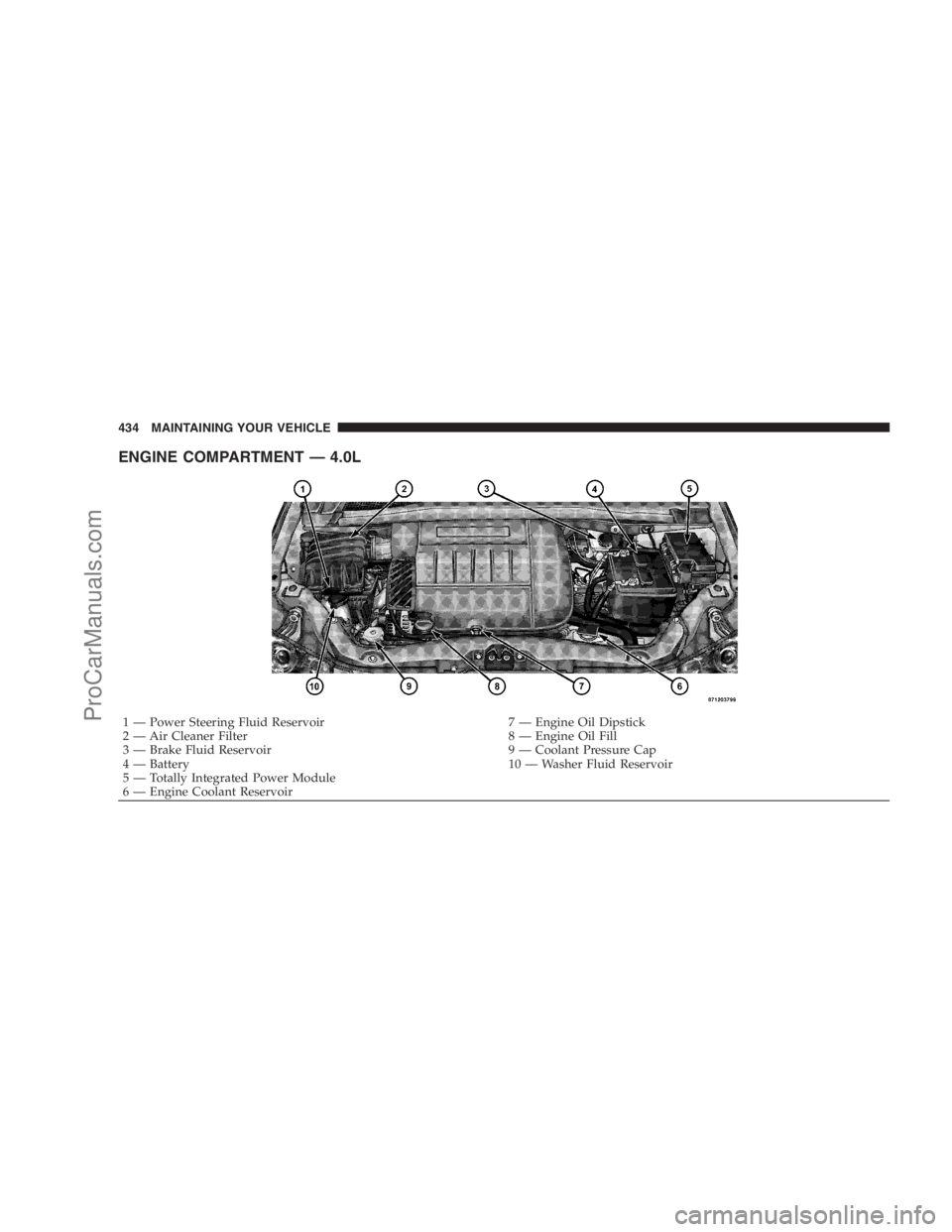
ENGINE COMPARTMENT — 4.0L
1 — Power Steering Fluid Reservoir 7 — Engine Oil Dipstick
2 — Air Cleaner Filter 8 — Engine Oil Fill
3 — Brake Fluid Reservoir 9 — Coolant Pressure Cap
4 — Battery 10 — Washer Fluid Reservoir
5 — Totally Integrated Power Module
6 — Engine Coolant Reservoir 434 MAINTAINING YOUR VEHICLE
ProCarManuals.com
Page 438 of 534

filler cap message will be displayed in the instrument
cluster. Tighten the gas cap until a�clicking�sound is
heard. This is an indication that the gas cap is properly
tightened. Press the odometer reset button to turn the
message off. If the problem persists, the message will
appear the next time the vehicle is started. If the problem
is detected twice in a row, the system will turn on the
Malfunction Indicator Light (MIL). Resolving the prob-
lem will turn the MIL light off. Take your vehicle in to an
authorized dealer.
EMISSIONS INSPECTION AND MAINTENANCE
PROGRAMS
In some localities, it may be a legal requirement to pass
an inspection of your vehicle’s emissions control system.
Failure to pass could prevent vehicle registration.
For states that require an Inspection and Mainte-
nance (I/M), this check verifies the MalfunctionIndicator Light (MIL) is functioning and is not on when
the engine is running, and that the OBD II system is
ready for testing.
Normally, the OBD II system will be ready. The OBD II
system maynotbe ready if your vehicle was recently
serviced, recently had a dead battery, or a battery replace-
ment. If the OBD II system should be determined not
ready for the I/M test, your vehicle may fail the test.
Your vehicle has a simple ignition key-actuated test,
which you can use prior to going to the test station. To
check if your vehicle’s OBD II system is ready, you must
do the following:
1. Insert your ignition key into the ignition switch.
2. Turn the ignition to the ON position, but do not crank
or start the engine.
3. If you crank or start the engine, you will have to start
this test over.
436 MAINTAINING YOUR VEHICLE
ProCarManuals.com
Page 439 of 534

4. As soon as you turn your key to the ON position, you
will see the MIL symbol come on as part of a normal bulb
check.
5. Approximately 15 seconds later, one of two things will
happen:
a. The MIL will flash for about 10 seconds and then
return to being fully illuminated until you turn OFF
the ignition or start the engine. This means that your
vehicle’s OBD II system isnot readyand you should
notproceed to the I/M station.
b. The MIL will not flash at all and will remain fully
illuminated until you turn OFF the ignition or start the
engine. This means that your vehicle’s OBD II system
isready, and you can proceed to the I/M station.
If your OBD II system isnot ready,you should see your
authorized dealer or repair facility. If your vehicle was
recently serviced or had a battery failure or replacement,you may need to do nothing more than drive your
vehicle as you normally would in order for your OBD II
system to update. A recheck with the above test routine
may then indicate that the system is now ready.
Regardless of whether your vehicle’s OBD II system is
ready or not ready, if the MIL is illuminated during
normal vehicle operation, you should have your vehicle
serviced before going to the I/M station. The I/M station
can fail your vehicle because the MIL is on with the
engine running.
REPLACEMENT PARTS
Use of genuine MOPAR�parts for normal/scheduled
maintenance and repairs is highly recommended to en-
sure the designed performance. Damage or failures
caused by the use of non-MOPAR�parts for maintenance
and repairs will not be covered by the manufacturer’s
warranty.
MAINTAINING YOUR VEHICLE 437
7
ProCarManuals.com
Page 446 of 534

WARNING!
A hot exhaust system can start a fire if you park over
materials that can burn. Such materials might be
grass or leaves coming into contact with your exhaust
system. Do not park or operate your vehicle in areas
where your exhaust system can contact anything that
can burn.
In unusual situations involving grossly malfunctioning
engine operation, a scorching odor may indicate severe
and abnormal catalyst overheating. If this occurs, the
vehicle should be stopped, the engine shut OFF and the
vehicle allowed to cool. Thereafter, service, including a
tune-up to manufacturer’s specifications, should be ob-
tained immediately.To minimize the possibility of catalyst damage:•Do not shut OFF the engine or interrupt the ignition
when the transaxle is in gear and the vehicle is in
motion.
•Do not try to start the engine by pushing or towing the
vehicle.
•Do not idle the engine with any spark plug wires
disconnected or removed, such as when diagnostic
testing, or for prolonged periods during very rough
idling or malfunctioning operating conditions.
Maintenance-Free Battery
The top of the maintenance-free battery is permanently
sealed. You will never have to add water, nor is periodic
maintenance required.
444 MAINTAINING YOUR VEHICLE
ProCarManuals.com
Page 447 of 534
WARNING!
•Battery fluid is a corrosive acid solution and can
burn or even blind you. Do not allow battery fluid
to contact your eyes, skin or clothing. Do not lean
over a battery when attaching clamps. If acid
splashes in eyes or on skin, flush the area imme-
diately with large amounts of water.
•Battery gas is flammable and explosive. Keep
flame or sparks away from the battery. Do not use
a booster battery or any other booster source with
an output greater than 12 volts. Do not allow cable
clamps to touch each other.
•Battery posts, terminals and related accessories
contain lead and lead compounds. Wash hands
after handling.
CAUTION!
•It is essential when replacing the cables on the
battery that the positive cable is attached to the
positive post and the negative cable is attached to
the negative post. Battery posts are marked posi-
tive (+) and negative (-) and identified on the
battery case. Cable clamps should be tight on the
terminal posts and free of corrosion.
•If a “fast charger” is used while the battery is in
the vehicle, disconnect both vehicle battery cables
before connecting the charger to battery. Do not
use a “fast charger” to provide starting voltage.
MAINTAINING YOUR VEHICLE 445
7
ProCarManuals.com
Page 469 of 534
Installation
Place the liner into the cupholder drawer and press the
liner into place so that the retention tabs seat into the
corresponding openings in the drawer.
FUSES
Totally Integrated Power Module (TIPM)
The Totally Integrated Power Module (TIPM) is located
in the engine compartment near the battery. Refer to the
applicable “Engine Compartment” illustration in this
section. This center contains cartridge fuses and mini-
fuses. A label that identifies each component may be
printed or embossed on the inside of the cover.
CAUTION!
•When installing the Totally Integrated Power
Module cover, it is important to ensure the cover is
properly positioned and fully latched. Failure to
do so may allow water to get into the Integrated
Power Module, and possibly result in a electrical
system failure.
•When replacing a blown fuse, it is important to
use only a fuse having the correct amperage rating.
The use of a fuse with a rating other than indicated
may result in a dangerous electrical system over-
load. If a properly rated fuse continues to blow, it
indicates a problem in the circuit that must be
corrected.
MAINTAINING YOUR VEHICLE 467
7
ProCarManuals.com
Page 476 of 534
steering column. If you experience temporary or perma-
nent loss of these systems, see your authorized dealer for
service.
VEHICLE STORAGE
If you are leaving your vehicle dormant for more than
21 days, you may want to take steps to protect your
battery. You may do the following:
•Remove the 20 Amp mini-fuse in the Totally Inte-
grated Power Module (TIPM) labeled Ignition-Off
Draw (IOD).
•Or, disconnect the negative cable from the battery.
•Anytime you store your vehicle, or keep it out of
service for two weeks or more, run the air conditioning
system at idle for about five minutes in the fresh air
and high blower setting. This will ensure adequate
system lubrication to minimize the possibility of com-
pressor damage when the system is started again.
REPLACEMENT LIGHT BULBS
LIGHT BULBS — Interior Bulb Number
Center & Rear Dome Light.................. 578
Center & Rear Reading Lights............... 578
Front Door Courtesy Light.................. 578
Front Header Reading Lights — If Equipped..... 578
Instrument Cluster Lights.................PC74
Liftgate Light(s).......................... 578
Overhead Console Reading Lights..........PC579
Removable Console Light — If Equipped....... 194
Visor Vanity Lights....................6501966
NOTE:For lighted switches, see your authorized dealer
for replacement instructions.
All of the interior bulbs are glass wedge base or glass
cartridge types. Aluminum base bulbs are not approved
and should not be used for replacement.
474 MAINTAINING YOUR VEHICLE
ProCarManuals.com
Page 487 of 534
NOTE:
•The oil change indicator message will not monitor the
time since the last oil change. Change your vehicle’s
oil if it has been six months since your last oil change,
even if the oil change indicator message is NOT
illuminated.
•Change your engine oil more often if you drive your
vehicle off-road for an extended period of time.
•Under no circumstances should oil change intervals
exceed 6,000 miles (10 000 km) or six months, which-
ever comes first.
Your authorized dealer will reset the oil change indicator
message after completing the scheduled oil change. If this
scheduled oil change is performed by someone other
than your dealer, the message can be reset by referring to
the steps described under “Oil Change Required” in “Use
Factory Settings” of the EVIC section in this manual orunder “Odometer/Trip Odometer” in the “Instrument
Cluster Descriptions section of this manual.
At Each Stop For Fuel
•Check the engine oil level about five minutes after a
fully warmed engine is shut OFF. Checking the oil
level while the vehicle is on level ground will improve
the accuracy of the oil level reading. Add oil only
when the level is at or below the ADD, SAFE or MIN
mark.
•Check the windshield washer solvent and add if
required.
Once A Month
•Check tire pressure and look for unusual wear or
damage.
•Inspect the battery and clean and tighten the terminals
as required.
MAINTENANCE SCHEDULES 485
8
M
A
I
N
T
E
N
A
N
C
E
S
C
H
E
D
U
L
E
S
ProCarManuals.com