Page 35 of 534
Power Door Locks — If Equipped
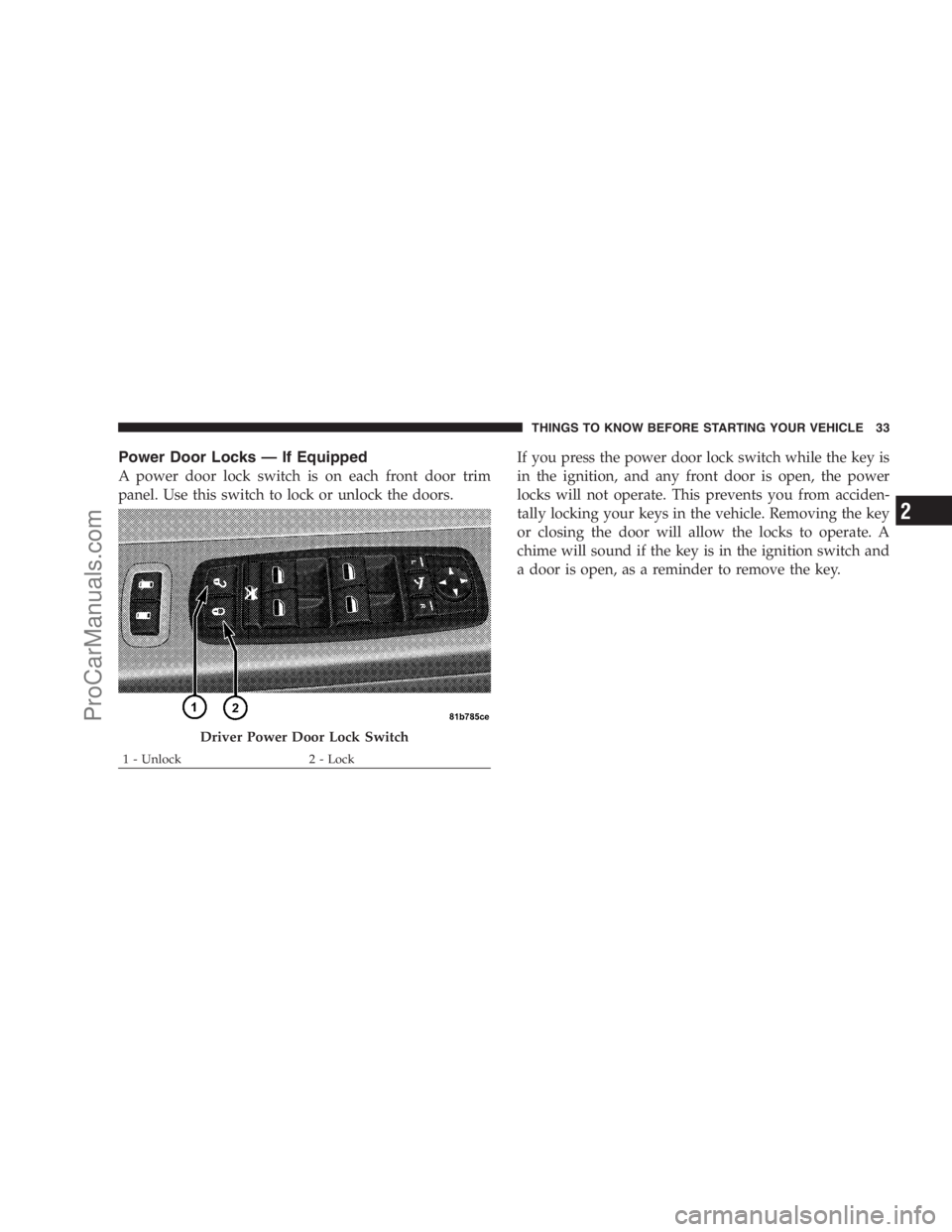
A power door lock switch is on each front door trim
panel. Use this switch to lock or unlock the doors.If you press the power door lock switch while the key is
in the ignition, and any front door is open, the power
locks will not operate. This prevents you from acciden-
tally locking your keys in the vehicle. Removing the key
or closing the door will allow the locks to operate. A
chime will sound if the key is in the ignition switch and
a door is open, as a reminder to remove the key.
Driver Power Door Lock Switch
1 - Unlock 2 - LockTHINGS TO KNOW BEFORE STARTING YOUR VEHICLE 33
2
ProCarManuals.com
Page 37 of 534
3. Place the key into the ignition.
4. Within 15 seconds, cycle the ignition key from the
LOCK position to the ON/RUN position a minimum of
four times, ending in the LOCK position(do not start the
engine).
5. Within 30 seconds, press the driver’s door lock switch
in the LOCK direction.
6. A single chime will be heard to indicate the feature has
been disabled.
7. To reactivate this feature, repeat the above steps.
8. If a chime is not heard, the program mode was
canceled before the feature could be disabled. If neces-
sary, repeat the above procedure.The Lock Doors Automatically at 15 mph (24 km/h)
feature can be reactivated by repeating the above men-
tioned procedure or by performing the procedure in the
EVIC (if equipped), Personal Settings (Customer-
Programmable Features) section.
Unlock Doors Automatically On Exit — If
Equipped
The Unlock Doors Automatically On Exit feature unlocks
all of the doors of the vehicle when any door is opened.
This will occur only after the shift lever has been shifted
into the PARK position, after the vehicle has been driven
(the shift lever has been shifted out of PARK and all
doors closed).
The Unlock Doors Automatically On Exit feature will not
operate if there is any manual operation of the power
door locks (lock or unlock).
THINGS TO KNOW BEFORE STARTING YOUR VEHICLE 35
2
ProCarManuals.com
Page 38 of 534

The Unlock Doors Automatically On Exit feature can be
enabled or disabled by performing the following proce-
dure:
1. Enter your vehicle and close all doors.
2. Fasten your seat belt. (Fastening the seat belt will
cancel any chimes that may be confusing during this
programming procedure.)
3. Insert the key into the ignition switch.
4. Within 15 seconds, cycle the ignition key from the
LOCK position to the ON/RUN position a minimum of
four times ending in the LOCK position(do not start the
engine).
5. Within 30 seconds, press the driver’s door lock switch
in the UNLOCK direction.
6. A single chime will sound to indicate the feature has
been changed.7. To reactivate this feature, repeat the above steps.
8. If a chime is not heard, the program mode was
canceled before the feature could be changed. If neces-
sary, repeat the above procedure.
The Unlock Doors Automatically On Exit feature can be
reactivated by repeating the above mentioned procedure
or by performing the procedure in the EVIC, Customer
Programmable Features section on vehicles so equipped.
NOTE:Use the Lock Doors Automatically at 15 mph
(24 km/h) and Unlock Doors Automatically On Exit
features in accordance with local laws.
Remote Power Unlock On First Press — If
Equipped
The Remote Power Unlock On First Press feature lets you
program the system to unlock either the driver’s side
door or all doors on the first press of the UNLOCK
button on the transmitter.
36 THINGS TO KNOW BEFORE STARTING YOUR VEHICLE
ProCarManuals.com
Page 40 of 534
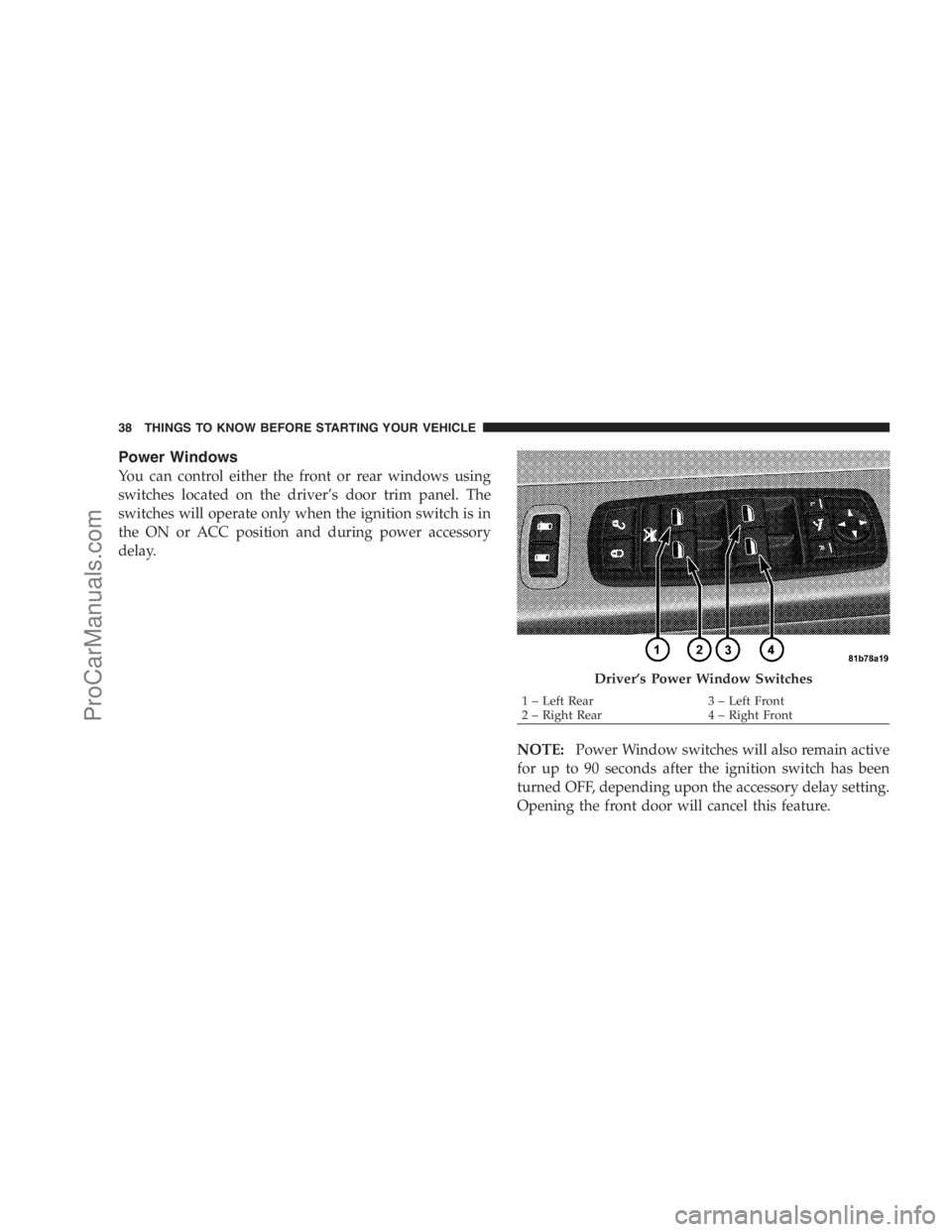
Power Windows
You can control either the front or rear windows using
switches located on the driver’s door trim panel. The
switches will operate only when the ignition switch is in
the ON or ACC position and during power accessory
delay.
NOTE:Power Window switches will also remain active
for up to 90 seconds after the ignition switch has been
turned OFF, depending upon the accessory delay setting.
Opening the front door will cancel this feature.
Driver’s Power Window Switches
1 – Left Rear 3 – Left Front
2 – Right Rear 4 – Right Front 38 THINGS TO KNOW BEFORE STARTING YOUR VEHICLE
ProCarManuals.com
Page 41 of 534
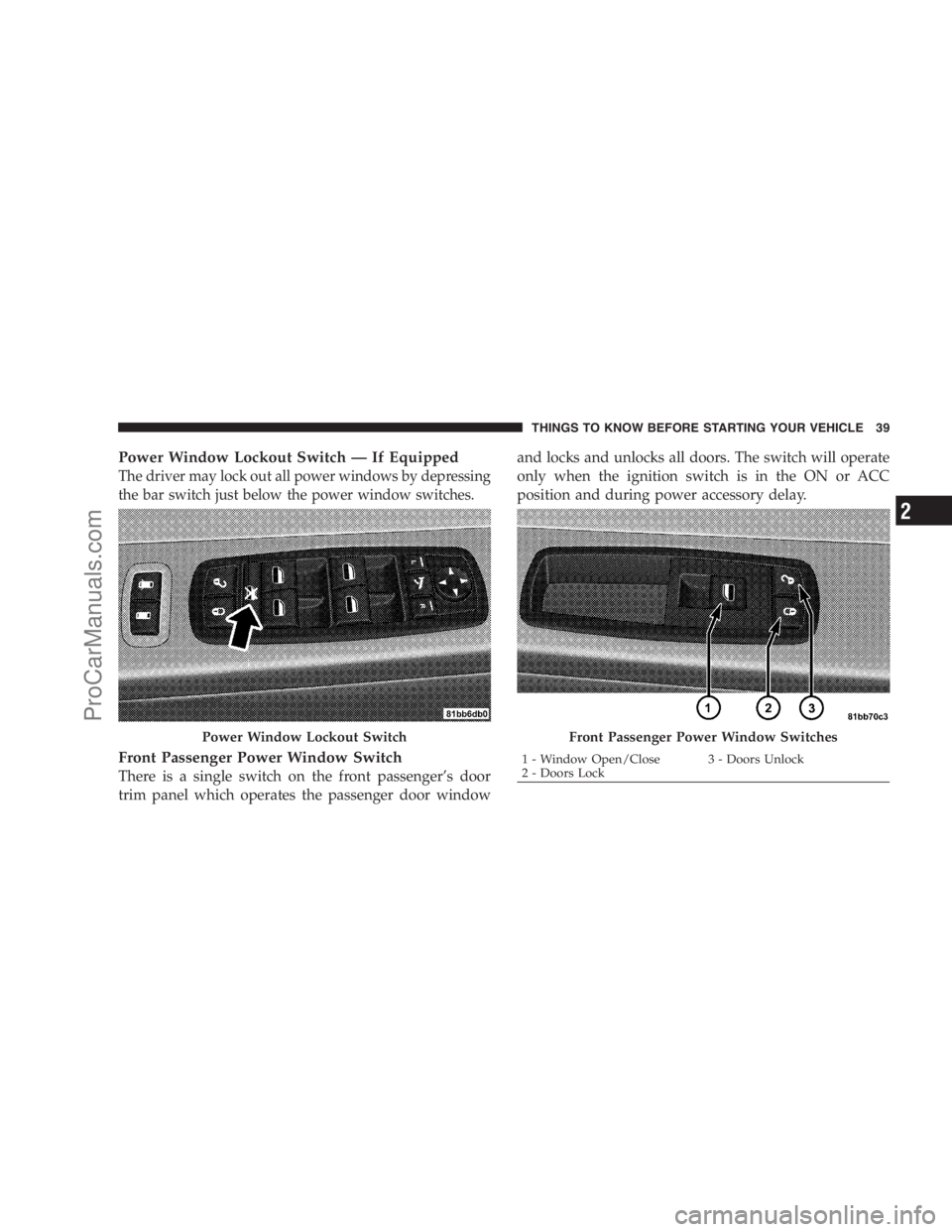
Power Window Lockout Switch — If Equipped
The driver may lock out all power windows by depressing
the bar switch just below the power window switches.
Front Passenger Power Window Switch
There is a single switch on the front passenger’s door
trim panel which operates the passenger door windowand locks and unlocks all doors. The switch will operate
only when the ignition switch is in the ON or ACC
position and during power accessory delay.
Power Window Lockout SwitchFront Passenger Power Window Switches
1 - Window Open/Close 3 - Doors Unlock
2 - Doors LockTHINGS TO KNOW BEFORE STARTING YOUR VEHICLE 39
2
ProCarManuals.com
Page 42 of 534
Sliding Side Door Power Window Switch
Second row passengers may power the sliding door
window by a single switch on the door handle assembly.
The switches will operate only when the ignition switch
is in the ON or ACC position.NOTE:Please note that the sliding door windows do
not fully recline, stopping several inches above the
window sill.
Auto Down Feature — If Equipped
The front window switches may be equipped with an
auto down feature. Press the window switch past the
detent, release, and the window will go down automati-
cally.
To open the window part way, press the window switch
part way and release it when you want the window to
stop.
The power window switches remain active for up to
90 seconds (depending on the accessory delay setting)
after the ignition switch has been turned off. Opening a
vehicle front door will cancel this feature.
Sliding Door Power Window Switch
40 THINGS TO KNOW BEFORE STARTING YOUR VEHICLE
ProCarManuals.com
Page 47 of 534

door switch is pressed. To close the door, wait until it
is fully open and then press the switch again.
•The power sliding side door switches will not operate
if the shift lever is in gear or the vehicle speed is above
0 mph (0 km/h).
•If the power sliding door encounters multiple obstruc-
tions within the same cycle, the system will automati-
cally stop and must be opened or closed manually.
WARNING!
You, or others, could be injured if caught in the path
of the sliding door. Make sure the door path is clear
before closing the door.
Power Sliding Side Door Open Flash
The left and right exterior hazard lights will flash for
12 seconds when either sliding door is opened. This will
alert other drivers in the area that passenger(s) could be
entering or exiting the vehicle.
The Sliding Side Door Open Flash can be enabled or
disabled by performing the following procedure:
1. Place the key in the ignition switch.
2. Cycle the ignition switch ON/OFF four times ending
in the ON position(do not start the engine).
3. Within 10 seconds of the final cycle, press the HAZ-
ARD switch.
4. A single chime will sound to signify that you have
successfully completed the programming.
You can turn the feature back on by repeating the above
mentioned procedure.
THINGS TO KNOW BEFORE STARTING YOUR VEHICLE 45
2
ProCarManuals.com
Page 65 of 534
by assuring that the belt is tight about the occupant early
in a collision. Pretensioners work for all size occupants,
including those in child restraints.
NOTE:These devices are not a substitute for proper seat
belt placement by the occupant. The seat belt still must be
worn snugly and positioned properly.
The pretensioners are triggered by the Occupant Re-
straint Controller (ORC). Like the front airbags, the
pretensioners are single use items. After a collision that is
severe enough to deploy the airbags and pretensioners,
both must be replaced.
Enhanced Seat Belt Use Reminder System
(BeltAlert�)
If the occupied driver’s seat belt has not been buckled
within 60 seconds of starting the vehicle and if the vehicle
speed is greater than 5 mph (8 km/h), BeltAlert�will
alert the driver to buckle the seat belt. The driver should
also instruct all other occupants to buckle their seat belts.Once the warning is triggered, BeltAlert�will continue to
chime and flash the Seat Belt Warning Light for 96 sec-
onds or until the driver’s seat belt is buckled.
BeltAlert�will be reactivated if the driver’s seat belt is
unbuckled for more than 10 seconds and the vehicle
speed is greater than 5 mph (8 km/h).
BeltAlert�Programming
BeltAlert�can be enabled or disabled by your authorized
dealer or by following these steps:
NOTE:The following steps must occur within the first
60 seconds of the ignition switch being turned to the ON
or START position. Chrysler LLC does not recommend
deactivating BeltAlert�.
1. With all doors closed and the ignition switch in any
position except ON or START, buckle the driver’s seat
belt.
THINGS TO KNOW BEFORE STARTING YOUR VEHICLE 63
2
ProCarManuals.com