Page 162 of 475
Begin Programming
1. Turn the ignition switch to the ON/RUN position.
2. Hold the battery side of the handheld transmitter
away from the HomeLink�button you wish to program.
Place the handheld transmitter 1 to 3 in (3 to 8 cm) away
from the HomeLink�button you wish to program while
keeping the indicator light in view.
3. Simultaneously press and hold both the chosen
HomeLink�button and the handheld transmitter button
until the HomeLink�indicator changes from a slow to a
rapidly blinking light, then release both the HomeLink�
and handheld transmitter buttons.
Watch for the HomeLink�indicator to change flash rates.
When it changes, it is programmed. It may take up to
30 seconds, or longer in rare cases. The garage door may
open and close while you train.NOTE:•Some gate operators and garage door openers may
require you to replace Step 3 with procedures noted in
the “Gate Operator/Canadian Programming” section.
•After training a HomeLink�channel, if the garage
door does not operate with HomeLink�and the ga-
rage door opener was manufactured after 1995, the
garage door opener may have a rolling code. If so,
proceed to Step 5 “Programming A Rolling Code
System.”
4. Press and hold the just-trained HomeLink�button
and observe the indicator light.
If the indicator light stays on constantly, programming is
complete and the garage door (or device) should activate
when the HomeLink�button is pressed.
160 UNDERSTANDING THE FEATURES OF YOUR VEHICLE
Page 165 of 475
to pick up the signal during programming. Similar to this
Canadian law, some U.S. gate operators are designed to
time-out in the same manner.
It may be helpful to unplug the device during the cycling
process to prevent possible overheating of the garage
door or gate motor.
If you are having difficulties programming a garage door
opener or a gate operator, replace “Programming
HomeLink�” Step 3, with the following:
3. Continue to press and hold the HomeLink�button
while you press and release - every two seconds
(“cycle”) your handheld transmitter until HomeLink�
has successfully accepted the frequency signal. The
indicator light will flash slowly and then rapidly when
fully trained.
If you unplugged the device for training, plug it back in
at this time.Then proceed with Step 4 under “Programming
HomeLink�,” earlier in this section.
Security
It is advised to erase all channels before you sell or turn
in your vehicle.
To do this, press and hold the two outside buttons for
20 seconds until the red indicator flashes. Note that all
channels will be erased. Individual channels cannot be
erased.
The HomeLink�Universal Transceiver is disabled when
the Vehicle Security Alarm is active.
Troubleshooting Tips
If you are having trouble programming HomeLink�, here
are some of the most common solutions:
•Replace the battery in the original transmitter.
UNDERSTANDING THE FEATURES OF YOUR VEHICLE 163
3
Page 167 of 475
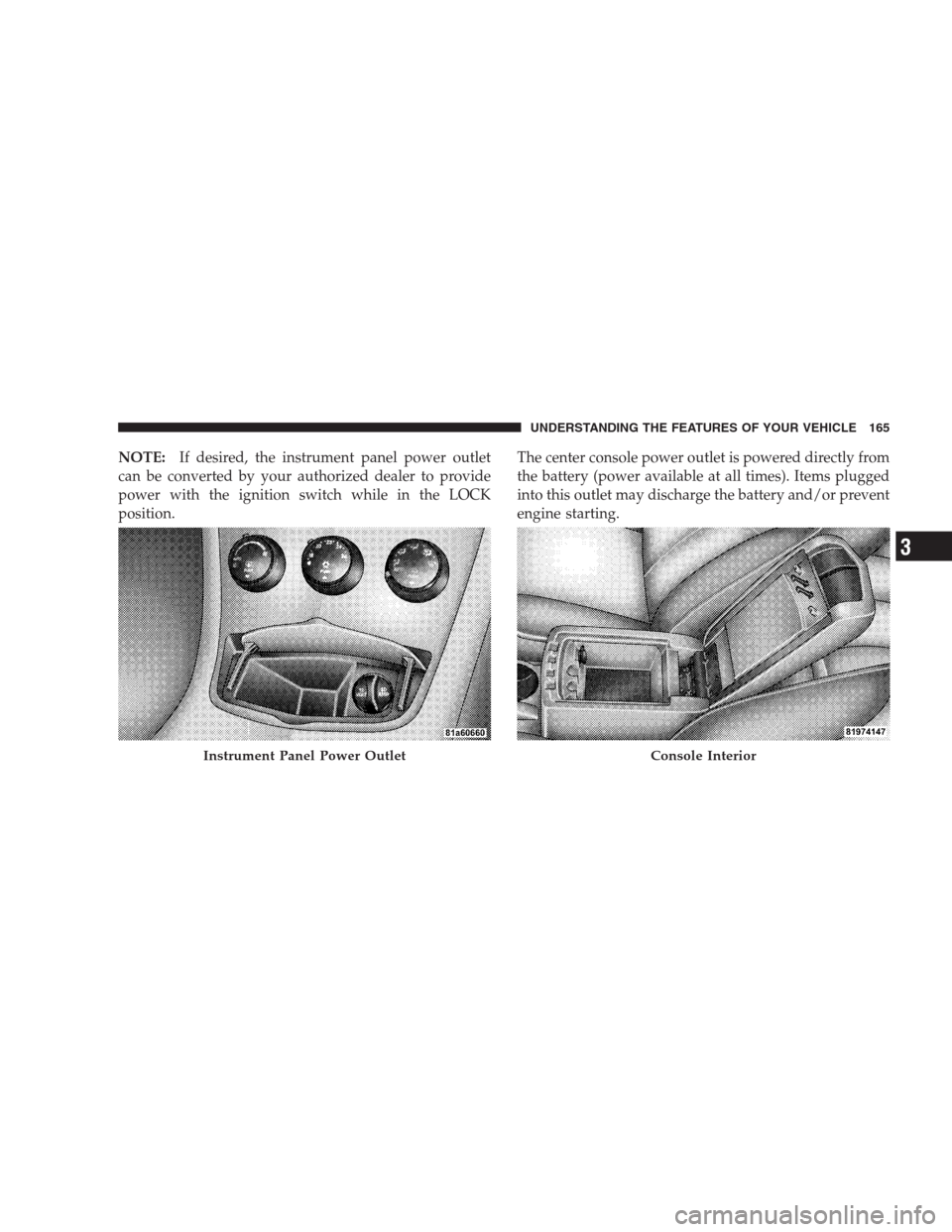
NOTE:If desired, the instrument panel power outlet
can be converted by your authorized dealer to provide
power with the ignition switch while in the LOCK
position.The center console power outlet is powered directly from
the battery (power available at all times). Items plugged
into this outlet may discharge the battery and/or prevent
engine starting.
Instrument Panel Power OutletConsole Interior
UNDERSTANDING THE FEATURES OF YOUR VEHICLE 165
3
Page 168 of 475
WARNING!
To avoid serious injury or death:
•Do not use a three-prong adapter.
•Do not insert any objects into the receptacles.
•Do not touch with wet hands.
•Close the lid when not in use and while driving
the vehicle.
•If this outlet is mishandled, it may cause an
electric shock and failure.
CAUTION!
•Many accessories that can be plugged in draw
power from the vehicle’s battery, even when not in
use (i.e., cellular phones, etc.). Eventually, if
plugged in long enough, the vehicle’s battery will
discharge sufficiently to degrade battery life
and/or prevent engine starting.
•Accessories that draw higher power (i.e., coolers,
vacuum cleaners, lights, etc.) will degrade the
battery even more quickly. Only use these inter-
mittently and with greater caution.
•After the use of high power draw accessories, or
long periods of the vehicle not being started (with
accessories still plugged in), the vehicle must be
driven a sufficient length of time to allow the
generator to recharge the vehicle’s battery.
166 UNDERSTANDING THE FEATURES OF YOUR VEHICLE
Page 197 of 475
Electronic Vehicle Information Center (EVIC)
Displays
When the appropriate conditions exist, the Electronic
Vehicle Information Center (EVIC) displays the following
messages.
•Turn Signal On (with a continuous warning chime
after one mile traveled)
•Left Front Turn Signal Light Out (with a single chime)
•Left Rear Turn Signal Light Out (with a single chime)
•Right Front Turn Signal Light Out (with a single
chime)
•Right Rear Turn Signal Light Out (with a single chime)
•RKE (Remote Keyless Entry) Battery Low (with a
single chime)
•Personal Settings Not Available – Vehicle Not in Park
•Personal Settings Not Available – Vehicle in Motion
•Left/Right Door Ajar (one or more, with a single
chime if speed is above 1 mph)
•Door(s) Ajar (with a single chime if vehicle is in
motion)
•Trunk Ajar (with a single chime)
•Headlights On
•Key In Ignition
•Convertible Top In Operation (with a single chime)
•Convertible Top Complete (with a single chime)
•Secure Cargo Shield (with a single chime)
•Speed Too High (with a single chime)
•Convertible Top Malfunction (with a single chime)
•Oil Change Required (with a single chime)
UNDERSTANDING YOUR INSTRUMENT PANEL 195
4
Page 271 of 475

WARNING! (Continued)
•Do not attempt to push or tow your vehicle to get
it started. Vehicles equipped with an automatic
transmission cannot be started this way. Unburned
fuel could enter the catalytic converter and once
the engine has started, ignite and damage the
converter and vehicle. If the vehicle has a dis-
charged battery, booster cables may be used to
obtain a start from a booster battery or the battery
in another vehicle. This type of start can be dan-
gerous if done improperly. Refer to Section 6 for
proper jump-starting procedures and follow them
carefully.
If the engine fails to start after you have followed the
“Normal Starting” or “Extreme Cold Weather” proce-
dures, it may be flooded. To clear any excess fuel, push
the accelerator pedal all the way to the floor and hold it.
Then, turn the ignition switch to the START position andrelease it as soon as the starter engages. The starter motor
will disengage automatically in 10 seconds. Once this
occurs, release the accelerator pedal, turn the ignition
switch to the LOCK position, wait 10 to 15 seconds, then
repeat the normal starting procedure.
CAUTION!
To prevent damage to the starter, do not crank the
engine for more than 15 seconds at a time. Wait 10 to
15 seconds before trying again.
After Starting
The idle speed will automatically decrease as the engine
warms up.
STARTING AND OPERATING 269
5
Page 274 of 475
Brake/Transaxle Interlock System
This system prevents you from moving the shift lever out
of PARK and into any gear unless the brake pedal is
pressed. This system is active only while the ignition
switch is in the ON position.Always press the brake
pedal first, before moving the shift lever out of PARK.
NOTE:If a malfunction occurs, the transaxle will not
shift out of PARK. Battery power is required to release the
Brake/Transaxle Interlock system. However, an override
system allows you to shift out of PARK in case of loss of
power. To activate the override system:
•Firmly apply the parking brake.
•Insert the ignition key into the ignition key lock
cylinder and rotate it to the ON position.
•Remove the cup holder liner.
•Insert a key, screwdriver, or finger into the hole at the
front of the cup holder and push and hold the manual
override release lever forward.
•While holding the release lever forward, move the
shift lever from PARK to NEUTRAL.
•Release the manual override.
NOTE:If this occurs, even if the override is successful,
it is recommended that you visit a dealer at your earliest
possible convenience. Your dealer has diagnostic equip-
ment to determine if the problem could recur.
272 STARTING AND OPERATING
Page 330 of 475
E-85 Usage In Non-Flex Fuel Vehicles
Non-FFV vehicles are compatible with gasoline contain-
ing 10% ethanol (E10). Gasoline with higher ethanol
content may void the vehicle’s warranty.
If a Non-FFV vehicle is inadvertently fueled with E-85
fuel, the engine will have some or all of these symptoms:
•operate in a lean mode
•OBD II “Malfunction Indicator Light” on
•poor engine performance
•poor cold start and cold drivability
•increased risk for fuel system component corrosion
To fix a Non-FFV vehicle inadvertently fueled once with
E-85 perform the following:
•drain the fuel tank (see your authorized dealer)
•change the engine oil and oil filter
•disconnect and reconnect the battery to reset the
engine controller memory
More extensive repairs will be required for prolonged
exposure to E-85 fuel.
MMT in Gasoline
MMT is a manganese containing metallic additive that is
blended into some gasoline to increase octane. Gasoline
blended with MMT provides no performance advantage
beyond gasoline of the same octane number without
MMT. Gasoline blended with MMT reduces spark plug
life and reduces emission system performance in some
vehicles. The manufacturer recommends that gasoline
without MMT be used in your vehicle. The MMT content
of gasoline may not be indicated on the gasoline pump,
therefore, you should ask your gasoline retailer whether
or not his/her gasoline contains MMT.
328 STARTING AND OPERATING