2009 CHEVROLET UPLANDER radio
[x] Cancel search: radioPage 370 of 464

One or more TPMS sensors are missing or
damaged. The DIC message and the TPMS
malfunction light should go off when the TPMS
sensors are installed and the sensor matching
process is performed successfully. See your dealer/
retailer for service.
Replacement tires or wheels do not match your
vehicle’s original equipment tires or wheels. Tires
and wheels other than those recommended for your
vehicle could prevent the TPMS from functioning
properly. SeeBuying New Tires on page 5-64.
Operating electronic devices or being near facilities
using radio wave frequencies similar to the TPMS
could cause the TPMS sensors to malfunction.
If the TPMS is not functioning it cannot detect or
signal a low tire condition. See your dealer/retailer for
service if the TPMS malfunction light and DIC message
comes on and stays on.
TPMS Sensor Matching Process
Each TPMS sensor has a unique identication code. Any
time you rotate your vehicle’s tires or replace one or more
of the TPMS sensors, the identication codes will need to
be matched to the new tire/wheel position. The sensors
are matched to the tire/wheel positions in the following
order: driver side front tire, passenger side front tire,
passenger side rear tire, and driver side rear tire using
a TPMS diagnostic tool. See your dealer/retailer for
service.
The TPMS sensors can also be matched to each
tire/wheel position by increasing or decreasing the
tire’s air pressure. If increasing the tire’s air pressure,
do not exceed the maximum ination pressure indicated
on the tire’s sidewall.
To decrease air-pressure out of a tire you can use the
pointed end of the valve cap, a pencil-style air pressure
gage, or a key.
5-60
Page 409 of 464
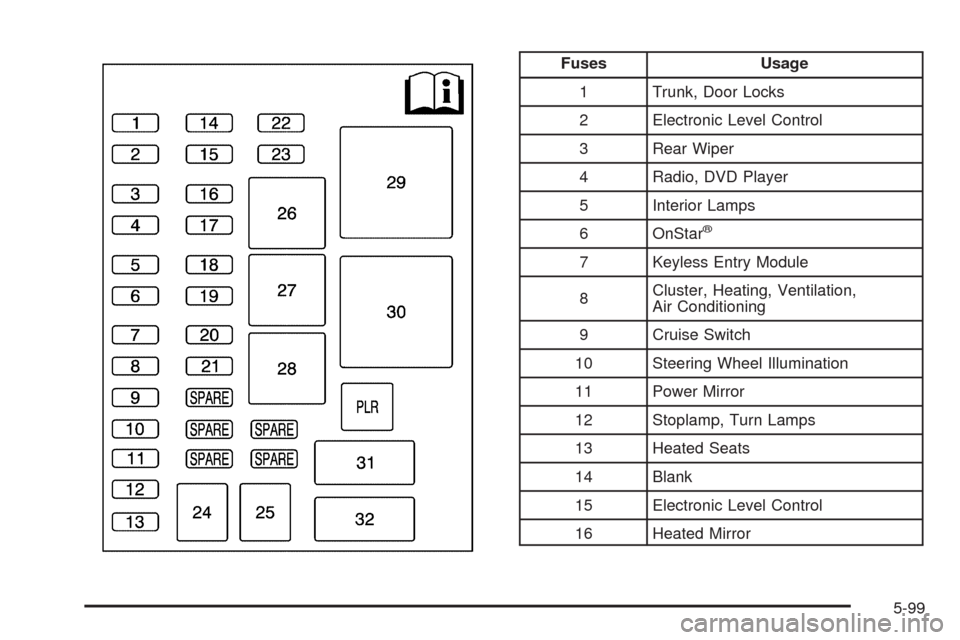
Fuses Usage
1 Trunk, Door Locks
2 Electronic Level Control
3 Rear Wiper
4 Radio, DVD Player
5 Interior Lamps
6 OnStar
®
7 Keyless Entry Module
8Cluster, Heating, Ventilation,
Air Conditioning
9 Cruise Switch
10 Steering Wheel Illumination
11 Power Mirror
12 Stoplamp, Turn Lamps
13 Heated Seats
14 Blank
15 Electronic Level Control
16 Heated Mirror
5-99
Page 433 of 464
Customer Assistance and Information...............7-2
Customer Satisfaction Procedure......................7-2
Online Owner Center......................................7-5
Customer Assistance for
Text Telephone (TTY) Users.........................7-6
Customer Assistance Offices............................7-6
GM Mobility Reimbursement Program................7-7
Roadside Assistance Program..........................7-7
Scheduling Service Appointments....................7-10
Courtesy Transportation.................................7-10
Collision Damage Repair................................7-11Reporting Safety Defects................................7-14
Reporting Safety Defects to the
United States Government..........................7-14
Reporting Safety Defects to the
Canadian Government................................7-15
Reporting Safety Defects to General Motors.....7-15
Service Publications Ordering Information.........7-15
Vehicle Data Recording and Privacy................7-16
Event Data Recorders...................................7-17
OnStar
®......................................................7-18
Navigation System........................................7-18
Radio Frequency Identication (RFID)..............7-18
Section 7 Customer Assistance Information
7-1
Page 448 of 464

Current and Past Model Order Forms
Technical Service Bulletins and Manuals are available
for current and past model GM vehicles. To request
an order form, specify year and model name of
the vehicle.
ORDER TOLL FREE: 1-800-551-4123
Monday-Friday 8:00 AM - 6:00 PM
Eastern Time
For Credit Card Orders Only
(VISA-MasterCard-Discover), visit Helm, Inc. on the
World Wide Web at: helminc.com
Or you can write to:
Helm, Incorporated
P.O. Box 07130
Detroit, MI 48207
Prices are subject to change without notice and without
incurring obligation. Allow ample time for delivery.
Note to Canadian Customers: All listed prices are
quoted in U.S. funds. Canadian residents are to make
checks payable in U.S. funds.
Vehicle Data Recording and
Privacy
Your GM vehicle has a number of sophisticated
computers that record information about the vehicle’s
performance and how it is driven. For example, your
vehicle uses computer modules to monitor and control
engine and transmission performance, to monitor the
conditions for airbag deployment and deploy airbags in a
crash and, if so equipped, to provide antilock braking to
help the driver control the vehicle. These modules may
store data to help your dealer/retailer technician service
your vehicle. Some modules may also store data about
how you operate the vehicle, such as rate of fuel
consumption or average speed. These modules may also
retain the owner’s personal preferences, such as radio
pre-sets, seat positions, and temperature settings.
7-16
Page 450 of 464

OnStar®
If your vehicle has OnStar and you subscribe to the
OnStar services, please refer to the OnStar Terms and
Conditions for information on data collection and
use. See alsoOnStar
®System on page 2-47in this
manual for more information.
Navigation System
If your vehicle has a navigation system, use of the
system may result in the storage of destinations,
addresses, telephone numbers, and other trip
information. Refer to the navigation system operating
manual for information on stored data and for deletion
instructions.
Radio Frequency
Identication (RFID)
RFID technology is used in some vehicles for functions
such as tire pressure monitoring and ignition system
security, as well as in connection with conveniences
such as key fobs for remote door locking/unlocking and
starting, and in-vehicle transmitters for garage door
openers. RFID technology in GM vehicles does not use
or record personal information or link with any other
GM system containing personal information.
7-18
Page 451 of 464

A
Accessories and Modications............................ 5-3
Accessory Power Outlets.................................3-20
Adding Equipment to Your Airbag-Equipped
Vehicle.......................................................1-91
Additives, Fuel................................................. 5-7
Add-On Electrical Equipment............................5-97
Air Cleaner/Filter, Engine.................................5-20
Air Conditioning......................................3-22, 3-25
Airbag
Passenger Status Indicator...........................3-34
Readiness Light..........................................3-33
Airbag System................................................1-77
Adding Equipment to Your Airbag-Equipped
Vehicle...................................................1-91
How Does an Airbag Restrain?......................1-83
Passenger Sensing System...........................1-85
Servicing Your Airbag-Equipped Vehicle..........1-90
What Makes an Airbag Inate?......................1-83
What Will You See After an Airbag Inates?....1-84
When Should an Airbag Inate?....................1-82
Where Are the Airbags?...............................1-80
Antenna, Fixed Mast......................................3-113
Antenna, XM™ Satellite Radio Antenna
System.....................................................3-113
Antilock Brake System (ABS)............................. 4-5
Anti-lock Brake, System Warning Light...............3-36Appearance Care
Aluminum Wheels........................................5-95
Care of Safety Belts and Built-in Child
Restraint Harness.....................................5-92
Chemical Paint Spotting...............................5-96
Child Restraint Pad......................................5-92
Cleaning Exterior Lamps/Lenses....................5-93
Fabric/Carpet..............................................5-91
Finish Care.................................................5-94
Finish Damage............................................5-96
Instrument Panel, Vinyl, and Other Plastic
Surfaces.................................................5-92
Interior Cleaning..........................................5-89
Leather
......................................................5-91
Sheet Metal Damage...................................5-96
Tires..........................................................5-95
Underbody Maintenance...............................5-96
Washing Your Vehicle...................................5-93
Weatherstrips..............................................5-92
Windshield, Backglass, and Wiper Blades.......5-94
Appointments, Scheduling Service.....................7-10
Audio System.................................................3-76
Audio Steering Wheel Controls....................3-111
Chime Level Adjustment.............................3-113
Fixed Mast Antenna...................................3-113
Radio Reception........................................3-112
Rear Seat Audio (RSA)...............................3-108
Setting the Clock.........................................3-77
1
Page 452 of 464

Audio System (cont.)
Theft-Deterrent Feature...............................3-110
XM™ Satellite Radio Antenna System...........3-113
Audio System(s).............................................3-77
Automatic Door Lock.......................................2-12
Automatic Transmission
Fluid..........................................................5-21
Operation...................................................2-35
B
Battery..........................................................5-36
Electric Power Management..........................3-18
Run-Down Protection...................................3-19
Brake
Emergencies................................................ 4-6
Brakes..........................................................5-33
System Warning Light..................................3-35
Braking........................................................... 4-4
Braking in Emergencies..................................... 4-6
Break-In, New Vehicle.....................................2-31
Bucket Seats, Rear........................................... 1-7
Built-in Child Restraint.....................................1-67
Bulb Replacement...........................................5-41
Front Turn Signal, Parking and Daytime
Running Lamps........................................5-43
Halogen Bulbs............................................5-41
Headlamp Aiming........................................5-41Bulb Replacement (cont.)
License Plate Lamps....................................5-45
Replacement Bulbs......................................5-45
Taillamps, Turn Signal, Stoplamps and
Back-up Lamps........................................5-44
Buying New Tires...........................................5-64
C
Calibration.....................................................3-49
California Fuel.................................................. 5-6
California Perchlorate Materials Requirements....... 5-4
California Proposition 65 Warning....................... 5-4
Canadian Owners................................................ ii
Capacities and Specications..........................5-104
Captain Chairs, Rear.......................................1-14
Carbon Monoxide...................................2-41, 4-16
Care of
Safety Belts and Built-in Child Restraint
Harness..................................................5-92
Cargo Lamp...................................................3-17
CD, MP3 .......................................................3-89
Chains, Tire...................................................5-70
Charging System Light....................................3-35
Check
Engine Light...............................................3-38
Checking Things Under the Hood......................5-12
Chemical Paint Spotting...................................5-96
2
Page 460 of 464

Power (cont.)
Sliding Door................................................2-16
Steering Fluid.............................................5-31
Windows....................................................2-25
Privacy..........................................................7-16
Event Data Recorders..................................7-17
Navigation System.......................................7-18
OnStar .......................................................7-18
Radio Frequency Identication.......................7-18
Programmable Automatic Door Unlock...............2-13
R
Radiator Pressure Cap....................................5-28
Radio Frequency Identication (RFID), Privacy....7-18
Radio(s)........................................................3-77
Radios
Rear Seat Audio........................................3-108
Reception.................................................3-112
Setting the Clock.........................................3-77
Theft-Deterrent..........................................3-110
Rear Climate Control System............................3-28
Rear Reading Lamps......................................3-17
Rear Seat Audio (RSA)..................................3-108
Rear Seat Entertainment System.......................3-93
Rear Seat Operation......................................... 1-6
Rear Windshield Washer/Wiper........................... 3-9Rearview Mirrors.............................................2-43
Reclining Seatbacks.......................................... 1-4
Recommended Fluids and Lubricants.................6-11
Recreational Vehicle Towing.............................4-24
Remote Keyless Entry (RKE) System.................. 2-4
Remote Keyless Entry (RKE) System, Operation . . . 2-5
Remote Vehicle Start........................................ 2-7
Removing the Flat Tire and Installing the
Spare Tire..................................................5-77
Removing the Spare Tire and Tools...................5-75
Replacement Bulbs.........................................5-45
Replacement Parts, Maintenance......................6-13
Reporting Safety Defects
Canadian Government..................................7-15
General Motors...........................................7-15
United States Government............................7-14
Restraint System Check
Checking the Restraint Systems....................1-92
Replacing Restraint System Parts
After a Crash..........................................1-93
Retained Accessory Power (RAP)......................2-32
Roadside
Assistance Program....................................... 7-7
Rocking Your Vehicle to Get it Out....................4-18
Routing, Engine Drive Belt...............................6-14
Running the Vehicle While Parked.....................2-42
10