2009 CHEVROLET UPLANDER radio
[x] Cancel search: radioPage 250 of 464

Files can be recorded with a variety of xed or
variable bit rates. Song title, artist name, and album
are available for display by the radio when
recorded using ID3 tags version 1 and 2.
Create a folder structure that makes it easy to nd
songs while driving. Organize songs by albums
using one folder for each album. Each folder
or album should contain 18 songs or less.
Make sure to nalize the disc when burning an MP3
disc, using multiple sessions. It is usually better to
burn the disc all at once.
Do not use CD-RW discs.
Do not use colored discs.
The player is able to read and play a maximum of
50 folders, 50 playlists, 10 sessions, and 255 les. Long
le names, folder names, or playlist names could use
more disc memory space than necessary. To conserve
space on the disc, minimize the length of the le, folder,
or playlist names. You can also play an MP3 CD that was
recorded using no le folders. The system can support up
to 11 folders in depth, though, keep the depth of the
folders to a minimum in order to keep down the
complexity and confusion in trying to locate a particular
folder during playback. If a CD contains more than the
maximum of 50 folders, 50 playlists, 10 sessions, and
255 les the player lets you access and navigate up to
the maximum, but all items over the maximum are
ignored.
Root Directory
The root directory is treated as a folder. If the root
directory has compressed audio les, the directory is
displayed as F1 ROOT. All les contained directly under
the root directory are accessed prior to any root
directory folders. However, playlists (Px) are always
accessed before root folders or les.
Empty Directory or Folder
If a root directory or a folder exists somewhere in the
le structure that contains only folders/subfolders and no
compressed les directly beneath them, the player
advances to the next folder in the le structure
that contains compressed audio les. The empty folder
does not display.
No Folder
When the CD contains only compressed les, the les
will be located under the root folder. The next and
previous folder functions do not function on a CD that was
recorded without folders or playlists. When displaying the
name of the folder the radio displays ROOT.
When the CD contains only playlists and compressed
audio les, but no folders, all les are located under the
root folder. The folder down and the folder up buttons
search playlists (Px) rst and then go to the root folder.
When the radio displays the name of the folder the
radio displays ROOT.
3-90
Page 251 of 464
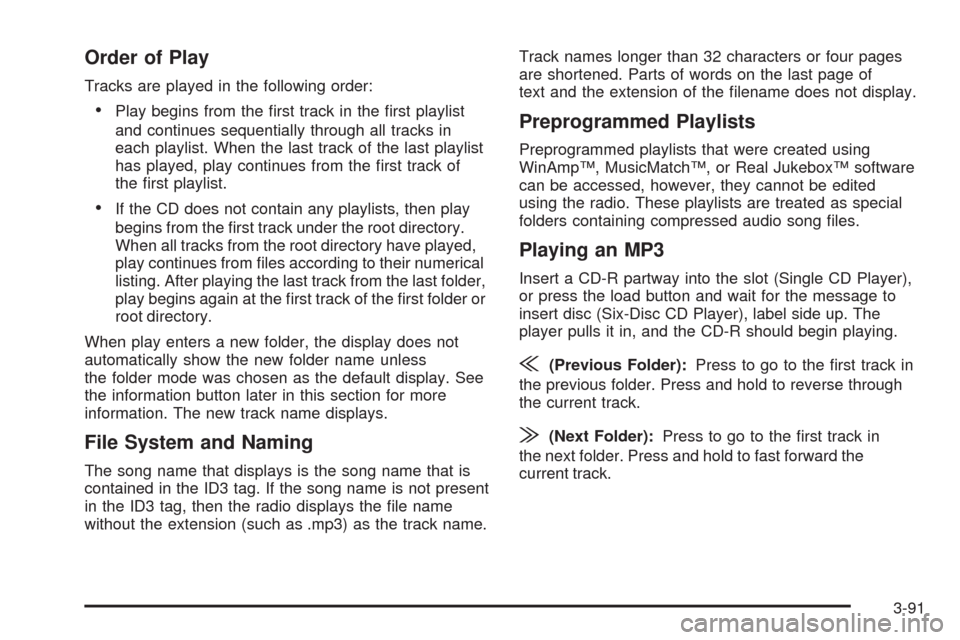
Order of Play
Tracks are played in the following order:
Play begins from the rst track in the rst playlist
and continues sequentially through all tracks in
each playlist. When the last track of the last playlist
has played, play continues from the rst track of
the rst playlist.
If the CD does not contain any playlists, then play
begins from the rst track under the root directory.
When all tracks from the root directory have played,
play continues from les according to their numerical
listing. After playing the last track from the last folder,
play begins again at the rst track of the rst folder or
root directory.
When play enters a new folder, the display does not
automatically show the new folder name unless
the folder mode was chosen as the default display. See
the information button later in this section for more
information. The new track name displays.
File System and Naming
The song name that displays is the song name that is
contained in the ID3 tag. If the song name is not present
in the ID3 tag, then the radio displays the le name
without the extension (such as .mp3) as the track name.Track names longer than 32 characters or four pages
are shortened. Parts of words on the last page of
text and the extension of the lename does not display.
Preprogrammed Playlists
Preprogrammed playlists that were created using
WinAmp™, MusicMatch™, or Real Jukebox™ software
can be accessed, however, they cannot be edited
using the radio. These playlists are treated as special
folders containing compressed audio song les.
Playing an MP3
Insert a CD-R partway into the slot (Single CD Player),
or press the load button and wait for the message to
insert disc (Six-Disc CD Player), label side up. The
player pulls it in, and the CD-R should begin playing.
{(Previous Folder):Press to go to the rst track in
the previous folder. Press and hold to reverse through
the current track.
|(Next Folder):Press to go to the rst track in
the next folder. Press and hold to fast forward the
current track.
3-91
Page 252 of 464

RDM (Random):Press to hear the tracks in random,
rather than sequential order, on one CD, one folder,
or all of the loaded CDs.
To use random, do one of the following:
Press and release until RANDOM DISC PLAY
displays, to play the tracks on a CD in random order.
Press and release until RANDOM FOLDER displays,
to play the tracks in a folder in random order.
Press and release until RANDOM ALL DISCS
displays, to play the tracks on all of the CDs that are
loaded in random order.
Press and release the RDM button until RANDOM OFF
displays, to turn off random play.
RPT (Repeat):Press to hear a track, CD, or a folder
over again.
To use repeat, do one of the following:
Press and release until REPEAT displays, to repeat
a track.
Press and release until REPEAT ONE DISC
displays, to repeat a CD.
Press and release until REPEAT FOLDER displays,
to repeat a folder.Press and release the RPT button until REPEAT OFF
displays, to turn off repeated play.
4(Information):Press to display the artist name and
album contained in the ID3 tag.
XM Radio Messages
xL (Explicit Language Channels):These
channels, or any others, can be blocked by calling
1-800-852-XMXM (9696).
Updating:The encryption code in the receiver is being
updated, and no action is required. This process
should take no longer than 30 seconds.
No Signal:The system is functioning correctly, but the
vehicle is in a location that is blocking the XM signal.
When the vehicle is moved into an open area, the signal
should return.
Loading XM:The audio system is acquiring and
processing audio and text data. No action is needed.
This message should disappear shortly.
CH Off Air:This channel is not currently in service.
Tune in to another channel.
3-92
Page 253 of 464

CH Unauth:This channel is blocked or cannot be
received with your XM Subscription package.
CH Unavail:This previously assigned channel is no
longer assigned. Tune to another station. If this station
was one of the presets, choose another station for
that preset button.
No Info:No artist, song title, category, or text
information is available at this time on this channel. The
system is working properly.
Not Found:There are no channels available for the
selected category. The system is working properly.
XM Locked:The XM receiver in the vehicle may have
previously been in another vehicle. For security
purposes, XM receivers cannot be swapped between
vehicles. If this message is received after having
the vehicle serviced, check with your dealer/retailer.
Radio ID:If tuned to channel 0, this message will
alternate with the XM Radio 8 digit radio ID label. This
label is needed to activate the service.Unknown:If this message is received when tuned to
channel 0, there may be a receiver fault. Consult
with your dealer/retailer.
Chk XMRcvr:If this message does not clear within a
short period of time, the receiver may have a fault.
Consult with your dealer/retailer.
Rear Seat Entertainment (RSE)
System
Vehicles with an RSE system have a video display
screen, auxiliary inputs, two sets of wireless
headphones, a DVD player, and a remote control.
Before Driving
The RSE is designed for rear seat passengers only.
The driver cannot safely view the video screen
while driving and should not try to do so.
Normal operation could be limited under extremely low
or high temperatures in order to protect the system
from damage. Operate the RSE system under normal or
comfortable cabin temperature ranges.
3-93
Page 255 of 464

To use the auxiliary audio and video inputs, connect an
external auxiliary device such as a camcorder to the
RCA jacks and turn on both the auxiliary device power
and the power on the front of the RSE player.
If a disc is present when the RSE power is turned on,
the player automatically begins playing the disc.
Press the AUX button on the remote control or the
DVD AUX button on the DVD player faceplate to switch
the system between the DVD player and the auxiliary
device. See “DVD Player” and “Remote Control” later in
this section for more information.
Parental Control
wj
(Parental Control):This button is located behind
the video screen next to the auxiliary and headphone
jacks. Press
wjwhile using RSA, or when a DVD or CD
is playing to blank the video screen and to mute the
audio. The power indicator lights on the DVD player
ashes. The parental control also disables all other button
operations from the remote control and the DVD player,
except for the eject button. Press
wjagain to restore
operation of the RSA, DVD player, and remote control.
wjcan also be used to turn the DVD player power on
and automatically resume play if the vehicle is on and a
disc is in the player. If a disc is not in the player then the
system powers up in auxiliary mode.
Audio Output
Audio from the DVD player or auxiliary inputs can be
heard through the following sources:
Vehicle Speakers
Wireless Headphones
Wired Headphones (not included)
Vehicle Speakers
Only one audio source can be heard through the
vehicle’s speakers at a time.
The RSE system or an auxiliary device can be heard
through all of the vehicle’s speakers when the following
occurs:
A DVD or auxiliary device is playing
The front audio system is on and the CD AUX
button is pressed to enable the RSE system
DVD appears on the radio display when the RSE
system is on.
To turn the vehicles speakers on and off, press the
CD AUX button on the radio. The audio from the RSE
system can be heard through the wireless headphones
and the vehicles speakers at the same time. The
volume on the radio varies when switching between the
radio, CD, DVD, MP3, or an auxiliary device.
3-95
Page 259 of 464

l(Fast Forward):Press to fast forward the DVD and
CD. To stop forwarding, press
rjorcY. While
the DVD is playing the copyright information or previews,
lmay not work.
MENU (Disc):Press to view the main DVD menu. The
menu is different on every disc. Use
q,Q,r,or
Rto move the cursor around the menu. After making a
selection, press
r.
r(Enter/Select):Press to select the choice that is
highlighted in any menu.
z(Display Control Button):Press to open the RSE
On-Screen Display (OSD) menus to adjust the color,
tint, brightness, contrast, and display modes.
For vehicles without rear seat climate control,z
can take the place of9C.
For vehicles with rear seat climate control,zis
also found on the remote control.
Playing a Disc
To play a disc, insert the disc with the label side up into
the loading slot. The DVD player continues loading
the disc and the player automatically starts if the vehicle
is in ACC/ACCESSORY, ON/RUN, or RAP.
If a disc is already in the player make sure that the DVD
player is on, then press
rjon the player faceplate or
on the remote control. Press DVD AUX on the player
faceplate, or CD AUX on the radio faceplate until RSE
displays, to start playing a disc.
Some DVDs do not allow fast forwarding or skipping of
the copyright information or previews. Some DVDs
begins playing after the previews have nished. If the
DVD does not begin playing at the main title, refer to the
on-screen instructions.
To stop playing a disc, press
cYon the DVD player
faceplate or the remote control.
To resume playback, press
rjon the DVD player
faceplate or the remote control. The movie should
resume play from where it was last stopped if the disc
has not been ejected.
If the disc has been ejected, the disc resumes play at
the beginning of the disc.
3-99
Page 264 of 464
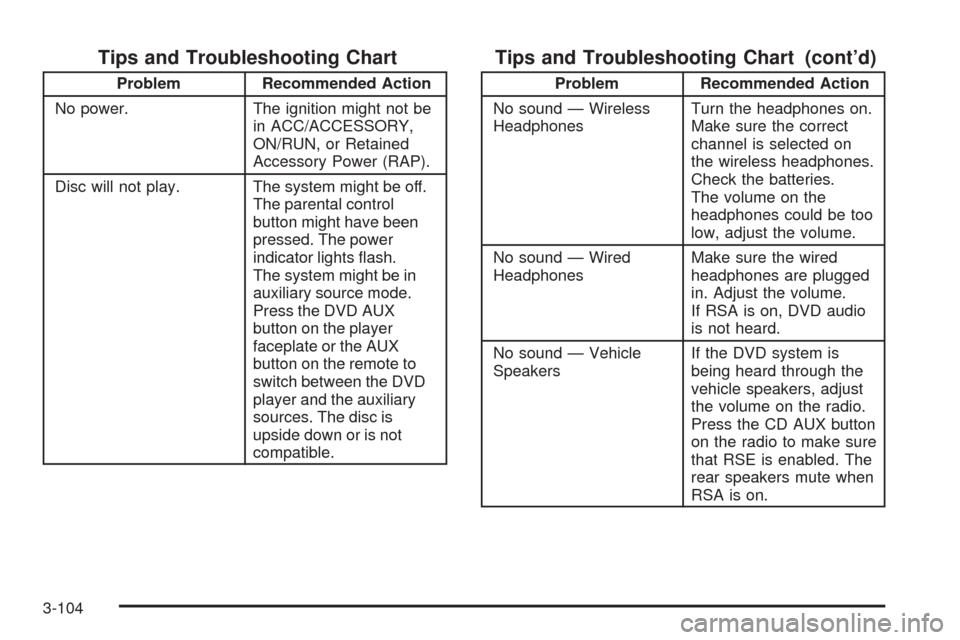
Tips and Troubleshooting Chart
Problem Recommended Action
No power. The ignition might not be
in ACC/ACCESSORY,
ON/RUN, or Retained
Accessory Power (RAP).
Disc will not play. The system might be off.
The parental control
button might have been
pressed. The power
indicator lights ash.
The system might be in
auxiliary source mode.
Press the DVD AUX
button on the player
faceplate or the AUX
button on the remote to
switch between the DVD
player and the auxiliary
sources. The disc is
upside down or is not
compatible.
Tips and Troubleshooting Chart (cont’d)
Problem Recommended Action
No sound — Wireless
HeadphonesTurn the headphones on.
Make sure the correct
channel is selected on
the wireless headphones.
Check the batteries.
The volume on the
headphones could be too
low, adjust the volume.
No sound — Wired
HeadphonesMake sure the wired
headphones are plugged
in. Adjust the volume.
If RSA is on, DVD audio
is not heard.
No sound — Vehicle
SpeakersIf the DVD system is
being heard through the
vehicle speakers, adjust
the volume on the radio.
Press the CD AUX button
on the radio to make sure
that RSE is enabled. The
rear speakers mute when
RSA is on.
3-104
Page 266 of 464
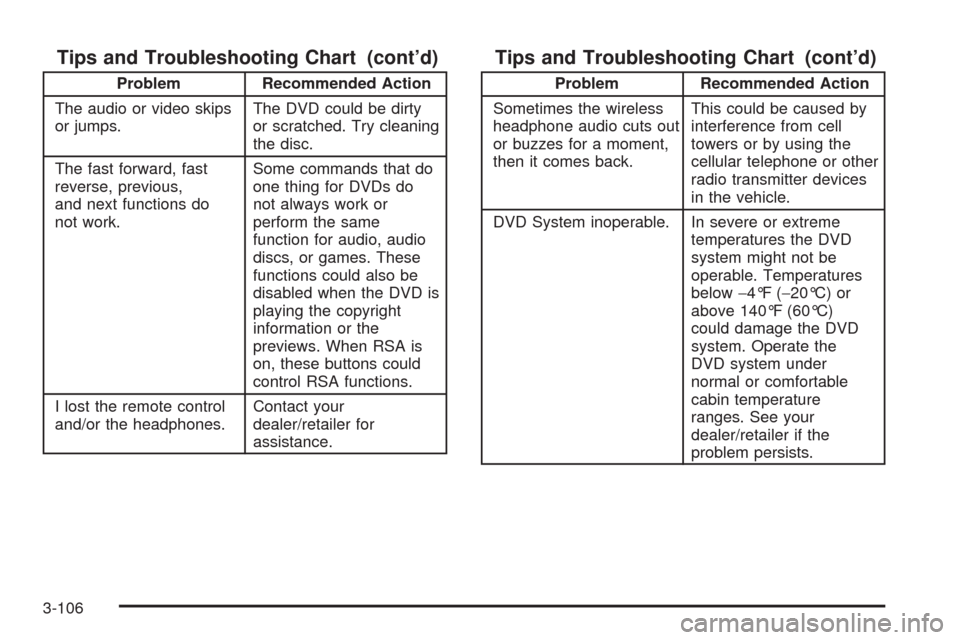
Tips and Troubleshooting Chart (cont’d)
Problem Recommended Action
The audio or video skips
or jumps.The DVD could be dirty
or scratched. Try cleaning
the disc.
The fast forward, fast
reverse, previous,
and next functions do
not work.Some commands that do
one thing for DVDs do
not always work or
perform the same
function for audio, audio
discs, or games. These
functions could also be
disabled when the DVD is
playing the copyright
information or the
previews. When RSA is
on, these buttons could
control RSA functions.
I lost the remote control
and/or the headphones.Contact your
dealer/retailer for
assistance.
Tips and Troubleshooting Chart (cont’d)
Problem Recommended Action
Sometimes the wireless
headphone audio cuts out
or buzzes for a moment,
then it comes back.This could be caused by
interference from cell
towers or by using the
cellular telephone or other
radio transmitter devices
in the vehicle.
DVD System inoperable. In severe or extreme
temperatures the DVD
system might not be
operable. Temperatures
below−4°F (−20°C) or
above 140°F (60°C)
could damage the DVD
system. Operate the
DVD system under
normal or comfortable
cabin temperature
ranges. See your
dealer/retailer if the
problem persists.
3-106