2009 CHEVROLET UPLANDER radio
[x] Cancel search: radioPage 268 of 464

DVD Distortion
Video distortion can occur when operating cellular
phones, scanners, CB radios, Global Position Systems
(GPS)*, two-way radios, mobile fax, or walkie talkies.
It might be necessary to turn off the DVD player when
operating one of these devices in or near the vehicle.
*Excludes the OnStar
®System.
Cleaning the DVD Player
When cleaning the outside DVD faceplate and buttons,
use only a clean cloth dampened with clean water.
Cleaning the Video Screen
When cleaning the video screen, use only a clean cloth
dampened with clean water. Use care when directly
touching or cleaning the screen, as damage may result.
Rear Seat Audio (RSA)
Vehicles with an RSA system allows rear seat
passengers to listen to and control any of the following
audio sources: AM/FM tuner, front CD player, and
XM™ Satellite Radio Service. However, the rear seat
passengers can only control the sources that the
front seat passengers are not listening to. For example,
rear seat passengers can listen to a CD in the front
radio and control it while the front seat passengers listen
to the radio through the front speakers. The rear seat
passengers have control of the volume for each
set of headphones.
The front seat audio controls always have priority over
the RSA controls. If the front seat passengers switch
the source for the main radio to a remote source,
the RSA is not able to control the remote source. RSA
can operate when the main radio is off.
3-108
Page 270 of 464

wj(Parental Control):This button is located behind
the video screen next to the auxiliary and headphone
jacks. Press
wjwhile using RSA, or when a DVD or CD
is playing to blank the video screen and to mute the
audio. The power indicator lights on the DVD player
ashes. The parental control also disables all other button
operations from the remote control and the DVD player,
except for the eject button. Press
wjagain to restore
operation of the RSA, DVD player, and remote control.
wjcan also be used to turn the DVD player power on
and automatically resume play if the vehicle is on and a
disc is in the player. If a disc is not in the player then the
system powers up in auxiliary mode.
Theft-Deterrent Feature
THEFTLOCK®is designed to discourage theft of the
vehicle’s radio by learning a portion of the Vehicle
Identication Number (VIN). The radio does not operate
and LOC, LOCK, or LOCKED displays if the radio is
stolen or moved to a different vehicle.
When the ignition is in the off position, a blinking red
light on the upper left side of the radio indicates
that THEFTLOCK
®is armed.
3-110
Page 271 of 464

Audio Steering Wheel Controls
For vehicles with steering wheel controls, some audio
controls can be adjusted at the steering wheel.
wtux(Seek/Scan):Press to seek or scan radio
stations while the radio is playing, or to select tracks
while a CD is playing.
To seek stations, press and releasewtorux
to go to the next or to the previous radio station
and stay there. The radio only seeks stations that
have a strong signal in the selected band.
To scan stations, press and holdwtoruxfor
two seconds until FREQUENCY SCAN displays.
The radio goes to a station, plays for a few seconds,then goes to the next station. Press
wtorux
again to stop scanning. The radio only scans stations
that have a strong signal in the selected band.
To go to the previous or next track on a CD,
press and release
wtoruxif more than
eight seconds have played. If
wtoruxis held
or pressed more than once, the player continues
moving backward or forward through the CD.
BAND:Press to switch between FM1, FM2, AM, or
XM1orXM2.
1–6 (Preset Pushbuttons):Press to play stations that
are programmed on the radio presets.
$(Mute//OnStar®):Press to silence the system.
Press again, to turn the sound on.
For vehicles with OnStar
®, press and hold to interact
with the OnStar®system. See theOnStar®System
on page 2-47in this manual for more information.
r(Play):When listening to the radio, press this button
to play a CD.
wux(Volume):Press to increase or decrease the
volume.
3-111
Page 272 of 464
Radio Reception
Frequency interference and static can occur during
normal radio reception if items such as cell phone
chargers, vehicle convenience accessories, and external
electronic devices are plugged into the accessory
power outlet. If there is interference or static, unplug the
item from the accessory power outlet.
AM
The range for most AM stations is greater than for FM,
especially at night. The longer range can cause station
frequencies to interfere with each other. For better radio
reception, most AM radio stations boost the power levels
during the day, and then reduce these levels during the
night. Static can also occur when things like storms and
power lines interfere with radio reception. When this
happens, try reducing the treble on the radio.
FM Stereo
FM signals only reach about 10 to 40 miles
(16 to 65 km). Although the radio has a built-in electronic
circuit that automatically works to reduce interference,
some static can occur, especially around tall buildings or
hills, causing the sound to fade in and out.
XM Satellite Radio Service
XM Satellite Radio Service gives digital radio reception
from coast-to-coast in the 48 contiguous United States,
and in Canada. Just as with FM, tall buildings or hills can
interfere with satellite radio signals, causing the sound to
fade in and out. In addition, traveling or standing under
heavy foliage, bridges, garages, or tunnels may cause
loss of the XM signal for a period of time.
Cellular Phone Usage
Cellular phone usage may cause interference with the
vehicle’s radio. This interference may occur when
making or receiving phone calls, charging the phone’s
battery, or simply having the phone on. This interference
causes an increased level of static while listening to
the radio. If static is received while listening to the radio,
unplug the cellular phone and turn it off.
3-112
Page 273 of 464

Fixed Mast Antenna
The xed mast antenna can withstand most car washes
without being damaged as long as it is securely
attached to the base. If the mast becomes slightly bent,
straighten it out by hand. If the mast is badly bent,
replace it.
Occasionally check to make sure the antenna is
tightened to its base. If tightening is required, tighten
by hand until fully seated plus one quarter turn.
XM™ Satellite Radio Antenna
System
The XM Satellite Radio antenna is located on the roof of
the vehicle. Keep the antenna clear of obstructions for
clear radio reception.
Chime Level Adjustment
The radio is used to adjust the vehicle’s chime volume
level. To adjust the chime volume level:
1. Turn the radio off with the ignition in the ON/RUN
position.
2. Press and hold pushbutton 6, the volume level will
change from the normal level to loud, and LOUD
will appear on the radio display.
If the chime volume is at the normal level, it
changes to the loud level and LOUD appears on
the radio display.
If the chime volume is at the loud level, it
changes to the normal level and NORMAL
appears on the radio display.
Removing the radio and not replacing it with a factory
radio or chime module disables the chimes.
3-113
Page 348 of 464
Notice:If you leave the radio or other accessories
on during the jump starting procedure, they could be
damaged. The repairs would not be covered by the
warranty. Always turn off the radio and other
accessories when jump starting the vehicle.
3. Turn off the ignition on both vehicles. Unplug
unnecessary accessories plugged into the cigarette
lighter or the accessory power outlet. Turn off
the radio and all lamps that are not needed.
This will avoid sparks and help save both batteries.
And it could save the radio!
4. Open the hoods and locate the batteries. Find the
positive (+) and negative (−) terminal locations on
each vehicle.
The battery will not need to be accessed for jump
starting. The vehicle has a remote positive (+) jump
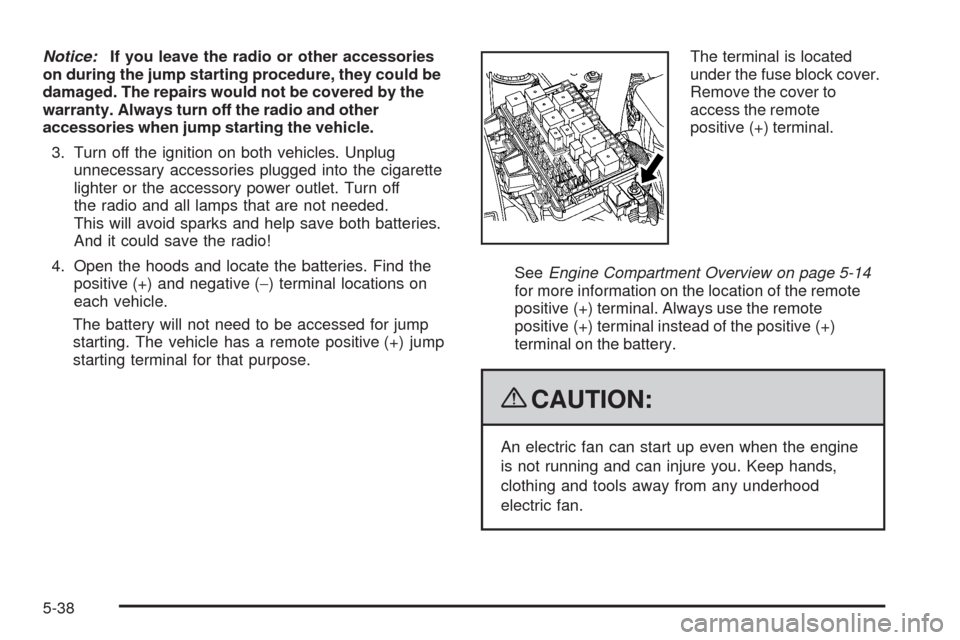
starting terminal for that purpose.The terminal is located
under the fuse block cover.
Remove the cover to
access the remote
positive (+) terminal.
SeeEngine Compartment Overview on page 5-14
for more information on the location of the remote
positive (+) terminal. Always use the remote
positive (+) terminal instead of the positive (+)
terminal on the battery.
{CAUTION:
An electric fan can start up even when the engine
is not running and can injure you. Keep hands,
clothing and tools away from any underhood
electric fan.
5-38
Page 367 of 464

Tire Pressure Monitor System
The Tire Pressure Monitor System (TPMS) uses radio
and sensor technology to check tire pressure levels.
The TPMS sensors monitor the air pressure in
your vehicle’s tires and transmit tire pressure readings
to a receiver located in the vehicle.
Each tire, including the spare (if provided), should be
checked monthly when cold and inated to the ination
pressure recommended by the vehicle manufacturer
on the vehicle placard or tire ination pressure label.
(If your vehicle has tires of a different size than the
size indicated on the vehicle placard or tire ination
pressure label, you should determine the proper
tire ination pressure for those tires.)
As an added safety feature, your vehicle has been
equipped with a tire pressure monitoring system (TPMS)
that illuminates a low tire pressure telltale when one
or more of your tires is signicantly under-inated.
Accordingly, when the low tire pressure telltale
illuminates, you should stop and check your tires as
soon as possible, and inate them to the proper
pressure. Driving on a signicantly under-inated tire
causes the tire to overheat and can lead to tire failure.
Under-ination also reduces fuel efficiency and tire
tread life, and may affect the vehicle’s handling
and stopping ability.Please note that the TPMS is not a substitute for proper
tire maintenance, and it is the driver’s responsibility to
maintain correct tire pressure, even if under-ination
has not reached the level to trigger illumination of
the TPMS low tire pressure telltale.
Your vehicle has also been equipped with a TPMS
malfunction indicator to indicate when the system is
not operating properly. The TPMS malfunction indicator
is combined with the low tire pressure telltale. When the
system detects a malfunction, the telltale will ash for
approximately one minute and then remain continuously
illuminated. This sequence will continue upon
subsequent vehicle start-ups as long as the malfunction
exists.
When the malfunction indicator is illuminated, the
system may not be able to detect or signal low tire
pressure as intended. TPMS malfunctions may occur
for a variety of reasons, including the installation of
replacement or alternate tires or wheels on the vehicle
that prevent the TPMS from functioning properly. Always
check the TPMS malfunction telltale after replacing one
or more tires or wheels on your vehicle to ensure that the
replacement or alternate tires and wheels allow the
TPMS to continue to function properly.
SeeTire Pressure Monitor Operation on page 5-58for
additional information.
5-57
Page 368 of 464

Federal Communications
Commission (FCC) and Industry
and Science Canada
The Tire Pressure Monitor System (TPMS) operates
on a radio frequency and complies with Part 15 of
the FCC Rules. Operation is subject to the following
two conditions:
1. This device may not cause harmful interference.
2. This device must accept any interference received,
including interference that may cause undesired
operation.
The TPMS operates on a radio frequency and complies
with RSS-210 of Industry and Science Canada.
Operation is subject to the following two conditions:
1. This device may not cause interference.
2. This device must accept any interference received,
including interference that may cause undesired
operation of the device.
Changes or modications to this system by other than
an authorized service facility could void authorization to
use this equipment.
Tire Pressure Monitor Operation
Your vehicle may have a Tire Pressure Monitor System
(TPMS) designed to warn the driver when a low tire
pressure condition exists. TPMS sensors are mounted
onto each tire and wheel assembly, excluding the spare
tire and wheel assembly. The TPMS sensors monitor
the air pressure in the vehicle’s tires and transmits
the tire pressure readings to a receiver located in the
vehicle.
When a low tire pressure
condition is detected, the
TPMS illuminates the low
tire pressure warning light
located on the instrument
panel cluster.
At the same time a message to check the pressure in
a specic tire appears on the Driver Information Center
(DIC) display. The low tire pressure warning light and the
DIC warning message come on at each ignition cycle
until the tires are inated to the correct ination pressure.
5-58