2009 CHEVROLET HHR traction control
[x] Cancel search: traction controlPage 4 of 450
Vehicle Symbol Chart
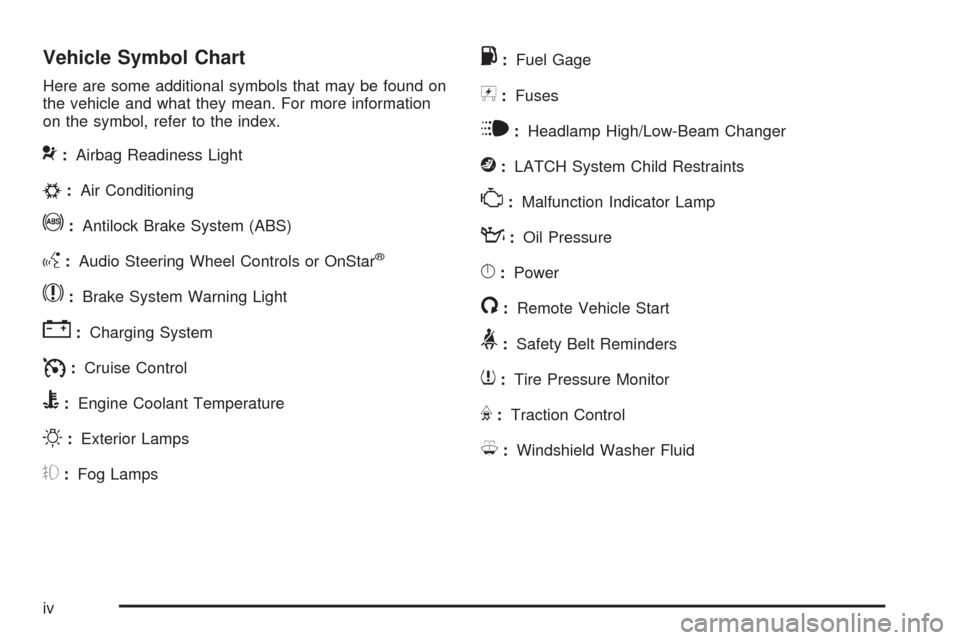
Here are some additional symbols that may be found on
the vehicle and what they mean. For more information
on the symbol, refer to the index.
9:Airbag Readiness Light
#:Air Conditioning
!:Antilock Brake System (ABS)
g:Audio Steering Wheel Controls or OnStar®
$:Brake System Warning Light
":Charging System
I:Cruise Control
B:Engine Coolant Temperature
O:Exterior Lamps
#:Fog Lamps
.:Fuel Gage
+:Fuses
i:Headlamp High/Low-Beam Changer
j:LATCH System Child Restraints
*:Malfunction Indicator Lamp
::Oil Pressure
}:Power
/:Remote Vehicle Start
>:Safety Belt Reminders
7:Tire Pressure Monitor
F:Traction Control
M:Windshield Washer Fluid
iv
Page 141 of 450
Instrument Panel Overview...............................3-4
Hazard Warning Flashers................................3-6
Horn .............................................................3-6
Tilt Wheel.....................................................3-6
Turn Signal/Multifunction Lever.........................3-7
Turn and Lane-Change Signals........................3-7
Headlamp High/Low-Beam Changer..................3-8
Flash-to-Pass.................................................3-8
Windshield Wipers..........................................3-8
Windshield Washer.........................................3-9
Rear Window Wiper/Washer...........................3-10
Cruise Control..............................................3-10
Headlamps..................................................3-14
Wiper Activated Headlamps............................3-15
Headlamps on Reminder................................3-15
Daytime Running Lamps (DRL).......................3-15
Automatic Headlamp System..........................3-16
Fog Lamps ..................................................3-16
Instrument Panel Brightness...........................3-17
Dome Lamp .................................................3-17
Entry/Exit Lighting.........................................3-17
Mirror Reading Lamps...................................3-17
Rear Reading Lamps....................................3-17
Electric Power Management...........................3-18
Battery Run-Down Protection..........................3-18
Accessory Power Outlet(s).............................3-19
Ashtray(s) and Cigarette Lighter......................3-21Climate Controls............................................3-21
Climate Control System.................................3-21
Outlet Adjustment.........................................3-24
Passenger Compartment Air Filter...................3-24
Warning Lights, Gages, and Indicators............3-26
Instrument Panel Cluster................................3-27
Speedometer and Odometer...........................3-28
Tachometer................................................
.3-28
Safety Belt Reminders...................................3-29
Airbag Readiness Light..................................3-30
Passenger Airbag Status Indicator...................3-31
Charging System Light..................................3-32
Up-Shift Light...............................................3-32
Brake System Warning Light..........................3-33
Antilock Brake System (ABS) Warning Light.....3-34
Enhanced Traction System (ETS)
Indicator/Warning Light...............................3-34
Electronic Stability Control (ESC)/
Traction Control System (TCS) Indicator/
Warning Light............................................3-35
Engine Coolant Temperature Warning Light......3-36
Engine Coolant Temperature Gage..................3-36
Tire Pressure Light.......................................3-37
Malfunction Indicator Lamp.............................3-37
Oil Pressure Light.........................................3-40
Security Light...............................................3-41
Fog Lamp Light............................................3-41
Section 3 Instrument Panel
3-1
Page 145 of 450
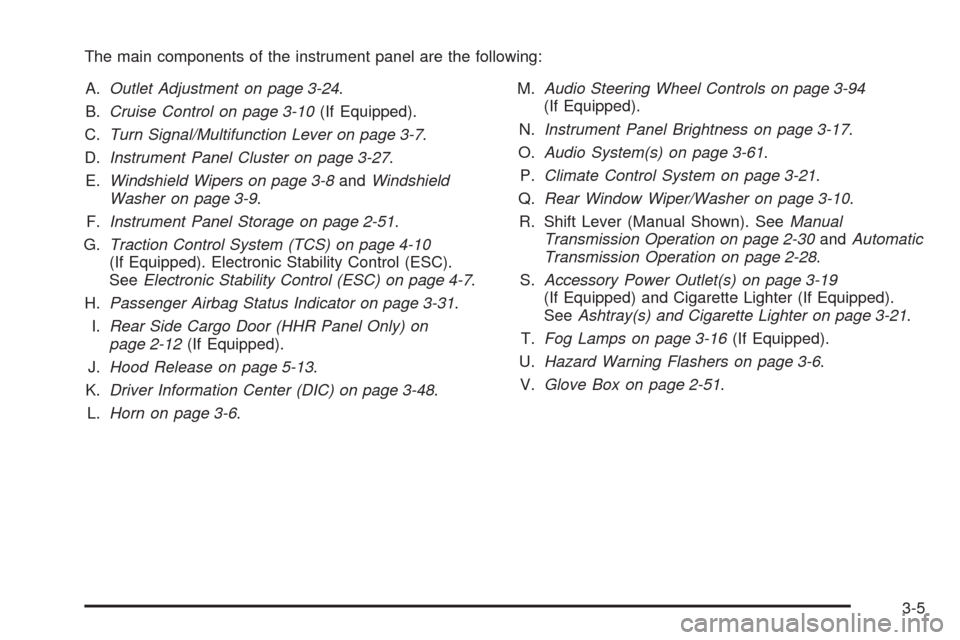
The main components of the instrument panel are the following:
A.Outlet Adjustment on page 3-24.
B.Cruise Control on page 3-10(If Equipped).
C.Turn Signal/Multifunction Lever on page 3-7.
D.Instrument Panel Cluster on page 3-27.
E.Windshield Wipers on page 3-8andWindshield
Washer on page 3-9.
F.Instrument Panel Storage on page 2-51.
G.Traction Control System (TCS) on page 4-10
(If Equipped). Electronic Stability Control (ESC).
SeeElectronic Stability Control (ESC) on page 4-7.
H.Passenger Airbag Status Indicator on page 3-31.
I.Rear Side Cargo Door (HHR Panel Only) on
page 2-12(If Equipped).
J.Hood Release on page 5-13.
K.Driver Information Center (DIC) on page 3-48.
L.Horn on page 3-6.M.Audio Steering Wheel Controls on page 3-94
(If Equipped).
N.Instrument Panel Brightness on page 3-17.
O.Audio System(s) on page 3-61.
P.Climate Control System on page 3-21.
Q.Rear Window Wiper/Washer on page 3-10.
R. Shift Lever (Manual Shown). SeeManual
Transmission Operation on page 2-30andAutomatic
Transmission Operation on page 2-28.
S.Accessory Power Outlet(s) on page 3-19
(If Equipped) and Cigarette Lighter (If Equipped).
SeeAshtray(s) and Cigarette Lighter on page 3-21.
T.Fog Lamps on page 3-16(If Equipped).
U.Hazard Warning Flashers on page 3-6.
V.Glove Box on page 2-51.
3-5
Page 151 of 450
{CAUTION:
Cruise control can be dangerous where you
cannot drive safely at a steady speed. So, do not
use the cruise control on winding roads or in
heavy traffic.
Cruise control can be dangerous on slippery roads.
On such roads, fast changes in tire traction can
cause excessive wheel slip, and you could lose
control. Do not use cruise control on slippery roads.
Setting Cruise Control
{CAUTION:
If you leave your cruise control on when you are not
using cruise, you might hit a button and go into
cruise when you do not want to. You could be
startled and even lose control. Keep the cruise
control switch off until you want to use cruise
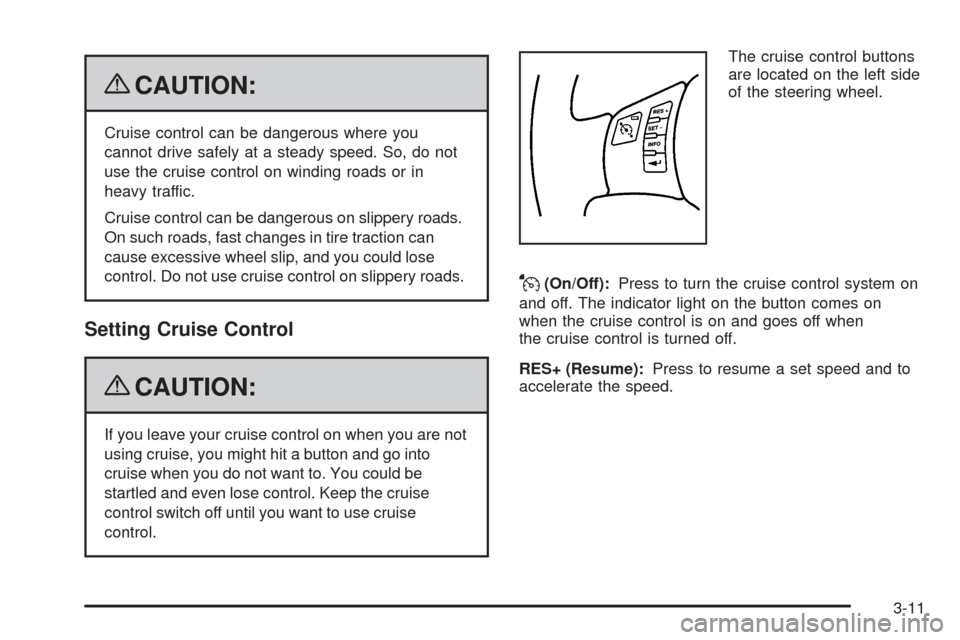
control.The cruise control buttons
are located on the left side
of the steering wheel.
J(On/Off):Press to turn the cruise control system on
and off. The indicator light on the button comes on
when the cruise control is on and goes off when
the cruise control is turned off.
RES+ (Resume):Press to resume a set speed and to
accelerate the speed.
3-11
Page 152 of 450
SET−(Set):Press to set a speed and to decrease the
speed.
To set a speed do the following:
1. Press
Ito turn cruise control on. The indicator
light on the button will come on.
2. Get to the desired speed.
3. Press the SET−control button and release it.
The CRUISE ENGAGED message will appear
on the Driver Information Center (DIC) to show
the system is engaged.
4. Take your foot off the accelerator pedal.
When you apply the brakes or operate the clutch pedal,
the cruise control will shut off.
If the vehicle is in cruise control and the Traction
Control System (TCS) begins to limit wheel spin, the
cruise control will automatically disengage. SeeTraction
Control System (TCS) on page 4-10andEnhanced
Traction System (ETS) on page 4-12. When road
conditions allow, the cruise control can be used again.
Resuming a Set Speed
Suppose the cruise control is set at a desired speed and
then the brake is applied. This disengages the cruise
control. To return to the previously set speed, you do
not need to go through the set process again. Once the
vehicle is going about 25 mph (40 km/h) or more, press
the RES+ part of the button briey.
The vehicle goes back to the previously set speed.
Increasing Speed While Using Cruise
Control
There are two ways to go to a higher speed.
1. Disengage the cruise control by applying the brake
pedal, but do not turn it off. Accelerate to a higher
speed and reset the cruise control.
2. If the cruise control system is already engaged,
press the RES+ button. Hold it there until the
desired speed is reached, and then release the
button. To increase the vehicle speed in small
amounts, press the RES+ button briey and then
release it. Each time this is done, the vehicle goes
about 1 mph (1.6 km/h) faster.
3-12
Page 175 of 450
Electronic Stability Control (ESC)/
Traction Control System (TCS)
Indicator/Warning Light
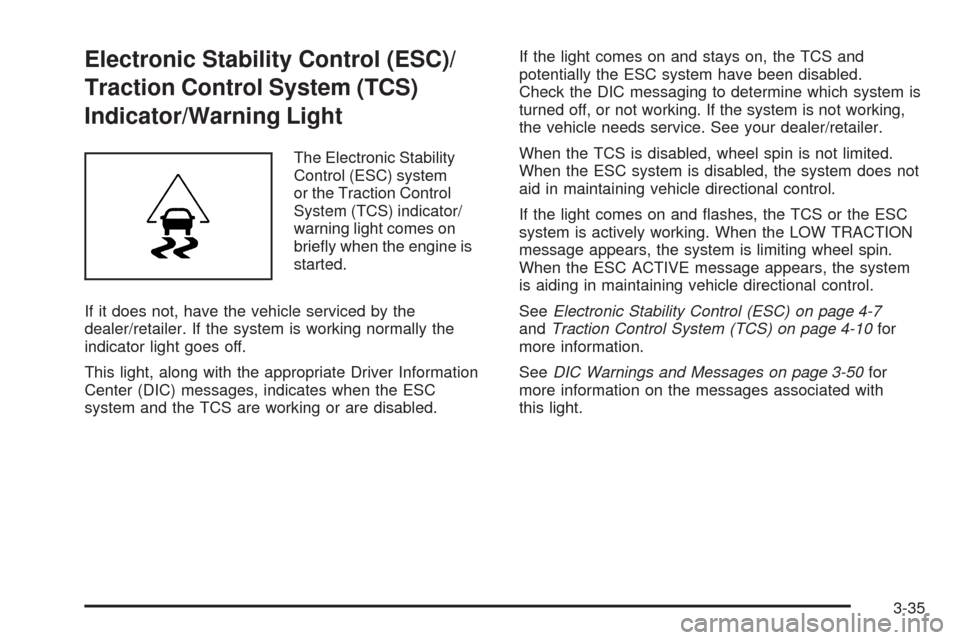
The Electronic Stability
Control (ESC) system
or the Traction Control
System (TCS) indicator/
warning light comes on
briey when the engine is
started.
If it does not, have the vehicle serviced by the
dealer/retailer. If the system is working normally the
indicator light goes off.
This light, along with the appropriate Driver Information
Center (DIC) messages, indicates when the ESC
system and the TCS are working or are disabled.If the light comes on and stays on, the TCS and
potentially the ESC system have been disabled.
Check the DIC messaging to determine which system is
turned off, or not working. If the system is not working,
the vehicle needs service. See your dealer/retailer.
When the TCS is disabled, wheel spin is not limited.
When the ESC system is disabled, the system does not
aid in maintaining vehicle directional control.
If the light comes on and ashes, the TCS or the ESC
system is actively working. When the LOW TRACTION
message appears, the system is limiting wheel spin.
When the ESC ACTIVE message appears, the system
is aiding in maintaining vehicle directional control.
SeeElectronic Stability Control (ESC) on page 4-7
andTraction Control System (TCS) on page 4-10for
more information.
SeeDIC Warnings and Messages on page 3-50for
more information on the messages associated with
this light.
3-35
Page 186 of 450
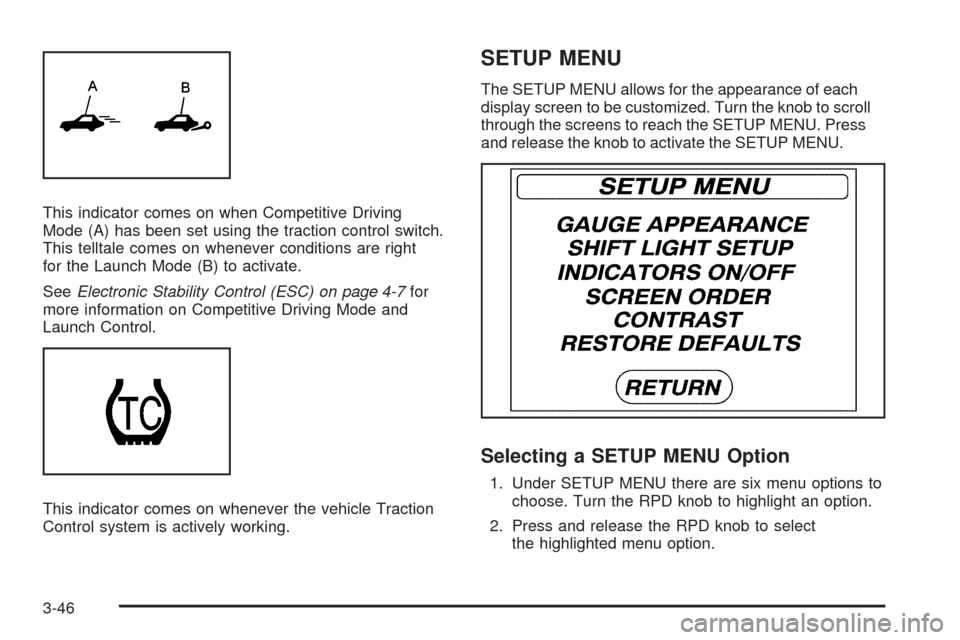
This indicator comes on when Competitive Driving
Mode (A) has been set using the traction control switch.
This telltale comes on whenever conditions are right
for the Launch Mode (B) to activate.
SeeElectronic Stability Control (ESC) on page 4-7for
more information on Competitive Driving Mode and
Launch Control.
This indicator comes on whenever the vehicle Traction
Control system is actively working.
SETUP MENU
The SETUP MENU allows for the appearance of each
display screen to be customized. Turn the knob to scroll
through the screens to reach the SETUP MENU. Press
and release the knob to activate the SETUP MENU.
Selecting a SETUP MENU Option
1. Under SETUP MENU there are six menu options to
choose. Turn the RPD knob to highlight an option.
2. Press and release the RPD knob to select
the highlighted menu option.
3-46
Page 187 of 450
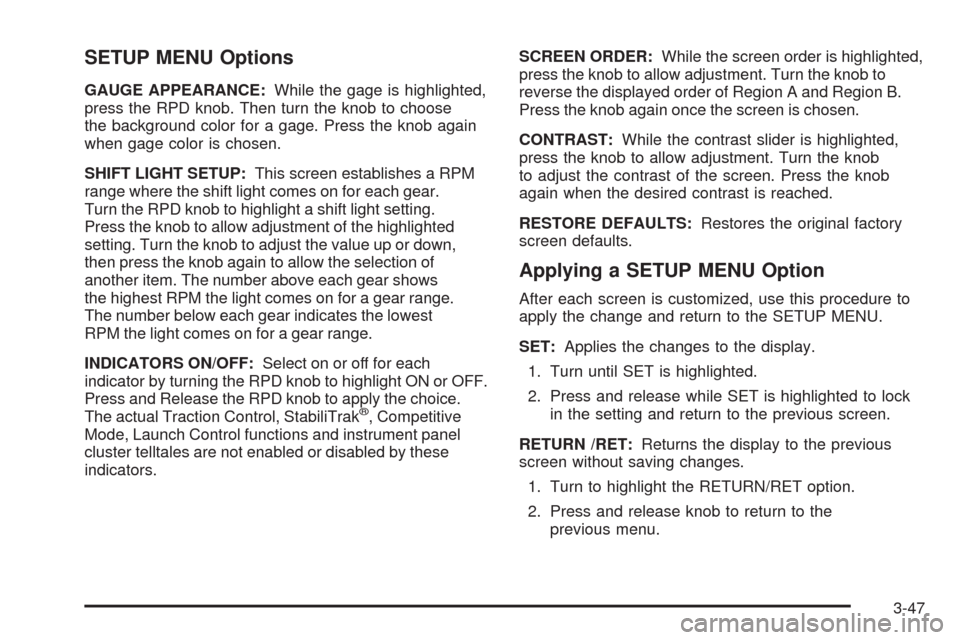
SETUP MENU Options
GAUGE APPEARANCE:While the gage is highlighted,
press the RPD knob. Then turn the knob to choose
the background color for a gage. Press the knob again
when gage color is chosen.
SHIFT LIGHT SETUP:This screen establishes a RPM
range where the shift light comes on for each gear.
Turn the RPD knob to highlight a shift light setting.
Press the knob to allow adjustment of the highlighted
setting. Turn the knob to adjust the value up or down,
then press the knob again to allow the selection of
another item. The number above each gear shows
the highest RPM the light comes on for a gear range.
The number below each gear indicates the lowest
RPM the light comes on for a gear range.
INDICATORS ON/OFF:Select on or off for each
indicator by turning the RPD knob to highlight ON or OFF.
Press and Release the RPD knob to apply the choice.
The actual Traction Control, StabiliTrak
®, Competitive
Mode, Launch Control functions and instrument panel
cluster telltales are not enabled or disabled by these
indicators.SCREEN ORDER:While the screen order is highlighted,
press the knob to allow adjustment. Turn the knob to
reverse the displayed order of Region A and Region B.
Press the knob again once the screen is chosen.
CONTRAST:While the contrast slider is highlighted,
press the knob to allow adjustment. Turn the knob
to adjust the contrast of the screen. Press the knob
again when the desired contrast is reached.
RESTORE DEFAULTS:Restores the original factory
screen defaults.
Applying a SETUP MENU Option
After each screen is customized, use this procedure to
apply the change and return to the SETUP MENU.
SET:Applies the changes to the display.
1. Turn until SET is highlighted.
2. Press and release while SET is highlighted to lock
in the setting and return to the previous screen.
RETURN /RET:Returns the display to the previous
screen without saving changes.
1. Turn to highlight the RETURN/RET option.
2. Press and release knob to return to the
previous menu.
3-47