2009 CHEVROLET EQUINOX service
[x] Cancel search: servicePage 93 of 442
Liftgate Operation with Loss of Power
The liftgate is equipped with an electric latch. If the
battery is disconnected or has low voltage, the liftgate
will not open.
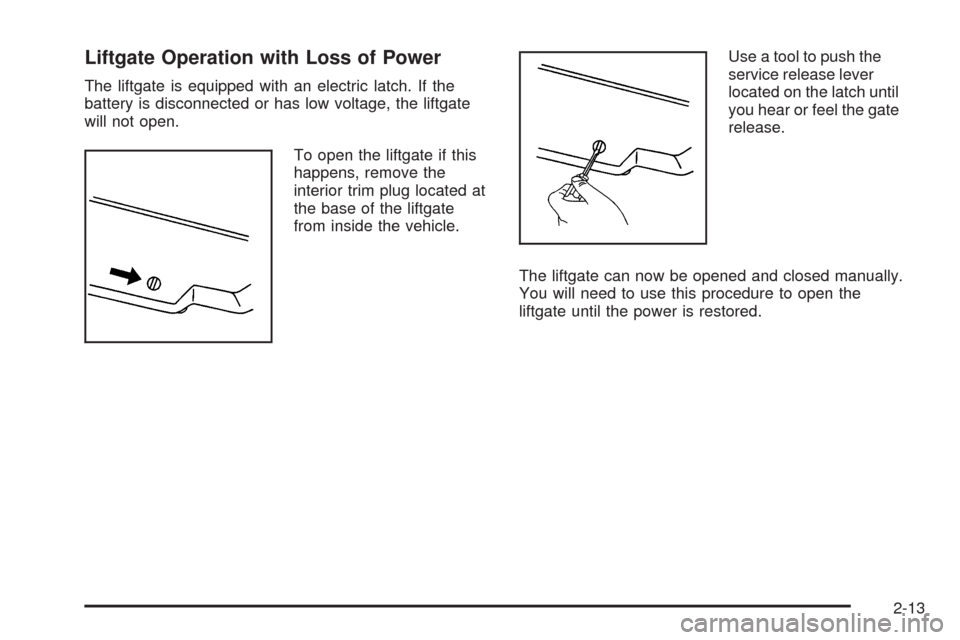
To open the liftgate if this
happens, remove the
interior trim plug located at
the base of the liftgate
from inside the vehicle.Use a tool to push the
service release lever
located on the latch until
you hear or feel the gate
release.
The liftgate can now be opened and closed manually.
You will need to use this procedure to open the
liftgate until the power is restored.
2-13
Page 97 of 442
Content Theft-Deterrent
Your vehicle has a content theft-deterrent alarm system.
To activate the theft-deterrent system:
1. Open the door.
2. Lock the door with the power door lock switch or the
Remote Keyless Entry (RKE) transmitter. If you are
using the RKE transmitter, the door does not need to
be open.
3. Close all doors.
The key must be removed from the ignition to arm
the system.
If the theft-deterrent system is activated and a door or
the liftgate is opened without using the RKE transmitter,
a 10 second pre-alarm will occur, and the security light
will ash. The horn will sound rapidly for 10 seconds. If
you do not press unlock on the RKE transmitter or insert
the key in the ignition and turn if from the LOCK/OFF
position, the alarm will go off. The horn will sound and the
headlamps will ash for 30 seconds.
After the alarm has sounded for 30 seconds, the system
will re-arm itself automatically.
To disarm the theft-deterrent system, do one of the
following:
1. Unlock the doors with the RKE transmitter.
2. Insert the key in the ignition and turn it from the
LOCK/OFF position.
PASS-Key®III+ Electronic
Immobilizer
The PASS-Key III+ system operates on a radio
frequency subject to Federal Communications
Commission (FCC) Rules and with Industry Canada.
This device complies with Part 15 of the FCC Rules.
Operation is subject to the following two conditions:
1. This device may not cause harmful interference.
2. This device must accept any interference received,
including interference that may cause undesired
operation.
This device complies with RSS-210 of Industry Canada.
Operation is subject to the following two conditions:
1. This device may not cause interference.
2. This device must accept any interference received,
including interference that may cause undesired
operation of the device.
Changes or modications to this system by other than
an authorized service facility could void authorization to
use this equipment.
PASS-Key III+ uses a radio frequency transponder in
the key that matches a decoder in the vehicle.
2-17
Page 98 of 442
PASS-Key®III+ Electronic
Immobilizer Operation
Your vehicle has PASS-Key®III+ (Personalized
Automotive Security System) theft-deterrent system.
PASS-Key
®III+ is a passive theft-deterrent system.
The system is automatically armed when the key
is removed from the ignition.
The system is automatically disarmed when the key is
turned to ON/RUN, ACC/ACCESSORY or START from
the LOCK/OFF position.
You do not have to manually arm or disarm the system.
The security light will come on if there is a problem
with arming or disarming the theft-deterrent system.
When the PASS-Key
®III+ system senses that someone
is using the wrong key, it prevents the vehicle from
starting. Anyone using a trial-and-error method to start
the vehicle will be discouraged because of the high
number of electrical key codes.
If the engine does not start and the security light on
the instrument panel comes on when trying to start the
vehicle, there may be a problem with your theft-deterrent
system. Turn the ignition off and try again.If the engine still does not start, and the key appears to
be undamaged, try another ignition key. At this time,
you may also want to check the fuse, seeFuses
and Circuit Breakers on page 5-97. If the engine still
does not start with the other key, your vehicle needs
service. If your vehicle does start, the rst key may be
faulty. See your dealer/retailer who can service the
PASS-Key
®III+ to have a new key made. In an
emergency, contact Roadside Assistance.
It is possible for the PASS-Key
®III+ decoder to “learn”
the transponder value of a new or replacement key.
Up to nine additional keys may be programmed for the
vehicle. The following procedure is for programming
additional keys only. If all the currently programmed
keys are lost or do not operate, you must see your
dealer/retailer or a locksmith who can service
PASS-Key
®III+ to have keys made and programmed
to the system.
See your dealer/retailer or a locksmith who can service
PASS-Key
®III+ to get a new key blank that is cut
exactly as the ignition key that operates the system.
2-18
Page 99 of 442
To program the new additional key:
1. Verify that the new key has a
1stamped on it.
2. Insert the original, already programmed, key in the
ignition and start the engine. If the engine will not
start, see your dealer/retailer for service.
3. After the engine has started, turn the key to
LOCK/OFF, and remove the key.
4. Insert the new key to be programmed and turn it to
the ON/RUN position within ve seconds of
removing the original key.
The security light will turn off once the key has
been programmed.
5. Repeat Steps 1 through 4 if additional keys are to
be programmed.
If you lose or damage your PASS-Key
®III+ key, see
your dealer/retailer or a locksmith who can service
PASS-Key
®III+ to have a new key made.
Do not leave the key or device that disarms or
deactivates the theft deterrent system in the vehicle.
Starting and Operating Your
Vehicle
New Vehicle Break-In
Notice:The vehicle does not need an elaborate
break-in. But it will perform better in the long run if
you follow these guidelines:
Do not drive at any one constant speed, fast or
slow, for the rst 500 miles (805 km). Do not
make full-throttle starts. Avoid downshifting to
brake or slow the vehicle.
Avoid making hard stops for the rst 200 miles
(322 km) or so. During this time the new brake
linings are not yet broken in. Hard stops with
new linings can mean premature wear and
earlier replacement. Follow this breaking-in
guideline every time you get new brake linings.
Do not tow a trailer during break-in. SeeTowing
a Trailer on page 4-32for the trailer towing
capabilities of your vehicle and more
information.
Following break-in, engine speed and load can be
gradually increased.
2-19
Page 100 of 442
Ignition Positions
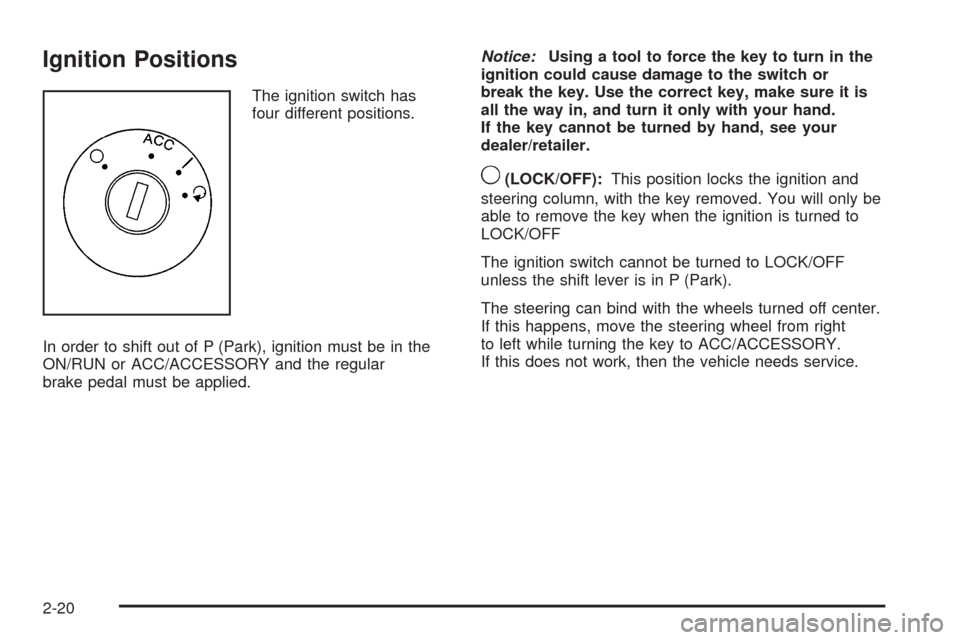
The ignition switch has
four different positions.
In order to shift out of P (Park), ignition must be in the
ON/RUN or ACC/ACCESSORY and the regular
brake pedal must be applied.Notice:Using a tool to force the key to turn in the
ignition could cause damage to the switch or
break the key. Use the correct key, make sure it is
all the way in, and turn it only with your hand.
If the key cannot be turned by hand, see your
dealer/retailer.
9(LOCK/OFF):This position locks the ignition and
steering column, with the key removed. You will only be
able to remove the key when the ignition is turned to
LOCK/OFF
The ignition switch cannot be turned to LOCK/OFF
unless the shift lever is in P (Park).
The steering can bind with the wheels turned off center.
If this happens, move the steering wheel from right
to left while turning the key to ACC/ACCESSORY.
If this does not work, then the vehicle needs service.
2-20
Page 117 of 442
Outside Convex Mirrors
{CAUTION:
A convex mirror can make things (like other
vehicles) look farther away than they really are.
If you cut too sharply into the right lane, you could
hit a vehicle on the right. Check the inside mirror
or glance over your shoulder before changing
lanes.
The passenger side mirror is convex shaped. A convex
mirror’s surface is curved so more can be seen from
the driver’s seat.
OnStar®System
OnStar uses several innovative technologies and live
advisors to provide a wide range of safety, security,
information, and convenience services. If the airbags
deploy, the system is designed to make an automatic
call to OnStar Emergency advisors who can request
emergency services be sent to your location. If the keys
are locked in the vehicle, call OnStar at 1-888-4-ONSTAR
to have a signal sent to unlock the doors. OnStar
Hands-Free Calling, including 30 trial minutes good
for 60 days, is available on most vehicles. OnStar
Turn-by-Turn Navigation service, with one trial route, is
available on most vehicles. Press the OnStar button to
have an OnStar advisor contact Roadside Service.
2-37
Page 118 of 442
OnStar service is provided subject to the OnStar Terms
and Conditions included in the OnStar Subscriber
glove box literature.
Some services such as Remote Door Unlock or Stolen
Vehicle Location Assistance may not be available until
the owner of the vehicle registers with OnStar. After the
rst prepaid year, contact OnStar to select a monthly or
annual subscription payment plan. If a payment plan
is not selected, the OnStar system and all services,
including airbag notication and emergency services,
may be deactivated and no longer available. For more
information visit onstar.com (U.S.) or onstar.ca (Canada),
or press the OnStar button to speak with an advisor.
Not all OnStar services are available on all vehicles.
To check if this vehicle is able to provide the services
described below, or for a full description of OnStar
services and system limitations, see the OnStar Owner’s
Guide in the glove box or visit onstar.com (U.S.) or
onstar.ca (Canada), contact OnStar at 1-888-4-ONSTAR
(1-888-466-7827) or TTY 1-877-248-2080, or press
the OnStar button to speak with an OnStar advisor
24 hours a day, 7 days a week.OnStar Services Available with the
Safe & Sound Plan
Automatic Notication of Airbag Deployment
Advanced Automatic Crash Notication (AACN)
(If equipped)
Link to Emergency Services
Roadside Assistance
Stolen Vehicle Location Assistance
Remote Door Unlock/Vehicle Alert
OnStar Vehicle Diagnostic Email
GM Goodwrench On Demand Diagnostics
OnStar Hands-Free Calling with 30 trial minutes
OnStar Virtual Advisor (U.S. Only)
OnStar Services Included with
Directions & Connections Plan
All Safe and Sound Plan Services
OnStar Turn-by-Turn Navigation (If equipped) or
Driving Directions — Advisor delivered
RideAssist
Information and Convenience Services
2-38
Page 119 of 442
OnStar Hands-Free Calling
OnStar Hands-Free Calling allows eligible OnStar
subscribers to make and receive calls using voice
commands. Hands-Free Calling is fully integrated into the
vehicle, and can be used with OnStar Pre-Paid Minute
Packages. Most vehicles include 30 trial minutes good
for 60 days. Hands-Free Calling can also be linked to a
Verizon Wireless service plan in the U.S. or a Bell
Mobility service plan in Canada, depending on eligibility.
To nd out more, refer to the OnStar Owner’s Guide in
the vehicle’s glove box, visit onstar.com or onstar.ca, or
speak with an OnStar advisor by pressing the OnStar
button or calling 1-888-4-ONSTAR (1-888-466-7827).
OnStar Turn-by-Turn Navigation
Vehicles with the OnStar Turn-by-Turn Navigation system
can provide voice-guided driving directions. Press the
OnStar button to have an OnStar advisor locate a
business or address and download driving directions to
the vehicle. Voice-guided directions to the desired
destination will play through the audio system speakers.
See the OnStar Owner’s Guide for more information.
OnStar Virtual Advisor
OnStar Virtual Advisor is a feature of OnStar Hands-Free
Calling that uses minutes to access location-based
weather, local traffic reports, and stock quotes. Press the
phone button and give a few simple voice commands
to browse through the various topics. See the OnStar
Owner’s Guide for more information. This feature is
only available in the continental U.S.
OnStar Steering Wheel Controls
This vehicle may have a Talk/Mute button that can
be used to interact with OnStar Hands-Free Calling.
SeeAudio Steering Wheel Controls on page 3-116
for more information.
On some vehicles, the mute button can be used to
dial numbers into voice mail systems, or to dial phone
extensions. See the OnStar Owner’s Guide for more
information.
2-39