2009 CADILLAC STS brakes
[x] Cancel search: brakesPage 293 of 514
ABS can change the brake pressure to each wheel, as
required, faster than any driver could. This can help
you steer around the obstacle while braking hard.
As you brake, the computer keeps receiving updates on
wheel speed and controls braking pressure accordingly.
Remember: ABS does not change the time you need to
get your foot up to the brake pedal or always decrease
stopping distance. If you get too close to the vehicle in
front of you, you will not have time to apply the brakes
if that vehicle suddenly slows or stops. Always leave
enough room up ahead to stop, even though you
have ABS.
Using ABS
Do not pump the brakes. Just hold the brake pedal
down rmly and let antilock work for you. You might
hear the antilock pump or motor operate, and feel the
brake pedal pulsate, but this is normal.
Braking in Emergencies
With ABS, you can steer and brake at the same time.
In many emergencies, steering can help more than even
the very best braking.
Brake Assist
This vehicle has a Brake Assist feature designed to
assist the driver in stopping or decreasing vehicle speed
in emergency driving conditions. This feature uses the
stability system hydraulic brake control module to
supplement the power brake system under conditions
where the driver has quickly and forcefully applied the
brake pedal in an attempt to quickly stop or slow down
the vehicle. The stability system hydraulic brake control
module increases brake pressure at each corner of the
vehicle until the ABS activates. Minor brake pedal
pulsations or pedal movement during this time is normal
and the driver should continue to apply the brake pedal
as the driving situation dictates The Brake Assist feature
will automatically disengage when the brake pedal is
released or brake pedal pressure is quickly decreased.
4-5
Page 294 of 514
StabiliTrak®System
The vehicle has a vehicle stability enhancement system
called StabiliTrak. It is an advanced computer controlled
system that assists with directional control of the vehicle
in difficult driving conditions.
If the vehicle has all-wheel-drive and has Active
Steering with Enhanced StabiliTrak, seeEnhanced
StabiliTrak
®on page 4-6.
StabiliTrak activates when the computer senses a
discrepancy between the intended path and the direction
the vehicle is actually traveling. StabiliTrak selectively
applies braking pressure at any one of the vehicle’s
brakes to help steer the vehicle in the intended direction.
When the system activates, a STABILITY SYS ACTIVE
message will be displayed on the Driver Information
Center (DIC). SeeDIC Warnings and Messages on
page 3-79. A noise may be heard or a vibration felt in the
brake pedal. This is normal. Continue to steer the vehicle
in the intended direction.
If there is a problem detected with StabiliTrak, a
SERVICE STABILITY SYS message will be displayed on
the DIC. SeeDIC Warnings and Messages on page 3-79.
When this message is displayed, the system is not
operational. Driving should be adjusted accordingly.StabiliTrak comes on automatically whenever the
vehicle is started. To help assist with directional control
of the vehicle, always leave the system on. StabiliTrak
can be turned off, however, by using the Traction
Control System (TCS)/StabiliTrak button. SeeTraction
Control System (TCS) on page 4-10.
If cruise control is being used when StabiliTrak activates,
it will automatically disengage. Cruise control may be
reengaged when road conditions allow. SeeCruise
Control on page 3-16orAdaptive Cruise Control
on page 3-20for more information.
Enhanced StabiliTrak®
All-wheel-drive (AWD) vehicles with the Active Steering
with Enhanced StabiliTrak option have an enhanced
computer controlled vehicle stability system that assists
with directional control of the vehicle in difficult driving
conditions. This system coordinates automatic control of
the Active Steering System, the Magnetic Ride Control
Suspension System, and the Brake Control System
for better vehicle performance.
During extreme cold temperature conditions, the active
steering function may be temporarily disabled which may
cause the steering wheel to be offset from the center
position while driving straight. This is normal operation
and the vehicle is safe to drive in these cases.
4-6
Page 295 of 514

Stability control activates when the computer senses a
difference between the intended path and the direction
the vehicle is actually traveling. Stability control
automatically adjusts the front road wheel steering
angle, modies the suspension stiffness, and selectively
applies braking pressure at any one of the vehicle’s
brakes to help maintain directional control of the vehicle.
When the system activates, a STABILITY SYS
ACTIVE message displays on the Driver Information
Center (DIC). SeeDIC Warnings and Messages
on page 3-79. It is normal to hear a noise or feel
vibration in the brake pedal when the system is working.
Continue to steer the vehicle in the intended direction.
If cruise control is engaged when Enhanced StabiliTrak
activates, the cruise control will automatically disengage.
Cruise Control may be re-engaged when road conditions
allow. SeeCruise Control on page 3-16,orAdaptive
Cruise Control on page 3-20for more information.
Enhanced StabiliTrak comes on automatically in the
Stability Touring Mode, when the vehicle is started.
The Stability Touring Mode is recommended for normal
driving. Enhanced StabiliTrak also has Stability
Competitive Mode that is turned on by pressing the
Traction Control (TC) button twice quickly. This mode is
designed to be used by the performance consciousdriver who desires less stability control intervention.
SeeCompetitive Driving Mode on page 4-11. When the
Stability Control Competitive Mode has been activated,
traction control operates in competitive mode and
cannot be turned off. The STABILITY COMPETITIVE
MODE message will be displayed on the DIC.
SeeDIC Warnings and Messages on page 3-79.
When operating the vehicle in the Stability Competitive
Mode, the system provides less stability control
intervention. Driving should be adjusted accordingly.
When the Stability Competitive Mode has been selected,
the Active Steering and Magnetic Ride Control Touring
Mode is not available. These systems are automatically
changed to the Performance Mode, providing more
response to road conditions and quicker steering
response. For more information, see “Active Steering
and Magnetic Ride Control Mode” in the Index of
the vehicle’s Navigation Manual.
To assist with directional control of the vehicle, always
leave the system on. Stability control can be turned
off however, by using the TC button. SeeTraction
Control System (TCS) on page 4-10. The STABILITY
SYS OFF message will be displayed on the DIC.
SeeDIC Warnings and Messages on page 3-79.
4-7
Page 298 of 514

Traction Control System (TCS)
The vehicle has a traction control system that limits
wheel spin. This is especially useful in slippery road
conditions. On a rear-wheel-drive vehicle, the system
operates if it senses that one or both of the rear wheels
are spinning or beginning to lose traction. On an
All-Wheel-Drive (AWD) vehicle, the system will operate if
it senses that any of the wheels are spinning or beginning
to lose traction. When this happens, the system brakes
the spinning wheel(s) and/or reduces engine power to
limit wheel spin.
The system may be heard or felt while it is working, but
this is normal.
This warning light comes
on if there is a problem
with TCS.SeeTraction Control System (TCS) Warning Light on
page 3-63. When this warning light is on, the system will
not limit wheel spin. Adjust your driving accordingly.
TCS automatically comes on whenever the vehicle is
started. To limit wheel spin, especially in slippery
road conditions, the system should always be left on,
but TCS can be turned off if needed.
Notice:Do not repeatedly brake or accelerate
heavily when TCS is off. The vehicle’s driveline
could be damaged.
When TCS is switched off on AWD and STS-V vehicles,
the system may still be working. This is normal and
necessary with the hardware on the vehicle.
It may be necessary to turn the system off if the vehicle
gets stuck in sand, mud or snow and rocking the vehicle
is required. SeeRocking Your Vehicle to Get It Out on
page 4-24andIf Your Vehicle is Stuck in Sand, Mud, Ice,
or Snow on page 4-23for more information. SeeWinter
Driving on page 4-21for information on using TCS when
driving in snowy or icy conditions.
4-10
Page 301 of 514

During some operating conditions, the active steering
might deactivate to protect the system from damage. You
might notice that the center position of the steering wheel
is changed. Unless there is a SERVICE STEERING SYS
message, the system will return to normal operation as
soon as the condition ceases, usually within a very short
period of time.
At low speeds, the active steering system requires less
movement of the steering wheel to change vehicle
direction than the normal power steering system.
Adjust your driving accordingly.
When certain steering faults are present, the active
steering deactivates and vehicle speed might be limited.
The SERVICE STEERING SYS and SPEED LIMITED
TO XXX messages will be displayed. SeeDIC Warnings
and Messages on page 3-79. The normal power steering
system is still operational. You might notice that the
center position of the steering wheel is changed and that
more steering effort at low speeds and less steering effort
at high speeds is required. You can continue to drive your
vehicle with normal power steering but you should have
your dealer/retailer inspect the steering system as soon
as possible in order to have the problem corrected and
the steering wheel position centered.
When stability control activates, the system
automatically adjusts the front road wheel steering
angle, modies the suspension stiffness, and selectivelyapplies braking pressure at any one of the vehicle’s
brakes to help maintain directional control of the vehicle.
Adjustments to the steering will not be felt in the
steering wheel. SeeEnhanced StabiliTrak
®on page 4-6.
It is recommended that the battery not be disconnected
when the steering wheel is turned from the center
position. If this occurs, the center position of the steering
wheel could be temporarily changed a small amount.
You can continue to operate your vehicle and, after
a short time, the center position of the steering wheel
will return to normal.
Steering Tips
It is important to take curves at a reasonable speed.
Traction in a curve depends on the condition of the tires
and the road surface, the angle at which the curve is
banked, and your speed. While in a curve, speed is the
one factor you can control.
If you need to reduce speed, do it before you enter the
curve, while the front wheels are straight ahead.
Try to adjust the speed so you can drive through the
curve. Maintain a reasonable, steady speed. Wait
to accelerate until you are out of the curve, and then
accelerate gently into the straightaway.
4-13
Page 302 of 514

To help you steer in the direction you want to go, during
certain sharp or sudden cornering maneuvers, gear
selection is controlled. This will maximize the available
drive wheel torque and minimize the transmission
response time and shift activity. During this kind of
maneuver, the transmission shifts automatically
as vehicle speed changes.
Steering in Emergencies
There are times when steering can be more effective
than braking. For example, you come over a hill and nd
a truck stopped in your lane, or a car suddenly pulls out
from nowhere, or a child darts out from between parked
cars and stops right in front of you. You can avoid these
problems by braking — if you can stop in time. But
sometimes you cannot; there is not room. That is the
time for evasive action — steering around the problem.
Your vehicle can perform very well in emergencies like
these. First apply the brakes. SeeBraking on page 4-3.
It is better to remove as much speed as you can from a
possible collision. Then steer around the problem, to the
left or right depending on the space available.An emergency like this requires close attention and a
quick decision. If you are holding the steering wheel
at the recommended 9 and 3 o’clock positions, you can
turn it a full 180 degrees very quickly without removing
either hand. But you have to act fast, steer quickly, and
just as quickly straighten the wheel once you have
avoided the object.
The fact that such emergency situations are always
possible is a good reason to practice defensive driving
at all times and wear safety belts properly.
4-14
Page 303 of 514
Off-Road Recovery
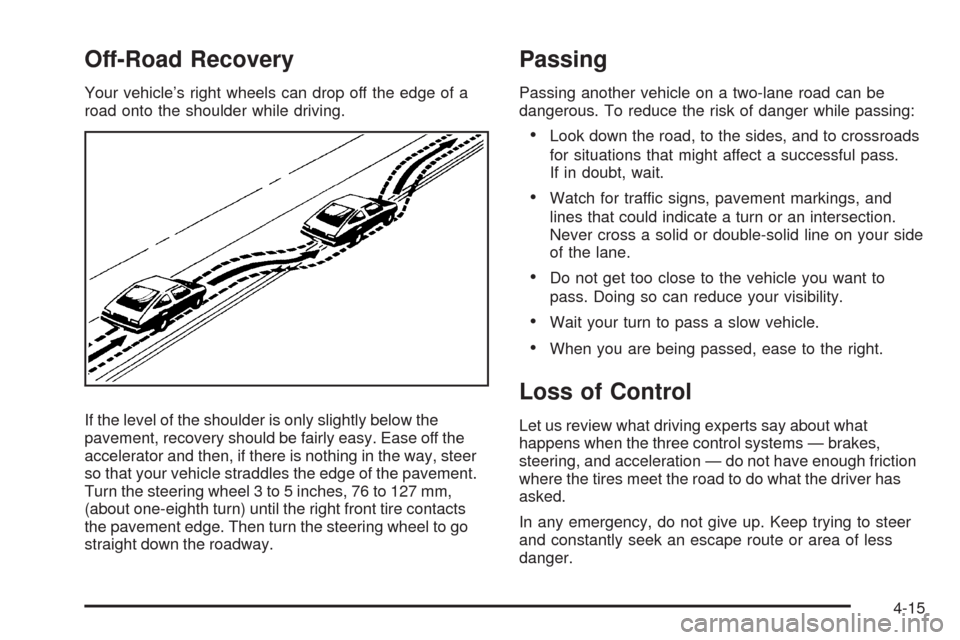
Your vehicle’s right wheels can drop off the edge of a
road onto the shoulder while driving.
If the level of the shoulder is only slightly below the
pavement, recovery should be fairly easy. Ease off the
accelerator and then, if there is nothing in the way, steer
so that your vehicle straddles the edge of the pavement.
Turn the steering wheel 3 to 5 inches, 76 to 127 mm,
(about one-eighth turn) until the right front tire contacts
the pavement edge. Then turn the steering wheel to go
straight down the roadway.
Passing
Passing another vehicle on a two-lane road can be
dangerous. To reduce the risk of danger while passing:
Look down the road, to the sides, and to crossroads
for situations that might affect a successful pass.
If in doubt, wait.
Watch for traffic signs, pavement markings, and
lines that could indicate a turn or an intersection.
Never cross a solid or double-solid line on your side
of the lane.
Do not get too close to the vehicle you want to
pass. Doing so can reduce your visibility.
Wait your turn to pass a slow vehicle.
When you are being passed, ease to the right.
Loss of Control
Let us review what driving experts say about what
happens when the three control systems — brakes,
steering, and acceleration — do not have enough friction
where the tires meet the road to do what the driver has
asked.
In any emergency, do not give up. Keep trying to steer
and constantly seek an escape route or area of less
danger.
4-15
Page 306 of 514

Driving in Rain and on Wet Roads
Rain and wet roads can reduce vehicle traction and
affect your ability to stop and accelerate. Always drive
slower in these types of driving conditions and avoid
driving through large puddles and deep-standing or
owing water.
{CAUTION:
Wet brakes can cause crashes. They might not
work as well in a quick stop and could cause
pulling to one side. You could lose control of
the vehicle.
After driving through a large puddle of water or a
car/vehicle wash, lightly apply the brake pedal until
the brakes work normally.
Flowing or rushing water creates strong forces.
Driving through owing water could cause your
vehicle to be carried away. If this happens, you
and other vehicle occupants could drown. Do not
ignore police warnings and be very cautious about
trying to drive through owing water.
Hydroplaning
Hydroplaning is dangerous. Water can build up under
your vehicle’s tires so they actually ride on the water.
This can happen if the road is wet enough and you are
going fast enough. When your vehicle is hydroplaning,
it has little or no contact with the road.
There is no hard and fast rule about hydroplaning.
The best advice is to slow down when the road is wet.
Other Rainy Weather Tips
Besides slowing down, other wet weather driving tips
include:
Allow extra following distance.
Pass with caution.
Keep windshield wiping equipment in good shape.
Keep the windshield washer uid reservoir lled.
Have good tires with proper tread depth. SeeTires
on page 5-54.
Turn off cruise control.
4-18