2009 CADILLAC ESCALADE radio
[x] Cancel search: radioPage 364 of 586
3. For the second row display select the Rear AUX
screen button next to Rear Display 1 and for the
third row display select the Rear AUX screen button
next to Rear Display 2. Each screen works
independently of the other. The second row screen
can watch a DVD while the third row screen can
use the auxiliary device.
The rear seat passengers can also use the remote
control to change the functions of the RSE. SeeRear
Seat Entertainment (RSE) System (Overhead) on
page 3-85orRear Seat Entertainment (RSE) System
(Headrest DVD) on page 3-95for more information.
Voice Recognition
The navigation system’s voice recognition allows for
hands-free operation of the navigation system,
audio system, and OnStar
®features. The DVD map
disc must be installed in the navigation system for voice
recognition to work. See “Installing the DVD Map
Disc” underMaps on page 4-14for more information.
Voice recognition can be used when the ignition is on or
when Retained Accessory Power (RAP) is active. See
“Retained Accessory Power (RAP)” in the Index of
your vehicle’s owner manual for more information.To use voice recognition, do the following:
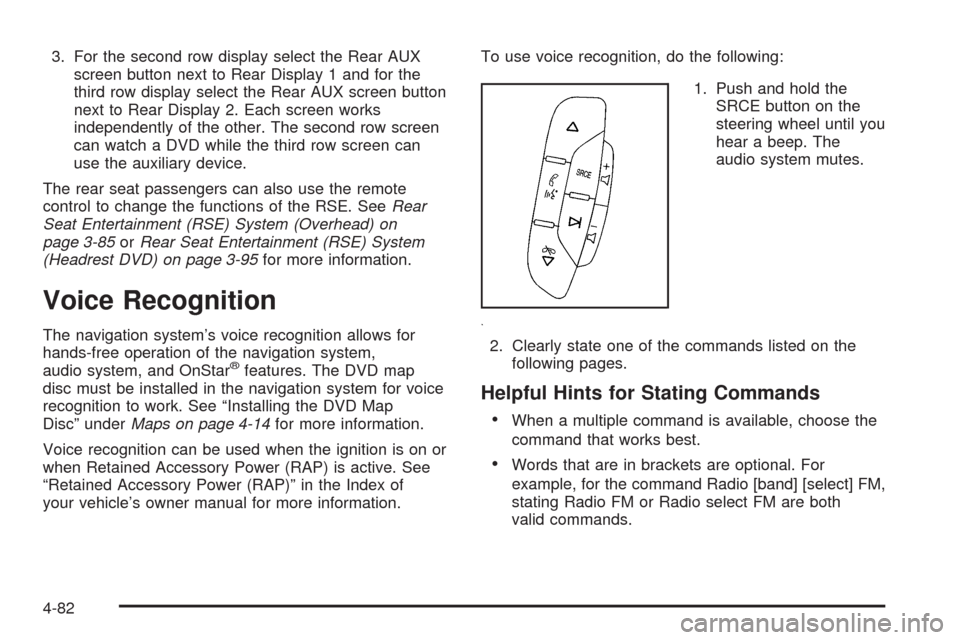
1. Push and hold the
SRCE button on the
steering wheel until you
hear a beep. The
audio system mutes.
2. Clearly state one of the commands listed on the
following pages.
Helpful Hints for Stating Commands
When a multiple command is available, choose the
command that works best.
Words that are in brackets are optional. For
example, for the command Radio [band] [select] FM,
stating Radio FM or Radio select FM are both
valid commands.
4-82
Page 366 of 586

Storing Voice Tags
From the address book entry information page, press
the Add Voice tag screen button. The system responds
“Name Please?” and you will have four seconds to
record a name. The system asks for conrmation of the
name before saving it as a voice tag.
Navigation Help
Navigation Help:This command instructs the system
to assist with navigation commands.
Display Commands
Use the following display commands to set the
display mode.
Display [set] day [mode]:Sets the display to
daytime mode.
Display [set] night [mode]:Sets the display to
night mode.
Display [set] auto [mode]:Sets the display to
automatic mode. The system changes between
day and night mode automatically.
System help:Instructs the system to assist with
display commands.
Radio Commands
The following are radio commands that can be accessed
by clearly stating the commands exactly as they are
written.
Radio [band] [select] AM, radio [band] [select] FM,
radio [band] [select] XM, radio [band] [select]
satellite:Instructs the system to go to either the AM,
FM, or XM (if equipped).
Radio [select] (frequency) AM, radio [select]
(frequency) FM:Instructs the system to go to a specic
frequency on either AM or FM.
Radio [select] (channel) XM, radio [select] (channel)
satellite:Instructs the system to go to a specic
channel on the XM™ band (if equipped).
Radio help:Instructs the system to assist with radio
commands.
4-84
Page 465 of 586

Notice:If you leave the radio or other accessories
on during the jump starting procedure, they could be
damaged. The repairs would not be covered by the
warranty. Always turn off the radio and other
accessories when jump starting the vehicle.
3. Turn off the ignition on both vehicles. Unplug
unnecessary accessories plugged into the cigarette
lighter or the accessory power outlets. Turn off
the radio and all the lamps that are not needed. This
avoids sparks and helps save both batteries. And
it could save the radio!
4. Open the hood on the other vehicle and locate the
positive (+) and negative (−) terminal locations on
that vehicle.
Your vehicle has a remote positive (+) jump starting
terminal and a remote negative (−) jump starting
terminal. You should always use these remote
terminals instead of the terminals on the battery.
If the vehicle has a remote positive (+) terminal, it is
located under a red plastic cover at the positive
battery post. To uncover the remote positive (+)
terminal, open the red plastic cover.The remote negative (-) terminal is a stud located
on the right front of the engine, where the negative
battery cable attaches.
SeeEngine Compartment Overview on page 6-14for
more information on the location of the remote
positive (+) and remote negative (-) terminals.
6-41
Page 487 of 586

High-Speed Operation
{CAUTION:
Driving at high speeds, 100 mph (160 km/h) or
higher, puts an additional strain on tires. Sustained
high-speed driving causes excessive heat build up
and can cause sudden tire failure. You could have
a crash and you or others could be killed. Some
high-speed rated tires require ination pressure
adjustment for high speed operation. When speed
limits and road conditions are such that a vehicle
can be driven at high speeds, make sure the tires
are rated for high speed operation, in excellent
condition, and set to the correct cold tire ination
pressure for the vehicle load.
If your vehicle has P265/65R18 or P285/45R22
size tires and you will be driving at high speeds, speeds
of 100 mph (160 km/h) or higher, set the cold ination
pressure to 3 psi (20 kPa) above the recommended tire
pressure shown on the Tire and Loading Information
Label. When you end this high-speed driving, return the
tires to the cold ination pressure shown on the Tire and
Loading Information label. SeeLoading the Vehicle on
page 5-32andInflation - Tire Pressure on page 6-61.
Tire Pressure Monitor System
The Tire Pressure Monitor System (TPMS) uses radio
and sensor technology to check tire pressure levels.
The TPMS sensors monitor the air pressure in
your vehicle’s tires and transmit tire pressure readings
to a receiver located in the vehicle.
Each tire, including the spare (if provided), should be
checked monthly when cold and inated to the ination
pressure recommended by the vehicle manufacturer
on the vehicle placard or tire ination pressure label.
(If your vehicle has tires of a different size than the
size indicated on the vehicle placard or tire ination
pressure label, you should determine the proper
tire ination pressure for those tires.)
As an added safety feature, your vehicle has been
equipped with a tire pressure monitoring system (TPMS)
that illuminates a low tire pressure telltale when one
or more of your tires is signicantly under-inated.
Accordingly, when the low tire pressure telltale
illuminates, you should stop and check your tires as
soon as possible, and inate them to the proper
pressure. Driving on a signicantly under-inated tire
causes the tire to overheat and can lead to tire failure.
Under-ination also reduces fuel efficiency and tire
tread life, and may affect the vehicle’s handling
and stopping ability.
6-63
Page 488 of 586

Please note that the TPMS is not a substitute for proper
tire maintenance, and it is the driver’s responsibility to
maintain correct tire pressure, even if under-ination has
not reached the level to trigger illumination of the
TPMS low tire pressure telltale.
Your vehicle has also been equipped with a TPMS
malfunction indicator to indicate when the system is
not operating properly. The TPMS malfunction indicator
is combined with the low tire pressure telltale. When
the system detects a malfunction, the telltale will ash
for approximately one minute and then remain
continuously illuminated. This sequence will continue
upon subsequent vehicle start-ups as long as the
malfunction exists.
When the malfunction indicator is illuminated, the
system may not be able to detect or signal low tire
pressure as intended. TPMS malfunctions may occur
for a variety of reasons, including the installation
of replacement or alternate tires or wheels on the vehicle
that prevent the TPMS from functioning properly.
Always check the TPMS malfunction telltale after
replacing one or more tires or wheels on your vehicle
to ensure that the replacement or alternate tires
and wheels allow the TPMS to continue to function
properly.
SeeTire Pressure Monitor Operation on page 6-65for
additional information.Federal Communications Commission
(FCC) and Industry and Science
Canada
The Tire Pressure Monitor System (TPMS) operates on
a radio frequency and complies with Part 15 of the
FCC Rules. Operation is subject to the following
two conditions:
1. This device may not cause harmful interference.
2. This device must accept any interference received,
including interference that may cause undesired
operation.
The TPMS operates on a radio frequency and complies
with RSS-210 of Industry and Science Canada.
Operation is subject to the following two conditions:
1. This device may not cause interference.
2. This device must accept any interference received,
including interference that may cause undesired
operation of the device.
Changes or modications to this system by other than
an authorized service facility could void authorization to
use this equipment.
6-64
Page 490 of 586

TPMS Malfunction Light and Message
The TPMS will not function properly if one or more of the
TPMS sensors are missing or inoperable. When the
system detects a malfunction, the low tire warning light
ashes for about one minute and then stays on for
the remainder of the ignition cycle. A DIC warning
message is also displayed. The low tire warning light
and DIC warning message come on at each ignition
cycle until the problem is corrected. Some of the
conditions that can cause the malfunction light and
DIC message to come on are:
One of the road tires has been replaced with the
spare tire. The spare tire does not have a TPMS
sensor. The TPMS malfunction light and DIC
message should go off once you re-install the road
tire containing the TPMS sensor.
The TPMS sensor matching process was started
but not completed or not completed successfully
after rotating the vehicle’s tires. The DIC message
and TPMS malfunction light should go off once
the TPMS sensor matching process is performed
successfully. See “TPMS Sensor Matching Process”
later in this section.
One or more TPMS sensors are missing or
damaged. The DIC message and the TPMS
malfunction light should go off when the TPMS
sensors are installed and the sensor matching
process is performed successfully. See your
dealer/retailer for service.
Replacement tires or wheels do not match your
vehicle’s original equipment tires or wheels.
Tires and wheels other than those recommended
for your vehicle could prevent the TPMS from
functioning properly. SeeBuying New Tires on
page 6-70.
Operating electronic devices or being near facilities
using radio wave frequencies similar to the TPMS
could cause the TPMS sensors to malfunction.
If the TPMS is not functioning it cannot detect or signal
a low tire condition. See your dealer/retailer for
service if the TPMS malfunction light and DIC message
comes on and stays on.
6-66
Page 527 of 586

Windshield Wiper Fuses
The windshield wiper motor is protected by a circuit
breaker and a fuse. If the motor overheats due to heavy
snow, etc., the wiper will stop until the motor cools. If
the overload is caused by some electrical problem, have
it xed.
Power Windows and Other Power
Options
Circuit breakers protect the power windows and other
power accessories. If the current load is too heavy,
the circuit breaker opens and then closes after a cool
down period, protecting the circuit until the problem
is xed or goes away.
Fuses and Circuit Breakers
If the vehicle is a Two-mode Hybrid, see the
Two-mode Hybrid manual for more information.
The wiring circuits in the vehicle are protected from
short circuits by a combination of fuses, circuit breakers
and fusible thermal links. This greatly reduces the
chance of res caused by electrical problems.Look at the silver-colored band inside the fuse. If the
band is broken or melted, replace the fuse. Be sure you
replace a bad fuse with a new one of the identical
size and rating.
If you ever have a problem on the road and don’t have
a spare fuse, you can borrow one that has the same
amperage. Just pick some feature of your vehicle
that you can get along without – like the radio or
cigarette lighter – and use its fuse, if it is the correct
amperage. Replace it as soon as you can.
Instrument Panel Fuse Block
The instrument panel fuse
block access door is
located on the driver side
edge of the instrument
panel.
Pull off the cover to access the fuse block.
6-103
Page 555 of 586

Customer Assistance and Information...............8-2
Customer Satisfaction Procedure......................8-2
Online Owner Center......................................8-4
Customer Assistance for Text
Telephone (TTY) Users................................8-5
Customer Assistance Offices............................8-5
GM Mobility Reimbursement Program................8-6
Roadside Service...........................................8-7
Scheduling Service Appointments.....................8-9
Courtesy Transportation.................................8-10
Collision Damage Repair................................8-11Reporting Safety Defects................................8-14
Reporting Safety Defects to the
United States Government..........................8-14
Reporting Safety Defects to the
Canadian Government................................8-15
Reporting Safety Defects to General Motors........8-15
Service Publications Ordering Information.........8-15
Vehicle Data Recording and Privacy................8-17
Event Data Recorders...................................8-17
OnStar
®......................................................8-18
Navigation System........................................8-18
Radio Frequency Identication (RFID)..............8-18
Section 8 Customer Assistance Information
8-1