2009 CADILLAC ESCALADE radio
[x] Cancel search: radioPage 279 of 586

PROG (Program):Press this button to go to the next
preset radio station or channel set on the main
radio. This function is inactive, with some radios, if the
front seat passengers are listening to the radio.
When a CD or DVD audio disc is playing, press this
button to go to the beginning of the CD or DVD audio.
This function is inactive, with some radios, if the
front seat passengers are listening to the disc.
When a disc is playing in the CD or DVD changer,
press this button to select the next disc, if multiple discs
are loaded. This function is inactive, with some radios,
if the front seat passengers are listening to the disc.
When a DVD video menu is being displayed, press the
PROG button to perform the menu function, enter.
Theft-Deterrent Feature
THEFTLOCK®is designed to discourage theft of the
vehicle’s radio by learning a portion of the Vehicle
Identication Number (VIN). The radio does not operate
if it is stolen or moved to a different vehicle.
Audio Steering Wheel Controls
Vehicles with audio
steering wheel controls
could differ depending
on the vehicle’s options.
Some audio controls
can be adjusted at the
steering wheel.
w(Next):Press to go to the next radio station stored
as a favorite, or the next track if a CD/DVD is playing.
xc(Previous/End):Press to go to the previous
radio station stored as a favorite, the next track if
a CD/DVD is playing, to reject an incoming call, or end
a current call.
bg(Mute/Push to Talk):Press to silence the vehicle
speakers only. Press again to turn the sound on.
For vehicles with OnStar
®or Bluetooth®systems press
and hold
bgfor longer than two seconds to interact
with those systems. SeeOnStar®System on page 2-52
andBluetooth®on page 3-73for more information.
3-113
Page 280 of 586

SRCE (Source/Voice Recognition):Press to switch
between the radio (AM, FM, XM), CD, and for vehicles
with, DVD, and rear auxiliary.
Press and hold this button for longer than one second
to initiate voice recognition. SeeVoice Recognition
on page 4-82for more information.
+
e−e(Volume): Press to increase or to decrease
the radio volume.
¨(Seek):Press to go to the next radio station while in
AM, FM, or XM™. Press
¨to go to the next track or
chapter while sourced to the CD or DVD slot. Press the
¨if multiple discs are loaded to go to the next disc while
sourced to a CD player.
Radio Reception
Frequency interference and static can occur during
normal radio reception if items such as cell phone
chargers, vehicle convenience accessories, and external
electronic devices are plugged into the accessory power
outlet. If there is interference or static, unplug the item
from the accessory power outlet.
AM
The range for most AM stations is greater than for FM,
especially at night. The longer range can cause station
frequencies to interfere with each other. For better radio
reception, most AM radio stations boost the power levels
during the day, and then reduce these levels during the
night. Static can also occur when things like storms and
power lines interfere with radio reception. When this
happens, try reducing the treble on the radio.
FM Stereo
FM signals only reach about 10 to 40 miles
(16 to 65 km). Although the radio has a built-in electronic
circuit that automatically works to reduce interference,
some static can occur, especially around tall buildings or
hills, causing the sound to fade in and out.
XM™ Satellite Radio Service
XM Satellite Radio Service gives digital radio reception
from coast-to-coast in the 48 contiguous United States,
and in Canada. Just as with FM, tall buildings or hills can
interfere with satellite radio signals, causing the sound to
fade in and out. In addition, traveling or standing under
heavy foliage, bridges, garages, or tunnels may cause
loss of the XM signal for a period of time.
3-114
Page 281 of 586

Cellular Phone Usage
Cellular phone usage may cause interference with the
vehicle’s radio. This interference may occur when
making or receiving phone calls, charging the phone’s
battery, or simply having the phone on. This interference
causes an increased level of static while listening to
the radio. If static is received while listening to the radio,
unplug the cellular phone and turn it off.
Rear Side Window Antenna
The AM-FM antenna is located in the passenger rear
side windows. Make sure the inside surfaces of the rear
side windows are not scratched and that the lines on
the glass are not damaged. If the inside surfaces
are damaged, they could interfere with radio reception.
If a cellular telephone antenna needs to be attached
to the glass, make sure that the grid lines for the AM-FM
antenna are not damaged. There is enough space
between the grid lines to attach a cellular telephone
antenna without interfering with radio reception.Notice:Using a razor blade or sharp object to clear
the inside of the rear side windows may affect
radio reception or damage the rear side window
antenna. Repairs would not be covered by the
warranty. Do not clear the inside of the rear side
windows with sharp objects.
Notice:Do not apply aftermarket glass tinting with
metallic lm. The metallic lm in some tinting
materials will interfere with or distort the incoming
radio reception. Any damage caused to the antenna
due to metallic tinting materials will not be covered
by the warranty.
XM™ Satellite Radio Antenna
System
The XM Satellite Radio antenna is located on the roof of
the vehicle. Keep the antenna clear of obstructions for
clear radio reception.
If the vehicle has a sunroof, the performance of the
XM system may be affected if the sunroof is open.
3-115
Page 285 of 586
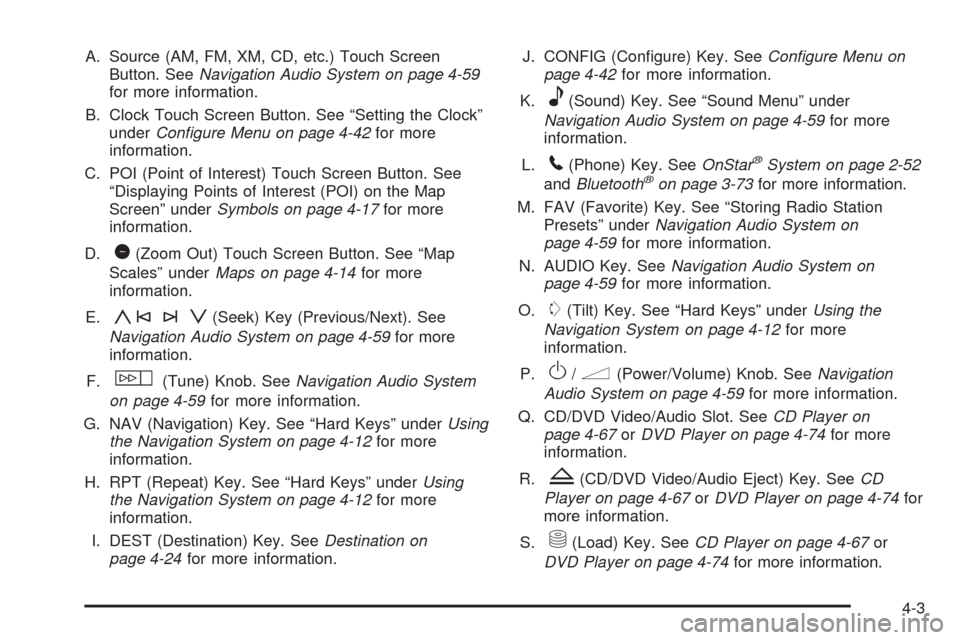
A. Source (AM, FM, XM, CD, etc.) Touch Screen
Button. SeeNavigation Audio System on page 4-59
for more information.
B. Clock Touch Screen Button. See “Setting the Clock”
underConfigure Menu on page 4-42for more
information.
C. POI (Point of Interest) Touch Screen Button. See
“Displaying Points of Interest (POI) on the Map
Screen” underSymbols on page 4-17for more
information.
D.
1(Zoom Out) Touch Screen Button. See “Map
Scales” underMaps on page 4-14for more
information.
E.
y©¨z(Seek) Key (Previous/Next). See
Navigation Audio System on page 4-59for more
information.
F.
w(Tune) Knob. SeeNavigation Audio System
on page 4-59for more information.
G. NAV (Navigation) Key. See “Hard Keys” underUsing
the Navigation System on page 4-12for more
information.
H. RPT (Repeat) Key. See “Hard Keys” underUsing
the Navigation System on page 4-12for more
information.
I. DEST (Destination) Key. SeeDestination on
page 4-24for more information.J. CONFIG (Congure) Key. SeeConfigure Menu on
page 4-42for more information.
K.
e(Sound) Key. See “Sound Menu” under
Navigation Audio System on page 4-59for more
information.
L.
5(Phone) Key. SeeOnStar®System on page 2-52
andBluetooth®on page 3-73for more information.
M. FAV (Favorite) Key. See “Storing Radio Station
Presets” underNavigation Audio System on
page 4-59for more information.
N. AUDIO Key. SeeNavigation Audio System on
page 4-59for more information.
O.
m(Tilt) Key. See “Hard Keys” underUsing the
Navigation System on page 4-12for more
information.
P.
O/n(Power/Volume) Knob. SeeNavigation
Audio System on page 4-59for more information.
Q. CD/DVD Video/Audio Slot. SeeCD Player on
page 4-67orDVD Player on page 4-74for more
information.
R.
Z(CD/DVD Video/Audio Eject) Key. SeeCD
Player on page 4-67orDVD Player on page 4-74for
more information.
S.
M(Load) Key. SeeCD Player on page 4-67or
DVD Player on page 4-74for more information.
4-3
Page 289 of 586

Language — English/Metric
To change the language of the navigation screens, see
Driver Information Center (DIC) on page 3-46for
more information.
To change the navigation screens from English or
metric, seeDIC Operation and Displays on page 3-46
for more information.
Deleting Personal Information
This navigation system can record and store personal
information such as names and addresses. Delete
this information when selling your vehicle or returning a
leased vehicle. See “Edit Address Book — Edit/View”
underConfigure Menu on page 4-42for deleting
information from the address book.
Limit Features While Driving
The navigation system may have this feature.
Touch the Limit Features While Driving screen button to
turn the ability to limit functions on and off while
driving. When this screen button is highlighted, the
following functions are limited while driving:
Music Navigator Scrolling
Radio Category Scrolling
Navigation Menu Scrolling and some functionsSee “Category” underNavigation Audio System on
page 4-59for more information. See “From Map” under
Destination on page 4-24for more information.
Some functions will remain limited regardless of the
setting.
Storing Radio Station Presets
To set preset radio stations, do the following:
1. Press
Oto turn the system on.
2. Press the AUDIO hard key and select the desired
band (AM, FM, or XM (if equipped)).
3. Use the
w(tuning) knob or the SEEK arrows to
tune to the desired station.
4. Press and hold one of the ve preset screen
buttons, at the bottom of the screen, until a beep is
heard or if the station displays on the selected
preset button.
5. Repeat the steps for each preset.
See “Storing Radio Station Presets” underNavigation
Audio System on page 4-59for more information.
4-7
Page 290 of 586

Setting the Clock
The navigation system time and the analog clock
operate independently. Changing the time through the
navigation system does not change the time on the
analog clock. SeeAnalog Clock on page 3-24to change
the analog clock time.
To set the time for the navigation system:
1. Press the CONFIG key to enter the congure menu
options, then press the CONFIG key repeatedly
until the time is selected or touch the time screen
button.
2. Press the Hours and Minutes−(minus) and +
(plus) signs to decrease or to increase the time.
See “Setting the Clock” underConfigure Menu on
page 4-42for more information.
Entering an Address and Point of
Interest, and Storing Preset
Destinations
Entering an Address
Enter a destination by inputting the city name rst:
1. If the radio is already on with a map disc inserted,
skip to Step 5.
2. Press
Oto turn the system on.
3. Insert the DVD map disc. See “Installing the Map
DVD” underMaps on page 4-14for more
information.
4. A caution may appear. Touch the OK screen button
to proceed.
5. Press the DEST hard key.
6. Press the
2Address Entry screen button.
7. Select the state/province screen button, if needed,
to change the current state or province. A list of all
of the available states and provinces appear.
Select the state or province.
8. Once a state or province has been selected the City
name category is automatically selected for entry.
If ve or less names are available, a list displays.
If more than ve are available, the List screen button
displays a number. This number represents the
number of available cities. Select this button to view
the list and select a city.
4-8
Page 291 of 586

9. Once a city has been selected the Street name
category is automatically selected for entry.
If ve or less streets are available for the selected
city, the system displays the list of streets. If
more than ve streets are available the system
displays the alpha keyboard. Start entering
the street name. If ve or less names are available,
a list displays. If more than ve are available, the
List screen button displays a number. This
button represents the number of available streets.
Select this button to view the list and select a street.
10. Once a street has been selected, select the
House # screen button to enter the house number.
The system displays the house number range
that is available for the street.
11. Select the Go screen button. A map screen, with
the destination marked appears.
12. Select the route preference (Fastest, Shortest,
or Other). The system calculates and highlights
the route.
13. Select the Start Guidance screen button. You are
now ready to start your route.
See “Address Entry ” underDestination on page 4-24
for more information.Entering a Point of Interest (POI)
To set a destination by entering a Point of Interest (POI),
do the following:
1. If the radio is already on with a map disc inserted,
skip to Step 5.
2. Press
Oto turn the system on.
3. Insert the DVD map disc. See “Installing the Map
DVD” underMaps on page 4-14for more
information.
4. A caution may appear. Touch the OK screen button
to proceed.
5. Press the DEST hard key.
6. Press the
iPoint of Interest screen button.
7. Select the state/province screen button, if needed,
to change the current state or province. A list of all
of the available states and provinces appear.
Select the state or province.
8. Enter the specic title of the POI in the POI name
space (e.g. Washington Monument).
If ve or less names are available, a list displays.
If more than ve are available, the List screen button
displays a number. This button represents the
number of available POIs. Select this button to view
the list.
4-9
Page 292 of 586

9. Select the Go screen button next to the POI. A map
screen, with the destination marked appears.
10. Select the route preference (Fastest, Shortest,
or Other). The system calculates and highlights
the route.
11. Select the Start Guidance screen button. The route
is now ready to be started.
See “Point of Interest (POI)” underDestination on
page 4-24for more information.
Storing Preset Destinations
1. If the radio is already on with a map disc inserted,
skip to Step 5.
2. Press
Oto turn the system on.
3. Insert the DVD map disc. See “Installing the Map
DVD” underMaps on page 4-14for more
information.
4. A caution may appear. Touch the OK screen button
to proceed.
5. Press the DEST hard key.
Enter a destination. SeeDestination on page 4-24
for more information on how to enter a destination.6. Press the DEST hard key, the Route screen
displays. Press the Final Destination or Stopover
screen button. The information screen displays
for that location. Press the Add to Address Book
screen button. The address book screen appears.
7. Select the Name screen button. An alpha-keyboard
displays. Enter the name. Select the Back screen
button.
8. Press and hold one of the screen buttons at the
bottom of the screen until the name appears in
the screen button on the display.
The name appears in that preset destination screen
button and is now available to select from the
Destination Entry screen. See “Using Your Stored
Preset Destinations” next in this section to select
it as a destination.
See “Adding or Changing Preset Destinations”
underDestination on page 4-24for more information
on how to add preset destinations.
4-10