2009 AUDI TT COUPE fuel
[x] Cancel search: fuelPage 27 of 316

In order to connect the special diagnostic equipment, push the plug
into the Data Link Connector (DLC). The DLC is located to the right of
the hood release =>
page 24, fig. 10.
Your authorized Audi dealer or a qualified service station can inter
pret the code and perform the necessary repair. •
Malfunction Indicator Lamp (MIL)
The Malfunction Indicator Lamp (MIU in the instrument cluster
=>
page 15, fig. 5 is part of the On -Board Diagnostic (OBD II) system.
The warning/indicator light illuminates when the ignition is
switched on and goes out after the engine starts and the idle has
stabilized. This indicates that the MIL is working properly.
If the light does not go out after the engine is started, or illuminates
while you are driving, a malfunction may exist in the engine system.
If the light starts flashing, the catalytic converter could be damaged .
Continue driving
with reduced power (avoiding sustained high
speeds and/or rapid accelerations) and have the condition
corrected. Contact your authorized Audi dealer .
If the light illuminates, the electronic speed limiter may also be
malfunctioning . For more information=>
page 25, "Electronic speed
limiter".
An improperly closed fuel filler cap may also cause the MIL light to
illuminate =>
page 213. •
Electronic speed limiter
Your vehicle may be factory equipped with tires that are rated for a
maximum speed of 130 mph (210 km/h). This is less than the
maximum speed of your vehicle . To reduce the risk of sudden tire
failure and loss of control if the vehicle is operated at excessive
speeds, your vehicle also has an electronic speed limiter. The elec-
Controls and equip
ment
Driver information system
tronic speed limiter prevents your vehicle from going faster than the
tire speed rating. For more information =>
page 246.
If the engine control unit receives faulty vehicle road speed signals,
the Malfunction Indicator Light (MIU•"" will illuminate. If this
occurs, contact the nearest authorized Audi dealer for assistance.
& WARNING
Always observe the posted speed limits and adjust your speed to
suit prevailing road, traffic and weather conditions. Never drive
your vehicle faster than the maximum speed rating of the tires installed. •
Trip computer
Introduction
The trip computer gives you information on current and
average fuel mileage, average speed, fuel range and
driving time.
Fig . 11 Trip computer
1
You can switch between the trip computer 1 and 2 by pressing the
! Reset! button®=>
page 26, fig. 12. .,,_
I • •
Page 28 of 316

Driver inf ormation sy ste m
You can tell which memory level is currently active by the number in
the display =>
page 25, fig. 11. The data from the single -trip memory
(memory level 1 l is being displayed if a
1 appears in the disp lay. If a
2 is shown, then the data from the total -trip memory is being
displayed (memory leve l 2l.
S in gle-trip m emor y (Trip c ompu ter 1 )
The single-trip memory stores the trip information from the time the
ignition is turned on until it is turned off . If the trip is con tinued
w ithi n 2 hour s from the time the ignition was turned off, the new
data will be included in the calculation of the current trip informa
tion. If the trip is interrupted for
more than 2 ho ur s the memory is
reset automatica lly.
T ot al-tr ip m em ory ( Trip co mpu te r 2)
Unlike the single -trip memory, the total -trip memory is no t reset
automatically . This permits you to evaluate your driving data for the
entire period between manua l resets.
F u el ra nge
The estimated cruising range in miles (km) appears in the display.
The display changes in increments of 6 miles (10 km) .
Avera ge fuel mil eage
The average fuel economy in MPG 0/100 km) since you last cleared
the memory appears in this display.
C ur rent f uel mileage
The instantaneous fuel consumption in mi les per ga llon (1/100 km)
is shown in this display. When the vehicle is stationary, the most
recent fuel consumption is displayed.
A ve ra g e sp eed
The average speed in mph (km/h) s ince the last time the display was
reset appears in the display.
El ap se d tim e
The length of time that you have been driving since you last rese t
the memory appears in this disp lay. The maximum time period that
can be recorded i s 999 hours and 59 minutes .
Distance
The elapsed distance since the last t ime the memory was cleared
appears in the display . The maximum distance that can be recorded
is 9,999 .9 mi les (9,999.9 kilometers).
[ i ] Tips
All stored values will be lost if the vehicle battery is disconnected .•
Op eration
The trip computer is controlled by two switches on the
windshield wiper lever.
Sel ecting th e trip comput er
Fig . 12 Wip er
a rm /w ip er leve r:
co ntrols fo r the t rip
co mput er
Tap the [Reset) button @ unt il the trip computer
(memory level 1 or 2) appears in the display =:>
page 25,
fig.11. _.
Page 29 of 316

Sele cting the fun ctions
- Push in the uppe r (lower) protrusion on the function
se lector switch
@ =>page 26, fig. 12. The functions for
the trip compu ter are d isp layed in succession on the
respective memory levels.
R ese ttin g the function to z ero
- Push the [Reset ] button ® for at least two seconds .
You can reset the fo llowing values to zero using the [R eset] button:
• driving time
• distance
• average fuel mileage
• average speed
The trip computer only opera tes when the ignition is on . When you
turn on the ignit ion, the function that was in use when you last
turned the ignition off will be displayed.
[ i ] T ip s
• You can also set the va lues for the functions to zero in the menu
display (R es et) ~
page 27 .
• All stored values wil l be lost if the vehic le battery is
disconnected .•
Con tro ls and eq uip
ment
Menu display
Introduction Dri
ver in form ati on syst em
Fig . 13 W ip er leve r:
Co ntrols for the men u
di sp la y
Fig . 14 Di spl ay: Star t
menu
Some functions in your vehicle can be set, activated, and controlled
by Men us (e.g. Acoustic park assist*) . With these menus you can
also select the informa tion shown in the driver information system ,
which operates only with the ignition switched on . Operation is
controlled by the
I Res et I button and the rocker switch on the wiper
lever~fig .13 . .,_.
Vehicle care
I I Technical data
Page 30 of 316

Driver inf ormation sy ste m
The Sta rt m enu shows you the different disp lay types:
Se t
Check
M enu off
Each display type in the Start menu contains a submenu with addi
tional options.
S et
Ch eck
Clock ~ page29
Lighting* ~ page 53~ page 55
Computer ~ page29
Acoustic park assist* ~ page95
Speed alarm (speed ~ page 37
warning)
Language (6 languages)
~ page29
Units (distance, fuel con -~ page29
sumption, temperature)
Wiper (service position)
~ page 62
Window ~ page 49
Doors (Auto-lock) ~ page 41
Service
Chassis number* ~ page23
~ page288
Navigating the menu
Use the rocker switch on the windshield wiper lever and
the[Reset) button to operate the menu and carry out
inquiries and selec tions.
-A
N
"' cc
Fig . 15 Wiper leve r:
Con trols fo r th e m enu
d is pla y
Fig . 16 Disp lay: Start
menu
Engine oil temperature* ___ __, [Reset] button ® an d rock er swit ch @ => fig. 15 functions:
Menu off
Registered keys ~ page 38
All of the messages shown in vehicles without
menu display appear on the display screen. To open the menu
• -Press the [Reset ) button ® unt il the menu display
=> fig. 16 appears
Page 34 of 316

Driver inf orm atio n syst em
Warnings and symbols
Red symbols
A red symbol means DANGER
- Pull of the road a nd stop t he vehicle .
- Turn off the engine.
- Check the malfunctioning system. Contact your autho -
rized Audi dea ler or a qua lified workshop for assistance .
BRAKE
-
USA models:
Malfunction in the brake system => page 33
Ca
nada m odels : => page 33
Malfunction in the brake system
Engine coolant level too low/
=> page 34
engine coolant temperature too
high
Engine oil pressure too low
=> page 35
When a red symbol appears, a warning tone will sound three times
in succession. The symbol continues to flash until the malfunction
has been repaired . If there is
more than one malfunction, the
symbols appear one after the other for about two seconds.
[ i ) Tip s
• The message for a malfunction can be shown by pressing on the
left knob.
• During route guidance on vehicles with a navigation system, the
warning symbo l is shown in the field above .•
Yellow symbols
A yellow symbol means WARNING .
Low fuel level => page 35
l!check engine oi l level => page35
-
Engine oil sensor malfunction => page 35
-
IIWorn brake pads => page36
USA model s: => page 36 Speed warning 1
IIC an ada model s:
Speed warning 1 => page36
--
USA mod els: => page 36 Speed warning 2
C anad a m od els: => page 36 Speed warning 2
Dynamic headlight range con -
=> page 36 trol* defective
Winds hield washer fluid level low
=> page36
Battery voltage too high or too => page 36 low
Defective light bulb
=> page 36
U SA mod els: => page 36
Defective brake light
C an ada m od els: => page36
Defective brake light
Page 37 of 316

Engine oil pressure malfunction 9=;r;
The red engine oil pressure warning symbol requires
immediate service or repair.
If the ~ symbol appears in the display and flashes, the oil
pressure is too low. In addition to the symbol, the following
message also appears in the display:
Switch off engine and check oil level
- Pull off the road and stop the vehicle .
- Shut the engine down.
- Check the engine oil level~
page 221.
-Contact your authorized Audi dealer for assistance if
necessary .
Engine oil level too low
If the engine oil level is too low, top off oil to the proper level
=>
page 222.
Engine oil level OK
If the ~ symbol starts flashing again ev en though the engine oil
level checks OK on the dipstick,
do not start driving again and do not
let the engine run at idle .
Instead, contact your authorized Audi
dealer for assistance .
[ i J Tips
• The engine oil pressure symbol ~ is not an indicator for a low
engine oil level. Do not rely on it. Instead, check the oil level in your
engine at regular intervals, preferably each time you refuel, and
always before going on a long trip.
• The yellow oil level warning indication _ requires oil refill or
workshop service without delay. Do not wait until the red oil pres sure warning symbol
~ starts to flash before you respond to the
Controls and equip
ment
Driver information system
low oil level warning = . By then, your engine may already have
suffered serious damage. •
Fuel supply too low Jl
When the L symbol illuminates, this means there are about 2.6
gallons
(10 liters) of fuel left in the fuel tank . Time to refuel!
=>
page 212.
If the symbol lights up , even when there is ample fuel in the tank,
and the text
Tank system malfunction! Please contact workshop
appears in the display, there is a fault in the system. Contact a qual
ified workshop to have the fault rectified. •
Checking the engine oil level .d'" ..
Please add max. 1 qt of engine oil!
If the symbol comes on, add 1 quart (1 liter) of oil at the next
opportunity=>
page 222. •
Checking the engine oil level -1.
When the _ symbol illuminates, check the engine oil level as soon
as possible =>
page 221. Top off the oil at your earliest opportunity
=>
page 222. •
Engine oil sensor defective • ...
If the symbol illuminates, contact your authorized Audi dealer
and have the oil sensor inspected. •
I • •
Page 81 of 316

-Pull the cover© out of the brackets 0 => fig. 69 in the
direction of the arrow.
Replacing the luggage compartment cover
-Push the cover up into the brackets 0-
- Press the buttons G) onto the ball heads.
& WARNING
Never store or place heavy objects on the luggage compartment
cover. If you leave something heavy on the cover and then open the
cover, the object could slide forward and injure anyone sitting in
the rear. Also, in the case of sudden braking or a crash, a heavy
object on the cover could fly forward and injure any passengers. •
Roof rack
First things first
A roof rack can be fitted to carry additional luggage on
the roof.
-Always read and follow the instructions provided by the
roof rack manufacturer when the roof rack system must
be installed.
If you are transporting luggage or other objects on the roof, please
note the following:
• Your vehicle has specially designed aerodynamic roof rails . Only
install a roof rack specifically designed for your model. Contact the
nearest Audi dealer for information on approved modular roof racks
for your vehicle.
• These approved roof racks are the basis for a complete roof rack
system. Additional attachments for the basic roof rack are neces-
Controls and equip
ment
Seats and storage
sary to safely transport luggage, bicycles, surf boards, skis or small
boats. All necessary hardware for these systems is available at your
authorized Audi dealer.
• We recommend that you keep the installation instructions for
your roof rack system together with your Owner's literature in the
vehicle.
When should the roof rack be removed?
• Before going through an automatic car wash (it is best to ask the
car wash operator for advice).
• When not in use , to reduce fuel consumption, wind noise and to
guard against theft.
& WARNING
• Use of an unapproved roof rack or incorrect mounting of an
approved roof rack can cause the roof rack or the items attached
to it to fall off the roof onto the road.
• Objects falling from the roof of a vehicle can cause a crash and
personal injury.
• Only mount the system between the markings shown in
~ page 80, fig. 70.
• The roof rack system must be installed exactly according to the
instructions provided.
0 Note
• Your vehicle warranty does not cover any damages to the vehicle
caused by using roof racks or mounting structures not approved by
Audi for your vehicle. The same applies to damage resulting from
incorrect roof rack installation .
• Always check the roof rack mountings and hardware before each
trip and during a trip to make sure everything is securely tightened.
If necessary, retighten the mountings and check the entire system
from time to time . .,,
I • •
Page 83 of 316
<£> For the sake of the environment
Sometimes it may be easier to leave a roof rack installed even
though you are not using it . Due to the increased air resistance your
vehicle wi ll unnecessarily use more fuel. Remove the roo f rack if you
are not going to use it. •
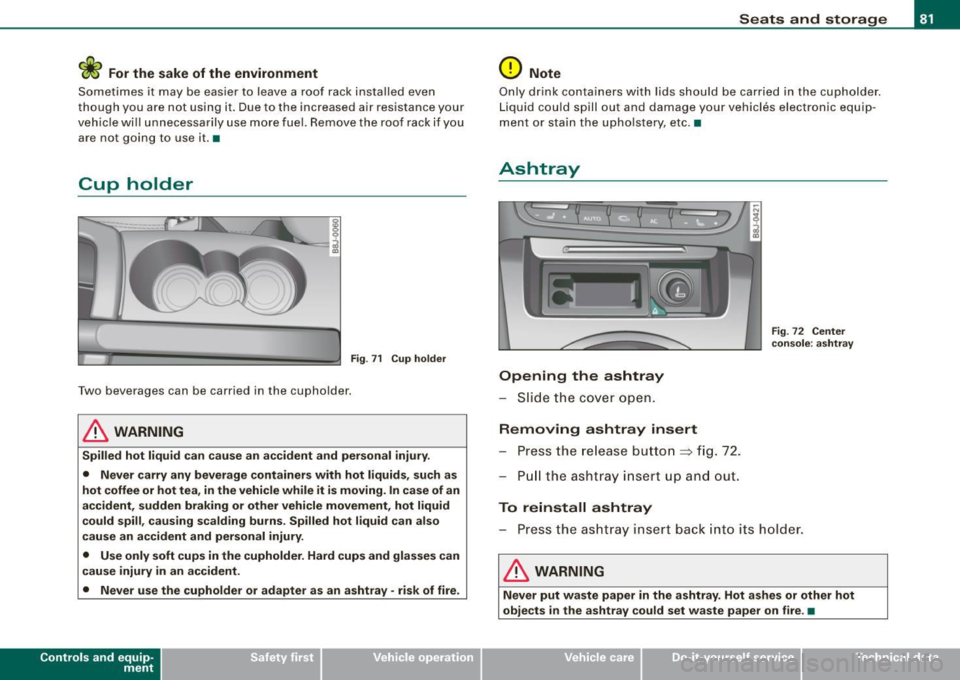
Cup holder
Fig. 71 C up hol der
Two beverages can be carried in the cupholder .
& WARNING
Spilled hot liq uid ca n cause an a ccident and perso nal injury .
• Never carry any beverage container s with hot liquids , such a s
hot coffee or hot tea , in the vehicle while it i s moving . In case of an
accident , sudden braking o r other vehicle movement , hot liquid
c ould spill , cau sing scald ing burns . Spilled hot liquid c an also
c au se an accident and per sonal injury.
• Use only soft cups in the cupholder . Hard cups and gla sses c an
c au se injury in an accident .
• Never use the cupholder or adapter as an ashtray · risk of fire .
Con tro ls and eq uip
ment
Seats and storag e
0 Note
Only drink containers with lids should be carried in the cupholder.
Liquid cou ld spill out and damage your vehicles electronic equip
ment or stain the upho lstery, etc. •
Ashtray
Opening the ashtray
- Slid e the cove r open.
Removing ashtray insert Press the re lease butto n
~ fig. 72.
P ull the ashtra y insert up and out .
To reinstall ashtray
F ig . 72 C enter
co nsole : a sht ray
- Press the ashtray insert back into its holder.
& WARNING
Nev er put w aste paper in the a shtr ay . Hot ashes or other hot
obje cts in the ashtr ay could set w aste paper on fire . •
Vehicle care I I irechnical data