2009 AUDI S6 key
[x] Cancel search: keyPage 173 of 398
![AUDI S6 2009 Owners Manual Audi Parking System -
----------------=----=------
Rear frequency adjustment
- Pressthe (CAR]function button.
- Select
Audi parking system.
- Select Rear frequency when you want to cha](/manual-img/6/57595/w960_57595-172.png "AUDI S6 2009 Owners Manual Audi Parking System -
----------------=----=------
Rear frequency adjustment
- Pressthe (CAR]function button.
- Select
Audi parking system.
- Select Rear frequency when you want to cha")
Audi Parking System -
----------------=----=------'
Rear frequency adjustment
- Pressthe (CAR]function button.
- Select
Audi parking system.
- Select Rear frequency when you want to change the
frequency of the rear audible signal generator.
When adjusting the volume and frequency, the new setting will
sound for approx. 2 seconds from each audible signal generator.
The volume and frequency settings are automatically stored and assigned to the master key with remote control.
& WARNING
• You should always adjust the volume and frequency of the
chimes so that you can easily hear the acoustic distance warning
even if the radio is playing, the air-conditioner blower is on High or
there is a high level of outside noise.
- Check the settings whenever anyone else has driven the
vehicle before you. •
Con tro ls and eq uip
ment
Audi Parking System (rear, with rear
view camera)
A pp lies to veh ic les: w ith Aud i Par king System ( rear) and re ar-view came ra
Acoustic parking system in the rear , with rear
view camera
The acoustic parking system gives an acoustic signal
when detecting obstacles, and the rear -view camera
offers further aid in the parking process.
OOID ;
r--= ===~~=~~;;;;;;;;~, ---;!
l_..:..:-=.: ~f---=====:=~.
Activation
Fig . 174 Rear lid: Loca
tion of the rear-view
camera
-Put the vehicle in reverse gear, the acoust ic parking
system with rear-view camera is activated automatically.
Activation of the acoustic parking system is confirmed by
a brief acknowledgement sound.
Deactivation
- Take the vehicle out of reverse gear. The acoustic park ing
system is immediately deactivated, and the rear -view
camera picture is deactivated automatically after a period of about 15 seconds, or
~
Vehicle care I I irechnical data
Page 182 of 398

• .___A_ u_d_ i _P _a_ r_ k_ i_ n ..:g=-- S_ y=-- s_t _ e _m _____________________________________________ _
& WARNING (continued)
• Maintain plenty of distance from an obstacle, so that your
outside mirror or a corner of your vehicle does not collide with any
obstacles - danger of accident!
• The Audi Parking System is not a substitute for being careful
and alert when backing up. Be especially careful during parking
and similar maneuvers. Always watch where you are driving and
make sure that nothing is in the way.
• When maneuvering or parking, do not only use the MMI Display
for orientation. Certain objects -depending on the screen resolu
tion -may not, or not entirely, be displayed ; for example trailer
hitches, chains, narrow posts, or fences . •
Settings in the MMI
App lies to veh ic les: witn Av(li Pi, rk ing System (rear! and rear-view camera
Adjusting the chimes -option 1
The volume and the pitch (frequency) of the chimes can
be adjusted in the MM/.
Fig . 186 MMI Display:
Selection menu
Rear volume adjustment
- Press the [CARI function button. -
Select
Systems * in the CAR menu .
- Select
Audi Parking System .
-Select Rear volume if you want to change the volume of
the chimes from the rear signal generator.
Rear frequency adjustment
- Press the [CAR I function button.
- Select
Systems* in the CAR menu .
- Select
Audi Parking System .
-Select Rear frequency when you want to change the
frequency of the chimes from the rear signal generator.
When adjusting the volume and frequency, the new setting will
sound for about 2 seconds from each audible signal generator . The
volume and frequency settings are automatically stored and assigned to the master key with remote control.
& WARNING
Always make sure that the volume and frequency of the chimes is
adjusted so that you can easily hear the acoustic distance signal
even if the radio is playing, the air-conditioner blower is on High or
there is a high level of outside noise. Check the settings whenever someone else has driven the vehicle before you. •
Page 183 of 398

______________________________________________ A_ u_d_ i _ P_a _ r_ k_ i_n -=g:a.- S_ y=--- s_t _ e _m _ ___._
Ap plies to vehicles: with Audi Par king System (r ear) and rea r-vie w came ra
Adjusting the chimes -option 2
The menu for adjusting signal sounds can also be called
up via the control button with the "settings" function.
Fig. 187 MMI Display:
Rear-view camera
picture
Fig . 188 MMI Display:
Audi Parking System
- Activate the Audi Parking System=> page 171. The rear
view camera picture appears in the MMI Display.
- Select
Settings => fig. 187. The menu for adjusting Rear
volume
and Rear frequency appears in the MMI Display
=>fig,
188.
Select Rear volume if you want to change the volume of
the chimes from the rear signal generator.
Contro ls and eq uip
ment
Select Rear frequency when you want to change the
frequency of the chimes from the rear signal generator.
Select
Settings => fig. 188, or
Press the [RETURN] button . T he rear-v iew camera picture
appears in the MMI Display again.
When adjusting the volume and frequency , the new setting will
sound for about 2 seconds from each audible signal generator. The
volume and frequency settings are automatically stored and
assigned to the master key with remote control.
& WARNING
Always make sure that the volume and frequency of the chimes is
adjusted so that you can easily hear the acoustic distance signal
even if the radio is playing, the air-conditioner blower is on High or
there is a high level of outside noise. Check the settings whenever
someone else has driven the vehicle before you. •
Safety tips
Applies to vehic les: with Audi Par king System {rear) and rea r-v iew came ra
Acoustic parking system error message
If a warning tone is audible for about five seconds when you turn on
the ignition, there is a malfunction in the system. Have the problem
corrected by your authorized Audi dealer.
Keep the sensors in the rear bumper clean and free from ice so that
the acoustic park assist system can function properly.•
Vehicle care I I irechnical data
Page 191 of 398
___________________________________________________ H_ o_m _ e_ L_ i_ n _k_ @_R _ __.11111
Ap plies to vehic les: wit h Hom elin k® un iversal remo te contro l
Programming the Homelink ® transmitter
The transmitter is programmed in two phases. For rolling
code transmitters, a third phase is also necessary.
[i Ii It~
Fig . 192 Overhead
console: HomeLink®
keypad
Fig . 193 Front bumper,
passenger side : loca
tion of transmitter unit
Phase 1: programming the overhead keypad
1. Make sure your vehicle is with in operating range of the
remote controlled garage door opener.
2. Set the parking brake=>
& in "General information " on
page 188 .
3. Turn the ignition on . Do not start the engine!
Con tro ls and eq uip
ment
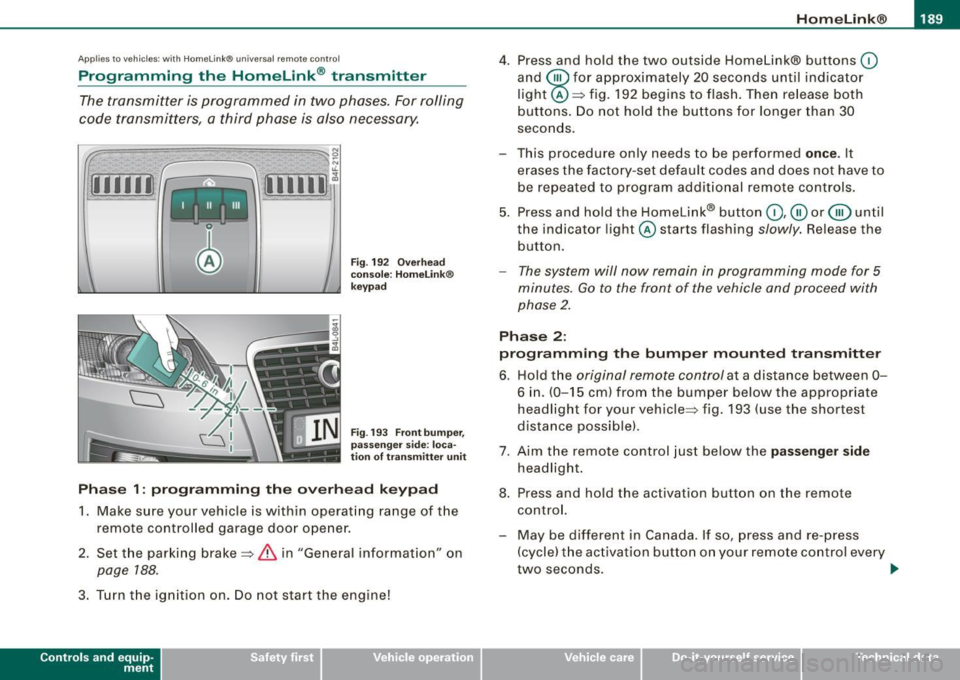
4. Press and hold the two outside Homelink® buttons (0
and @for approximately 20 seconds until indicator
light @=> fig. 192 begins to flash. Then release both
buttons. Do not hold the buttons for longer than 30
seconds.
This procedure only needs to be performed
once. It
erases the factory-set default codes and does not have to be repeated to program additional remote controls.
5. Press and hold the Homelink® button
(0 ,@ or @ until
the indicator l ight @starts flashing
slowly. Release the
button.
- The system will now remain in programming mode for 5
minutes.
Go to the front of the vehicle and proceed with
phase 2.
Phase 2:
programming the bumper mounted transmitter
6. Hold the original remote control at a distance between 0-
6 in. (0-15 cm ) from the bumper below the appropriate
headlight for your vehicle=> fig . 193 (use the shortest
distance possible) .
7. Aim the remote control just below the
passenger side
headlight.
8. Press and hold the activation button on the remote control.
- May be different in Canada. If so, press and re-press (cycle) the activation button on your remote control every
two seconds. .,_
Vehicle care I I irechnical data
Page 192 of 398
• ..__H_ o_m_ e_ L_ i_ n _k_ @_R __________________________________________________ _
9. The emergency flashers will flash three times (after
about 15-60 seconds) when the programming is
successful. Release the button on the remote control.
- To program more devices, repeat steps 4 to 9.
10. Press and hold the trained Homelink® button and
observe the indicator light@=> page 189, fig. 192.
- If the indicator light is solid/continuous, programming is
complete and your device should activate when you press and release the trained Homelink® button.
- If the indicator light blinks rapidly for 2 seconds and is
then a solid/continuous light, proceed with phase 3 to program a rolling code device.
Phase 3: rolling code programming
- A second person on a ladder who can safely reach the
garage door opener motor is recommended.
11. Locate the "learn" button on the garage door opener
motor (refer to the operating instructions for the opener,
as the location of this button may vary by manufacturer).
12. Press and release the learn button on the garage door
opener motor.
- Note: once the button is pressed, there are 30 seconds in
which to initiate the next step.
13. On the Homelink® keypad inside the vehicle, firmly
press and hold the Homelink ® button previously
programmed in phases 1 and 2 for two seconds and
release. Repeat this sequence
twice .
- Some vehicles may require the press/hold/release
sequence up to three times to complete the training
process.
- Homelink® should now activate your rolling code
equipped device.
If the 5 minute time limit is exceeded, the emergency flashers will
flash one time
to indicate that the process has been terminated. In
this case, repeat steps 4 through 9.
If the emergency flashers do not flash
three times (after about 15-
60 seconds), programming was not successful. In this case, repeat
steps 4 through 9 .
Remote control units for garage door openers in Canada are set to
stop transmitting radio frequency signals after two seconds. This
time may not b e sufficient for the Homelink® system to learn the
radio frequency signal. Perform all other steps as described
above. •
Applies to vehicles: with Horne link ® uni versa l remote contro l
Operating the HomeLink ® transmitter
The Homelink® transmitter works in the same manner as
the original handheld remote control that came with the
system.
[iiiil~
I -I II I Ill
Fig. 194 Overhead
console: Homelink®
keypad ...
Page 193 of 398
______________________________________________________ H_o_ m.....: e..:L:.; i __ n ;..k __ ® .:.R __ _
-Press the appropriate programmed button G),@ or @
to activate the desired remote control function~
& in
"General information" on
page 188. •
Applies t o ve hicl es: wit h Hom elin k® universal re mote co nt ro l
Reprogramming a single button
A Homelink ® button can be reprogrammed individually
without affecting the other button a/locations.
Programming the overhead keypad
- Press the appropriate Homelink® button unt il the indi
cator light begins flashing slowly.
Programming the bumper mounted transmitter
1. Hold the original remote control at a distance between 0-
5 in. (0-13 cm) from the bumper below the appropriate
headlight for your vehicle (use the sho rtest distance
possible) .
2. Aim the remote control just below the
passenger side
headlight.
3. Press and hold the activation button on the remote control.
4. The emergency flashers will flash
three times (after
about
15-60 seconds) when the programm ing is
successful. Now release the button on the remote
control.
- If the device ut ilizes a rolling code, please follow phase 3
of ~
page 189, "Programming the Homelink® trans
mitter" for rolling code programming.
Controls and equip
ment This procedure
will cause
the existing programming on the
Homelink ® button to be erased! •
App lies t o ve hicles : with Homeli nk® universa l re m ote contro l
Erasing the programming of the Homelink ®
transmitter
When you erase the programming , the programming on
all three of the transmitter channels with be lost!
- Perform steps 1 to 4 as descr ibed on~ page 189, "Phase
1: programm ing the overhead keypad ".
When completed , the Homelin k® system will be in the program
ming mode and is then ready to learn the cod es for remote
controlled devices.
(I) Tips
• Programmed buttons cannot be erased individually.
• For security reasons you ar e advis ed to erase the programming
of the Homelink ® system befo re you sell your vehicle. •
I • •
Page 211 of 398
& WARNING !continued)
• Never let any person ride with their feet on the instrument
panel or sticking out the window or on the seat.
• Never remove a safety belt while the vehicle is moving. Doing
so will increase your risk of being injured or killed.
• Never wear belts twisted.
• Never wear belts over rigid or breakable objects in or on your
clothing, such as eye glasses, pens, keys, etc. , as these may cause
injury .
• Never allow safety belts to become damaged by being caught
in door or seat hardware.
• Do not wear the shoulder part of the belt under your arm or
otherwise out of position.
• Several layers of heavy clothing may interfere with correct posi
tioning of belts and reduce the overall effectiveness of the system.
• Always keep belt buckles free of anything that may prevent the
buckle from latching securely.
• Never use comfort clips or devices that create slack in the
shoulder belt. However, special clips may be required for the
proper use of some child restraint systems.
• Torn or frayed safety belts can tear , and damaged belt hard
ware can break in an accident . Inspect belts regularly . If webbing,
bindings, buckles, or retractors are damaged, have belts replaced
by an authorized Audi dealer or qualified workshop .
• Safety belts that have been worn and loaded in an accident
must be replaced with the correct replacement safety belt by an
authorized Audi dealer. Replacement may be necessary even if
damage cannot be clearly seen. Anchorages that were loaded
must also be inspected.
• Never remove, modify, disassemble, or try to repair the safety
belts yourself.
Safety first
Safety belts
& WARNING !continued)
• Always keep the belts clean. Dirty belts may not work properly
and can impair the function of the inertia reel
~ page 293, "Safety
belts" .•
Safety belts
Fastening safety belts
Seat first -everybody buckle up!
Fig. 205 Belt buckle
and tongue on the
driver's seat
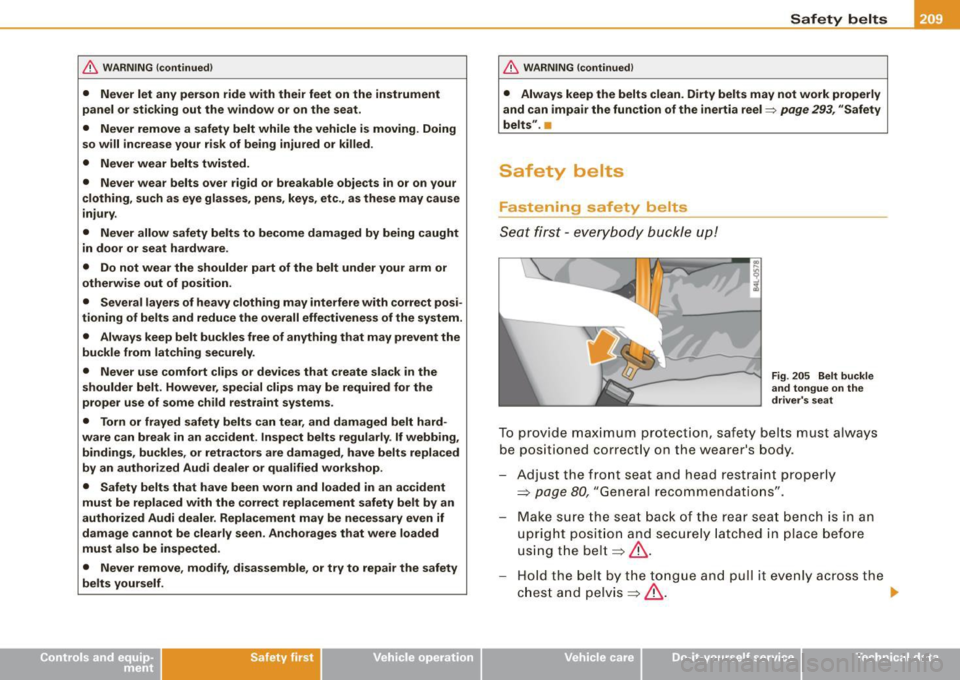
To provide maximum protection, safety belts must always
be positioned correctly on the wearer's body.
Adjust the front seat and head restraint properly
=> page 80, "General recommendations" .
Make sure the seat back of the rear seat bench is in an
upright position and securely latched in place before
using the belt
=> & .
Hold the belt by the tongue and pull it evenly across the
chest and pelvis
=> &. _,.
•
Vehicle care I I irechnical data
Page 212 of 398
___ S_a_ f_ e_ t-= y_ b_e_ l_ t _s _______________________________________________ _
-Insert t he tongue into the correct b uckle of y our seat
unt il you h ea r it la tc h securely~ fig. 205.
Pull on t he belt to make sure that it is securely latched in
the buckle.
Aut om ati c sa fe ty belt re tra cto rs
Eve ry safety be lt is equipped with an automatic belt retractor on the
shoulder belt. This feature locks the belt when the belt is pulled out
fast, during hard braking and in an accident. The belt may a lso lock
when you drive up or down a steep hill or through a sharp curve .
During normal driving the belt lets you move free ly.
Safety belt prete nsi oners
The safety belts are equipped with a be lt pretensioner that he lps to
tighten the sa fety be lt and remove slack when the pretensioner is
activated. The function of the pretensioner is monitored by a
warning light=>
page 18 .
Swit chable locking fe ature
Every safety belt except the one on the driver sea t is equipped with
a switchab le locking feature that
must be used when the safety belt
is used to a ttach a chi ld safe ty sea t. Be sure to read the important
information about this feature=>
page 248.
& WARNING
Improper ly positioned safet y belts can cause seriou s inj ury in an
accident =>
page 210 , "S afety belt po sitio n".
• Safet y belts offer opt imum protection on ly when the seat back
i s upright and belt s are properly po sition ed on t he bod y.
• Always make sure that the rear seat backrest to whi ch the
c enter r ear sa fet y belt i s atta ched i s sec ure ly lat ched whe nev er
the rear center saf ety belt i s being us ed. If the ba ckrest is not
s ecu rely lat ched, the pas senge r will mo ve fo rward with the back
rest dur ing sudden braking , in a sudden maneu ver and e spec iall y
in a cra sh.
& W AR N ING (continu ed )
• Never attach the safety belt to the buck le for anothe r seat .
Atta ch ing th e be lt to the wrong buckle will reduce safety belt
e ffe cti venes s and can ca use seriou s per son al injur y.
• A p assenger who i s not prope rly re str ained can be s eriousl y
injured by the saf ety belt it self wh en it m ove s from the stronger
p art s of the body into criti ca l area s like the abd omen .
• Alway s lock the convert ible lo ck ing retractor when you are
s ecu ring a ch ild safety se at in the v ehi cle
=> page 2 50. •
Safety belt position
Correct belt posi ti o n is the key to getting maximum
protecti on f rom safety be lts.
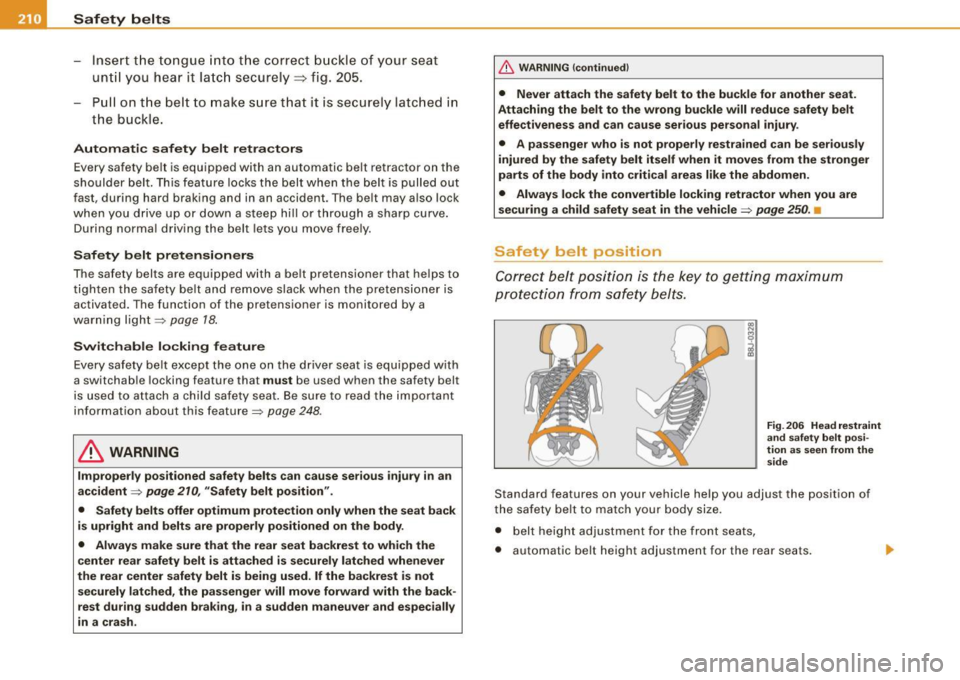
Fig . 2 06 He ad r est ra in t
an d sa fe ty b elt p osi
tion a s seen from th e
sid e
Standard features on your vehicle help you adjust the position of
the safety belt to match your body size .
• belt height adjustment for the front seats,
• automatic belt height adjustment for the rear seats.