2009 AUDI S6 height
[x] Cancel search: heightPage 117 of 398

On the road 1111
-------------------'
Applies to v ehi cles : wi th ele ctr ic ally a djuste d steer in g wh eel
Electrically adjusted steering vvheel
The he ight and re ach of the stee ring whe el can b e electr i
cally adj uste d to s uit t he d river .
First, adjust the d river's seat co rrect ly.
Height adjustment
Fig . 115 Switch for
steering wheel adjust ·
ment
- Push the switch@ up or dow n=> fig. 1 15. T he steer ing
w heel he ight cha nges for a s long as you pre ss th e swi tc h.
Reach adjustment
- Push the s witch @ forw ard o r backwar d => fig . 11 5. T h e
s teer ing whe el reach ch an ges for as lon g as you pr ess
t h e s wit c h.
Ther e must b e at least 1 O in ches ( 25 cml betw een your chest and the
cen te r of th e st eer ing w hee l. If you cannot sit mo re than 1 0 in che s
(2 5 cm) from the stee rin g wh eel, se e if adaptive equ ipm ent is ava il
able to help you reach the pedals and increase the distance from the
st eeri ng whe el.
F or detailed info rmation on how to ad just the drive r's seat, see
~ pa ge 81.
Con tro ls and eq uip
ment
T he steering whe el can be adj ust ed even when the ignition is turn ed
O ff . F or vehi cle s with seat memory , the i ndividu al p osi tions fo r the
st eer in g w he el can be sto red a lon g w ith th e seat position.
& WARNING
Improper use of steering wheel adjustment and improper seating
position can cause serious personal injury.
• Adjust the steering wheel column only when the vehicle is not
moving to prevent loss of vehicle control .
• Adjust the driver's seat or steering wheel so that there is a
minimum of 10 inches (25 cm ) between your chest and the
steering wheel~
page 196 , fig. 195 . If you cannot maintain this
minimum distance , the airbag system cannot protect you prop
erly .
• If physical limitations prevent you from sitting 1 O inches (25
cml or more from the steering wheel , check with your authorized
Audi dealer to see if adaptive equipment is available.
• If the steering wheel is aligned with your face, the supple
mental driver's airbag cannot provide as much protection in an
accident . Always make sure that the steering wheel is aligned with
your chest .
• Always hold the steering wheel with your hands at the 9 o'clock
and 3 o'clock positions to reduce the risk of personal injury if the
driver's airbag deploys .
• Never hold the steering wheel at the 12 o'clock position or with
your hands inside the steering wheel rim or on the steer ing wheel
hub . Holding the steering wheel the wrong way can cause serious
injuries to the hands, arms and head if the driver's airbag
deploys. •
Vehicle care I I Technical data
Page 124 of 398
![AUDI S6 2009 Owners Manual -On the road --------------------
[
i] Tips
• You can apply the parking brake at any time - even with the igni
tion turned off. The ignition must be turned on in order](/manual-img/6/57595/w960_57595-123.png "AUDI S6 2009 Owners Manual -On the road --------------------
[
i] Tips
• You can apply the parking brake at any time - even with the igni
tion turned off. The ignition must be turned on in order")
-On the road --------------------
[
i] Tips
• You can apply the parking brake at any time - even with the igni
tion turned off. The ignition must be turned on in order to release
the parking brake .
• Occasional noises when the parking brake is applied and
released are normal and are not a cause for concern .
• The parking brake goes through a self -test cycle at regular inter
vals - when the vehicle is parked . Any associated noises are
normal. •
Parking
To prevent a parked vehicle from rolling away, there are a
few things you should do.
When you park your vehicle, do the following
- Stop the vehicle using the brake pedal.
- Pull the switch to apply the electromechanical parking
brake.
- Move the selector lever into the
P position ~& .
- Switch off the engine and remove the ignition key from
the ignition lock.
When you park your vehicle on hills, do the
following - Stop the vehicle using the brake pedal.
- Pull the switch to apply the electromechanical parking
brake.
- If you are parking headed downhill, turn the front wheels
toward the curb. - If you are
parking headed uphill, turn the front wheels
awayfrom the curb.
- Move the selector lever into the P position .
- Switch off the engine and remove the ignition key from
the ignition lock.
& WARNING
This is how you can reduce the risk of injury when leaving your
vehicle.
• Never park the vehicle where it can come in contact with dry
grass, spilled fuel or any other flammable materials.
• When parking on hills, always turn the wheels so that the front
wheels will first roll into the curb, if the vehicle should start to roll.
• Never allow anyone -especially small children -to remain in the
vehicle when it is locked. Locked doors make it more difficult for
rescuers to access the passenger compartment in the event of an
emergency. Danger to life!
• Never leave children unsupervised in the vehicle. Children
could release the parking brake or move the gearshift lever out of
gear. The vehicle could start to roll away and cause an accident.
• No matter what the season is, the temperature in a parked
vehicle can reach dangerous levels.
0 Note
• Please exercise care when you park your vehicle in parking areas
with parking barriers or curbs. Parking barriers and curbs vary in height and could damage your bumper and related components as
the front of your vehicle moves over a barrier or curb that is too
high, as you park or as you back out of a parking spot. In order to be
sure that no such damage can occur, you may wish to stop short of
having the front tires of your car touch the parking barrier or curb . ..,_
Page 176 of 398

_____ A_ u_d _ i_ P_ a_r _k _in _ g=- S--=- y_s _t _e _m ____________________________________________ _
"Parking mode 1" appears by default in the MMI Display if the rear
v iew came ra is activate d=>
page 171 . You can switch to " parki ng
mode
2" by pressing the control button with the mode @
=> page 175, fig. 180 function . By repeatedly p ressing the control
button with the
mode function, you can switch back and forth
between "parking mode
1 " and "pa rking mode 2".
Orientation lines and marked surfa ces
Orientati on l ines and col ored ma rke d surfaces( => page 175, fig . 179
or => page 177, fig. 181) a re projected into the rear -view ca mer a
pictu res, subject to the two diffe rent par king modes . These orienta
tion lines and surfaces offer aid when parking or maneuvering. The
orientation lines and su rfaces refer to the height of a leve l driving
sur face.
When the indicated orientation lines and indicated blue surfaces
sup erimpos e veh ic le s or o bjects, a t the lates t, t he respectiv e
d istance to the vehicles or objects has become too short
=>
p age 179 .
If the tr unk lid is open, the o rien tat io n lin es and marked su rfaces are
not displayed .
& WARNING
• The rear-view camera has blind spots , in which objects cannot
be detected . Be especially careful to check for small children and
animals before backing up . Small children and animals will not
always be detected by the sensors.
• The Audi Parking System is not a substitute for being careful
and alert when backing up . Be especially careful during parking
and similar maneuvers . Always watch where you are driving and
make sure that nothing is in the way.
• Remember that low obstacles which have already been
signaled may pass below the system 's sensing zone when the
vehicle is backing up . The fact that the signal stops does not mean
that you have cleared the obstacle . When the signal stops , impact
is imminent . Objects such as trailer hit ches, chains , narrow posts
& WARNING (continued )
or fences covered by a thin layer of paint may not always be
detected by the sy stem. They can still damage your vehicle
without warning .
• Always make sure that the volume and frequency of the chime s
is adjusted so that you can easily hear the acoustic distance signal
even if the radio is playing , the air -conditioner blower is on High or
there is a high level of outside noise .
- Check the settings whenever someone else has driven the
vehicle before you .
• Improper reliance on the Audi Parking System can cause colli
sions and serious personal injury .
- Never rely only on parking assi st w hen changing backing up .
- Always check rear view mirrors to make sure it is safe to back
up .
[ i ] Tips
• B efore parking with the rear -view camera, the Adaptive Air
Su spensi on* co mfort or automatic mode must be switched on
=>
page 20.
• The rea r-v iew ca mera pic ture is avai la bl e as soon as the M MI
Display or the MMI is sw itched on, or the start -up phase is
completed.
• I n order for the rear-view camera to function proper ly, the
c a m era len s=>
page 171 , fig. 17 4 mu st be kept clea n, a nd free of
snow and ice. P lease follow the additional notes on=>
page 182.
• The came ra c overage a ngle changes when the trunk lid is open .
T herefore, the rear-view camera picture is d isplayed without orien
t a tion lin es an d w ith out blue surfaces .•
Page 186 of 398

• .___A_ d_ a --=- p_t_ i_v _e _ A_ ir_ S_u_ s_,_ p_e_ n_ s_io _ n _____________________________________________ _
Adaptive Air Suspension
Adaptive Air Suspension and
Damping
A pplies to vehicles: wi th Adap tive Air Suspens ion
Description
Adaptive Air Suspension and damping can be regulated
and they adapt automatically to a request from the driver
and the driving situation at the time.
Adaptive Air Suspension is an electronically controlled springing
and damping system . This chassis system makes it easier on the
driver by adapting to the particular situation through imperceptible
control processes.
The
Adaptive Air Suspension component regulates ground clear
ance depending on vehicle speed, load condition and driver input.
When the system is in automatic mode, accelerating to a speed above a predetermined limit will make the vehicle lower itself. On
the other hand, driving more slowly results in the vehicle raising again at specific speeds.
The
damping component provides individual control of the
damping forces. For example, with damping characteristics set to
provide greater comfort, damping is set somewhat harder for a brief
period only as required, for example, when going around a curve or
over rough road surfaces as well as when braking.
Settings
Adaptive Air Suspension provides the driver with the opportunity to
set the chassis characteristics also to their individual preference.
With the driving modes
standard, automatic and dynamic the driver
has three chassis settings available, ranging from comfort to sporty .
In addition,
lift provides a fourth mode which can be selecting for
driving over poor stretches of road :::::,
page 185, "Chassis controls". The modes are set in
MMI:::::,
page 185.
& WARNING
The height of the parked vehicle can change due to temperature
fluctuations or changes in load.
0 Note
• Whenever you park your vehicle, always make sure there is
adequate clearance above and below the vehicle. The height of the parked vehicle can change as the result of temperature fluctuations,
changes in load condition and changes in the driving mode (ground
clearance!.
• If the vehicle is being transported (e.g. by tow truck, train, ship,
etc.) , mount the tie -down chains/cables over the running surface
(circumference) of the tires . Never secure the vehicle by the axle, the
suspension struts or the front or rear towline eye. For technical
reasons, the pressure in the suspension struts may change during
the transport, which could result in the vehicle no longer being
secured properly.
• To prevent damage to the vehicle underbody, remember that
your vehicle is not an off-road vehicle, even in the "lift" mode. The
ground clearance is insufficient for this type of operation.
• If you are going to tow a trailer, you must activate the trailer oper
ation mode :::::,
page 186.
[ i] Tips
Before you raising your vehicle using the vehicle jack (for example,
when changing a flat tire) you must activate the jacking mode
=> page 186. •
Page 196 of 398
........ _o_ r_iv _i_ n""' g::;._ S_ a_f _e _ly =---------------------------------------------------
Driving Safely
General notes
Safe driving habits
Please remember -safety first!
This chapter contains important information , tips, instructions and
warnings that you need to read and observe for your own safety, the
safety of your passengers and others. We have summarized here
what you need to know about safety belts, airbags, child restraints as well as child safety. Your safety is for us
priority number 1. Always
observe the information and warnings in this section -for your own
safety as well as that of your passengers.
The information in this section applies to all model versions of your
vehicle. Some of the features described in this sections may be
standard equipment on some models, or may be optional equip
ment on others. If you are not sure, ask your authorized Audi dealer.
& WARNING
• Always make sure that you follow the instructions and heed
the WARNINGS in this Manual. It is in your interest and in the interest of your passengers.
• Always keep the complete Owner's Literature in your Audi
when you lend or sell your vehicle so that this important informa
tion will always be available to the driver and passengers.
• Always keep the Owner's literature handy so that you can find
it easily if you have questions. •
Safety equipment
The safety features are part of the occupant restraint
system and work together to help reduce the risk of injury
in a wide variety of accident situations.
Your safety and the safety of your passengers should not be left to
chance. Advances in technology have made a variety of features
available to help reduce the risk of injury in an accident. The
following is a list of just a few of the safety features in your Audi:
• sophisticated safety belts for driver and all passenger seating
positions,
• safety belt pretensioners,
• safety belt force limiters for the front seats,
• safety belt height adjustment systems for the front seats,
• automatic safety belt height adjustment for the rear seats,
• front airbags,
• side airbags in the front seats and outer rear seats*,
• side curtain airbags,
• special LATCH anchorages for child restraints,
• head restraints for each seating position,
• adjustable steering column.
These individual safety features, can work together as a system to
help protect you and your passengers in a wide range of accidents.
These features cannot work as a system if they are not always correctly adjusted and correctly used.
Safety is everybody's responsibility! •
Page 197 of 398
________________________________________________ D_r_iv _ i _n_ g~ S_ a_ fe_ ly __ lffllll
Important things to do before driving
Safety is everybody's job! Vehicle and occupant safety
always depends on the informed and careful driver.
For your safety and the safety of your passengers, before
driving always:
-Make sure that all lights and signals are operat ing
correctly.
- Make sure that the tire pressure is correct.
- Make sure that all windows are clean and afford good
visibility to the outside.
- Secure all luggage and other items carefully =>
page 99.
-Make sure that noth ing can interfere w ith the pedals.
- Adjust front seat, head restraint and mirrors correctly for your height .
- Instruct passengers to adjust the head restraints
according to their height.
- Make sure to use the right ch ild restraint correctly to
protect children =>
page 238, "Child Safety ".
- Sit properly in your seat and make sure that your passen
gers do the same=>
page 80, "General recommenda
tions".
- Fasten your safety belt and wear it p roperly. Also instruct
your passengers to fasten the ir safety belts properly
=>
page 205. •
Controls and equip
ment Safety first
Vehicle operation
What impairs driving safety?
Safe driving is directly related to the condition of the
vehicle, the driver as well as the driver's ability to concen
trate on the road without being distracted.
The driver is responsible for the safety of the vehicle and all
of its occupants. If your ability to drive is impaired, safety
risks for everybody in the vehicle increase and you also
become a hazard to everyone else on the road =>& .There
fore:
Do not let yourself be distracted by passengers or by
using a cellular telephone .
NEVER drive when your driving ability is impaired (by
medications, alcohol, drugs, etc.).
- Observe all traffic laws, rules of the road and speed limits
and plain common sense .
- ALWAYS adjust your speed to road, traffic and weather
conditions.
- Take frequent breaks on long trips. Do not drive for more
than two hours at a stretch.
- Do NOT drive when you are tired, under pressure or when
you are stressed .
& WARNING
Impaired driving safety increases the risk of serious personal
injury and death whenever a vehicle is being used. •
Vehicle care Do-it-yourself service Technical data
Page 212 of 398
___ S_a_ f_ e_ t-= y_ b_e_ l_ t _s _______________________________________________ _
-Insert t he tongue into the correct b uckle of y our seat
unt il you h ea r it la tc h securely~ fig. 205.
Pull on t he belt to make sure that it is securely latched in
the buckle.
Aut om ati c sa fe ty belt re tra cto rs
Eve ry safety be lt is equipped with an automatic belt retractor on the
shoulder belt. This feature locks the belt when the belt is pulled out
fast, during hard braking and in an accident. The belt may a lso lock
when you drive up or down a steep hill or through a sharp curve .
During normal driving the belt lets you move free ly.
Safety belt prete nsi oners
The safety belts are equipped with a be lt pretensioner that he lps to
tighten the sa fety be lt and remove slack when the pretensioner is
activated. The function of the pretensioner is monitored by a
warning light=>
page 18 .
Swit chable locking fe ature
Every safety belt except the one on the driver sea t is equipped with
a switchab le locking feature that
must be used when the safety belt
is used to a ttach a chi ld safe ty sea t. Be sure to read the important
information about this feature=>
page 248.
& WARNING
Improper ly positioned safet y belts can cause seriou s inj ury in an
accident =>
page 210 , "S afety belt po sitio n".
• Safet y belts offer opt imum protection on ly when the seat back
i s upright and belt s are properly po sition ed on t he bod y.
• Always make sure that the rear seat backrest to whi ch the
c enter r ear sa fet y belt i s atta ched i s sec ure ly lat ched whe nev er
the rear center saf ety belt i s being us ed. If the ba ckrest is not
s ecu rely lat ched, the pas senge r will mo ve fo rward with the back
rest dur ing sudden braking , in a sudden maneu ver and e spec iall y
in a cra sh.
& W AR N ING (continu ed )
• Never attach the safety belt to the buck le for anothe r seat .
Atta ch ing th e be lt to the wrong buckle will reduce safety belt
e ffe cti venes s and can ca use seriou s per son al injur y.
• A p assenger who i s not prope rly re str ained can be s eriousl y
injured by the saf ety belt it self wh en it m ove s from the stronger
p art s of the body into criti ca l area s like the abd omen .
• Alway s lock the convert ible lo ck ing retractor when you are
s ecu ring a ch ild safety se at in the v ehi cle
=> page 2 50. •
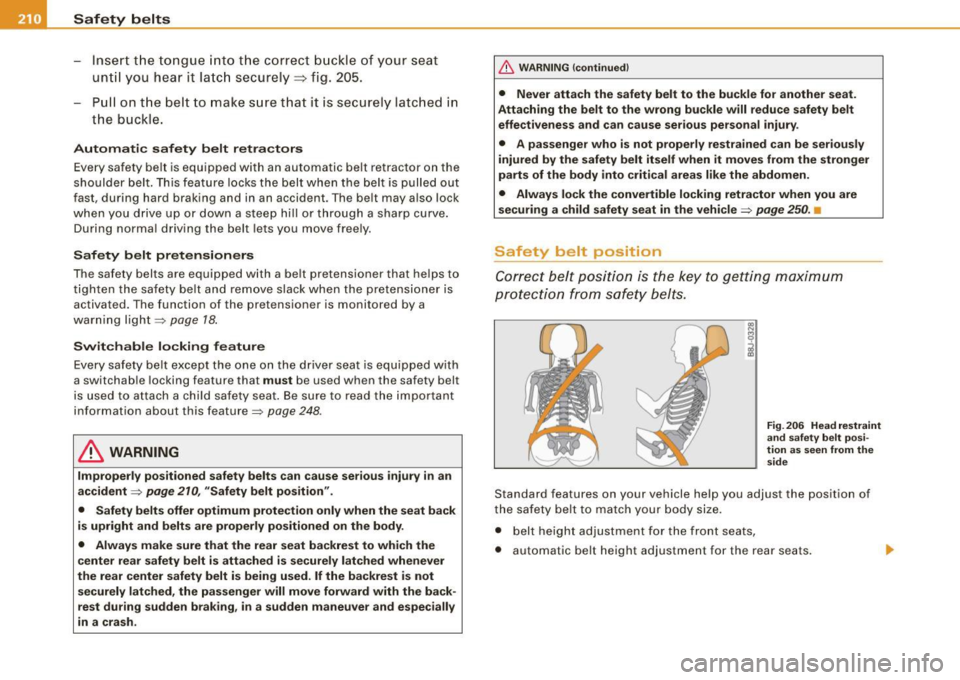
Safety belt position
Correct belt posi ti o n is the key to getting maximum
protecti on f rom safety be lts.
Fig . 2 06 He ad r est ra in t
an d sa fe ty b elt p osi
tion a s seen from th e
sid e
Standard features on your vehicle help you adjust the position of
the safety belt to match your body size .
• belt height adjustment for the front seats,
• automatic belt height adjustment for the rear seats.
Page 214 of 398
-Safety belts ----=-----------------
& WARNING
Improperly positioned
safety belts can cause serious personal
injury in an accident.
• Expectant mothers must always wear the lap portion of the
safety belt as low as possible across the pelvis and below the
rounding of the abdomen.
• Always read and heed all WARNINGS and other important infor
mation
~ & in "Fastening safety belts" on page 209. •
Unfastening safety belts
Unbuckle the safety belt with the red release button only
after the vehicle has stopped.
Fig . 208 Releasing the
tongue from the buckle
-Push the red release button on the buckle=> fig. 208. The
belt tongue will spring out of the buckle=>& .
- Let the be lt wind up on the retractor as you guide the belt
tongue to its stowed pos ition.
& WARNING
Never unfasten safety belt while the vehicle is moving. Doing so
will increase your risk of being injured or killed .•
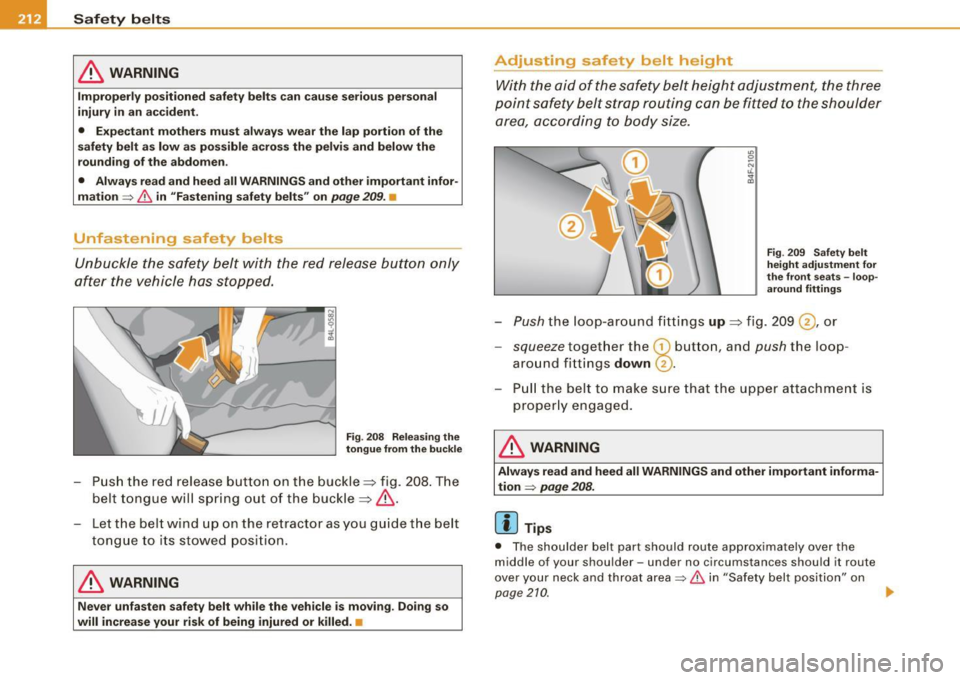
Adjusting safety belt height
With the aid of the safety belt height adjustment, the three
point safety belt strap routing can be fitted to the shoulder area, according to body size.
Fig . 209 Safety belt
height adjustment for
the front seats -loop
around fittings
Push the loop -around fittings up => fig. 209 @ , or
- squeeze together the G) button , and push the loop
around f ittings
down @.
- Pull the belt to make sure that the upper attachment is
properly e ngaged .
& WARNING
Always read and heed all WARNINGS and other important informa
tion
~ page 208.
[ i ] Tips
• The shoulder belt part should route approximately over the
middle of you r shoulder -und er no circu mstanc es should it route
over your neck and throat area
~ & in "Safety belt position" on
pag e21Q
~