2009 AUDI S6 cruise control
[x] Cancel search: cruise controlPage 130 of 398

• .___A_ d_a_ p:- t_iv _ e_ C_ r_u _is _ e_C_ o_ n_ t_ r_ o_ l --------------------------------------------
& WARNING (continued)
• Never allow the closing speed between you and other vehicles
to be so high that the Adaptive Cruise Control may not be able to slow your vehicle safely. If closing speed is too high , you must
apply the brakes yourself to reduce the risk of a rear -end crash.
• Never rest your foot on the accelerator pedal, especially when
the Adaptive Cruise Control is being used. Pressure on the acceler
ator will override the ACC braking function and prevent the brakes
from being applied when ACC detects a situation when the brakes must be applied .
• Never use Adaptive Cruise Control when you cannot drive
safely at a steady speed, including on city streets, on winding
roads or when road conditions are poor (for example, on ice,
gravel, in fog, heavy rain or on wet roads that increase the risk of
hydroplaning).
• The radar sensor's
vision can be reduced by rain, snow and
heavy road spray. These and similar conditions can prevent vehi
cles up ahead from being accurately detected and in some cases
they may not be detected at all. Do not use ACC when the radar sensors cannot accurately detect vehicles moving ahead of you in
traffic.
• Always turn off Adaptive Cruise Control when entering turn
lanes, exit lanes and construction zones or in similar situations
because the vehicle will automatically accelerate to the stored
speed when the road ahead is clear.
• To prevent unintended operation, always switch ACC off when
it is not being used.
[ i) Tips
• For safety reasons, the stored speed is deleted when the ignition
is turned off .
• The Electronic Stabilization Program (ESP) and the Anti-Slip
Regulation (ASR) cannot be deactivated when the Adaptive Cruise
Control is switched on. If the ESP and the Anti-Slip Regulation (ASRI has been deactivated and you then switch on the
Adaptive Cruise
Control, the ESP function will also be activated automatically.
• Damage caused by accidents and some minor collisions can
affect the radar sensor settings and cause the system to malfunc
tion or switch off completely.
• The radar sensor cover is heated. In winter conditions, you
should still check before driving to make sure it is free of ice and
snow. If necessary, clean the area near the radar sensor carefully
=>
page 127, fig. 123.
• To ensure that the radar sensor is not blocked, foreign objects
(e.g. stickers, larger license plate mounts, add -on parts) must not
cover the area near the radar sensor=>
page 127, fig. 123. The area
near the radar sensor must not be painted, either.
• For Declaration of Compliance to United States FCC and Industry
Canada regulations =>
page 375. •
Applies 10 veh ic les: w ith Ada ptive Crui se Contro l
How does Adaptive Cruise Control work?
Vehicles traveling ahead are detected with the aid of a
radar sensor.
Fig. 124 Basic prin
ciple diagram : Radar
sensor measurement
range
Adaptive Cruise Control uses a radar sensor in the front of the
vehicle=> fig. 124. Th e system has limitations=>
page 140. Things
that are not moving in your lane and in your direction of travel will
~
Page 131 of 398

Adaptiv e Crui se Contro l IIJ!IIIII ---------------------------------..:....:.:=:...:.;_;....::.....::...._ \
_______ _
not be detected. The sensor measures the distance to reflective
surfaces that must have a certain size. The system responds only
after the distance measurement has been made . If a measurement
is not possible, the system cannot respond and wil l not react to a
vehicle or something else up ahead.
O pen ro ad
When the road is clear, the Adaptive Cruise Control works like cruise
control. It main tains a constant target speed specified by the driver.
D riv in g in tr affic
If a slower vehic le driving ahead is detected, the Adaptive Cruise
Control dece lerates (within the limits of the system)::::;,
page 138,
"Driver intervention prompt" and::::;, page 140, "System limitations"
to its speed and after adjusting, tries to maintain the set distance
from the vehicle ahead . The vehicle may temporarily drive s lower
than the set speed while adjusting::::;,
& in "Description" on
page 127.
If the vehicle in front accelerates, Adaptive Cruise Control a lso acce l
erates up to the speed that you have set.
Sit uation s re qui ring d rive r int erve ntion
In some situations you will have to use the footbrake to s low the
vehicle down in order to keep a safe distance from vehic le in front
of you or to avoid a rear -end collision. In this situation, a symbol
appears and a warning tone sounds::::;,
page 138.
P assing anoth er veh icle
If you move into the pass ing lane and no vehicle is detected ahead,
the Adaptive Cruise Control accelerates to the speed you have set
and ma intains it.
O ve rridin g ACC
You can increase your speed at any time by stepping on the acceler
ator pedal. After you re lease the acce lerator pedal, the system
adjusts back down to the speed you previously set.
Controls and equip
ment R
edu cin g s topping di sta nce
If the radar sensor detects that the distance to the vehicle ahead is
less than defined minimum distance, the brakes are automatical ly
prepared for emergency braking by the driver . The brake pads are
moved very c lose to the brake discs without actual ly braking the
vehic le. This brake assistant feature reacts more quick ly to the
driver's braking, and also works when Adaptive Cruise Control is off.
The stopping distance is reduced as a result of this advance brake
preparation. This function does not perform any emergency brak ing
maneuvers by itself; the driver must always app ly the brakes.
& WARNING
• Never r ely on the d istan ce control feature of ACC alone t o
p re vent re ar- end colli sio ns. Alwa ys be prep ared t o br ake and take
eva sive ac tion to a void colli sio ns and ot her acc ident sit uation s.
• Never allo w the clo sing sp ee d b etwe en you and other vehi cle s
to be so hi gh th at th e Ada ptive Crui se Control may not b e able to
s low your vehicl e safely . If clo sing spe ed i s too h igh , you must
a pp ly the brake s yours elf to reduce the risk of a rea r-end cras h.
[ i ] Tip s
Please note that the amount of acceleration the Adaptive Cruise
Contro l uses depends on the Distance setting selected . DISTA NCE 1
gives you acceleration that is dynamic and sporty . D ISTANCE 4, on
t he o ther hand, gives more moderate acce leration. For more infor
mation about the time intervals::::;,
page 133, "How is the distance
(time interval) set?" .
• Please note that if the Adaptive Cruise Control has begun braking
t he vehicle and the driver chooses to brake the vehicle additional ly,
the brakes may feel "hard". This is simply due to the pressure build
up of the initial braking .
• Adaptive Cruise Control is switched off after pressing the foot
brake . The speed saved up this point can be resumed. To resume the
saved speed, release the brake pedal and pu ll the control lever _.,
I • •
Page 132 of 398

• ..__A_ d_ a-:.. p_t _iv _ e_ C_r_ u_ i _s _ e_ C_ o_n_ t_ r_ o_ l _____________________________________________ _
toward you=> page 132, "Turning Adaptive Cruise Control off
t emporarily". •
Applies t o ve hicles: with Adapt ive Cruis e Control
Switching the system on and off
Fig . 12 5 Con tro l l eve r:
Sw itchin g on and o ff
Swit ching th e sy stem on
- Pull the lever to position G) ~ fig. 125 .
Switching the s ystem off
- Press the lever to position 0 (latched). •
Applies to vehic les: with Adapt ive Cruise Contro l
How is the speed stored?
Fi g. 12 6 Contr ol l ever :
Stori ng sp ee d
With the system switched on the speed is stored as follows :
Drive at the speed you want . The speed must be between
20 and 95 mph (30 and 150 km/h) .
Pr ess the
I SETI button ~ fig. 126 to sto re the desired
speed .
After the I SETI button is released, the current speed is stored and
maintained .
The saved speed is now shown in the LED display in the speedom
eter by one or two illuminated red light diodes=>
page 135. At the
same time, the saved speed is also shown for a sho rt time in the
Information line=>
page 137.
[ i ] Tips
For sa fety reasons, the stored speed is erased when the igni tion or
the ACC is turned off. •
Page 133 of 398

Adaptive Cruise Control -
---------------=-------'
Applies to vehi cles: w it h Ada ptive Crui se Co nt rol
Changing stored speed
The speed can be changed without touching the acceler
ator or brake pedal .
Fig. 127 Control lever:
Changing speed
Increasing speed
- Press the lever briefly upwards
G) ~ fig. 127. USA
models: the speed increases by about 2.5 mph. Canada
models: speed will increase by one mark on the speed
ometer scale.
- Press the lever upwards
G) and hold it. As long as you
hold the lever down, the light diode display in the speed
ometer LED display in the speedometer moves forward
and the speed is increased .
Reducing speed
- Press the lever briefly downwards
Q. USA models: the
speed decreases by 2.5 mph. Canada models: speed will
decrease by one mark on the speedometer scale.
Con tro ls and eq uip
ment
- Press the lever downwards Q and hold it. As long as you
hold the lever down, the light diode display in the speed
ometer LED display moves backward and the speed is
reduced.
After releasing the lever, the system regulates the speed to the value
just set .
After each adjustment, the newly -set speed is shown for a shor t
time in the Information line~ page
137.
& WARNING
Improper use of the Adaptive Cruise Control features and inatten
tion can lead to an accident causing serious personal injury.
• It is dangerous to use the "RESUME" feature when the previ
ously set speed is too high for existing road, traffic or weather
conditions.
• Always read and heed the information and WARNINGS ~
& in
"Description" on
page 127 .
[ i] Tips
You can inc rease your spe ed at any time by stepping on the ac celer
ator pedal. After you release the accelerator pedal, the system
adjust s back down to the speed you previously set . A new desired
speed can be stored at any time by pressing the !SET ) button
~ page 130 , fig. 126. •
Vehicle care I I irechnical data
Page 134 of 398
-Adaptive Cruise Control "----'-----------------
Ap
plies to ve hicles : w it h Ad aptive Crui se Co nt rol
Turning Adaptive Cruise Control off
temporarily
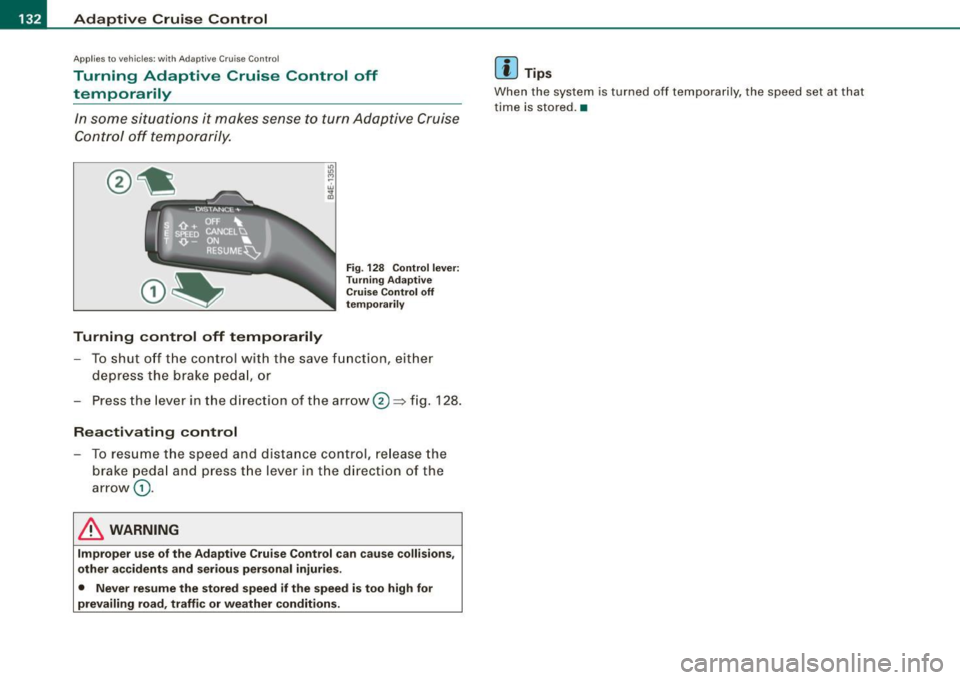
In some situations it makes sense to turn Adaptive Cruise
Control off temporarily.
Turning control off temporarily
Fig. 128 Control lever:
Turning Adaptive
Cruise Control off
temporarily
- To shut off the control with the save function, either
depress the brake peda l, or
Press the lever in the direction of the arrow ®~ fig.
128 .
Reactivating control
-To resume the speed and distance control, release the
brake pedal and press th e lever in the direction of the
arrow
G) .
& WARNING
Improper use of the Adaptive Cruise Control can cause collisions,
other accidents and serious personal injuries.
• Never resume the stored speed if the speed is too high for
prevailing road, traffic or weather conditions .
[ i ] Tips
When the system is turned off temporarily, the speed set at that
time is stored. •
Page 135 of 398
Adaptive Cruise Control -
---------------=-------'
Applies to vehi cles: with Adaptive Cru ise Co nt rol
How is the distance (time interval) set?
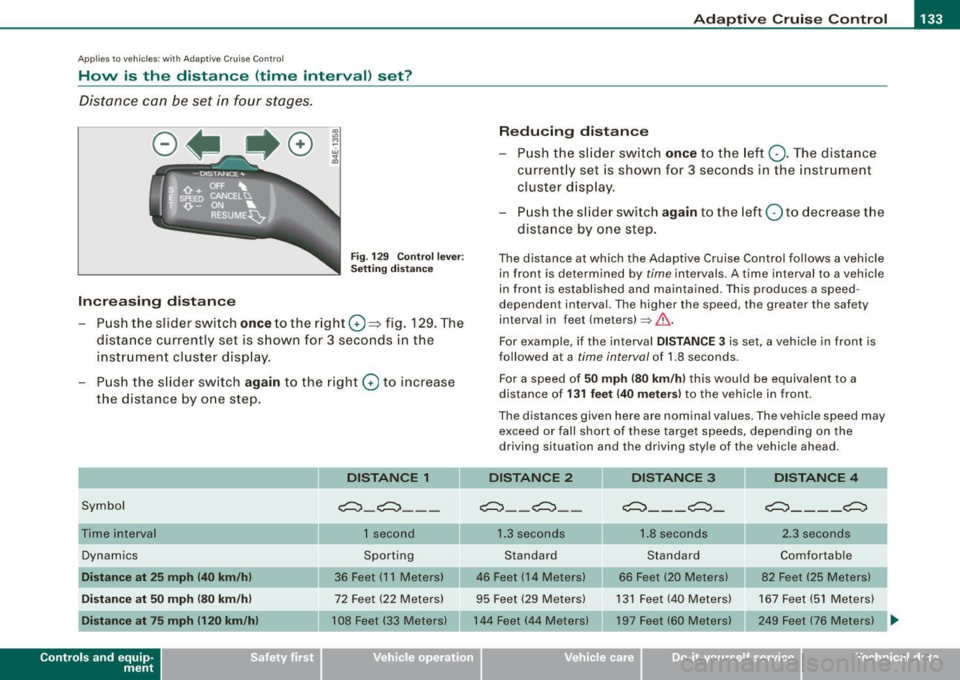
Distance can be set in four stages.
Fig . 129 Control lever:
Setting distance
Increasing distance
- Push the slider switch
once to the right G) ~ fig. 129. The
distance currently set is shown for 3 seconds in the
instrument cluster display.
- Push the slider switch
again to the right G) to increase
the distance by one step.
Symbol
Dynamics
Distance at 25 mph (40 km/h)
Distance at 50 mph (80 km/h)
Distance at 75 mph 1120 km/h)
Con tro ls and eq uip
ment
DISTANCE 1
~-~---
1 second
Sporting
36 Feet (11 Meters)
72 Feet (22 Meters)
108 Feet (33 Meters)
Reducing distance
Push the slider switch
once to the left Q. The distance
currently set is shown for 3 seconds in the instrument
cluster display.
Push the slider switch
again to the left Oto decrease the
distance by one step.
The distance at which the Adaptive Cruise Control follows a vehicle in front is determined by
time intervals. A time interval to a vehicle
in front is established and maintained. This produces a speed
dependen t interval. The higher the speed , the greater the safety
interval in feet (meters)
=> &..
For example, if the interval DISTANCE 3 is set, a vehicle in front is
followed at a
time interval of 1.8 seconds .
For a speed of
50 mph (80 km/h) this would be equivalent to a
distance of
131 feet (40 meters) to the vehicle in front.
The distances given here are nominal values. The vehicle speed may exceed or fall short of these target speeds, depending on the
driving situation and the driving style of the vehicle ahead.
DISTANCE 2 DISTANCE 3 DISTANCE 4
~--~--~---~- ~----~
1.3 seconds 1.8 seconds 2.3 seconds
Standard Standard Comfortable
46 Feet (14 Meters) 66 Feet (20 Meters) 82 Feet (25 Meters)
95 Feet (29 Meters) 131 Feet (40 Meters) 167 Feet (51 Meters)
144 Feet (44 Meters) 197 Feet (60 Meters) 249 Feet (76 Meters)
~
Vehicle care I I Technical data
Page 136 of 398

• .___A_ d_a_ p:- t_iv _ e_ C_ r_u _is _ e_C_ o_ n_ t_ r_ o_ l --------------------------------------------
How your vehicle responds when accelerating and fol lowing other
veh ic les w ith ACC operat ing can be a dapt ed to your persona l wishes
through different driving programs. Depending on which driving prog ram a nd whic h dis tance you choose, your vehicle will respond
Settings DISTANCE 1
Symbol for time interval
~ -~---
more dynamica lly or more comfortably when accelerating and
b raki ng. T he setting is selecte d throug h the MM I menu Adaptive
Cruise Control =>
page 139, "M M I settings".
DISTANCE 2 DISTANCE 3 DISTANCE4
~-- ~-- ~--- ~- ~---- ~
Support for: Bumper -to-bumper Bumper -to-bumper Bumper -to -bumper Secondary roads,
traffic, brisk driving
Response in "dynamic " driving program
1
Response in "standard " driving program 2
Response in "comfort " driving program 3
(dynamic) 1 ----2 ----- 3 ----- 4 ----- 5 (comfortable)
& WARNING
Following other veh icles too clo sely increases the risk of a crash
and serious personal injury .
• Following other vehicles too closely , parti cularly at h igher
speeds increases the risk of collisions and serious personal injury.
• Setting short distan ces to the traffic ahead reduces the time
and distance available to bring your vehicle to a safe stop and
makes it even more necessary to pay close attention to traffic .
• Always select a speed and distance to traffic ahead that is safe
and appropriate under the prevailing traffic , road , weather and
lighting conditions .
• Never rely on the distan ce control feature of ACC alone to
p revent rear-end collisions . Alw ays be prepared to brake and take
evasive action to avoid collisions and other accident situations.
• Never allow the closing speed between you and other vehicles
to be so high that the Adaptive Cruise Control may not be able to traf
fic, "keeping pace" traffic, "kee ping pace" trai ler operation
co mfortably comfortably
2
2 3
3 3 4
4 4
5
&, WARNING !continued )
slow your vehicle safely . If closing speed is too high, you must
apply the brakes your self to reduce the risk of a rear -end crash.
• Always select a greater following distance to the vehicle ahead
on wet road s than on dry roads.
• Always read and heed the information and WARNINGS =>
& in
" De script ion " on
page 127 .
[ i ] Tips
The distance setting is reset to the factory default DISTANCE 3 the
n ext t ime the ign ition is turne d on.•
Page 137 of 398

Adaptive Crui se Control Ill
---------------=-------'
Driver information
Ap plies to vehic les : with Ada ptive C ruise Cont rol
Displays in the instrument cluster
Depending on the driving situation, driver information is
d isplayed in the instrument cluster.
@ Speedometer and indicator light display
@ Display in the instrument cluster
Fig. 13 0 O verv ie w
instrument cluste r
@ Spe edom ete r and indi cat or light display
Important information concerning vehic le operation with Adaptive
Cruise Control is shown in display area @. The desired speed you
set is indicated in the speedometer (LED lights around the edge).
Th e in dicator lights sh ow whe ther the system has detected a vehicle
traveling ahead.
@ Display in the instrument cluster
I n disp lay area @ information from the navigation system* and the
t rip c omputer is disp layed in ad diti on to inf ormation about Adaptive
Cruise Control.
You can select among the differen t info rmation by repea ted brie f
taps on the [R ESET) button on the windshie ld w iper lever
~ page 39, "Operation".
Con tro ls and eq uip
ment
Certain pieces of information in the bottom part of the disp lay are
not shown permanent ly. Information is d isplayed on ly if you se t or
change the speed setting, change the time interval, when messages
are disp layed or if the Adaptive Cruise Control is turned off for safety
reasons .•
A pplies to veh ic les : with Ada ptive Cru is e Cont ro l
Display in the speedometer
Desired speed
Fig . 1 31 D isplay in th e
s pe edome ter
The desired speed set by the drive r is displayed by a red LED .
If the desired speed was set between two lines on the speedometer
using th e [SET) bu tton, the two c losest light emitting diodes will
come on
~ fig . 131 .
The system allows only speeds to be set between 20 to 95 mph (30
t o 150 km/h) to be set. This speed range is faintly illuminated in the
speedometer (LED lights).
Ind icator lights ( symbols )
• ""~ Open road : The indicator light""~ shows that ACC is active
and that no moving vehicle has been detected with in range of the
radar senso r up ahead in your lane of travel. The set speed is main -
t ained . .,
Vehicle care I I Technical data