2009 AUDI S3 light
[x] Cancel search: lightPage 40 of 324

Openin g a nd clo sin g
• Remote control feature => page 36.
• Anti-theft alarm system=> page 45.
All the doors and the rear lid are locked by the central locking
system when you lock the vehicle.
U nlock ing th e vehic le
You can un lock the vehicle from outside either by using the remote
control
or by inserting and turning the key in the driver's door lock.
When you
unl ock your vehic le:
• The anti-theft alarm system is deactivated briefly .
• The vehicle interior lights i lluminate for approxima tely 30
seconds.
• All turn signal ligh ts will flash twice when the car is un locked .
• After unlocking the vehicle, you have 30 seconds to open a door
or the rear lid. After 30 seconds, the vehic le automatica lly locks and
the anti-theft alarm system activates again .
The rear lid can be locked or unlocked either by using the remote
control
o r by inserting and turning the key in the driver's door lock.
Un locking the vehicle with the remote control
c::::::5 wil l only unlock
the rear lid , to open it, the lid handle needs to be pressed.
Lo ckin g the vehicle
You can lock the vehicle from outside either by using the remote
control
or by inserting and turning the key in the drivers's door lock.
When you
lo ck the vehicle :
• All doors and the rear lid are locked .
• All turn signal lights will flash once when the car is locked.
• The anti -theft alarm system is activated . T he horn of the anti
theft alarm system will sound and the anti-theft alarm system readi ness l ight, located in the center of the instrument pane l below the
windshie ld on the right s ide of the air vent, will start to b link.
• The vehicle interior ligh ts turn off .
Automatic locking *
The automatic locking fea ture locks all the vehicle doors and the
rear lid when you drive faster than 9 mph (15 km/h).
You can unlock the vehicle from the inside by:
• removing the key from the ignition switch (the vehicle wi ll auto
matically un lock itself) or
• pressing the unlock part of the power lock switch
oc:"D or
• pulling the inside handle for that door (once - the front door is
unlocked and opened at the same time, twice to open the rear door).
If you wish, you can have an authorized Audi dealer convert your
powe r door lock sys te m to automatic locking.
& WARNING
• When you lock your vehicle from out side , nobody -esp ecia lly
c h ildr en - s hould r em ain in sid e the vehi cle . R emember , when you
lock the vehicle from the out side the window s ca nnot be opened
fr om t he in side .
• When you leave the vehicle , alway s remo ve the ignition key and
t a ke it with you . Thi s w ill pre vent p assengers (children , for
ex ampl e) from a ccidentall y being lock ed in the vehicle should they
a cc ident ally pre ss t he powe r lock ing switc h on t he center consol e.
• Do not leave children in side the vehicle un supe rvi se d. In an
emerg ency it w ould be impos sible t o ope n th e door s from the
out side without the key.
[ i ] T ips
• In the event of a crash with airbag deployment all locked doors
wi ll be automatical ly un locked to give access to the vehic le occu
pants from the outs ide .
• If the power locking system shou ld fai l, you can stil l open the
fue l tank flap in an emergency=>
page 223. ~
Page 41 of 324

• You are well advised not to keep valuables inside an unattended
vehic le, visible or no t. Even a properly locked vehicle cannot provide
the security of a safe! •
Unlocking and locking the vehicle with the
remote control
How the remote control works.
Fig. 2 6 Remo te
c on tro l: fu ncti on
bu ttons
To unlock the v ehi cle doors and rear lid CD
- Press button @ once to un lock driver' door.
- Press b utton @twice to unlock all doors and the rea r lid .
To lo ck th e vehicl e doors and rear lid
rn
- Press butto n @ => ,& in "General description" o n
page 37.
-Watch that a ll turn signal lights flash once.
To op en r ear lid only
e::5
- Press button @ for approx imately one seco nd.
Con tro ls and eq uip
ment
Op ening and clo sing
PANIC Button
- Push the red butto n@ to ac tivate the panic function . T he
horn sounds and the t urn signa ls flash.
- P ush the button @again to deact ivate the panic func-
t ion.
The remote controls allows you to :
• lock or unlock the vehicle
• selectively un lock the rear lid.
The turn signals will f lash briefly whenever yo u lock or unlock the
vehicle. A lso, the interior light will come on or go off whenever you
open or close the driver's door .
The transmitter and battery are located in the head o f the remote
control. The receiver is located inside the vehicle. The maximum
effective range depends on several things . Remember, if the battery
is weak, th e effective range decreases.
The remote -c o ntro l key c ontains a fold -out key tha t you can use to
manually lock or unlock the vehicle and to start the engine.
If you need to replace the remote control, or if you need to have it
repai red , you mus t see your authorized Audi dealer . Only the n can
you use the key again .
& WARNING
Read and follo w all WARNINGS => & in "General de scr iption " on
page
3 7.
[ i ] Tip s
• The remote control key is automatically deactivated when the
ign ition is switched on.
• The operation of the remote control key can be temporarily
disrupted by interference from transmitters in the vicinity of the ..,
Vehicle care I I irechnical data
Page 42 of 324
Opening and closing
vehicle working in the same frequency range (e.g. a cell phone,
radio equipment).
• In order to make sure the locking function is working, you should
a lways keep your eye on the vehicle to make sure it is properly
locked .
• Do not use the remote control if you are inside the car, otherwise
you may unintentionally lock the vehicle, and then you would set off
the anti-theft alarm when you try open a door. In case this happens
anyhow, push the unlock button@.
• Use the panic function only if you are in an emergency
situation. •
Resetting the remote control
The remote control must be reset if the vehicle does not
unlock.
- Press the unlock button III on the remote control.
- Manually unlock the driver's door lock with the mechan-
ical key within 30 seconds .
- Press either the lock-
m or the unlock III button to
complete the reset sequence .•
Doors, power locks
Operating the locks with the fold-out key
To lock and unlock the vehicle from the outside, turn the
key in the lock of the driver 's door.
N
-N
-ci. gi
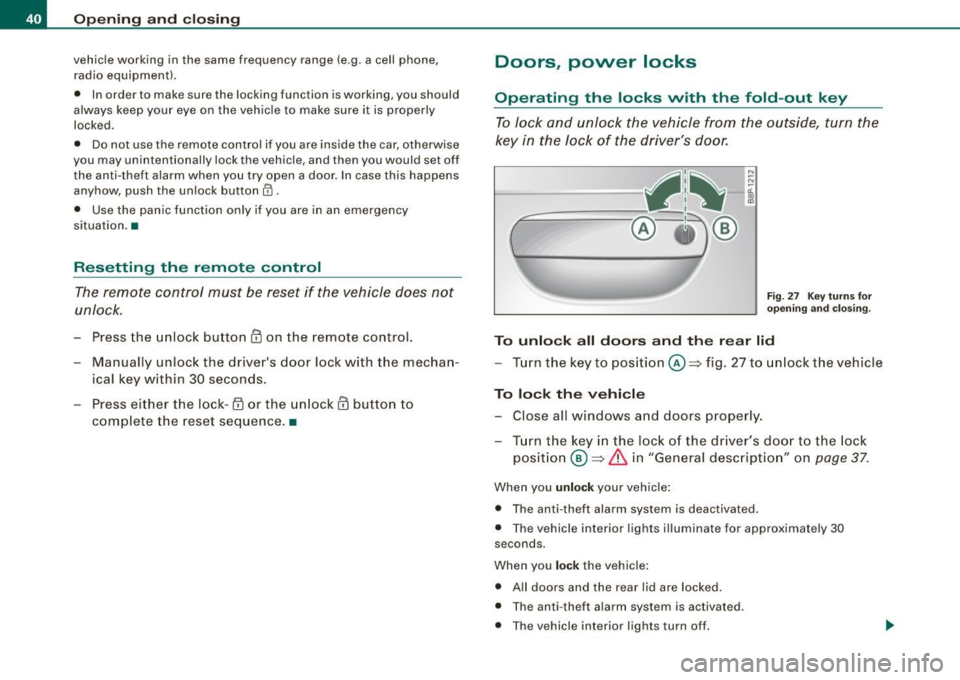
Fig. 27 Key turn s for
ope ning and closing.
To unlock all doors and the rear lid
-Turn the key to position©=> fig. 27 to unlock the vehicle
To lock the vehicle
-Close all windows and doors properly.
- Turn the key in the lock of the driver's door to the lock
position @~
& in "General description" on page 37.
When you unlock your vehicle :
• The anti-theft alarm system is deactivated .
• The vehicle interior lights illuminate for approximate ly 30
seconds .
When you
lock the vehicle :
• All doors and the rear lid are locked.
• The anti -theft alarm system is activated .
• The vehicle interior lights turn off.
Page 43 of 324

& WARNING
Alw ays rea d and he ed W ARNIN G => 6 in "Genera l descripti on" on
page 37. •
Locking and unlocking the vehicle from inside
The vehicle can be locked or unlocked from the inside
using the power locking switches located in the driver's
and the front passenger's door.
F ig . 2 8 Dri ver's do or:
powe r locking switch
In addition to t he central locking switches in t he doors,
there is a locking switch on the rear center console for the
rear -seat passengers
~ page 42 .
How to lo ck all doors and the rear lid
simultaneously
- P ress lower part of t he power locking switch m ~ fig. 28
~ & -
How to unlo ck all doors and the rear lid
s imultan eo usly
- Press the upper part of the switch m .
Controls and equip
ment
Opening and clo sing
How to unlo ck / op en eac h front door separat ely
using th e door handle
- Pull the door handle once to release the lock and simul -
taneously ope n the door.
How to un lock / open each r ear door separat ely
using th e door handle
- Pull the doo r handle once to release the lock.
- Pull the handle
twice to open the door.
If you lock the vehicle using the pow er lockin g swit ch G'.i, please note
the following :
• You cannot open the doors or the rear lid from the
outside
(inc reased security, for examp le when you are stopped at a red
light) .
• The diode in the power locking switch i lluminate when a ll the
doors and the rear lid are closed and locked .
• You can unlock and open the doors individually from the inside
by pulling o nce on the door hand le for the front doors and twice for
the rear doors.
• If the driver's door is opened (a fter you have locked the vehicle
from the inside using the power locking switch), the door will
remain un locked to prevent you from locki ng yourself out of your
vehicle. After you close the door, you have to lock the d river 's door
again .
• If you have a crash and the airbag is activated, the doors au to
matically un lock .
& WARNING
• If you u se the power l ock ing switch w ith the door s clo sed ,
r e memb er t ha t all the vehic le doors will lo ck .
• Locking door s from th e in side c an h elp pr event inadv ertent
do or op en in g durin g an accident and can also prevent un want ed ...
I • •
Page 47 of 324
Anti-theft alarm system
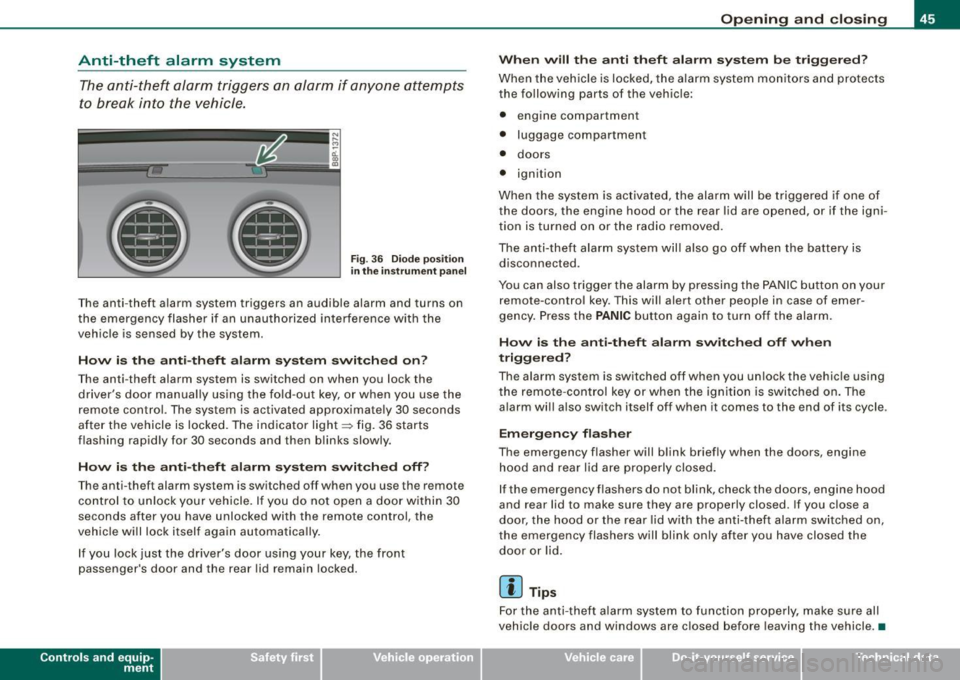
The anti-theft alarm triggers an alarm if anyone attempts
to break into the vehicle.
F ig . 3 6 D iod e posi tion
in th e instrum ent p an el
T he anti-theft alarm system triggers an audible alarm and turns on
the emergency flasher if an unau thorized interference with the
vehicle is sensed by the system .
How is the anti -theft alarm sy ste m switched on ?
The anti -theft alarm system is switched on when you lock the
driver's door manually using the fold -out key, or when you use the
remote control. The system is activated approximate ly 30 seconds
after the vehicle is locked. The indicator light~ fig. 36 starts
flashing rapid ly for 30 seconds and then b links slowly .
How i s the anti -theft alarm s yste m switch ed off?
The anti-theft alarm system is switched off when you use the remote
co ntrol to un lock your vehicle. I f you do not open a d oor within 30
seconds after you have unlocked with the remote control, the
vehicle will lock itself again automatically.
I f you lock just the driver's door using your key, the front
passenger's door and the rear lid remain locked.
Con tro ls and eq uip
ment
Op ening and clo sing
When will th e anti th eft alarm sy ste m b e trigg ere d ?
When the vehic le is locked, the a larm system monitors a nd protects
the following parts of the vehic le:
• engine compartment
• luggage compartment
• doors
• ignition
When the system is ac tivated, the alarm will be trigge red if one of
the doors, the engine hood or the rear lid are opened, or if the igni
t ion is turned on or the radio removed.
The anti-theft alarm sys tem will also go off when the battery is
disconnected .
You can also trigger the alarm by pressing the PA NIC button on your
remote-contro l key. This will alert other people in case of emer
gency. Press the
PANIC button again to turn off the alarm.
How is th e anti-th eft alarm sw itched off when
triggered ?
The alarm system is switched off when you unlock the vehic le using
the remote -cont rol key or when the ignition is switched on . The
alarm wi ll also switch itself off when it comes to the end of its cycle .
Emergency flasher
The emergency flasher will blink briefly when the doors, engine
h o od and rear lid are properly closed.
If the emergency flashers do not blink, check the doors, engine hood
and rear lid to make sure they are properly closed. If you close a
door, the hood or the rear lid with the anti -theft alarm switched on,
the emergency flashers will blink only after you have closed the
door or lid.
[ i ] Tips
For the anti -theft a larm sys tem to func tion properly, make su re all
vehicle doors and windows are closed before leaving the vehicle . •
Vehicle care I I irechnical data
Page 49 of 324

Closing th e window s
- Pull the switch up to the
first stop and hold it there until
the window has risen to the desired position.
- Pull the switch quickly to the
second pos iti on: the
window will automatically close all the way~
& in
"Controls".
A cti vating /d eacti va ting r ear window s
- Pu sh the switc h to the
depressed pos ition to a ctiv ate the
rear windows -the l ight in the sw itch wi ll go out.
- Briefly press t he switch to
de activat e the rear windows -
the switch will return to the sa fety position and the light
w ill illuminate.
The safety switch©=> page 46, fig. 37 in the armrest on the driver's
door turns off the rear power windows. Only when the safety switch
is depressed can the rear windows be opened or closed. The symbol
in the safety switch il lum inates when the power windows in the rear
doors are switched off (button NOT depressed). This feature has
been provided for the safety of small children riding in the rear of
the vehicle .
[ i J Tip s
The windows can still be opened and closed for about ten minutes
after the ignition has been turned off. The power windows are not
shut off until one of the front doors is opened. •
Contro ls and eq uip
ment
Op ening and clo sing
Convenience close /open feature
You can close or open the windows from outside when
you lock or unlock your c ar with the key.
---==- ~fit ~-:..--.:..-_-_-_-_- _-_- _-_-_-_--:-
c -= ® !)®
Conv eni ence open f eatur e
N ;:.
-0:. a, m
Fig . 38 Key turns for
o pen ing a nd clos ing
Keep the key in the lock on the driver 's door @ unt il all
windows and the panorama sliding/tilt roof* have
reached the desired position.
Con venience close feature
- Hold the key in t he lock of the driver's door in t he closed
position unti l a ll windows and the panorama s lid ing/tilt
roof* are closed
~ & .
The automatic close function will cease im me diat ely if the key is
re leased. For safe ty reasons it is not possible to open and c lose the
sunroof with the remote -control key.
& WARNING
• Be c are ful when clo sin g th e window s. Check to se e that no one
i s in the way, or se riou s inju ry could result!
• Alwa ys read and heed WARNIN G~
& in "Gen eral de scription "
o n
pa ge 3 7. •
Vehicle care I I Technical data
Page 51 of 324

Closing complete ly
- Press the sw itch 0 ~ p age 48, fig . 39 until the roof is
completely closed
~ & .
Closing partially
- Press the sw itch 0 ~ page 48, fig. 39 until the roof has
reac hed the des ired position~ &. If the roof is almost
closed and you interrupt the operation, the roof opens
automatically to a min imum setting; this is the smallest
possible opening that can be set.
If you park your vehicle in the sun, we recommend that you c lose the
sun b lind . You should especially make certain that the panoramic
s liding sunroof is c losed when the sun blind is closed when parked
or if there is a sudden rain shower.
The sun blind has two positions : completely open or completely
closed . The sun blind is manually operated.
& WARNING
Never clo se the pan oramic sliding sunroof careless ly or wi thout
wa tc hing -th ere i s a ri sk of per son al injur y. For t his re aso n, a lways
remove the ignit ion ke y wh en l eav ing the vehi cle.
[ i ) Tips
• When you park your vehicle, we genera lly recommend closing
the panoramic sliding sunroof and the sun blind.
• When the vehicle is parked, a wet roof shou ld be dried light ly
with a soft cloth
before it is op ened so that water does not drip into
the interior .
• In an emergency , the panoramic sliding sunroof can be closed
manually ~
page 49, "Emergency mechan ical closing for the
panoramic sliding sunroof".•
Contro ls and eq uip
ment
Op ening and clo sing
Ap plies to vehicles: wi th panoramic sliding sunroof
Comfort closing
The open roof can also be closed from the outside.
- Hold the key in the driver's door lock in the loc k position
until the roof is closed ~& .
& WARNING
Never clo se the panor ami c sliding su nroof careles sly or without
wat ching -ther e is a r isk of p ers onal injury. •
Emergency mechanical closing for
the panoramic sliding sunroof
App lies to veh icles: with panoramic s liding sun roof
Uncovering the light unit
In an emergency, the panoramic sliding sunroof can be
closed manually. Removal of the light unit requires some
dexterity.
--- '!!ii '-,-.. ---i
EJ
Vehicle care I I
~ 0:. CD
th e head line r:
re m ov ing t he g lass
Technical data
Page 52 of 324

Opening and closing
Fig. 41 Light unit in
the headliner:
removing the switch
cover
Please switch off all lamps before removing the light unit
=>& .The glass and the switch cover simply click into place
for insta llation. Be sure they are positioned correctly for
installa tion.
Removing the glass
Take the screwdriver from the vehicle tool kit.
- Use the flat end of the reversible screwdriver blade.
- Insert the screwdriver carefully between the light unit
and the glass into the visible marks (arrows) => page
49,
fig . 40.
- Pry the glass out carefully.
Removing the switch cover
Push the flat blade of the screwdriver several times in
succession between the light unit and the switch cover at
different places on the left and right and carefully lift the
switch cover as you do this::::> fig. 41. On vehicles with
additional equipment you can allow the cover to hang by
the wire, otherwise place the loose cover to one side.
& WARNING
Before working on the front light unit switch the integral lamps off
- otherwise you risk being burned . •
Appl ies to vehicles : with panoramic s lidi ng sunroof
Removing the light unit
Removing the light unit requires some dexterity.
1111111111111111111111111111111
Fig. 42 Light unit in
the headliner :
removing screws in the
light unit
Fig . 43 Removing the
light unit
Installation of the light unit follows the steps used in
removal, but in reverse order.
- Insta ll the Phillips head blade in the screwdriver.