2009 AUDI Q7 automatic transmission
[x] Cancel search: automatic transmissionPage 189 of 426

_______________________________________________ A_ u_t _o _ m_ a_ t _i_ c_ t_r _a _n _ s_ m __ is_s_ i _o _ n __ !II
Autom ati c selec to r l eve r lock
The se lector lever is locked in the P and N positions when the igni
tion is turned on. To move the lever from these positions the driver
must depress the brake pedal. As a reminder to the driver, the
follow ing warning appears in the instrument cluster disp lay when
the selector is in
P and N:
When stationary app ly foot brake while s electing gear
A time delay e lement prevents the selector lever from locking when
it is moved through the
N position (going from R to Dl. The locking
e lement will lock the selector lever if the lever is left in N (Neutral)
for more than approximately 1 second, without the brake peda l
being pressed.
At speeds above about 3 mph (5 km/h) the Automatic Shift Lock is
automatically deactivated in the
N posi tion .
Interl ock button
The lock button on the selector lever prevents the lever from being
accidentally shifted into certain positions. Pressing this button
deactivates the selector leve r lock. Dependi ng on the direction of
the shift, the selector lever locks at different positions. The positions
are highligh ted in the illus trati on =>
page 186, fig . 199.
Igniti on k ey saf ety in te rlo ck
The key canno t be removed from the ignition un less the selector
lever is in the
P park position. When the ignition key is removed, the
selector lever wil l be l ocked in the
P posi tion .•
Kick -down
T he kick-down feature allows the vehicle to genera te
maximum accelera tion.
When you press the acce lerator pedal beyond the resistance point
that is reached at ful l throttle, the transmission wi ll select a lower
gear ratio based on vehic le speed and engine RPM . The engine RPM
wil l be control led to produce maximum vehic le acceleration as long
Controls and equip
ment
as you continue to press the acce lerator pedal beyond this resis
t ance poin t.
& WARNING
Be careful when u sing the ki ck -down feature on slippery road s.
Rapid acceleration ma y cause the vehicle to skid . •
Dynamic shift program (DSP)
T he aut omatic tr ans mission is electro nically c ontrolle d.
The transmission is se lf adapting and will automaticall y select the
b est shi ft program su ited to the driving conditio ns and driving style.
The transmission will select one of the
e conomy programs when
you drive at a s teady speed or a g radually changing speed without
heavy acceleration. This achieves optimum fuel efficiency, with ear ly
upshifting and delayed downshifting .
The trans mission will au tomatically select the
sporty shift progra ms
when you drive at higher speeds, or with heavy acce leration and
frequent ly cha nging speeds . Upshifts ar e delayed t o make f ull use
of engine power . Downshifting takes place at higher engine speeds
than in t he ec onomy p rograms .
The selection of the most su itable shift program is a continuous,
automatic process . The driver can a lso make the transmission
sw itch to a sporty progra m by
quickly pressing down the gas peda l.
This causes the transmission to shift down to a lower gear to
achiev e rapid acc elerati on, e.g . fo r q uickly pass ing another vehicle .
You do not need to press the gas pedal into the kick-down range.
After the transm ission has upshifted, the original progra m is
selected according to your driving sty le.
An additiona l shift program allows the automatic transmission to
select the proper gear fo r uph ill and downhi ll gradients.
This keeps the transmission from shifting up and down unneces sari ly on hi lls. The transmissio n will shift down t o a lowe r gear when _,.
I • •
Page 190 of 426

111..__A_ u_ t _o_ m_ a_ t_ i_ c _ t_r _a _n_ s_ m_ is_ s_i o _ n ________________________________________________ _
the driver presses the brake pedal on a downhill gradient. This
makes use of the braking effect of the engine without the need to
shift down manually. •
Manual shift program
Using the manual shift program you can manually select
gears.
Fi g. 200 Ce nter
co nso le: s hiftin g the
tiptr onic® ma nually
Fi g. 20 1 Disp lay:
man ual s hift progr am ,
selected gear
Swit ching to manual shift program
Push the selector lever to the right from D. As soon as the
transmissio n has switched over, the selected gear
appears in the display => fig. 201.
To upshift
Push the selector lever forward to the plus position 0
=> fig. 200.
To downshift
- Push the lever to the minus position Q.
When accelerating, the transmission will automatically shift into
gears 1 , 2, 3, 4 or 5 before the engine reaches its maximum RPM .
If you apply a light throttle when accelerating, tiptronic® will auto
matically sh ift from 1st to 2nd gear to save fue l. If you app ly a heavy
throttle, the transmission will stay in 1st gear until near maximum
RPM is reached, or unti l the driver shifts into 2nd gear .
If you take your foot off the accelerator peda l when driving down a
steep incline, tiptronic® wi ll downshift from the selected gear into
the next lower gear until it reaches 1st gear, based on road speed
and engine RPM. Automatic downshifting is interrupted as soon as
you apply the thrott le again .
[ i ] Tips
• When you shi ft into the next lower gear, the transmission will
downshift only when there is no possibi lity of over -revving the
engine.
• When the kickdown comes on, the transmission wil l shift down
to a lower gear, depending on vehicle and eng ine speeds.
• tiptronic® is inoperative when the transmission is in the fail-safe
mode. a
Page 191 of 426
_________________________________________________ A_ u_t_ o_ m_ a_t _i _ c _ t _ra_ n_s_ m __ is_s_ io_ n _ __.11111
Ap plies to vehi cles : wi th tip troni c-st eerin g wh eel
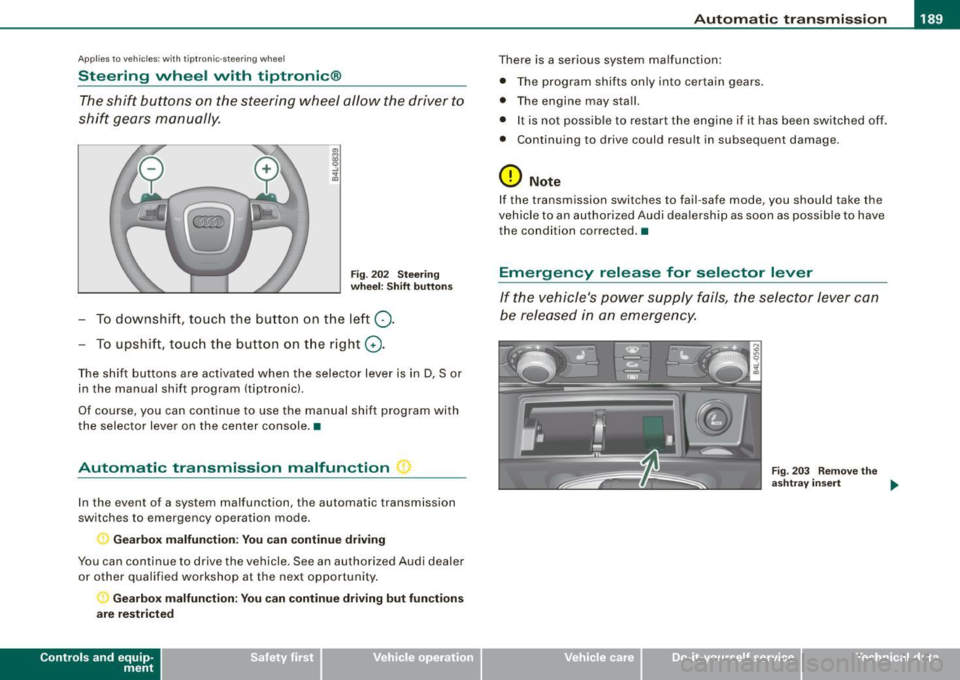
Steering wheel with tiptronic ®
The shift buttons on the steering wheel allow the driver to
shift gears manually.
Fig . 202 Steering
wheel: Shift buttons
- To downshift, touch the button on the left Q.
- To upshift , touch the button on the right G) .
The shift buttons are activated when the selector lever is in D, Sor
in the manual shift program (tip tronic) .
Of course, you can continue to use the manual shift program with
the selector lever on the center console .•
Automatic transmission malfunction ~
In the event of a system malfunction, the automatic transmission
switches to emergency operation mode.
Gearbox malfunction: You can continue driving
You can continue to drive the vehicle. See an authorized Audi dealer or other qualified workshop at the next opportunity.
Gearbox malfunction: You can continue driving but functions
are restricted
Con tro ls and eq uip
ment
There is a serious system malfunction:
• The program shifts only into certain gears.
• The engine may stall.
• It is not possible to restart the engine if it has been switched off .
• Continuing to drive could result in subsequent damage .
0 Note
If the transmission switches to fail -safe mode , you should take the
vehicle to an authorized Audi dealership as soon as possible to have
the condition corrected .•
Emergency release for selector lever
If the vehicle's power supply fails, the selector lever can
be released in an emergency.
Fig . 203 Remove the
ashtray insert
~
Vehicle care I I Technical data
Page 194 of 426

• .___A_ d_v_ a_ n_c_ e_ d_ P _a_r_k _i_ n -=g,_ S-=y"- s_ t_ e_ m __________________________________________ _
-Press the sw itch PJJJ! in the cente r console ~ page 191,
fig. 206 t o activate the A udi pa rking system m anually .
Activation of the acoustic parking system is confirmed by
a brief acknowledgement sound . The indicator light in
the switch lights up.
D ea ctivation
If you drive forwards faster tha n approx. 6 mph (10 km/h),
or
- if you switch the ign ition off, the entire acoustic parking
assist is automatically deactivated, or
- you can press the sw itch
P111! i n the center console
=> page 191, fig. 206 to deact ivate the Audi parking
system. The indicator light in the switch goes out.
You have to turn on the acoustic parking assist m anuall y if you wish
to park the vehicle forwards or if you w ish to approach an obstacle
forwards and want a distance warning .
The range at which the sensors start to measu re is
about:
Front
Rear
W arning ton es side
cen
te r
side
cen ter 3 ft (0
.90 ml
4ft (1.20 ml
2 ft (0.60 ml
5 .2 ft (1.60 ml
Distance warning is given by chimes which are generated by a
signal generator . The volume and the pitch of the chimes can be
adjusted in the MMI => page 201.
Mute In the case of vehic les with automa tic transmission, an acoustic
distance warning is discontinued when the transmission selector lever is moved to the P position. However, the system remains
active
. As soon as the selector lever is moved from the
P posi tion
and the vehicle approaches an obstacle, the acoustic distance
warning resumes .
Dri ving fo rward/ba ckvv ard
Distance warning when driving forward/backward is based o n
detection of an obstacle in the range of the parking assist . As the
distance dec reases, the time interval between the audible tones
becomes shorter.
When the distance is less than approx . 1 ft (0.30 m), the tone
becomes continuous. At this point you shou ld s top backing up or
driving forward .
If the distance to an obstac le remains the same, the vo lume of the
distance warning is gradually reduced after about
4 seconds (does
not app ly to the zone for the cont inuous tone). If you sta rt to
approach the detected obstacle again, the distance warning will
sound at the normal volume again .
P a rk ing
When you selec t ano ther gear when parki ng (e .g . reverse/forward),
the warning tones are temporarily suppressed, but the visual display remains on the MMI display . If you start approaching a
detected obstacle again, the distance warning wi ll sound at the
normal vo lume again .
Vi sual disp lay
T he segments on the MMI display indicate a change in the distance
between the vehicle and an obstacle . The number of segments
displayed depends on the obstacles in front of or behind the
vehic le. The c loser the vehic le comes to the obstacle, the closer the
segments approach the vehic le => page 191, fig. 207. When the
segment before last is disp layed, the veh icle has reached the colli
sion zone. At this point you should stop backing up or driving
forward =>
&,. ..,.
Page 310 of 426

ll'I __ T_ r _a_ il_e _r_ t_ o_ vv_ in__... g,_ __________________________________________________ _
& WARNING
Anyone not properly restrained in a moving vehicle is at a much
greater risk
in an accident. Never let anyone ride in your car who
is not properly wearing the restraints provided by Audi .
c:
Trailer towing tips
Important to know
Your vehicle handles differently when towing a trailer because of
the additional weight and different weight distribution. Safety,
performance and economy will greatly depend on how carefully you
load your trailer and operate your rig.
Before you actually tow your trailer, practice turning, stopping and
backing up in an area away from traffic. Keep practicing until you
have become completely familiar with the way your vehicle -trailer
combination behaves and responds.
Backing up is difficult and requires practice. Backing up with a
trailer generally requires steering action opposite to that when
backing up your vehicle without a trailer.
Maintain a greater distance between your vehicle and the one in
front of you. You will need more room to stop. To compensate for
the trailer, you will need a larger than normal turning radius.
When passing, remember that you cannot accelerate as fast as you normally would because of the added load. Make sure you have
enough room to pass. After passing, allow plenty of room for your
trailer before changing lanes again.
Avoid jerky starts, sharp turns or rapid lane changes.
[ i] Tips
• Do not tow a trailer during the break-in period of your vehicle. • If you tow
a trailer, your Audi may require more frequent mainte
nance due to the extra load~
page 401. •
Parking on a s1ope
Do not park on a slope with a trailer. If it cannot be
avoided , do so only after doing the following:
When parking:
-Apply the foot brake.
- Have someone place chocks under both the vehicle and
the trailer wheels.
- With chocks in place, slowly release the brakes until the
wheel chocks absorb the load.
- Turn the wheels towards the curb.
- Apply the parking brake.
- Move the selector lever to
P.
When restarting after parking:
- Apply the foot brake.
- Start the engine.
- Move the selector lever to
D.
-Release the parking brake and slowly pull out and away
from the wheel chocks.
- Stop and have someone retrieve the wheel chocks.
[ i] Tips
I f you move the selector lever of the automatic transmission to P
before applying the parking brake and before blocking the wheels, II-
Page 350 of 426

-~_T_ ir_e_ s_ a_ n_d _ w_ h_ e_e _l_s _________________________________________________ _
& WARNING (continued)
crashes and serious personal injuries . Have worn or damaged tires
replaced immediately.
• Tires age even if they are not being used and can fail suddenly,
especially at high speeds. Tires that are more than 6 years old can
only be used in an emergency and then with special care and at
low speed.
Glossary of tire and loading terminology
Accessory weight
means the combined weight (in excess of those standard items
which may be replaced) of automatic transmission, power steering,
power brakes, power windows, power seats, radio, and heater, to
the extent that these items are available as factory-installed equip
ment (whether installed or not).
Aspect ratio means the ratio of the height to the width of the tire in percent.
Numb ers of 55 or lower indicate a low sidewall for improved
steering response and better overall handling on dry pavement.
Bead
means the part of the tire that is made of steel wires, wrapped or reinforced by ply cords and that is shaped to fit the rim.
Bead separation means a breakdown of the bond between components in the bead.
Cord
means the strands forming the plies in the tire.
& WARNING (continued)
• Never mount used tires on your vehicle if you are not sure of
their "previous history." Old used tires may have been damaged
even though the damage cannot be seen that can lead to sudden
tire failure and loss of vehicle control.
• If you notice unusual vibration or if the vehicle pulls to one side
when driving, always stop as soon as it is safe to do so and check
the wheels and tires for damage . •
Cold tire inflation pressure
means the tire pressure recommended by the vehicle manufacturer
for a tire of a designated size that has not been driven for more than
a couple of miles (kilometers) at low speeds in the three hour period
before the tire pressure is measured or adjusted.
Curb weight means the weight of a motor vehicle with standard equipment
including the maximum capacity of fuel, oil, and coolant, air condi
tioning and additional weight of optional equipment.
Extra load tire
means a tire design to operate at higher loads and at higher infla
tion pressures than the corresponding standard tire. Extra load tires
may be identified as "XL",
"xi", "EXTRA LOAD", or "RF" on the side
wall.
Gross Axle Weight Rating ("GAWR")
means the load-carrying capacity of a single axle system, measured
at the tire -ground interfaces.
Gross Vehicle Weight Rating ("GVWR"l
means the maximum total loaded weight of the vehicle.
Page 375 of 426

What do I do now? -
---------------~.;______
•
& WARNING (continued)
• Loose items in the passenger compartment can cause serious
personal injury during hard braking or in an accident .
- Never store the inflatable spare tire or jack and tools in the
passenger compartment.
- Always store all jacking equipment, tools, and the inflatable
spare tire in the luggage compartment.
- Tighten the knurled retaining screw for the inflatable spare
tire securely.
0 Note
• Th e inflatable spare tire has been developed specifically for this
vehicle model. It must not be exchanged or used for other vehicle
models. Similarly, inflatable tires from other vehicle models must
not be used.
• Normal summer or winter tires must not be installed on the
inflatable tire rim.•
Changing a wheel
Before changing a wheel
Observe the following precautions for your own and your
passenger's safety when changing a wheel.
-After you experience a tire failure, pull the car well away
from moving traffic and try to reach
level ground before
you stop => & .
- All passengers should
leave the car and move to a safe
location (for instance, behind the guardrail)=> &.
- Engage the
parking brake to prevent your vehicle from
rolling unintentionally=> &. -
Move
selector lever to position P =:> & .
- If you are towing a trailer: unhitch the trailer from your
vehicle.
- Block the diagonally opposite wheel with the folding
chocks or other objects.
- Take the
jack and the inflatable spare tire out of the
luggage compartment=>
page 370.
& WARNING
You or your passengers could be injured while changing a wheel if
you do not follow these safety precautions:
• If you have a flat tire, move a safe distance off the road. Turn off
the engine, turn the emergency flashers on and use other warning
devices to alert other motorists.
• Make sure that passengers wait in a safe place away from the
vehicle and well away from the road and traffic.
• To help prevent the vehicle from moving suddenly and possibly
slipping off the jack , always fully set the parking brake and block
the wheel diagonally opposite the wheel being changed with the
folding chocks or other objects. When one front wheel is lifted off
the ground, placing the Automatic Transmission in "P" (Park) will
not prevent the vehicle from moving.
• Before you change a wheel, be sure the ground is level and firm .
If necessary, use a sturdy board under the jack.
• After installing the inflatable spare tire, make sure that you
replace the flat tire/wheel in its storage area properly and tighten
the knurled retaining screw securely. •
Do-it -yourself service
Page 385 of 426

Fuses and bul bs 11111 ________________________________ ..:....:,:_=-.::..:....:.;.:_.:..:..,_,;__,;____,J
....
No.
1
-
2
3
4
5
6
Eq uipm ent
Headlight electronic system (left side of vehi -
cle)
Adaptive Cruise Control
Not used
Audi lane assis t
Not used
Terminal 15 (interior)
Oil level sensor
8 Diagnostic connector
9 Automatic dipping interior mirror
10 Homelink
1 1 Control module Gateway
12 Headlight range adjustment
Amps
10
5
10
5
5
5
5
5
5
5
Fuse Location , Instrument Panel right
Fi g. 310 F use pane l
l ayo ut
Some of the equipment items listed are optional or only avai lable on
certain model configurations .
•
Note that th e fo llo wi ng ta ble is acc urate a t the time of goi ng to
pre ss and is subject to change. In th e event of di screpan cies, t he
l a b el on the ins ide o f th e cover a lw ays ta ke s prec eden ce.
The power seats are protected by circ uit breakers , which automati
ca lly reset af ter a few seconds after the overload has been reme
died .
No. Equipm ent
Fu se holder (bla ck )
1 Heated rear seats
2 Automatic transmission
3 Heated front seats
4 E lectronic Stability Program (ESP)
5 Door control module (right side of vehicle)
6 Rear electrical out
lets
7 Lumbar support passenger's seat
8 Cigarette lighter front
9 Front electrical outlets
10 A/C controls
1 1 Electronic Stabilization Prog ram (ESP),
Brake light switch
12 Inte lligent power modu le passenger
Fuse holder (brown )
1
2
3
Headlight electronic system (right side of vehi
cle)
Ride height adjustment
Telephone package
4 Audi side assist 5 E lectronic Stab ilizat ion Program (ESP)
Vehicle care Do-it-yourself service
Amps
20
5/10
30 20
15
25
10
20
25
10
5
15
1 0
5
5
5
5
-
irechnical data