Page 457 of 648
Rotate the dial to select the entry
that you want to delete the voice
tag f or and press ENTER, or press
the Talk button and say the list
number of entry to delete.The selected entry will be
highlighted. Move the interf ace
selector down, or press the Talk
button and say ‘‘OK’’ to delete the
entry’s voice tag.
Rotate the dial to select ‘‘Delete
Voice Tag’’ and press ENTER, or
press the Talk button and say
‘‘Delete Voice Tag.’’ HFL responds
‘‘Please select the number of the
voice tag to delete.’’ 5.
3. 4.
BluetoothHandsFreeL ink(Models with navigation system)
454
VOICE TAG ICON
LIST NUMBER
SELECTED ENTRY
�\f���—�
���—�����y�
�\f�������\f�\f�y���
�)� �����\f�\f�y�\f�������y
2009 TL
Page 465 of 648
Rotate the dial to select ‘‘Delete’’
and press ENTER, or press the
Talk button and say ‘‘Delete.’’ HFL
responds ‘‘Please select the
number of user name to edit f rom
the list.’’Rotate the dial to select the entry
that you want to delete the user
name f or and press ENTER, or
press the Talk button and say the
list number of the entry to delete.
The selected entry will be
highlighted. Move the interf ace
selector down, or press the Talk
button and say ‘‘OK,’’ to delete
the name.
If you delete the user name,
the user name will be ‘‘No name.’’
5.
4. 6.
BluetoothHandsFreeL ink(Models with navigation system)
462
NOTE:
ENTRY
LIST NUMBER SELECTED ENTRY
�\f���—�
���—�����y�
�\f�������\f�
�y���
�)� �����\f�\f�y�\f�������y
2009 TL
Page 470 of 648

Most AcuraLink f unctions are
controlled by the interf ace dial. The
interface dial has two parts, a knob
and a selector.
The knob turns lef t and right. Use it
to make selections or adjustments to
a list or menu on the screen.The selector can be pushed lef t,
right, up, down, and in. Use the
selector to scroll through lists, to
select menus, and to highlight menu
items. When you make a selection,
push the center of the selector
(ENTER)togotothatselection.
AcuraLink enhances your ownership
experience by providing a direct
communication link between your
vehicleandtheAcuraServer.
Working through the XM radio
satellite, AcuraLink works in
conjunction with the navigation
system, Bluetooth
HandsFreeLink
(HFL),andaudiosysteminyour
vehicle. It displays and receives
several kinds of messages, including:
Operating tips and inf ormation on
your vehicle’s f eatures.
Important recall and safety
inf ormation.
Maintenance inf ormation to keep
your vehicle in top condition.
Diagnostic inf ormation to provide
inf ormation about any problems
with your vehicle. Interf ace Dial
A curaL ink (U.S. models only)
On models wit h navigat ion syst em
Features
467
SELECTOR
CANCEL BUTTON
INTERFACE DIAL ENTER
KNOB
�\f���—�\f���—�����y�
�������������y���
�)� �����\f�\f�y�\f�������y
2009 TL
Page 472 of 648
Unread messages have a closed
envelope icon next to them. The icon
disappears when it has already been
read.Only Diagnostic Inf o
messages appear on the navigation
screen while driving. They indicate if
your vehicle has a problem that may
need immediate attention (see page ).
Af ter purchasing your vehicle,
messages may not appear
immediately.
Your dealer has to register the
vehicle identif ication bef ore you can
receive messages. This can take
several days to process.
Select ‘‘Messages’’, then select a
message category by pressing
ENTER. Select the message you
want to read and press ENTER.
When you open a message, you can
read a summary of it, and then
choose one of several options. If an
option is not available f or a message,
that option will not be highlighted.
478
CONT INUED
Message Options
A curaL ink (U.S. models only)
Features
469
NOTE:
�\f���—�\f���—�����y�
���������
���y���
�)� �����\f�\f�y�\f�������y
2009 TL
Page 492 of 648
Turn the engine of f , and conf irm the
f uel f ill cap is installed. If it is, loosen
it, then retighten it until it clicks at
least once. The message should go
off after several days of normal
driving once you tighten or replace
the f uel f ill cap. To scroll to another
message, press the INFO button.If the system still detects a leak in
your vehicle’s evaporative emissions
system, the malf unction indicator
lamp (MIL) comes on. If the f uel f ill
cap was not already tightened, turn
the engine of f , and check or
retighten the f uel f ill cap until it
clicks at least once. The MIL should
go off after several days of normal
driving once the cap is tightened or
replaced. If the MIL does not go of f ,
have your vehicle inspected by a
dealer. For more inf ormation, see
page .
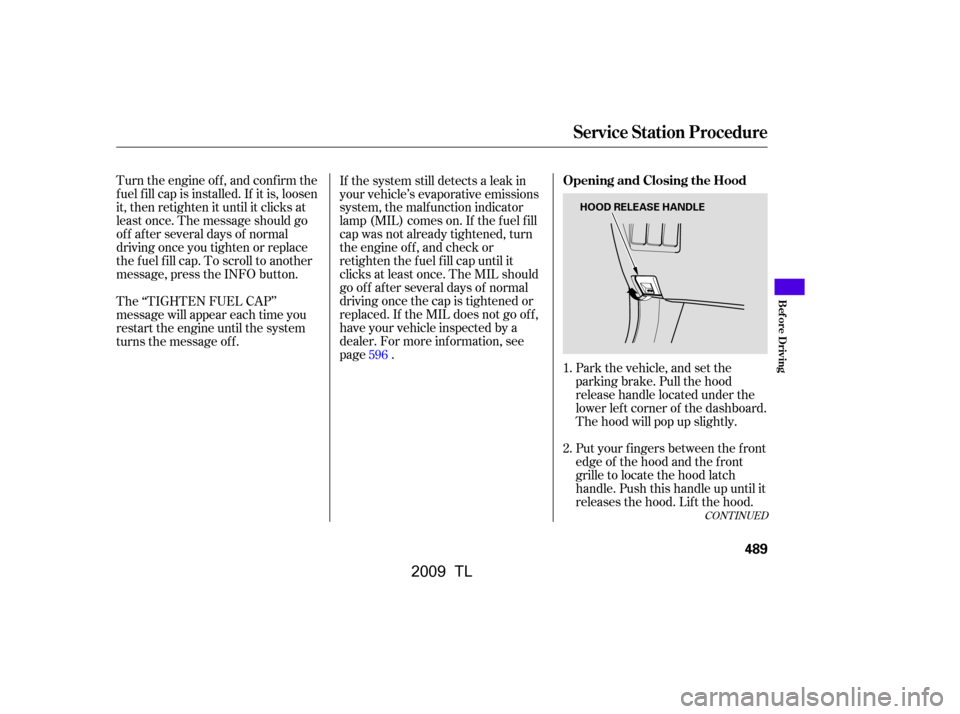
Park the vehicle, and set the
parking brake. Pull the hood
release handle located under the
lower lef t corner of the dashboard.
The hood will pop up slightly.
Put your f ingers between the f ront
edge of the hood and the f ront
grille to locate the hood latch
handle. Push this handle up until it
releases the hood. Lif t the hood.
The ‘‘TIGHTEN FUEL CAP’’
message will appear each time you
restart the engine until the system
turns the message of f .
1.
2.
596
CONT INUED
Service Station Procedure
Opening and Closing the Hood
Bef ore Driving
489
HOOD RELEASE HANDLE
�\f���—�\f���—�����y�
�������������y���
�)� �����\f�\f�y�\f�������y
2009 TL
Page 495 of 648
�µ
�µ �µ
�µ
Fuel economy is not a f ixed number.
It varies based on driving conditions,
driving habits and vehicle condition.
Theref ore, it is not possible f or one
set of estimates to predict f uel
economy precisely f or all drivers in
all environments.
Provides an estimated annual f uel
cost, based on 15,000 miles (20,000
km) per year multiplied by the cost
pergallon(basedonEPAfuelcost
data) divided by the combined f uel
economy.
For more inf ormation on f uel
economy ratings and factors that
af f ect f uel economy, visit(Canada: Visit
)
Represents urban
driving in a vehicle in light traf f ic. A
range of miles per gallon achieved is
also provided.
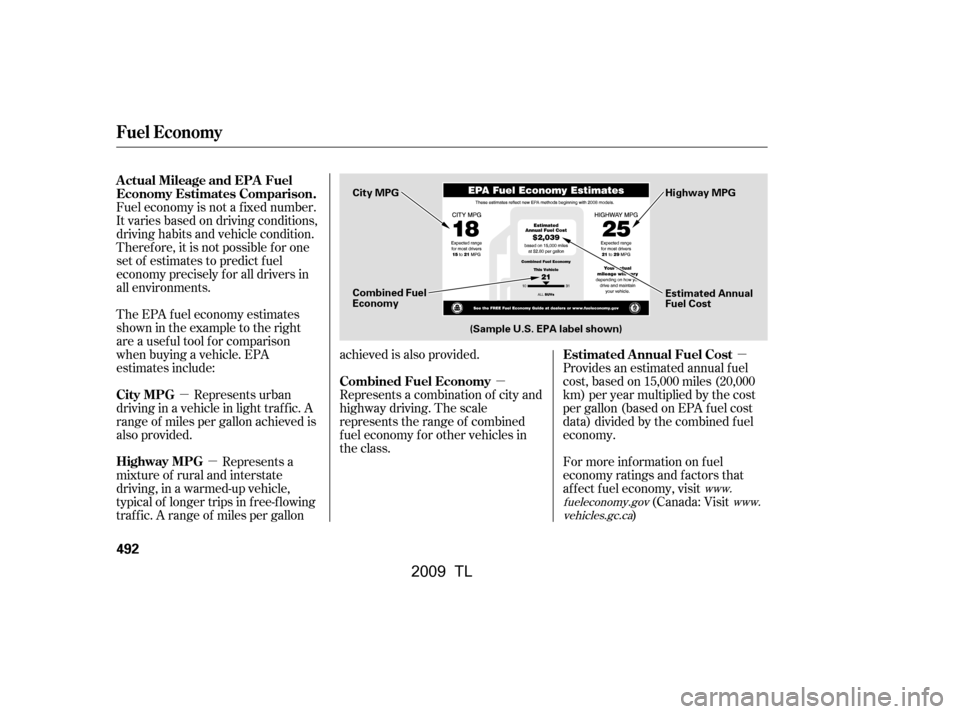
The EPA f uel economy estimates
shownintheexampletotheright
are a usef ul tool f or comparison
when buying a vehicle. EPA
estimates include:
Represents a combination of city and
highway driving. The scale
represents the range of combined
f uel economy f or other vehicles in
the class.
Represents a
mixture of rural and interstate
driving, in a warmed-up vehicle,
typical of longer trips in f ree-f lowing
traf f ic. A range of miles per gallon achieved is also provided.
www.
fueleconomy.gov www.
vehicles.gc.ca
Actual Mileage and EPA Fuel
Economy Estimates Comparison.
Estimated Annual Fuel Cost
City MPG Combined Fuel Economy
Highway MPG
Fuel Economy
492
Combined Fuel
Economy (Sample U.S. EPA label shown) Estimated Annual
Fuel Cost
City MPG
Highway MPG
�\f���—�\f���—�����y�
���������\f���y���
�)� �����\f�\f�y�\f�������y
2009 TL
Page 498 of 648

Modif ying your vehicle, or installing
some non-Acura accessories, can
make it unsaf e. Bef ore you make any
modif ications or add any accessories,
be sure to read the f ollowing
inf ormation.
Your dealer has Acura accessories
that allow you to personalize your
vehicle. These accessories have
been designed and approved f or your
vehicle, and are covered by warranty.Bef ore installing any accessory:
Make sure the accessory does not
obscure any lights, or interf ere
with proper vehicle operation or
perf ormance.
Although non-Acura accessories may
f it on your vehicle, they may not
meet f actory specif ications, and
could adversely af f ect your vehicle’s
handling and stability. Bef ore installing any electronic
accessory, have the installer
contact your dealer for assistance.
If possible, have your dealer
inspect the f inal installation.
Do not install accessories on the
side pillars or across the rear
windows. Accessories installed in
theseareasmayinterferewith
proper operation of the side
curtain airbags.
Be sure electronic accessories do
not overload electrical circuits
(see page ) or interf ere with
proper operation of your vehicle.
When properly installed, cellular
phones, alarms, two-way radios, and
low-powered audio systems should
not interf ere with your vehicle’s
computer controlled systems, such
as your airbags, anti-lock brakes, and
tire pressure monitoring system. 599
A ccessories
A ccessories and Modif ications
Bef ore Driving
495
Improper accessories or
modifications can affect your
vehicle’s handling, stability, and
performance, and cause a
crash in which you can be hurt
or killed.
Follow all instructions in this
owner’s manual regarding
accessories and modifications.
�\f���—�\f���—�����y�
�������������y���
�)� �����\f�\f�y�\f���\f�\f�y
2009 TL
Page 505 of 648

Make sure all windows, mirrors,
and outside lights are clean and
unobstructed. Remove f rost, snow,
or ice.Check the seat adjustment (see
page ).
Check the adjustment of the
inside and outside mirrors (see
page ).
Check the steering wheel
adjustment (see page ).
Make sure the doors are securely
closed and locked.
Fasten your seat belt. Check that
your passengers have f astened
their seat belts (see page ).When you start the engine, check
the gauges and indicators in the
instrument panel, and the
messages on the multi-inf ormation
display (see pages , and
).
Youshoulddothesechecksand
adjustments bef ore you drive your
vehicle:
Check that the hood is f ully closed.
Check that the trunk is f ully
closed.
Visually check the tires. If a tire
looks low, use a gauge to check its
pressure.
Check that any items you may be
carrying are stored properly or
f astened down securely.
3.
2.
1.
7.
8.
9.
4.
5. 6.
155
63 75
77
16
161
140
10. 11.
Preparing to Drive
502
�����—�����—�����y�
�������������y���
�)� ���������y���������y
2009 TL


