2009.5 Peugeot 308 CC Dag ignition
[x] Cancel search: ignitionPage 17 of 256

1
35
INSTRUMENTS and CONTROLS
Manual Check
System which informs the driver of the
warnings present and of the activated
or deactivated status of the functions.
With the engine running, to start a
manual check, press the "CHECK/000"
button on the instrument panel.
If no "major" faults have been detected,
"CHECK OK" appears on the large in-
strument panel screen. If a "minor" fault has been detected, the
warning lamp concerned then
"CHECK
OK" appear on the large instrument
panel screen. Consult a PEUGEOT
dealer.
If a "major" fault has been detected, only
the warning lamps concerned appear on
the large instrument panel screen. Have
it checked by a PEUGEOT dealer.
Total distance recorder
System which measures the total dis-
tance travelled by the vehicle during its
life. The total and trip distances are dis-
played for thirty seconds when the ig-
nition is switched off, when the driver's
door is opened and when the vehicle is
locked or unlocked.
Trip distance recorder
System which measures a distance
travelled since it was reset to zero by
the driver.
With the ignition on, press the button
until zeros appear.
Page 26 of 256
2
i
i
44
MULTIFUNCTION SCREENS
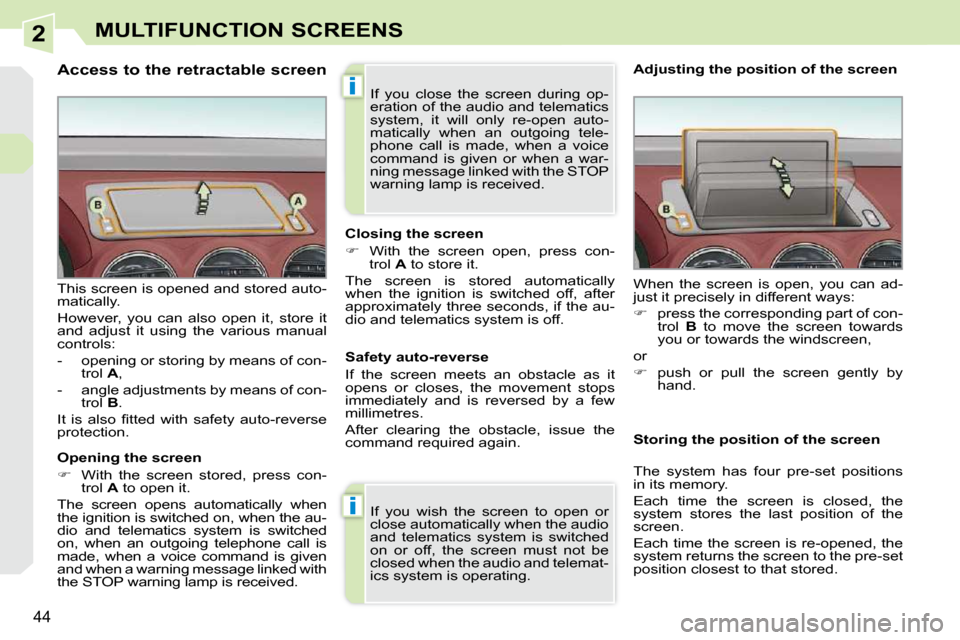
Access to the retractable screen
Opening the screen
With the screen stored, press con-
trol A to open it.
The screen opens automatically when
the ignition is switched on, when the au-
dio and telematics system is switched
on, when an outgoing telephone call is
made, when a voice command is given
and when a warning message linked with
the STOP warning lamp is received.
This screen is opened and stored auto-
matically.
However, you can also open it, store it
and adjust it using the various manual
controls:
- opening or storing by means of con-
trol A ,
- angle adjustments by means of con- trol B .
It is also fi tted with safety auto-reverse
protection. Closing the screen
With the screen open, press con-
trol A to store it.
The screen is stored automatically
when the ignition is switched off, after
approximately three seconds, if the au-
dio and telematics system is off.
If you wish the screen to open or
close automatically when the audio
and telematics system is switched
on or off, the screen must not be
closed when the audio and telemat-
ics system is operating. When the screen is open, you can ad-
just it precisely in different ways:
press the corresponding part of con-
trol B to move the screen towards
you or towards the windscreen,
or
push or pull the screen gently by
hand.
Adjusting the position of the screen
Safety auto-reverse
If the screen meets an obstacle as it
opens or closes, the movement stops
immediately and is reversed by a few
millimetres.
After clearing the obstacle, issue the
command required again. Storing the position of the screen
The system has four pre-set positions
in its memory.
Each time the screen is closed, the
system stores the last position of the
screen.
Each time the screen is re-opened, the
system returns the screen to the pre-set
position closest to that stored.
If you close the screen during op-
eration of the audio and telematics
system, it will only re-open auto-
matically when an outgoing tele-
phone call is made, when a voice
command is given or when a war-
ning message linked with the STOP
warning lamp is received.
Page 41 of 256
3
i
58
COMFORT
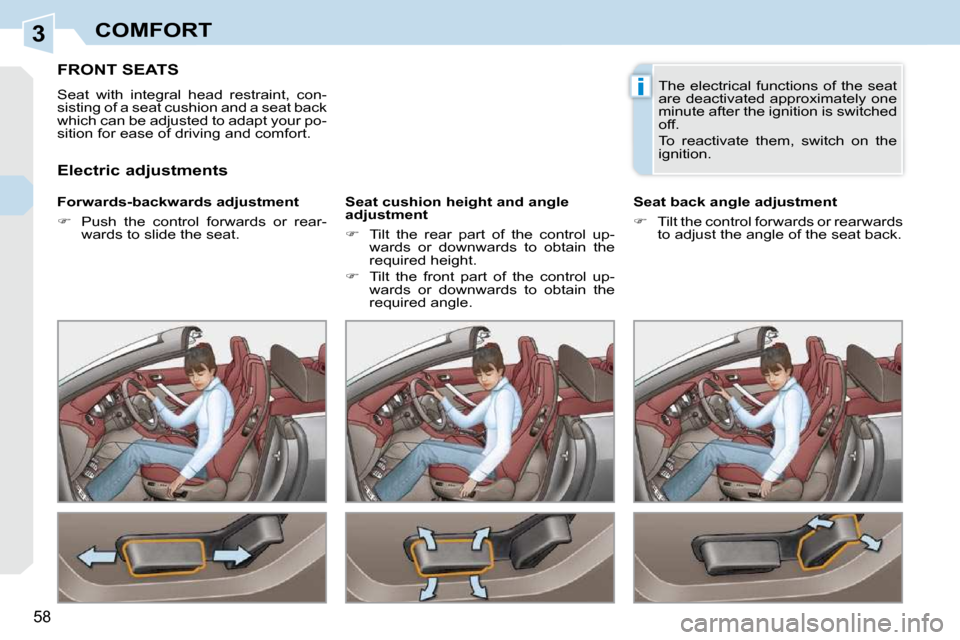
FRONT SEATS
Seat with integral head restraint, con-
sisting of a seat cushion and a seat back
which can be adjusted to adapt your po-
sition for ease of driving and comfort.
Forwards-backwards adjustment
Push the control forwards or rear-
wards to slide the seat. Seat cushion height and angle
adjustment
Tilt the rear part of the control up-
wards or downwards to obtain the
required height.
Tilt the front part of the control up-
wards or downwards to obtain the
required angle. Seat back angle adjustment
Tilt the control forwards or rearwards
to adjust the angle of the seat back.
Electric adjustments The electrical functions of the seat
are deactivated approximately one
minute after the ignition is switched
off.
To reactivate them, switch on the
ignition.
Page 44 of 256

3
i
!
!
61
COMFORT
STORING DRIVING POSITIONS
System which takes into account the
electrical settings of the driver's seat
and exterior mirrors. It enables you to
store up to two positions using the but-
tons on the side of the driver's seat and
two further driving positions using the
two remote control keys. Recalling a stored position
Storing a position Storing a new position cancels the
previous position.
When the ignition is off, after a few
consecutive position recalls, the
function will be deactivated until
the engine is started, to prevent
discharging of the battery.
Using the remote control keys
When the vehicle is locked, the remote
control key stores the position of the
driver's seat and exterior mirrors.
Each remote control key can store one
specifi c setting.
Using buttons M/1/2
Press and hold button 1 or 2 until
the audible signal is heard indicat-
ing the end of the adjustment.
Using the remote control keys
When the vehicle is unlocked, the driv-
er's seat and the exterior mirrors return
to the position stored by the remote
control key.
Using buttons M/1/2
Switch on the ignition.
Adjust your seat and your exterior
mirrors.
Press button M , then press button 1
or 2 within four seconds.
An audible signal is heard indicating that the storing has been taken into
account.
REAR SEATS
Fixed two-seat bench fi tted with roll-
over bars to guarantee your protection
should the vehicle roll over.
Do not place any covering on the
rear head restraints. Use a spe-
cial cover recommended by the
PEUGEOT network.
The rear head restraints are fi xed. They
incorporate the roll-over hoops (re-
fer to the section "Safety - § Roll-over
hoops").
The rear bench seat may be fi tted with a
folding comfort armrest in the centre of
the seat back.
Page 45 of 256

3
i
!
!
61
COMFORT
STORING DRIVING POSITIONS
System which takes into account the
electrical settings of the driver's seat
and exterior mirrors. It enables you to
store up to two positions using the but-
tons on the side of the driver's seat and
two further driving positions using the
two remote control keys. Recalling a stored position
Storing a position Storing a new position cancels the
previous position.
When the ignition is off, after a few
consecutive position recalls, the
function will be deactivated until
the engine is started, to prevent
discharging of the battery.
Using the remote control keys
When the vehicle is locked, the remote
control key stores the position of the
driver's seat and exterior mirrors.
Each remote control key can store one
specifi c setting.
Using buttons M/1/2
Press and hold button 1 or 2 until
the audible signal is heard indicat-
ing the end of the adjustment.
Using the remote control keys
When the vehicle is unlocked, the driv-
er's seat and the exterior mirrors return
to the position stored by the remote
control key.
Using buttons M/1/2
Switch on the ignition.
Adjust your seat and your exterior
mirrors.
Press button M , then press button 1
or 2 within four seconds.
An audible signal is heard indicating that the storing has been taken into
account.
REAR SEATS
Fixed two-seat bench fi tted with roll-
over bars to guarantee your protection
should the vehicle roll over.
Do not place any covering on the
rear head restraints. Use a spe-
cial cover recommended by the
PEUGEOT network.
The rear head restraints are fi xed. They
incorporate the roll-over hoops (re-
fer to the section "Safety - § Roll-over
hoops").
The rear bench seat may be fi tted with a
folding comfort armrest in the centre of
the seat back.
Page 46 of 256
3
!
i
i
!
62
COMFORT
The objects observed are, in real-
ity, closer than they appear.
Take this into account in order to
correctly judge the distance of ve-
hicles approaching from behind.
MIRRORS
Exterior mirrors
Each fi tted with an adjustable mirror
glass permitting the lateral rearward vi-
sion necessary for overtaking or park-
ing. They can also be folded for parking
in confi ned spaces. Folding
From outside: lock the vehicle using
the remote control or the key.
From inside: with the ignition on, pull
control A rearwards.
The folding and unfolding of the
exterior mirrors using the remote
control can be deactivated by a
PEUGEOT dealer.
Demisting - defrosting Unfolding
From outside: unlock the vehicle us-
ing the remote control or the key.
From inside: with the ignition on, pull
control A rearwards.
If the mirrors are folded using con-
trol
A , they will not unfold when the
vehicle is unlocked. Pull again on
control A .
If your vehicle is fi tted with
heated mirrors, the demisting-
defrosting operates with the
engine running, by switching
on the heated rear screen (re-
fer to the "Demisting-defrosting the rear
screen" section).
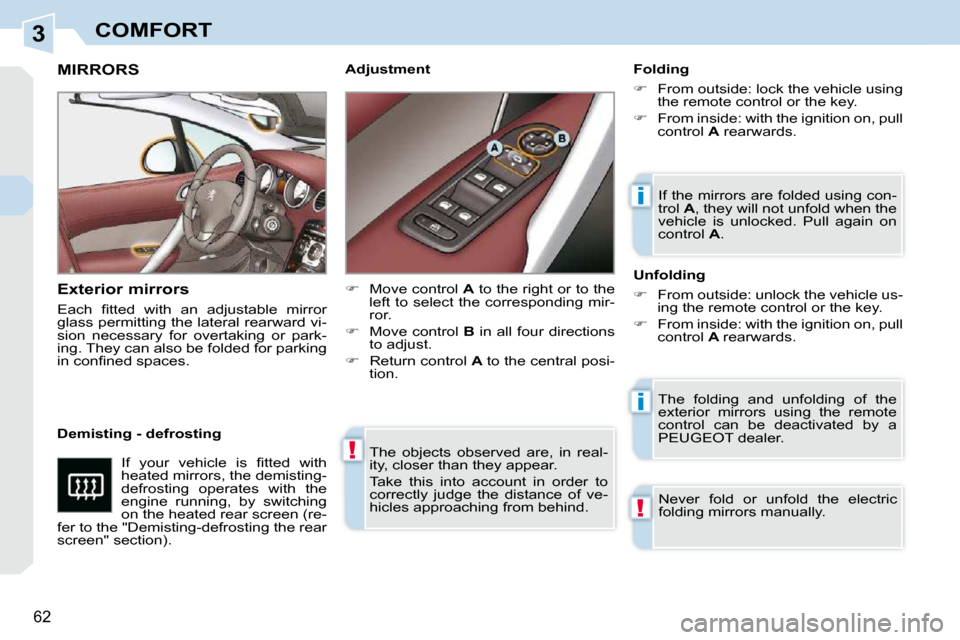
Move control A to the right or to the
left to select the corresponding mir-
ror.
Move control B in all four directions
to adjust.
Return control A to the central posi-
tion.
Never fold or unfold the electric
folding mirrors manually.
Adjustment
Page 53 of 256
4
67
ACCESS
Locating your vehicle
Press the closed padlock
to locate your locked vehi-
cle in a car park. Electronic engine immobiliser
The key contains an electronic chip
which has a special code. When the
ignition is switched on, this code must
be recognised in order for starting to be
possible.
This electronic engine immobiliser locks
the engine management system a few
minutes after the ignition is switched off
and prevents starting of the engine by
anyone who does not have the key.
Anti-theft protection
In the event of a malfunction,
you are informed by lighting of
this warning lamp, an audible
signal and a message on the
multifunction screen.
In this case, your vehicle does not start;
contact a PEUGEOT dealer as soon as
possible.
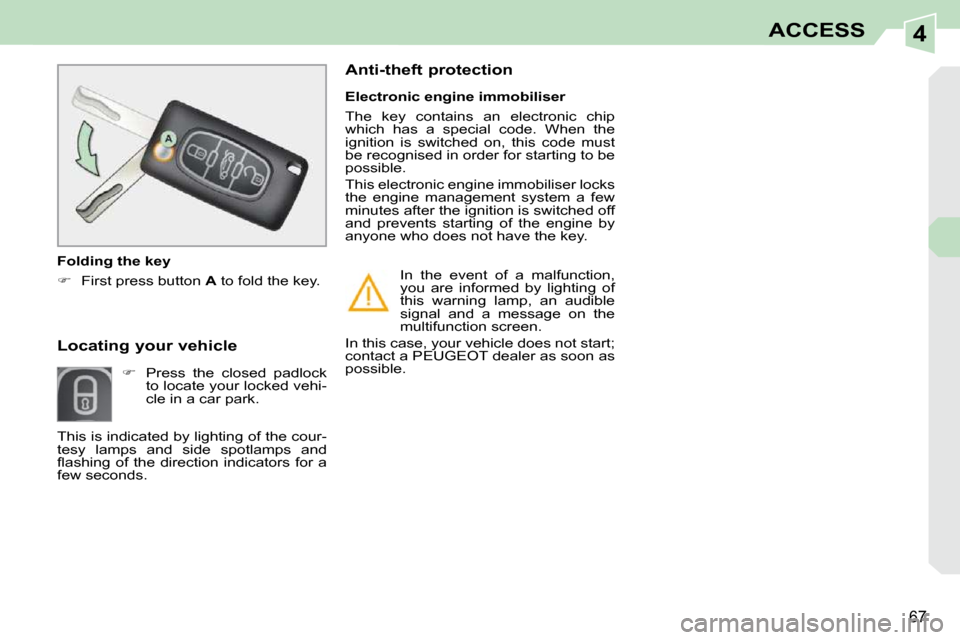
Folding the key
First press button A to fold the key.
This is indicated by lighting of the cour-
tesy lamps and side spotlamps and
fl ashing of the direction indicators for a
few seconds.
Page 54 of 256

4
i
68
ACCESS
Starting the vehicle
Insert the key in the ignition switch.
The system recognises the starting code.
Turn the key fully towards the dash-
board to position 3 (Starting) .
When the engine starts, release the
key.
Switching the vehicle off
Immobilise the vehicle.
Turn the key fully towards you to po-
sition 1 (Stop) .
Remove the key from the ignition
switch. Remote control problem
Following disconnection of the vehicle
battery, replacement of the remote con-
trol battery or in the event of a remote
control malfunction, you can no longer
unlock, lock or locate your vehicle.
First of all, use the key in the lock to
unlock or lock your vehicle.
Then, reinitialise the remote control.
If the problem persists, contact a
PEUGEOT dealer as soon as possible. Changing the battery
Battery ref.: CR1620/3 volts.
Reinitialisation
Switch off the ignition.
Turn the key to position 2 (Ignition) .
Press the closed padlock immedi-
ately for a few seconds.
Switch off the ignition and remove
the key from the ignition switch.
The remote control is fully operational
again.
Unclip the casing using a coin at the
notch.
Slide the fl at battery out of its location.
Slide the new battery into its loca-
tion observing the original direction.
Clip the casing.
Reinitialise the remote control.
This replacement battery is available
from PEUGEOT dealers.
If the battery is fl at, you are
informed by lighting of this warn-
ing lamp, an audible signal and
a message on the multifunction
screen.
Key left in the "Ignition"
position
If the key has been left in the ig-
nition switch, the ignition will be
switched off automatically after
one hour.
To switch the ignition back on, turn
the key to position
1 (Stop) , then
back to position 2 (Ignition) .