Page 110 of 238
OTHER FUNCTIONS
1262008 TUNDRA Navigation from Oct.07 Prod.(OM34469U)
CAUTION: Radio Frequency Radiation
Exposure
This equipment complies with FCC radi-
ation exposure limits set forth for uncon-
trolled equipment and meets the FCC ra-
dio frequency (RF) Exposure Guidelines
in Supplement C to OET65. This equip-
ment has very low levels of RF energy
that it deemed to comply without maxi-
mum permissive exposure evaluation
(MPE). But it is desirable that it should be
installed and operated with at least 20 cm
and more between the radiator and per-
son’s body (excluding extremities:
hands, wrists, feet and legs).
Colocation: This transmitter must not
be co−located or operated in conjunction
with any other antenna or transmitter.— Enter a Bluetooth� phone
To use the handsfree system, you need
to enter your phone into the system. Once
you have registered it, you can make a
handsfree call.
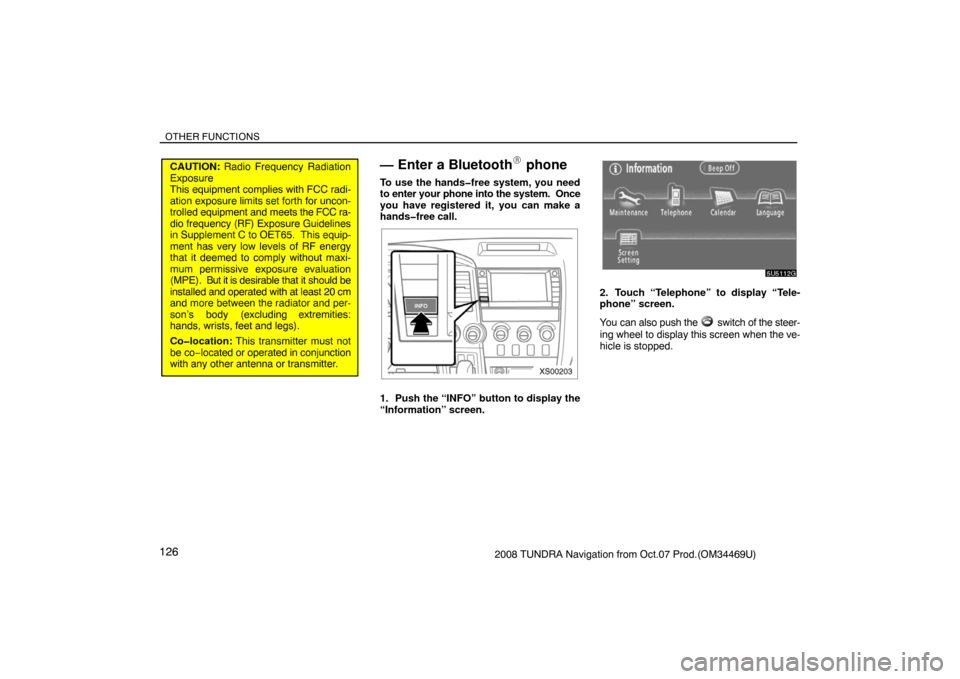
XS00203
1. Push the “INFO” button to display the
“Information” screen.
5U5112G
2. Touch “Telephone” to display “Tele-
phone” screen.
You can also push the
switch of the steer-
ing wheel to display this screen when the ve-
hicle is stopped.
Page 111 of 238
OTHER FUNCTIONS
1272008 TUNDRA Navigation from Oct.07 Prod.(OM34469U)
5U5139G
3. Touch “Settings” to display “Settings”
screen.
5U5140G
4. Touch “Bluetooth∗” to display the
“Bluetooth∗ Settings” screen.
∗: Bluetooth is a registered trademark of
Bluetooth SIG. Inc.
5U5141G
5. Touch “Register” to connect your cel-
lular phone to the system.
XS00126
6. When this screen is displayed, input
the Passkey displayed on the screen into
the phone.
For the operation of the phone, see the manu-
al that comes with your cellular phone.
If you want to cancel it, touch “Cancel”.
5U5143G
7. When the connection is completed,
this screen is displayed.
You do not need to enter the phone in case of
using the same one.
5U5144G
When this screen is displayed, follow the
guidance on the screen to try again.
Page 112 of 238
OTHER FUNCTIONS
1282008 TUNDRA Navigation from Oct.07 Prod.(OM34469U)
�Connecting a Bluetooth� phone
(i) Automatically
5U5145G
When you register your phone, auto con-
nection will be turned on. Always set it to
this mode and leave the Bluetooth
� phone
in a condition where connection can be
established.
Each time you touch “Auto Connect”, auto
connection will be switched on or off.
5U5309G
When the engine switch is turned to the
ACC or ON position, the selected Blue-
tooth
� phone will be automatically con-
nected and the connection result is dis-
played.
This screen appears when the Bluetooth
�
phone is first connected after the engine
switch is turned to the ACC or ON position.(ii) Manually
When the auto connection failed or turned
off, you have to connect Bluetooth
�
manually.
5U5146G
Touch “Connect” after having enabled the
Bluetooth� connection on the phone.
5U5147G
When the connection is completed, this
screen is displayed.
Now you can use the Bluetooth
� phone.
Page 113 of 238
OTHER FUNCTIONS
1292008 TUNDRA Navigation from Oct.07 Prod.(OM34469U)
�Reconnecting the Bluetooth� phone
If the Bluetooth
� phone is disconnected
with a poor reception from the Bluetooth�
network when the engine switch is turned
to the ACC or ON position, the system au-
tomatically reconnects the Bluetooth
�
phone. In this case, the connection result
is not displayed.
If the Bluetooth
� is disconnected on purpose
such as you turned your cellular phone OFF,
this does not happen. Reconnect it by the fol-
lowing methods.
�Select the Bluetooth� phone again.
�Enter the Bluetooth� phone.
— Call on the Bluetooth�
phone
After you enter the Bluetooth� phone, you
can call by using handsfree system. You
can call using the 7 methods described
below.
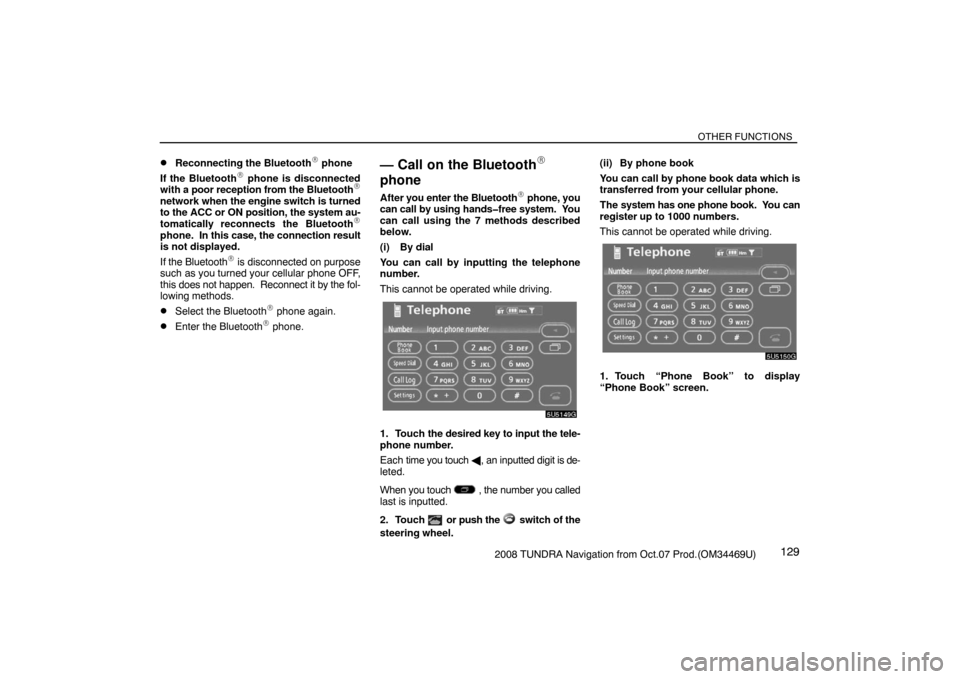
(i) By dial
You can call by inputting the telephone
number.
This cannot be operated while driving.
5U5149G
1. Touch the desired key to input the tele-
phone number.
Each time you touch �, an inputted digit is de-
leted.
When you touch
, the number you called
last is inputted.
2. Touch
or push the switch of the
steering wheel.(ii) By phone book
You can call by phone book data which is
transferred from your cellular phone.
The system has one phone book. You can
register up to 1000 numbers.
This cannot be operated while driving.
5U5150G
1. Touch “Phone Book” to display
“Phone Book” screen.
Page 114 of 238
OTHER FUNCTIONS
1302008 TUNDRA Navigation from Oct.07 Prod.(OM34469U)
5U5151G
2. Select the desired number from the list.
5U5152G
3. Touch or push the switch of the
steering wheel.(iii) By dialed numbers
You can call by dialed number. The sys-
tem memorizes up to 5 dialed numbers. If
it is over than 5, the oldest number is de-
leted.
This cannot be operated while driving.
5U5153G
1. Touch “Call Log” to display “Outgoing
Calls” screen.
5U5154G
�When you call by phone book, the name
(if registered) is displayed.
�When you call the same number
continuously, only the newest number is
registered.
2. Select the desired number from the list.
5U5156G
3. Touch or push the switch of the
steering wheel.
Page 115 of 238
OTHER FUNCTIONS
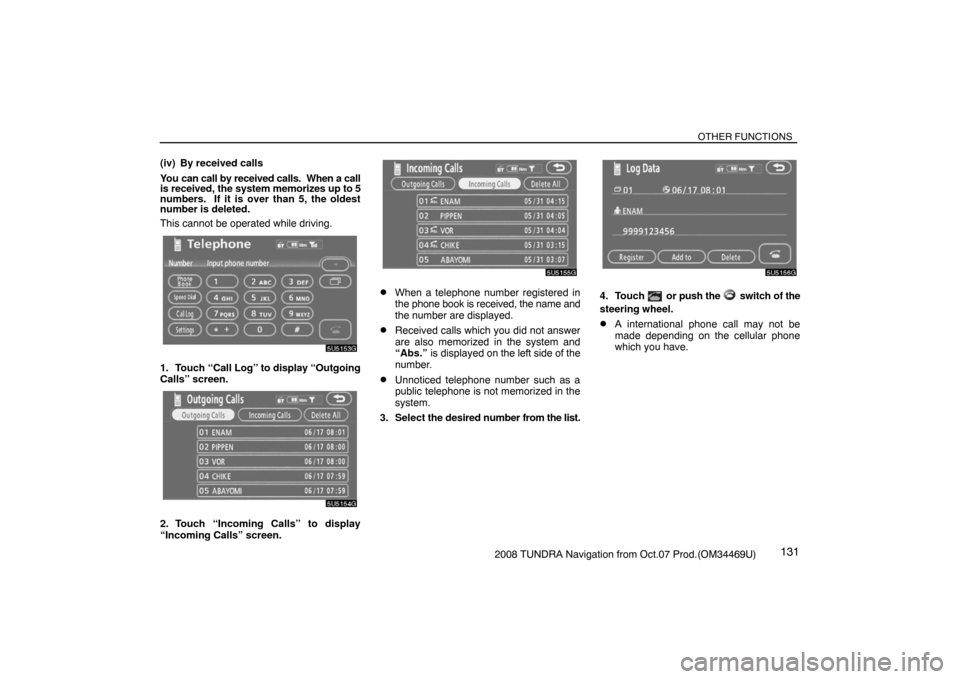
1312008 TUNDRA Navigation from Oct.07 Prod.(OM34469U) (iv) By received calls
You can call by received calls. When a call
is received, the system memorizes up to 5
numbers. If it is over than 5, the oldest
number is deleted.
This cannot be operated while driving.
5U5153G
1. Touch “Call Log” to display “Outgoing
Calls” screen.
5U5154G
2. Touch “Incoming Calls” to display
“Incoming Calls” screen.
5U5155G
�When a telephone number registered in
the phone book is received, the name and
the number are displayed.
�Received calls which you did not answer
are also memorized in the system and
“Abs.” is displayed on the left side of the
number.
�Unnoticed telephone number such as a
public telephone is not memorized in the
system.
3. Select the desired number from the list.
5U5156G
4. Touch or push the switch of the
steering wheel.
�A international phone call may not be
made depending on the cellular phone
which you have.
Page 116 of 238
OTHER FUNCTIONS
1322008 TUNDRA Navigation from Oct.07 Prod.(OM34469U) (v) By speed dial
You can call by registered telephone num-
ber which you selected from a phone
book, dialed numbers and received calls.
(See page 138 for registering the speed
dial.)
5U5157G
1. Touch “Speed Dial” to display “Speed
Dial” screen.
5U5158G
2. Touch the desired number to call. You
can change the page by touching “Speed
Dial 2” or “Speed Dial 3”.
When you push the telephone button while
driving, the screen above appears. Touch the
desired name to call. (The telephone number
is not displayed.)(vi) By voice recognition
XS00127
You can call by giving a command. (For the
operation and command of voice recogni-
tion, see “Speech command system” on
page 165 and “Help screen” on page 167.)
Page 117 of 238

OTHER FUNCTIONS
1332008 TUNDRA Navigation from Oct.07 Prod.(OM34469U)
�Dialing by name
You can call by giving a voice tag regis-
tered in the phone book. For setting the
voice recognition, see “Setting the voice
recognition” on page 149.
Example: Call DAD
XS00129
You: Push the talk switch.
System: “After the beep, please say the
name.”
You: “DAD.”
System: “DAD chosen, when ready, please
briefly push the talk switch or push
the off−hook switch to dial.”
You: Push the talk switch.
System: “After the beep, please say “Dial”.”
You: “Dial.”
System: “Dialing the name.”
Now you can call DAD.
XS00128
“Next” is displayed when multiple entries are
found for a searched name.
Up to 6 entries can be displayed including the
first searched one.
Do the following to change the entry to the
next one.
�Touch “Next”
�Push the talk switch to say “Next
Candidate”.
Calling without the voice recognition
After the entry number is displayed, you can
also call by pushing the telephone switch or
touching “Dial”.