Page 254 of 496
242
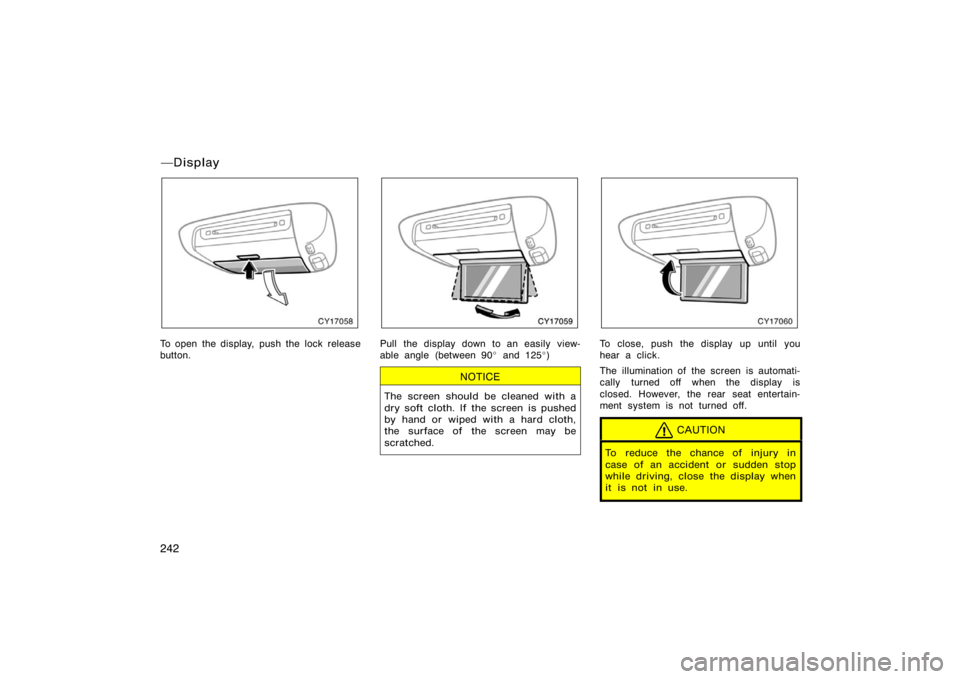
CY17058
To open the display, push the lock release
button.
CY17059
Pull the display down to an easily view-
able angle (between 90� and 125 �)
NOTICE
The screen should be cleaned with a
dry soft cloth. If the screen is pushed
by hand or wiped with a hard cloth,
the surface of the screen may be
scratched.
CY17060
To close, push the display up until you
hear a click.
The illumination of the screen is automati-
cally turned off when the display is
closed. However, the rear seat entertain-
ment system is not turned off.
CAUTION
To reduce the chance of injury in
case of an accident or sudden stop
while driving, close the display when
it is not in use.
�Display
Page 257 of 496
245
USING THE CONTROLLER
To use the rear seat entertainment sys-
tem controller, direct the signal output
portion of the controller to the signal
reception portion of the rear seat enter-
tainment system display.
The controller does not operate properly
when the signal reception portion of the
display is exposed to direct sunlight.
Block the display from direct sunlight.
CAUTION
To reduce the chance of injury in
case of an accident or a sudden stop
while driving, stow the controller in
the console box or front seat side
table when it is not in use.
NOTICE
Observe the followings, otherwise the
controller may be damaged.
�Do not drop or strongly knock the
controller against hard objects.
� Do not sit on or place heavy ob-
jects on the controller.
� Do not leave the controller exposed
to high temperatures (such as on
the instrument panel) for a long
time.
Page 262 of 496
250
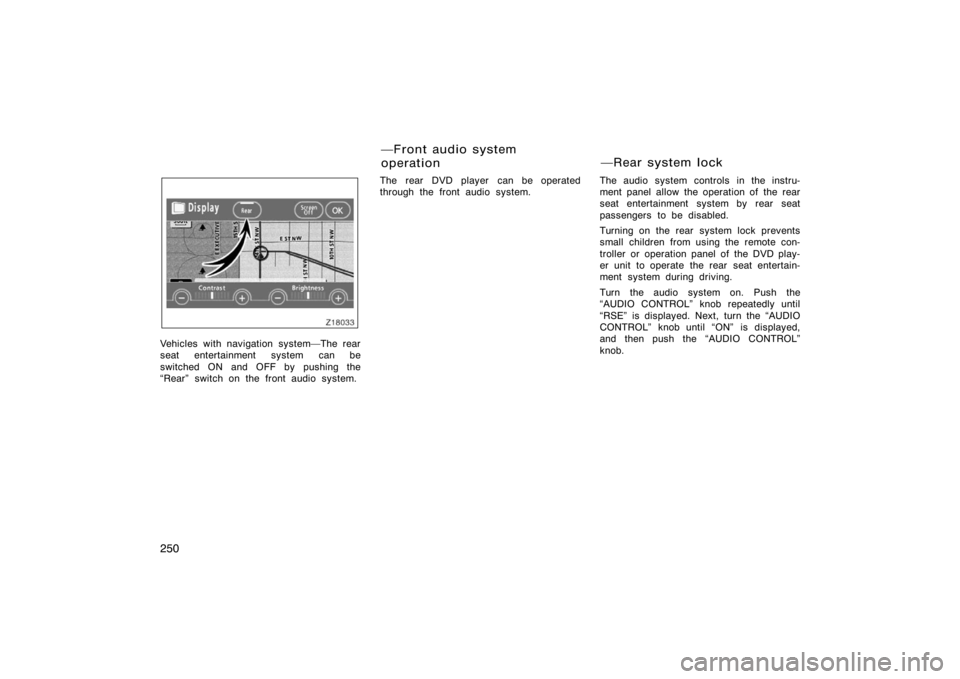
Z18033
Vehicles with navigation system�The rear
seat entertainment system can be
switched ON and OFF by pushing the
�Rear" switch on the front audio system.The rear DVD player can be operated
through the front audio system.
The audio system controls in the instru-
ment panel allow the operation of the rear
seat entertainment system by rear seat
passengers to be disabled.
Turning on the rear system lock prevents
small children from using the remote con-
troller or operation panel of the DVD play-
er unit to operate the rear seat entertain-
ment system during driving.
Turn the audio system on. Push the
�AUDIO CONTROL" knob repeatedly until
�RSE" is displayed. Next, turn the �AUDIO
CONTROL" knob until �ON" is displayed,
and then push the �AUDIO CONTROL"
knob.
�Front audio system
operation
�Rear system lock
Page 263 of 496

251
Z18031E
Vehicles with navigation system�
Push the �INFO" button to change the
screen to �Screen Setting".
Push the �ON" switch on the �Screen
Setting" screen to turn on the �Rear
system lock". Then push �OK".
Z17443
When the rear system lock is on and any
button is pushed on the remote controller
or the operation panel, the screen shown
above is displayed for approximately 6
seconds.
Even when the rear system lock is turned
on during play mode, the images and
sounds continue without interruption.
The condition of the rear system lock is
maintained, even when the engine switch
is turned off.The DVD player can play audio CDs/
MP3 CDs, DVD video discs, CD texts,
dts−CDs and video CDs.
For appropriate discs for this player, see
�Audio/video system operating hints" on
page 280 in this Section.
The DVD player works when the engine
switch is in the �ACC" or �ON" position.
To turn on the DVD player, a disc must
be loaded in the player.
To turn off the player, eject the disc.
Error messages
If the player malfunctions, your audio sys-
tem will display following error messages.
If �DISC CHECK" appears on the
screen:
It indicates that the disc is dirty,
damaged or it was inserted upside down.
Clean the disc or insert it correctly.
If �REGION CODE ERROR" appears on
the screen: It indicates that the DVD re-
gion code is not set properly.
If �DVD ERROR" appears on the
screen: There is a problem inside the
player. Eject the disc. Set the disc again.
If the malfunction still exists, take your
vehicle to your Toyota dealer.
�DVD player
Page 278 of 496

266
Z18023
To enter the code of the language you
want to read, use the joystick to enter the
appropriate 4−digit language code. For de-
tails about the language codes, see the
language code list.
Push the �ENT" button on the controller.
If numbers which are not on the list are
entered and the �ENT" button is pushed,
the �Incorrect code" screen will appear.
Enter the language code you want to read
again.
To return to the �Select DVD Lang."
screen, push the �Back" switch on the
screen.
Z18024
TURNING THE ANGLE MARK ON OR
OFF
The angle mark can be turned on for
discs that are multi−angle compatible.
Each time you push the �Angle Mark"
switch on the screen, the angle mark
turns on or off alternately.
Z18025
SETTING LEVEL OF VIEWER
RESTRICTIONS
You can restrict the play back screen by
setting the viewer restrictions. You can
prevent the restriction with a password.
Some discs do not supply a restriction.
To set the level of viewer restriction, push
the �Parental Lock" switch on the �Setup
Menu" screen. The �Enter Personal Code"
screen will appear.
Page 292 of 496

280
NOTICE
To ensure correct audio/video system
operation:
�Be careful not to spill beverages
over the system.
� Do not put anything other than a
compact disc into the slot.
� Do not put anything other than a
DVD video, video CD, dts−CD or au-
dio CD into the DVD player.
� The use of a cellular phone inside
or near the vehicle may cause a
noise from the speakers of the sys-
tem which you are listening to.
However, this does not indicate a
malfunction.
RADIO RECEPTION
Usually, a problem with radio reception
does not mean there is a problem with
your radio�it is just the normal result of
conditions outside the vehicle. For example, nearby buildings and terrain
can interfere with FM reception. Power
lines or telephone wires can interfere with
AM signals. And of course, radio signals
have a limited range. The farther you are
from a station, the weaker its signal will
be. In addition, reception conditions
change constantly as your vehicle moves.
Here are some common reception prob-
lems that probably do not indicate a prob-
lem with your radio:
FM
Fading and drifting stations�Generally, the
effective range of FM is about 40 km (25
miles). Once outside this range, you may
notice fading and drifting, which increase
with the distance from the radio transmit-
ter. They are often accompanied by distor-
tion.
Multi−path�FM signals are reflective,
making it possible for two signals to reach
your antenna at the same time. If this
happens, the signals will cancel each oth-
er out, causing a momentary flutter or
loss of reception.Static and fluttering�These occur when
signals are blocked by buildings, trees, or
other large objects. Increasing the bass
level may reduce static and fluttering.
Station swapping�If the FM signal you
are listening to is interrupted or weak-
ened, and there is another strong station
nearby on the FM band, your radio may
tune in the second station until the origi-
nal signal can be picked up again.
AM
Fading�AM broadcasts are reflected by
the upper atmosphere�especially at night.
These reflected signals can interfere with
those received directly from the radio sta-
tion, causing the radio station to sound
alternately strong and weak.
Station interference�When a reflected sig-
nal and a signal received directly from a
radio station are very nearly the same
frequency, they can interfere with each
other, making it difficult to hear the broad-
cast.
Static�AM is easily affected by external
sources of electrical noise, such as high
tension power lines, lightening, or electri-
cal motors. This results in static.
Audio/video system operating
hints
Page 308 of 496
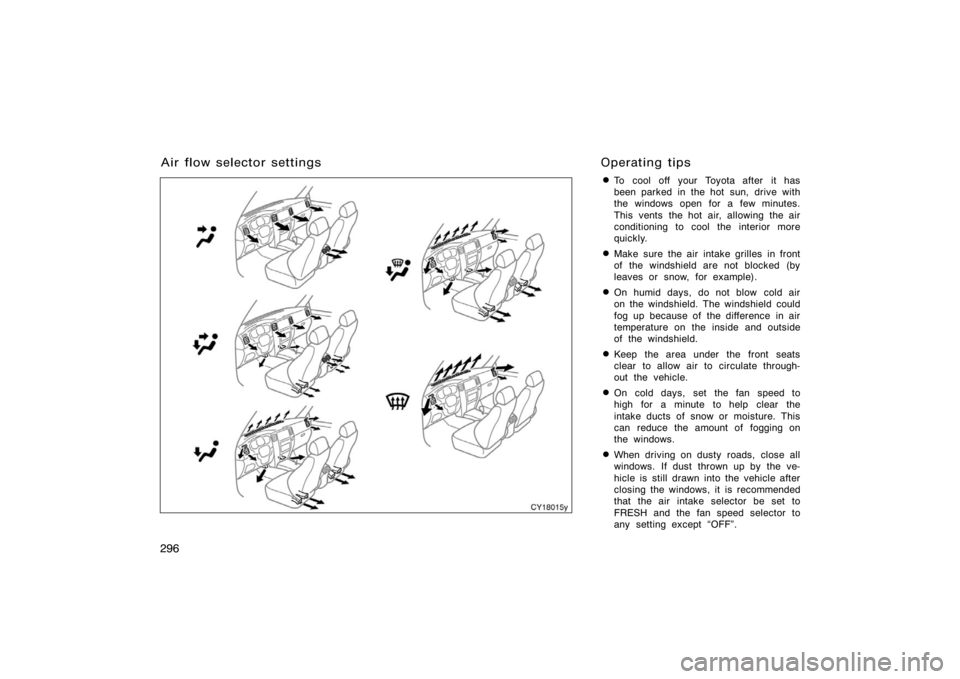
296�
To cool off your Toyota after it has
been parked in the hot sun, drive with
the windows open for a few minutes.
This vents the hot air, allowing the air
conditioning to cool the interior more
quickly.
�Make sure the air intake grilles in front
of the windshield are not blocked (by
leaves or snow, for example).
�On humid days, do not blow cold air
on the windshield. The windshield could
fog up because of the difference in air
temperature on the inside and outside
of the windshield.
�Keep the area under the front seats
clear to allow air to circulate through-
out the vehicle.
�On cold days, set the fan speed to
high for a minute to help clear the
intake ducts of snow or moisture. This
can reduce the amount of fogging on
the windows.
�When driving on dusty roads, close all
windows. If dust thrown up by the ve-
hicle is still drawn into the vehicle after
closing the windows, it is recommended
that the air intake selector be set to
FRESH and the fan speed selector to
any setting except �OFF".
Air flow selector settings
CY18015y
Operating tips
Page 316 of 496
304
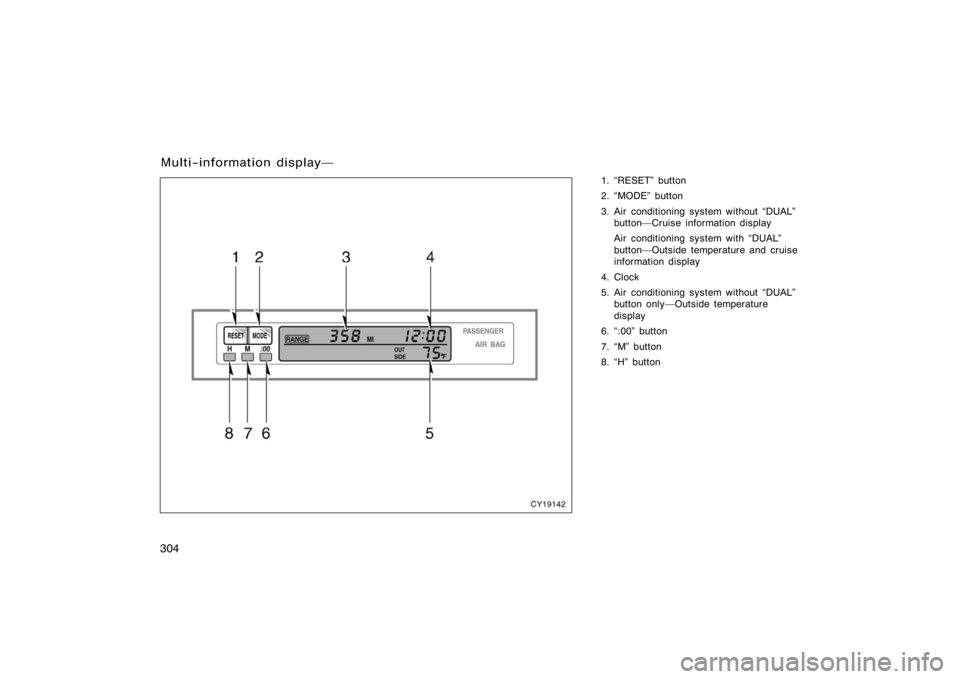
1. �RESET" button
2. �MODE" button
3. Air conditioning system without �DUAL"button�Cruise information display
Air conditioning system with �DUAL"
button�Outside temperature and cruise
information display
4. Clock
5. Air conditioning system without �DUAL" button only�Outside temperature
display
6. �:00" button
7. �M" button
8. �H" button
Multi−information display�
CY19142