2008 SUBARU TRIBECA rear view mirror
[x] Cancel search: rear view mirrorPage 74 of 409

1-50
Seat, seatbelt and SRS airbags
WARNING
Do not attach accessories to the
windshield, or fit an extra-wide mir-
ror over the rear view mirror. If the
SRS airbag deploys, those objects
could become projectiles that could
seriously injure vehicle occupants.
! Driver ’s SRS frontal airbag
The driver ’s SRS frontal airbag uses a
dual stage inflator. The inflator operates in
different ways depending on the severity
of impact, backward-forward adjustment
of the driver ’s seat position and whether or
not he/she is wearing the seatbelt.
The backward-forward adjustment of the
driver ’s seat position is monitored by the driver
’s seat position sensor under the
driver ’s seat.
Whether or not the driver is wearing the
seatbelt is monitored by the seatbelt
buckle switch.
Observe the following precautions. Failure
to do so may cause the seatbelt buckle
switch and/or the seat position sensor to
malfunction, preventing the Subaru ad-
vanced frontal airbag system from func-
tioning correctly or causing the system to
fail.
. Do not place articles/metal objects or
install any accessory other than a genuine
SUBARU accessory under the driver ’s
seat. Do not allow the rear seat occupant
to kick the driver ’s seat or push up its
bottom surface with his/her feet.
. Do not place a magnet near the
seatbelt buckle or under the driver ’s seat.
If the seatbelt buckle switch and/or the
driver ’s seat position sensor have failed,
the SRS airbag system warning light will
illuminate. Although the driver ’sSRS
frontal airbag can deploy regardless of
the backward-forward adjustment of the
driver ’s seat position even when the
warning light is on, have the system
inspected by your SUBARU dealer im-
mediately if the SRS airbag system warn-
ing light comes on.
NOTEThe driver ’s SRS side airbag, SRS
curtain airbag and seatbelt preten-
sioner are not controlled by the Subaru
advanced frontal airbag system.
! Front passenger ’s SRS frontal air-
bag
The front passenger ’s SRS frontal airbag
uses a dual stage inflator. The inflator
operates in different ways depending on
the severity of impact.
The total load on the seat is monitored by
the occupant detection system ’s weight
sensor located under the seat.
The system has another sensor that
monitors the tension of the front passen-
ger seatbelt. Using the total seat load and
seatbelt tension data from the sensors,
the occupant detection system determines
whether the front passenger ’s SRS frontal
airbag should or should not be inflated.
The occupant detection system may not
inflate the front passenger ’s SRS frontal
airbag even when the driver ’s SRS frontal
airbag deploys. This is normal.
Observe the following precautions. Failure
to do so may prevent the Subaru ad-
vanced frontal airbag system from func-
tioning correctly or cause the system to
fail.
. Do not apply any strong impact to the
ProCarManuals.com
Page 159 of 409
other similar items. Periodically wipe the
sensors clean using a piece of dry soft
cotton cloth or an applicator.
!Compass calibration
1. For optimum calibration, switch off all
nonessential electrical accessories (rear
window defogger, heater/air conditioning
system, spotlight, etc.) and ensure all
doors are shut.
2. Drive to an open, level area away from
large metallic objects or structures and
make certain the ignition switch is in the
“ON ”position.
3. Press and hold the left button for 3
seconds then release, and the compass
will enter the calibration mode. “CAL”and
direction will be displayed.
4. Drive slowly in a circle until “CAL”
disappears from the display (approxi-
mately two or three circles). The compass
is now calibrated.
5. Further calibration may be necessary
should outside influences cause the mirror
to read inaccurately. You will know that
this has occurred if your compass begins
to read in only limited directions. Should
you encounter this situation, return to step
one of the above procedure and recali-
brate the mirror. !
Compass zone adjustment
1. The zone setting is factory preset to
Zone 8. Refer to the “Compass calibration
zone” map attached to the end of this
manual to verify that the compass zone
setting is correct for your geographical
location.
2. Press and hold the right button for 3
seconds then release, and the word
“ZONE ”will briefly appear and then the
zone number will be displayed.
3. Press the right-hand button repeatedly
to cycle the display through all possible
zone settings. Stop cycling when the
correct zone setting for your location is
displayed.
4. Releasing the button for 3 seconds will
exit the zone setting mode.
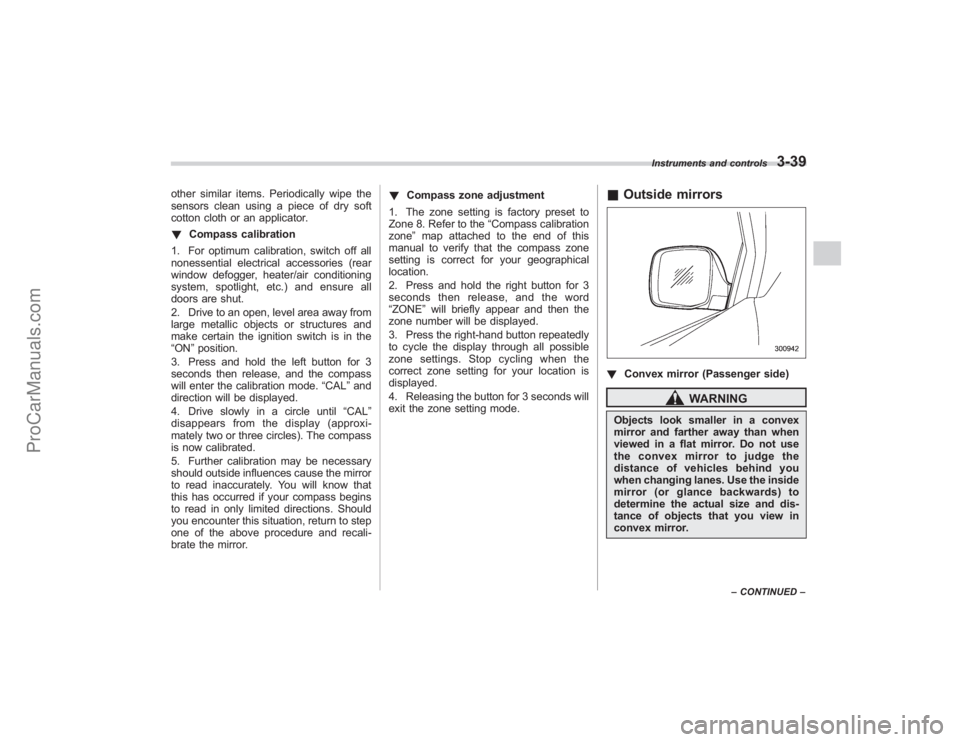
& Outside mirrors! Convex mirror (Passenger side)
WARNING
Objects look smaller in a convex
mirror and farther away than when
viewed in a flat mirror. Do not use
the convex mirror to judge the
distance of vehicles behind you
when changing lanes. Use the inside
mirror (or glance backwards) to
determine the actual size and dis-
tance of objects that you view in
convex mirror.
Instruments and controls
3-39
–CONTINUED –
ProCarManuals.com
Page 209 of 409
Interior light...................................................... 6-2
Dome light....................................................... 6-2
Cargo area light ............................................... 6-2
Rear gate light ................................................. 6-3
Automatic ambient light for center console area (if equipped) .................................................. 6-3
Map light........................................................... 6-3
Sun visors ........................................................ 6-4
Sun visor extension plate ................................. 6-4
Vanity mirror with light ..................................... 6-4
Storage compartment...................................... 6-5
Glove box........................................................ 6-5
Center console box .......................................... 6-6
Rear console .................................................... 6-7
Overhead console ............................................ 6-7
Cup holder........................................................ 6-7
Front passenger ’s cup holder ........................... 6-8
Rear seat (5-seater models)/Second-row seat (7-seater models) passenger ’s cup holder ....... 6-8
Third-row seat cup holders (7-seater models) ........................................... 6-9
Accessory power outlets ................................. 6-9
Coat hook ....................................................... 6-11
Rear (5-seater models)/Second-row
(7-seater models) passenger area .................. 6-11
Shopping bag hook........................................ 6-12
Floor mat ........................................................ 6-12 Cargo area cover (if equipped)
..................... 6-13
Using the cover.............................................. 6-13
To remove the cover ....................................... 6-14
To install the cover housing ............................ 6-14
Convenient tie-down hooks.......................... 6-15
Under-floor storage compartment ................ 6-15
5-seater models.............................................. 6-15
7-seater models .............................................. 6-16
HomeLink®Wireless Control System
(if equipped) ................................................ 6-16
Garage door opener programming in the
U.S.A. ........................................................... 6-17
Programming rolling-code-protected garage door openers in the U.S.A. .................................... 6-18
Programming for entrance gates and garage door openers in Canada ........................................ 6-19
Programming other devices ............................ 6-20
Operating the HomeLink ®Wireless Control
System ......................................................... 6-20
Reprogramming a single HomeLink ®
button .......................................................... 6-20
Erasing HomeLink ®button memory ................ 6-20
In case a problem occurs ................................ 6-20
Rear view camera (if equipped) .................... 6-21
Position of rear view camera........................... 6-22
How to use the rear view camera .................... 6-22
Viewing range on the screen ........................... 6-22
Distance marker (help line) ............................. 6-24
Interior equipment
6
ProCarManuals.com
Page 212 of 409
6-4
Interior equipment
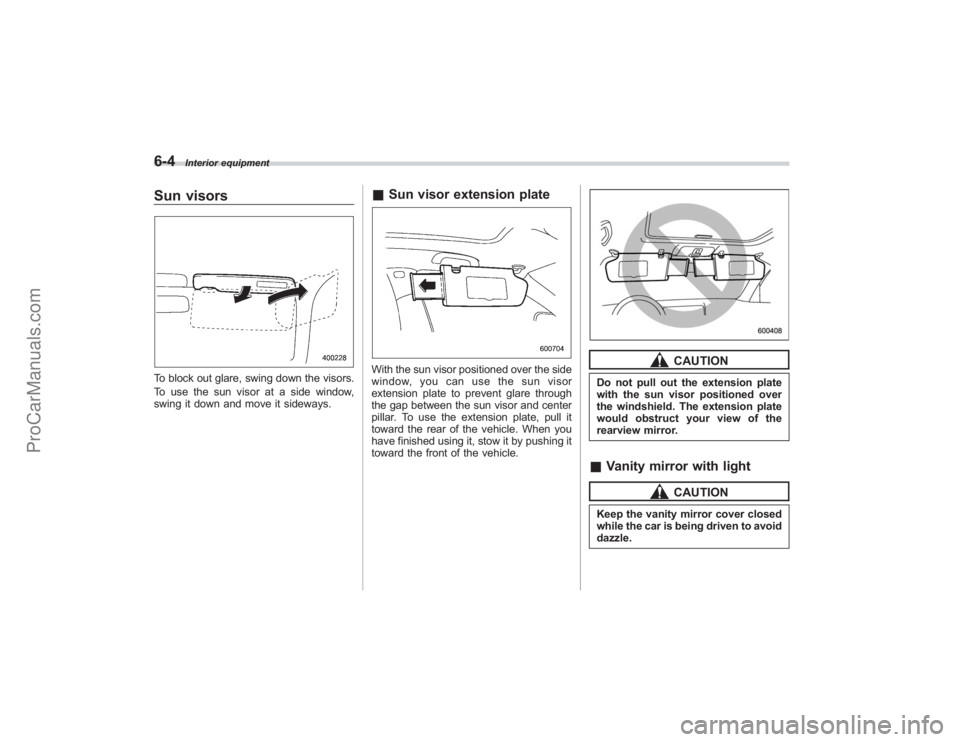
Sun visorsTo block out glare, swing down the visors.
To use the sun visor at a side window,
swing it down and move it sideways.
&Sun visor extension plateWith the sun visor positioned over the side
window, you can use the sun visor
extension plate to prevent glare through
the gap between the sun visor and center
pillar. To use the extension plate, pull it
toward the rear of the vehicle. When you
have finished using it, stow it by pushing it
toward the front of the vehicle.
CAUTION
Do not pull out the extension plate
with the sun visor positioned over
the windshield. The extension plate
would obstruct your view of the
rearview mirror.&Vanity mirror with light
CAUTION
Keep the vanity mirror cover closed
while the car is being driven to avoid
dazzle.
ProCarManuals.com
Page 230 of 409
6-22
Interior equipment
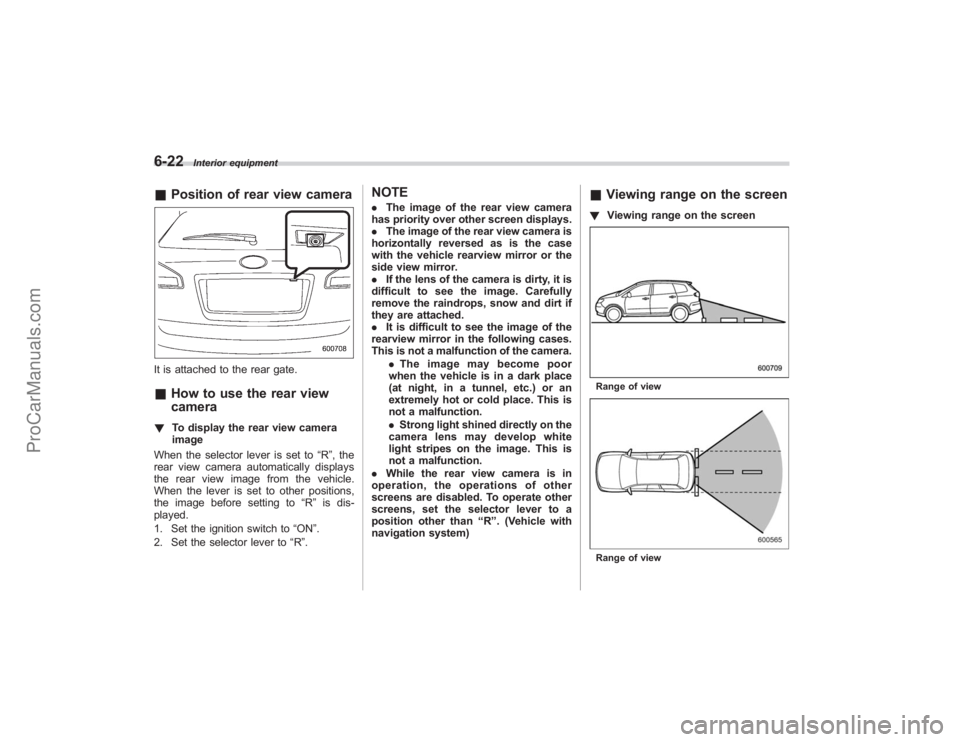
&Position of rear view cameraIt is attached to the rear gate.&How to use the rear view
camera! To display the rear view camera
image
When the selector lever is set to “R”, the
rear view camera automatically displays
the rear view image from the vehicle.
When the lever is set to other positions,
the image before setting to “R”is dis-
played.
1. Set the ignition switch to “ON”.
2. Set the selector lever to “R ”.
NOTE. The image of the rear view camera
has priority over other screen displays.
. The image of the rear view camera is
horizontally reversed as is the case
with the vehicle rearview mirror or the
side view mirror.
. If the lens of the camera is dirty, it is
difficult to see the image. Carefully
remove the raindrops, snow and dirt if
they are attached.
. It is difficult to see the image of the
rearview mirror in the following cases.
This is not a malfunction of the camera.
.The image may become poor
when the vehicle is in a dark place
(at night, in a tunnel, etc.) or an
extremely hot or cold place. This is
not a malfunction.
. Strong light shined directly on the
camera lens may develop white
light stripes on the image. This is
not a malfunction.
. While the rear view camera is in
operation, the operations of other
screens are disabled. To operate other
screens, set the selector lever to a
position other than “R ”. (Vehicle with
navigation system)
& Viewing range on the screen! Viewing range on the screenRange of viewRange of view
ProCarManuals.com
Page 293 of 409
create a traffic safety hazard.
For safety, always connect the towing
vehicle and trailer with trailer safety
chains. Pass the chains crossing each
other under the trailer tongue to prevent
the trailer from dropping onto the ground
in case the trailer tongue should discon-
nect from the hitch ball. Allow sufficient
slack in the chains taking tight-turn situa-
tions into account; however, be careful not
to let them drag on the ground.
For more information about the safety
chain connection, refer to the instructions
for your hitch and trailer.
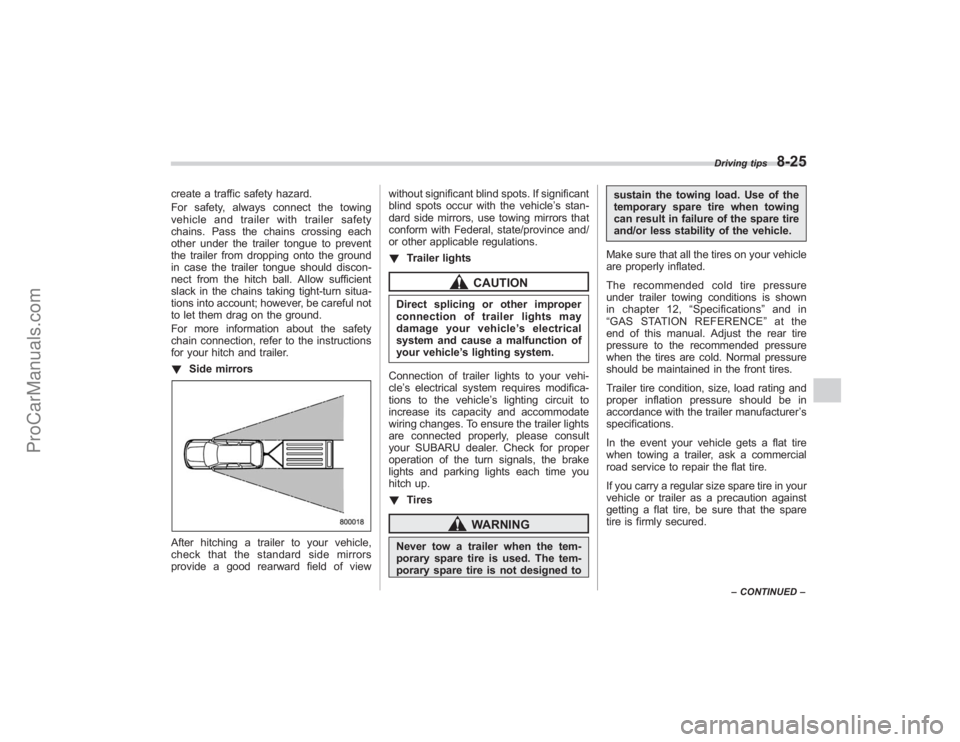
!Side mirrorsAfter hitching a trailer to your vehicle,
check that the standard side mirrors
provide a good rearward field of view without significant blind spots. If significant
blind spots occur with the vehicle’
s stan-
dard side mirrors, use towing mirrors that
conform with Federal, state/province and/
or other applicable regulations.
! Trailer lights
CAUTION
Direct splicing or other improper
connection of trailer lights may
damage your vehicle’ s electrical
system and cause a malfunction of
your vehicle ’s lighting system.
Connection of trailer lights to your vehi-
cle ’s electrical system requires modifica-
tions to the vehicle ’s lighting circuit to
increase its capacity and accommodate
wiring changes. To ensure the trailer lights
are connected properly, please consult
your SUBARU dealer. Check for proper
operation of the turn signals, the brake
lights and parking lights each time you
hitch up.
! Tires
WARNING
Never tow a trailer when the tem-
porary spare tire is used. The tem-
porary spare tire is not designed to sustain the towing load. Use of the
temporary spare tire when towing
can result in failure of the spare tire
and/or less stability of the vehicle.
Make sure that all the tires on your vehicle
are properly inflated.
The recommended cold tire pressure
under trailer towing conditions is shown
in chapter 12, “Specifications ”and in
“ GAS STATION REFERENCE ”at the
end of this manual. Adjust the rear tire
pressure to the recommended pressure
when the tires are cold. Normal pressure
should be maintained in the front tires.
Trailer tire condition, size, load rating and
proper inflation pressure should be in
accordance with the trailer manufacturer ’s
specifications.
In the event your vehicle gets a flat tire
when towing a trailer, ask a commercial
road service to repair the flat tire.
If you carry a regular size spare tire in your
vehicle or trailer as a precaution against
getting a flat tire, be sure that the spare
tire is firmly secured.
Driving tips
8-25
– CONTINUED –
ProCarManuals.com
Page 294 of 409
8-26
Driving tips
&Trailer towing tips
CAUTION
. Never exceed 45 mph (72 km/h)
when towing a trailer in hilly
country on hot days.
. When towing a trailer, steering,
stability, stopping distance and
braking performance will be dif-
ferent from normal operation. For
safety’ s sake, you should employ
extra caution when towing a
trailer and you should never
speed. You should also keep the
following tips in mind:
! Before starting out on a trip
. Check that the vehicle and vehicle-to-
hitch mounting are in good condition. If
any problems are apparent, do not tow the
trailer.
. Check that the vehicle sits horizontally
with the trailer attached. If the vehicle is
tipped sharply up at the front and down at
the rear, check the total trailer weight,
GVW, GAWs and tongue load again, then
confirm that the load and its distribution
are acceptable.
. Check that the tire pressures are
correct. .
Check that the vehicle and trailer are
connected properly. Confirm that
–the trailer tongue is connected
properly to the hitch ball.
– the trailer lights connector is con-
nected properly and trailer ’sbrake
lights illuminate when the vehicle ’s
brake pedal is pressed, and that the
trailer ’s turn signal lights flash when
the vehicle’ s turn signal lever is oper-
ated.
– the safety chains are connected
properly.
– all cargo in the trailer is secured
safely in position.
– the side mirrors provide a good
rearward field of view without a sig-
nificant blind spot.
. Sufficient time should be taken to learn
the “feel ”of the vehicle/trailer combination
before starting out on a trip. In an area free
of traffic, practice turning, stopping and
backing up.
! Driving with a trailer
. You should allow for considerably more
stopping distance when towing a trailer.
Avoid sudden braking because it may
result in skidding or jackknifing and loss of
control.
. Avoid uneven steering, sharp turns and
rapid lane changes. .
Slow down before turning. Make a
longer than normal turning radius because
the trailer wheels will be closer than the
vehicle wheels to the inside of the turn. In
a tight turn, the trailer could hit your
vehicle.
. Crosswinds will adversely affect the
handling of your vehicle and trailer, caus-
ing sway. Crosswinds can be due to
weather conditions or the passing of large
trucks or buses. If swaying occurs, firmly
grip the steering wheel and slow down
immediately but gradually.
. When passing other vehicles, consid-
erable distance is required because of the
added weight and length caused by
attaching the trailer to your vehicle.
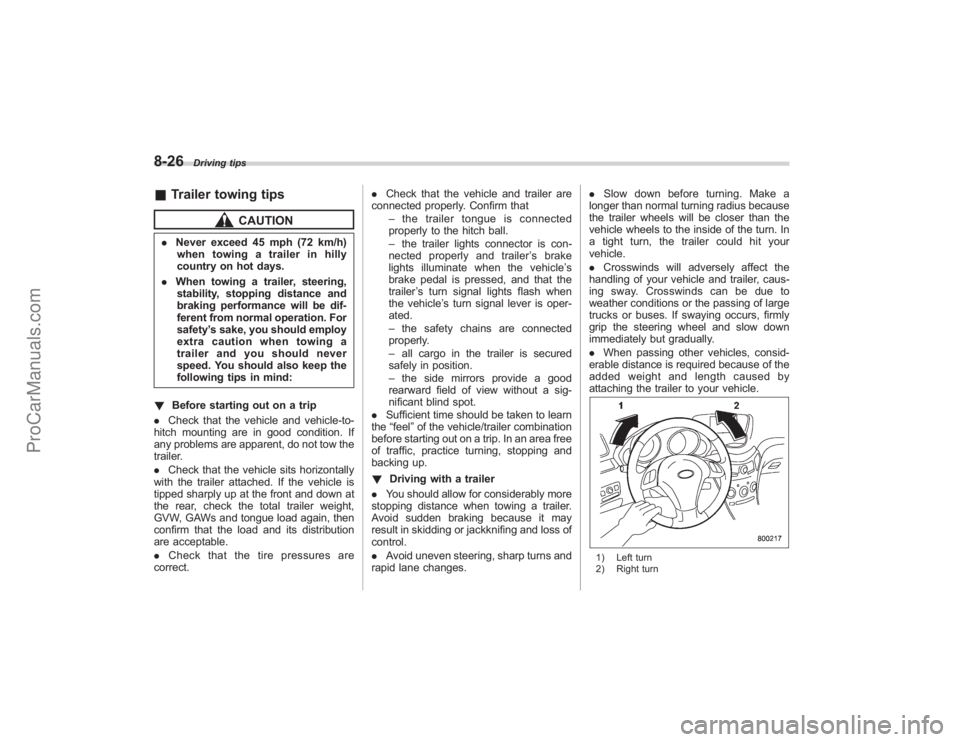
1) Left turn
2) Right turn
ProCarManuals.com
Page 377 of 409
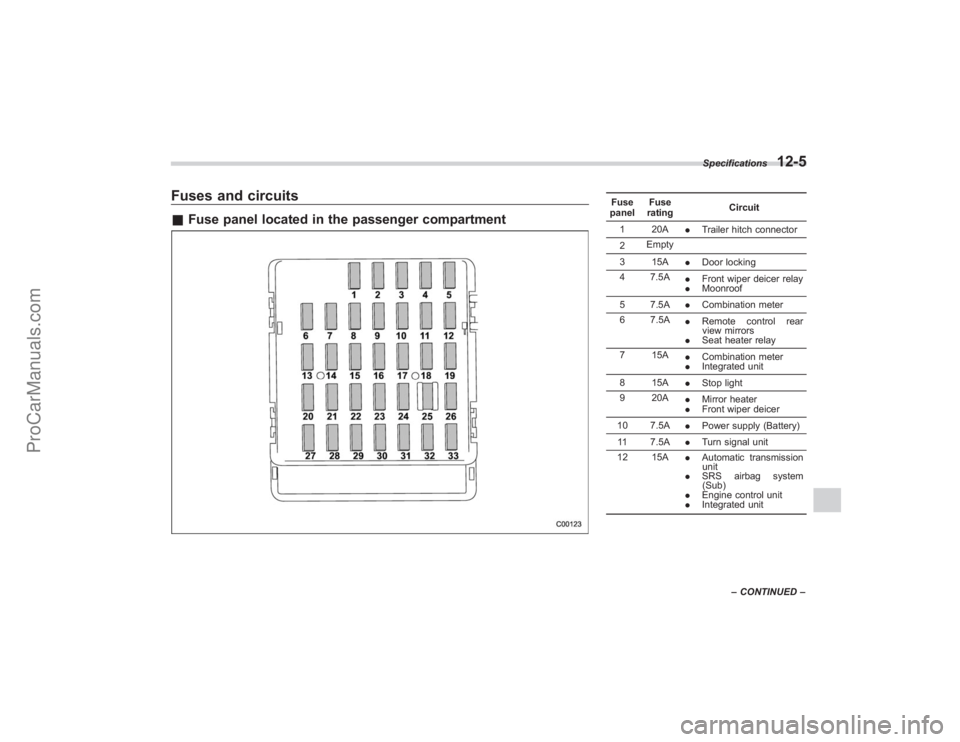
Fuses and circuits&Fuse panel located in the passenger compartment
Fuse
panel Fuse
rating Circuit
1 20A .Trailer hitch connector
2 Empty
3 15A .Door locking
4 7.5A .Front wiper deicer relay
. Moonroof
5 7.5A .Combination meter
6 7.5A .Remote control rear
view mirrors
. Seat heater relay
7 15A .Combination meter
. Integrated unit
8 15A .Stop light
9 20A .Mirror heater
. Front wiper deicer
10 7.5A .Power supply (Battery)
11 7.5A .Turn signal unit
12 15A .Automatic transmission
unit
. SRS airbag system
(Sub)
. Engine control unit
. Integrated unitSpecifications
12-5
–
CONTINUED –
ProCarManuals.com