2008 SUBARU TRIBECA service
[x] Cancel search: servicePage 172 of 409
4-10
Climate control
Operating tips for heater and
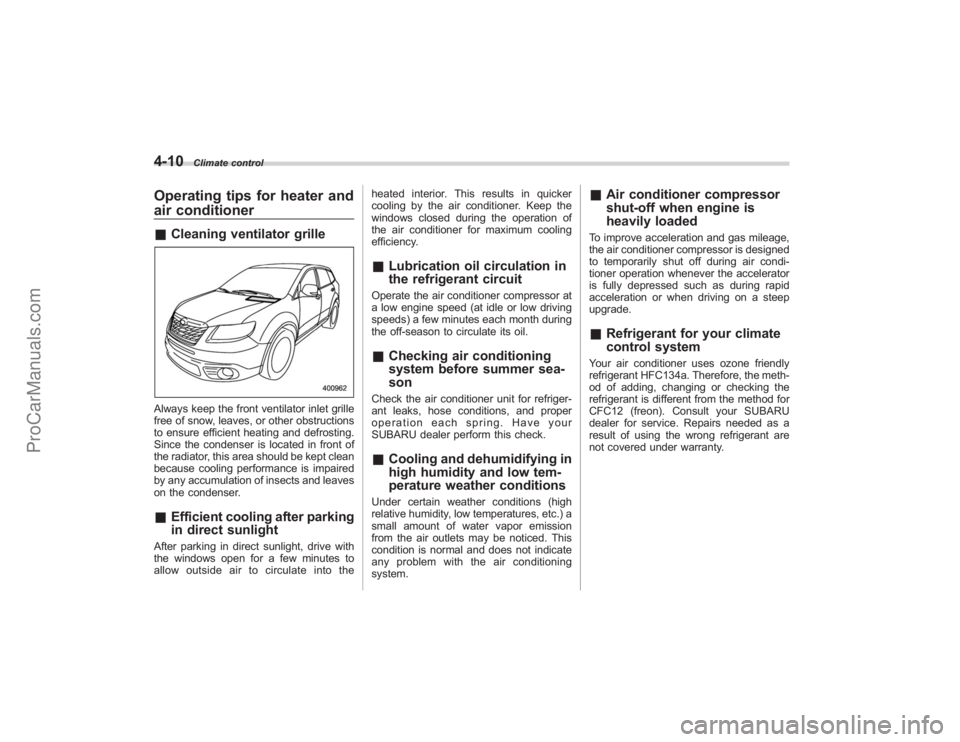
air conditioner&Cleaning ventilator grilleAlways keep the front ventilator inlet grille
free of snow, leaves, or other obstructions
to ensure efficient heating and defrosting.
Since the condenser is located in front of
the radiator, this area should be kept clean
because cooling performance is impaired
by any accumulation of insects and leaves
on the condenser.&Efficient cooling after parking
in direct sunlightAfter parking in direct sunlight, drive with
the windows open for a few minutes to
allow outside air to circulate into the heated interior. This results in quicker
cooling by the air conditioner. Keep the
windows closed during the operation of
the air conditioner for maximum cooling
efficiency.
&
Lubrication oil circulation in
the refrigerant circuitOperate the air conditioner compressor at
a low engine speed (at idle or low driving
speeds) a few minutes each month during
the off-season to circulate its oil.&Checking air conditioning
system before summer sea-
sonCheck the air conditioner unit for refriger-
ant leaks, hose conditions, and proper
operation each spring. Have your
SUBARU dealer perform this check.&Cooling and dehumidifying in
high humidity and low tem-
perature weather conditionsUnder certain weather conditions (high
relative humidity, low temperatures, etc.) a
small amount of water vapor emission
from the air outlets may be noticed. This
condition is normal and does not indicate
any problem with the air conditioning
system.
&Air conditioner compressor
shut-off when engine is
heavily loadedTo improve acceleration and gas mileage,
the air conditioner compressor is designed
to temporarily shut off during air condi-
tioner operation whenever the accelerator
is fully depressed such as during rapid
acceleration or when driving on a steep
upgrade.&Refrigerant for your climate
control systemYour air conditioner uses ozone friendly
refrigerant HFC134a. Therefore, the meth-
od of adding, changing or checking the
refrigerant is different from the method for
CFC12 (freon). Consult your SUBARU
dealer for service. Repairs needed as a
result of using the wrong refrigerant are
not covered under warranty.
ProCarManuals.com
Page 178 of 409
5-2
Audio
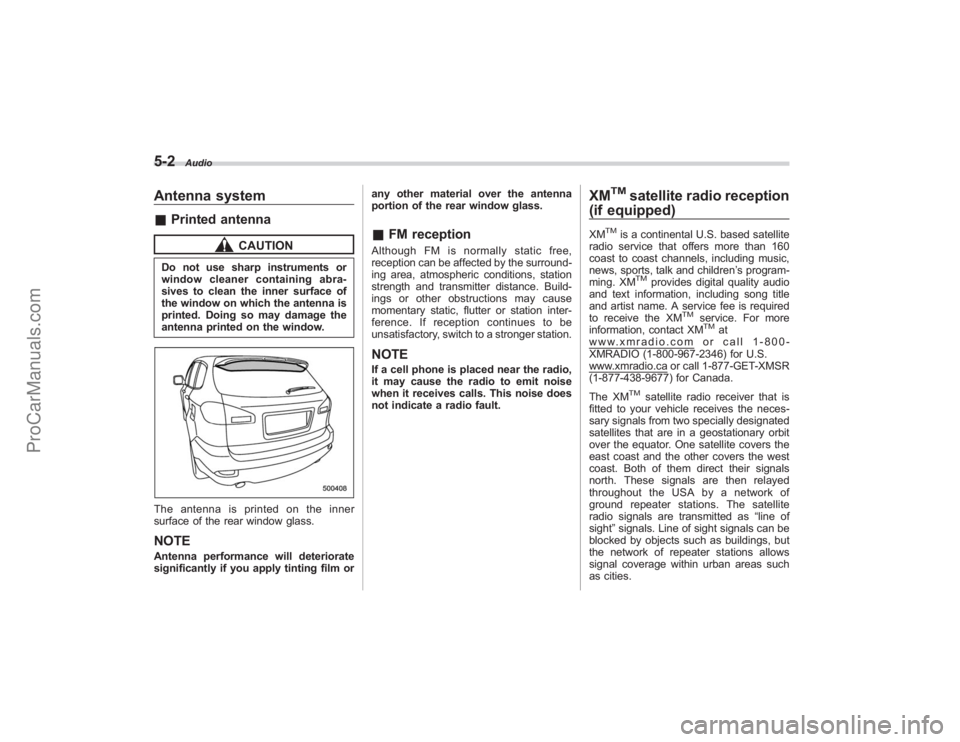
Antenna system&Printed antenna
CAUTION
Do not use sharp instruments or
window cleaner containing abra-
sives to clean the inner surface of
the window on which the antenna is
printed. Doing so may damage the
antenna printed on the window.The antenna is printed on the inner
surface of the rear window glass.NOTEAntenna performance will deteriorate
significantly if you apply tinting film or any other material over the antenna
portion of the rear window glass.
&
FM receptionAlthough FM is normally static free,
reception can be affected by the surround-
ing area, atmospheric conditions, station
strength and transmitter distance. Build-
ings or other obstructions may cause
momentary static, flutter or station inter-
ference. If reception continues to be
unsatisfactory, switch to a stronger station.NOTEIf a cell phone is placed near the radio,
it may cause the radio to emit noise
when it receives calls. This noise does
not indicate a radio fault.
XM
TM
satellite radio reception
(if equipped)
XM
TM
is a continental U.S. based satellite
radio service that offers more than 160
coast to coast channels, including music,
news, sports, talk and children ’s program-
ming. XM
TM
provides digital quality audio
and text information, including song title
and artist name. A service fee is required
to receive the XM
TM
service. For more
information, contact XMTM
at
www.xmradio.com or call 1-800-
XMRADIO (1-800-967-2346) for U.S.www.xmradio.ca or call 1-877-GET-XMSR
(1-877-438-9677) for Canada.
The XM
TM
satellite radio receiver that is
fitted to your vehicle receives the neces-
sary signals from two specially designated
satellites that are in a geostationary orbit
over the equator. One satellite covers the
east coast and the other covers the west
coast. Both of them direct their signals
north. These signals are then relayed
throughout the USA by a network of
ground repeater stations. The satellite
radio signals are transmitted as “line of
sight ”signals. Line of sight signals can be
blocked by objects such as buildings, but
the network of repeater stations allows
signal coverage within urban areas such
as cities.
ProCarManuals.com
Page 184 of 409
5-8
Audio
NOTEWhile you are holding down either side
of the TUNE TRACK button, the tuning
frequency will not stop changing even
if the frequency of a receivable station
is reached.
!Seek tuning
If you press the “
”or “
”side of the
SEEK FLDR button (7), the radio will
automatically search for a receivable
station and stop at the first one it finds.
This function may not be available, how-
ever, when radio signals are weak. In such
a situation, perform manual tuning to
select the desired station.
! Automatic tuning (SCAN)
Press the “SCAN”button (8) to change the
radio to the SCAN mode. In this mode, the
radio scans through the radio band until a
station is found. The radio will stop at the
station for 5 seconds while displaying the
frequency, after which scanning will con-
tinue until the entire band has been
scanned from the low end to the high
end. Press the “SCAN”button again to
cancel the SCAN mode and to stop on any
displayed frequency.
Press the “
”or “
”side of the SEEK
FLDR (7) button again to cancel the scan
mode and to stop on any displayed frequency.
When the
“SCAN”button is pressed for
automatic tuning, stations are scanned in
the direction of low frequencies to high
frequencies only.
Automatic tuning may not function prop-
erly if the station reception is weakened by
distance from the station or proximity to
tall buildings and hills.
! Selecting preset stations
Presetting a station with a preset button
(10) allows you to select that station in a
single operation. Up to six, AM, FM1 and
FM2 stations each may be preset.
! How to preset stations
1. Press the “FM AM”button (2) to select
FM1, FM2, or AM reception.
2. Press the “SCAN”button (8) or tune
the radio manually until the desired station
frequency is displayed.
3. Press one of the preset buttons (10)
for more than 1.5 seconds to store the
frequency. If the button is pressed for less
than 1.5 seconds, the preceding selection
will remain in memory.
NOTE. If the connection between the radio
and battery is broken for any reason
such as vehicle maintenance or radio removal, all stations stored in the
preset buttons are cleared. If this
occurs, it is necessary to reset the
preset buttons.
.
If a cell phone is placed near the
radio, it may cause the radio to emit
noise when it receives calls. This noise
does not indicate a radio fault.
! Satellite radio mode (if equipped)
To receive satellite radio, it is necessary to
install the Subaru genuine satellite recei-
ver (optional part) and to enter into a
contract. For details, please contact your
SUBARU dealer.
! Sirius satellite radio
Sirius satellite radio is a recent innovation
that allows the listener to experience
digital sound quality and to have a greater
variety of channels to choose from (more
than 160 channels with the relevant
subscription).
Use of satellite radio (Sirius) requires a
tuner, antenna and a service contract. For
details, please contact your SUBARU
dealer or visit Sirius Satellite Radio at
www.sirius.com or call 1-888-539-SIRIUS
(7474) for more information. Sirius, the
Sirius dog logo, channel names and logos
are trademarks of SIRIUS Satellite Radio
Inc.
ProCarManuals.com
Page 185 of 409
!XM
TM
satellite radio
XM
TM
is a continental U.S. based satellite
radio service that offers more than 160
coast to coast channels, including music,
news, sports, talk and children ’s program-
ming. XM
TM
provides digital quality audio
and text information, including song title
and artist name. A service fee is required
to receive the XM
TM
service. For more
information, contact your SUBARU dealer
or XM
TM
at
www.xmradio.com or call 1-800-
XMRADIO (1-800-967-2346) for U.S.www.xmradio.ca or call 1-877-GET-XMSR
(1-877-438-9677) for Canada.
! Satellite radio reception
Satellite radio signals are best received in
areas with a clear view of the open sky. In
areas where there are tall buildings, trees,
tunnels or other structures that may
obstruct the signal of the satellites, there
may be signal interruptions. Other circum-
stances that may result in signal loss
include driving near a wall, steep cliff or
hill, or driving on the lower level of a multi-
tiered road or inside a parking garage.
To help reduce this condition, satellite
radio providers have installed ground-
based repeaters in heavily populated
areas. However, you may still experience
reception problems in some areas. !
Displaying satellite radio ID of tuner
When you activate satellite radio, you
should have your satellite radio tuner ID
ready because each tuner is identified by
its unique satellite radio tuner ID.
The satellite radio ID will be needed when
you activate satellite radio and receive
satellite radio customer support.
The satellite radio ID can be found on the
audio display by tuning the channel to “0”.
Turn the “TUNE TRACK ”button (4) to
select the satellite radio channel.
! Band selection button
Push the “SAT”button (1) when the radio
is off to turn on the radio.
Push the “SAT”button when the radio is
on to select SAT1, SAT2 or SAT3 recep-
tion.
! Channel selection
Press “
”of the TUNE TRACK button (4)
to select the next channel and press “
”
of the button to select the previous
channel.
Keep pressing “
”of the button to
change to the next channel continuously
and keep pressing “
”of the button to
change to the previous channel continu-
ously. !
Category selection
Press “
”or “
”of the SEEK FLDR
button (7) to display the current category.
Press “
”again to select the next
category, and press “
”again to select
the previous category.
! Channel scan
Press the “SCAN”button (8) to change the
radio to the SCAN mode. In this mode, the
radio scans through the channels until a
station is found. The radio will stop at the
station for 5 seconds while displaying the
channel number, after which scanning will
continue until the entire channel has been
scanned from the low end to the high end.
Also during the category selection, chan-
nel scan can be performed in that cate-
gory.
Press the “SCAN”button again to cancel
the SCAN mode and to stop on any
displayed channel.
! Selecting preset channels
Presetting a channel with a preset button
(10) allows you to select that channel in a
single operation. Up to six, SAT1, SAT2
and SAT3 channels each may be preset.
! How to preset channels
1. Press the “SAT”button (1) to select
SAT1, SAT2 and SAT3 reception.
Audio
5-9
– CONTINUED –
ProCarManuals.com
Page 195 of 409
NOTEWhile you are holding down either side
of the TUNE/TRACK button, the tuning
frequency will not stop changing even
if the frequency of a receivable station
is reached.
!Seek tuning (SEEK)
If you press the “
”or “
”side of the
SEEK FLDR button (7), the radio will
automatically search for a receivable
station and stop at the first one it finds.
This function may not be available, how-
ever, when radio signals are weak. In such
a situation, perform manual tuning to
select the desired station.
! Scan tuning (SCAN)
Press the “SCAN”button (8) to change the
radio to the SCAN mode. In this mode, the
radio scans through the radio band until a
station is found. The radio will stop at the
station for 5 seconds while displaying the
frequency, after which scanning will con-
tinue until the entire band has been
scanned from the low end to the high
end. Press the “SCAN”button again to
cancel the SCAN mode and to stop on any
displayed frequency.
Press the “
”or “
”side of the SEEK
FLDR button (7) again to cancel the scan
mode and to stop on any displayed frequency.
When the
“SCAN”button is pressed for
automatic tuning, stations are scanned in
the direction of low frequencies to high
frequencies only.
Automatic tuning may not function prop-
erly if the station reception is weakened by
distance from the station or proximity to
tall buildings and hills.
! Selecting preset stations
Presetting a station with a preset button
allows you to select that station in a single
operation. Up to six AM, FM1 and FM2
stations each may be preset.
! How to preset stations
1. Press the “FM AM”button (2) to select
FM1, FM2 or AM reception.
2. Press the “SCAN”button (8) or tune
the radio manually until the desired station
frequency is displayed.
3. Press one of the preset buttons for
more than 1.5 seconds to store the
frequency. If the button is pressed for less
than 1.5 seconds, the preceding selection
will remain in memory.
NOTE. If the connection between the radio
and battery is broken for any reason
such as vehicle maintenance or radio removal, all stations stored in the
preset buttons are cleared. If this
occurs, it is necessary to reset the
preset buttons.
.
If a cell phone is placed near the
radio, it may cause the radio to emit
noise when it receives calls. This noise
does not indicate a radio fault.
! Satellite radio mode (if equipped)
To receive satellite radio, it is necessary to
install the Subaru genuine satellite recei-
ver (optional part) and to enter into a
contract. For details, please contact your
SUBARU dealer.
! Sirius satellite radio
Sirius satellite radio is a recent innovation
that allows the listener to experience
digital sound quality and to have a greater
variety of channels to choose from (more
than 160 channels with the relevant
subscription).
Use of satellite radio (Sirius) requires a
tuner, antenna and a service contract. For
details, please contact your SUBARU
dealer or visit Sirius Satellite Radio at
www.sirius.com or call 1-888-539-SIRIUS
(7474) for more information. Sirius, the
Sirius dog logo, channel names and logos
are trademarks of SIRIUS Satellite Radio
Inc.
Audio
5-19
– CONTINUED –
ProCarManuals.com
Page 196 of 409
5-20
Audio
!XM
TM
satellite radio
XM
TM
is a continental U.S. based satellite
radio service that offers more than 160
coast to coast channels, including music,
news, sports, talk and children ’s program-
ming. XM
TM
provides digital quality audio
and text information, including song title
and artist name. A service fee is required
to receive the XM
TM
service. For more
information, contact your SUBARU dealer
or XM
TM
at
www.xmradio.com or call 1-800-
XMRADIO (1-800-967-2346) for U.S.www.xmradio.ca or call 1-877-GET-XMSR
(1-877-438-9677) for Canada.
! Satellite radio reception
Satellite radio signals are best received in
areas with a clear view of the open sky. In
areas where there are tall buildings, trees,
tunnels or other structures that may
obstruct the signal of the satellites, there
may be signal interruptions. Other circum-
stances that may result in signal loss
include driving near a wall, steep cliff or
hill, or driving on the lower level of a multi-
tiered road or inside a parking garage.
To help reduce this condition, satellite
radio providers have installed ground-
based repeaters in heavily populated
areas. However, you may still experience
reception problems in some areas. !
Displaying satellite radio ID of tuner
When you activate satellite radio, you
should have your satellite radio tuner ID
ready because each tuner is identified by
its unique satellite radio tuner ID.
The satellite radio ID will be needed when
you activate satellite radio and receive
satellite radio customer support.
The satellite radio ID can be found on the
audio display by tuning the channel to “0”.
Turn the “TUNE/TRACK ”button (4) to
select the satellite radio channel.
! Band selection button
Push the “SAT”button (1) when the radio
is off to turn on the radio.
Push the “SAT”button when the radio is
on to select SAT1, SAT2 or SAT3 recep-
tion.
! Channel selection
Press “
”of the TUNE TRACK button (4)
to select the next channel and press “
”
of the button to select the previous
channel.
Keep pressing “
”of the button to
change to the next channel continuously
and keep pressing “
”of the button to
change to the previous channel continu-
ously. !
Category selection
Press “
”or “
”of the SEEK FLDR
button (7) to display the current category.
Press “
”again to select the next
category, and press “
”again to select
the previous category.
! Channel scan
Press the “SCAN”button (8) to change the
radio to the SCAN mode. In this mode, the
radio scans through the channels until a
station is found. The radio will stop at the
station for 5 seconds while displaying the
channel number, after which scanning will
continue until the entire channel has been
scanned from the low end to the high end.
Also during the category selection, chan-
nel scan can be performed in that cate-
gory.
Press the “SCAN”button again to cancel
the SCAN mode and to stop on any
displayed channel.
! Selecting preset channels
Presetting a channel with a preset button
(10) allows you to select that channel in a
single operation. Up to six, SAT1, SAT2
and SAT3 channels each may be preset.
! How to preset channels
1. Press the “SAT”button (1) to select
SAT1, SAT2 and SAT3 reception.
ProCarManuals.com
Page 224 of 409
6-16
Interior equipment
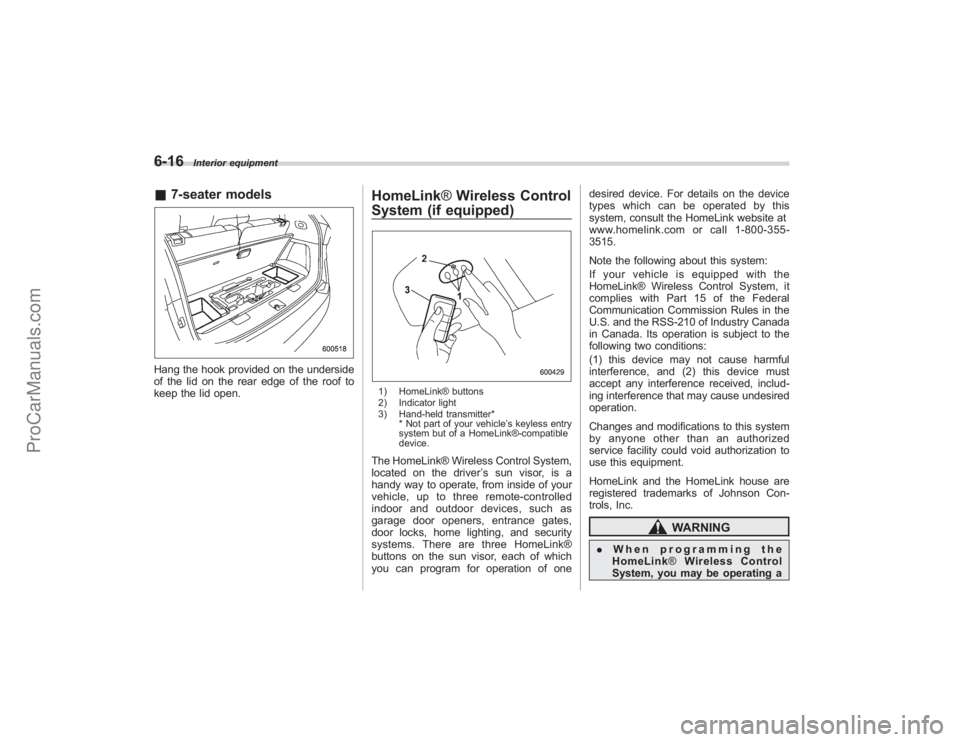
&7-seater modelsHang the hook provided on the underside
of the lid on the rear edge of the roof to
keep the lid open.
HomeLink ®Wireless Control
System (if equipped)1) HomeLink® buttons
2) Indicator light
3) Hand-held transmitter*
* Not part of your vehicle ’s keyless entry
system but of a HomeLink®-compatible
device.The HomeLink® Wireless Control System,
located on the driver ’s sun visor, is a
handy way to operate, from inside of your
vehicle, up to three remote-controlled
indoor and outdoor devices, such as
garage door openers, entrance gates,
door locks, home lighting, and security
systems. There are three HomeLink®
buttons on the sun visor, each of which
you can program for operation of one desired device. For details on the device
types which can be operated by this
system, consult the HomeLink website at
www.homelink.com or call 1-800-355-
3515.
Note the following about this system:
If your vehicle is equipped with the
HomeLink® Wireless Control System, it
complies with Part 15 of the Federal
Communication Commission Rules in the
U.S. and the RSS-210 of Industry Canada
in Canada. Its operation is subject to the
following two conditions:
(1) this device may not cause harmful
interference, and (2) this device must
accept any interference received, includ-
ing interference that may cause undesired
operation.
Changes and modifications to this system
by anyone other than an authorized
service facility could void authorization to
use this equipment.
HomeLink and the HomeLink house are
registered trademarks of Johnson Con-
trols, Inc.
WARNING
.
When programming the
HomeLink ®Wireless Control
System, you may be operating a
ProCarManuals.com
Page 235 of 409
Fuel................................................................... 7-2
Fuel requirements ............................................ 7-2
Fuel filler lid and cap ........................................ 7-3
State emission testing (U.S. only) ................... 7-5
Preparing to drive ............................................ 7-7
Starting the engine ........................................... 7-7
Stopping the engine ......................................... 7-8
Remote engine start system (dealer option) ............................................... 7-8
Starting your vehicle ........................................ 7-9
Remote start safety features ............................. 7-9
Entering the vehicle while it is running via remote start ............................................................... 7-9
Entering the vehicle following remote engine start shutdown ....................................................... 7-9
Pre-heating or pre-cooling the interior of the vehicle ......................................................... 7-10
Service mode ................................................. 7-10
Remote transmitter programming and programmable feature option ........................ 7-10
System maintenance ....................................... 7-11
Automatic transmission ................................. 7-12
Selector lever................................................. 7-13
Selector lever reverse inhibiting function . ....... 7-14
Selection of manual mode .............................. 7-15
Maximum speeds ........................................... 7-16
Driving tips .................................................... 7-16
SPORT mode ................................................. 7-17 Shift lock release
............................................ 7-17
Power steering............................................... 7-18
Braking ........................................................... 7-18
Braking tips .................................................... 7-18
Brake system ................................................. 7-19
Disc brake pad wear warning indicators .......... 7-19
ABS (Anti-lock Brake System)...................... 7-20
ABS system self-check................................... 7-20
ABS warning light ........................................... 7-21
Electronic Brake Force Distribution (EBD)
system ......................................................... 7-22
Steps to take if EBD system fails .................... 7-22
Vehicle Dynamics Control system ................ 7-23
Vehicle Dynamics Control system monitor....... 7-25
Traction Control system OFF switch ................ 7-26
Tire pressure monitoring system
(TPMS) ......................................................... 7-27
Parking your vehicle ..................................... 7-29
Parking brake................................................. 7-29
Parking tips .................................................... 7-29
Cruise control ................................................ 7-30
To set cruise control ....................................... 7-30
To temporarily cancel the cruise control .......... 7-31
To turn off the cruise control ........................... 7-31
To change the cruising speed .. ....................... 7-32
Cruise control indicator light ........................... 7-33
Cruise control set indicator light ..................... 7-33
Starting and operating
7
ProCarManuals.com