2008 Peugeot Bipper stru
[x] Cancel search: struPage 35 of 131

30
Accesses
When this button is pressed, the
alarm is deactivated when the
vehicle is unlocked.
Deactivation using the key
Unlock the doors using the key and enter
the vehicle. Switch on the ignition to the
RUNNING position, identification of the key
code will switch off the alarm.
CONFIDENTIAL CARD
This is given to you on delivery of your
vehicle with the duplicate keys.
It contains the identification code necessary
for any work carried out by a PEUGEOT
dealer on the electronic immobiliser system.
This code is hidden by a film, which should
be removed only if necessary.
Keep your card in a safe place, never inside
the vehicle.
When undertaking a long trip or journey,
however, it is advisable to take it with you
along with your personal papers.
Deactivation of the anti-lift protection
To deactivate the anti-lift protection, press
the button located on the vehicle’s courtesy
light.
Good practice
To quickly deactivate the siren following
unwanted triggering, unlock the vehicle
using the remote control.
To avoid setting the alarm, before washing
the vehicle for example, lock the vehicle
using the key.
Deactivation using the remote control
Signalling of attempted intrusion
When you return to your vehicle,
flashing of the electronic engine
immobiliser warning light or
the appearance of a warning
message on the instrument panel display
indicates an attempted intrusion during your
absence.
Page 37 of 131

32
Accesses
Driver’s door
Pull the interior handle to unlock.
Sliding side door
Pull the handle A towards the rear, slide
the door fully to pass the point of resistance
(Light van) or to trigger the device which
retains the door in the open position
(Combi).
Active locking: When the vehicle
speed approaches 12 mph (20 km/h), a
characteristic locking noise indicates that
your vehicle has been locked automatically.
This "AUTOCLOSE" function is activated or
deactivated via the "MENU".
This function is deactivated when the vehicle
is delivered.
Hinged rear doors
To open, slide the control B to the right.
Load space
Press once to unlock the sliding
side doors and the rear doors
(Light van) from the driving
position.
OPENING FROM THE INSIDE
Good practice
When opening, take care not to obstruct the
guide space on the floor to allow the door to
slide correctly.
Do not block traffic.
Page 41 of 131

35
1
READY TO SET OFF
Steering wheel controls
LIGHTING CONTROL
Selection is by rotation of the white mark
on the ring, when the ignition key is in the
"RUNNING" position.
All lights off
Side lights on
This is indicated on the
instrument panel by lighting of
the warning light.
Dipped headlamps/main beam headlamps on
Dipped headlamps/main beam headlamps change
Pull the control fully towards you.
Headlamp fl ash
Direction indicators (green fl ashing)
"Motorway" function
System which indicates a change of lane on
a motorway.
Press up or down once, without passing
the point of resistance; the corresponding
direction indicators will flash three times. Pull the control towards you
gently, regardless of the position
of the ring.
Left: downwards. The direction
arrow warning light flashes on the
instrument panel.
Right: upwards. The direction arrow warning
light flashes on the instrument panel.
Turn the ring into position.
Page 47 of 131
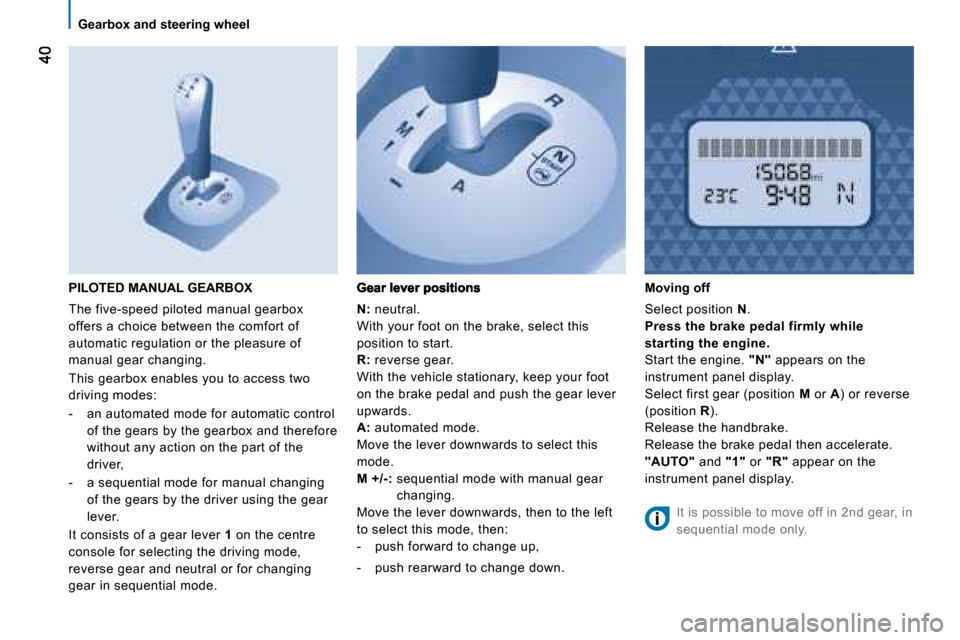
Gearbox and steering wheel
PILOTED MANUAL GEARBOX
The five-speed piloted manual gearbox
offers a choice between the comfort of
automatic regulation or the pleasure of
manual gear changing.
This gearbox enables you to access two
driving modes:
- an automated mode for automatic control of the gears by the gearbox and therefore
without any action on the part of the
driver,
- a sequential mode for manual changing of the gears by the driver using the gear
lever.
It consists of a gear lever 1 on the centre
console for selecting the driving mode,
reverse gear and neutral or for changing
gear in sequential mode.
N: neutral.
With your foot on the brake, select this
position to start.
R: reverse gear.
With the vehicle stationary, keep your foot
on the brake pedal and push the gear lever
upwards.
A: automated mode.
Move the lever downwards to select this
mode.
M +/-: sequential mode with manual gear
changing.
Move the lever downwards, then to the left
to select this mode, then:
- push forward to change up,
- push rearward to change down.
Moving off
Select position N .
Press the brake pedal firmly while
starting the engine.
Start the engine. "N" appears on the
instrument panel display.
Select first gear (position M or A ) or reverse
(position R ).
Release the handbrake.
Release the brake pedal then accelerate.
"AUTO" and "1" or "R" appear on the
instrument panel display.
It is possible to move off in 2nd gear, in
sequential mode only.
Page 48 of 131

AUTO41
1
READY TO SET OFF
Gearbox and steering wheel
Stopping - Starting on a slope
This gearbox is a piloted manual gearbox
which does not have a clutch pedal.
Do not use the accelerator pedal to
immobilise the vehicle on a slope, apply
the handbrake instead.
When moving off on a slope, accelerate
gradually while releasing the
handbrake.
Switching to sequential mode
Once you have moved off, you can switch to
sequential mode by selecting position M .
"AUTO" disappears and the
gears engaged appear in
succession on the instrument
panel display.
The gear change requests are only carried
out if the engine speed permits it.
Take your foot off the accelerator pedal
gently to engage the gear.
At low speeds, when approaching a stop
or traffic lights for example, the gearbox
changes down to first gear automatically.
Switching to automated mode
After using the sequential mode, you can
return to the automated mode by selecting
position A .
"AUTO" and the gear engaged
appear on the instrument panel
display.
The gearbox then operates in
auto-active mode, without any action on the
part of the driver.
It continuously selects the gear most suited
to the following parameters:
- driving style,
- road characteristics,
- vehicle load.
To optimise driving comfort and obtain the
most suitable gear, avoid sharp variations in
the pressure on the accelerator pedal.
If you press the accelerator pedal beyond
the point of resistance, the gearbox
selects the gear below to permit sharper
acceleration.
Stopping the vehicle
Before switching off the engine, you can:
- move to position N to leave the gearbox
in neutral.
- leave a gear engaged, such as first or reverse.
In both cases, it is imperative that you apply
the handbrake to immobilise the vehicle.
Reinitialisation
Following disconnection of the battery, the
gearbox must be reinitialised:
- switch on the ignition, "AUTO" appears
on the instrument panel display,
- press the brake pedal,
- wait approximately 30 seconds until "N"
or a gear appears on the instrument
panel display,
- release the brake pedal.
The gearbox is operational again.
Operating anomaly
With the ignition on, the flashing
of "AUTO" and lighting of this
warning light, accompanied by
an audible signal and a message
on the instrument panel display, indicate a
gearbox malfunction.
Have it checked by a PEUGEOT dealer. The brake pedal must be pressed while
starting the engine.
Never select neutral N while the vehicle is
moving.
Only engage reverse gear R with the vehicle
immobilised and the brake pedal pressed.
In all cases, it is imperative that you apply
the handbrake in order to immobilise the
vehicle.
On a steep gradient, it is preferable to
switch to sequential mode.
Page 63 of 131

3
IN-CAR TECHNOLOGY
Parking assistance
AUDIBLE REAR PARKING ASSISTANCE
The audible system consists of four
proximity sensors, installed in the rear
bumper.
It detects any obstacle which enters the
field: person, vehicle, tree, fence, behind the
vehicle during the manoeuvre.
However, it will not be able to detect obstacles
located immediately below the bumper.
An object, such as a stake, a roadworks
cone or any other similar object may be
detected at the beginning of the manoeuvre
but may no longer be detected when the
vehicle moves close to it. When the distance between the rear of
the vehicle and the obstacle is less than
approximately thirty centimetres, the audible
signal becomes continuous.
This function will be deactivated
automatically if a trailer is being towed.
You are advised to obtain a towbar
recommended by PEUGEOT and have it
installed by a professional.
If anomalies are detected on engaging
reverse gear, the warning light comes on,
possibly accompanied by a message on the
display. Stop the assistance
Change to neutral.
Operating fault
If this warning light or the service
warning light comes on on the
instrument panel, accompanied
by a message on the display,
contact a PEUGEOT dealer.
Good practice
In bad weather or in winter, ensure that the
sensors are not covered with mud, ice or
snow. Engage reverse gear
The proximity information is indicated by an
audible signal which becomes more rapid as
the vehicle approaches the obstacle.
Page 67 of 131

61
3
IN-CAR TECHNOLOGY
Mobile telephone with hands-free function
MOBILE TELEPHONE WITH HANDS-FREE FUNCTION
This new equipment uses wireless
communication technology referred to
as Bluetooth®
which allows you to make
hands-free telephone calls safely from inside
your vehicle via your Bluetooth ®
compatible
mobile telephone.
First connection to the system
Turn the ignition key to the RUNNING
position.
Switch on your mobile telephone.
Activate the Bluetooth ®
function on
your mobile telephone and search for
the Bluetooth ®
accessories around the
telephone.
Follow the instructions on your mobile
telephone during the matching and the search
between the telephone and the system.
Enter the connection code "1234" and confi rm.
Your mobile telephone is now connected in
Bluetooth ®
mode with the vehicle’s hands-
free system (matching).
Activation of the system
Once your mobile telephone has been
matched with the vehicle’s hands-free
system, simply: - turn the ignition key to the RUNNING
position,
- switch on your mobile telephone,
- activate the Bluetooth ®
function on your
mobile telephone.
When the connection is established, an
audible signal is heard and the message
"Phone" appears on the audio equipment
display, if it is switched on.
For further information, consult a PEUGEOT
dealer and your mobile telephone manual.
An incoming call is picked up by pressing
the button represented by a green
telephone. The sound of the telephone call
is transmitted via the vehicle’s audio system.
The microphone is incorporated in the
courtesy light console.
Hang up by pressing the button represented
by a red telephone.
Page 74 of 131

68
Ventilation
DE-ICING AND DEMISTING
Windscreen
The ventilation outlets located at the base
of the windscreen and the side vents for the
side windows increase the effectiveness of
the de-icing and demisting. Do not obstruct
these eight air outlets.
The manual air conditioning consists of the
pollen filter and air recirculation.
The pollen filter permits continuous and
effective filtering of dust.
The air recirculation (which can be activated
by the driver or the passenger) isolates the
passenger compartment from the exterior
atmosphere.
However, this position should only be used
temporarily, the norm is to drive with the
control positioned with the exterior air intake
open.
Manual mode
Direct the control to this air
distribution setting.
For faster and more effective
de-icing and demisting of the
windscreen: - increase the air flow setting,
Returning to the exterior air intake
position permits renewal of the air
in the passenger compartment.
Rear screen and mirrors de-icing
This function only operates when
the engine is running. Pressing
this button activates the rapid
demisting/de-icing of the rear
screen and mirrors. This function switches
off automatically to prevent an excessive
consumption of energy. It switches off when
the engine is switched off. Pressing this
button switches the function off.
- move the exterior air intake
control temporarily to air
recirculation.