Page 166 of 226
11
i
AUDIO EQUIPMENT and TELEMATICS
YOUR AUDIO-CD SYSTEM
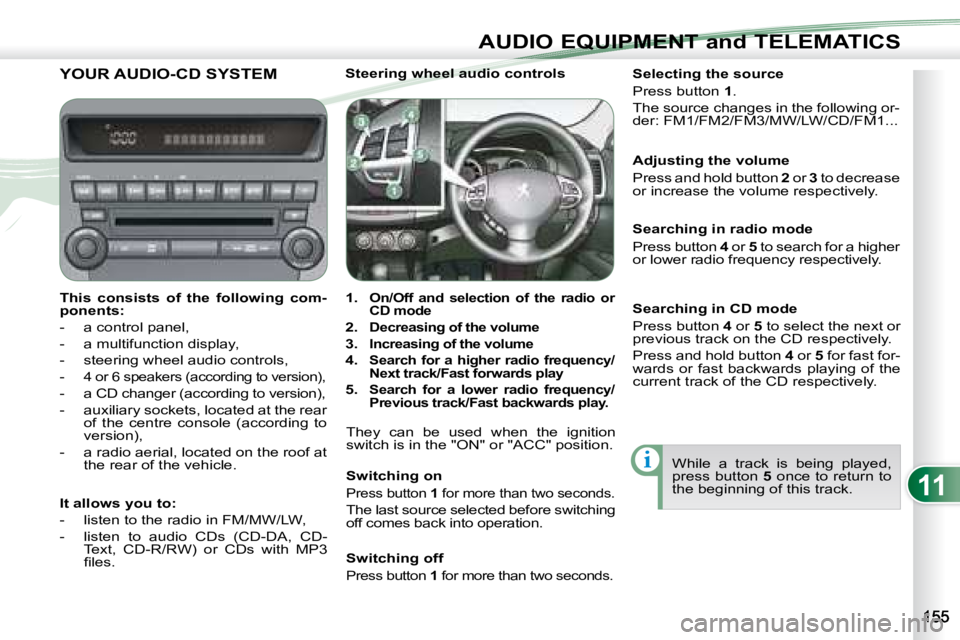
This consists of the following com-
ponents:
- a control panel,
- a multifunction display,
- steering wheel audio controls,
-
4 or 6 speakers (according to version),
- a CD changer (according to version),
- auxiliary sockets, located at the rear of the centre console (according to
version),
- a radio aerial, located on the roof at the rear of the vehicle. Steering wheel audio controls
1.
On/Off and selection of the radio or
CD mode
2.
Decreasing of the volume
3.
Increasing of the volume
4.
Search for a higher radio frequency/
Next track/Fast forwards play
5. Search for a lower radio frequency/
Previous track/Fast backwards play.
They can be used when the ignition
switch is in the "ON" or "ACC" position.
Switching on
Press button 1 for more than two seconds.
The last source selected before switching
off comes back into operation. Selecting the source
Press button
1 .
The source changes in the following or-
der: FM1/FM2/FM3/MW/LW/CD/FM1...
Searching in radio mode
Press button 4 or 5 to search for a higher
or lower radio frequency respectively.
While a track is being played,
press button 5 once to return to
the beginning of this track.
Adjusting the volume
Press and hold button
2 or 3 to decrease
or increase the volume respectively.
It allows you to:
- listen to the radio in FM/MW/LW,
- listen to audio CDs (CD-DA, CD- Text, CD-R/RW) or CDs with MP3
fi les. Switching off
Press button
1 for more than two seconds.
Searching in CD mode
Press button 4 or 5 to select the next or
previous track on the CD respectively.
Press and hold button 4 or 5 for fast for-
wards or fast backwards playing of the
current track of the CD respectively.
Page 182 of 226

11
i
AUDIO EQUIPMENT and TELEMATICS
YOUR AUDIO-TELEMATICS SYSTEM YOUR AUDIO-TELEMATICS SYSTEM
This consists of the following components:
- a tilting 7’’ LCD colour touch screen,
- a GPS aerial located in your fascia,
- a radio aerial located at the rear, on the roof of the vehicle,
- 4 to 6 speakers (according to version),
- controls around the screen and at the steering wheel plu s touch buttons on the screen according to the display,
- a voice synthesiser (male or female) giving the directions duri ng navigation.
GPS aerial
It allows you to:
- be guided to the destination of your choice (European map on 30 Gb hard disc) taking traffi c conditions into account,
- listen to the radio,
- listen to audio CDs (CDDA, CD-Text, CD-R/RW) or CDs with MP3 and WMA fi les,
- copy audio CDs to a music server, up to 2,500 songs (coded i n MP3/WMA) on 10 Gb available on the hard disc,
- play DVDs (playing of video if the vehicle is stationary),
- make hands-free telephone calls.
For maintenance of the display, we recommend the use of a n on-abrasive soft cloth (spectacles cloth) without any
additional products.
Page 219 of 226
11
AUDIO EQUIPMENT and TELEMATICS
HANDS-FREE TELEPHONE
What is the Bluetooth®
hands-free telephone with voice recognition?
The system uses wireless communication technology referred to as
Bluetooth ®
which allows you to make hands-free telephone calls in
your vehicle via your Bluetooth ®
compatible mobile telephone.
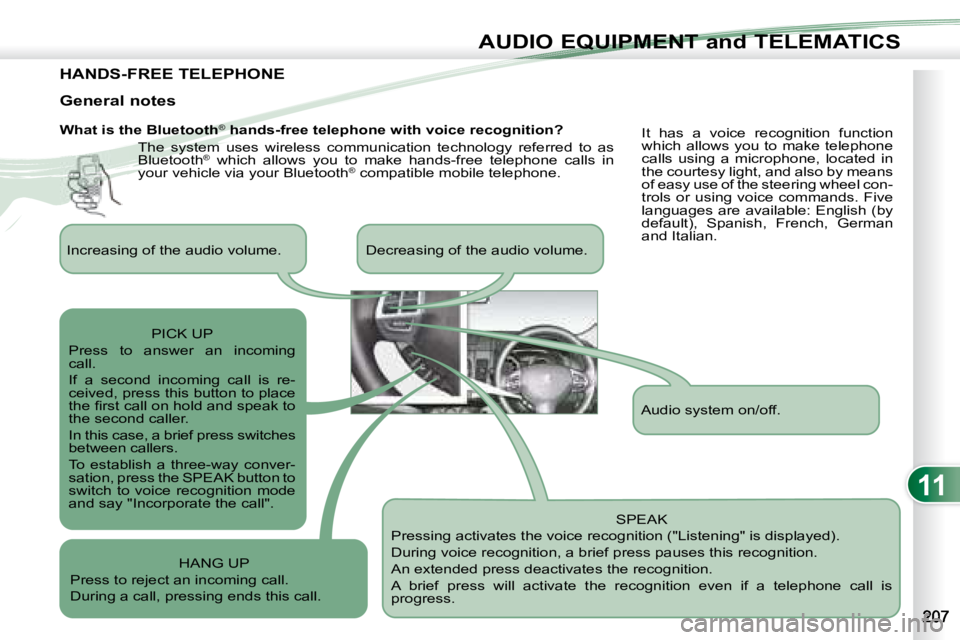
SPEAK
Pressing activates the voice recognition ("Listening" is displayed).
During voice recognition, a brief press pauses this recognition.
An extended press deactivates the recognition.
A brief press will activate the recognition even if a telep hone call is
progress.
General notes
It has a voice recognition function
which allows you to make telephone
calls using a microphone, located in
the courtesy light, and also by means
of easy use of the steering wheel con-
trols or using voice commands. Five
languages are available: English (by
default), Spanish, French, German
and Italian.
Audio system on/off.
Increasing of the audio volume. Decreasing of the audio vo
lume.
PICK UP
Press to answer an incoming
call.
If a second incoming call is re-
ceived, press this button to place
the fi rst call on hold and speak to
the second caller.
In this case, a brief press switches
between callers.
To establish a three-way conver-
sation, press the SPEAK button to
switch to voice recognition mode
and say "Incorporate the call".
HANG UP
Press to reject an incoming call.
During a call, pressing ends this call.
Page:
< prev 1-8 9-16 17-24