2008 NISSAN TIIDA lever
[x] Cancel search: leverPage 156 of 2771
AT-144
< SERVICE INFORMATION >
DTC P1760 OVERRUN CLUTCH SOLENOID VALVE
DTC P1760 OVERRUN CLUTCH SOLENOID VALVE
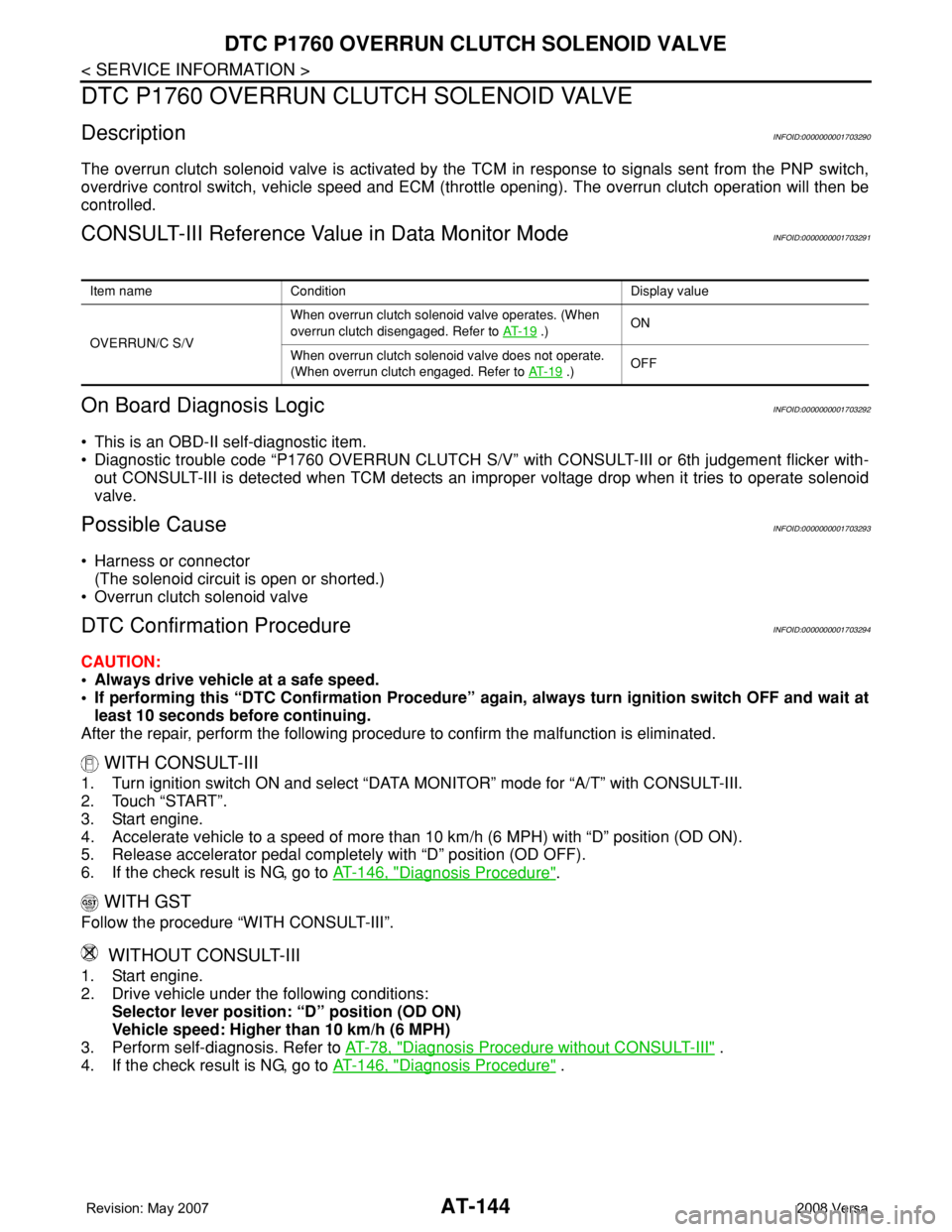
DescriptionINFOID:0000000001703290
The overrun clutch solenoid valve is activated by the TCM in response to signals sent from the PNP switch,
overdrive control switch, vehicle speed and ECM (throttle opening). The overrun clutch operation will then be
controlled.
CONSULT-III Reference Value in Data Monitor ModeINFOID:0000000001703291
On Board Diagnosis LogicINFOID:0000000001703292
• This is an OBD-II self-diagnostic item.
• Diagnostic trouble code “P1760 OVERRUN CLUTCH S/V” with CONSULT-III or 6th judgement flicker with-
out CONSULT-III is detected when TCM detects an improper voltage drop when it tries to operate solenoid
valve.
Possible CauseINFOID:0000000001703293
• Harness or connector
(The solenoid circuit is open or shorted.)
• Overrun clutch solenoid valve
DTC Confirmation ProcedureINFOID:0000000001703294
CAUTION:
• Always drive vehicle at a safe speed.
• If performing this “DTC Confirmation Procedure” again, always turn ignition switch OFF and wait at
least 10 seconds before continuing.
After the repair, perform the following procedure to confirm the malfunction is eliminated.
WITH CONSULT-III
1. Turn ignition switch ON and select “DATA MONITOR” mode for “A/T” with CONSULT-III.
2. Touch “START”.
3. Start engine.
4. Accelerate vehicle to a speed of more than 10 km/h (6 MPH) with “D” position (OD ON).
5. Release accelerator pedal completely with “D” position (OD OFF).
6. If the check result is NG, go to AT-146, "
Diagnosis Procedure".
WITH GST
Follow the procedure “WITH CONSULT-III”.
WITHOUT CONSULT-III
1. Start engine.
2. Drive vehicle under the following conditions:
Selector lever position: “D” position (OD ON)
Vehicle speed: Higher than 10 km/h (6 MPH)
3. Perform self-diagnosis. Refer to AT-78, "
Diagnosis Procedure without CONSULT-III" .
4. If the check result is NG, go to AT-146, "
Diagnosis Procedure" .
Item name Condition Display value
OVERRUN/C S/VWhen overrun clutch solenoid valve operates. (When
overrun clutch disengaged. Refer to AT- 1 9
.)ON
When overrun clutch solenoid valve does not operate.
(When overrun clutch engaged. Refer to AT- 1 9
.)OFF
Page 161 of 2771
DTC VEHICLE SPEED SENSOR MTR
AT-149
< SERVICE INFORMATION >
D
E
F
G
H
I
J
K
L
MA
B
AT
N
O
P
DTC VEHICLE SPEED SENSOR MTR
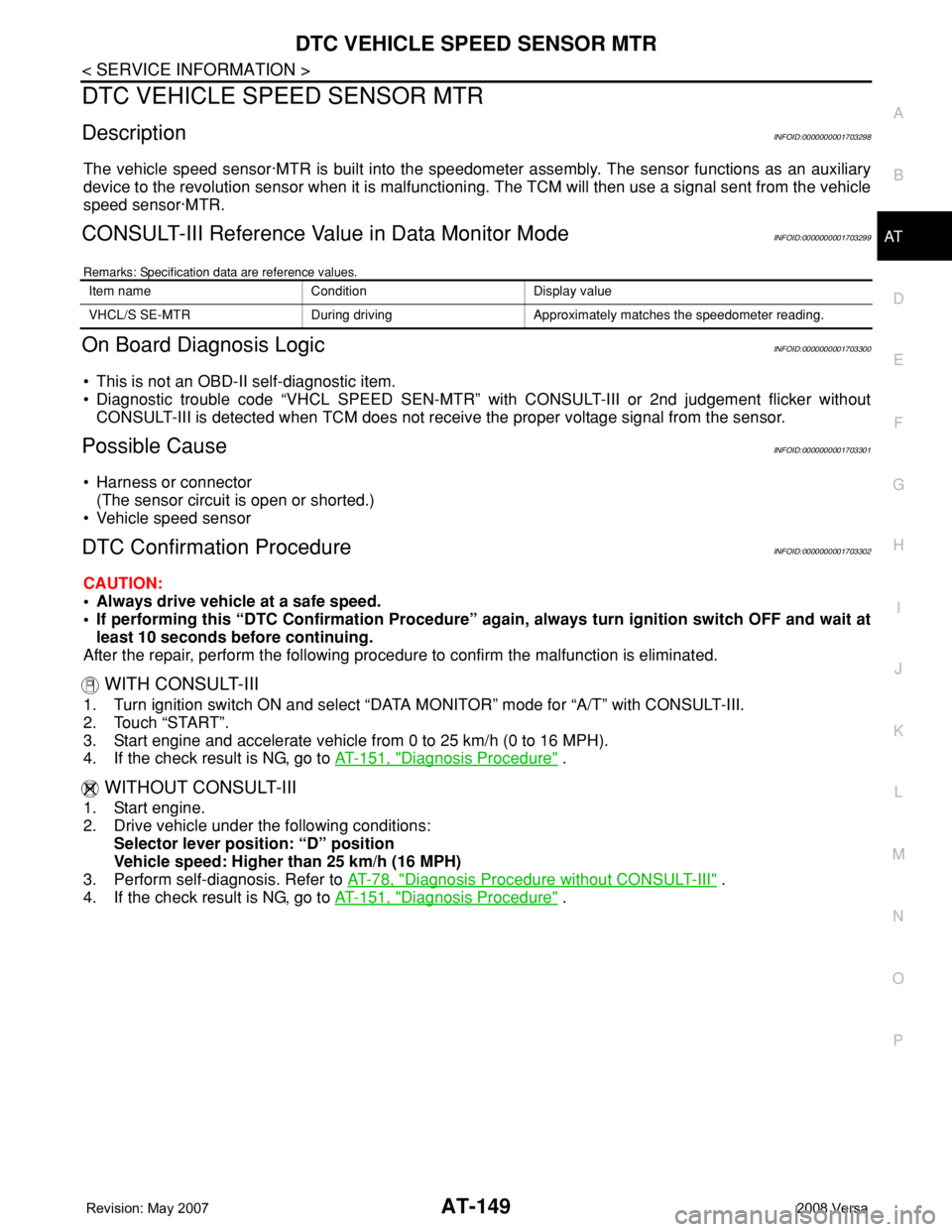
DescriptionINFOID:0000000001703298
The vehicle speed sensor·MTR is built into the speedometer assembly. The sensor functions as an auxiliary
device to the revolution sensor when it is malfunctioning. The TCM will then use a signal sent from the vehicle
speed sensor·MTR.
CONSULT-III Reference Value in Data Monitor ModeINFOID:0000000001703299
Remarks: Specification data are reference values.
On Board Diagnosis LogicINFOID:0000000001703300
• This is not an OBD-II self-diagnostic item.
• Diagnostic trouble code “VHCL SPEED SEN-MTR” with CONSULT-III or 2nd judgement flicker without
CONSULT-III is detected when TCM does not receive the proper voltage signal from the sensor.
Possible CauseINFOID:0000000001703301
• Harness or connector
(The sensor circuit is open or shorted.)
• Vehicle speed sensor
DTC Confirmation ProcedureINFOID:0000000001703302
CAUTION:
• Always drive vehicle at a safe speed.
• If performing this “DTC Confirmation Procedure” again, always turn ignition switch OFF and wait at
least 10 seconds before continuing.
After the repair, perform the following procedure to confirm the malfunction is eliminated.
WITH CONSULT-III
1. Turn ignition switch ON and select “DATA MONITOR” mode for “A/T” with CONSULT-III.
2. Touch “START”.
3. Start engine and accelerate vehicle from 0 to 25 km/h (0 to 16 MPH).
4. If the check result is NG, go to AT-151, "
Diagnosis Procedure" .
WITHOUT CONSULT-III
1. Start engine.
2. Drive vehicle under the following conditions:
Selector lever position: “D” position
Vehicle speed: Higher than 25 km/h (16 MPH)
3. Perform self-diagnosis. Refer to AT-78, "
Diagnosis Procedure without CONSULT-III" .
4. If the check result is NG, go to AT-151, "
Diagnosis Procedure" .
Item name Condition Display value
VHCL/S SE-MTR During driving Approximately matches the speedometer reading.
Page 164 of 2771

AT-152
< SERVICE INFORMATION >
DTC BATT/FLUID TEMP SEN (A/T FLUID TEMP SENSOR CIRCUIT AND TCM
POWER SOURCE)
DTC BATT/FLUID TEMP SEN (A/T FLUID TEMP SENSOR CIRCUIT AND
TCM POWER SOURCE)
DescriptionINFOID:0000000001703305
The A/T fluid temperature sensor detects the A/T fluid temperature and sends a signal to the TCM.
CONSULT-III Reference Value in Data Monitor ModeINFOID:0000000001703306
Remarks: Specification data are reference values.
On Board Diagnosis LogicINFOID:0000000001703307
• This is not an OBD-II self-diagnostic item.
• Diagnostic trouble code “BATT/FLUID TEMP SEN” with CONSULT-III or 8th judgement flicker without CON-
SULT-III is detected when TCM receives an excessively low or high voltage from the sensor.
Possible CauseINFOID:0000000001703308
• Harness or connector
(The sensor circuit is open or shorted.)
• A/T fluid temperature sensor
DTC Confirmation ProcedureINFOID:0000000001703309
CAUTION:
• Always drive vehicle at a safe speed.
• If performing this “DTC Confirmation Procedure” again, always turn ignition switch OFF and wait at
least 10 seconds before continuing.
After the repair, perform the following procedure to confirm the malfunction is eliminated.
WITH CONSULT-III
1. Start engine.
2. Select “DATA MONITOR” mode for “A/T” with CONSULT-III.
3. Touch “START”.
4. Drive vehicle under the following conditions.
SLCT LVR POSI: “D” position
VEHICLE SPEED: Higher than 20 km/h (12 MPH)
5. If the check result is NG, go to AT-154, "
Diagnosis Procedure" .
WITHOUT CONSULT-III
1. Start engine.
2. Drive vehicle under the following conditions.
Selector lever position: D position
Vehicle speed: higher than 20 km/h (12 MPH)
3. Perform self-diagnosis. Refer to AT-78, "
Diagnosis Procedure without CONSULT-III" .
4. If the check result is NG, go to AT-154, "
Diagnosis Procedure" .
Item name Condition Display value
FLUID TEMP SEWhen A/T fluid temperature is 20°C (68°F). 1.5 V
When A/T fluid temperature is 80°C (176°F). 0.5 V
Page 170 of 2771

AT-158
< SERVICE INFORMATION >
DTC TURBINE REVOLUTION SENSOR
DTC TURBINE REVOLUTION SENSOR
DescriptionINFOID:0000000001703313
The turbine revolution sensor (power train revolution sensor) detects forward clutch drum rpm (revolutions per
minute). It is located on the input side of the automatic transaxle. The vehicle speed sensor A/T (Revolution
sensor) is located on the output side of the automatic transaxle. With the two sensors, input and output rpms
are accurately detected. As a result, optimal shift timing during deceleration and shift quality can be improved.
CONSULT-III Reference Value in Data Monitor ModeINFOID:0000000001703314
Remarks: Specification data are reference values.
On Board Diagnosis LogicINFOID:0000000001703315
• This is not an OBD-II self-diagnostic item.
• Diagnostic trouble code “TURBINE SENSOR” with CONSULT-III or 10th judgement flicker without CON-
SULT-III is detected when TCM does not receive the proper voltage signal from the sensor.
Possible CauseINFOID:0000000001703316
• Harness or connector
(The sensor circuit is open or shorted.)
• Turbine revolution sensor (power train revolution sensor)
DTC Confirmation ProcedureINFOID:0000000001703317
CAUTION:
• Always drive vehicle at a safe speed.
• Be careful not to rev engine into the red zone on the tachometer.
• If performing this “DTC Confirmation Procedure” again, always turn ignition switch OFF and wait at
least 10 seconds before continuing.
After the repair, perform the following procedure to confirm the malfunction is eliminated.
WITH CONSULT-III
1. Start engine.
2. Select “DATA MONITOR” mode for “A/T” with CONSULT-III.
3. Touch “START”.
4. Drive vehicle under the following conditions for more than 5 seconds.
SLCT LVR POSI: “D” position
VEHICLE SPEED: Higher than 40 km/h (25 MPH)
ENGINE SPEED: Higher than 1,500 rpm
THROTTLE POSI: Greater than 1.0/8 of the full throttle position
5. If the check result is NG, go to AT-160, "
Diagnosis Procedure" .
WITHOUT CONSULT-III
1. Start engine.
2. Drive vehicle under the following conditions for more than 5 seconds.
Selector lever position: “D” position
Vehicle speed: Higher than 40 km/h (25 MPH)
Engine speed: Higher than 1,500 rpm
Throttle position: 1.0/8 of the full throttle position
3. Perform self-diagnosis. Refer to AT-78, "
Diagnosis Procedure without CONSULT-III" .
4. If the check result is NG, go to AT-160, "
Diagnosis Procedure" .
Item name Condition Display value
TURBINE REV During driving (lock-up ON) Approximately matches the engine speed.
Page 179 of 2771
PNP, OD SWITCH AND CLOSED THROTTLE, WIDE OPEN THROTTLE POSI-
TION SIGNAL CIRCUIT
AT-167
< SERVICE INFORMATION >
D
E
F
G
H
I
J
K
L
MA
B
AT
N
O
P
PNP, OD SWITCH AND CLOSED THROTTLE, WIDE OPEN THROTTLE PO-
SITION SIGNAL CIRCUIT
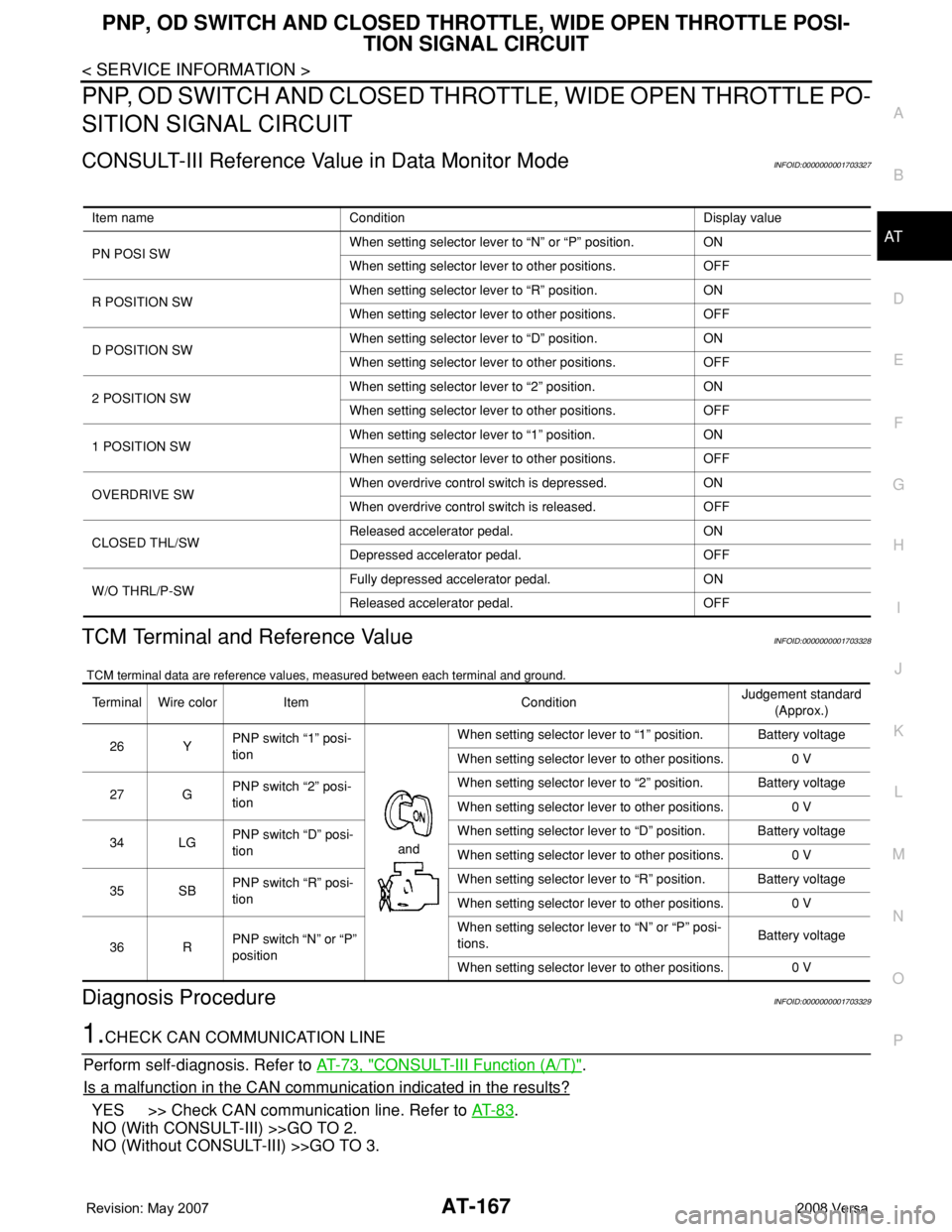
CONSULT-III Reference Value in Data Monitor ModeINFOID:0000000001703327
TCM Terminal and Reference ValueINFOID:0000000001703328
TCM terminal data are reference values, measured between each terminal and ground.
Diagnosis ProcedureINFOID:0000000001703329
1.CHECK CAN COMMUNICATION LINE
Perform self-diagnosis. Refer to AT-73, "
CONSULT-III Function (A/T)".
Is a malfunction in the CAN communication indicated in the results?
YES >> Check CAN communication line. Refer to AT- 8 3.
NO (With CONSULT-III) >>GO TO 2.
NO (Without CONSULT-III) >>GO TO 3.
Item name Condition Display value
PN POSI SWWhen setting selector lever to “N” or “P” position. ON
When setting selector lever to other positions. OFF
R POSITION SWWhen setting selector lever to “R” position. ON
When setting selector lever to other positions. OFF
D POSITION SWWhen setting selector lever to “D” position. ON
When setting selector lever to other positions. OFF
2 POSITION SWWhen setting selector lever to “2” position. ON
When setting selector lever to other positions. OFF
1 POSITION SWWhen setting selector lever to “1” position. ON
When setting selector lever to other positions. OFF
OVERDRIVE SWWhen overdrive control switch is depressed. ON
When overdrive control switch is released. OFF
CLOSED THL/SWReleased accelerator pedal. ON
Depressed accelerator pedal. OFF
W/O THRL/P-SWFully depressed accelerator pedal. ON
Released accelerator pedal. OFF
Terminal Wire color Item ConditionJudgement standard
(Approx.)
26 YPNP switch “1” posi-
tion
andWhen setting selector lever to “1” position. Battery voltage
When setting selector lever to other positions. 0 V
27 GPNP switch “2” posi-
tionWhen setting selector lever to “2” position. Battery voltage
When setting selector lever to other positions. 0 V
34 LGPNP switch “D” posi-
tionWhen setting selector lever to “D” position. Battery voltage
When setting selector lever to other positions. 0 V
35 SBPNP switch “R” posi-
tionWhen setting selector lever to “R” position. Battery voltage
When setting selector lever to other positions. 0 V
36 RPNP switch “N” or “P”
positionWhen setting selector lever to “N” or “P” posi-
tions.Battery voltage
When setting selector lever to other positions. 0 V
Page 180 of 2771
AT-168
< SERVICE INFORMATION >
PNP, OD SWITCH AND CLOSED THROTTLE, WIDE OPEN THROTTLE POSI-
TION SIGNAL CIRCUIT
2.CHECK PNP SWITCH CIRCUIT
With CONSULT-III
1. Turn ignition switch ON. (Do not start engine.)
2. Select “TCM INPUT SIGNALS” in “DATA MONITOR” mode for “A/T” with CONSULT-III.
3. Read out “P·N”, “R”, “D”, “2” and “1” position switches moving selector lever to each position.
OK or NG
OK >> GO TO 4.
NG >> Check PNP switch circuit. Refer to AT- 8 6
.
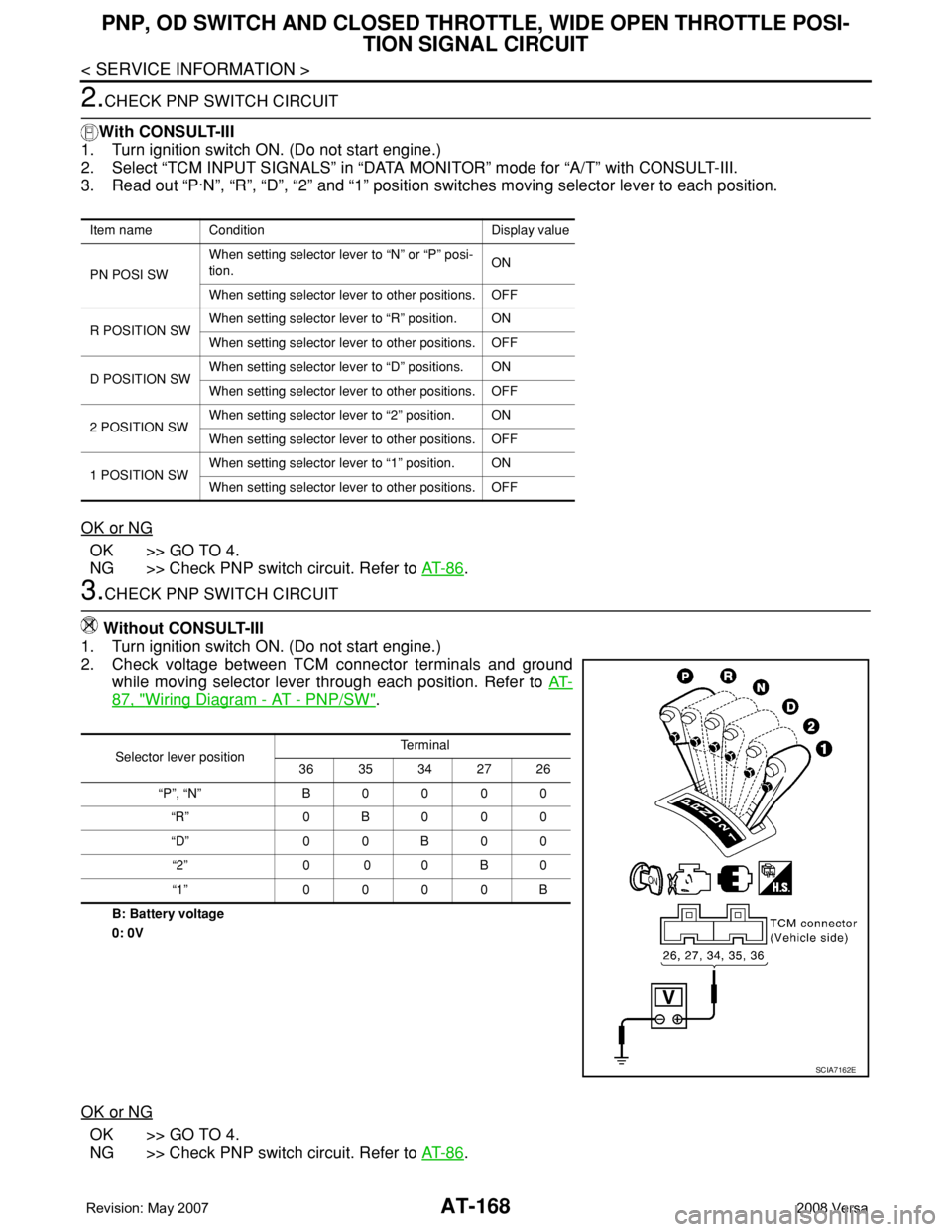
3.CHECK PNP SWITCH CIRCUIT
Without CONSULT-III
1. Turn ignition switch ON. (Do not start engine.)
2. Check voltage between TCM connector terminals and ground
while moving selector lever through each position. Refer to AT-
87, "Wiring Diagram - AT - PNP/SW".
B: Battery voltage
0: 0V
OK or NG
OK >> GO TO 4.
NG >> Check PNP switch circuit. Refer to AT- 8 6
.
Item name Condition Display value
PN POSI SWWhen setting selector lever to “N” or “P” posi-
tion.ON
When setting selector lever to other positions. OFF
R POSITION SWWhen setting selector lever to “R” position. ON
When setting selector lever to other positions. OFF
D POSITION SWWhen setting selector lever to “D” positions. ON
When setting selector lever to other positions. OFF
2 POSITION SWWhen setting selector lever to “2” position. ON
When setting selector lever to other positions. OFF
1 POSITION SWWhen setting selector lever to “1” position. ON
When setting selector lever to other positions. OFF
Selector lever positionTe r m i n a l
36 35 34 27 26
“P”, “N” B0000
“R” 0B000
“D” 0 0 B 0 0
“2” 0 0 0 B 0
“1” 0000B
SCIA7162E
Page 181 of 2771
PNP, OD SWITCH AND CLOSED THROTTLE, WIDE OPEN THROTTLE POSI-
TION SIGNAL CIRCUIT
AT-169
< SERVICE INFORMATION >
D
E
F
G
H
I
J
K
L
MA
B
AT
N
O
P
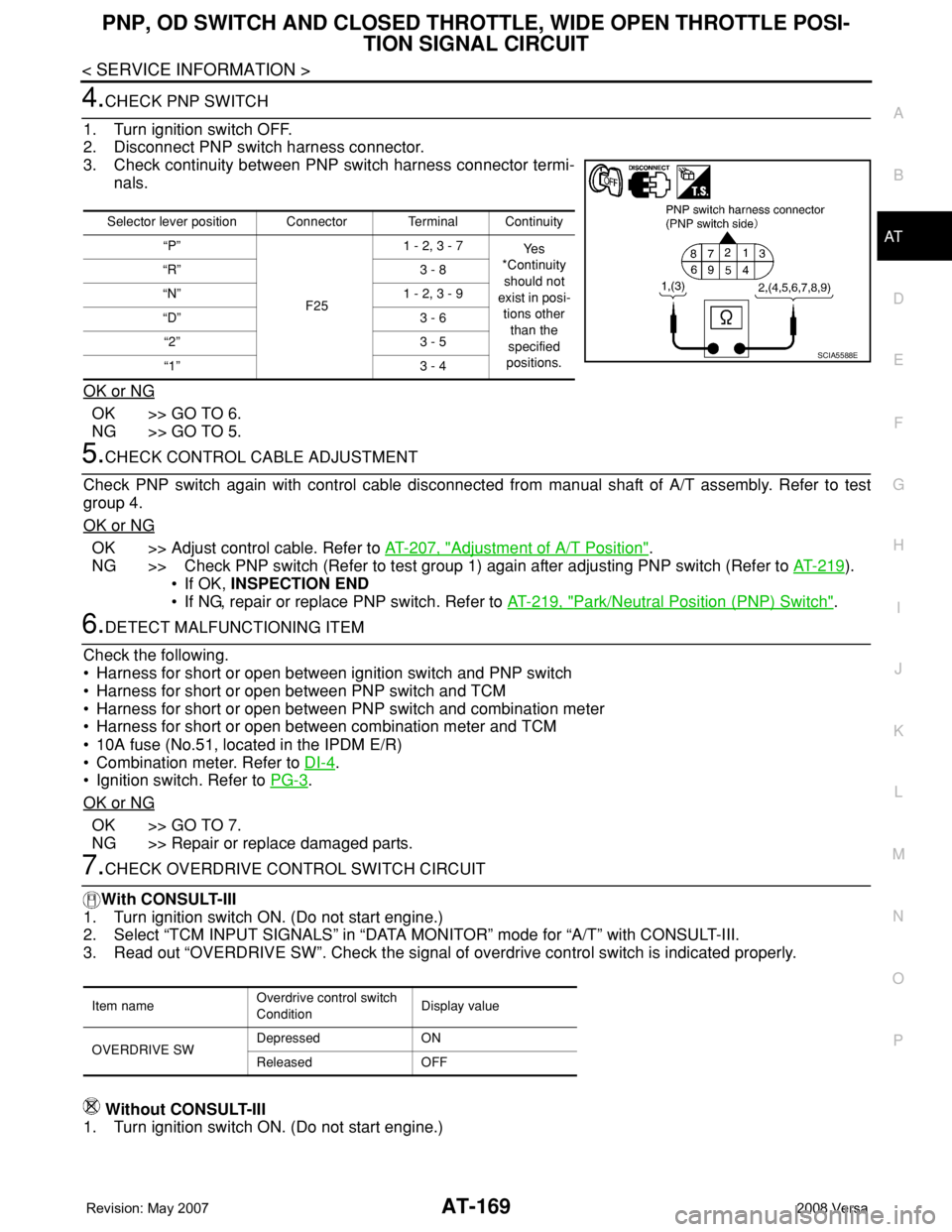
4.CHECK PNP SWITCH
1. Turn ignition switch OFF.
2. Disconnect PNP switch harness connector.
3. Check continuity between PNP switch harness connector termi-
nals.
OK or NG
OK >> GO TO 6.
NG >> GO TO 5.
5.CHECK CONTROL CABLE ADJUSTMENT
Check PNP switch again with control cable disconnected from manual shaft of A/T assembly. Refer to test
group 4.
OK or NG
OK >> Adjust control cable. Refer to AT-207, "Adjustment of A/T Position".
NG >> Check PNP switch (Refer to test group 1) again after adjusting PNP switch (Refer to AT-219
).
• If OK, INSPECTION END
• If NG, repair or replace PNP switch. Refer to AT-219, "
Park/Neutral Position (PNP) Switch".
6.DETECT MALFUNCTIONING ITEM
Check the following.
• Harness for short or open between ignition switch and PNP switch
• Harness for short or open between PNP switch and TCM
• Harness for short or open between PNP switch and combination meter
• Harness for short or open between combination meter and TCM
• 10A fuse (No.51, located in the IPDM E/R)
• Combination meter. Refer to DI-4
.
• Ignition switch. Refer to PG-3
.
OK or NG
OK >> GO TO 7.
NG >> Repair or replace damaged parts.
7.CHECK OVERDRIVE CONTROL SWITCH CIRCUIT
With CONSULT-III
1. Turn ignition switch ON. (Do not start engine.)
2. Select “TCM INPUT SIGNALS” in “DATA MONITOR” mode for “A/T” with CONSULT-III.
3. Read out “OVERDRIVE SW”. Check the signal of overdrive control switch is indicated properly.
Without CONSULT-III
1. Turn ignition switch ON. (Do not start engine.)
Selector lever position Connector Terminal Continuity
“P”
F251 - 2, 3 - 7
Ye s
*Continuity
should not
exist in posi-
tions other
than the
specified
positions. “R” 3 - 8
“N” 1 - 2, 3 - 9
“D” 3 - 6
“2” 3 - 5
“1” 3 - 4
SCIA5588E
Item nameOverdrive control switch
ConditionDisplay value
OVERDRIVE SWDepressed ON
Released OFF
Page 183 of 2771
PNP, OD SWITCH AND CLOSED THROTTLE, WIDE OPEN THROTTLE POSI-
TION SIGNAL CIRCUIT
AT-171
< SERVICE INFORMATION >
D
E
F
G
H
I
J
K
L
MA
B
AT
N
O
P
11 .PERFORM SELF-DIAGNOSIS
Without CONSULT-III
Perform self-diagnosis. Refer to AT-78, "
Diagnosis Procedure without CONSULT-III".
OK or NG
OK >>INSPECTION END
NG − 1 >> Self-diagnosis does not activate: GO TO 12.
NG − 2 >> DTC is displayed: Check the malfunctioning system. Refer to AT-78, "
Diagnosis Procedure with-
out CONSULT-III".
12.CHECK TCM
1. Check TCM input/output signal. Refer to AT-71, "
TCM Terminal and Reference Value".
2. If NG, recheck TCM pin terminals for damage or loose connection with harness connector.
OK or NG
OK >>INSPECTION END
NG >> Repair or replace damaged parts.
Component InspectionINFOID:0000000001703330
OVERDRIVE CONTROL SWITCH
• Check continuity between A/T device harness connector terminals.
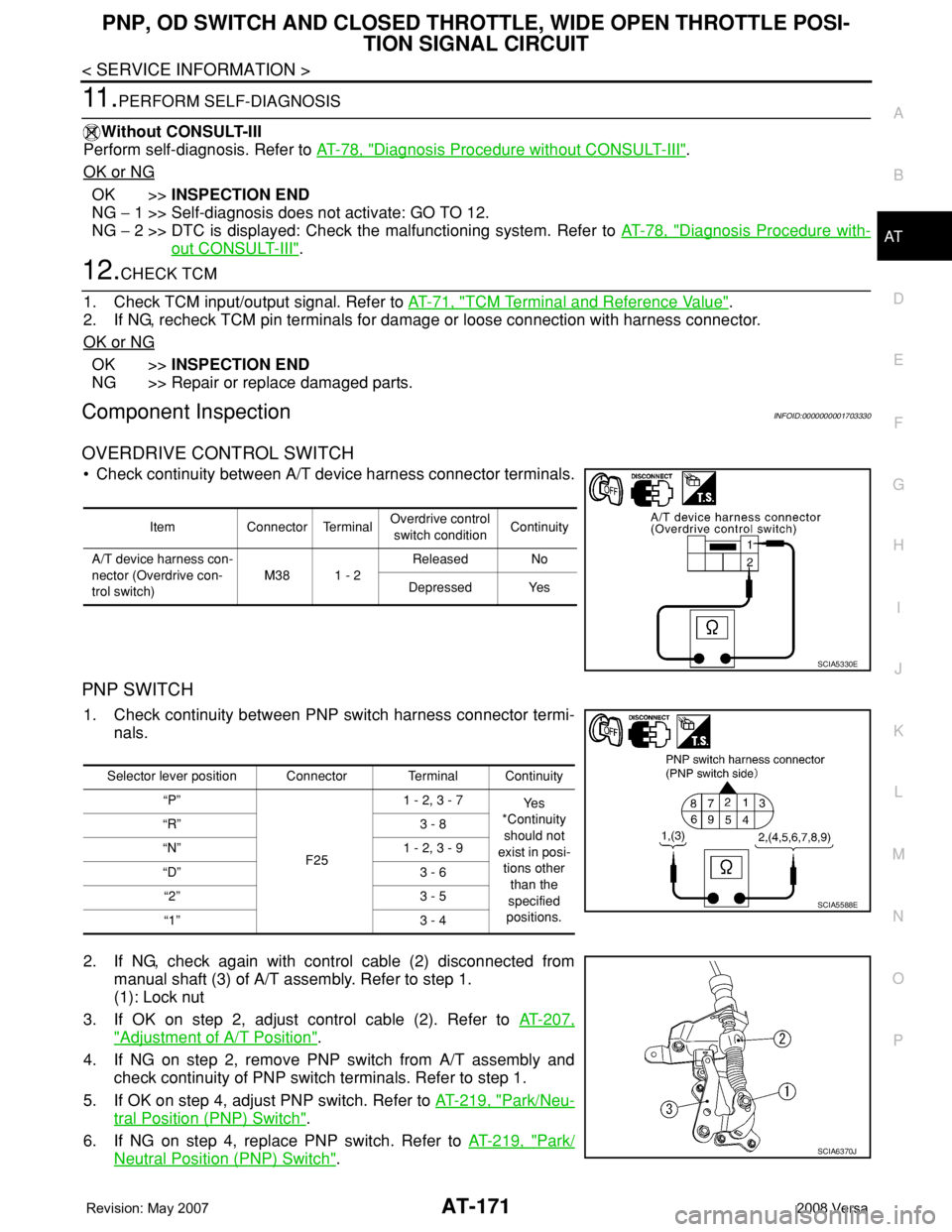
PNP SWITCH
1. Check continuity between PNP switch harness connector termi-
nals.
2. If NG, check again with control cable (2) disconnected from
manual shaft (3) of A/T assembly. Refer to step 1.
(1): Lock nut
3. If OK on step 2, adjust control cable (2). Refer to AT-207,
"Adjustment of A/T Position".
4. If NG on step 2, remove PNP switch from A/T assembly and
check continuity of PNP switch terminals. Refer to step 1.
5. If OK on step 4, adjust PNP switch. Refer to AT-219, "
Park/Neu-
tral Position (PNP) Switch".
6. If NG on step 4, replace PNP switch. Refer to AT-219, "
Park/
Neutral Position (PNP) Switch".
Item Connector TerminalOverdrive control
switch conditionContinuity
A/T device harness con-
nector (Overdrive con-
trol switch)M38 1 - 2Released No
Depressed Yes
SCIA5330E
Selector lever position Connector Terminal Continuity
“P”
F251 - 2, 3 - 7
Ye s
*Continuity
should not
exist in posi-
tions other
than the
specified
positions. “R” 3 - 8
“N” 1 - 2, 3 - 9
“D” 3 - 6
“2” 3 - 5
“1” 3 - 4
SCIA5588E
SCIA6370J