2008 NISSAN TEANA check engine
[x] Cancel search: check enginePage 4908 of 5121
![NISSAN TEANA 2008 Service Manual HEATER & COOLING UNIT ASSEMBLY
VTL-97
< ON-VEHICLE REPAIR >[WITH 7 INCH DISPLAY]
C
D
E
F
G
H
J
K
L
MA
B
VTL
N
O
P
16. Remove floor duct 1 (left and right) (1) and rear ventilator duct 1
(2), and then](/manual-img/5/57391/w960_57391-4907.png "NISSAN TEANA 2008 Service Manual HEATER & COOLING UNIT ASSEMBLY
VTL-97
< ON-VEHICLE REPAIR >[WITH 7 INCH DISPLAY]
C
D
E
F
G
H
J
K
L
MA
B
VTL
N
O
P
16. Remove floor duct 1 (left and right) (1) and rear ventilator duct 1
(2), and then")
HEATER & COOLING UNIT ASSEMBLY
VTL-97
< ON-VEHICLE REPAIR >[WITH 7 INCH DISPLAY]
C
D
E
F
G
H
J
K
L
MA
B
VTL
N
O
P
16. Remove floor duct 1 (left and right) (1) and rear ventilator duct 1
(2), and then remove heater & cooling unit assembly (3).
INSTALLATION
Installation is basically the reverse order of removal.
CAUTION:
Replace O-rings with new ones. Then apply compressor oil to them when installing.
Check for leakages when recharging refrigerant.
NOTE:
Refer to CO-9, "
Refilling" when filling radiator with engine coolant.
Charge the refrigerant.
JPIIA0921ZZ
Page 4913 of 5121
![NISSAN TEANA 2008 Service Manual VTL-102
< ON-VEHICLE REPAIR >[WITH 7 INCH DISPLAY]
HEATER CORE
Removal and Installation
INFOID:0000000003894516
REMOVAL
1. Remove heater & cooling unit assembly. Refer to VTL-93, "Exploded View".
2. R](/manual-img/5/57391/w960_57391-4912.png "NISSAN TEANA 2008 Service Manual VTL-102
< ON-VEHICLE REPAIR >[WITH 7 INCH DISPLAY]
HEATER CORE
Removal and Installation
INFOID:0000000003894516
REMOVAL
1. Remove heater & cooling unit assembly. Refer to VTL-93, \"Exploded View\".
2. R")
VTL-102
< ON-VEHICLE REPAIR >[WITH 7 INCH DISPLAY]
HEATER CORE
Removal and Installation
INFOID:0000000003894516
REMOVAL
1. Remove heater & cooling unit assembly. Refer to VTL-93, "Exploded View".
2. Remove mounting screws (A), and then remove foot duct (left)
(1).
3. Remove heater pipe grommet (1).
4. Remove mounting screw (A), and then remove heater pipe sup-
port (2).
5. Remove mounting screws (B), and then remove heater pipe
cover (3).
6. Slide heater core (1) to leftward (as shown in the figure).
INSTALLATION
Installation is basically the reverse order of removal.
CAUTION:
Replace O-rings with new ones. Then apply compressor oil to them when installing.
Check for refrigerant leakage when charging refrigerant.
NOTE:
Refer to CO-9, "
Refilling" when filling radiator with engine coolant.
Charge the refrigerant.
37. Defroster door link 38. Foot door link 39. Max. cool door lever
40. Foot door lever 41. Defroster door lever 42. Adapter case
43. Distributor lower case 44. Ventilator door 45. Intake sensor
46. Intake sensor bracket 47. Foot door 48. Max. cool door
49. Defroster door 50. Air mix door (Slide door)
Refer to GI-4, "
Components" for symbols in the figure.
JPIIA0925ZZ
JPIIA0926ZZ
JPIIA0927ZZ
Page 4942 of 5121
WCS-12
< FUNCTION DIAGNOSIS >
DIAGNOSIS SYSTEM (METER)
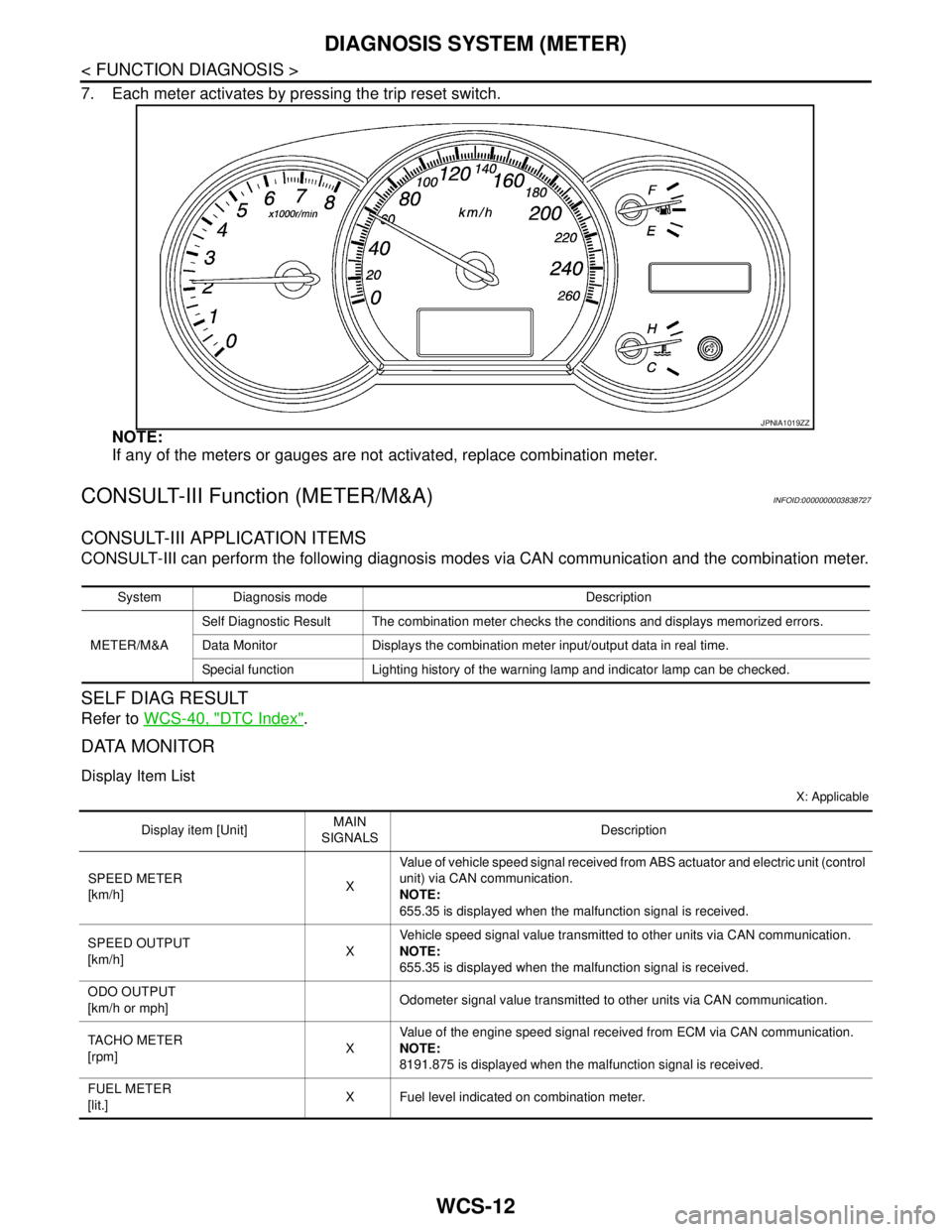
7. Each meter activates by pressing the trip reset switch.
NOTE:
If any of the meters or gauges are not activated, replace combination meter.
CONSULT-III Function (METER/M&A)INFOID:0000000003838727
CONSULT-III APPLICATION ITEMS
CONSULT-III can perform the following diagnosis modes via CAN communication and the combination meter.
SELF DIAG RESULT
Refer to WCS-40, "DTC Index".
DATA MONITOR
Display Item List
X: Applicable
JPNIA1019ZZ
System Diagnosis mode Description
METER/M&ASelf Diagnostic Result The combination meter checks the conditions and displays memorized errors.
Data Monitor Displays the combination meter input/output data in real time.
Special function Lighting history of the warning lamp and indicator lamp can be checked.
Display item [Unit]MAIN
SIGNALSDescription
SPEED METER
[km/h]XValue of vehicle speed signal received from ABS actuator and electric unit (control
unit) via CAN communication.
NOTE:
655.35 is displayed when the malfunction signal is received.
SPEED OUTPUT
[km/h]XVehicle speed signal value transmitted to other units via CAN communication.
NOTE:
655.35 is displayed when the malfunction signal is received.
ODO OUTPUT
[km/h or mph]Odometer signal value transmitted to other units via CAN communication.
TACHO METER
[rpm]XValue of the engine speed signal received from ECM via CAN communication.
NOTE:
8191.875 is displayed when the malfunction signal is received.
FUEL METER
[lit.]X Fuel level indicated on combination meter.
Page 4943 of 5121
![NISSAN TEANA 2008 Service Manual WCS
DIAGNOSIS SYSTEM (METER)
WCS-13
< FUNCTION DIAGNOSIS >
C
D
E
F
G
H
I
J
K
L
MB A
O
P
W TEMP METER
[°C] XValue of engine coolant temperature signal is received from ECM via CAN com-
munication.
NO](/manual-img/5/57391/w960_57391-4942.png "NISSAN TEANA 2008 Service Manual WCS
DIAGNOSIS SYSTEM (METER)
WCS-13
< FUNCTION DIAGNOSIS >
C
D
E
F
G
H
I
J
K
L
MB A
O
P
W TEMP METER
[°C] XValue of engine coolant temperature signal is received from ECM via CAN com-
munication.
NO")
WCS
DIAGNOSIS SYSTEM (METER)
WCS-13
< FUNCTION DIAGNOSIS >
C
D
E
F
G
H
I
J
K
L
MB A
O
P
W TEMP METER
[°C] XValue of engine coolant temperature signal is received from ECM via CAN com-
munication.
NOTE:
215 is displayed when the malfunction signal is input.
ABS W/L
[On/Off]Status of ABS warning lamp detected from ABS warning lamp signal is received
from ABS actuator and electric unit (control unit) via CAN communication.
VDC/TCS IND
[On/Off]Status of VDC OFF indicator lamp detected from VDC OFF indicator lamp signal
is received from ABS actuator and electric unit (control unit) via CAN communica-
tion.
SLIP IND
[On/Off]Status of SLIP indicator lamp detected from slip indicator lamp signal received
from ABS actuator and electric unit (control unit) via CAN communication.
BRAKE W/L
[On/Off]Status of brake warning lamp detected from brake warning lamp signal is received
from ABS actuator and electric unit (control unit) via CAN communication.
NOTE:
Displays “Off” if the brake warning lamp is illuminated when the valve check starts,
the parking brake switch is turned ON or the brake fluid level switch is turned ON.
DOOR W/L
[On/Off]Status of door warning detected from door switch signal received from BCM via
CAN communication.
TRUNK/GLAS-H
[On/Off]Status of trunk warning detected from trunk switch signal received from BCM via
CAN communication.
HI-BEAM IND
[On/Off]Status of high beam indicator lamp detected from high beam request signal is re-
ceived from BCM via CAN communication.
TURN IND
[On/Off]Status of turn indicator lamp detected from turn indicator signal is received from
BCM via CAN communication.
FR FOG IND
[On/Off]Status of front fog light indicator lamp detected from front fog light request signal
is received from BCM via CAN communication.
RR FOG IND
[On/Off]Status of rear fog light indicator lamp detected from rear fog light request signal is
received from BCM via CAN communication.
LIGHT IND
[On/Off]Status of light indicator lamp detected from position light request signal is received
from BCM via CAN communication.
OIL W/L
[On/Off]Status of oil pressure warning lamp detected from oil pressure switch signal is re-
ceived from BCM via CAN communication.
MIL
[On/Off] Status of malfunction indicator lamp detected from malfunctioning indicator lamp
signal is received from ECM via CAN communication.
CRUISE IND
[On/Off]Status of CRUISE indicator detected from ASCD status signal is received from
ECM via CAN communication.
SPORT IND
[On/Off]Status of SPORT indicator detected from sport mode switch signal is received
from control device.
4WD W/L
[On/Off]This item is displayed, but cannot be monitored.
4WD LOCK IND
[On/Off]This item is displayed, but cannot be monitored.
FUEL W/L
[On/Off]Low-fuel warning lamp status detected by the identified fuel level.
WASHER W/L
[On/Off]This item is displayed, but cannot be monitored.
KEY G/Y W/L
[On/Off]Status of key warning lamp (G/Y) detected from key warning signal is received
from BCM via CAN communication.
AFS OFF IND
[On/Off]This item is displayed, but cannot be monitored.
LCD
[B&P N, B&P I, ID NG, ROTAT, SFT
P, INSRT, BATT, NO KY,OUTKY, LK
WN]Displays status of Intelligent Key system warning detected from meter display sig-
nal is received from BCM via CAN communication.
Display item [Unit]MAIN
SIGNALSDescription
Page 4947 of 5121

WCS
DIAGNOSIS SYSTEM (BCM)
WCS-17
< FUNCTION DIAGNOSIS >
C
D
E
F
G
H
I
J
K
L
MB A
O
P
FREEZE FRAME DATA (FFD) AND IGN COUNTER
Freeze Frame Data
The BCM records the following condition at the moment a particular DTC is detected.
Vehicle Speed
Odo/Trip Meter
Vehicle Condition (BCM detected condition)
IGN Counter
IGN counter indicates the number of times that ignition switch is turned ON after DTC is detected.
The number is 0 when a malfunction is detected now.
The number increases like 1 → 2 → 3...38 → 39 after returning to the normal condition whenever ignition
switch OFF → ON.
The number is fixed to 39 until the self-diagnosis results are erased if it is over 39.
BUZZER
BUZZER : CONSULT-III Function (BCM - BUZZER)INFOID:0000000003838705
CONSULT-III APPLICATION ITEMS
DATA MONITOR
CONSULT screen terms Description
SLEEP>LOCKWhile turning BCM status from low power consumption mode to normal mode (Power supply
position is “LOCK”)
SLEEP>OFFWhile turning BCM status from low power consumption mode to normal mode (Power supply
position is “OFF”.)
LOCK>ACC While turning power supply position from “LOCK” to “ACC”
ACC>ON While turning power supply position from “ACC” to “IGN”
RUN>ACCWhile turning power supply position from “RUN” to “ACC” (Vehicle is stopping and selector
lever is except P position.)
CRANK>RUNWhile turning power supply position from “CRANKING” to “RUN” (From cranking up the en-
gine to run it)
RUN>URGENT While turning power supply position from “RUN“ to “ACC” (Emergency stop operation)
ACC>OFF While turning power supply position from “ACC” to “OFF”
OFF>LOCK While turning power supply position from “OFF” to “LOCK”
OFF>ACC While turning power supply position from “OFF” to “ACC”
ON>CRANK While turning power supply position from “IGN” to “CRANKING”
OFF>SLEEPWhile turning BCM status from normal mode (Power supply position is “OFF”.) to low power
consumption mode
LOCK>SLEEPWhile turning BCM status from normal mode (Power supply position is “LOCK”.) to low pow-
er consumption mode
LOCK Power supply position is “LOCK” (Ignition switch OFF with steering is locked.)
OFF Power supply position is “OFF” (Ignition switch OFF with steering is unlocked.)
ACC Power supply position is “ACC” (Ignition switch ACC)
ON Power supply position is “IGN” (Ignition switch ON with engine stopped)
ENGINE RUN Power supply position is “RUN” (Ignition switch ON with engine running)
CRANKING Power supply position is “CRANKING” (At engine cranking)
Test item Diagnosis mode Description
BUZZERData Monitor Displays BCM input data in real time.
Active Test Operation of electrical loads can be checked by sending driving signal to them.
Page 5005 of 5121
WCS
THE PARKING BRAKE RELEASE WARNING CONTINUES SOUNDING, OR
DOES NOT SOUND
WCS-75
< SYMPTOM DIAGNOSIS >
C
D
E
F
G
H
I
J
K
L
MB A
O
P
SYMPTOM DIAGNOSIS
THE PARKING BRAKE RELEASE WARNING CONTINUES SOUNDING, OR
DOES NOT SOUND
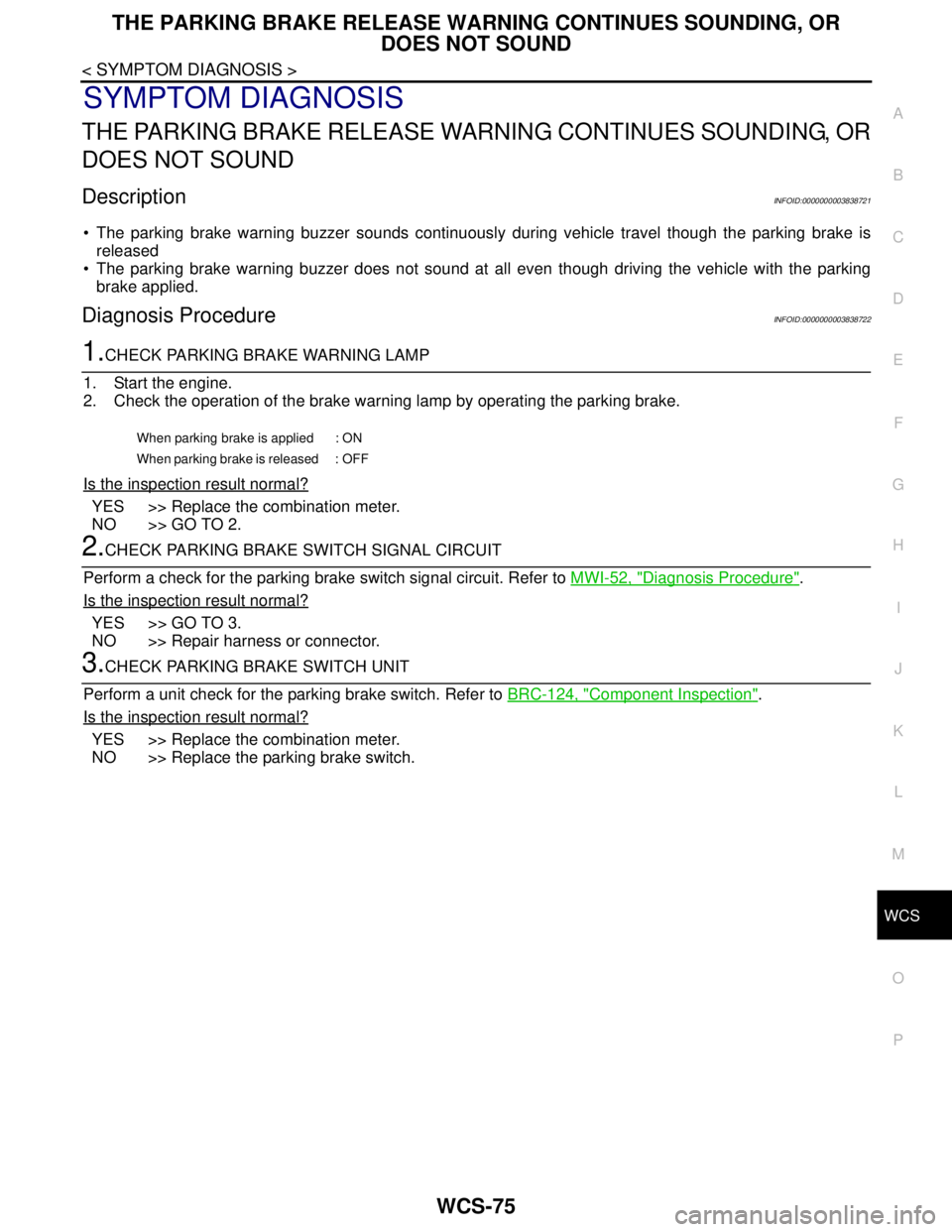
DescriptionINFOID:0000000003838721
The parking brake warning buzzer sounds continuously during vehicle travel though the parking brake is
released
The parking brake warning buzzer does not sound at all even though driving the vehicle with the parking
brake applied.
Diagnosis ProcedureINFOID:0000000003838722
1.CHECK PARKING BRAKE WARNING LAMP
1. Start the engine.
2. Check the operation of the brake warning lamp by operating the parking brake.
Is the inspection result normal?
YES >> Replace the combination meter.
NO >> GO TO 2.
2.CHECK PARKING BRAKE SWITCH SIGNAL CIRCUIT
Perform a check for the parking brake switch signal circuit. Refer to MWI-52, "
Diagnosis Procedure".
Is the inspection result normal?
YES >> GO TO 3.
NO >> Repair harness or connector.
3.CHECK PARKING BRAKE SWITCH UNIT
Perform a unit check for the parking brake switch. Refer to BRC-124, "
Component Inspection".
Is the inspection result normal?
YES >> Replace the combination meter.
NO >> Replace the parking brake switch.
When parking brake is applied : ON
When parking brake is released : OFF
Page 5013 of 5121

WW-1
DRIVER CONTROLS
C
D
E
F
G
H
I
J
K
M
SECTION WW
A
B
WW
N
O
P
CONTENTS
WIPER & WASHER
BASIC INSPECTION ....................................3
DIAGNOSIS AND REPAIR WORKFLOW ..........3
Work Flow .................................................................3
FUNCTION DIAGNOSIS ...............................5
FRONT WIPER AND WASHER SYSTEM ..........5
System Diagram ........................................................5
System Description ...................................................5
Component Parts Location ........................................8
Component Description ............................................8
HEADLAMP WASHER SYSTEM .......................10
System Diagram ......................................................10
System Description .................................................10
Component Parts Location ......................................11
Component Description ..........................................11
DIAGNOSIS SYSTEM (BCM) ............................12
COMMON ITEM .........................................................12
COMMON ITEM : CONSULT-III Function (BCM -
COMMON ITEM) .....................................................
12
WIPER .......................................................................13
WIPER : CONSULT-III Function (BCM - WIPER) ....13
DIAGNOSIS SYSTEM (IPDM E/R) .....................15
Diagnosis Description .............................................15
CONSULT-III Function (IPDM E/R) .........................17
COMPONENT DIAGNOSIS .........................20
WIPER AND WASHER FUSE, FUSIBLE LINK
....
20
Description ..............................................................20
Diagnosis Procedure ...............................................20
POWER SUPPLY AND GROUND CIRCUIT ......21
BCM (BODY CONTROL MODULE) ..........................21
BCM (BODY CONTROL MODULE) : Diagnosis
Procedure ................................................................
21
IPDM E/R (INTELLIGENT POWER DISTRIBU-
TION MODULE ENGINE ROOM) ..............................
21
IPDM E/R (INTELLIGENT POWER DISTRIBU-
TION MODULE ENGINE ROOM) : Diagnosis Pro-
cedure ......................................................................
21
FRONT WIPER MOTOR LO CIRCUIT ..............23
Component Function Check ....................................23
Diagnosis Procedure ...............................................23
FRONT WIPER MOTOR HI CIRCUIT ...............25
Component Function Check ....................................25
Diagnosis Procedure ...............................................25
FRONT WIPER AUTO STOP SIGNAL CIR-
CUIT ..................................................................
27
Component Function Check ....................................27
Diagnosis Procedure ...............................................27
FRONT WIPER MOTOR GROUND CIRCUIT ...29
Diagnosis Procedure ...............................................29
WASHER SWITCH ............................................30
Description ...............................................................30
Component Inspection .............................................30
HEADLAMP WASHER RELAY ........................31
Component Inspection .............................................31
HEADLAMP WASHER CIRCUIT ......................32
Component Function Check ....................................32
Diagnosis Procedure ...............................................32
FRONT WIPER AND WASHER SYSTEM ........35
Wiring Diagram - FRONT WIPER AND WASHER
SYSTEM - ................................................................
35
HEADLAMP WASHER SYSTEM ......................39
Wiring Diagram -HEADLAMP WASHER SYS-
TEM- ........................................................................
39
Page 5027 of 5121
DIAGNOSIS SYSTEM (IPDM E/R)
WW-15
< FUNCTION DIAGNOSIS >
C
D
E
F
G
H
I
J
K
MA
B
WW
N
O
P
DIAGNOSIS SYSTEM (IPDM E/R)
Diagnosis DescriptionINFOID:0000000003941292
AUTO ACTIVE TEST
Description
In auto active test mode, the IPDM E/R sends a drive signal to the following systems to check their operation.
Oil pressure warning lamp
Front wiper (LO, HI)
Parking lamps
License plate lamps
Tail lamps
Front fog lamps
Headlamps (LO, HI)
A/C compressor (magnet clutch)
Cooling fan
Operation Procedure
1. Close the hood and lift the wiper arms from the windshield. (Prevent windshield damage due to wiper
operation)
NOTE:
When auto active test is performed with hood opened, sprinkle water on windshield beforehand.
2. Turn ignition switch OFF.
3. Turn the ignition switch ON, and within 20 seconds, press the driver door switch 10 times. Then turn the
ignition switch OFF.
CAUTION:
Close passenger door.
4. Turn the ignition switch ON within 10 seconds. After that the horn sounds once and the auto active test
starts.
5. The oil pressure warning lamp starts blinking when the auto active test starts.
6. After a series of the following operations is repeated 3 times, auto active test is completed.
NOTE:
When auto active test mode has to be cancelled halfway through test, turn ignition switch OFF.
CAUTION:
• If auto active test mode cannot be actuated, check door switch system. Refer to DLK-57,
"ComponentFunctionCheck".
Do not start the engine.
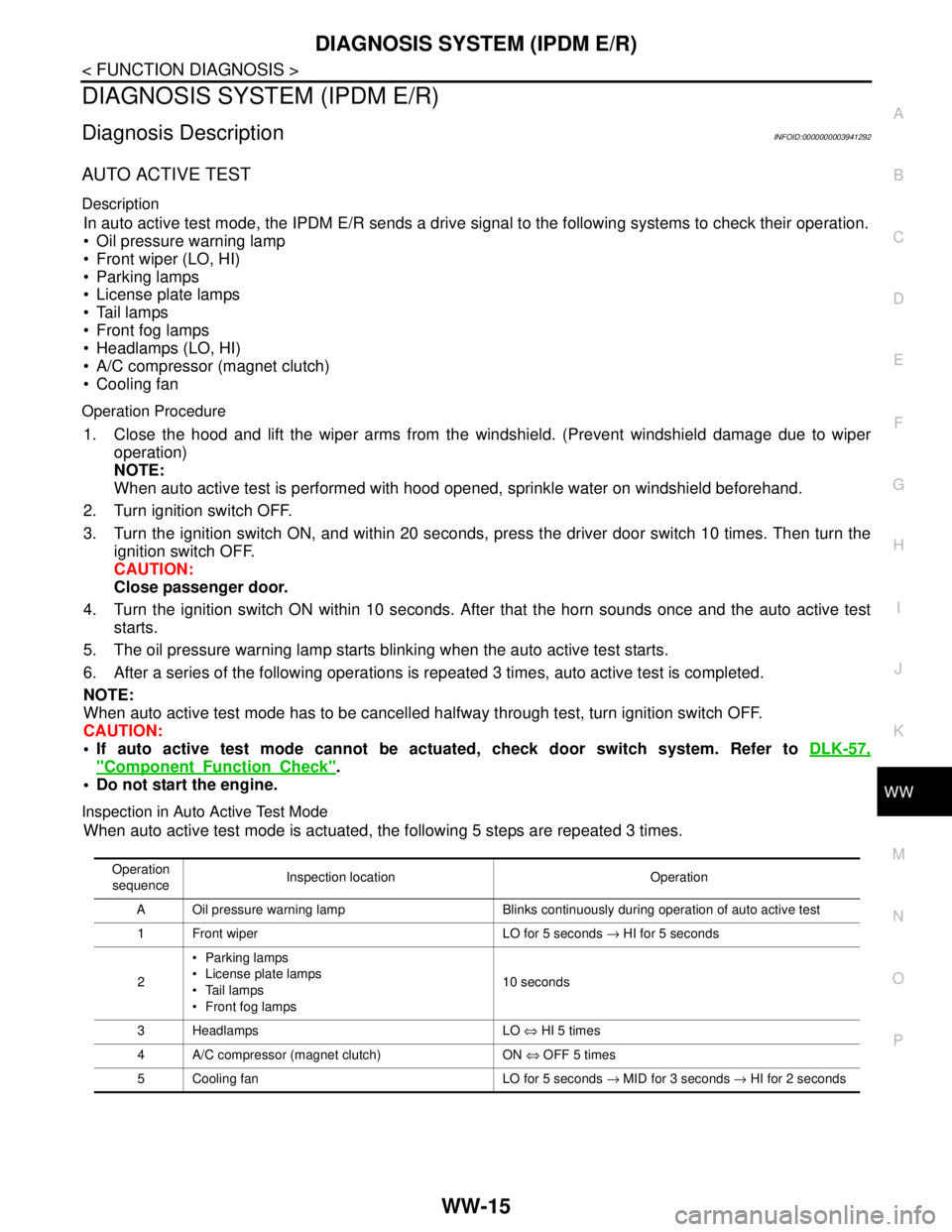
Inspection in Auto Active Test Mode
When auto active test mode is actuated, the following 5 steps are repeated 3 times.
Operation
sequenceInspection location Operation
A Oil pressure warning lamp Blinks continuously during operation of auto active test
1 Front wiper LO for 5 seconds → HI for 5 seconds
2Parking lamps
License plate lamps
Tail lamps
Front fog lamps10 seconds
3 Headlamps LO ⇔ HI 5 times
4 A/C compressor (magnet clutch) ON ⇔ OFF 5 times
5 Cooling fan LO for 5 seconds → MID for 3 seconds → HI for 2 seconds