Page 129 of 309
Black plate (131,1)
Model "S35-D" EDITED: 2007/ 12/ 19
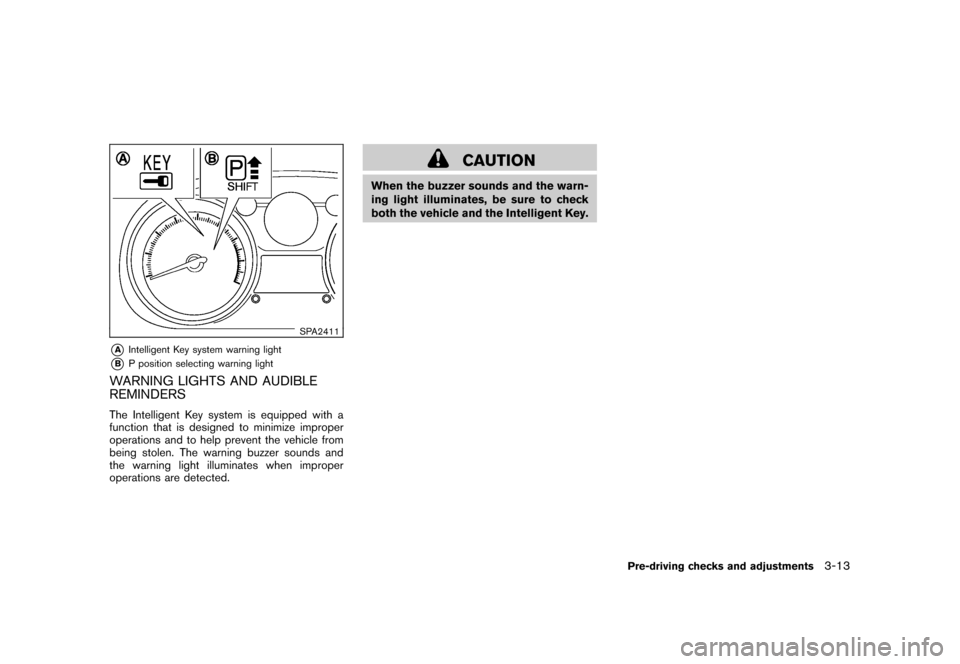
SPA2411
*A
Intelligent Key system warning light
*B
P position selecting warning light
WARNING LIGHTS AND AUDIBLE
REMINDERSThe Intelligent Key system is equipped with a
function that is designed to minimize improper
operations and to help prevent the vehicle from
being stolen. The warning buzzer sounds and
the warning light illuminates when improper
operations are detected.
CAUTION
When the buzzer sounds and the warn-
ing light illuminates, be sure to check
both the vehicle and the Intelligent Key.
Pre-driving checks and adjustments
3-13
Page 130 of 309
Black plate (132,1)
Model "S35-D" EDITED: 2007/ 12/ 19
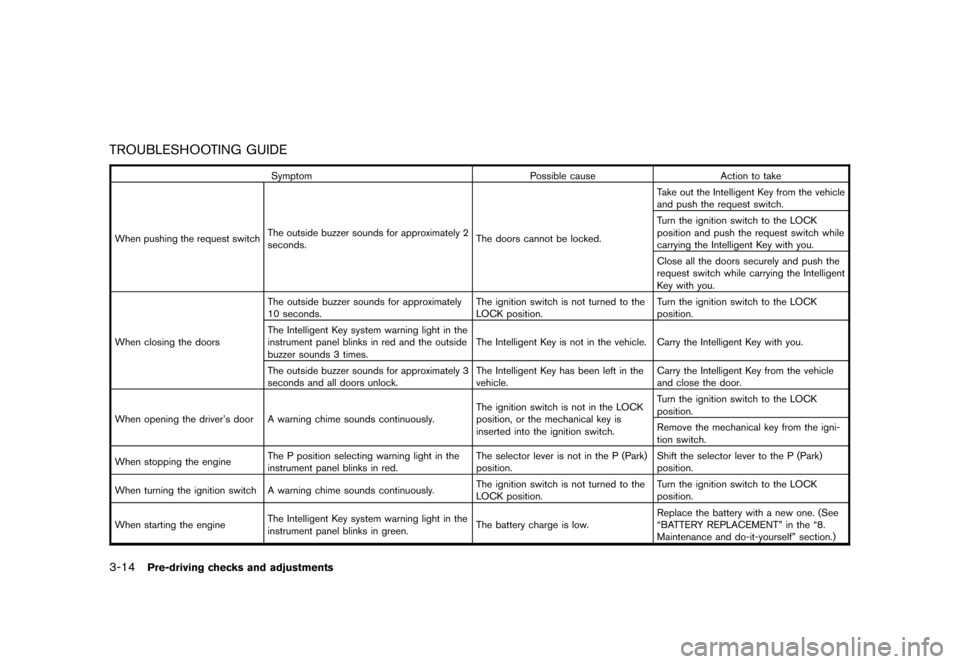
TROUBLESHOOTING GUIDE
Symptom Possible cause Action to take
When pushing the request switchThe outside buzzer sounds for approximately 2
seconds.The doors cannot be locked.Take out the Intelligent Key from the vehicle
and push the request switch.
Turn the ignition switch to the LOCK
position and push the request switch while
carrying the Intelligent Key with you.
Close all the doors securely and push the
request switch while carrying the Intelligent
Key with you.
When closing the doorsThe outside buzzer sounds for approximately
10 seconds.The ignition switch is not turned to the
LOCK position.Turn the ignition switch to the LOCK
position.
The Intelligent Key system warning light in the
instrument panel blinks in red and the outside
buzzer sounds 3 times.The Intelligent Key is not in the vehicle. Carry the Intelligent Key with you.
The outside buzzer sounds for approximately 3
seconds and all doors unlock.The Intelligent Key has been left in the
vehicle.Carry the Intelligent Key from the vehicle
and close the door.
When opening the driver’s door A warning chime sounds continuously.The ignition switch is not in the LOCK
position, or the mechanical key is
inserted into the ignition switch.Turn the ignition switch to the LOCK
position.
Remove the mechanical key from the igni-
tion switch.
When stopping the engineThe P position selecting warning light in the
instrument panel blinks in red.The selector lever is not in the P (Park)
position.Shift the selector lever to the P (Park)
position.
When turning the ignition switch A warning chime sounds continuously.The ignition switch is not turned to the
LOCK position.Turn the ignition switch to the LOCK
position.
When starting the engineThe Intelligent Key system warning light in the
instrument panel blinks in green.The battery charge is low.Replace the battery with a new one. (See
“BATTERY REPLACEMENT” in the “8.
Maintenance and do-it-yourself” section.)
3-14
Pre-driving checks and adjustments
Page 131 of 309
Black plate (133,1)
Model "S35-D" EDITED: 2007/ 12/ 19
Symptom Possible cause Action to take
When pushing the ignition switchThe Intelligent Key system warning light in the
instrument panel illuminates in red.The Intelligent Key is not in the vehicle.If the key warning light illuminates in red
even while you are carrying the Intelligent
Key, the battery is completely discharged.
Replace the battery with a new one. (See
“BATTERY REPLACEMENT” in the “8.
Maintenance and do-it-yourself” section.)
Pre-driving checks and adjustments
3-15
Page 133 of 309
Black plate (135,1)
Model "S35-D" EDITED: 2007/ 12/ 19
.Opening any doors.
.Pushing the ignition switch.
.Inserting the mechanical key into the ignition
switch.
During this 1-minute time period, if the UNLOCK
button is pushed, all doors will be locked
automatically after another 1 minute.
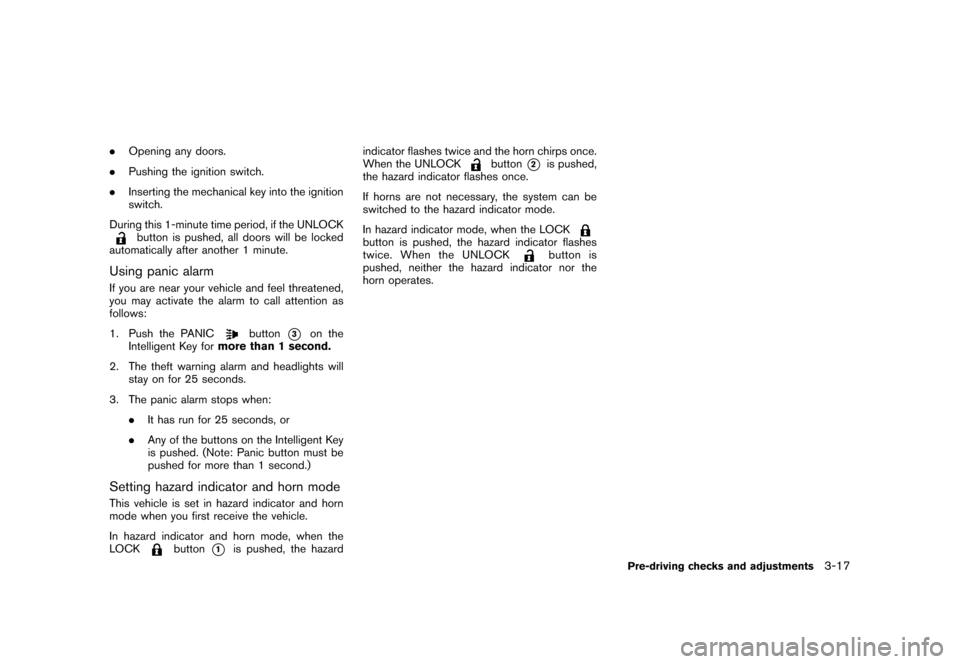
Using panic alarmIf you are near your vehicle and feel threatened,
you may activate the alarm to call attention as
follows:
1. Push the PANIC
button
*3
on the
Intelligent Key formore than 1 second.
2. The theft warning alarm and headlights will
stay on for 25 seconds.
3. The panic alarm stops when:
.It has run for 25 seconds, or
.Any of the buttons on the Intelligent Key
is pushed. (Note: Panic button must be
pushed for more than 1 second.)
Setting hazard indicator and horn modeThis vehicle is set in hazard indicator and horn
mode when you first receive the vehicle.
In hazard indicator and horn mode, when the
LOCK
button
*1
is pushed, the hazardindicator flashes twice and the horn chirps once.
When the UNLOCK
button
*2
is pushed,
the hazard indicator flashes once.
If horns are not necessary, the system can be
switched to the hazard indicator mode.
In hazard indicator mode, when the LOCK
button is pushed, the hazard indicator flashes
twice. When the UNLOCK
button is
pushed, neither the hazard indicator nor the
horn operates.
Pre-driving checks and adjustments
3-17
Page 135 of 309
Black plate (137,1)
Model "S35-D" EDITED: 2007/ 12/ 19
WARNING
.Make sure the hood is completely
closed and latched before driving.
Failure to do so could cause the
hood to fly open and result in an
accident.
.If you see steam or smoke coming
from the engine compartment, to
avoid injury do not open the hood.
SPA2412
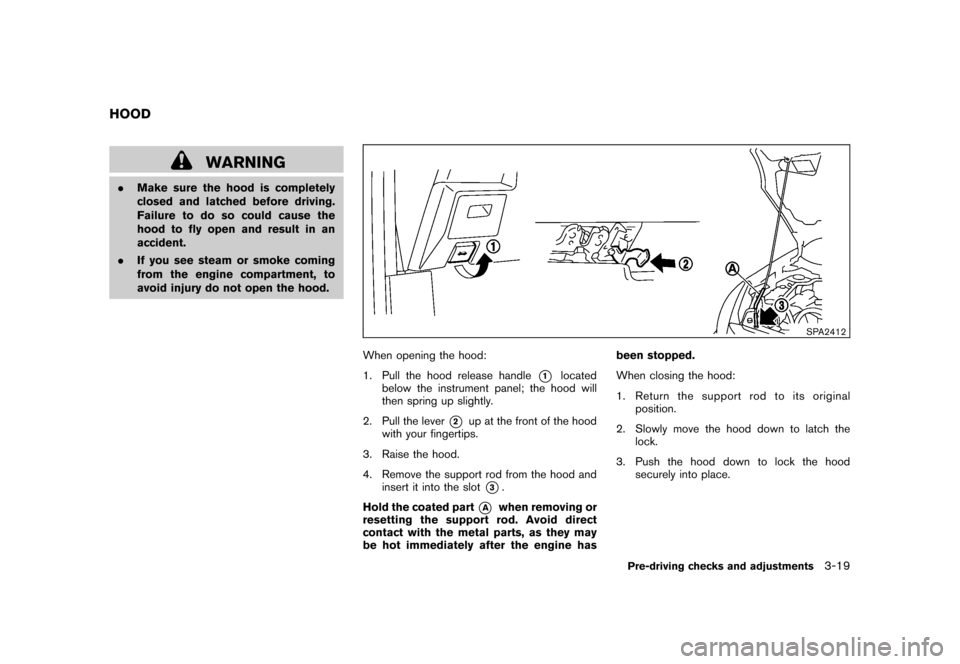
When opening the hood:
1. Pull the hood release handle
*1
located
below the instrument panel; the hood will
then spring up slightly.
2. Pull the lever
*2
up at the front of the hood
with your fingertips.
3. Raise the hood.
4. Remove the support rod from the hood and
insert it into the slot
*3.
Hold the coated part
*A
when removing or
resetting the support rod. Avoid direct
contact with the metal parts, as they may
be hot immediately after the engine hasbeen stopped.
When closing the hood:
1. Return the support rod to its original
position.
2. Slowly move the hood down to latch the
lock.
3. Push the hood down to lock the hood
securely into place.
HOOD
Pre-driving checks and adjustments
3-19
Page 138 of 309
Black plate (140,1)
Model "S35-D" EDITED: 2007/ 12/ 19
mishandled. Always stop engine
and do not smoke or allow open
flames or sparks near the vehicle
when refueling.
.Do not attempt to top off the fuel
tank after the fuel pump nozzle
shuts off automatically. Continued
refueling may cause fuel overflow,
resulting in fuel spray and possibly
a fire.
.Use only an original equipment type
fuel-filler cap as a replacement. It
has a built-in safety valve needed
for proper operation of the fuel
system and emission control sys-
tem. An incorrect cap can result in a
serious malfunction and possible
injury. It could also cause the mal-
function indicator light to come on.
.Never pour fuel into the throttle
body to attempt to start your vehi-
cle.
.Do not fill a portable fuel container
in the vehicle or trailer. Static elec-
tricity can cause an explosion of
flammable liquid, vapor or gas in
any vehicle or trailer. To reduce the
risk of serious injury or death whenfilling portable fuel containers:
— Always place the container on
the ground when filling.
— Do not use electronic devices
when filling.
— Keep the pump nozzle in contact
with the container while you are
filling it.
— Use only approved portable fuel
containers for flammable liquid.
CAUTION
.If fuel is spilled on the vehicle body,
flush it away with water to avoid
paint damage.
.Tighten until the fuel-filler cap
clicks. Failure to tighten the fuel-
filler cap properly may cause the
malfunction indicator light
(MIL) to illuminate. If the
light
illuminates because the fuel-filler
cap is loose or missing, tighten or
install the cap and continue to drive
the vehicle. The
light should
turn off after a few driving trips. If
the
light does not turn off after
a few driving trips, have the vehicleinspected by a NISSAN dealer.
For additional information, see
“Malfunction Indicator Light (MIL)”
in the “2. Instruments and controls”
section.
3-22
Pre-driving checks and adjustments
Page 140 of 309
Black plate (142,1)
Model "S35-D" EDITED: 2007/ 12/ 19
SPA1792
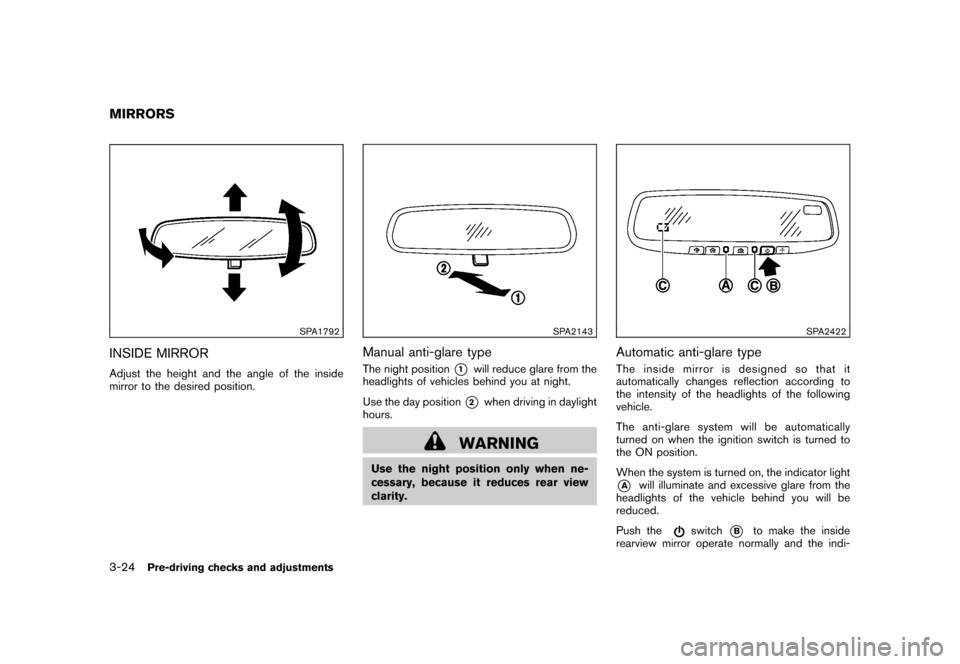
INSIDE MIRRORAdjust the height and the angle of the inside
mirror to the desired position.
SPA2143
Manual anti-glare typeThe night position
*1
will reduce glare from the
headlights of vehicles behind you at night.
Use the day position*2
when driving in daylight
hours.
WARNING
Use the night position only when ne-
cessary, because it reduces rear view
clarity.
SPA2422
Automatic anti-glare typeThe inside mirror is designed so that it
automatically changes reflection according to
the intensity of the headlights of the following
vehicle.
The anti-glare system will be automatically
turned on when the ignition switch is turned to
the ON position.
When the system is turned on, the indicator light*A
will illuminate and excessive glare from the
headlights of the vehicle behind you will be
reduced.
Push the
switch
*B
to make the inside
rearview mirror operate normally and the indi-
MIRRORS3-24
Pre-driving checks and adjustments
Page 141 of 309
Black plate (143,1)
Model "S35-D" EDITED: 2007/ 12/ 19
cator light will turn off. Push the
switch
again to turn the system on.
Do not allow any object to cover the
sensors
*C
or apply glass cleaner on
them. Doing so will reduce the sensitivity
of the sensors, resulting in improper
operation.
For the compass operation, see “COMPASS” in
the “2. Instruments and controls” section.
For the HomeLink®Universal Transceiver opera-
tion, see “HomeLink®UNIVERSAL TRANSCEI-
VER” in the “2. Instruments and controls”
section.
SPA1390
OUTSIDE MIRRORS
WARNING
Objects viewed in the outside mirror on
the passenger side are closer than they
appear. Be careful when moving to the
right. Using only this mirror could cause
an accident. Use the inside mirror or
glance over your shoulder to properly
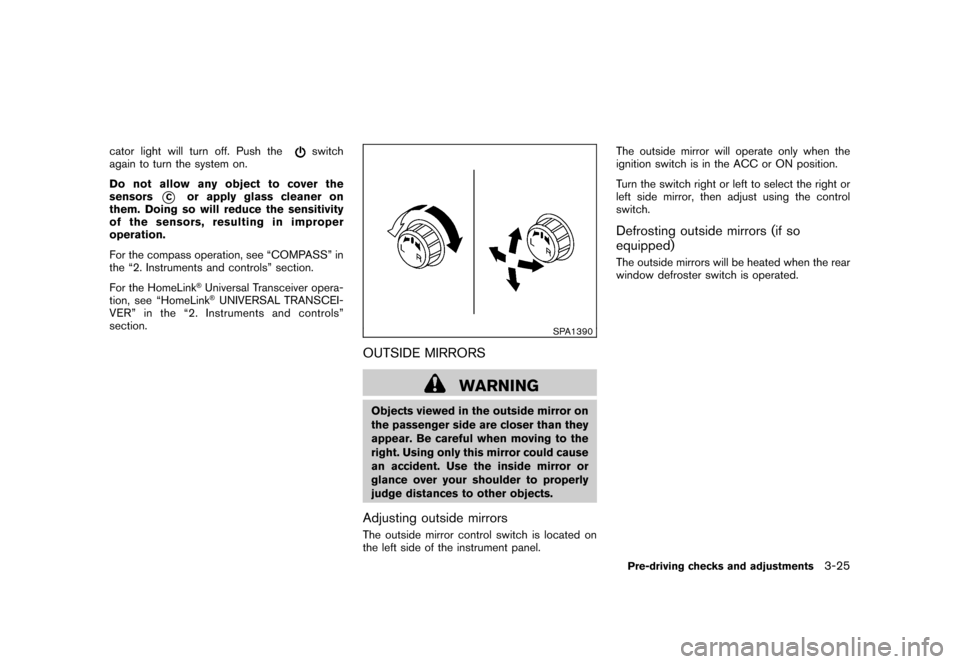
judge distances to other objects.Adjusting outside mirrorsThe outside mirror control switch is located on
the left side of the instrument panel.The outside mirror will operate only when the
ignition switch is in the ACC or ON position.
Turn the switch right or left to select the right or
left side mirror, then adjust using the control
switch.
Defrosting outside mirrors (if so
equipped)The outside mirrors will be heated when the rear
window defroster switch is operated.Pre-driving checks and adjustments
3-25