On-boar
dcomputer 114
X
To select astored station: briefly press
the j ork button.
X To select achannel from the channel
list: press and hold the jork but-
ton.
X To select astation using the station
search (only if no station list is being
received): press and hold the jor
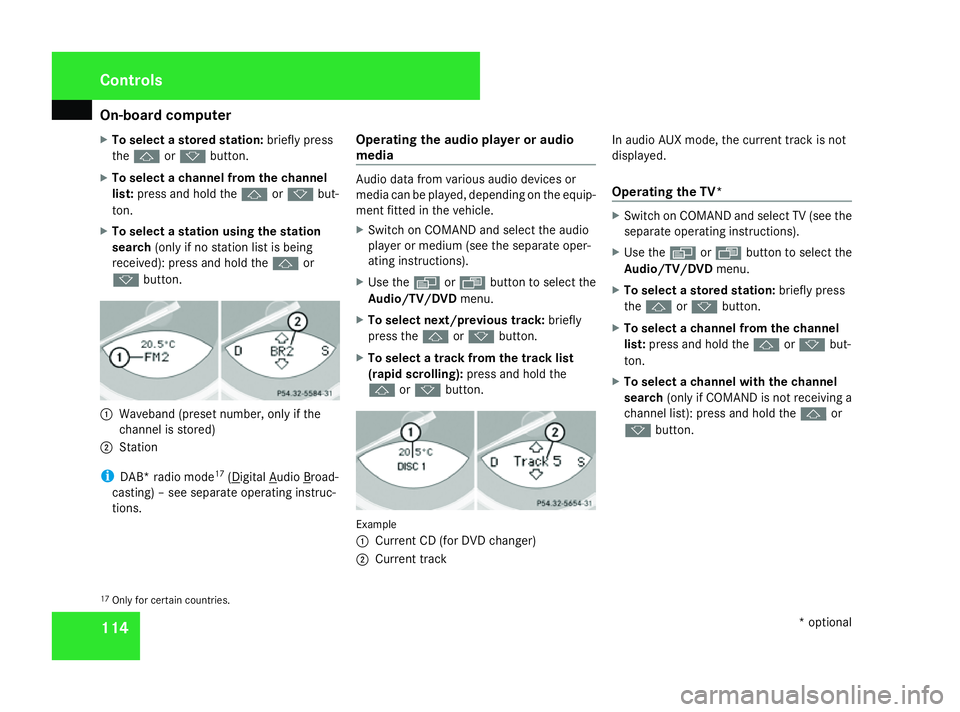
k button. 1
Waveband (preset number, only if the
channel is stored)
2 Station
i DAB* radio mode 17
( Digital Audio Broad-
casting) –see separate operating instruc-
tions. Operating the audio player or audio
media Audio data from various audio devices or
media can be played
,depending on the equip-
ment fitted in the vehicle.
X Switc honC OMAND and select the audio
player or medium (see the separate oper-
ating instructions).
X Use the èor· button to select the
Audio/TV/DVD menu.
X To select next/previous track: briefly
press the jork button.
X To select atrack from the track list
(rapid scrolling): press and hold the
j ork button. Example
1
Current CD (for DVD changer)
2 Current track In audio AUX mode, the curren
ttrack is not
displayed.
Operating the TV* X
Switc honC OMAND and select TV (see the
separate operating instructions).
X Use the èor· button to select the
Audio/TV/DVD menu.
X To select astored station: briefly press
the j ork button.
X To select achannel from the channel
list: press and hold the jork but-
ton.
X To select achannel with the channel
search (only if COMAND is not receivin ga
channel list): press and hold the jor
k button.
17 Only for certain countries. Controls
*optional
230_AKB; 5; 4, en-GB
bjanott, Version: 2.9.6 2008-04-08T15:09:54+02:00-Seite 114 Dateiname: 6515_3089_02_buchblock.pdf; preflight