2008 MERCEDES-BENZ E-CLASS SALOON steering
[x] Cancel search: steeringPage 48 of 401
Occupant safety
45
The driver's front airbag and front-passenger
front airbag are deployed:
R at the start of an accident with a high rate
of vehicle acceleration or deceleration in a
longitudinal direction
R if the system determines that airbag
deployment can offer additional protection
to that provided by the seat belt
R if the seat belt is fastened
R independently of other airbags in the vehi-
cle
R if the vehicle overturns, but only if the sys-
tem detects high vehicle deceleration in a
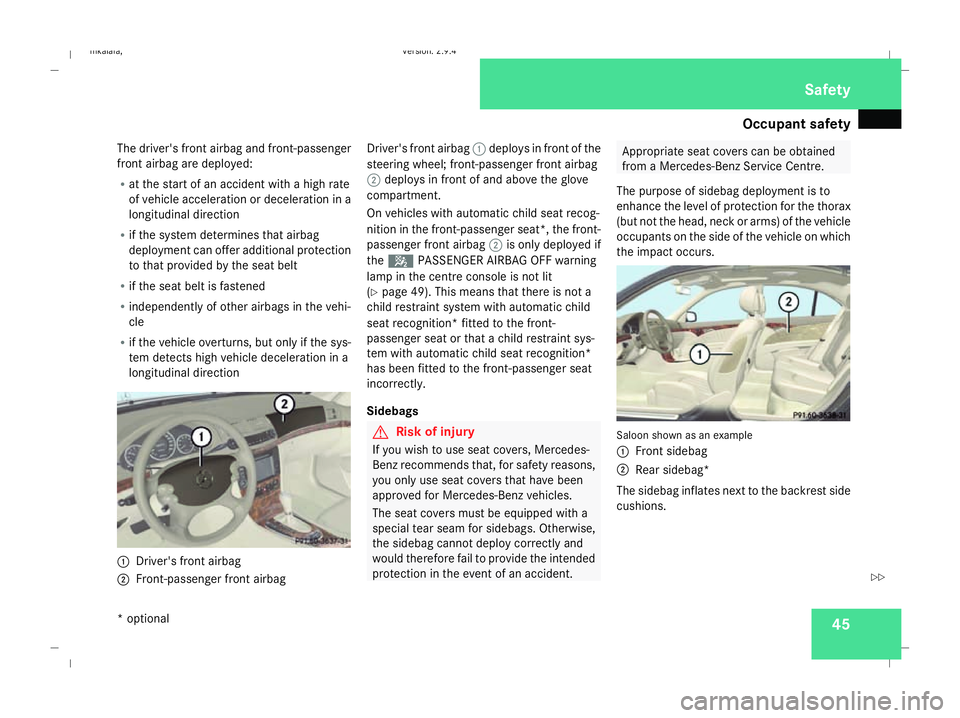
longitudinal direction 1
Driver's front airbag
2 Front-passenger front airbag Driver's front airbag
1deploys in front of the
steering wheel; front-passenger front airbag
2 deploys in front of and above the glove
compartment.
On vehicles with automatic child seat recog-
nition in the front-passenger seat*, the front-
passenger front airbag 2is only deployed if
the 5 PASSENGER AIRBAG OFF warning
lamp in the centre console is not lit
(Y page 49). This means that there is not a
child restraint system with automatic child
seat recognition* fitted to the front-
passenger seat or that a child restraint sys-
tem with automatic child seat recognition*
has been fitted to the front-passenger seat
incorrectly.
Sidebags G
Risk of injury
If you wish to use seat covers, Mercedes-
Benz recommends that, for safety reasons,
you only use seat covers that have been
approved for Mercedes-Benz vehicles.
The seat covers must be equipped with a
special tear seam for sidebags. Otherwise,
the sidebag cannot deploy correctly and
would therefore fail to provide the intended
protection in the event of an accident. Appropriate seat covers can be obtained
from a Mercedes-Benz Service Centre.
The purpose of sidebag deployment is to
enhance the level of protection for the thorax
(but not the head, neck or arms) of the vehicle
occupants on the side of the vehicle on which
the impact occurs. Saloon shown as an example
1
Front sidebag
2 Rear sidebag*
The sidebag inflates next to the backrest side
cushions. Safety
* optional
211_AKB; 2; 5, en-GB
mkalafa,
Version: 2.9.4 2008-02-29T16:57:07+01:00 - Seite 45 ZDateiname: 6515_3416_02_buchblock.pdf; preflight
Page 61 of 401
Driving safety sys
tems58
X
To deactivate: press button1.
Indicator lamp 2goes out. You can oper-
ate the rear side windows using the
switches in the rear compartment. Driving safety systems
Overview of driving safety systems
In this section, you will find information about
the following driving safety systems:
R ABS ( Anti-lock Braking System)
R BAS ( Brake Assist System)
R Adaptive brake lamps
R ESP ®
( Electronic Stability Program)
R EBV (electronic brake-power distribution)
R ADAPTIVE BRAKE
i In wintry road conditions, always use win-
ter tyres (M+S tyres) and, where necessary,
snow chains. Only in this way will the driv-
ing safety systems described in this section
work as effectively as possible. G
Risk of accident
The risk of an accident is significantly
increased by driving too fast. This is partic-
ularly the case when cornering as well as
on wet or slippery roads or when driving too
close to the vehicle in front.
The driving safety systems described in this
section cannot reduce this risk nor override
the laws of physics. For this reason, always adapt your driving
style to suit the prevailing road and weather
conditions. Maintain sufficient distance
from other road users and objects on the
road.
ABS (Anti-lock Braking System)
ABS regulates brake pressure in such a way
that the wheels do not lock when you brake.
This allows you to continue steering the vehi-
cle when braking.
ABS works from a speed of about 8 km/h
upwards, regardless of road surface condi-
tions. ABS works on slippery surfaces, even
when you only brake gently. G
Risk of accident
Do not depress the brake pedal several
times in quick succession (pumping).
Depress the brake firmly and evenly. Pump-
ing the brake pedal reduces the braking
effect.
Braking If ABS intervenes when braking, you will feel
a pulsing in the brake pedal.Safety
211_AKB; 2; 5, en-GB
mkalafa
,V ersion: 2.9.4
2008-02-29T16:57:07+01:00 - Seite 58 Dateiname: 6515_3416_02_buchblock.pdf; preflight
Page 68 of 401

65
Opening and closing
...........................66
Key positions ....................................... 76
Seats .................................................... 77
Steering wheel .................................... 89
Mirrors ................................................. 91
Memory functions* .............................93
Seat belts ............................................. 95
Lights ................................................... 99
Windscreen wipers ...........................105
Side windows .................................... 107Driving and parking
..........................110
Transmission ..................................... 114
Instrument cluster ............................120
On-board computer ..........................121
Driving systems ................................ 142
Air conditioning ................................. 162
Sliding sunroof .................................. 180
Loading and stowing ........................186
Features ............................................. 207 Controls
211_AKB; 2; 5, en-GB
mkalafa,
Version: 2.9.4
2008-02-29T16:57:07+01:00 - Seite 65 Dateiname: 6515_3416_02_buchblock.pdf; preflight
Page 92 of 401
Steering wheel
89Steering wheel
Points to remember
Depending on the vehicle equipment, you can
adjust the steering wheel either manually or
electrically*. G
Risk of injury
The electrically adjustable steering
wheel* can be adjusted when the key is
removed from the ignition lock. Therefore,
do not leave children unsupervised in the
vehicle as they could become trapped as
the steering wheel is adjusted. G
Risk of accident
Only adjust the steering wheel when the
vehicle is stationary and do not pull away
until the steering wheel adjustment mech-
anism is locked in position. You might oth-
erwise drive without the steering wheel
adjustment mechanism being locked in
position. As a result you could be distracted
from road and traffic conditions by an unex-
pected movement of the steering wheel
and thereby cause an accident.
The steerability of the vehicle is however
not affected. When you adjust the steering wheel, make
sure that:
R
the steering wheel can be reached with
your arms slightly bent
R you can move your legs freely
R you can see all the displays in the instru-
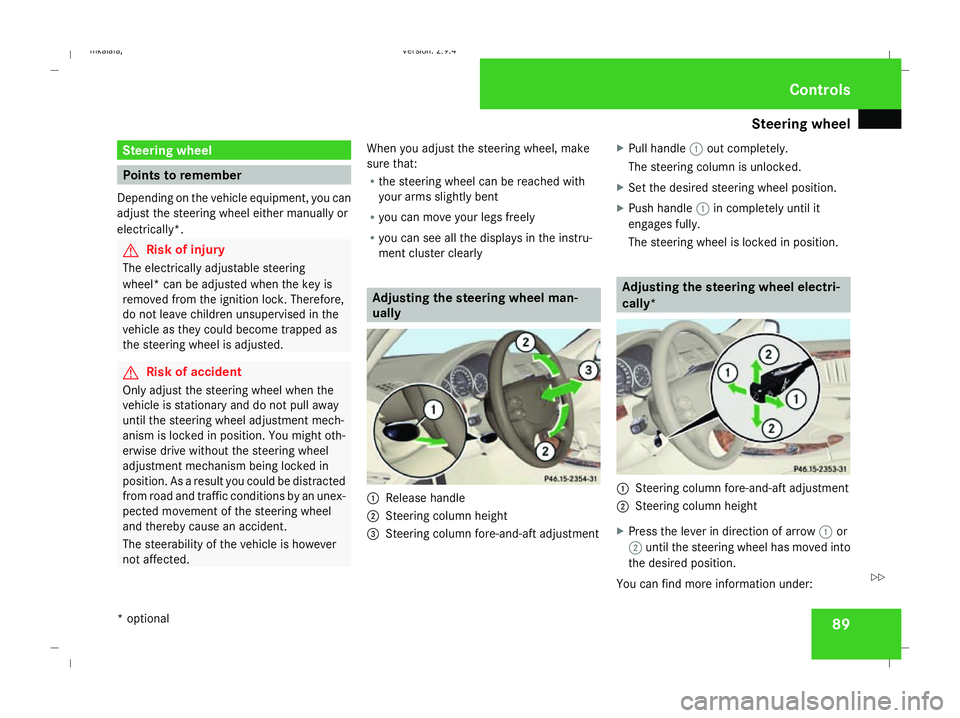
ment cluster clearly Adjusting the steering wheel man-
ually
1
Release handle
2 Steering column height
3 Steering column fore-and-aft adjustment X
Pull handle 1out completely.
The steering column is unlocked.
X Set the desired steering wheel position.
X Push handle 1in completely until it
engages fully.
The steering wheel is locked in position. Adjusting the steering wheel electri-
cally*
1
Steering column fore-and-aft adjustment
2 Steering column height
X Press the lever in direction of arrow 1or
2 until the steering wheel has moved into
the desired position.
You can find more information under: Controls
* optional
211_AKB; 2; 5, en-GB
mkalafa,
Version: 2.9.4 2008-02-29T16:57:07+01:00 - Seite 89 ZDateiname: 6515_3416_02_buchblock.pdf; preflight
Page 93 of 401
Steering wheel
90
R
Easy-entry/exit feature (Y page 90)
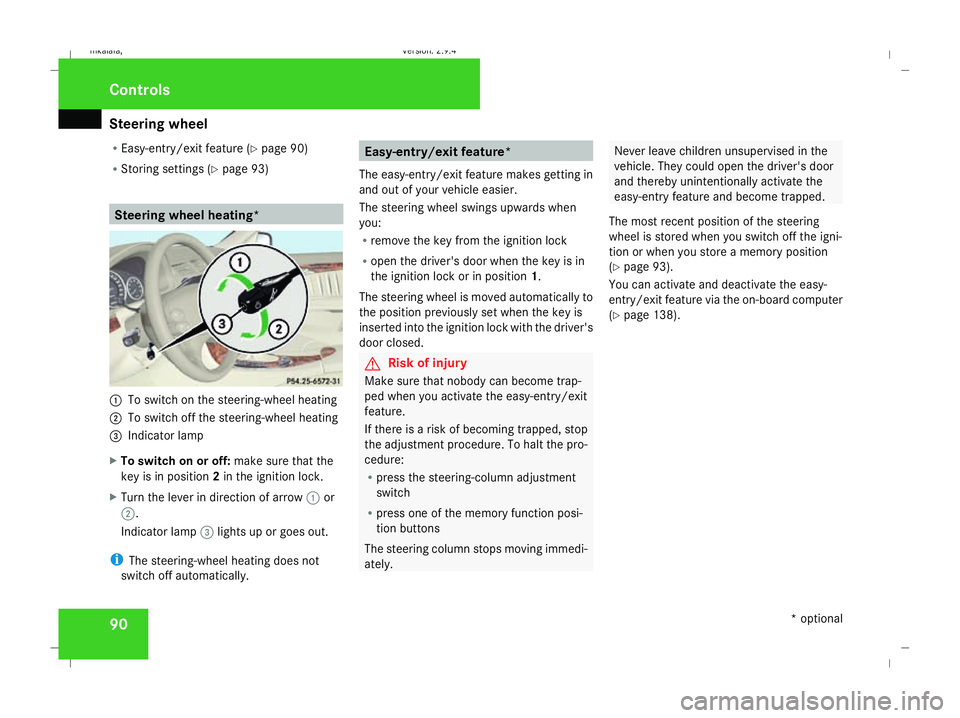
R Storing settings (Y page 93) Steering wheel heating*
1
To switch on the steering-wheel heating
2 To switch off the steering-wheel heating
3 Indicator lamp
X To switch on or off: make sure that the
key is in position 2in the ignition lock.
X Turn the lever in direction of arrow 1or
2.
Indicator lamp 3lights up or goes out.
i The steering-wheel heating does not
switch off automatically. Easy-entry/exit feature*
The easy-entry/exit feature makes getting in
and out of your vehicle easier.
The steering wheel swings upwards when
you:
R remove the key from the ignition lock
R open the driver's door when the key is in
the ignition lock or in position 1.
The steering wheel is moved automatically to
the position previously set when the key is
inserted into the ignition lock with the driver's
door closed. G
Risk of injury
Make sure that nobody can become trap-
ped when you activate the easy-entry/exit
feature.
If there is a risk of becoming trapped, stop
the adjustment procedure. To halt the pro-
cedure:
R press the steering-column adjustment
switch
R press one of the memory function posi-
tion buttons
The steering column stops moving immedi-
ately. Never leave children unsupervised in the
vehicle. They could open the driver's door
and thereby unintentionally activate the
easy-entry feature and become trapped.
The most recent position of the steering
wheel is stored when you switch off the igni-
tion or when you store a memory position
(Y page 93).
You can activate and deactivate the easy-
entry/exit feature via the on-board computer
(Y page 138). Controls
* optional
211_AKB; 2; 5, en-GB
mkalafa,
Version: 2.9.4 2008-02-29T16:57:07+01:00 - Seite 90Dateiname: 6515_3416_02_buchblock.pdf; preflight
Page 96 of 401

Memory functions*
93
X
Make sure that parking position for the
exterior mirror on the front-passenger side
is stored with the memory function
(Y page 94).
X Make sure that the key is in position 2in
the ignition lock.
X Make sure that button 2for the exterior
mirror on the front-passenger side is
pressed in.
X Engage reverse gear.
The exterior mirror on the front-passenger
side moves to the stored parking position.
The exterior mirror on the front-passenger
side moves back to its original position:
R as soon as you exceed a speed of
10 km/h
R about ten seconds after you have disen-
gaged reverse gear
R if you press button 1for the exterior mir-
ror on the driver's side Memory functions*
Storing settings
You can store up to three different settings
using the memory button.
The following settings are stored as a single
memory preset:
R Position of the seat, backrest and head
restraint
R Dynamic driving seat*: activated/deacti-
vated
R Driver's side: steering-wheel position
R Driver's side: position of the exterior mir-
rors on the driver's and front-passenger
sides G
Risk of injury
The memory function can be used when the
key has been removed. For this reason,
children should never be left unsupervised
in the vehicle. They could otherwise
become trapped when moving the seat or
the steering wheel. G
Risk of accident
Only use the memory function on the
driver’s side when the vehicle is stationary.
You could otherwise be distracted from the traffic conditions by the steering wheel and
seat moving of their own accord, and cause
an accident.
1
Storage position switches 1,2,3
2 Memory button M
X Adjust the seat ( Ypage 77).
X On the driver's side, also adjust the steer-
ing wheel (Y page 89) and the mirrors
(Y page 91).
X Press memory button M2.
X Press one of storage position switches 1,
2 or 31 within three seconds.
The settings are stored in the selected pre-
set position. A tone sounds when the set-
tings have been completed. Controls
* optional
211_AKB; 2; 5, en-GB
mkalafa
, Version: 2.9.4 2008-02-29T16:57:07+01:00 - Seite 93 ZDateiname: 6515_3416_02_buchblock.pdf; preflight
Page 97 of 401

Memory functions*
94 Calling up a stored setting
G
Risk of accident
Only use the memory function on the
driver’s side when the vehicle is stationary.
You could otherwise be distracted from the
traffic conditions by the steering wheel and
seat moving of their own accord, and cause
an accident.
X Press and hold the relevant storage posi-
tion switch 1,2or 3until the seat, steering
wheel and mirrors are in the stored posi-
tion.
i The setting procedure is interrupted as
soon as you release the storage position
switch. Storing a parking position
To make it easier to park, you can store the
front-passenger side exterior mirror position
in such a way that you can see the rear wheel
on that side as soon as you engage reverse
gear.
You can store a parking position for the exte-
rior mirror on the front-passenger side using
the memory button.
You will find information about using the exte-
rior mirror's parking position in the "Parking
aid" section (Y page 92). 1
Exterior mirror on the driver's side
2 Adjustment button
3 Exterior mirror on the front-passenger
side
4 Memory button M X
Make sure that the vehicle is stationary and
that the key is in position 2in the ignition
lock.
X Press button 3for the exterior mirror on
the front-passenger side.
X Use button 2to adjust the exterior mirror
to a position which allows you to see the
rear wheel and the kerb.
X Press memory button M4.
X Press one of the arrows on adjustment but-
ton 2within three seconds.
The parking position is stored if the exterior
mirror does not move.
i If the mirror moves out of position, repeat
the steps. You can adjust the exterior mir-
ror again after storing the setting. Controls
* optional
211_AKB; 2; 5, en-GB
mkalafa
, Version: 2.9.4 2008-02-29T16:57:07+01:00 - Seite 94Dateiname: 6515_3416_02_buchblock.pdf; preflight
Page 100 of 401
Seat belts
97Belt warning for driver and front
passenger
The < seat belt warning lamp in the instru-
ment cluster reminds you that all occupants
should fasten their seat belts. The
or it may flash. Additionally, there may be a
warning tone.
The < seat belt warning lamp goes out and
the warning tone ceases when the driver and
the front passenger have fastened their seat
belt.
For certain countries only: regardless of
whether the driver or the front passenger is
already secured, the
has been started. The
front passenger have fastened their seat belt.
i Further information about the
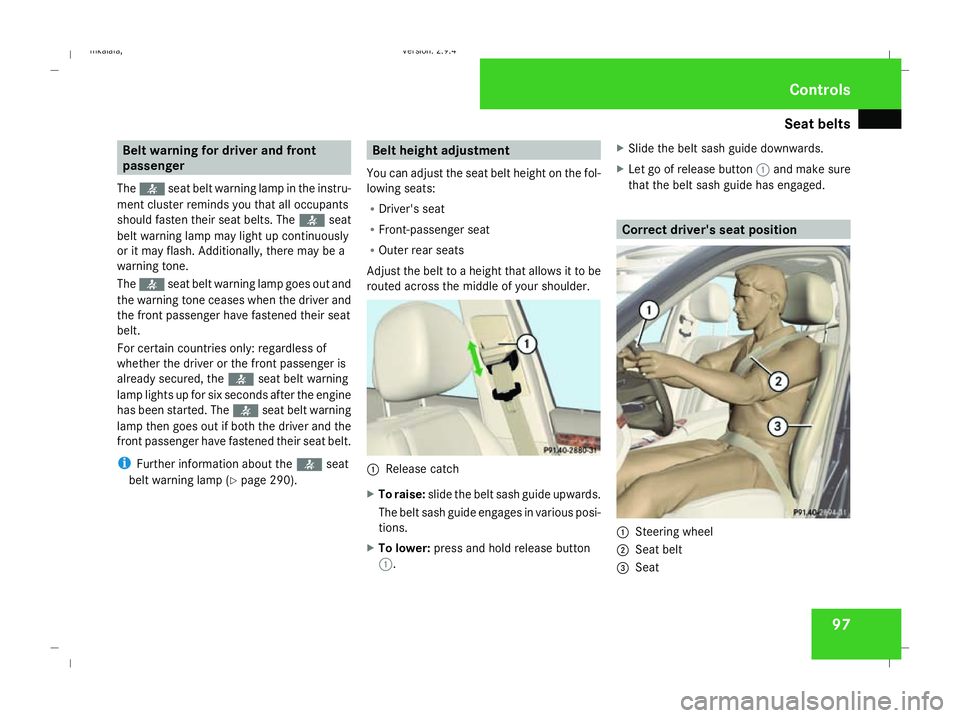
You can adjust the seat belt height on the fol-
lowing seats:
R Driver's seat
R Front-passenger seat
R Outer rear seats
Adjust the belt to a height that allows it to be
routed across the middle of your shoulder. 1
Release catch
X To raise: slide the belt sash guide upwards.
The belt sash guide engages in various posi-
tions.
X To lower: press and hold release button
1. X
Slide the belt sash guide downwards.
X Let go of release button 1and make sure
that the belt sash guide has engaged. Correct driver's seat position
1
Steering wheel
2 Seat belt
3 Seat Controls
211_AKB; 2; 5, en-GB
mkalafa,
Version: 2.9.4 2008-02-29T16:57:07+01:00 - Seite 97 ZDateiname: 6515_3416_02_buchblock.pdf; preflight