2008 MERCEDES-BENZ E-CLASS SALOON steering
[x] Cancel search: steeringPage 101 of 401
Seat belts
98 G
Risk of accident
Only adjust the driver's seat when the vehi-
cle is stationary. You will otherwise be dis-
tracted from the road and traffic conditions
and you could lose control of the vehicle as
a result of the seat moving. This could
cause an accident. G
Risk of accident
Only adjust the steering wheel when the
vehicle is stationary and do not pull away
until the steering wheel adjustment mech-
anism is locked in position. You might oth-
erwise drive without the steering wheel
adjustment mechanism being locked in
position. As a result you could be distracted
from road and traffic conditions by an unex-
pected movement of the steering wheel
and thereby cause an accident.
The steerability of the vehicle is however
not affected.
X Check whether seat 3and the head
restraint are adjusted properly
(Y page 77). Make sure that:
R
you are as far away from the driver's front
airbag as possible
R you are sitting in a normal upright posi-
tion
R you can fasten the seat belt properly
R you have moved the backrest to an
almost vertical position
R you have set the seat angle so that your
thighs are gently supported
R you can depress the pedals properly
R you have adjusted the head restraint so
that the back of your head is supported
at eye level by the central area of the
head restraint
X Check whether steering wheel 1is adjus-
ted properly (Y page 89).
Make sure that:
R you can hold the steering wheel with your
arms slightly bent
R you can move your legs freely
R you can see all the displays in the instru-
ment cluster clearly
X Check whether you have fastened seat belt
2 properly (Y page 95). It should:
R
fit snugly across your body
R be routed across the middle of your
shoulder
R routed in your pelvic area across the hip
joints Controls
211_AKB; 2; 5, en-GB
mkalafa,
Version: 2.9.4 2008-02-29T16:57:07+01:00 - Seite 98Dateiname: 6515_3416_02_buchblock.pdf; preflight
Page 106 of 401

Lights
103Position Load
-1 Front and rear seats occupied
or
Front and rear seats occu-
pied, luggage compartment
laden
0 Front seats occupied
1 Driver's seat occupied, lug-
gage compartment laden
X
Turn thumbwheel for headlamp range 1to
the position which corresponds to the load
in your vehicle. Headlamp cleaning system*
The headlamps are cleaned automatically if
the "Wipe with windscreen washer fluid" func-
tion is operated five times while the lights are
on and the engine is running. When you
switch off the ignition, the automatic head-
lamp cleaning system is reset and counting is
resumed from 0. Intelligent Light System* (vehicles
with bi-xenon headlamps*)
The Intelligent Light System adapts the light-
ing of the front headlamps to the prevailing
driving conditions so that the road is illumi-
nated better.
i The Intelligent Light System is only active
when it is dark.
The Intelligent Light System comprises:
R Active light function
R Cornering light function
R Motorway mode
R Extended range foglamps Active light function For the active light function, the dipped-beam
headlamps swivel horizontally. The swivel
angle changes according to the respective
driving situation. The active light function is
not active when the vehicle is stationary.
Cornering light function
Specially designed headlamps light up the
area into which you are driving when turning
corners.
If you are driving at speeds below 40 km/h,
the cornering light function is activated either
by the turn signals or when the steering wheel
is turned. If you are driving at speeds above
40 km/h the cornering light function is deac-
tivated.
Switching on
X
Make sure that the engine is running.
X Switch on the dipped-beam headlamps.
X Switch off the fog lights.
X Switch on the turn signal.
The cornering light on the same side as the
turn signal comes on, even if you turn the
steering wheel in the opposite direction
after indicating. Controls
* optional
211_AKB; 2; 5, en-GB
mkalafa,
Version: 2.9.4
2008-02-29T16:57:07+01:00 - Seite 103 ZDateiname: 6515_3416_02_buchblock.pdf; preflight
Page 107 of 401

Lights
104
or
X
Turn the steering wheel in the desired
direction.
When in a forwards gear: the cornering
lamp on the inside of the bend comes on.
When in reverse gear: the cornering light on
the outside of the bend comes on.
Switching off
X Turn the steering wheel back to the straight
ahead position.
The turn signal switches off. The cornering
lamp may remain lit for a short time.
or
X Switch off the turn signal.
The cornering lamp may remain lit for a
short time.
The cornering light will go out after a maxi-
mum of three minutes.
Motorway mode Motorway mode optimises the illumination of
the road by:
R controlling the brightness
R adapting the headlamp range Motorway mode is activated if you are driving
faster than 110 km/h and do not make any
large steering movements for 1,000 m.
Extended range foglamps The extended range foglamps reduce the
glare experienced by the driver and improve
the illumination of the edge of the carriage-
way.
X To switch on: switch on the rear foglamp.
The front foglamps and the rear foglamp
are switched on. The extended range fog-
lamps are activated if you are driving slower
than 70 km/h.
X To switch off: switch off the rear foglamp.
i The extended range foglamps switch off
automatically when you drive faster than
100 km/h. Interior lighting
Front overhead control panel Front overhead control panel
1
X To switch the left-hand reading lamp
on/off
2 ò To switch the rear interior lighting
on/off
3 ¡ To switch the automatic function
on/off
4 X To switch the right-hand reading
lamp on/off
5 ð To switch the front interior lighting
on/off Controls
211_AKB; 2; 5, en-GB
mkalafa,
Version: 2.9.4
2008-02-29T16:57:07+01:00 - Seite 104 Dateiname: 6515_3416_02_buchblock.pdf; preflight
Page 117 of 401
Transmission
114 Switching off the engine
G
Risk of accident
If the engine is not running, there is no
power assistance for the steering and
brakes. Steering and braking then takes
much more effort.
As a result, you might lose control of the
vehicle, cause an accident and injure your-
self and others.
Do not switch off the engine while driving.
Vehicles with manual transmission X
Shift to either first or reverse gear.
X Turn the key to position 0(Ypage 76) in the
ignition lock and remove it.
The immobiliser is activated.
Vehicles with automatic transmission* X
Move the selector lever to P.
Using the key
X Turn the key to position 0(Ypage 76) in the
ignition lock and remove it.
The immobiliser is activated. Using KEYLESS GO*
X
Press and hold the KEYLESS GO button
(Y page 77).
The engine stops and all the lamps in the
instrument cluster go out ( Ypage 26). Transmission
Introduction to the transmission
G
Risk of accident
The movement of the pedals must not be
impaired in any way. Do not keep any
objects in the driver's footwell. Make sure
that floormats or carpets are correctly
secured and that there is sufficient clear-
ance for the pedals. G
Risk of accident
Do not change down for additional engine
braking on a slippery road surface. This
could cause the drive wheels to lose their
grip and the vehicle could skid. This could
cause you to lose control of your vehicle
and cause an accident. Controls
* optional
211_AKB; 2; 5, en-GB
mkalafa
,V ersion: 2.9.4
2008-02-29T16:57:07+01:00 - Seite 114 Dateiname: 6515_3416_02_buchblock.pdf; preflight
Page 121 of 401
Transmission
118 Steering wheel gearshift paddles*
and manual gearshift program*
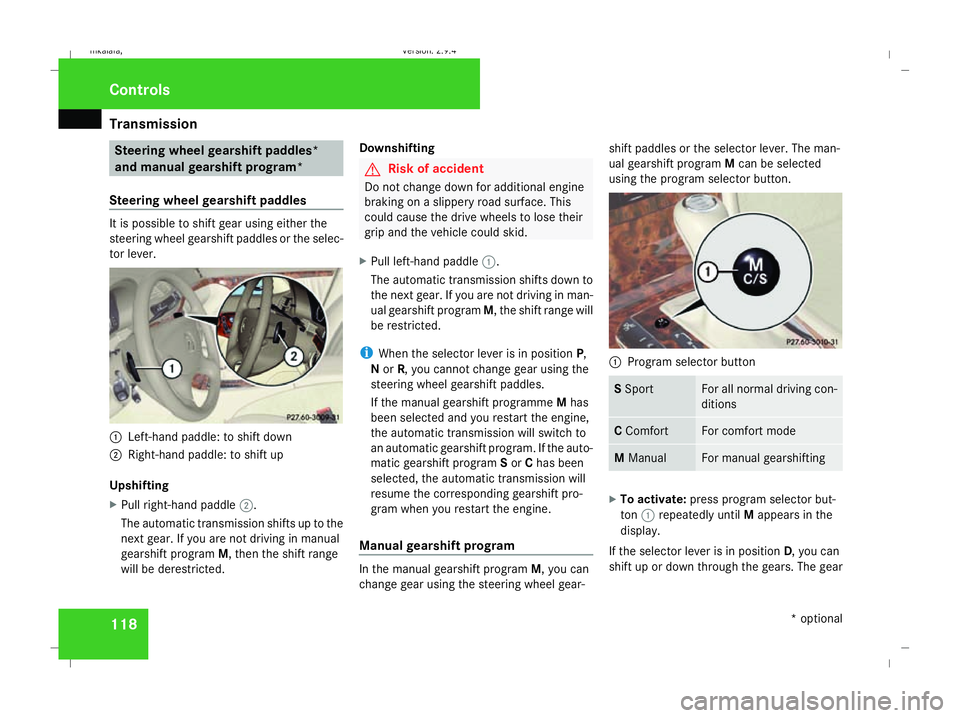
Steering wheel gearshift paddles It is possible to shift gear using either the
steering wheel gearshift paddles or the selec-
tor lever.
1
Left-hand paddle: to shift down
2 Right-hand paddle: to shift up
Upshifting
X Pull right-hand paddle 2.
The automatic transmission shifts up to the
next gear. If you are not driving in manual
gearshift program M, then the shift range
will be derestricted. Downshifting G
Risk of accident
Do not change down for additional engine
braking on a slippery road surface. This
could cause the drive wheels to lose their
grip and the vehicle could skid.
X Pull left-hand paddle 1.
The automatic transmission shifts down to
the next gear. If you are not driving in man-
ual gearshift program M, the shift range will
be restricted.
i When the selector lever is in position P,
N or R, you cannot change gear using the
steering wheel gearshift paddles.
If the manual gearshift programme Mhas
been selected and you restart the engine,
the automatic transmission will switch to
an automatic gearshift program. If the auto-
matic gearshift program Sor Chas been
selected, the automatic transmission will
resume the corresponding gearshift pro-
gram when you restart the engine.
Manual gearshift program In the manual gearshift program
M, you can
change gear using the steering wheel gear- shift paddles or the selector lever. The man-
ual gearshift program
Mcan be selected
using the program selector button. 1
Program selector button S
Sport For all normal driving con-
ditions
C
Comfort For comfort mode
M
Manual For manual gearshifting
X
To activate: press program selector but-
ton 1repeatedly until Mappears in the
display.
If the selector lever is in position D, you can
shift up or down through the gears. The gear Controls
* optional
211_AKB; 2; 5, en-GB
mkalafa
,V ersion: 2.9.4
2008-02-29T16:57:07+01:00 - Seite 118 Dateiname: 6515_3416_02_buchblock.pdf; preflight
Page 122 of 401
Transmission
119
currently selected and engaged is shown in
the display.
Upshifting
X
Briefly press the selector lever to the right
towards D+
or
X Pull the right-hand steering wheel gearshift
paddle (Y page 118).
The automatic transmission shifts up to the
next gear.
Vehicles with AMG engines
! In manual gearshift program M, the auto-
matic transmission does not shift up auto-
matically even when the limiting speed for
the current gear is reached. When the lim-
iting speed is reached, the fuel supply is cut
to prevent the engine from overrevving.
You must make sure that the engine speed
does not reach the red area of the rev coun-
ter. There is otherwise a risk of engine
damage.
X Shift up a gear when the ^upshift symbol
appears in the display instead of M.
When the AMG display is switched on, the
display colour changes to red and UPappears next to the gear indicator, instructing you to
shift up.
Downshifting G
Risk of accident
Do not change down for additional engine
braking on a slippery road surface. This
could cause the drive wheels to lose their
grip and the vehicle could skid.
X Briefly press the selector lever to the left
towards D-
or
X Pull the left-hand steering wheel gearshift
paddle (Y page 118).
The automatic transmission shifts down to
the next gear.
i For maximum acceleration, pull the left-
hand steering wheel gearshift paddle until
the transmission selects the optimum gear
for the current speed.
Kickdown
i It is not possible to use kickdown in the
manual gearshift program Mon vehicles
with AMG engines. You can also use kickdown for maximum
acceleration in manual gearshift program
M.
X Depress the accelerator pedal beyond the
pressure point.
The transmission shifts to a lower gear
depending on the engine speed.
i It is not possible to shift gears using the
steering wheel gearshift paddles during
kickdown. Controls
211_AKB; 2; 5, en-GB
mkalafa
,V ersion: 2.9.4
2008-02-29T16:57:07+01:00 - Seite 119 ZDateiname: 6515_3416_02_buchblock.pdf; preflight
Page 125 of 401
On-board computer
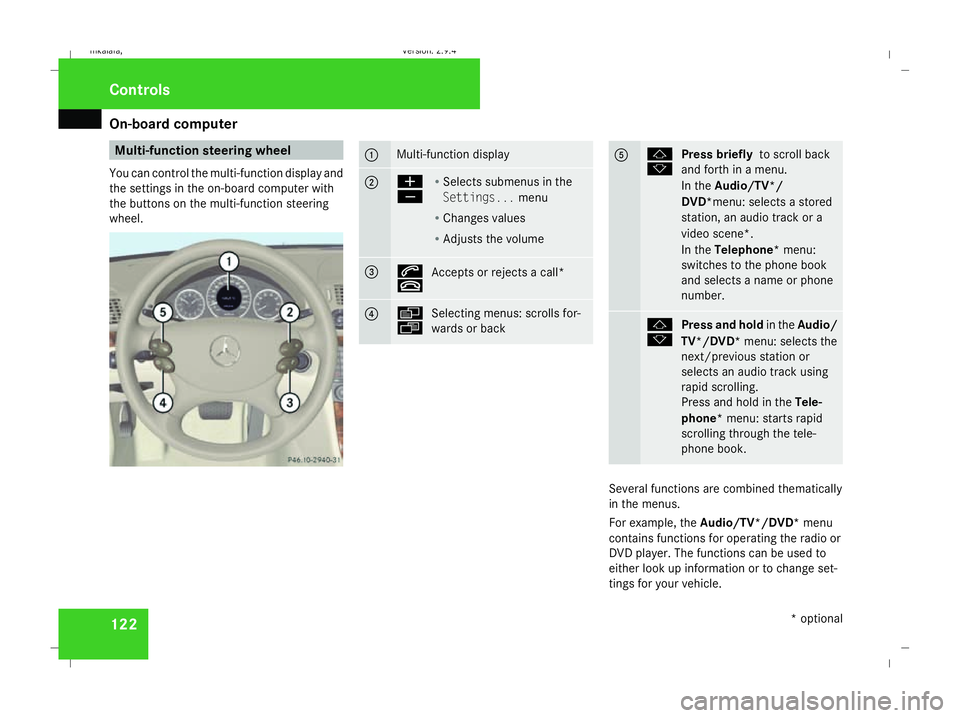
122 Multi-function steering wheel
You can control the multi-function display and
the settings in the on-board computer with
the buttons on the multi-function steering
wheel. 1 Multi-function display
2 æ
ç
R
Selects submenus in the
Settings... menu
R Changes values
R Adjusts the volume 3 s
t
Accepts or rejects a call* 4 è
ÿ
Selecting menus: scrolls for-
wards or back 5 j
k
Press briefly
to scroll back
and forth in a menu.
In the Audio/TV*/
DVD*menu: selects a stored
station, an audio track or a
video scene*.
In the Telephone* menu:
switches to the phone book
and selects a name or phone
number. j
k
Press and hold
in theAudio/
TV*/DVD* menu: selects the
next/previous station or
selects an audio track using
rapid scrolling.
Press and hold in the Tele-
phone* menu: starts rapid
scrolling through the tele-
phone book. Several functions are combined thematically
in the menus.
For example, the Audio/TV*/DVD* menu
contains functions for operating the radio or
DVD player. The functions can be used to
either look up information or to change set-
tings for your vehicle. Controls
* optional
211_AKB; 2; 5, en-GB
mkalafa,
Version: 2.9.4 2008-02-29T16:57:07+01:00 - Seite 122Dateiname: 6515_3416_02_buchblock.pdf; preflight
Page 141 of 401
On-board computer
138 G
Risk of fire and poisoning
The operation of the auxiliary heating pro-
duces hot, toxic exhaust fumes. The fuel
vapours produced during refuelling could
ignite on the hot exhaust system.
Do not switch on the auxiliary heating at
filling stations or in enclosed spaces, for
instance, a garage, if there is no air extrac-
tion system.
You could otherwise endanger yourself and
others.
The Auxiliary heat. function can be called
up directly.
X Turn the key to position 1or 2in the ignition
lock.
X Press the button for the auxiliary heating on
the centre console (Y page 178).
or
X Press the èor· button to select the
Settings... menu.
X Press the jbutton to call up the selec-
tion of submenus.
X Press the æorç button to select the
Heater submenu.
X Press the jbutton to select Auxiliary
heat.. X
Press the æorç button to select
one of the three switch-on times or Timer
off (auxiliary heating switched off).
When a switch-on time is selected, the yel-
low indicator lamp lights up in the auxiliary
heating button.
X Press the j,èorÿ button to
select a different display.
Changing the switch-on time for the
auxiliary heating* This function is only displayed if you have
selected a switch-on time. Here you can enter
the time at which the auxiliary heating is to
be switched on.
X
Press the èor· button to select the
Settings... menu.
X Press the jbutton to call up the selec-
tion of submenus.
X Press the æorç button to select the
Heater submenu.
X Press the jbutton to select Switch-on
time X Set hours.
X Press the æorç button to set the
hour. X
Press the jbutton to select Switch-on
time X Set minutes .
X Press the æorç button to set the
minutes.
After changing from one menu to another,
the new time setting is stored. The yellow
indicator lamp lights up on the button for
the auxiliary heating on the centre console.
X Press the j,èorÿ button to
select a different display.
Activating/deactivating the easy-
entry/exit feature* i
For more information on the easy-entry/
exit feature, see (Y page 90). G
Risk of injury
When the easy-entry/exit feature is active,
the steering wheel moves. There is a risk of
occupants becoming trapped. Before acti-
vating the easy-entry/exit feature, make
sure that nobody can become trapped.
Do not leave children unsupervised in the
vehicle, even if they are secured in a child
restraint system. The children could open
the driver's door and thereby unintention- Controls
* optional
211_AKB; 2; 5, en-GB
mkalafa,
Version: 2.9.4 2008-02-29T16:57:07+01:00 - Seite 138Dateiname: 6515_3416_02_buchblock.pdf; preflight