2008 INFINITI FX35 mount
[x] Cancel search: mountPage 3000 of 3924
DOOR MIRRORGW-87
< SERVICE INFORMATION >
C
DE
F
G H
J
K L
M A
B
GW
N
O P
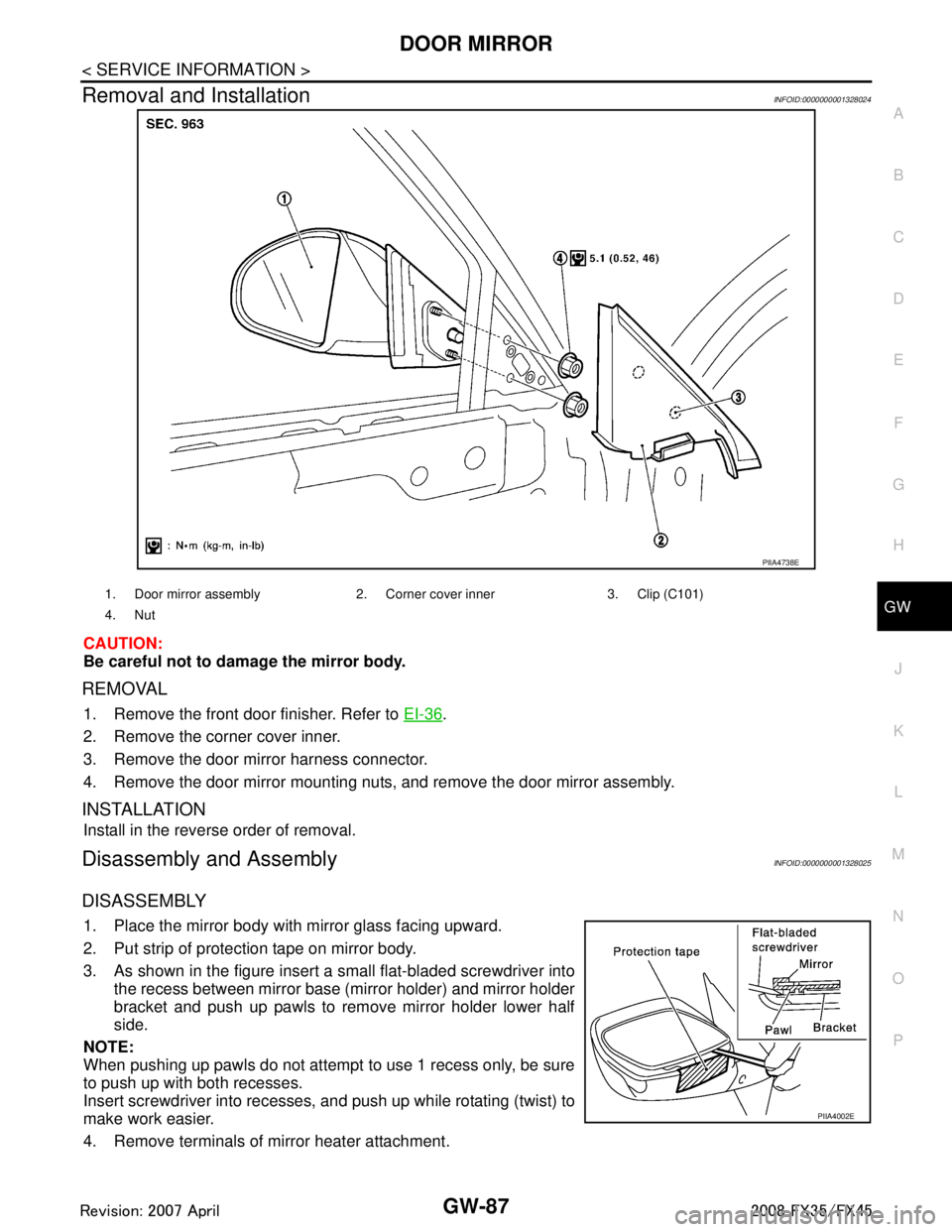
Removal and InstallationINFOID:0000000001328024
CAUTION:
Be careful not to damage the mirror body.
REMOVAL
1. Remove the front door finisher. Refer to EI-36.
2. Remove the corner cover inner.
3. Remove the door mirror harness connector.
4. Remove the door mirror mounting nuts, and remove the door mirror assembly.
INSTALLATION
Install in the reverse order of removal.
Disassembly and AssemblyINFOID:0000000001328025
DISASSEMBLY
1. Place the mirror body with mirror glass facing upward.
2. Put strip of protection tape on mirror body.
3. As shown in the figure insert a small flat-bladed screwdriver into the recess between mirror base (mirror holder) and mirror holder
bracket and push up pawls to remove mirror holder lower half
side.
NOTE:
When pushing up pawls do not attempt to use 1 recess only, be sure
to push up with both recesses.
Insert screwdriver into recesses, and push up while rotating (twist) to
make work easier.
4. Remove terminals of mirror heater attachment.
PIIA4738E
1. Door mirror assembly 2. Corn er cover inner 3. Clip (C101)
4. Nut
PIIA4002E
3AA93ABC3ACD3AC03ACA3AC03AC63AC53A913A773A893A873A873A8E3A773A983AC73AC93AC03AC3
3A893A873A873A8F3A773A9D3AAF3A8A3A8C3A863A9D3AAF3A8B3A8C
Page 3007 of 3924

IP-6
< SERVICE INFORMATION >
SQUEAK AND RATTLE TROUBLE DIAGNOSES
Insulates where slight movement is present. Ideal for instrument panel applications.
SILICONE GREASE
Used in of UHMW tape that will be visible or not fit.
Note: Will only last a few months.
SILICONE SPRAY
Use when grease cannot be applied.
DUCT TAPE
Use to eliminate movement.
CONFIRM THE REPAIR
Confirm that the cause of a noise is repaired by test driving the vehicle. Operate the vehicle under the same
conditions as when the noise originally occurred. Refer to the notes on the Diagnostic Worksheet.
Generic Squeak and Rattle TroubleshootingINFOID:0000000001328085
Refer to Table of Contents for specific component removal and installation information.
INSTRUMENT PANEL
Most incidents are caused by contact and movement between:
1. The cluster lid A and instrument panel
2. Acrylic lens and combination meter housing
3. Instrument panel to front pillar garnish
4. Instrument panel to windshield
5. Instrument panel mounting pins
6. Wiring harnesses behind the combination meter
7. A/C defroster duct and duct joint
These incidents can usually be located by tapping or moving the components to duplicate the noise or by
pressing on the components while driving to stop the noi se. Most of these incidents can be repaired by apply-
ing felt cloth tape or silicon spray (in hard to reach areas). Urethane pads can be used to insulate wiring har-
ness.
CAUTION:
Do not use silicone spray to isolate a squeak or ra ttle. If you saturate the area with silicone, you will
not be able to recheck the repair.
CENTER CONSOLE
Components to pay attention to include:
1. Shifter assembly cover to finisher
2. A/C control unit and cluster lid C
3. Wiring harnesses behind audio and A/C control unit
The instrument panel repair and isolation pr ocedures also apply to the center console.
DOORS
Pay attention to the:
1. Finisher and inner panel making a slapping noise
2. Inside handle escutcheon to door finisher
3. Wiring harnesses tapping
4. Door striker out of alignment causing a popping noise on starts and stops
Tapping or moving the components or pressing on them wh ile driving to duplicate the conditions can isolate
many of these incidents. You can usually insulate the areas with felt cloth tape or insulator foam blocks from
the NISSAN Squeak and Rattle Kit (J43980) to repair the noise.
TRUNK
Trunk noises are often caused by a loose jack or loose items put into the trunk by the owner.
In addition look for:
1. Trunk lid dumpers out of adjustment
2. Trunk lid striker out of adjustment
3. The trunk lid torsion bars knocking together
4. A loose license plate or bracket
3AA93ABC3ACD3AC03ACA3AC03AC63AC53A913A773A893A873A873A8E3A773A983AC73AC93AC03AC3
3A893A873A873A8F3A773A9D3AAF3A8A3A8C3A863A9D3AAF3A8B3A8C
Page 3008 of 3924

SQUEAK AND RATTLE TROUBLE DIAGNOSESIP-7
< SERVICE INFORMATION >
C
DE
F
G H
J
K L
M A
B
IP
N
O P
Most of these incidents can be repaired by adjusting, se curing or insulating the item(s) or component(s) caus-
ing the noise.
SUNROOF/HEADLINING
Noises in the sunroof/headlining area can often be traced to one of the following:
1. Sunroof lid, rail, linkage or seals making a rattle or light knocking noise
2. Sunvisor shaft shaking in the holder
3. Front or rear windshield touching headlining and squeaking
Again, pressing on the components to stop the noise while duplicating the conditions can isolate most of these
incidents. Repairs usually consist of insulating with felt cloth tape.
SEATS
When isolating seat noise it's important to note the pos ition the seat is in and the load placed on the seat when
the noise is present. These conditions should be duplic ated when verifying and isolating the cause of the
noise.
Cause of seat noise include:
1. Headrest rods and holder
2. A squeak between the seat pad cushion and frame
3. The rear seatback lock and bracket
These noises can be isolated by moving or pressing on the suspected components while duplicating the con-
ditions under which the noise occurs. Most of thes e incidents can be repaired by repositioning the component
or applying urethane tape to the contact area.
UNDERHOOD
Some interior noise may be caused by components under the hood or on the engine wall. The noise is then
transmitted into the passenger compartment.
Causes of transmitted underhood noise include:
1. Any component mounted to the engine wall
2. Components that pass through the engine wall
3. Engine wall mounts and connectors
4. Loose radiator mounting pins
5. Hood bumpers out of adjustment
6. Hood striker out of adjustment
These noises can be difficult to isolate since they cannot be reached from the interior of the vehicle. The best
method is to secure, move or insulate one component at a time and test drive the vehicle. Also, engine RPM
or load can be changed to isolate the noise. Repairs c an usually be made by moving, adjusting securing, or
insulating the component causing the noise.
3AA93ABC3ACD3AC03ACA3AC03AC63AC53A913A773A893A873A873A8E3A773A983AC73AC93AC03AC3
3A893A873A873A8F3A773A9D3AAF3A8A3A8C3A863A9D3AAF3A8B3A8C
Page 3045 of 3924
![INFINITI FX35 2008 Service Manual
TROUBLE DIAGNOSES WORK FLOWLAN-25
< SERVICE INFORMATION > [CAN FUNDAMENTAL]
C
D
E
F
G H
I
J
L
M A
B
LAN
N
O P
h. Reception item of “ABS”: “UNKWN” is not indicated. This indicates normal commu](/manual-img/42/57017/w960_57017-3044.png "INFINITI FX35 2008 Service Manual
TROUBLE DIAGNOSES WORK FLOWLAN-25
< SERVICE INFORMATION > [CAN FUNDAMENTAL]
C
D
E
F
G H
I
J
L
M A
B
LAN
N
O P
h. Reception item of “ABS”: “UNKWN” is not indicated. This indicates normal commu")
TROUBLE DIAGNOSES WORK FLOWLAN-25
< SERVICE INFORMATION > [CAN FUNDAMENTAL]
C
D
E
F
G H
I
J
L
M A
B
LAN
N
O P
h. Reception item of “ABS”: “UNKWN” is not indicated. This indicates normal communication between ABS and its receiving units. Do not draw any line.
i. Reception item of “IPDM-E”: “UNKWN” is not i ndicated. This indicates normal communication between
IPDM-E and its receiving units. Do not draw any line.
3. Based on information received from “CAN DIAG SUPPORT MNTR”, place a check mark on the known
good CAN communication line between ECM and IPDM-E.
a. Through the previous procedure, the circuit betw een ADP splice and TCM has the most amount of lines
(shade 3-a in the figure below).
b. Place a check mark on the known good lines to establish the error circuit.
PKID1217E
3AA93ABC3ACD3AC03ACA3AC03AC63AC53A913A773A893A873A873A8E3A773A983AC73AC93AC03AC3
3A893A873A873A8F3A773A9D3AAF3A8A3A8C3A863A9D3AAF3A8B3A8C
Page 3053 of 3924
![INFINITI FX35 2008 Service Manual
TROUBLE DIAGNOSES WORK FLOWLAN-33
< SERVICE INFORMATION > [CAN FUNDAMENTAL]
C
D
E
F
G H
I
J
L
M A
B
LAN
N
O P
b. The tachometer moved normally: Put check marks between ECM and M&A. The circuit betwee](/manual-img/42/57017/w960_57017-3052.png "INFINITI FX35 2008 Service Manual
TROUBLE DIAGNOSES WORK FLOWLAN-33
< SERVICE INFORMATION > [CAN FUNDAMENTAL]
C
D
E
F
G H
I
J
L
M A
B
LAN
N
O P
b. The tachometer moved normally: Put check marks between ECM and M&A. The circuit betwee")
TROUBLE DIAGNOSES WORK FLOWLAN-33
< SERVICE INFORMATION > [CAN FUNDAMENTAL]
C
D
E
F
G H
I
J
L
M A
B
LAN
N
O P
b. The tachometer moved normally: Put check marks between ECM and M&A. The circuit between ECM and M&A is functioning properly (check marks 5-b in the figure below).
6. The circuit which has the most amount of lines are the possible cause. Error is detected from ABS actua-
tor and electric unit (control unit) branch line (shaded in the figure below).
NOTE:
For abbreviations, refer to LAN-37, "
Abbreviation List".
SKIB8735E
3AA93ABC3ACD3AC03ACA3AC03AC63AC53A913A773A893A873A873A8E3A773A983AC73AC93AC03AC3
3A893A873A873A8F3A773A9D3AAF3A8A3A8C3A863A9D3AAF3A8B3A8C
Page 3104 of 3924

LT-2
HEADLAMP AIMING CONTROL ......................61
Schematic ............................................................ ...61
Wiring Diagram - H/AIM - .......................................62
Removal and Installation ........................................64
Switch Circuit Inspection ........................................65
FRONT FOG LAMP ...........................................66
Component Parts and Harness Connector Loca-
tion ....................................................................... ...
66
System Description .................................................66
CAN Communication System Description ..............67
CAN Communication Unit .......................................67
Wiring Diagram - F/FOG - ......................................68
Terminal and Reference Value for BCM .................69
Terminal and Reference Value for IPDM E/R .........70
How to Proceed with Trouble Diagnosis .................71
Preliminary Check ..................................................71
CONSULT-III Functions (BCM) ..............................72
CONSULT-III Functions (IPDM E/R) ......................72
Front Fog Lamps Do Not Illuminate (Both Sides) ...72
Front Fog Lamp Does Not Illuminate (One Side) ...74
Aiming Adjustment ..................................................75
Bulb Replacement ..................................................76
Removal and Installation ........................................76
TURN SIGNAL AND HAZARD WARNING
LAMPS ...............................................................
78
Component Parts and Harness Connector Loca-
tion ....................................................................... ...
78
System Description .................................................78
CAN Communication System Description ..............80
CAN Communication Unit .......................................80
Schematic ...............................................................81
Wiring Diagram - TURN - ........................................82
Terminal and Reference Value for BCM .................84
Terminal and Reference Value for Rear Combina-
tion Lamp Control Unit ............................................
86
How to Proceed with Trouble Diagnosis .................88
Preliminary Check ..................................................88
CONSULT-III Functions (BCM) ..............................89
Turn Signal Lamp Does Not Operate .....................90
Rear Turn Signal Lamp Does Not Operate ............92
Hazard Warning Lamp Does Not Operate But
Turn Signal Lamp Operates ...................................
94
Bulb Replacement (Front Turn Signal Lamp) .........95
Bulb Replacement (Rear Turn Signal Lamp) ..........95
Removal and Installation of Front Turn Signal
Lamp .......................................................................
95
Removal and Installation of Rear Turn Signal
Lamp .......................................................................
95
Removal and Installation of Rear Combination
Lamp Control Unit ...................................................
95
LIGHTING AND TURN SIGNAL SWITCH .........96
Removal and Installation ..................................... ...96
HAZARD SWITCH .............................................97
Removal and Installation ..................................... ...97
COMBINATION SWITCH ..................................98
Wiring Diagram - COMBSW - .............................. ...98
Combination Switch Reading Function ...................98
Terminal and Reference Value for BCM .................99
CONSULT-III Functions (BCM) .............................103
Combination Switch Inspection .............................104
Removal and Installation .......................................107
STOP LAMP .....................................................108
Component Parts and Harness Connector Loca-
tion ....................................................................... .
108
System Description ...............................................108
Schematic .............................................................109
Wiring Diagram - STOP/L - ...................................110
Terminal and Reference Value for Rear Combina-
tion Lamp Control Unit ......................................... .
112
Stop Lamp Does Not Operate ...............................112
High-Mounted Stop Lamp .....................................114
Stop Lamp .............................................................115
Rear Combination Lamp Control Unit ...................115
BACK-UP LAMP ............................................ ..116
Wiring Diagram - BACK/L - .................................. .116
Bulb Replacement .................................................117
Removal and Installation .......................................117
PARKING, LICENSE PLATE AND TAIL
LAMPS ..............................................................
118
Component Parts and Harness Connector Loca-
tion ....................................................................... .
118
System Description ...............................................118
CAN Communication System Description ............120
CAN Communication Unit .....................................120
Schematic .............................................................121
Wiring Diagram - TAIL/L - .....................................122
Terminal and Reference Value for BCM ...............126
Terminal and Reference Value for IPDM E/R .......127
Terminal and Reference Value for Rear Combina-
tion Lamp Control Unit ......................................... .
128
How to Proceed with Trouble Diagnosis ...............128
Preliminary Check .................................................128
CONSULT-III Functions (BCM) .............................129
CONSULT-III Functions (IPDM E/R) .....................129
Parking, License Plate and Side Marker Lamps
Do Not Illuminate ..................................................
129
Tail Lamp Does Not Operate ................................133
Parking, License Plate, Side Maker and Tail
Lamps Do Not Turn OFF (After Approx. 10 Min-
utes) ......................................................................
134
License Plate Lamp ..............................................135
Front Parking Lamp ..............................................135
Tail Lamp ..............................................................135
Front Side Marker Lamp .......................................135
Rear Side Marker Lamp ........................................136
Rear Combination Lamp Control Unit ...................136
REAR COMBINATION LAMP ..........................137
Bulb Replacement ................................................ .137
Removal and Installation .......................................137
INTERIOR ROOM LAMP ..................................138
3AA93ABC3ACD3AC03ACA3AC03AC63AC53A913A773A893A873A873A8E3A773A983AC73AC93AC03AC3
3A893A873A873A8F3A773A9D3AAF3A8A3A8C3A863A9D3AAF3A8B3A8C
Page 3132 of 3924
LT-30
< SERVICE INFORMATION >
HEADLAMP - XENON TYPE -
After installing bulb, be sure to install plastic cap and bulb socket securely to insure watertight-
ness.
Removal and InstallationINFOID:0000000001328289
REMOVAL
1. Disconnect the battery cable from the negative terminal or remove power fuse.
2. Remove front bumper fascia assembly. Refer to EI-14, "
Compo-
nent Parts Location".
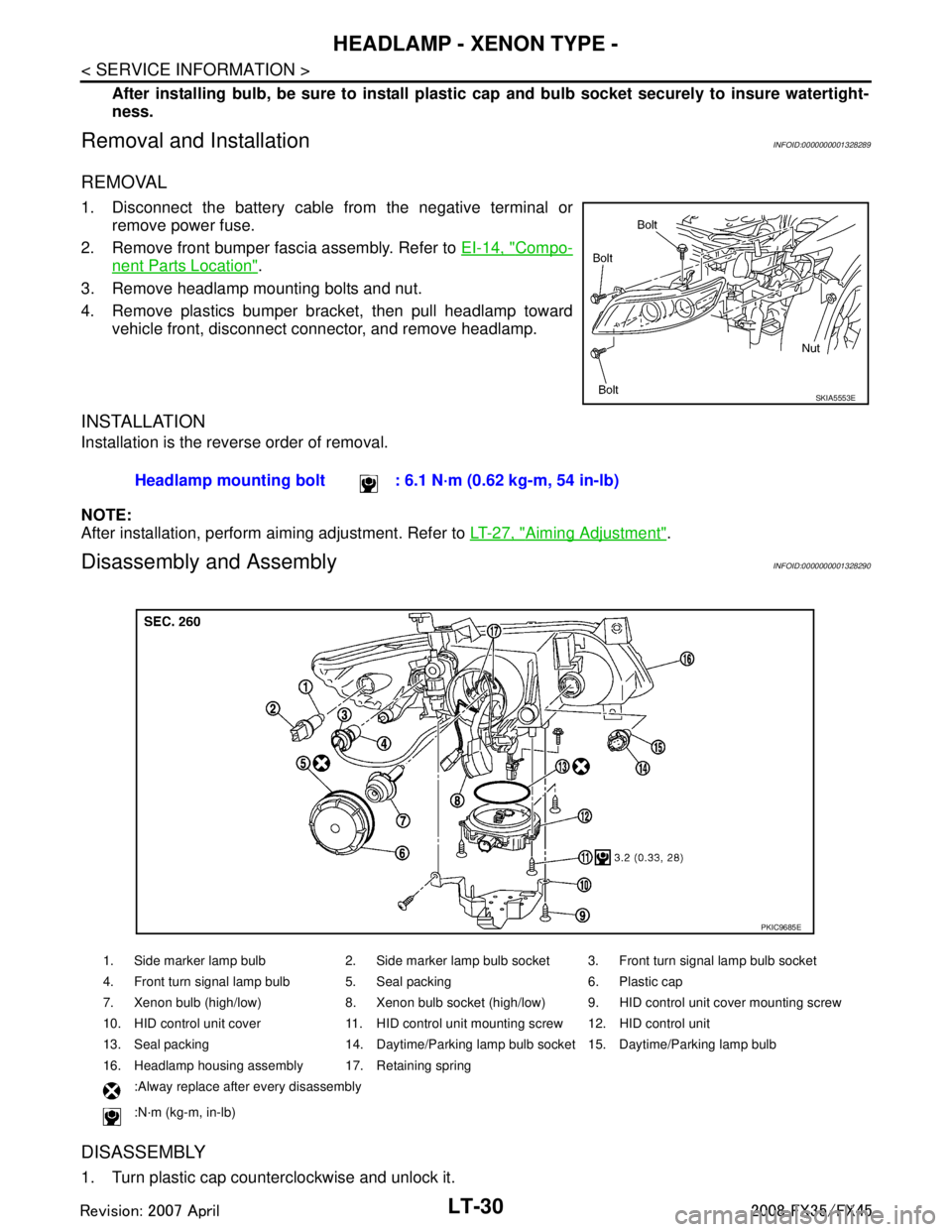
3. Remove headlamp mounting bolts and nut.
4. Remove plastics bumper bracket, then pull headlamp toward vehicle front, disconnect connector, and remove headlamp.
INSTALLATION
Installation is the reverse order of removal.
NOTE:
After installation, perform aiming adjustment. Refer to LT-27, "
Aiming Adjustment".
Disassembly and AssemblyINFOID:0000000001328290
DISASSEMBLY
1. Turn plastic cap counterclockwise and unlock it.
SKIA5553E
Headlamp mounting bolt : 6.1 N·m (0.62 kg-m, 54 in-lb)
1. Side marker lamp bulb 2. Side marker lamp bulb socket 3. Front turn signal lamp bulb socket
4. Front turn signal lamp bulb 5. Seal packing 6. Plastic cap
7. Xenon bulb (high/low) 8. Xenon bulb socket (high/low) 9. HID control unit cover mounting screw
10. HID control unit cover 11. HID control unit mounting screw 12. HID control unit
13. Seal packing 14. Daytime/Parking lamp bulb socket 15. Daytime/Parking lamp bulb
16. Headlamp housing assembly 17. Retaining spring
:Alway replace after every disassembly
:N·m (kg-m, in-lb)
PKIC9685E
3AA93ABC3ACD3AC03ACA3AC03AC63AC53A913A773A893A873A873A8E3A773A983AC73AC93AC03AC3
3A893A873A873A8F3A773A9D3AAF3A8A3A8C3A863A9D3AAF3A8B3A8C
Page 3133 of 3924
HEADLAMP - XENON TYPE -LT-31
< SERVICE INFORMATION >
C
DE
F
G H
I
J
L
M A
B
LT
N
O P
2. Turn xenon bulb socket count erclockwise, and unlock it.
3. Unlock retaining spring, and remove xenon bulb (high/low).
4. Remove HID control unit cover mounting screw.
5. Remove HID control unit cover.
6. Disconnect HID control unit connector.
7. Remove HID control unit mounting screws.
8. Remove HID control unit.
9. Turn daytime/parking lamp bulb socket counterclockwise and unlock it.
10. Remove daytime/parking lamp bulb from its socket.
11. Turn front turn signal lamp bulb socket counterclockwise and unlock it.
12. Remove front turn signal lamp bulb from its socket.
13. Turn front side marker lamp bulb socket counterclockwise and unlock it.
14. Remove front side marker lamp bulb from its socket.
ASSEMBLY
Assembly is the reverse order of disassembly.
CAUTION:
When HID control unit is removed, rein stall it securely and avoid any looseness.
After installing bulb, be sure to install plastic cap and bulb socket securely to insure watertightness.
HID control unit mounting screw
: 3.2 N·m (0.33 kg-m, 28 in-lb)
3AA93ABC3ACD3AC03ACA3AC03AC63AC53A913A773A893A873A873A8E3A773A983AC73AC93AC03AC3
3A893A873A873A8F3A773A9D3AAF3A8A3A8C3A863A9D3AAF3A8B3A8C