2008 INFINITI FX35 instrument panel
[x] Cancel search: instrument panelPage 814 of 3924

BL-80
< SERVICE INFORMATION >
INTELLIGENT KEY SYSTEM
door switch OFF (when all the doors are closed);
Remote control button of Intelligent Key turns on interior lamp (for 30 seconds) with input of UNLOCK signal
from Intelligent Key.
Panic Alarm Function
When key switch is OFF and ignition knob is not pushed (when mechanical key is not inserted in ignition
knob), BCM turns ON and OFF horn and headlamp intermit tently with input of PANIC ALARM signal from
Intelligent Key. The alarm automatically turns off after 25 seconds or when Intelligent Key unit receives any
signal from Intelligent Key.
Panic alarm operation mode can be changed using “WORK SUPPORT” mode in “PANIC ALARM DELAY”.
Refer to BL-104, "
CONSULT-III Application Item".
Remote Control Power Window Down (Open) Operation
When Intelligent Key unlock switch is turned ON with i gnition switch OFF, and Intelligent Key unlock switch is
detected to be on continuously for 3 seconds, the driver's door and passenger's door power windows are
simultaneously opened.
Power window is operated to open and the operation continues as long as the Intelligent Key unlock switch is
pressed.
Remote control power window down operation mode can be changed using “P/W DOWN DELAY” mode in
“WORK SUPPORT”. Refer to BL-104, "
CONSULT-III Application Item".
Key Reminder Function
As an operation verification function, when doors are lock ed or unlocked using Intelligent Key remote control-
ler button operation, hazard lamps flash and horn sounds.
ENGINE STARTUP FUNCTION
Operation Description
When ignition knob is pressed, Intelligent Key unit sends request signal from inside key antenna, key-ID ver- ification is conducted with Intelligent Key using two-wa y communication, and if verification is successful, an
ignition rotation prohibition latch release signal is sent to steering lock unit. Steering lock unit releases igni-
tion knob rotation prohibition latch. (Ignition knob can now be turned.)
When it becomes possible to rotate the ignition knob, “KEY” warning lamp in combination meter lights up green to notify driver that ignition knob can be turned.
NOTE:
When it becomes impossible to rotate the ignition knob, “KEY” warning lamp in combination meter lights up
red.
When key-ID verification is successful and ignition knob switch is in the ON state, Intelligent Key unit uses CAN communication to send engine start permission signal to BCM.
When BCM receives engine start permission signal, it uses CAN communication to sent starter request sig-
nal to IPDM E/R so that the engine will start when ignition knob is rotated to START position.
Operation Range
Engine can be started when Intelligent Key is in the v ehicle. However, sometimes engine might not start when
Intelligent Key is on instrument panel, rear parcel shelf, or in glove box.
NOTE:
luggage room can enable detection of Intelligent Key by a CONSULT-III function. Refer to BL-104, "
CON-
SULT-III Application Item".
Active Check Function
Confirm whether or not ignition knob can be rotated by checking the color of warning lamp in combination
meter.
WARNING AND ALARM FUNCTION
Vehicle operation Hazard lamp Horn
Door unlocking operation Once —
Door locking operation Twice Once
Condition Operation
Ignition knob rotation possib le “KEY” warning lamp in combin ation meter is lit up green.
Ignition rotation not possibl e “KEY” warning lamp in combin ation meter is lit up red.
3AA93ABC3ACD3AC03ACA3AC03AC63AC53A913A773A893A873A873A8E3A773A983AC73AC93AC03AC3
3A893A873A873A8F3A773A9D3AAF3A8A3A8C3A863A9D3AAF3A8B3A8C
Page 817 of 3924

INTELLIGENT KEY SYSTEMBL-83
< SERVICE INFORMATION >
C
DE
F
G H
J
K L
M A
B
BL
N
O P
Intelligent Key remote controller button and door reques t switch operations change the engine startup function
settings (startup enabled/disabled) for each Intelligent Key independently.
Settings Change Procedure1. With the ignition switch is in the LOCK positi on (ignition knob not pressed), hold down both the LOCK and
UNLOCK remote control buttons on the Intelligent Key at the same time for at least 10 seconds (The yard-
stick is that the Intelligent Key LED flashes 20 times.)
2. Within 5 seconds of releasing the Intelligent Key remote controller buttons, press the driver door request
switch.
3. The KEY warning lamp in combination meter lights up for 3 seconds (engine starting enabled → starting
disabled: lights up red, engine starting disabled → flashes green). This completes the settings change.
Changing Settings Using CONSULT-III
The settings for the Intelligent Key system func tions can be changed using CONSULT-III (WORK SUPPORT).
Refer to BL-104, "
CONSULT-III Application Item".
NOTE:
Once a function setting is changed, it will remain effective even if the battery is disconnected.
Changing Settings Using Display Unit
The settings of the Intelligent Key system can be changed, using CONSULT-III, display unit, Intelligent Key
and door request switch in the cent er of the instrument panel.
NOTE:
Once a function setting is changed, it will remain effective even if the battery is disconnected.
INTELLIGENT KEY REGISTRATION
Intelligent Key-ID registration is executed using the CONSULT-III. Up to 4 can be registered.
CAUTION:
After a new Intelligent Key-ID is regi stered, be sure to check the function.
When registering an additional Intelligent Key-ID , take any Intelligent Keys already registered and
Intelligent Keys for any other vehicles out of the vehicle before starting.
CONSULT-III can be used to check and delete Intelligent Key-IDs.
For future information, see the CO NSULT-III Operation Manual NATS.
STEERING LOCK UNIT REGISTRATION
Steering Lock Unit ID Registration
CAUTION:
The method for registering a steering lock unit ID depends on the status of the steering lock unit and
Intelligent Key unit (new or old unit).
After registration is completed, press ignition knob with a portable unit in the vehicle so that it can
be rotated, and confirm that it cannot be rotated even when ignition switch is pressed without a por-
table unit in the vehicle.
For further information, see the CONS ULT-III Operation Manual NATS.
CAN Communication System DescriptionINFOID:0000000001327838
CAN (Controller Area Network) is a serial communication li ne for real time application. It is an on-vehicle mul-
tiplex communication line with high data communication speed and excellent error detection ability. Many elec-
tronic control units are equipped onto a vehicle, and each control unit shares information and links with other
control units during operation (not independent). In CAN communication, control units are connected with 2
communication lines (CAN H line, CAN L line) allowing a high rate of information transmission with less wiring.
Each control unit transmits/receives data but selectively reads required data only.
Setting item Description
Intelligent Key Lock Response-Sound The sound pattern of the Intelligent Key operation can be set as desired. (Setting value:
OFF, Beeper or Horn chirp)
Intelligent Key Unlock Response-Beep
Sound The beep sound when unlocking door with the Intelligent Key operation can be turned ON
or OFF.
Intelligent Key Engine Start Function This function can be performed to ON or OFF.
Intelligent Key Lock/Unlock Function The door handle request switch lock/unlock operation with the Intelligent Key can be can-
celed or activated.
Return All Settings to Default The all settings made by VEHICLE ELECTRONICS will return to default.
3AA93ABC3ACD3AC03ACA3AC03AC63AC53A913A773A893A873A873A8E3A773A983AC73AC93AC03AC3
3A893A873A873A8F3A773A9D3AAF3A8A3A8C3A863A9D3AAF3A8B3A8C
Page 864 of 3924

BL-130
< SERVICE INFORMATION >
INTELLIGENT KEY SYSTEM
Removal and Installation of Intelligent Key Unit
INFOID:0000000001327871
REMOVAL
1. Remove the instrument lower driver panel. Refer to IP-11, "Removal and Installation".
2. Disconnect the Intelligent Key unit connector, remove the screw and Intelligent Key unit.
INSTALLATION
Install in the reverse order of removal.
Intelligent Key Battery ReplacementINFOID:0000000001327872
INTELLIGENT KEY BATTERY INSPECTION
Check by connecting a resistance (approximately 300 Ω) so that the
current value becomes about 10 mA.
PIIA6371E
PIIB4646E
Standard : Approx. 2.5V - 3.0V
OCC0607D
3AA93ABC3ACD3AC03ACA3AC03AC63AC53A913A773A893A873A873A8E3A773A983AC73AC93AC03AC3
3A893A873A873A8F3A773A9D3AAF3A8A3A8C3A863A9D3AAF3A8B3A8C
Page 990 of 3924

BR-6
< SERVICE INFORMATION >
BRAKE PEDAL
Component
INFOID:0000000001327608
Removal and InstallationINFOID:0000000001327609
REMOVAL
1. Remove front kicking plate (driver side). Refer to EI-38, "Component Parts Location".
2. Remove dash side finisher (driver side). Refer to EI-38, "
Component Parts Location".
3. Remove instrument lower panel (driver side). Refer to IP-10
.
4. Remove steering column assembly. Refer to PS-12, "
Removal and Installation".
5. Remove stop lamp switch and ASCD cancel s witch (or brake switch) from pedal assembly.
6. Remove snap pin and clevis pin from brake booster clevis.
7. Remove mounting nuts and bolt from bracket, and remove brake pedal assembly from vehicle.
INSPECTION AFTER REMOVAL
1. Clevis pin 2. Snap pin 3. Brake pedal assembly
4. Stopper rubber 5. Pedal pad 6. ASCD cancel switch (Models with
ASCD)
Brake switch (Models with ICC)
7. Stop lamp switch 8. Clip
SFIA1940E
SFIA0159E
3AA93ABC3ACD3AC03ACA3AC03AC63AC53A913A773A893A873A873A8E3A773A983AC73AC93AC03AC3
3A893A873A873A8F3A773A9D3AAF3A8A3A8C3A863A9D3AAF3A8B3A8C
Page 1195 of 3924

LANE DEPARTURE WARNING SYSTEMDI-69
< SERVICE INFORMATION >
C
DE
F
G H
I
J
L
M A
B
DI
N
O P
LANE DEPARTURE WARNING SYSTEM
Precaution for Lane Depa rture Warning (LDW) systemINFOID:0000000001328492
WARNING:
Lane Departure Warning (LDW) is only a warning d evice to inform the driver of an unintended lane
departure. It will not steer the vehicle or prevent loss of control. It is the driver's responsibility to stay
alert, drive safely, keep the vehicle in the traveling lane, and be in control of the vehicle at all times.
LDW system does not operate u nder the following conditions:
- At speeds below approx. 72 km/h (45 MPH).
- If it cannot detect lane markers.
LDW system may not function proper ly under the following conditions:
- On roads where a water puddle, dirt or snow is covering the lane markers.
- On roads where the lane markers are faded or are not painted clearly.
- On roads where the lane markers are painted yellow.
LDW system may not monitor the lane markers in certain road, weather or driving conditions.
- On roads where there are sharp curves.
- Where the traveling lane merges or separates.
- On roads where the discontinued lane marker s are present, such as near tollgates, etc.
- On roads where there are not general lane markers.
- On roads where the lane width is too narrow.
- During bad weather (rain, fog, snow, etc.).
- When strong light (for example, at sunrise or sunse t) is directly shining on the front of the vehicle.
- When entering or exiting a tunnel wher e sudden changes in brightness occur.
- When traveling close to the vehicle in front of you, which causes obstruction of the camera unit
range.
- When the vehicle's traveling direction does not align with the lane marker.
- When rain, snow or dirt adhere to the windshield in front of the camera unit.
Excessive noise interferes with warning system ch ime sound and the chime may not be heard.
CAUTION:
To keep the LDW system operating proper ly, be sure to observe the following:
Always keep the windshield clean. The sensing capability of the camera unit depends on the condi-
tion of the windshield. See “Appearan ce and care” for cleaning instruction.
Never strike or damage the areas around the camera unit.
Never touch the camera lens.
Never attach a sticker (including transparent mate rial) or install an accessory near the camera unit.
Never place reflective materials, such as a white pape r or mirrors on the instrument panel. Reflection
of the sunlight may adversely affect the camera unit's lane marker detection capability.
System DescriptionINFOID:0000000001328493
LDW SYSTEM OPERATION
The Lane Departure Warning (LDW) system warns the driver when the vehicle is traveling close to either the
left or the right of the traveling lane.
The system monitors lane markers of the traveling lane using the LDW camera unit. When the LDW camera
unit detects that the vehicle is traveli ng close to either the left or the right of the traveling lane, the LDW indi-
cator lamp flashes and a chime sounds to alert the driver.
NOTE:
When activating turn signal, LDW system does not give a warning to the lane marker on the turn signal side.
The LDW system can be turned on or off by pushing t he LDW switch. When the system is on, the LDW sys-
tem ON indicator illuminates.
The LDW system has an automatic mode and manual mode.
In the automatic mode
- LDW system automatically turns on, when the i gnition switch is turned to the ON position.
- LDW system ON indicator located on the LDW swit ch illuminates, indicating that the system is on.
- To cancel LDW system, push the LDW switch to turn off LDW system ON indicator.
- To turn on the system, push LDW switch again.
In the manual mode- LDW system is still off when the igniti on switch is turned to the ON position.
3AA93ABC3ACD3AC03ACA3AC03AC63AC53A913A773A893A873A873A8E3A773A983AC73AC93AC03AC3
3A893A873A873A8F3A773A9D3AAF3A8A3A8C3A863A9D3AAF3A8B3A8C
Page 1197 of 3924
LANE DEPARTURE WARNING SYSTEMDI-71
< SERVICE INFORMATION >
C
DE
F
G H
I
J
L
M A
B
DI
N
O P
NOTE:
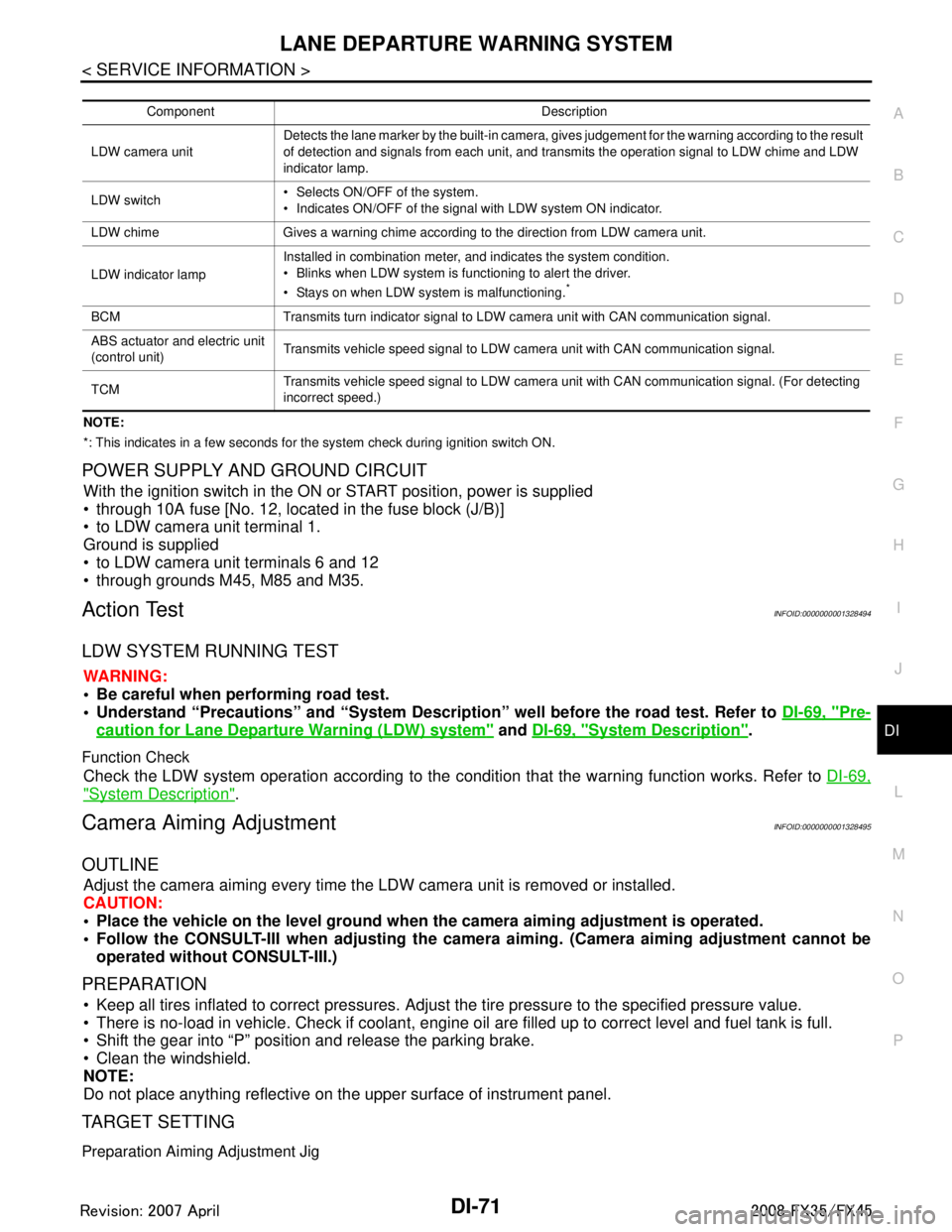
*: This indicates in a few seconds for the system check during ignition switch ON.
POWER SUPPLY AND GROUND CIRCUIT
With the ignition switch in the ON or START position, power is supplied
through 10A fuse [No. 12, located in the fuse block (J/B)]
to LDW camera unit terminal 1.
Ground is supplied
to LDW camera unit terminals 6 and 12
through grounds M45, M85 and M35.
Action TestINFOID:0000000001328494
LDW SYSTEM RUNNING TEST
WARNING:
Be careful when performing road test.
Understand “Precautions” and “System Description” well before the road test. Refer to DI-69, "
Pre-
caution for Lane Departure Warning (LDW) system" and DI-69, "System Description".
Function Check
Check the LDW system operation according to the c ondition that the warning function works. Refer to DI-69,
"System Description".
Camera Aiming AdjustmentINFOID:0000000001328495
OUTLINE
Adjust the camera aiming every time the LDW camera unit is removed or installed.
CAUTION:
Place the vehicle on the level ground when the camera aiming adjustment is operated.
Follow the CONSULT-III when ad justing the camera aiming. (Camera aiming adjustment cannot be
operated without CONSULT-III.)
PREPARATION
Keep all tires inflated to correct pressures. Adjust the tire pressure to the specified pressure value.
There is no-load in vehicle. Check if coolant, engine oil are filled up to correct level and fuel tank is full.
Shift the gear into “P” position and release the parking brake.
Clean the windshield.
NOTE:
Do not place anything reflective on t he upper surface of instrument panel.
TARGET SETTING
Preparation Aiming Adjustment Jig
Component Description
LDW camera unit Detects the lane marker by the built-in camera, gives judgement for the warning according to the result
of detection and signals from each unit, and transmits the operation signal to LDW chime and LDW
indicator lamp.
LDW switch Selects ON/OFF of the system.
Indicates ON/OFF of the signal with LDW system ON indicator.
LDW chime Gives a warning chime according to the direction from LDW camera unit.
LDW indicator lamp Installed in combination meter, and indicates the system condition.
Blinks when LDW system is functioning to alert the driver.
Stays on when LDW system is malfunctioning.
*
BCM Transmits turn indicator signal to LDW camera unit with CAN communication signal.
ABS actuator and electric unit
(control unit)
Transmits vehicle speed signal to LDW camera unit with CAN communication signal.
TCM Transmits vehicle speed signal to LDW camera unit with CAN communication signal. (For detecting
incorrect speed.)
3AA93ABC3ACD3AC03ACA3AC03AC63AC53A913A773A893A873A873A8E3A773A983AC73AC93AC03AC3
3A893A873A873A8F3A773A9D3AAF3A8A3A8C3A863A9D3AAF3A8B3A8C
Page 1218 of 3924
DI-92
< SERVICE INFORMATION >
LANE DEPARTURE WARNING SYSTEM
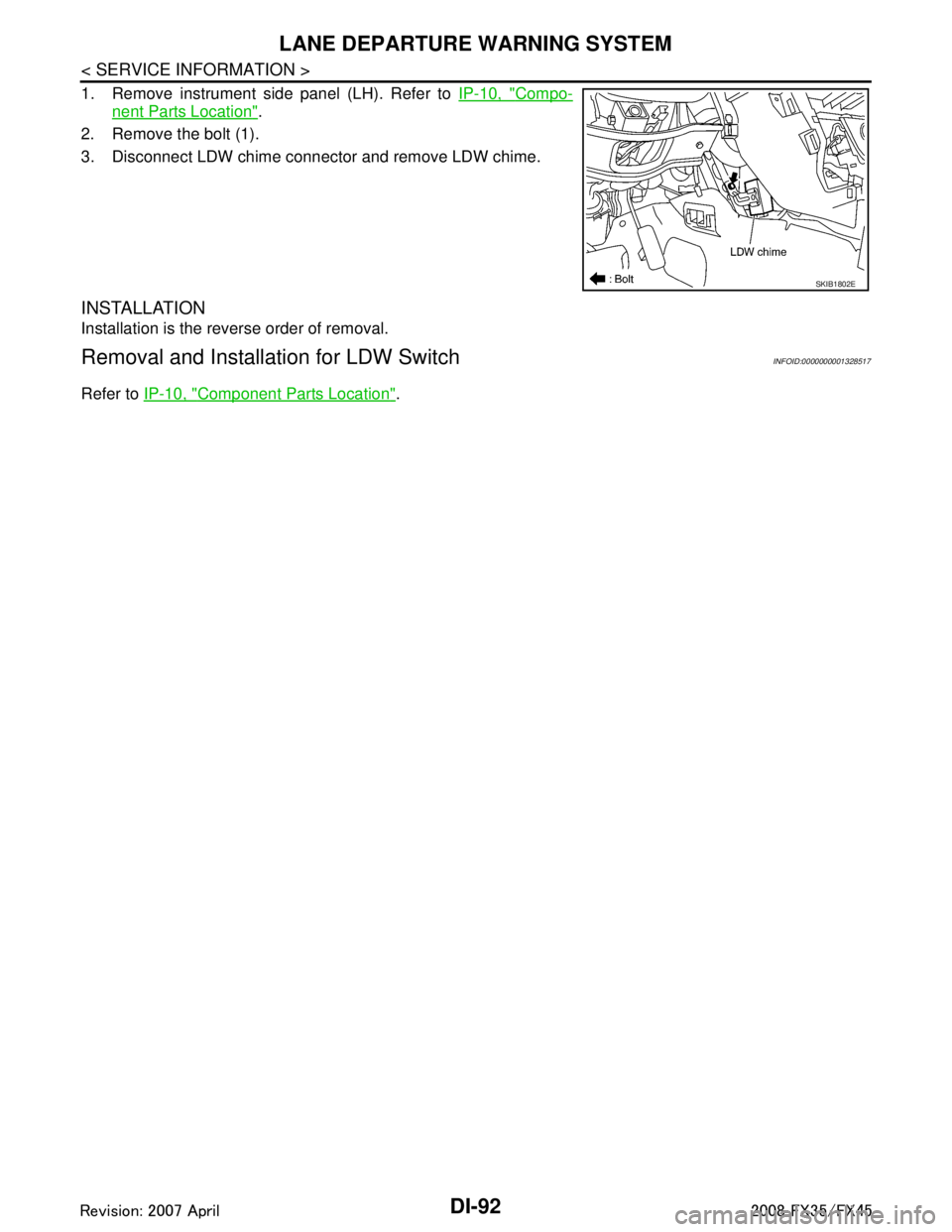
1. Remove instrument side panel (LH). Refer to IP-10, "Compo-
nent Parts Location".
2. Remove the bolt (1).
3. Disconnect LDW chime connector and remove LDW chime.
INSTALLATION
Installation is the reverse order of removal.
Removal and Installation for LDW SwitchINFOID:0000000001328517
Refer to IP-10, "Component Parts Location".
SKIB1802E
3AA93ABC3ACD3AC03ACA3AC03AC63AC53A913A773A893A873A873A8E3A773A983AC73AC93AC03AC3
3A893A873A873A8F3A773A9D3AAF3A8A3A8C3A863A9D3AAF3A8B3A8C
Page 1294 of 3924
![INFINITI FX35 2008 Service Manual
EC-54
< SERVICE INFORMATION >[VQ35DE]
ON BOARD DIAGNOSTIC (OBD) SYSTEM
ON BOARD DIAGNO
STIC (OBD) SYSTEM
IntroductionINFOID:0000000001325914
The ECM has an on board diagnostic system, which detects](/manual-img/42/57017/w960_57017-1293.png "INFINITI FX35 2008 Service Manual
EC-54
< SERVICE INFORMATION >[VQ35DE]
ON BOARD DIAGNOSTIC (OBD) SYSTEM
ON BOARD DIAGNO
STIC (OBD) SYSTEM
IntroductionINFOID:0000000001325914
The ECM has an on board diagnostic system, which detects")
EC-54
< SERVICE INFORMATION >[VQ35DE]
ON BOARD DIAGNOSTIC (OBD) SYSTEM
ON BOARD DIAGNO
STIC (OBD) SYSTEM
IntroductionINFOID:0000000001325914
The ECM has an on board diagnostic system, which detects malfunctions related to engine sensors or actua-
tors. The ECM also records various emission-related diagnostic information including:
The above information can be checked usi ng procedures listed in the table below.
×: Applicable —: Not applicable
*: When DTC and 1st trip DTC simultaneously appear on the display, they cannot be clearly distinguished from each other.
The malfunction indicator lamp (MIL) on the instrument panel lights up when the same malfunction is detected
in two consecutive trips (Two trip detection logic) , or when the ECM enters fail-safe mode. (Refer to EC-95,
"Fail-Safe Chart".)
Two Trip Detection LogicINFOID:0000000001325915
When a malfunction is detected for the 1st time, 1st trip DTC and 1st trip Freeze Frame data are stored in the
ECM memory. The MIL will not light up at this stage. <1st trip>
If the same malfunction is detected again during the next drive, the DTC and Freeze Frame data are stored in
the ECM memory, and the MIL lights up. The MIL lights up at the same time when the DTC is stored. <2nd
trip> The “trip” in the “Two Trip Detection Logic” m eans a driving mode in which self-diagnosis is performed
during vehicle operation. Specific on board diagnostic item s will cause the ECM to light up or blink the MIL,
and store DTC and Freeze Frame data, even in the 1st trip, as shown below.
× : Applicable —: Not applicable
When there is an open circuit on MIL circuit, the ECM c annot warn the driver by lighting up MIL when there is
malfunction on engine control system.
Emission-related diagnostic information Diagnostic service
Diagnostic Trouble Code (DTC) Service $03 of SAE J1979
Freeze Frame data Service $02 of SAE J1979
System Readiness Test (SRT) code Service $01 of SAE J1979
1st Trip Diagnostic Trouble Code (1st Trip DTC) Service $07 of SAE J1979
1st Trip Freeze Frame data
Test values and Test limits Service $06 of SAE J1979
Calibration ID Service $09 of SAE J1979
DTC 1st trip DTC Freeze
Frame data 1st trip Freeze
Frame data SRT code SRT status Test value
CONSULT-III ×× × × × × —
GST ×× × —×××
ECM ××*— — — ×—
Items MIL DTC 1st trip DTC
1st trip 2nd trip 1st trip
displaying 2nd trip
displaying 1st trip
displaying 2nd trip
display- ing
Blinking Lighting
up Blinking Lighting
up
Misfire (Possible three way catalyst
damage) — DTC: P0300 - P0306 is
being detected ×
———— — ×—
Misfire (Possible three way catalyst
damage) — DTC: P0300 - P0306 is
being detected ——
×—— ×——
One trip detection diagnoses (Re-
fer to EC-55, "
Emission-Related Di-
agnostic Information".) —
×—— ×———
Except above — — — ×— ×× —
3AA93ABC3ACD3AC03ACA3AC03AC63AC53A913A773A893A873A873A8E3A773A983AC73AC93AC03AC3
3A893A873A873A8F3A773A9D3AAF3A8A3A8C3A863A9D3AAF3A8B3A8C