2008 INFINITI FX35 mount
[x] Cancel search: mountPage 2389 of 3924
![INFINITI FX35 2008 Service Manual
FUEL INJECTOREC-1149
< SERVICE INFORMATION > [VK45DE]
C
D
E
F
G H
I
J
K L
M A
EC
NP
O
FUEL INJECTOR
Component DescriptionINFOID:0000000001327051
The fuel injector is a small, precise solenoid valve.](/manual-img/42/57017/w960_57017-2388.png "INFINITI FX35 2008 Service Manual
FUEL INJECTOREC-1149
< SERVICE INFORMATION > [VK45DE]
C
D
E
F
G H
I
J
K L
M A
EC
NP
O
FUEL INJECTOR
Component DescriptionINFOID:0000000001327051
The fuel injector is a small, precise solenoid valve.")
FUEL INJECTOREC-1149
< SERVICE INFORMATION > [VK45DE]
C
D
E
F
G H
I
J
K L
M A
EC
NP
O
FUEL INJECTOR
Component DescriptionINFOID:0000000001327051
The fuel injector is a small, precise solenoid valve. When the ECM
supplies a ground to the fuel injector ci
rcuit, the coil in the fuel injec-
tor is energized. The energized coil pulls the ball valve back and
allows fuel to flow through the fuel injector into the intake manifold.
The amount of fuel injected depends upon the injection pulse dura-
tion. Pulse duration is the length of time the fuel injector remains
open. The ECM controls the injection pulse duration based on
engine fuel needs.
CONSULT-III Reference Val ue in Data Monitor ModeINFOID:0000000001327052
Specification data are reference values.
SEF375Z
MONITOR ITEM CONDITION SPECIFICATION
B/FUEL SCHDL See EC-709
.
INJ PULSE-B1
INJ PULSE-B2 Engine: After warming up
Selector lever: P or N
Air conditioner switch: OFF
No load Idle 2.0 - 3.0 msec
2,000 rpm 1.9 - 2.9 msec
3AA93ABC3ACD3AC03ACA3AC03AC63AC53A913A773A893A873A873A8E3A773A983AC73AC93AC03AC3
3A893A873A873A8F3A773A9D3AAF3A8A3A8C3A863A9D3AAF3A8B3A8C
Page 2427 of 3924
![INFINITI FX35 2008 Service Manual
VARIABLE INDUCTION AIR CONTROL SYSTEM (VIAS)
EC-1187
< SERVICE INFORMATION > [VK45DE]
C
D
E
F
G H
I
J
K L
M A
EC
NP
O
VARIABLE INDUCTION AI
R CONTROL SYSTEM (VIAS)
DescriptionINFOID:0000000001327082](/manual-img/42/57017/w960_57017-2426.png "INFINITI FX35 2008 Service Manual
VARIABLE INDUCTION AIR CONTROL SYSTEM (VIAS)
EC-1187
< SERVICE INFORMATION > [VK45DE]
C
D
E
F
G H
I
J
K L
M A
EC
NP
O
VARIABLE INDUCTION AI
R CONTROL SYSTEM (VIAS)
DescriptionINFOID:0000000001327082")
VARIABLE INDUCTION AIR CONTROL SYSTEM (VIAS)
EC-1187
< SERVICE INFORMATION > [VK45DE]
C
D
E
F
G H
I
J
K L
M A
EC
NP
O
VARIABLE INDUCTION AI
R CONTROL SYSTEM (VIAS)
DescriptionINFOID:0000000001327082
SYSTEM DESCRIPTION
*: The ECM determines the start signal status by the signals of engine speed and battery voltage.
When the engine is running at low or medium speed, the power valve isfully closed. Under this condition, the
effective suction port length is equivalentto the total lengt h of the intake manifold collector's suction port includ-
ingthe intake valve. This long suction port provides incr eased air intake whichresults in improved suction effi-
ciency and higher torque generation.
The surge tank and one-way valve are provided. When engine is runningat high speed, the ECM sends the
signal to the VIAS control solenoid valve.This signal introduces the intake manifold vacuum into the power
valve actuatorand therefore opens the power valve to two suction passages together in thecollector.
Under this condition, the effective port length is equi valent to thelength of the suction port provided indepen-
dently for each cylinder. Thisshortened port length results in enhanced engine output with reduced suctionre-
sistance under high speeds.
The power valve is always open regardless of the engine speed when gear position is in N or P.
COMPONENT DESCRIPTION
Power Valve
Sensor Input signal to ECM ECM function Actuator
Crankshaft position sensor (POS)
Camshaft position sensor (PHASE) Engine speed*
VIAS control VIAS control solenoid valve
Mass air flow sensor Amount of intake air
Throttle position sensor Throttle position
Accelerator pedal position sensor Accelerator pedal position
Battery Battery voltage*
Engine coolant temperature sensor Engine coolant temperature
PBIB1876E
3AA93ABC3ACD3AC03ACA3AC03AC63AC53A913A773A893A873A873A8E3A773A983AC73AC93AC03AC3
3A893A873A873A8F3A773A9D3AAF3A8A3A8C3A863A9D3AAF3A8B3A8C
Page 2444 of 3924

SQUEAK AND RATTLE TROUBLE DIAGNOSESEI-7
< SERVICE INFORMATION >
C
DE
F
G H
J
K L
M A
B
EI
N
O P
Insulates where slight movement is present. Ideal for instrument panel applications.
SILICONE GREASE
Used in place of UHMW tape that will be visible or not fit.
Note: Will only last a few months.
SILICONE SPRAY
Use when grease cannot be applied.
DUCT TAPE
Use to eliminate movement.
CONFIRM THE REPAIR
Confirm that the cause of a noise is repaired by test driving the vehicle. Operate the vehicle under the same
conditions as when the noise originally occurred. Refer to the notes on the Diagnostic Worksheet.
Generic Squeak and Rattle TroubleshootingINFOID:0000000001328057
Refer to Table of Contents for specific component removal and installation information.
INSTRUMENT PANEL
Most incidents are caused by contact and movement between:
1. The cluster lid A and instrument panel
2. Acrylic lens and combination meter housing
3. Instrument panel to front pillar garnish
4. Instrument panel to windshield
5. Instrument panel mounting pins
6. Wiring harnesses behind the combination meter
7. A/C defroster duct and duct joint
These incidents can usually be located by tapping or moving the components to duplicate the noise or by
pressing on the components while driving to stop the noi se. Most of these incidents can be repaired by apply-
ing felt cloth tape or silicon spray (in hard to reach areas). Urethane pads can be used to insulate wiring har-
ness.
CAUTION:
Do not use silicone spray to isolate a squeak or ra ttle. If you saturate the area with silicone, you will
not be able to recheck the repair.
CENTER CONSOLE
Components to pay attention to include:
1. Shifter assembly cover to finisher
2. A/C control unit and cluster lid C
3. Wiring harnesses behind audio and A/C control unit
The instrument panel repair and isolation pr ocedures also apply to the center console.
DOORS
Pay attention to the:
1. Finisher and inner panel making a slapping noise
2. Inside handle escutcheon to door finisher
3. Wiring harnesses tapping
4. Door striker out of alignment causing a popping noise on starts and stops
Tapping or moving the components or pressing on them while driving to duplicate the conditions can isolate
many of these incidents. You can usually insulate the ar eas with felt cloth tape or insulator foam blocks from
the Nissan Squeak and Rattle Kit (J-43980) to repair the noise.
TRUNK
Trunk noises are often caused by a loose jack or loose items put into the trunk by the owner.
In addition look for:
1. Trunk lid dumpers out of adjustment
2. Trunk lid striker out of adjustment
3. The trunk lid torsion bars knocking together
4. A loose license plate or bracket
3AA93ABC3ACD3AC03ACA3AC03AC63AC53A913A773A893A873A873A8E3A773A983AC73AC93AC03AC3
3A893A873A873A8F3A773A9D3AAF3A8A3A8C3A863A9D3AAF3A8B3A8C
Page 2445 of 3924

EI-8
< SERVICE INFORMATION >
SQUEAK AND RATTLE TROUBLE DIAGNOSES
Most of these incidents can be repaired by adjusting, securing or insulating the item(s) or component(s) caus-
ing the noise.
SUNROOF/HEADLINING
Noises in the sunroof/headlining area c an often be traced to one of the following:
1. Sunroof lid, rail, linkage or seals making a rattle or light knocking noise
2. Sun-visor shaft shaking in the holder
3. Front or rear windshield touching headlining and squeaking
Again, pressing on the components to stop the noise while duplicating the conditions can isolate most of these
incidents. Repairs usually consist of insulating with felt cloth tape.
SEATS
When isolating seat noise it's important to note the pos ition the seat is in and the load placed on the seat when
the noise is present. These conditions should be dupl icated when verifying and isolating the cause of the
noise.
Cause of seat noise include:
1. Headrest rods and holder
2. A squeak between the seat pad cushion and frame
3. The rear seatback lock and bracket
These noises can be isolated by moving or pressing on the suspected components while duplicating the con-
ditions under which the noise occurs. Most of thes e incidents can be repaired by repositioning the component
or applying urethane tape to the contact area.
UNDERHOOD
Some interior noise may be caused by components under the hood or on the engine wall. The noise is then
transmitted into the passenger compartment.
Causes of transmitted under-hood noise include:
1. Any component mounted to the engine wall
2. Components that pass through the engine wall
3. Engine wall mounts and connectors
4. Loose radiator mounting pins
5. Hood bumpers out of adjustment
6. Hood striker out of adjustment
These noises can be difficult to isolate since they cannot be reached from the interior of the vehicle. The best
method is to secure, move or insulate one component at a time and test drive the \
vehicle. Also, engine RPM
or load can be changed to isolate the noise. Repairs can usually be made by moving, adjusting, securing, or
insulating the component causing the noise.
3AA93ABC3ACD3AC03ACA3AC03AC63AC53A913A773A893A873A873A8E3A773A983AC73AC93AC03AC3
3A893A873A873A8F3A773A9D3AAF3A8A3A8C3A863A9D3AAF3A8B3A8C
Page 2453 of 3924
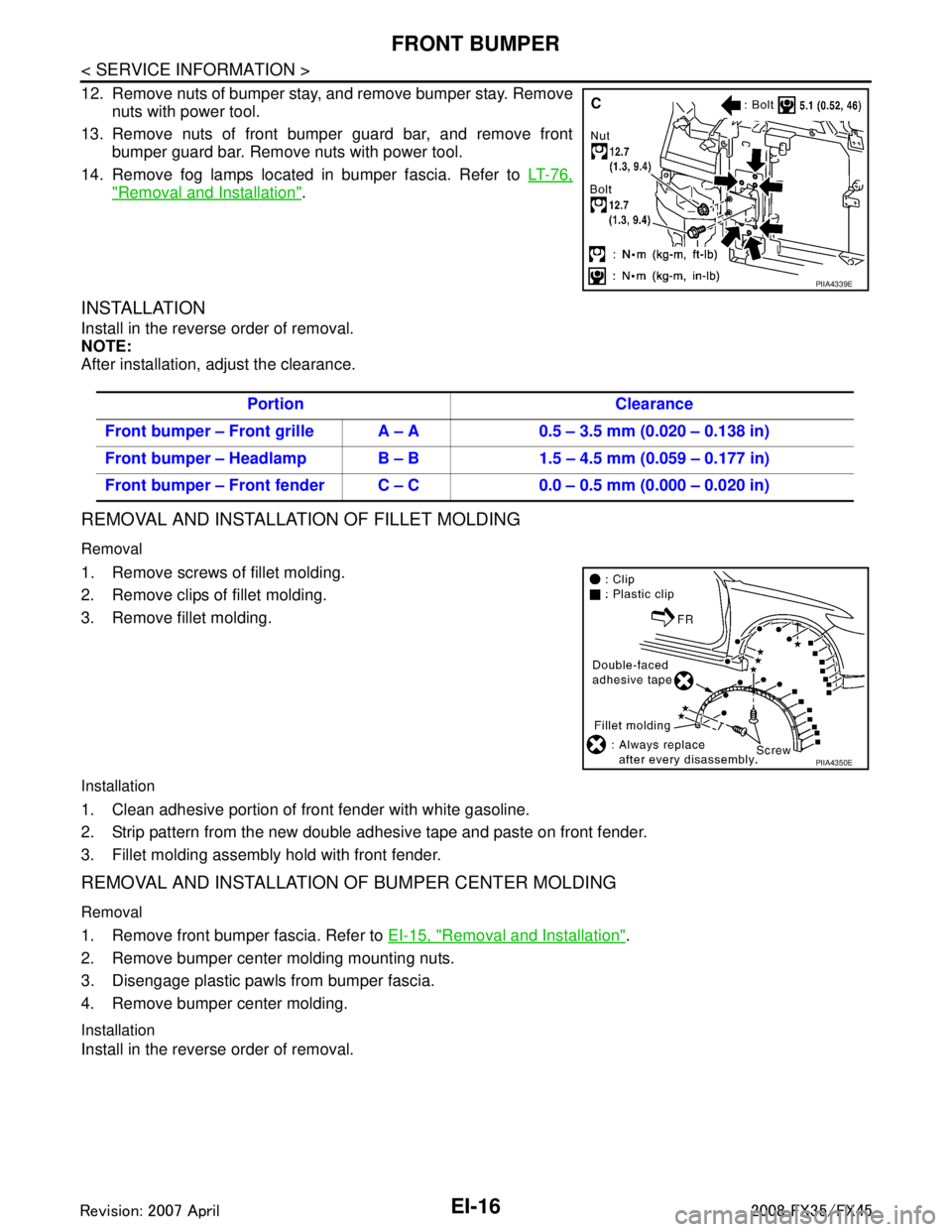
EI-16
< SERVICE INFORMATION >
FRONT BUMPER
12. Remove nuts of bumper stay, and remove bumper stay. Removenuts with power tool.
13. Remove nuts of front bumper guard bar, and remove front bumper guard bar. Remove nuts with power tool.
14. Remove fog lamps located in bumper fascia. Refer to LT-76,
"Removal and Installation".
INSTALLATION
Install in the reverse order of removal.
NOTE:
After installation, adjust the clearance.
REMOVAL AND INSTALLATION OF FILLET MOLDING
Removal
1. Remove screws of fillet molding.
2. Remove clips of fillet molding.
3. Remove fillet molding.
Installation
1. Clean adhesive portion of front fender with white gasoline.
2. Strip pattern from the new double adhesive tape and paste on front fender.
3. Fillet molding assembly hold with front fender.
REMOVAL AND INSTALLATION OF BUMPER CENTER MOLDING
Removal
1. Remove front bumper fascia. Refer to EI-15, "Removal and Installation".
2. Remove bumper center molding mounting nuts.
3. Disengage plastic pawls from bumper fascia.
4. Remove bumper center molding.
Installation
Install in the reverse order of removal.
PIIA4339E
Portion Clearance
Front bumper – Front grille A – A 0.5 – 3.5 mm (0.020 – 0.138 in)
Front bumper – Headlamp B – B 1.5 – 4.5 mm (0.059 – 0.177 in)
Front bumper – Front fender C – C 0.0 – 0.5 mm (0.000 – 0.020 in)
PIIA4350E
3AA93ABC3ACD3AC03ACA3AC03AC63AC53A913A773A893A873A873A8E3A773A983AC73AC93AC03AC3
3A893A873A873A8F3A773A9D3AAF3A8A3A8C3A863A9D3AAF3A8B3A8C
Page 2489 of 3924
![INFINITI FX35 2008 Service Manual
PRECAUTIONSEM-5
< SERVICE INFORMATION > [VQ35DE]
C
D
E
F
G H
I
J
K L
M A
EM
NP
O
Precaution for Assembly and InstallationINFOID:0000000001325697
Use torque wrench to tighten bolts or nuts to specif](/manual-img/42/57017/w960_57017-2488.png "INFINITI FX35 2008 Service Manual
PRECAUTIONSEM-5
< SERVICE INFORMATION > [VQ35DE]
C
D
E
F
G H
I
J
K L
M A
EM
NP
O
Precaution for Assembly and InstallationINFOID:0000000001325697
Use torque wrench to tighten bolts or nuts to specif")
PRECAUTIONSEM-5
< SERVICE INFORMATION > [VQ35DE]
C
D
E
F
G H
I
J
K L
M A
EM
NP
O
Precaution for Assembly and InstallationINFOID:0000000001325697
Use torque wrench to tighten bolts or nuts to specification.
When tightening nuts and bolts, as a basic rule, equally tighten in several different steps starting with the
ones in center, then ones on inside and outside diagonally in this order. If the order of tightening is specified,
do exactly as specified.
Replace with new gasket, packing, oil seal or O-ring.
Dowel pins are used for several parts alignment. When replacing and reassembling parts with dowel pins, make sure that dowel pins are installed in the original position.
Thoroughly wash, clean, and air-blow each part. Carefully check engine oil or engine coolant passages for any restriction and blockage.
Avoid damaging sliding or mating surfaces. Completely re move foreign materials such as cloth lint or dust.
Before assembly, oil sliding surfaces well.
Release air within route when refilling after draining engine coolant.
After repairing, start the engine and increase engine speed to check engine coolant, fuel, engine oil, and
exhaust gases for leakage.
Precaution for Angle TighteningINFOID:0000000001325698
Use the angle wrench [SST: KV10112100 (BT8653-A)] for the final tightening of the following engine parts:
- Cylinder head bolts
- Main bearing cap bolts
- Connecting rod cap bolts
- Crankshaft pulley bolt (No the angle wrench is required as bolt flange is provided with notches for angletightening)
Do not use a torque value for final tightening.
The torque value for these parts are for a preliminary step.
Ensure thread and seat surfaces are clean and coated with engine oil.
Precaution for Liquid GasketINFOID:0000000001325699
REMOVAL OF LIQUID GASKET SEALING
After removing mounting nuts and bolts, separate the mating sur- face using the seal cutter (SST) and remove old liquid gasket seal-
ing.
CAUTION:
Be careful not to damage the mating surfaces.
Tap the seal cutter to insert it, and then slide it by tapping on the side as shown in the figure.
In areas where the seal cutter is difficult to use, use a plastic ham-
mer to lightly tap the parts, to remove it.
CAUTION:
If for some unavoidable reason tool such as a screwdriver is
used, be careful not to damage the mating surfaces.
LIQUID GASKET APPLICATION PROCEDURE
1. Using a scraper, remove old liquid gasket adhering to the gasket application surface and the mating surface.
Remove liquid gasket completely from the groove of the gas-
ket application surface, mounting bolts, and bolt holes.
2. Wipe the liquid gasket application surface and the mating sur- face with white gasoline (lighting and heating use) to remove
adhering moisture, grease and foreign materials.
PBIC0002E
PBIC0003E
3AA93ABC3ACD3AC03ACA3AC03AC63AC53A913A773A893A873A873A8E3A773A983AC73AC93AC03AC3
3A893A873A873A8F3A773A9D3AAF3A8A3A8C3A863A9D3AAF3A8B3A8C
Page 2490 of 3924
![INFINITI FX35 2008 Service Manual
EM-6
< SERVICE INFORMATION >[VQ35DE]
PRECAUTIONS
3. Attach liquid gasket tube to the tube presser (commercial ser-
vice tool).
Use Genuine RTV Silicone Seal ant or equivalent. Refer to
GI-44
.
4. App](/manual-img/42/57017/w960_57017-2489.png "INFINITI FX35 2008 Service Manual
EM-6
< SERVICE INFORMATION >[VQ35DE]
PRECAUTIONS
3. Attach liquid gasket tube to the tube presser (commercial ser-
vice tool).
Use Genuine RTV Silicone Seal ant or equivalent. Refer to
GI-44
.
4. App")
EM-6
< SERVICE INFORMATION >[VQ35DE]
PRECAUTIONS
3. Attach liquid gasket tube to the tube presser (commercial ser-
vice tool).
Use Genuine RTV Silicone Seal ant or equivalent. Refer to
GI-44
.
4. Apply liquid gasket without breaks to the specified location with the specified dimensions.
If there is a groove for liquid gasket application, apply liquid
gasket to the groove.
As for bolt holes, normally apply liquid gasket inside the holes. Occasionally, it should be applied outside the holes. Make
sure to read the text of this manual.
Within five minutes of liquid gasket application, install the mat-
ing component.
If liquid gasket protrudes, wipe it off immediately.
Do not retighten mounting bolts or nuts after the installation.
After 30 minutes or more have passed from the installation, fill engine oil and engine coolant.
CAUTION:
If there are specific instruct ions in this manual, observe
them.
EMA0622D
SEM159F
3AA93ABC3ACD3AC03ACA3AC03AC63AC53A913A773A893A873A873A8E3A773A983AC73AC93AC03AC3
3A893A873A873A8F3A773A9D3AAF3A8A3A8C3A863A9D3AAF3A8B3A8C
Page 2502 of 3924
![INFINITI FX35 2008 Service Manual
EM-18
< SERVICE INFORMATION >[VQ35DE]
AIR CLEANER AND AIR DUCT
INSTALLATION
Note the following, and install in the reverse order of removal.
Align marks. Attach each joint. Screw clamps firmly.
T](/manual-img/42/57017/w960_57017-2501.png "INFINITI FX35 2008 Service Manual
EM-18
< SERVICE INFORMATION >[VQ35DE]
AIR CLEANER AND AIR DUCT
INSTALLATION
Note the following, and install in the reverse order of removal.
Align marks. Attach each joint. Screw clamps firmly.
T")
EM-18
< SERVICE INFORMATION >[VQ35DE]
AIR CLEANER AND AIR DUCT
INSTALLATION
Note the following, and install in the reverse order of removal.
Align marks. Attach each joint. Screw clamps firmly.
To position air cleaner case, refer to
EM-18, "
Changing Air Cleaner Filter".
Changing Air Cleaner FilterINFOID:0000000001325709
INSPECTION
Check status (fouling, damage, etc.) of air cleaner filter at power duct
hole.
REMOVAL
Removal in the order below.
1. Remove air duct (inlet) from air cleaner case.
2. Disconnect harness connector from mass air flow sensor.
3. Loosen clamp bolts of air hose.
4. Remove mounting bolts for air cleaner case. Remove air cleaner
case/mass air flow sensor/air hose assembly.
5. Unhook clips and open air cleaner case, and remove air cleaner filter.
INSTALLATION
Note the following, and install in the reverse order of removal.
If grommet at bottom of air cleaner case comes off together with air
cleaner case, fix it to vehicle before installation.
Look at internal bottom face through power duct hole, and position air cleaner case with resonator upper end circle and air cleaner
case round hole aligned. Then push air cleaner case straight
down.
At this time, check by hand if protrusion at bottom of air cleaner
case has been inserted into grommet on vehicle side.
Clip power duct with bulge on reverse side of lower end engaged with air cleaner case.
SBIA0463E
SBIA0464E
KBIA0954E
3AA93ABC3ACD3AC03ACA3AC03AC63AC53A913A773A893A873A873A8E3A773A983AC73AC93AC03AC3
3A893A873A873A8F3A773A9D3AAF3A8A3A8C3A863A9D3AAF3A8B3A8C