Page 40 of 413

�µ�Û�Ý
�Û
�Ý
The ignition switch must be in the
ACCESSORY (I) or ON (II) position.
Turn the system on by pushing the
power/volume knob or the AM/FM
button. Adjust the volume by turning
the power/volume knob.
Pushing the AUDIO button will also
turn on the system.
You can also operate the audio
system without using the control
icons on the audio screen. Use the
control buttons on the lef t side of the
screen. The status bar appears on
the bottom of the screen each time
you operate any of the control
buttons. On the navigation screen,
you can also see audio inf ormation
by touching the AUDIO INFO icon
on the lower of the screen. The band and f requency that the
radio was last tuned to are displayed.
To change bands, press the AM/FM
button, or touch the desired band
icon (FM1, FM2, AM, XM1, or XM2).
On the FM band, STEREO will be
displayed if the station is
broadcasting in stereo. Stereo
reproduction on AM is not available.
For inf ormation on XM radio, see
page .
You can use any of f ive methods to
f ind radio stations on the selected
band: tune, seek, scan, the preset
buttons, and auto select.
Use the TUNE bar to tune
the radio to a desired f requency.
Press the side of the bar to tune
to a higher f requency, and press the side to tune to a lower
f requency.
Press and hold the or side of
the TUNE bar until you hear two
beeps to change the f requency
rapidly. Release the bar when the
display reaches the desired
f requency.
142
CONT INUED
Audio System (Models with navigation system)
T o Play the A M/FM Radio
T o Select a Station
TUNE
Features
139
�����—�����—�
�
�y�
�������������y���
�(�+���������y���
�����y
Page 41 of 413

�µ
�µ
�Û�Ý
�µ Each preset button’s f requency is
shown on the bottom of the audio
display.
If you do nothing, the system will
then scan f or the next strong station
andplayitfor10seconds.Whenit
plays a station you want to listen to,
press the SCAN button again.
Each preset button can
store one f requency on AM and two
f requencies on FM.
Select the desired band, AM or
FM. FM1 and FM2 let you store
two f requencies with each preset
button.
Usethetune,seek,orscan
function to tune the radio to a
desired station.
Pick a preset button, and hold it
until you hear a beep.
Repeat steps 1 through 3 to store a
total of six stations on AM and
twelve stations on FM.
The seek f unction
searches up and down f rom the
current f requency to f ind a station
with a strong signal. To activate it,
press and hold the or side of
the TUNE bar until you hear a beep,
then release it.
The scan f unction samples
all stations with strong signals on the
selected band. To activate it, press
the SCAN button, then release it.
You will see SCAN in the display.
The system will scan f or a station
with a strong signal. When it f inds
one, it will stop and play that station
f or about 10 seconds. 1. 2. 3. 4.
Audio System (Models with navigation system)
Preset
SEEK
SCAN
140
�����—�����—�
�
�y�
�������������y���
�(�+���������y���
�����y
Page 42 of 413

�µIf you are
traveling far from home and can no
longer receive your preset stations,
you can use the auto select feature to
find stations in the local area.
Press the AUDIO button to view the
audio control icons, then press the
AUTO SEL icon. You will see AUTO
SEL f lashing in the display, and the
system goes into scan mode f or
several seconds. It stores the
f requencies of six AM, and twelve
FM stations in the preset buttons. You will see a ‘‘0’’ displayed af ter
pressing a preset button if auto
select cannot f ind a strong station f or
every preset button.
If you do not like the stations auto
select has stored, you can store
other f requencies on the preset
buttons as previously described.
press the
AUTO SEL icon. This restores the
presets you originally set.
For inf ormation on AM/FM radio
f requencies and reception, see page .
172
To turn of f auto select,
Audio System (Models with navigation system)
AUTO SELECT
Features
141
�����—�����—�
�
�y�
�������������y���
�(�+���������y���
�����y
Page 45 of 413
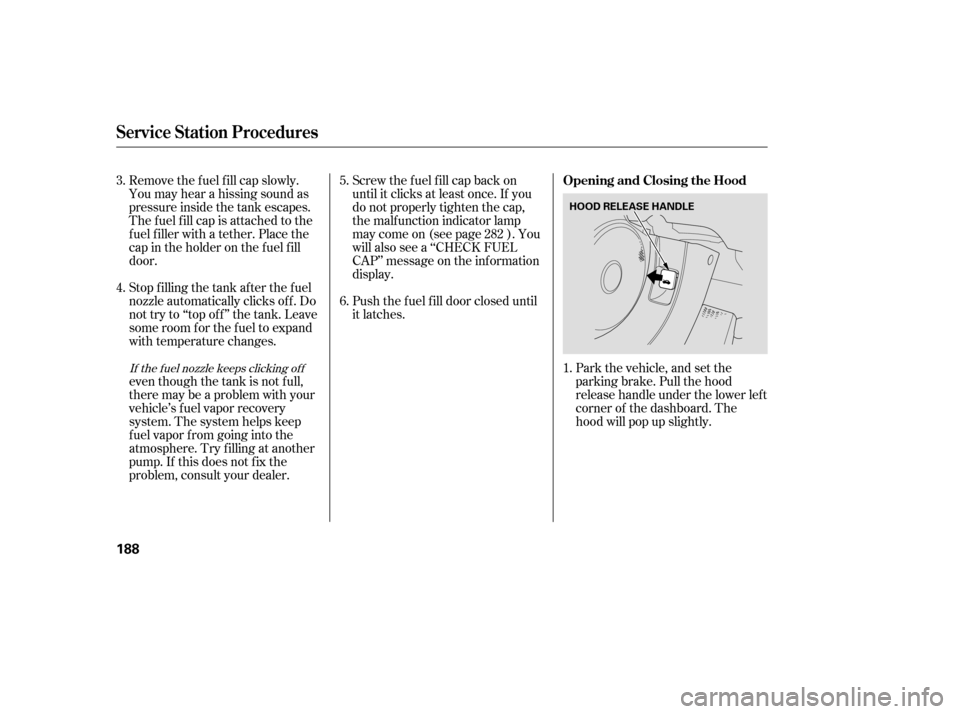
Park the vehicle, and set the
parking brake. Pull the hood
release handle under the lower lef t
corner of the dashboard. The
hood will pop up slightly.
Screw the f uel f ill cap back on
until it clicks at least once. If you
do not properly tighten the cap,
the malf unction indicator lamp
maycomeon(seepage ).You
will also see a ‘‘CHECK FUEL
CAP’’ message on the inf ormation
display.
Push the f uel f ill door closed until
it latches.
Remove the f uel f ill cap slowly.
You may hear a hissing sound as
pressure inside the tank escapes.
The fuel fill cap is attached to the
f uel f iller with a tether. Place the
cap in the holder on the f uel f ill
door.
Stop f illing the tank af ter the f uel
nozzle automatically clicks of f . Do
not try to ‘‘top off’’ the tank. Leave
some room f or the f uel to expand
with temperature changes.
even though the tank is not f ull,
there may be a problem with your
vehicle’s fuel vapor recovery
system. The system helps keep
f uel vapor f rom going into the
atmosphere. Try f illing at another
pump. If this does not f ix the
problem, consult your dealer.
1.
5. 6.
4.
3.
282If the f uel nozzle keeps clicking of f
Service Station Procedures
Opening and Closing the Hood
188
HOOD RELEASE HANDLE
�����—�����—�
�
�y�
�������������y���
�(�+���������y���
�����y
Page 47 of 413

�µ �µ�µ�µ�µ�µ�µ�µ�µ�µ�µ�µ�µ�Î
�Î�Î
�Î�Î
CONT INUED
Displayed
Engine Oil Lif e (%) 100 %90 %
80 %
70 %
60 %
50 %
40 %
30 %
20 %
15 %
10 %
15 %5%0%
Calculated Engine
Oil Lif e (%)
100 % 91 % 90 % 81 %
80 % 71 %
70 % 61 %
60 % 51 %
50 % 41 %
40 % 31 %
30 % 21 %
20 % 16 %
15 % 11 %
10 % 6 %
15 % 6 %
5% 1% 0%
Your vehicle displays engine oil lif e
and maintenance service items on
the inf ormation display to show you
when you should have your dealer
perf orm engine oil replacement and
indicated maintenance service.
Based on the engine operating
conditions and accumulated engine
revolutions, the onboard computer in
your vehicle calculates the remaining
engine oil lif e and displays it as a
percentage. The remaining engine oil lif e is
displayed on the inf ormation display
according to this table:
To see the current engine oil lif e,
turn the ignition switch to the ON
(II) position, then push and release
the SEL/RESET button repeatedly
until the engine oil lif e indicator
appears (see page ). 65
1:2:DX and Canadian DX-G
LX,EX,EX-L,andSi
1
1 2
Maintenance Minder
Engine Oil L if e Indicator
Maint enance
225
MAINTENANCE
MINDER INDICATOR ENGINE OIL LIFE
INDICATOR
INFORMATION DISPLAY
�����—�����—�
�
�y�
�������������y���
�(�+���������y���������y
Page 48 of 413
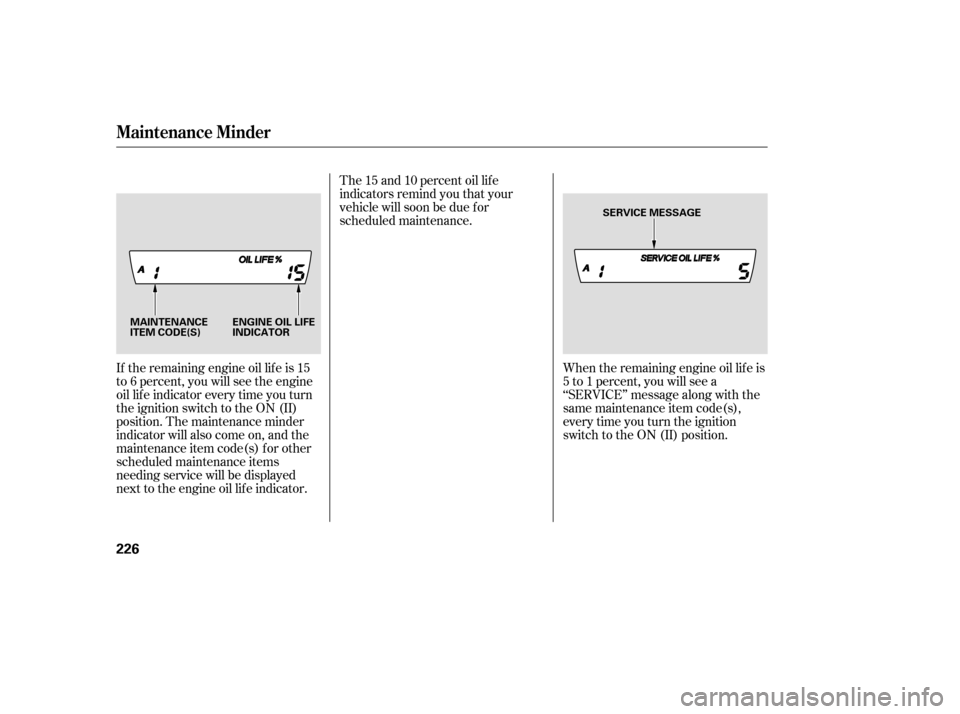
If the remaining engine oil lif e is 15
to 6 percent, you will see the engine
oil lif e indicator every time you turn
the ignition switch to the ON (II)
position. The maintenance minder
indicator will also come on, and the
maintenance item code(s) for other
scheduled maintenance items
needing service will be displayed
next to the engine oil lif e indicator.When the remaining engine oil lif e is
5 to 1 percent, you will see a
‘‘SERVICE’’ message along with the
same maintenance item code(s),
every time you turn the ignition
switch to the ON (II) position.
The 15 and 10 percent oil lif e
indicators remind you that your
vehicle will soon be due f or
scheduled maintenance.
Maintenance Minder
226
ENGINE OIL LIFE
INDICATOR
MAINTENANCE
ITEM CODE(S) SERVICE MESSAGE
�����—�����—�
�
�y�
�����������
�y���
�(�+���������y�������
�y
Page 49 of 413

If you do not perf orm the indicated
maintenance, negative mileage is
displayed and begins to blink af ter
the vehicle has been driven 10 miles
(10 km) or more.
Negative mileage means your
vehicle has passed the maintenance
required point.
Immediately have the indicated
maintenance done by your dealer.
When the remaining engine oil lif e is
0 percent, the engine oil lif e indicator
will blink. The display comes on
everytimeyouturntheignition
switch to the ON (II) position. The
maintenance minder indicator
( ) also comes on and remains
on in the instrument panel. When
you see this message, immediately
have the indicated maintenance done
by your dealer.
The maintenance item code or codes
indicate the main and sub items
required at the time of the oil change
(see page ).
You can switch the display to the
odometer, the trip meter, and the
outside temperature indicator (if
equipped) by pushing the SEL/
RESET button on the dashboard
repeatedly.
Whentheengineoillifeis15to1
percent, the maintenance minder
indicator ( ) comes on every
time you turn the ignition switch to
the ON (II) position, then it goes out
if you switch the inf ormation display.
When you see this message, have
the indicated maintenance
perf ormed by your dealer as soon as
possible.
231
CONT INUED
Maintenance Minder
Maint enance
227
NEGATIVE MILEAGE
�����—�����—�
�
�y�
���������
���y���
�(�+���������y���������y
Page 50 of 413

Your dealer will reset the display
af ter completing the required
maintenance service. You will see
‘‘OIL LIFE 100%’’ on the inf ormation
display the next time you turn the
ignition switch to the ON (II)
position.
If maintenance service is done by
someone other than your dealer,
reset the maintenance minder as
f ollows:Turn the ignition switch to the ON
(II) position.
Press the SEL/RESET button
repeatedly until the engine oil lif e
indicator is displayed.
All maintenance items displayed on
the inf ormation display are in code.
For an explanation of these
maintenance codes, see page .
You can change the inf ormation
display f rom the engine oil lif e
display to the odometer, the trip
meter, or the outside temperature (if
equipped) every time you press and
release the SEL/RESET button.
When the engine oil lif e is 0 percent
or negative mileage, the
maintenance minder indicator
( )remainsonevenif you
change the inf ormation display.
Immediately have the service
perf ormed, and make sure to reset
the display as described on the
f ollowing.
1. 2.
231
Maintenance Minder
Resetting the Engine Oil Lif e
Display
Maintenance Main Items and Sub
Items
228
MAINTENANCE MAIN ITEM
MAINTENANCE SUB ITEM
�����—�����—�
�
�y�
���������
���y���
�(�+���������y���������y