Page 25 of 413
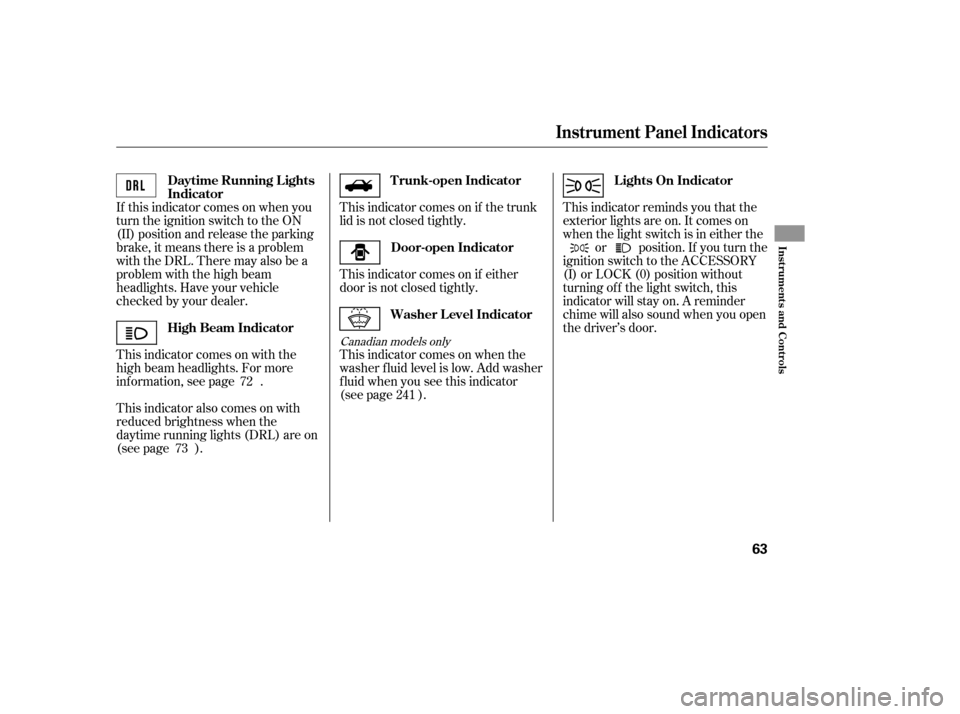
If this indicator comes on when you
turn the ignition switch to the ON
(II) position and release the parking
brake, it means there is a problem
withtheDRL.Theremayalsobea
problem with the high beam
headlights. Have your vehicle
checked by your dealer.
This indicator comes on with the
high beam headlights. For more
inf ormation, see page .
This indicator also comes on with
reduced brightness when the
daytime running lights (DRL) are on
(see page ).This indicator comes on if either
door is not closed tightly.
This indicator comes on when the
washer f luid level is low. Add washer
f luid when you see this indicator
(see page ).
This indicator comes on if the trunk
lid is not closed tightly.
This indicator reminds you that the
exterior lights are on. It comes on
when the light switch is in either the
or position. If you turn the
ignition switch to the ACCESSORY
(I) or LOCK (0) position without
turning of f the light switch, this
indicator will stay on. A reminder
chime will also sound when you open
the driver’s door.
72 241
73
Canadian models only
High Beam Indicator Door-open Indicator
T runk-open Indicator L ights On Indicator
Washer Level Indicator
Daytime Running L ights
Indicator
Instrument Panel Indicators
Inst rument s and Cont rols
63
�����—�����—�
�
�y�
����
��������y���
�(�+���������y���������y
Page 30 of 413
The spotlights have a two-position
switch. In the DOOR position, the
lights come on when you open either
door. In the OFF position, the lights
do not come on.
The spotlights (with the switch in
the DOOR position) also come on
when you unlock the door with the
key or the remote transmitter, and
when you remove the key f rom the
ignition switch.The courtesy light between the
spotlights comes on when you turn
the parking lights on. To adjust its
brightness, push the instrument
panel brightness control buttons
under the driver’s side vent with the
ignition switch in the ON (II)
position.
On models with moonroof
On models with moonroofCourtesy L ight
Interior Lights
112
DOOR ACTIVATEDOFF POSITION
SPOTLIGHT
COURTESY LIGHT
�����—�����—�
�
�y�
�������������y���
�(�+���������y���
�
���y
Page 67 of 413
�Î�Î
�Î
�Î
�Î
�Î
�Π��ΠOnly on vehicles equipped with navigation system. Ref er to the navigati
on system manual.
To use the horn, press the center pad of the steering wheel.
If equipped
1:2:3:
Your Vehicle at a Glance
4
HEADLIGHTS/TURN SIGNALS
STEERING WHEEL
ADJUSTMENT WINDSHIELD WIPERS/WASHERS
(P. 71)
(P. 72)
Vehicle with navigation system is shown. (P. 75)HORN
CRUISE CONTROL BUTTONSPASSENGER AIRBAG OFF
INDICATOR
(P. 30)
HAZARD WARNING BUTTON
(P. 74)
REAR WINDOW DEFOGGER
(P. 74)
HEATED MIRRORS
INSTRUMENT PANEL
BRIGHTNESS BUTTONS
(P. 73)
DISPLAY CHANGE
BUTTON
(P. 66)
SEL/RESET
BUTTON
VEHICLE STABILITY
ASSIST (VSA) SYSTEM
OFF SWITCH
REMOTE AUDIO
CONTROLS
VOICE CONTROL
SWITCHES
HOOD RELEASE HANDLE
(P. 182)
(P. 66)
(P. 211)
(P. 171)
(P. 176)(P. 103)
1 2
2
2
2
3
�����—�����—�����y��������
������y���
�(�#���������y���������y
Page 136 of 413

When you press the hazard warning
button, both turn signal indicators
and all turn signals on the outside of
the vehicle f lash.If this indicator comes on when the
ignition switch is turned to the ON
(II) position and the parking brake is
released, it means there is a problem
in the circuit. Have your vehicle
checked by your dealer.
This indicator comes on with the
high beam headlights. For more
inf ormation, see page .
This indicator also comes on with
reduced brightness when the
daytime running lights (DRL) are on
(see page ).This indicator reminds you that the
exterior lights are on. It comes on
when the light switch is in either the
or position. If you turn the
ignition switch to the ACCESSORY
(I) or the LOCK (0) position without
turning of f the light switch, this
indicator will remain on. A reminder
chime will also sound when you open
the driver’s door and remove the key
from the ignition switch.
The lef t or right turn signal indicator
blinks when you signal a lane change
or turn. If an indicator does not blink
or blinks rapidly, it usually means
one of the turn signal bulbs is
burned out (see pages and ).
Replace the bulb as soon as possible,
since other drivers cannot see that
you are signaling.
This indicator comes on if the trunk
lid is not closed tightly.
This indicator comes on if any door
is not closed tightly.
247
246
72
73
Turn Signal and
Hazard Warning
Indicators
Lights On Indicator
‘‘Daytime Running
Lights’’ Indicator
High Beam Indicator
Trunk-open Indicator
Door-open Indicator
Instrument Panel Indicators
Inst rument s and Cont rols
61
�����—�����—�����y���������������y���
�(�#���������y���������y
Page 141 of 413
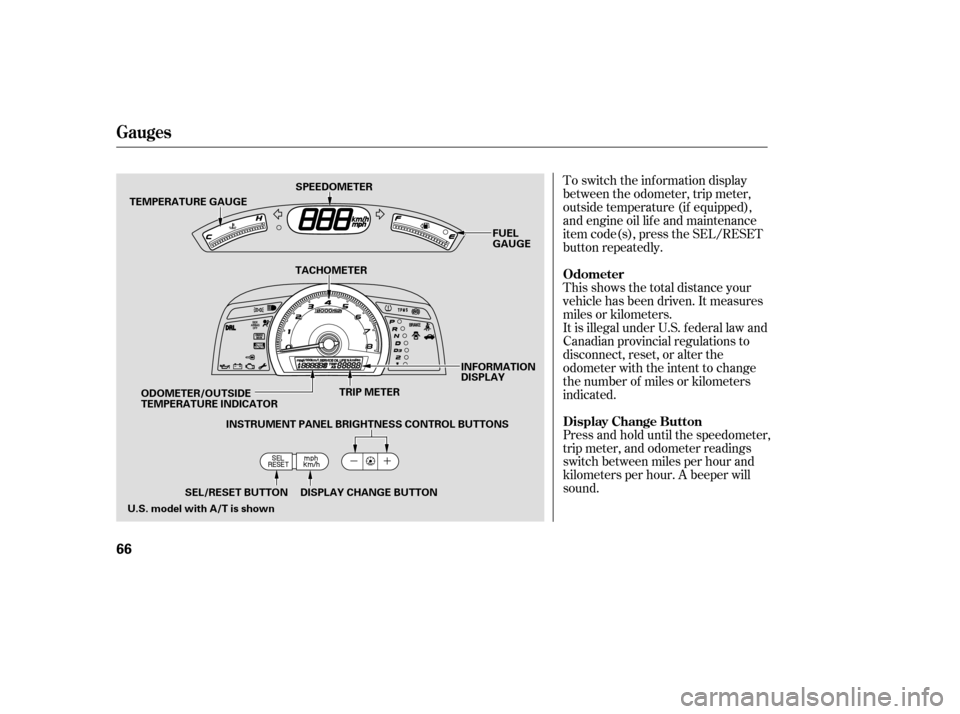
To switch the information display
between the odometer, trip meter,
outside temperature (if equipped),
and engine oil lif e and maintenance
item code(s), press the SEL/RESET
button repeatedly.
Press and hold until the speedometer,
trip meter, and odometer readings
switch between miles per hour and
kilometers per hour. A beeper willsound.
This shows the total distance your
vehicle has been driven. It measures
miles or kilometers.
It is illegal under U.S. f ederal law and
Canadian provincial regulations to
disconnect, reset, or alter the
odometer with the intent to change
the number of miles or kilometers
indicated.
Odometer
Display Change Button
Gauges
66
TEMPERATURE GAUGE
TRIP METER
SPEEDOMETER
FUEL
GAUGE
SEL/RESET BUTTON DISPLAY CHANGE BUTTON INFORMATION
DISPLAY
TACHOMETER
ODOMETER/OUTSIDE
TEMPERATURE INDICATOR INSTRUMENT PANEL BRIGHTNESS CONTROL BUTTONS
U.S. model with A/T is shown
�����—�����—�����y���������������y���
�(�#���������y�������
�y
Page 146 of 413
�Î
�Î
�Î �Î �Î
�Î
�Π��ΠOnly on vehicles equipped with navigation system. Ref er to the navigati on system manual.
To use the horn, press the center pad of the steering wheel.
If equipped
1:2:3:
Controls Near the Steering Wheel
70
HEADLIGHTS/
TURN SIGNALS
HAZARD WARNING
BUTTON
PASSENGER AIRBAG
OFF INDICATOR
SEL/RESET BUTTON WINDSHIELD
WIPERS/WASHERS
INSTRUMENT PANEL BRIGHTNESS
DISPLAY CHANGE BUTTON
REAR WINDOW
DEFOGGER
(P. 73)
(P. 66)
(P. 66)
(P. 74)
(P. 74)
(P. 30)
(P. 72)
(P. 71)
STEERING WHEEL
ADJUSTMENT HORN
(P. 75)
Vehicle with navigation system is shown. HOOD RELEASE HANDLE
(P. 182)VEHICLE STABILITY ASSIST
(VSA) SYSTEM OFF SWITCH
REMOTE AUDIO CONTROLS
VOICE CONTROL SWITCHES HEATED MIRRORS
(P. 211)
(P. 171)
(P. 103)CRUISE CONTROL
BUTTONS
(P. 176)
1
2
2 3 2
2
�����—�����—�����y��������
������y���
�(�#���������y���������y
Page 149 of 413

�´�µ
The buttons under the lef t side vent
control the brightness of the
instrument panel. Push the or
button to adjust the brightness.
Separate adjustments can be made
when the headlights are on and of f .
With the headlight switch of f or
position, the high beam
headlights come on with reduced
brightness when you turn the
ignition switch to the ON (II)
position and release the parking
brake. They remain on until you turn
the ignition switch of f , even if you
set the parking brake.
The headlights revert to normal
operation when you turn them on
with the switch.
There are six brightness levels.
When you push either button, the
inf ormation display indicates the
current level. You will hear a tonewhen you reach the maximum or
minimum brightness. The display
returns to the odometer 5 seconds
af ter you stop adjusting the
brightness.
To reduce glare at night, the
instrument panel illumination dims
when you turn the light switch to the
or position.
The center of each meter (upper and
lower) illuminates with reduced
brightness when you unlock and
open the driver’s door, and then goes
back to the selected brightness when
you turn the ignition switch to the
ON (II) position.
If you insert the key but do not turn
the ignition switch to the ON (II)
position, the illumination turns of f in
about 10 seconds.
Daytime Running L ights Instrument Panel Brightness
Headlights, Instrument Panel Brightness
Inst rument s and Cont rols
73
INSTRUMENT PANEL BRIGHTNESS
CONTROL BUTTONS
�����—�����—�����y��������
����
�y���
�(�#���������y���������y
Page 203 of 413

�µ�µ
�µ
These two
modes adjust the strength of the
sound coming f rom each speaker.
BALANCE adjusts the side-to-side
strength, while FADER adjusts the
front-to-back strength. You can use the instrument panel
brightness control buttons to adjust
the illumination of the audio system
(see page ). The audio system
illuminates when the parking lights
are on, even if the radio is of f .
The SVC
mode controls the volume based on
vehicle speed. The f aster you go, the
louder the audio volume becomes.
As you slow down, the audio volume
decreases.
The SVC has f our modes; SVC OFF,
SVC LOW, SVC MID, and SVC
HIGH. The def ault setting is MID.
Turn the SOUND (TUNE) knob to
adjust the setting to your liking.
If you f eel the sound is too loud,
choose low. If you f eel the sound is
too quiet, choose high.
Use the TREBLE/
BASS modes to adjust the tone to
your liking.
73
Balance/Fader A udio System L ighting
Speed-sensitive volume
compensation (SVC)
Treble/Bass
Audio System (Models without navigation system)
118
�����—�����—�����y���������������y���
�(�#���������y���
�����y