Page 142 of 413

Each trip meter works independently,
so you can keep track of two
dif f erent distances.
There are two trip meters: TRIP A
and TRIP B. Switch between these
displays by pressing the SEL/
RESET button repeatedly. This shows how much f uel you have.
It may show slightly more or less
than the actual amount.
To reset a trip meter, display it, and
then press and hold the SEL/RESET
button until the number resets to‘‘0.0.’’
This meter shows the number of
miles or kilometers driven since you
last reset it.
This shows the temperature of the
engine’s coolant. During normal
operation, the reading should rise to
about the middle of the gauge. In
severe driving conditions, such as
very hot weather or a long period of
uphill driving, the reading may rise
into the upper half of the gauge. If it
reaches the red (Hot) mark, pull
safely to the side of the road. See
page f or instructions and
precautions on checking the engine
cooling system.275
Trip Meter Fuel Gauge Temperature Gauge
Gauges
Inst rument s and Cont rols
67
Avoid driving with an extremely low
f uel level. Running out of f uel could
cause the engine to misf ire, damaging
the catalytic converter.
�����—�����—�����y���������������y���
�(�#���������y���������y
Page 143 of 413

�¶�¶�µ
�µ�µ�µ�µ �µ�µ�µ
If equipped
The temperature sensor is in the
f ront bumper. Theref ore, the
temperature reading can be af f ected
by heat ref lection f rom the road
surf ace, engine heat, and the
exhaust f rom surrounding traf f ic.
This can cause an incorrect
temperature reading when your
speed is under 19 mph (30 km/h).
The sensor delays the display update
until it reaches the correct outside
temperature. This may take several
minutes. If the outside temperature is
incorrectly displayed, you can adjust
it up to 5°F ( 3°C) warmer or
cooler.
NOTE: The temperature must be
stabilized bef ore doing this
procedure.
This indicator displays the outside
temperature in Fahrenheit (U.S.
models) or Centigrade (Canadian
models). To see the outside
temperature, press and release the
SEL/RESET button until the
temperature is shown on the
inf ormation display. Select the outside temperature
display, then press and hold the
SEL/RESET button f or 10 seconds.
The f ollowing sequence will appear
for1secondeach:0,1,2,3,4,5, 5,4, 3, 2, 1, 0 (U.S.) or 0, 1, 2,
3, 3, 2, 1, 0 (Canada).
When it reaches the desired value,
release the SEL/RESET button. You
should see the new outside
temperature displayed.
In certain weather conditions,
temperature readings near f reezing
(32°F, 0°C) could mean that ice is
f orming on the road surf ace. Your vehicle’s onboard diagnostic
system will detect a loose or missing
f uel f ill cap as an evaporative system
leak. The f irst time a leak is detected
a ‘‘CHECK FUEL CAP’’ message
appears on the information display.
Turn the engine of f , and conf irm the
f uel f ill cap is installed. If it is, loosen
it, then retighten it until it clicks at
least once. The message should go
off after several days of normal
driving once you tighten or replace
the f uel f ill cap. To scroll to another
display, press the SEL/RESET
button. The ‘‘CHECK FUEL CAP’’
message will appear each time you
restart the engine until the system
turns the message of f .
Outside Temperature Indicator
Check Fuel Cap Message
Gauges
68
�����—�����—�����y���������������y���
�(�#���������y���������y
Page 144 of 413
The inf ormation display in the
instrument panel shows you the
engine oil lif e and maintenance
service items when the ignition
switch is in the ON (II) position. This
inf ormation helps to keep you aware
of the periodic maintenance your
vehicle needs f or continued trouble-
f ree driving. Ref er to page f or
more inf ormation.
If the system still detects a leak in
your vehicle’s evaporative emissions
system, the malf unction indicator
lamp (MIL) comes on. If the f uel f ill
cap was not already tightened, turn
the engine of f , and check or
retighten the f uel f ill cap until it
clicks at least once. The MIL should
go off after several days of normal
driving once the cap is tightened or
replaced. If the MIL does not go of f ,
have your vehicle inspected by a
dealer. For more inf ormation, see
page .
278 223
Maintenance Minder
Gauges
Inst rument s and Cont rols
69
�����—�����—�����y��������
������y���
�(�#���������y���������y
Page 145 of 413
The inf ormation display in the
instrument panel shows you the
engine oil lif e and maintenance
service items when the ignition
switch is in the ON (II) position. This
inf ormation helps to keep you aware
of the periodic maintenance your
vehicle needs f or continued trouble-
f ree driving. Ref er to page f or
more inf ormation.
If the system still detects a leak in
your vehicle’s evaporative emissions
system, the malf unction indicator
lamp (MIL) comes on. If the f uel f ill
cap was not already tightened, turn
the engine of f , and check or
retighten the f uel f ill cap until it
clicks at least once. The MIL should
go off after several days of normal
driving once the cap is tightened or
replaced. If the MIL does not go of f ,
have your vehicle inspected by a
dealer. For more inf ormation, see
page .
278 223
Maintenance Minder
Gauges
Inst rument s and Cont rols
69
�����—�����—�����y��������
������y���
�(�#���������y���������y
Page 146 of 413
�Î
�Î
�Î �Î �Î
�Î
�Π��ΠOnly on vehicles equipped with navigation system. Ref er to the navigati on system manual.
To use the horn, press the center pad of the steering wheel.
If equipped
1:2:3:
Controls Near the Steering Wheel
70
HEADLIGHTS/
TURN SIGNALS
HAZARD WARNING
BUTTON
PASSENGER AIRBAG
OFF INDICATOR
SEL/RESET BUTTON WINDSHIELD
WIPERS/WASHERS
INSTRUMENT PANEL BRIGHTNESS
DISPLAY CHANGE BUTTON
REAR WINDOW
DEFOGGER
(P. 73)
(P. 66)
(P. 66)
(P. 74)
(P. 74)
(P. 30)
(P. 72)
(P. 71)
STEERING WHEEL
ADJUSTMENT HORN
(P. 75)
Vehicle with navigation system is shown. HOOD RELEASE HANDLE
(P. 182)VEHICLE STABILITY ASSIST
(VSA) SYSTEM OFF SWITCH
REMOTE AUDIO CONTROLS
VOICE CONTROL SWITCHES HEATED MIRRORS
(P. 211)
(P. 171)
(P. 103)CRUISE CONTROL
BUTTONS
(P. 176)
1
2
2 3 2
2
�����—�����—�����y��������
������y���
�(�#���������y���������y
Page 149 of 413

�´�µ
The buttons under the lef t side vent
control the brightness of the
instrument panel. Push the or
button to adjust the brightness.
Separate adjustments can be made
when the headlights are on and of f .
With the headlight switch of f or
position, the high beam
headlights come on with reduced
brightness when you turn the
ignition switch to the ON (II)
position and release the parking
brake. They remain on until you turn
the ignition switch of f , even if you
set the parking brake.
The headlights revert to normal
operation when you turn them on
with the switch.
There are six brightness levels.
When you push either button, the
inf ormation display indicates the
current level. You will hear a tonewhen you reach the maximum or
minimum brightness. The display
returns to the odometer 5 seconds
af ter you stop adjusting the
brightness.
To reduce glare at night, the
instrument panel illumination dims
when you turn the light switch to the
or position.
The center of each meter (upper and
lower) illuminates with reduced
brightness when you unlock and
open the driver’s door, and then goes
back to the selected brightness when
you turn the ignition switch to the
ON (II) position.
If you insert the key but do not turn
the ignition switch to the ON (II)
position, the illumination turns of f in
about 10 seconds.
Daytime Running L ights Instrument Panel Brightness
Headlights, Instrument Panel Brightness
Inst rument s and Cont rols
73
INSTRUMENT PANEL BRIGHTNESS
CONTROL BUTTONS
�����—�����—�����y��������
����
�y���
�(�#���������y���������y
Page 199 of 413
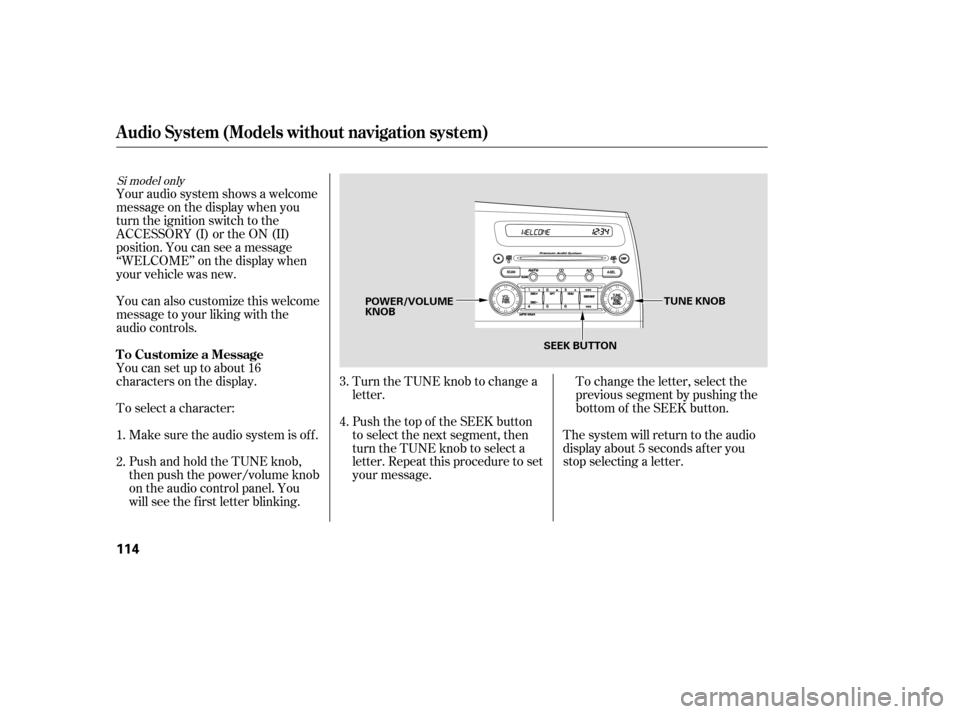
To change the letter, select the
previous segment by pushing the
bottom of the SEEK button.
Turn the TUNE knob to change a
letter.
Push the top of the SEEK button
to select the next segment, then
turn the TUNE knob to select a
letter. Repeat this procedure to set
your message. The system will return to the audio
display about 5 seconds af ter you
stop selecting a letter.
PushandholdtheTUNEknob,
then push the power/volume knob
on the audio control panel. You
will see the f irst letter blinking.
Make sure the audio system is of f .
To select a character:
Youcansetuptoabout16
characters on the display.
You can also customize this welcome
message to your liking with the
audio controls.
Your audio system shows a welcome
message on the display when you
turn the ignition switch to the
ACCESSORY (I) or the ON (II)
position. You can see a message
‘‘WELCOME’’ on the display when
your vehicle was new. 2.
3. 4.
1.
Si model only
Audio System (Models without navigation system)
T o Customize a Message
114
TUNE KNOB
POWER/VOLUME KNOB
SEEK BUTTON
�����—�����—�����y�����������
���y���
�(�#���������y���
�
���y
Page 201 of 413

�µ
�µ
�µ�µ
�µ
If you do nothing, the system will
then scan f or the next strong station
and play it f or 10 seconds. When it
plays a station you want to listen to,
press the SCAN button again.
Use the TUNE knob to
tune the radio to a desired f requency.
Turn the knob right to tune to a
higher f requency, or lef t to tune to a
lower f requency.
The scan f unction samples
all stations with strong signals on the
selected band. To activate it, press
the SCAN button, then release it.
You will see SCAN in the display.
The system will scan f or a station
with a strong signal. When it f inds
one, it will stop and play that station
f or about 10 seconds. The SEEK f unction
searches up and down f rom the
current f requency to f ind a station
with a strong signal. To activate it,
press the or side of the
SEEK button, then release it. Each side of the buttons
(1 through 6) can store one
f requency on AM, and two
f requencies on FM.
Repeat steps 1 through 3 to store a
total of six stations on AM and
twelve stations on FM.
Pick a preset number (1 6), and
hold it until you hear a beep.
Usethetune,seek,orscan
function to tune the radio to a
desired station.
Select the desired band, AM or
FM. FM1 and FM2 let you store
twelve stations.
The ignition switch must be in the
ACCESSORY (I) or ON (II) position.
Turn the system on by pushing the
power/volume knob or the AM or
FM button (the AM/FM button).
Adjust the volume by turning the
power/volume knob.
The band and f requency that the
radio was last tuned to is displayed.
To change bands, press the AM/FM
button (AM or FM button). On the
FM band, ST will be displayed if the
stationisbroadcastinginstereo.
Stereo reproduction in AM is not
available.
You can use any of f ive methods to
f ind radio stations on the selected
band: tune, seek, scan, the preset
buttons, and auto select.
1. 2.3. 4.
TUNE
SCAN
SEEK Preset
To Select a Station
Audio System (Models without navigation system)
116
�����—�����—�����y���������������y���
�(�#���������y���
���
�y