Page 233 of 413

�µ
�Û �Ý
�µ �µ
�µ �µ
To
select a dif f erent f older, press either
side of the TUNE bar to move to the
beginning of the next f older. Press
the side of the TUNE bar to skip
to the next folder, and the side to
move to the beginning of the current
folder.Pressitagaintoskiptothe
beginning of the previous f older.
To continuously replay
a track (f ile in MP3 or WMA mode),
press and release the RPT button
(preset 1). You will see TRACK
REPEAT in the display. Press and
hold the RPT button for 2 seconds to
turn it off. This feature,
when activated, replays all f iles on
the selected f older in the order they
are compressed. To activate folder
repeat, press and hold the RPT
button (preset 1). You will see
FOLDER REPEAT in the display.
The system continuously replays the
current f older. Press the RPT button
again to turn it off. Pressing the
RDM button or selecting a dif f erent
folder with the TUNE bar also turns
of f f older repeat.
This
featureplaysthetrackswithinadisc
(the f iles within a f older) in random
order. To activate track random,
press and release the RDM button
(preset 2). You will see TRACK
RANDOM in the display. Press and
hold the RDM button for 2 seconds
to return to normal play. This
feature, when activated, plays all
f iles in each f older in random order,
rather than in the order they are
compressed. To activate folder
random, press the RDM button
(preset 2) twice. You will see
FOLDER RANDOM in the display.
The system then selects and plays
f iles randomly. This continues until
you deactivate folder random by
pressing the RDM button again, or if
you select a dif f erent f older with the
TUNE bar.
In MP3 or WMA mode
In MP3 or WMA mode In MP3 or WMA mode
Audio System (Models with navigation system)
FOLDER SELECTION
T RA CK REPEA T (FIL E
REPEAT) FOLDER REPEAT
TRACK RANDOM (Random
within a disc/f older)FOLDER RANDOM
148
�����—�����—�����y���
����
������y���
�(�#���������y���
�����y
Page 234 of 413
�µ�µ
CONT INUED
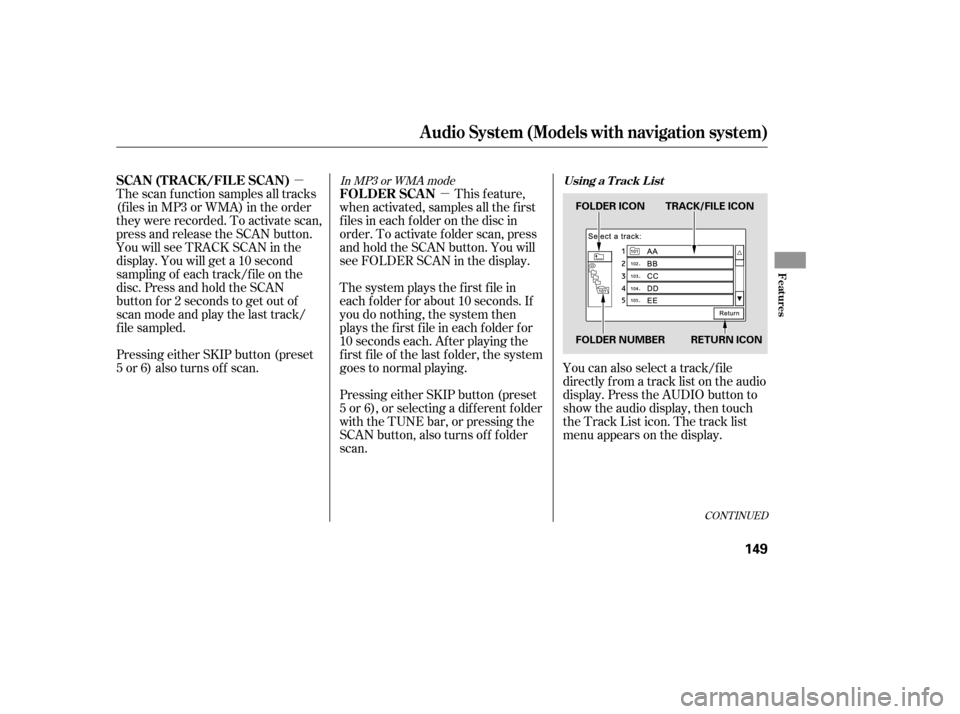
You can also select a track/f ile
directly f rom a track list on the audio
display. Press the AUDIO button to
show the audio display, then touch
the Track List icon. The track list
menu appears on the display.
Pressing either SKIP button (preset
5 or 6) also turns of f scan.
The scan f unction samples all tracks
(f iles in MP3 or WMA) in the order
they were recorded. To activate scan,
press and release the SCAN button.
You will see TRACK SCAN in the
display. You will get a 10 second
sampling of each track/f ile on the
disc. Press and hold the SCAN
button f or 2 seconds to get out of
scan mode and play the last track/
f ile sampled.
This feature,
when activated, samples all the first
f iles in each f older on the disc in
order. To activate f older scan, press
and hold the SCAN button. You will
see FOLDER SCAN in the display.
The system plays the f irst f ile in
each f older f or about 10 seconds. If
you do nothing, the system then
plays the f irst f ile in each f older f or
10 seconds each. Af ter playing the
first file of the last folder, the system
goes to normal playing.
Pressing either SKIP button (preset
5 or 6), or selecting a dif f erent f older
with the TUNE bar, or pressing the
SCAN button, also turns of f f older
scan.
In MP3 or WMA mode
Audio System (Models with navigation system)
Using a T rack L istSCA N (T RA CK /FIL E SCA N) FOLDER SCAN
Features
149
FOLDER ICON TRACK/FILE ICON
FOLDER NUMBER RETURN ICON
�����—�����—�����y���
�����������y���
�(�#���������y���
�����y
Page 235 of 413

�Û�ÝTo remove a disc f rom the audio unit,
f old back the screen by pressing the
OPEN button (see page ). Press
the disc eject button ( ) to
remove the disc. If you eject the disc,
but do not remove it f rom the slot,
the system will automatically reload
it af ter 10 seconds and put it in pause
mode. To begin playing, press the
CD button.
To return the screen to the upright
position, press the CLOSE button.
When playing a CD recorded with
text data, each track name is shown
on the audio display. With a disc
recorded in MP3 or WMA, the f older
number and the location are also
displayed.
You cannot close the screen if a disc
is partially inserted into its slot.
You can also eject the disc when the
ignition switch is of f .
If the disc was not recorded with text
data, only the track number is shown.
To scroll through the display, touch
the or icononthesideof the
screen.Togobacktotheprevious
display, touch the Return icon on the
screen.
Select the desired track/f ile by
touching the icon on the display. The
selected icon will be highlighted in
blue. The system begins to play the
selected track/f ile. With a disc in
MP3 or WMA, touch the f older icon
on the upper lef t of the screen to
move to the parent folder. The
current f older is highlighted in blue. To play the radio when a disc is
playing, press the AM/FM button or
touch the FM1, FM2, AM, XM1, or
XM2 icon. If a PC card is in the audio
unit, touch the CARD icon to play
the PC card. Press the CD button
again or touch the CD icon to switch
back to the disc player.
If you turn the system of f while a
disc is playing, either with the
power/volume knob or by turning
of f the ignition switch, the disc will
stay in the drive. When you turn the
system back on, the disc will begin
playing where it lef t of f .
146
Audio System (Models with navigation system)
Removing a DiscTo Stop Playing a Disc
150
�����—�����—�����y���
�������
���y���
�(�#���������y���
�����y
Page 236 of 413
�Û�Ý
Load the desired discs in the
magazine, and load the magazine in
the changer according to the
instructions that came with the unit.
To select the disc changer, press the
CD/AUX button. The disc and track
numbers will be displayed. To select
a dif f erent disc, use either side of the
TUNE bar. To select the previous
disc, press the side. To select the
next disc, press the side.
If you select an empty slot in the
magazine, the changer will search
f or the next available disc to load and
play. For inf ormation on how to handle
and protect discs, see page .
An optional six or eight disc changer
is available f or your vehicle. This
disc changer uses the same controls
used f or the in-dash disc player or
the radio. 168
Operating the Optional Disc
Changer
Protecting Discs
Audio System (Models with navigation system)
Features
151
�����—�����—�����y���
���������
�y���
�(�#���������y���
�����y
Page 237 of 413

Thechartontherightexplainsthe
error messages you may see in the
display while playing a disc.
If you see an error message in the
display while playing a disc, press
the eject button. After ejecting the
disc, check it for damage or
deformation. If there is no damage,
insert the disc again.
If there is still a problem, the error
message will appear again. Press the
eject button, and pull out the disc.
Insert a dif f erent disc. If the new
disc plays, there is a problem with
the f irst disc. If the error message
cycle repeats and you cannot clear it,
take your vehicle to a dealer.Error Message Cause Solution
FOCUS Error
Mechanical Error
TOC Error
High Temperature
Press the eject button, and pull out the disc.
Check if it is inserted correctly in the discplayer.
Make sure the disc is not scratched or damaged.
For more information, see page 169.
Press the eject button, and pull out the disc.
Check the disc f or damage or def ormation. For
more information, see page 169.
If the disc cannot be pulled out, or the error
message does not disappear after the disc is
ejected, see your dealer.
Press the eject button, and pull out the disc.
Check the disc f or damage or def ormation. For
more information, see page 169.
Will disappear when the temperature returns to
normal.
Audio System (Models with navigation system)
Disc Player Error Messages
152
�����—�����—�����y���
�����������y���
�(�#���������y���
�����y
Page 240 of 413
�µ �µ�µ�µ
CONT INUED
Compatible with variable bit rate
and multi-session
Maximum layers
(including ROOT): 8 layers
In WMA f ormat, DRM (digital rights
management) f iles cannot be played.
If the system finds a DRM file, it
skips that f ile and plays the next
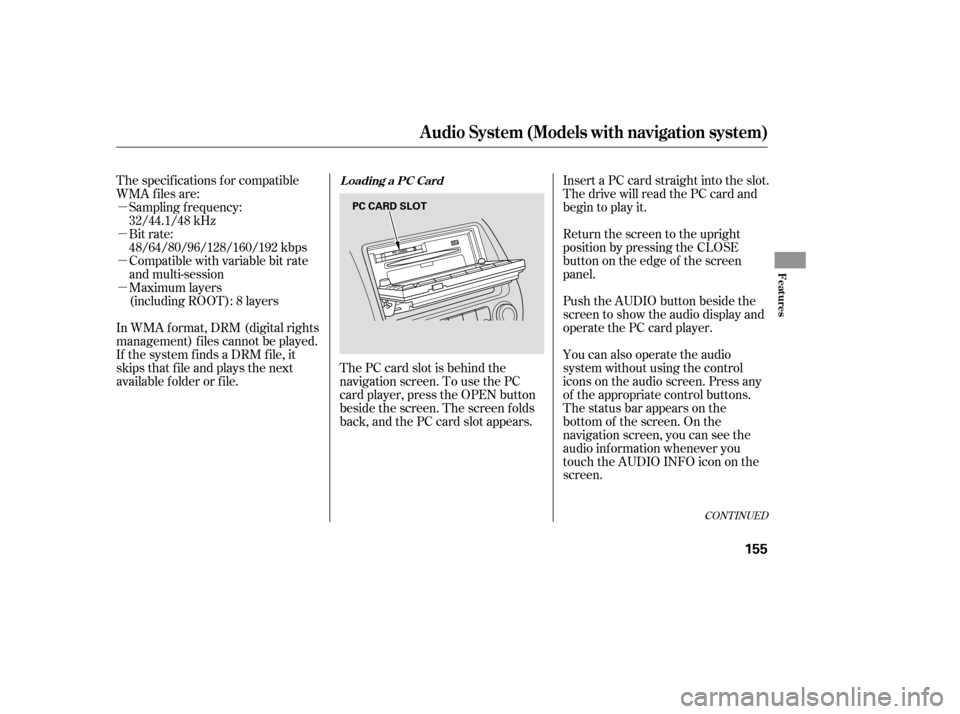
available f older or f ile. The PC card slot is behind the
navigation screen. To use the PC
card player, press the OPEN button
beside the screen. The screen f olds
back, and the PC card slot appears.Insert a PC card straight into the slot.
The drive will read the PC card and
begin to play it.
Return the screen to the upright
position by pressing the CLOSE
button on the edge of the screen
panel.
Push the AUDIO button beside the
screen to show the audio display and
operate the PC card player.
You can also operate the audio
system without using the control
icons on the audio screen. Press any
of the appropriate control buttons.
The status bar appears on the
bottom of the screen. On the
navigation screen, you can see the
audio inf ormation whenever you
touch the AUDIO INFO icon on the
screen.
The specif ications f or compatible
WMA f iles are:
Sampling f requency:
32/44.1/48 kHz
Bit rate:
48/64/80/96/128/160/192 kbps
Audio System (Models with navigation system)
Loading a PC Card
Features
155
PC CARD SLOT
�����—�����—�����y���
�����������y���
�(�#���������y���
�����y
Page 241 of 413
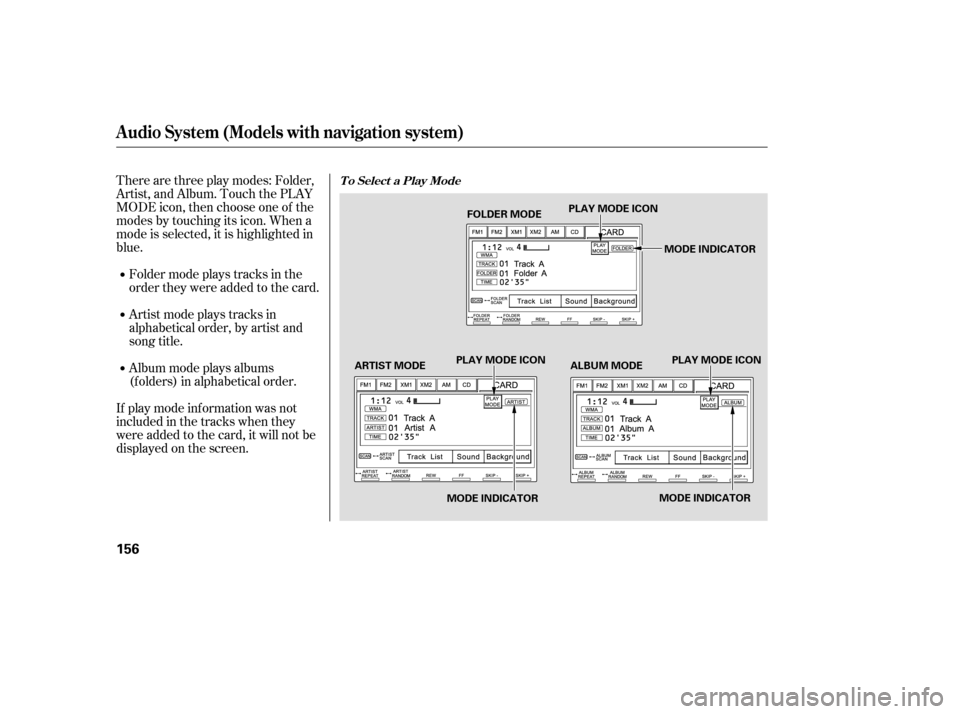
Therearethreeplaymodes:Folder,
Artist, and Album. Touch the PLAY
MODE icon, then choose one of the
modes by touching its icon. When a
mode is selected, it is highlighted in
blue.
If play mode information was not
includedinthetrackswhenthey
were added to the card, it will not be
displayed on the screen.Foldermodeplaystracksinthe
order they were added to the card.
Artistmodeplaystracksin
alphabetical order, by artist and
song title.
Album mode plays albums
(f olders) in alphabetical order.
Audio System (Models with navigation system)
T o Select a Play Mode
156
FOLDER MODE
MODE INDICATOR
PLAY MODE ICON
PLAY MODE ICON PLAY MODE ICON
MODE INDICATOR MODE INDICATOR
ARTIST MODE ALBUM MODE
�����—�����—�����y���
�����������y���
�(�#���������y���
���
�y
Page 242 of 413
CONT INUED
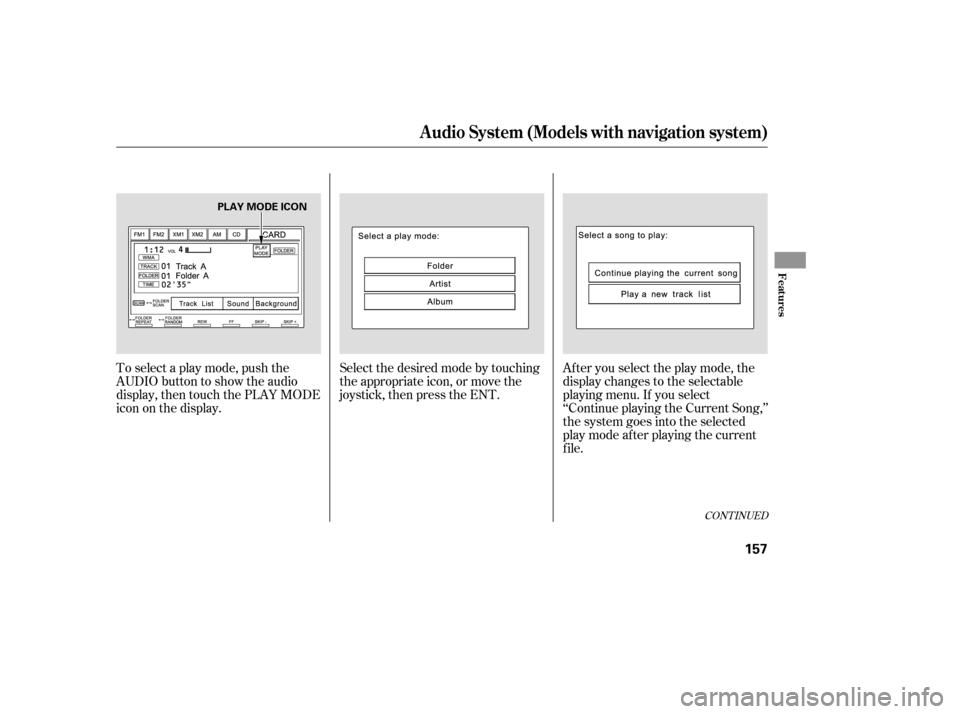
To select a play mode, push the
AUDIO button to show the audio
display, then touch the PLAY MODE
icon on the display.Select the desired mode by touching
the appropriate icon, or move the
joystick, then press the ENT.
After you select the play mode, the
display changes to the selectable
playing menu. If you select
‘‘Continue playing the Current Song,’’
the system goes into the selected
play mode af ter playing the current
f ile.
Audio System (Models with navigation system)
Features
157
PLAY MODE ICON
�����—�����—�����y���
�������
���y���
�(�#���������y���
�����y