Page 244 of 413

�µ�µ �µ
�Û �Ý �µ
�µ �µ
�µ
Each time you press and
release (preset 6), the player
skips forward to the beginning of the
next f ile. Press and release (preset 5), to skip backward to
the beginning of the current f ile.
Press it again to skip to the
beginning of the previous f ile.
To move rapidly within
a f ile, press and hold (preset 4)
or (preset 3).
To
select a dif f erent f older, press either
side of the TUNE bar to move the
beginning of the next f older. Press
the side of the TUNE bar to skip
the next f older, and to the side to
move the beginning of the current
folder.Pressitagaintoskiptothe
beginning of the previous f older. To continuously replay
a f ile, press and release the RPT
button (preset 1). You will see
TRACK REPEAT in the display.
Press the RPT button again to turn it
off.
This f eature, when
activated, replays all the files on the
selected f older/artist/album in the
order they are recorded or listed. To
activate each repeat mode, press and
hold the RPT button (preset 1) f or 2
seconds. You will see FOLDER
REPEAT, ARTIST REPEAT or
ALBUM REPEAT in the display.
The system continuously replays the
current f older/artist/album. Press
andholdtheRPTbuttonfor2
seconds again to turn it of f . Pressing
the RDM button, or selecting a
dif f erent f older/artist/album with
the TUNE bar also turns off the
repeat feature. This feature
plays the f iles within a f older in
random order. To activate track
random, press and release the RDM
button (preset 2). You will see
TRACK RANDOM in the display.
Press and hold the RDM button for 2
seconds to return to normal play.
This f eature, when
activated, plays all files in each
f older/artist/album in random order,
rather than in the order they are
recorded or listed. To activate each
random play, press the RDM button
(preset 2) 2 times. You will see
FOLDER RANDOM, ARTIST
RANDOM or ALBUM RANDOM in
the display.
CONT INUED
Audio System (Models with navigation system)
SK IP
FF/REW
FOLDER SELECTION T RA CK REPEA T (FIL E
REPEAT)
FOLDER/ARTIST/ALBUM
REPEAT
TRACK RANDOM (Random
within a f older)
FOLDER/ARTIST/ALBUM
RANDOM
Features
159
�����—�����—�����y���
�����������y���
�(�#���������y���
�����y
Page 245 of 413

�µ�µ
The system then selects and plays
f iles randomly. This continues until
you deactivate each random play by
pressing the RDM button again, or
you select a dif f erent f older/artist/
album with the TUNE bar.
Pressing either of the SKIP buttons
(preset 5 or 6) also turns of f the scan
feature. The scan f unction samples
all f iles on the PC card in the order
they are recorded. To activate scan,
press and release the SCAN button.
You will see TRACK SCAN in the
display. You will get a 10 second
sampling of each f ile on the PC card.
Press and hold the SCAN button for
2 seconds to get out of scan mode
and play the last f ile sampled. This f eature, when
activated, samples the first file in
each f older/artist/album on the PC
card in order. To activate each scan
f eature, press and hold the SCAN
button until you hear a beep. You will
see FOLDER SCAN, ARTIST SCAN
or ALBUM SCAN in the display.
The system plays the f irst f ile in the
f older f or about 10 seconds. If you do
nothing, the system plays the first
f ile in each f older, in order, f or 10
seconds each. Af ter playing the f irst
f ile of the last f older/artist/album,
the system returns to normal play. Pressing either of the SKIP buttons
(preset 5 or 6), selecting a dif f erent
folder/artist/album with the TUNE
bar, or pressing the SCAN button,
also turns off the scan feature.
Audio System (Models with navigation system)
SCAN
FOLDER/ARTIST/ALBUM
SCAN
160
�����—�����—�����y���
�����������y���
�(�#���������y���
�����y
Page 246 of 413
�Û�Ý
CONT INUED
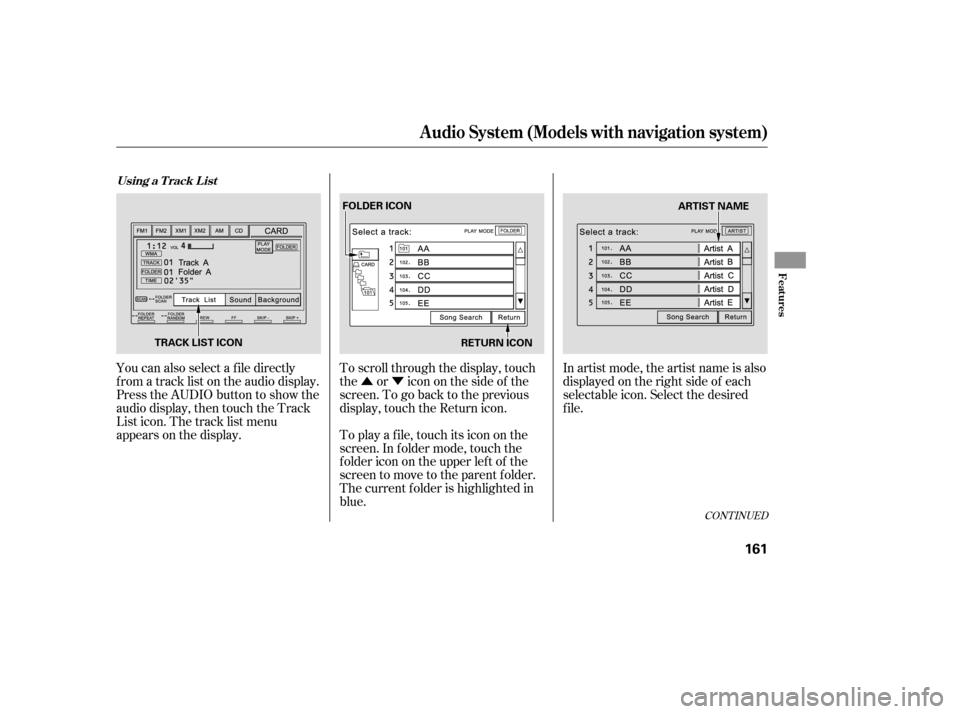
You can also select a f ile directly
f rom a track list on the audio display.
Press the AUDIO button to show the
audio display, then touch the Track
List icon. The track list menu
appears on the display.To scroll through the display, touch
the or icononthesideof the
screen.Togobacktotheprevious
display, touch the Return icon.
To play a f ile, touch its icon on the
screen. In f older mode, touch the
f older icon on the upper lef t of the
screen to move to the parent folder.
The current f older is highlighted in
blue.In artist mode, the artist name is also
displayed on the right side of each
selectable icon. Select the desired
f ile.
Audio System (Models with navigation system)
Using a T rack L ist
Features
161
RETURN ICON
FOLDER ICON
TRACK LIST ICON ARTIST NAME
�����—�����—�����y���
�����������y���
�(�#���������y���
�����y
Page 247 of 413
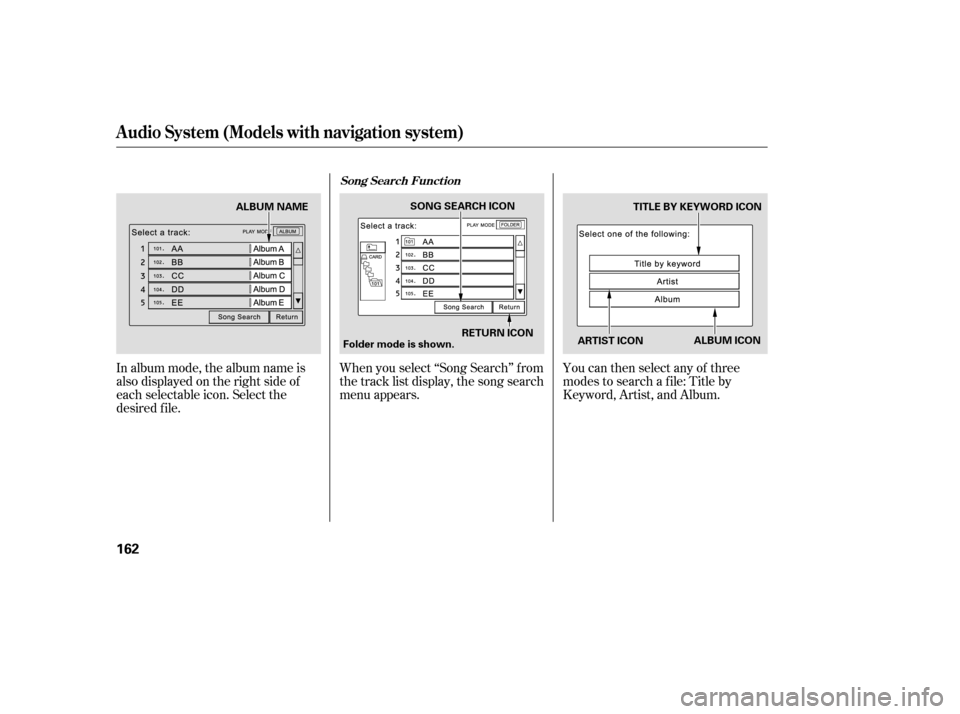
In album mode, the album name is
also displayed on the right side of
each selectable icon. Select the
desired f ile.When you select ‘‘Song Search’’ f rom
the track list display, the song search
menu appears.
You can then select any of three
modes to search a f ile: Title by
Keyword, Artist, and Album.
Audio System (Models with navigation system)
Song Search Funct ion
162
ARTIST ICONTITLE BY KEYWORD ICON
RETURN ICON
SONG SEARCH ICON
ALBUM ICON
Folder mode is shown.
ALBUM NAME
�����—�����—�����y���
�����������y���
�(�#���������y���
�����y
Page 248 of 413
�Û�Ý
Searching f or a Song Title by KeywordSearching f or a Song by Artist Name
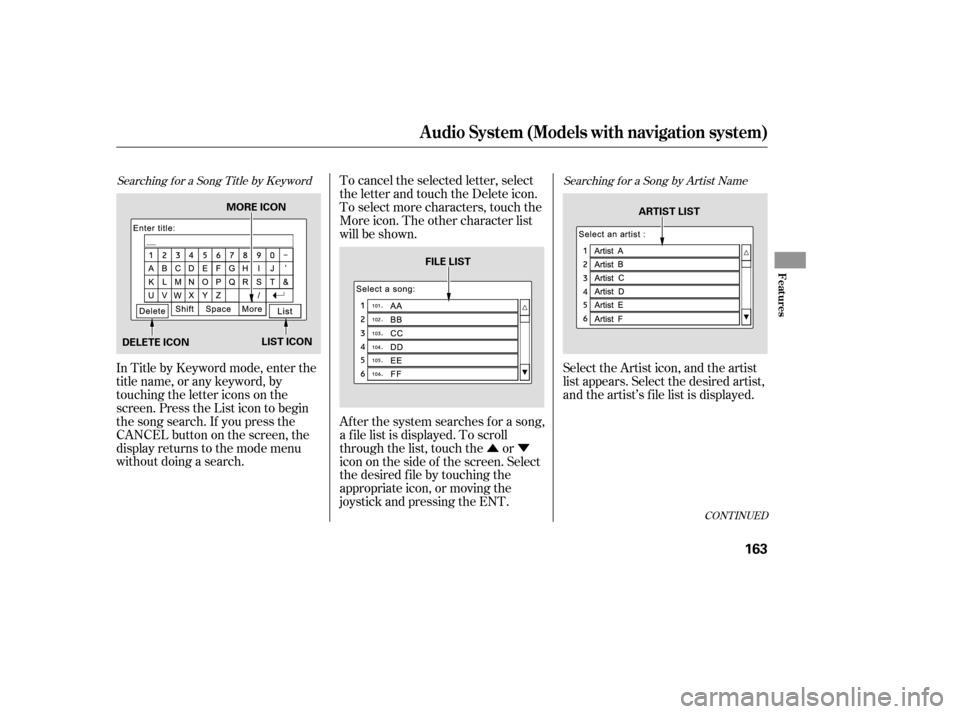
In Title by Keyword mode, enter the
title name, or any keyword, by
touching the letter icons on the
screen. Press the List icon to begin
the song search. If you press the
CANCELbuttononthescreen,the
display returns to the mode menu
without doing a search.To cancel the selected letter, select
the letter and touch the Delete icon.
To select more characters, touch the
More icon. The other character list
will be shown.
Af ter the system searches f or a song,
a f ile list is displayed. To scroll
through the list, touch the or
icon on the side of the screen. Select
the desired f ile by touching the
appropriate icon, or moving the
joystick and pressing the ENT.
Select the Artist icon, and the artist
list appears. Select the desired artist,
and the artist’s f ile list is displayed.
CONT INUED
Audio System (Models with navigation system)
Features
163
MORE ICON
DELETE ICON LIST ICON FILE LIST
ARTIST LIST
�����—�����—�����y���
���������
�y���
�(�#���������y���
�����y
Page 249 of 413
Searching f or a Song by Album Name
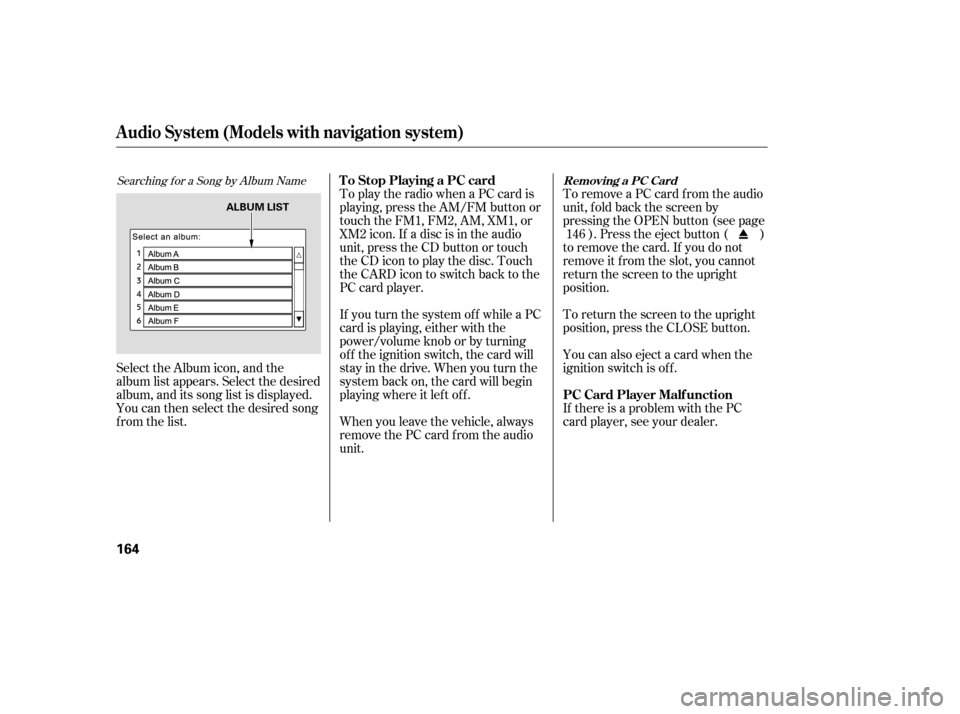
Select the Album icon, and the
album list appears. Select the desired
album, and its song list is displayed.
You can then select the desired song
from the list.To play the radio when a PC card is
playing, press the AM/FM button or
touch the FM1, FM2, AM, XM1, or
XM2 icon. If a disc is in the audio
unit, press the CD button or touch
theCDicontoplaythedisc.Touch
the CARD icon to switch back to the
PC card player.
If you turn the system of f while a PC
card is playing, either with the
power/volume knob or by turning
of f the ignition switch, the card will
stay in the drive. When you turn the
system back on, the card will begin
playing where it lef t of f .
When you leave the vehicle, always
remove the PC card f rom the audio
unit.To remove a PC card f rom the audio
unit, f old back the screen by
pressing the OPEN button (see page
). Press the eject button ( )
to remove the card. If you do not
remove it f rom the slot, you cannot
return the screen to the upright
position.
To return the screen to the upright
position, press the CLOSE button.
You can also eject a card when the
ignition switch is of f .
If there is a problem with the PC
card player, see your dealer. 146
Audio System (Models with navigation system)
T o Stop Playing a PC card
PC Card Player Malf unctionRemoving a PC Card
164
ALBUM LIST
�����—�����—�����y���
�������
���y���
�(�#���������y���
�����y
Page 250 of 413
Error Message
If you see an error message in the
display while playing a PC card, f ind
thesolutioninthecharttotheright.
If you cannot clear the error
message, take your vehicle to your
dealer. Solution
The system cannot read the f ile(s). Check the f iles in the disc. There is a
possibility that the files have been damaged.
It appears when the PC card is empty or there are no MP3 or WMA f iles in
the PC card. Save the MP3 or WMA f iles in the PC card.
It appears when the unsupported PC card is inserted. The system supports
CF card, Flash ATA card, and SanDisk 6-in-1 Card Adapter.
Audio System (Models with navigation system)
PC Card Error Messages
Features
165
FILE ERROR
NO MUSIC
MEDIA ERROR
�����—�����—�����y���
�������
���y���
�(�#���������y���
�����y
Page 251 of 413
The radio can receive the complete
AM and FM bands.
Those bands cover these f requen-
cies:
AM band: 530 to 1,710 kHz
FM band: 87.7 to 107.9 MHzHow well the radio receives stations
is dependent on many f actors, such
as the distance from the station’s
transmitter, nearby large objects,
and atmospheric conditions.
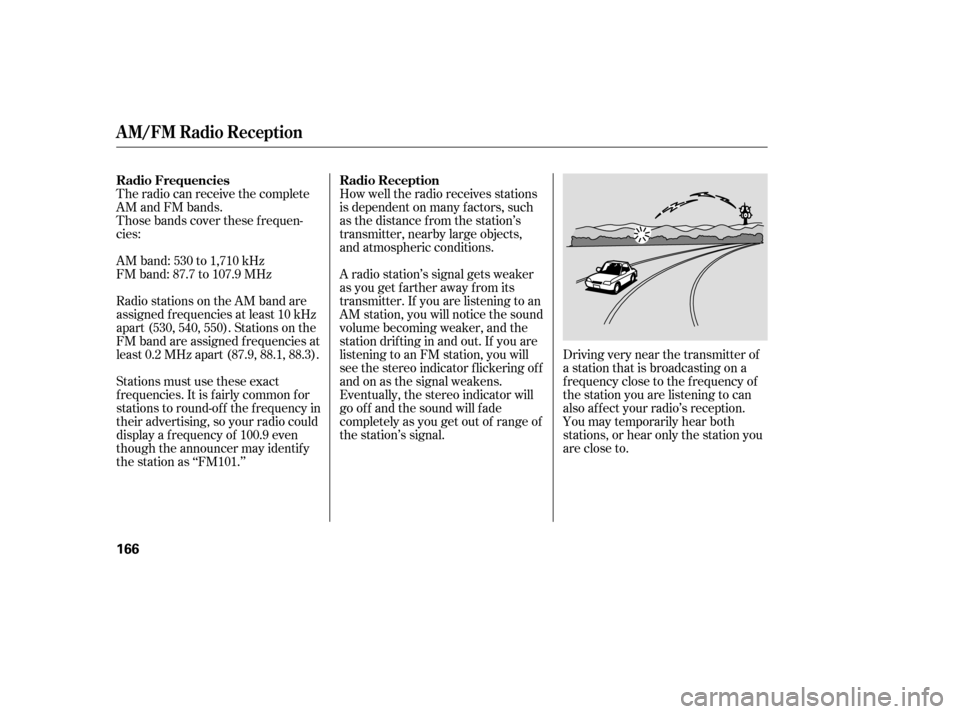
Driving very near the transmitter of
a station that is broadcasting on a
f requency close to the f requency of
the station you are listening to can
also af f ect your radio’s reception.
You may temporarily hear both
stations,orhearonlythestationyou
are close to.
A radio station’s signal gets weaker
as you get f arther away f rom its
transmitter. If you are listening to an
AM station, you will notice the sound
volume becoming weaker, and the
stationdriftinginandout.If youare
listening to an FM station, you will
see the stereo indicator f lickering of f
and on as the signal weakens.
Eventually, the stereo indicator will
go of f and the sound will f ade
completely as you get out of range of
the station’s signal.
Radio stations on the AM band are
assigned f requencies at least 10 kHz
apart (530, 540, 550). Stations on the
FM band are assigned f requencies at
least 0.2 MHz apart (87.9, 88.1, 88.3).
Stations must use these exact
f requencies. It is f airly common f or
stations to round-of f the f requency in
their advertising, so your radio could
display a f requency of 100.9 even
though the announcer may identif y
the station as ‘‘FM101.’’
Radio Frequencies Radio Reception
A M/FM Radio Recept ion
166
�����—�����—�����y���
�����������y���
�(�#���������y���
���
�y