Page 5 of 163
8
Familiarisation
INTERIOR Automatic air conditioning
This automatic air conditioning system
guarantees comfort and a suffi cient circulation
of air in the passenger compartment.
Cruise control
This system automatically maintains
the speed of the vehicle at the value
programmed by the driver, without any
action on the accelerator pedal. Audio and communication
systems
This equipment benefits from the
latest technology: MP3 compatible
audio equipment, Bluetooth hands-free
telephone, audio system.
Interior layout
- 12 V socket.
- Cooled glove box.
- Central storage tray with lock.
50
43
80
63
Page 6 of 163
1
FAMILIARISATION
9
Familiarisation
1. Fuse box.
2. Programmable heating.
3. Cruise control switch.
4. MODE, configuration and
personalisation/lighting rheostat/
headlamp beam height adjustment.
5. Lights and direction indicators control.
6. Instrument panel with display.
7. Wipers/wash-wipe/trip computer
controls.
8. Storage compartment between 2
adjustable vents.
9. Audio equipment.
10. Manual air conditioning.
11. Movable ashtray.
12. Lighter.
13. 12 volt accessories socket (180 W max).
14. Controls bar:
- De-icing/demisting button.
- Front fog lamps button.
- Rear fog lamps button.
- Hazard warning lights button.
- Central locking button/alarm indicator light.
- Central unlocking of the doors and load space button.
- Dynamic stability control (ASR) button.
15. Gear lever.
16. Ignition switch.
17. Driver's air bag/horn.
INSTRUMENTS AND CONTROLS
Page 78 of 163
80
Audio equipment
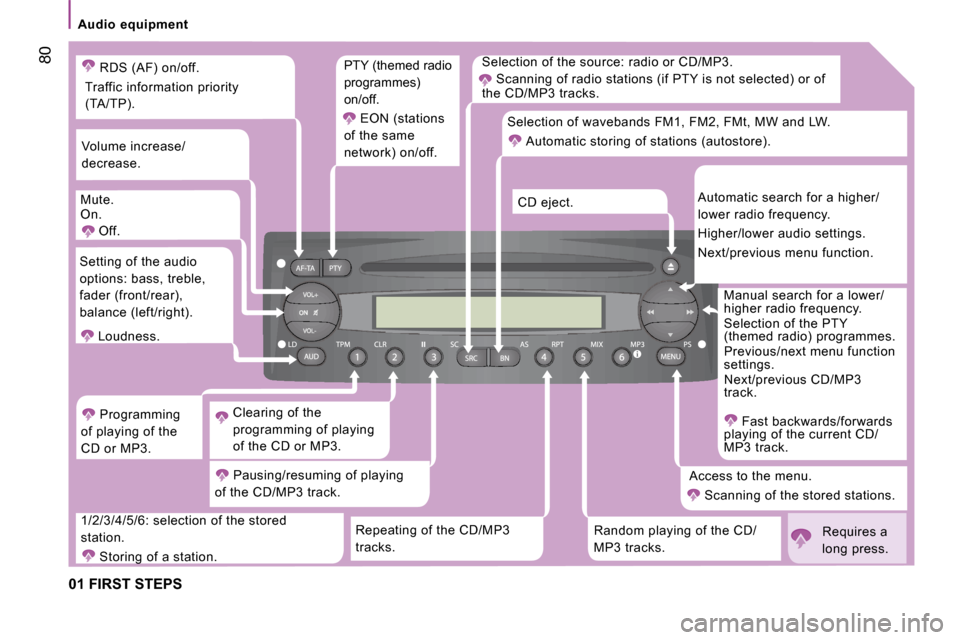
01 FIRST STEPS
Selection of the source: radio or CD/MP3. Scanning of radio stations (if PTY is not selected ) or of
the CD/MP3 tracks.
Repeating of the CD/MP3
tracks. Random playing of the CD/
MP3 tracks. Access to the menu.
Scanning of the stored stations. Manual search for a lower/
higher radio frequency.
Selection of the PTY
(themed radio) programmes.
Previous/next menu function
settings.
Next/previous CD/MP3
track.
Fast backwards/forwards
playing of the current CD/
MP3 track.
Automatic search for a higher/
lower radio frequency.
Higher/lower audio settings.
Next/previous menu function.
CD eject.
Selection of wavebands FM1, FM2, FMt, MW and LW.
Automatic storing of stations (autostore).
1/2/3/4/5/6: selection of the stored
station. Storing of a station. Pausing/resuming of playing
of the CD/MP3 track. Clearing of the
programming of playing
of the CD or MP3.
Programming
of playing of the
CD or MP3.
Setting of the audio
options: bass, treble,
fader (front/rear),
balance (left/right).
Loudness.
Volume increase/
decrease.
Mute.
On. Off. PTY (themed radio
programmes)
on/off.
EON (stations
of the same
network) on/off.
RDS (AF) on/off.
Traffic information priority
(TA/TP).
Requires a
long press.
Page 79 of 163
Audio equipment
4
IN-CAR TECHNOLOGY
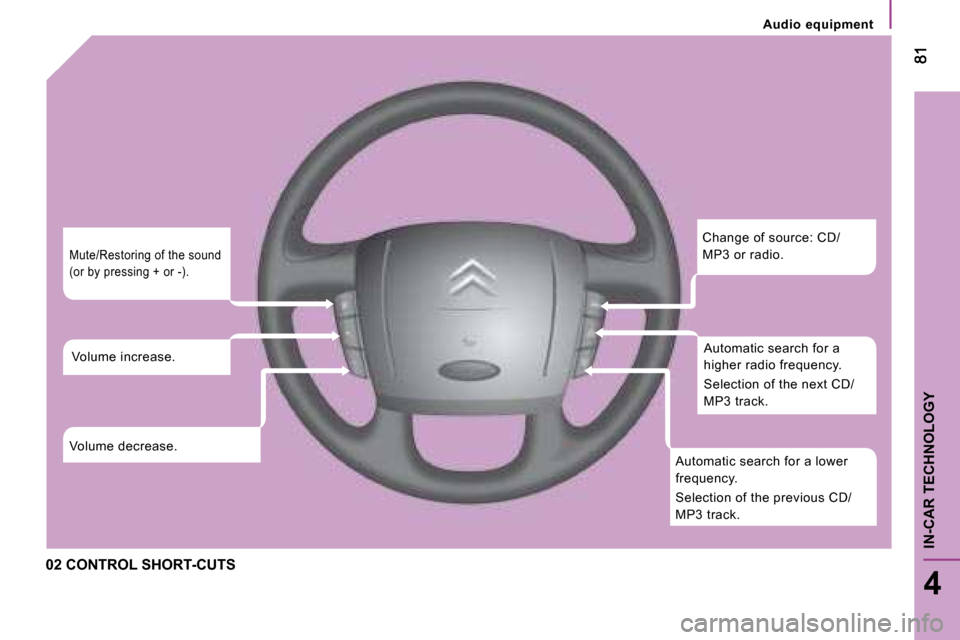
02 CONTROL SHORT-CUTS
Change of source: CD/
MP3 or radio. Automatic search for a
higher radio frequency.
Selection of the next CD/
MP3 track.
Automatic search for a lower
frequency.
Selection of the previous CD/
MP3 track.
Mute/Restoring of the sound
(or by pressing + or -).
Volume increase.
Volume decrease.
Page 80 of 163
82
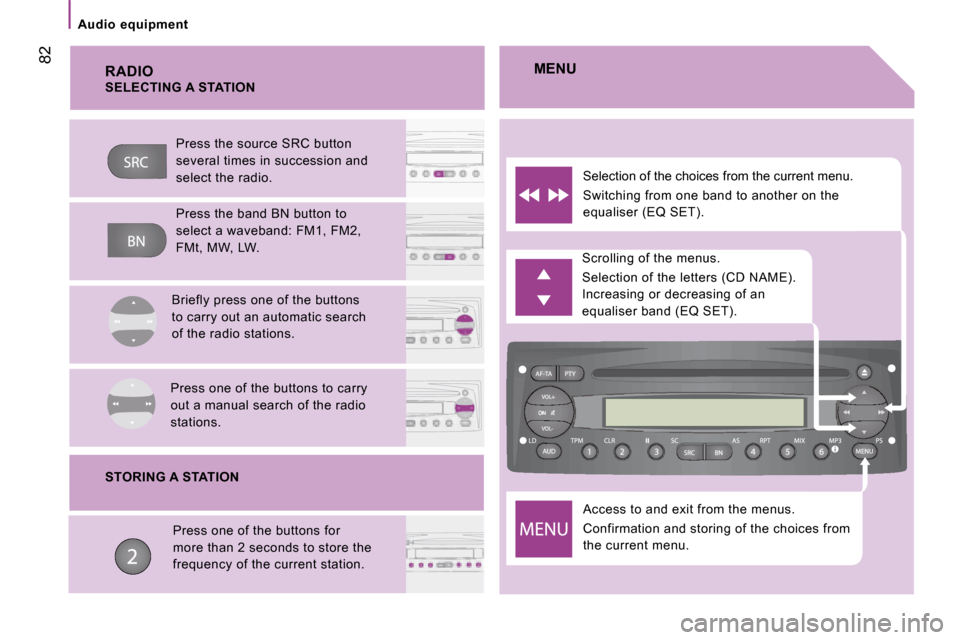
Audio equipment RADIO
Access to and exit from the menus.
Confirmation and storing of the choices from
the current menu.
Scrolling of the menus.
Selection of the letters (CD NAME).
Increasing or decreasing of an
equaliser band (EQ SET).
Selection of the choices from the current menu.
Switching from one band to another on the
equaliser (EQ SET).
MENU
SELECTING A STATION
Press the source SRC button
several times in succession and
select the radio.
Press the band BN button to
select a waveband: FM1, FM2,
FMt, MW, LW.
Briefly press one of the buttons
to carry out an automatic search
of the radio stations.
Press one of the buttons to carry
out a manual search of the radio
stations.
STORING A STATION Press one of the buttons for
more than 2 seconds to store the
frequency of the current station.
Page 81 of 163
82
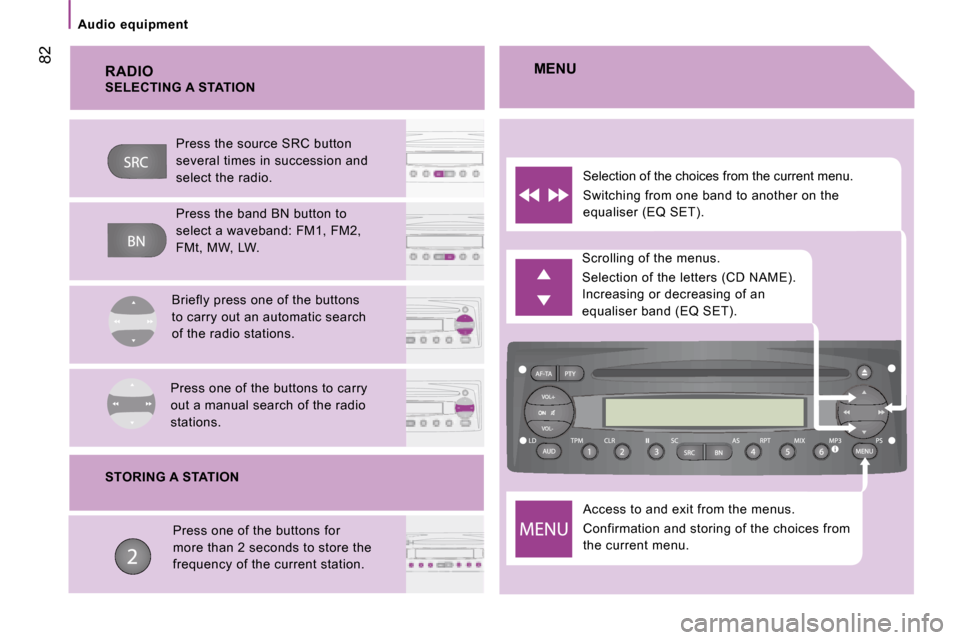
Audio equipment RADIO
Access to and exit from the menus.
Confirmation and storing of the choices from
the current menu.
Scrolling of the menus.
Selection of the letters (CD NAME).
Increasing or decreasing of an
equaliser band (EQ SET).
Selection of the choices from the current menu.
Switching from one band to another on the
equaliser (EQ SET).
MENU
SELECTING A STATION
Press the source SRC button
several times in succession and
select the radio.
Press the band BN button to
select a waveband: FM1, FM2,
FMt, MW, LW.
Briefly press one of the buttons
to carry out an automatic search
of the radio stations.
Press one of the buttons to carry
out a manual search of the radio
stations.
STORING A STATION Press one of the buttons for
more than 2 seconds to store the
frequency of the current station.
Page 82 of 163
Audio equipment
83
4
IN-CAR TECHNOLOGY
Scroll the
display
Sélectionner
Display
Select
Display
Select
Display
Select
Display
Enables you
to…
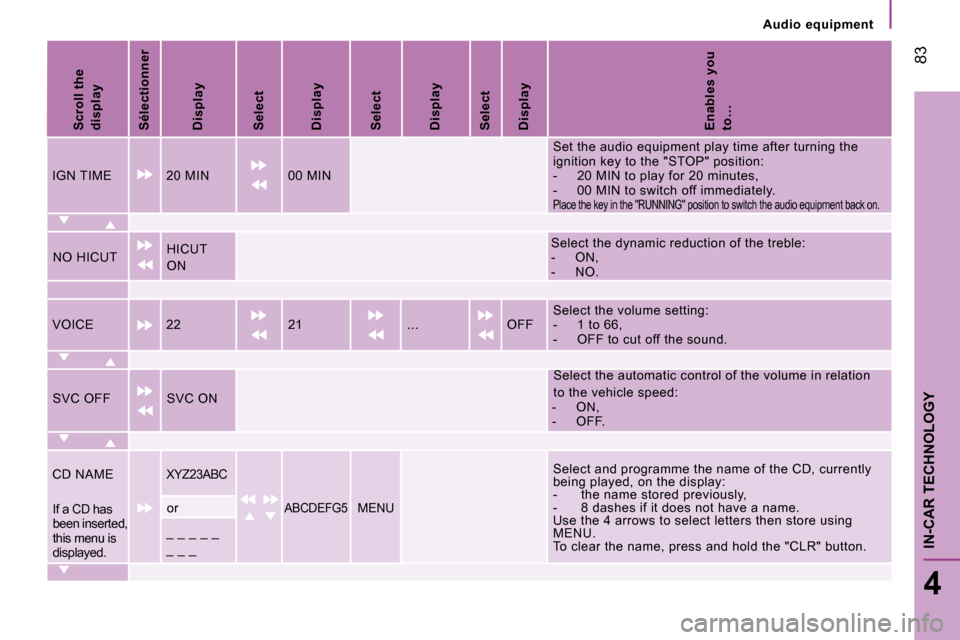
IGN TIME 20 MIN 00 MIN Set the audio equipment play time after turning th
e
ignition key to the "STOP" position:
- 20 MIN to play for 20 minutes,
- 00 MIN to switch off immediately.
Place the key in the "RUNNING" position to switch the audio equipment back on.
NO HICUT HICUT
ON Select the dynamic reduction of the treble:
- ON,
- NO.
VOICE 22 21 ... OFF Select the volume setting:
- 1 to 66,
- OFF to cut off the sound.
SVC OFF SVC ON Select the automatic control of the volume in rela
tion
to the vehicle speed:
- ON,
- OFF.
CD NAME
XYZ23ABC Select and programme the name of the CD, currently
being played, on the display:
- the name stored previously,
- 8 dashes if it does not have a name.
Use the 4 arrows to select letters then store usin g
MENU.
To clear the name, press and hold the "CLR" button .
If a CD has
been inserted,
this menu is
displayed. or ABCDEFG5 MENU
_ _ _ _ _
_ _ _
Page 83 of 163
84
Audio equipment
Scroll the
display
Select
Display
Select
Display
Select
Display
Select
Display
Enables you
to…
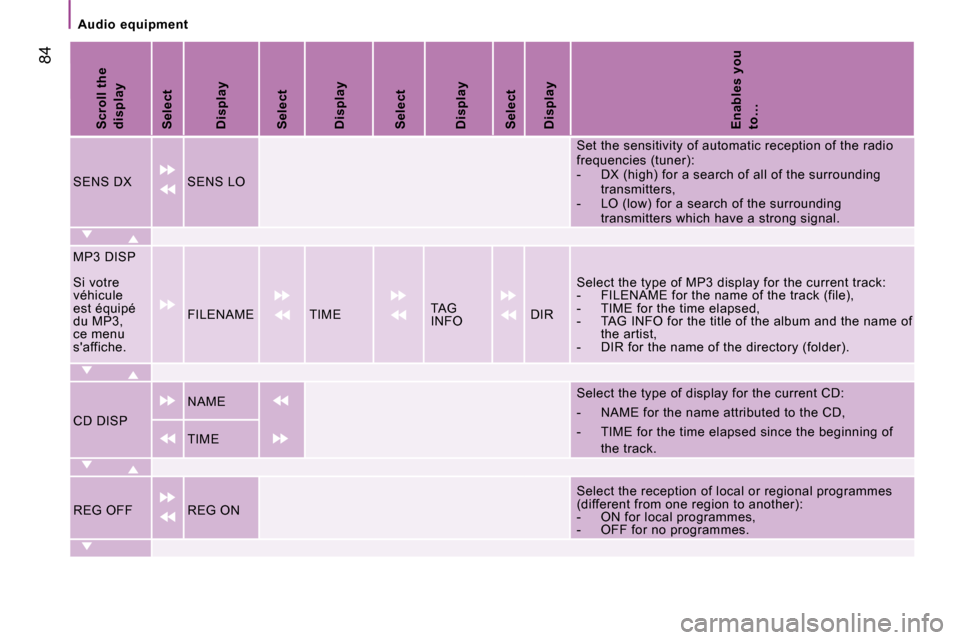
SENS DX SENS LO Set the sensitivity of automatic reception of the
radio
frequencies (tuner):
- DX (high) for a search of all of the surround ing
transmitters,
- LO (low) for a search of the surrounding transmitters which have a strong signal.
MP3 DISP
Si votre
véhicule
est équipé
du MP3,
ce menu
s'affiche. FILENAME TIME
TAG
INFO DIR Select the type of MP3 display for the current tra
ck:
- FILENAME for the name of the track (file),
- TIME for the time elapsed,
- TAG INFO for the title of the album and the na me of
the artist,
- DIR for the name of the directory (folder).
CD DISP NAME
Select the type of display for the current CD:
- NAME for the name attributed to the CD,
- TIME for the time elapsed since the beginning
of
the track.
TIME
REG OFF REG ON Select the reception of local or regional programm
es
(different from one region to another):
- ON for local programmes,
- OFF for no programmes.