2008 CHEVROLET TRAIL BLAZER door lock
[x] Cancel search: door lockPage 148 of 472
Entry Lighting
The vehicle has entry lighting.
When any door is opened, the dome lamps come on as
long as the dome override lamp override button is
not pressed in. When all the doors are closed, the lamps
stay on for a short period of time and then turn off
automatically. If you use the Remote Keyless Entry
(RKE) transmitter to unlock the vehicle, the interior
lamps come on for a short time whether or not the
dome lamp override is on.
Exit Lighting
With exit lighting, the interior lamps come on when you
remove the key from the ignition. If the dome override
is off, these lamps stay on for a short period of time and
then go out.
Reading Lamps
The reading lamps are located in the front console.
Press the lens on the lamps to turn the reading lamps
on or off.
Electric Power Management
The vehicle has Electric Power Management (EPM)
that estimates the battery’s temperature and state
of charge. It then adjusts the voltage for best
performance and extended life of the battery.
When the battery’s state of charge is low, the voltage is
raised slightly to quickly put the charge back in. When
the state of charge is high, the voltage is lowered slightly
to prevent overcharging. If the vehicle has a voltmeter
gage or a voltage display on the Driver Information
Center (DIC), you may see the voltage move up
or down. This is normal. If there is a problem, an alert
will be displayed.
The battery can be discharged at idle if the electrical
loads are very high. This is true for all vehicles.
This is because the generator (alternator) may not be
spinning fast enough at idle to produce all the power that
is needed for very high electrical loads.
3-18
Page 188 of 472
DIC Vehicle Customization
Your vehicle may have customization capabilities that
allow you to program some features to one setting
based on your preference. All of the customizable
options listed may not be available on your vehicle.
Only the options available display on the Driver
Information Center (DIC).
The default settings for the customization features were
set when your vehicle left the factory, but may have
been changed from their default state since then.
To change feature preferences, make sure the ignition
is on and the vehicle is in PARK (P). To avoid
excessive drain on the battery, it is recommended that
the headlamps are turned off.
Press the customization button to scroll through the
available customizable options.
After pressing the customization button, VEHICLE
SETTINGS momentarily displays before going to a
customization option.
Lock Doors
Press the customization button until LOCK DOORS: IN
GEAR appears in the display. To select your preference
for automatic locking, press the select button while LOCK
DOORS: IN GEAR is displayed on the DIC. Pressing the
select button will scroll through the following settings:
LOCK DOORS: IN GEAR (default):The doors will lock
when the vehicle is shifted out of PARK (P).
LOCK DOORS: WITH SPEED:The doors will lock
when the vehicle speed is above 8 mph (13 km/h) for
three seconds.
To select a setting and move on to the next feature,
press the customization button while the desired setting
is displayed on the DIC.
SeeProgrammable Automatic Door Locks on page 2-8
for more information.
3-58
Page 189 of 472
Unlock Doors
Press the customization button until UNLOCK DOORS:
IN PARK appears in the display. To select your
preference for automatic unlocking, press the select
button while UNLOCK DOORS: IN PARK is displayed
on the DIC. Pressing the select button will scroll through
the following settings:
UNLOCK DOORS: IN PARK (default):All of the doors
will unlock when the vehicle is shifted into PARK (P).
UNLOCK DRIVER: IN PARK:The driver’s door will be
unlocked when the vehicle is shifted into PARK (P).
UNLOCK DOORS: KEY OUT:All of the doors
will unlock when the key is taken out of the ignition.
UNLOCK DOORS: MANUALLY:The doors will not be
unlocked automatically.
To select a setting and move on to the next feature,
press the customization button while the desired setting
is displayed on the DIC.
SeeProgrammable Automatic Door Locks on page 2-8
for more information.
Lock Feedback
Press the customization button until LOCK FEEDBACK:
BOTH appears in the display. To select your preference
for the feedback you receive when locking the vehicle
with the Remote Keyless Entry (RKE) transmitter, press
the select button while LOCK FEEDBACK: BOTH is
displayed on the DIC. Pressing the select button
will scroll through the following settings:
LOCK FEEDBACK: BOTH (default):The parking
lamps will ash each time you press the button with the
lock symbol on the RKE transmitter and the horn will
chirp the second time you press the lock button.
LOCK FEEDBACK: OFF:There will be no feedback
when locking the vehicle.
LOCK FEEDBACK: LAMPS:The parking lamps will
ash each time you press the button with the lock
symbol on the RKE transmitter.
LOCK FEEDBACK: HORN:The horn will chirp the
second time you press the button with the lock symbol
on the RKE transmitter.
To select a setting and move on to the next feature,
press the customization button while the desired setting
is displayed on the DIC.
3-59
Page 274 of 472
Tire and Loading Information Label
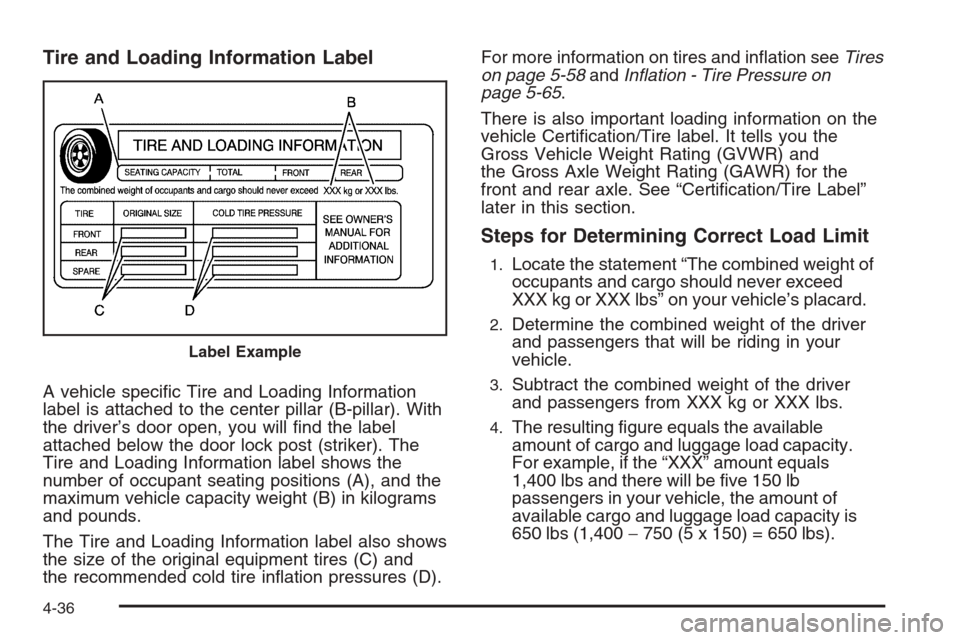
A vehicle specic Tire and Loading Information
label is attached to the center pillar (B-pillar). With
the driver’s door open, you will nd the label
attached below the door lock post (striker). The
Tire and Loading Information label shows the
number of occupant seating positions (A), and the
maximum vehicle capacity weight (B) in kilograms
and pounds.
The Tire and Loading Information label also shows
the size of the original equipment tires (C) and
the recommended cold tire ination pressures (D).For more information on tires and ination seeTires
on page 5-58andInflation - Tire Pressure on
page 5-65.
There is also important loading information on the
vehicle Certication/Tire label. It tells you the
Gross Vehicle Weight Rating (GVWR) and
the Gross Axle Weight Rating (GAWR) for the
front and rear axle. See “Certication/Tire Label”
later in this section.
Steps for Determining Correct Load Limit
1.Locate the statement “The combined weight of
occupants and cargo should never exceed
XXX kg or XXX lbs” on your vehicle’s placard.
2.Determine the combined weight of the driver
and passengers that will be riding in your
vehicle.
3.Subtract the combined weight of the driver
and passengers from XXX kg or XXX lbs.
4.The resulting gure equals the available
amount of cargo and luggage load capacity.
For example, if the “XXX” amount equals
1,400 lbs and there will be ve 150 lb
passengers in your vehicle, the amount of
available cargo and luggage load capacity is
650 lbs (1,400−750 (5 x 150) = 650 lbs).
Label Example
4-36
Page 306 of 472
Filling the Tank
{CAUTION:
Fuel vapor burns violently and a fuel re can
cause bad injuries. To help avoid injuries to you
and others, read and follow all the instructions
on the pump island. Turn off your engine when
you are refueling. Do not smoke if you are near
fuel or refueling your vehicle. Do not use
cellular phones. Keep sparks, ames, and
smoking materials away from fuel. Do not leave
the fuel pump unattended when refueling your
vehicle. This is against the law in some places.
Do not re-enter the vehicle while pumping fuel.
Keep children away from the fuel pump; never
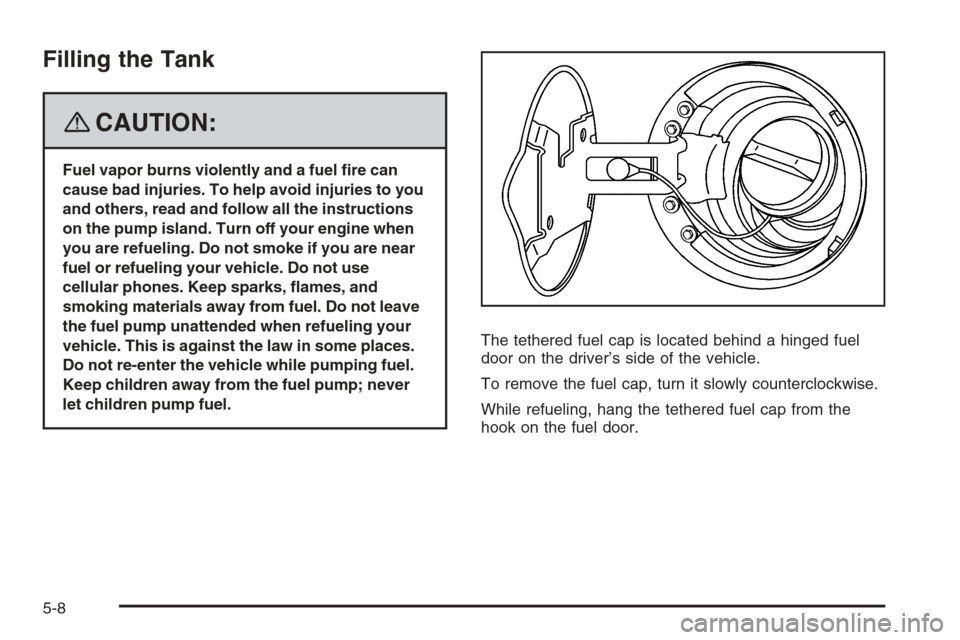
let children pump fuel.The tethered fuel cap is located behind a hinged fuel
door on the driver’s side of the vehicle.
To remove the fuel cap, turn it slowly counterclockwise.
While refueling, hang the tethered fuel cap from the
hook on the fuel door.
5-8
Page 417 of 472
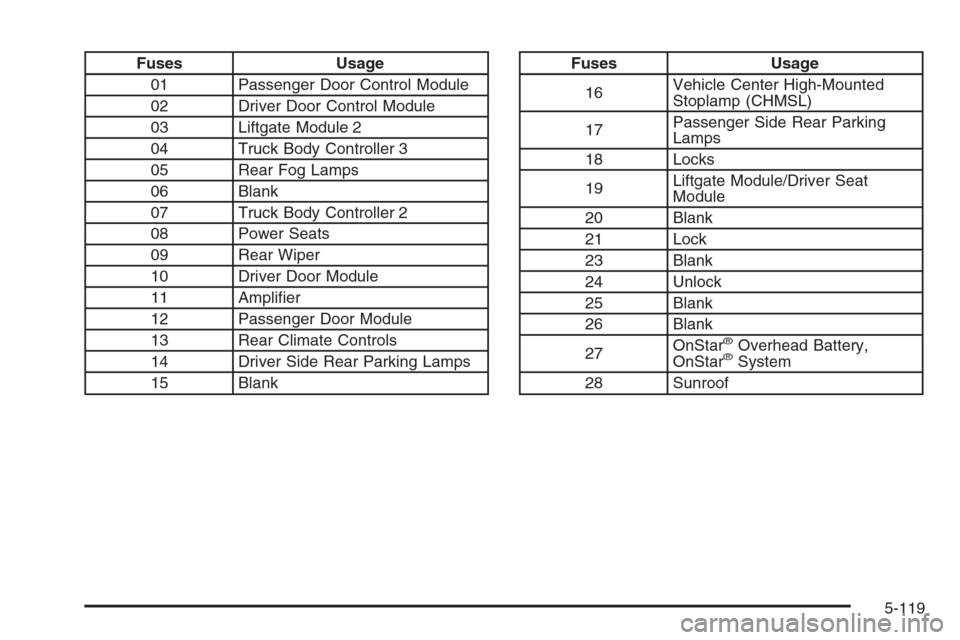
Fuses Usage
01 Passenger Door Control Module
02 Driver Door Control Module
03 Liftgate Module 2
04 Truck Body Controller 3
05 Rear Fog Lamps
06 Blank
07 Truck Body Controller 2
08 Power Seats
09 Rear Wiper
10 Driver Door Module
11 Amplier
12 Passenger Door Module
13 Rear Climate Controls
14 Driver Side Rear Parking Lamps
15 BlankFuses Usage
16Vehicle Center High-Mounted
Stoplamp (CHMSL)
17Passenger Side Rear Parking
Lamps
18 Locks
19Liftgate Module/Driver Seat
Module
20 Blank
21 Lock
23 Blank
24 Unlock
25 Blank
26 Blank
27OnStar
®Overhead Battery,
OnStar®System
28 Sunroof
5-119
Page 428 of 472
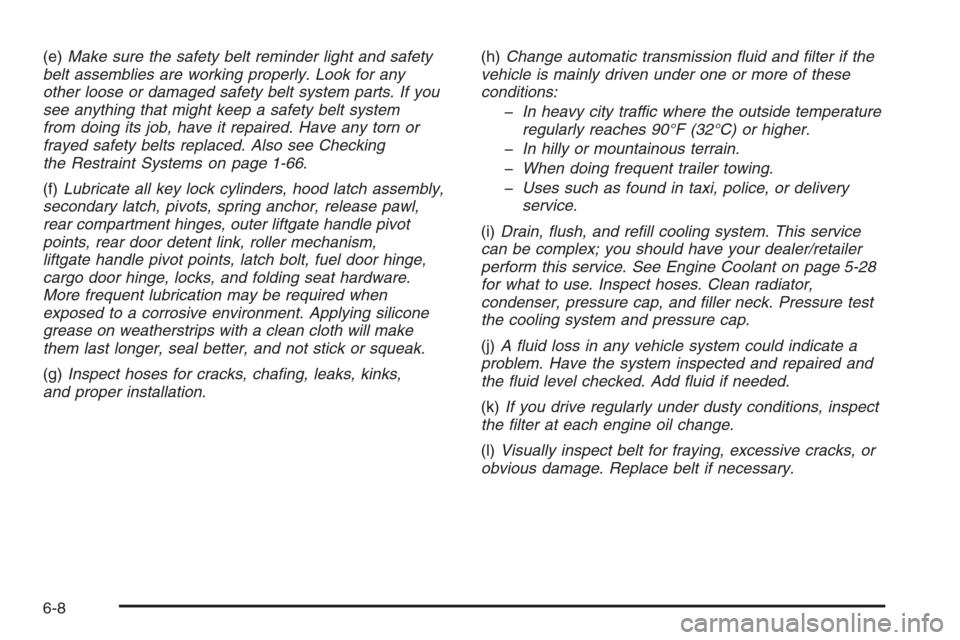
(e)Make sure the safety belt reminder light and safety
belt assemblies are working properly. Look for any
other loose or damaged safety belt system parts. If you
see anything that might keep a safety belt system
from doing its job, have it repaired. Have any torn or
frayed safety belts replaced. Also see Checking
the Restraint Systems on page 1-66.
(f)Lubricate all key lock cylinders, hood latch assembly,
secondary latch, pivots, spring anchor, release pawl,
rear compartment hinges, outer liftgate handle pivot
points, rear door detent link, roller mechanism,
liftgate handle pivot points, latch bolt, fuel door hinge,
cargo door hinge, locks, and folding seat hardware.
More frequent lubrication may be required when
exposed to a corrosive environment. Applying silicone
grease on weatherstrips with a clean cloth will make
them last longer, seal better, and not stick or squeak.
(g)Inspect hoses for cracks, chafing, leaks, kinks,
and proper installation.(h)Change automatic transmission fluid and filter if the
vehicle is mainly driven under one or more of these
conditions:
In heavy city traffic where the outside temperature
regularly reaches 90°F (32°C) or higher.
In hilly or mountainous terrain.
When doing frequent trailer towing.
Uses such as found in taxi, police, or delivery
service.
(i)Drain, flush, and refill cooling system. This service
can be complex; you should have your dealer/retailer
perform this service. See Engine Coolant on page 5-28
for what to use. Inspect hoses. Clean radiator,
condenser, pressure cap, and filler neck. Pressure test
the cooling system and pressure cap.
(j)A fluid loss in any vehicle system could indicate a
problem. Have the system inspected and repaired and
the fluid level checked. Add fluid if needed.
(k)If you drive regularly under dusty conditions, inspect
the filter at each engine oil change.
(l)Visually inspect belt for fraying, excessive cracks, or
obvious damage. Replace belt if necessary.
6-8
Page 458 of 472
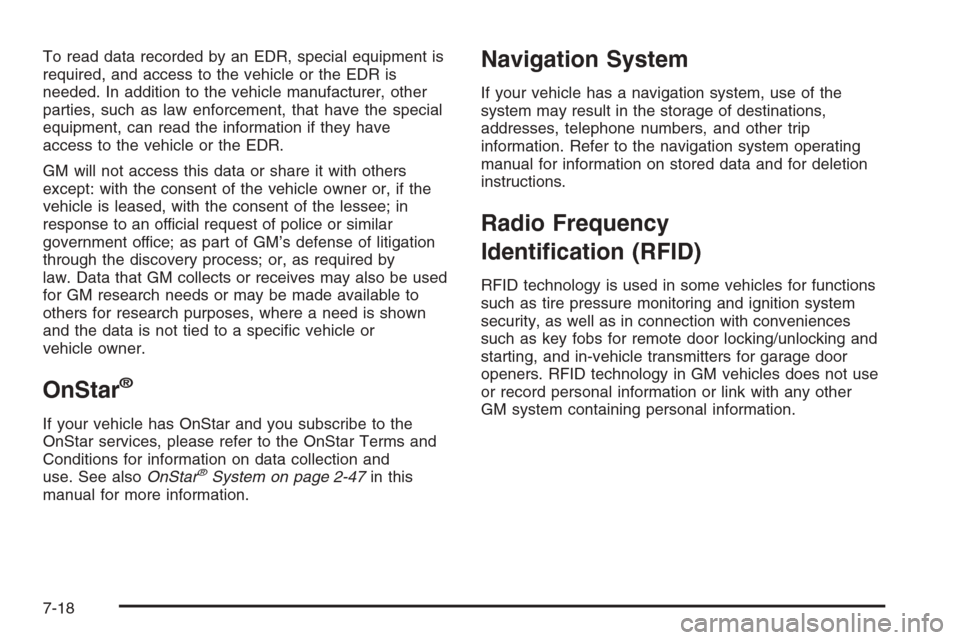
To read data recorded by an EDR, special equipment is
required, and access to the vehicle or the EDR is
needed. In addition to the vehicle manufacturer, other
parties, such as law enforcement, that have the special
equipment, can read the information if they have
access to the vehicle or the EDR.
GM will not access this data or share it with others
except: with the consent of the vehicle owner or, if the
vehicle is leased, with the consent of the lessee; in
response to an official request of police or similar
government office; as part of GM’s defense of litigation
through the discovery process; or, as required by
law. Data that GM collects or receives may also be used
for GM research needs or may be made available to
others for research purposes, where a need is shown
and the data is not tied to a specic vehicle or
vehicle owner.
OnStar®
If your vehicle has OnStar and you subscribe to the
OnStar services, please refer to the OnStar Terms and
Conditions for information on data collection and
use. See alsoOnStar
®System on page 2-47in this
manual for more information.
Navigation System
If your vehicle has a navigation system, use of the
system may result in the storage of destinations,
addresses, telephone numbers, and other trip
information. Refer to the navigation system operating
manual for information on stored data and for deletion
instructions.
Radio Frequency
Identication (RFID)
RFID technology is used in some vehicles for functions
such as tire pressure monitoring and ignition system
security, as well as in connection with conveniences
such as key fobs for remote door locking/unlocking and
starting, and in-vehicle transmitters for garage door
openers. RFID technology in GM vehicles does not use
or record personal information or link with any other
GM system containing personal information.
7-18