2008 CHEVROLET SILVERADO lock
[x] Cancel search: lockPage 161 of 596

When the System Does Not Seem to
Work Properly
If the URPA system will not activate due to a temporary
condition, the message PARKING ASSIST OFF will be
displayed on the DIC and a red light will be shown on the
rear URPA display when the shift lever is moved into
R (Reverse). This occurs under the following conditions:
The driver disables the system.
The parking brake pedal is depressed.
The ultrasonic sensors are not clean. Keep the
vehicle’s rear bumper free of mud, dirt, snow, ice and
slush. For cleaning instructions, seeWashing Your
Vehicle on page 5-118.
A trailer was attached to the vehicle, or a bicycle or
an object was hanging out of the tailgate during the
last drive cycle, the red light may illuminate in the
rear display. Once the attached object is removed,
URPA will return to normal operation.
A tow bar is attached to the vehicle.
The vehicle’s bumper is damaged. Take the vehicle
to your dealer/retailer to repair the system.
Other conditions may affect system performance,
such as vibrations from a jackhammer or the
compression of air brakes on a very large truck.
If the system is still disabled, after driving forward at
least 15 mph (25 km/h), take the vehicle to your
dealer/retailer.
OnStar®System
OnStar uses several innovative technologies and live
advisors to provide you with a wide range of safety,
security, information, and convenience services. If your
airbags deploy, the system is designed to make an
automatic call to OnStar Emergency advisors who can
request emergency services be sent to your location.
If you lock your keys in the vehicle, call OnStar at
1-888-4-ONSTAR and they can send a signal to unlock
your doors. If you need roadside assistance, press
the OnStar button and they can contact Roadside
Service for you.
OnStar service is provided to you subject to the
OnStar Terms and Conditions. You may cancel your
OnStar service at any time by contacting OnStar.
2-67
Page 162 of 596
A complete OnStar Owner’s Guide and the OnStar
Terms and Conditions are included in the vehicle’s
OnStar Subscriber glove box literature. For more
information, visit onstar.com or onstar.ca, contact
OnStar at 1-888-4-ONSTAR (1-888-466-7827) or TTY
1-877-248-2080, or press the OnStar button to speak
with an OnStar advisor 24 hours a day, 7 days a week.
Not all OnStar features are available on all vehicles.
To check if your vehicle is equipped to provide the
services described below, or for a full description of
OnStar services and system limitations, see the OnStar
Owner’s Guide in your glove box or visit onstar.com.
OnStar Services
For new vehicles with OnStar, the Safe & Sound Plan,
or the Directions & Connections Plan is included for
one year from the date of purchase. You can extend this
plan beyond the rst year, or upgrade to the Directions
& Connections Plan. For more information, press
the OnStar button to speak with an advisor. Some
OnStar services (such as Remote Door Unlock or Stolen
Vehicle Location Assistance) may not be available
until you register with OnStar.
Available Services with Safe & Sound Plan
Automatic Notication of Airbag Deployment
Advanced Automatic Crash Notication (AACN)
(If equipped)
Link to Emergency Services
Roadside Assistance
Stolen Vehicle Location Assistance
AccidentAssist
Remote Door Unlock/Vehicle Alert
OnStar Vehicle Diagnostics
GM Goodwrench On Demand Diagnostics
OnStar Hands-Free Calling with
30 complimentary minutes
OnStar Virtual Advisor (U.S. Only)
2-68
Page 173 of 596
Center Console Storage
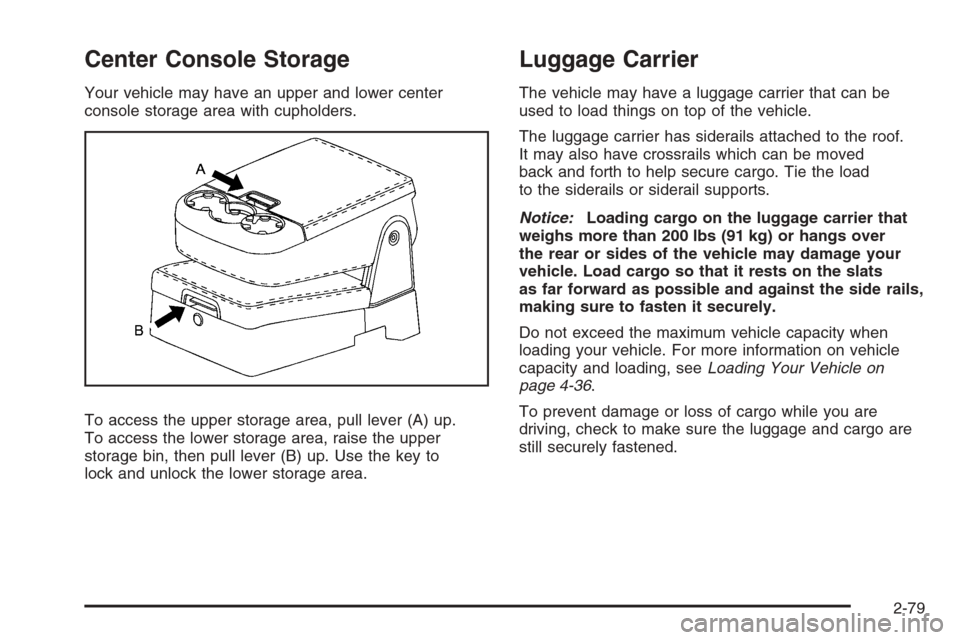
Your vehicle may have an upper and lower center
console storage area with cupholders.
To access the upper storage area, pull lever (A) up.
To access the lower storage area, raise the upper
storage bin, then pull lever (B) up. Use the key to
lock and unlock the lower storage area.
Luggage Carrier
The vehicle may have a luggage carrier that can be
used to load things on top of the vehicle.
The luggage carrier has siderails attached to the roof.
It may also have crossrails which can be moved
back and forth to help secure cargo. Tie the load
to the siderails or siderail supports.
Notice:Loading cargo on the luggage carrier that
weighs more than 200 lbs (91 kg) or hangs over
the rear or sides of the vehicle may damage your
vehicle. Load cargo so that it rests on the slats
as far forward as possible and against the side rails,
making sure to fasten it securely.
Do not exceed the maximum vehicle capacity when
loading your vehicle. For more information on vehicle
capacity and loading, seeLoading Your Vehicle on
page 4-36.
To prevent damage or loss of cargo while you are
driving, check to make sure the luggage and cargo are
still securely fastened.
2-79
Page 174 of 596
Be sure the cargo is properly loaded.
If small heavy objects are placed on the roof, cut a
piece of 3/8 inch plywood to t inside the crossrails
and siderails to spread the load. Tie the plywood
to the siderail supports.
Tie the load to the crossrails or the siderail
supports. Use the crossrails only to keep the load
from sliding. To move a crossrail, lift the release
lever, on both sides of the rail, up to loosen it. Slide
the crossrail to the desired position balancing the
force side to side. Press the release lever on both
sides of the rail, down to tighten it. Try to slide the
crossrail back and forth slightly to be sure it is tight.
If you need to carry long items, move the crossrails
as far apart as they will go. Tie the load to the
crossrails and the siderails or siderail supports. Also
tie the load to the bumpers. Do not tie the load so
tightly that the crossrails or siderails are damaged.
After moving a crossrail, be sure it is securely locked
into the siderail.Your vehicle has a Center High-Mounted
Stoplamp (CHMSL) located above the rear glass.
If items are loaded on the roof of the vehicle, care
should be taken not to block or damage the CHMSL unit.
Rear Seat Armrest
Your vehicle may have a rear seat armrest that contains
two cupholders. To access the cupholders, pull the
armrest down from the rear seatback.
Cargo Management System
Your vehicle may have a cargo management system.
It is located in the bed of the truck. The system contains
three rails located on the front and sides of the bed.
The system will include four adjustable cargo tie-downs.
The tie-downs can be placed on the upper and lower
slides of the rail.
2-80
Page 176 of 596
Sunroof
If your vehicle has a power sliding sunroof, the ignition
needs to be turned to RUN, or the Retained Accessory
Power (RAP) must be activated to open or close
the sunroof. When RAP is active, the sunroof will work
for 10 minutes after the ignition is turned off, or until
the driver’s door is opened. SeeRetained Accessory
Power (RAP) on page 2-24for more information.
Extended Cab
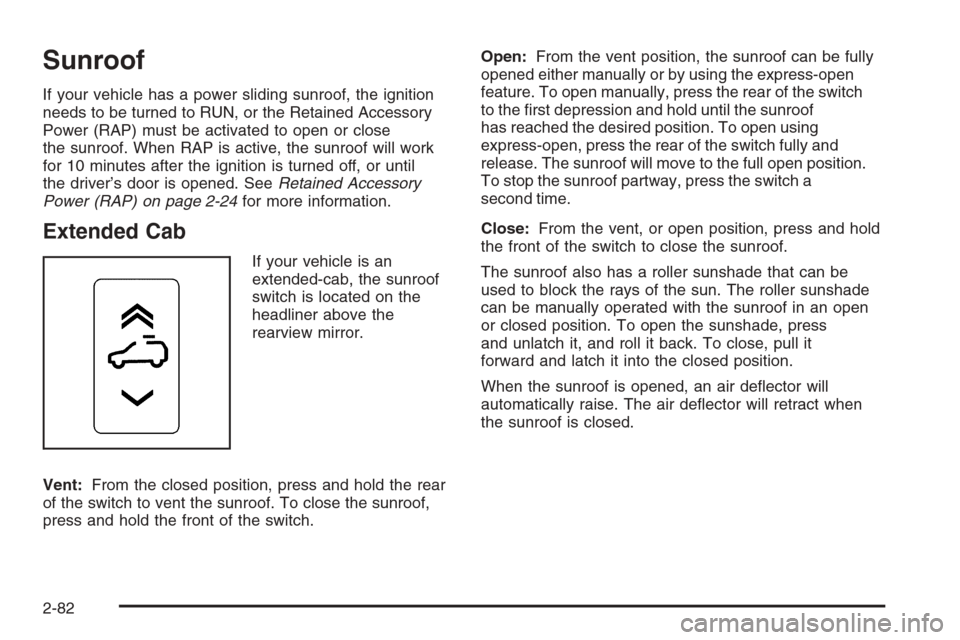
If your vehicle is an
extended-cab, the sunroof
switch is located on the
headliner above the
rearview mirror.
Vent:From the closed position, press and hold the rear
of the switch to vent the sunroof. To close the sunroof,
press and hold the front of the switch.Open:From the vent position, the sunroof can be fully
opened either manually or by using the express-open
feature. To open manually, press the rear of the switch
to the rst depression and hold until the sunroof
has reached the desired position. To open using
express-open, press the rear of the switch fully and
release. The sunroof will move to the full open position.
To stop the sunroof partway, press the switch a
second time.
Close:From the vent, or open position, press and hold
the front of the switch to close the sunroof.
The sunroof also has a roller sunshade that can be
used to block the rays of the sun. The roller sunshade
can be manually operated with the sunroof in an open
or closed position. To open the sunshade, press
and unlatch it, and roll it back. To close, pull it
forward and latch it into the closed position.
When the sunroof is opened, an air deector will
automatically raise. The air deector will retract when
the sunroof is closed.
2-82
Page 177 of 596
Crew Cab
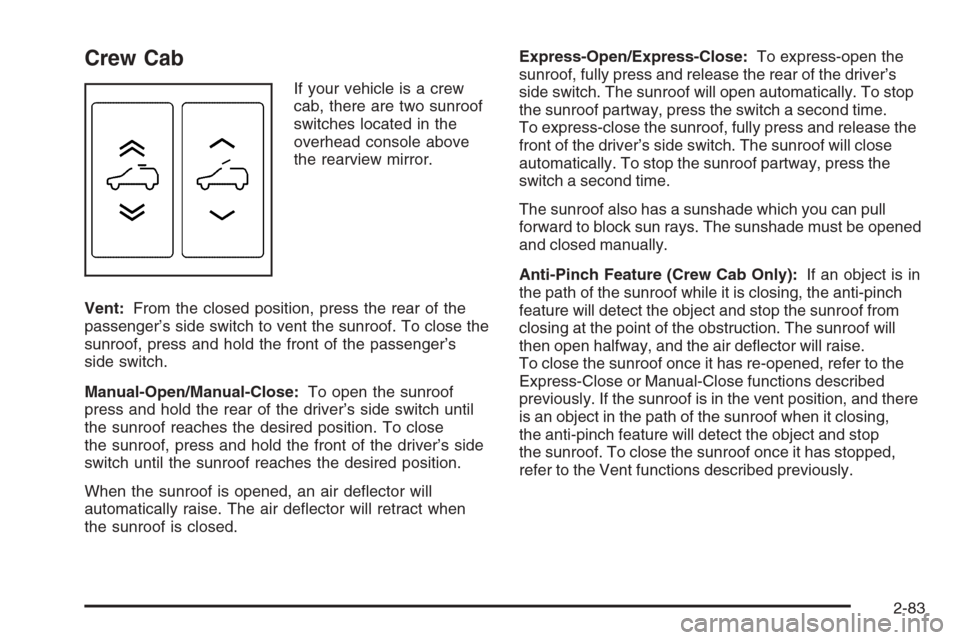
If your vehicle is a crew
cab, there are two sunroof
switches located in the
overhead console above
the rearview mirror.
Vent:From the closed position, press the rear of the
passenger’s side switch to vent the sunroof. To close the
sunroof, press and hold the front of the passenger’s
side switch.
Manual-Open/Manual-Close:To open the sunroof
press and hold the rear of the driver’s side switch until
the sunroof reaches the desired position. To close
the sunroof, press and hold the front of the driver’s side
switch until the sunroof reaches the desired position.
When the sunroof is opened, an air deector will
automatically raise. The air deector will retract when
the sunroof is closed.Express-Open/Express-Close:To express-open the
sunroof, fully press and release the rear of the driver’s
side switch. The sunroof will open automatically. To stop
the sunroof partway, press the switch a second time.
To express-close the sunroof, fully press and release the
front of the driver’s side switch. The sunroof will close
automatically. To stop the sunroof partway, press the
switch a second time.
The sunroof also has a sunshade which you can pull
forward to block sun rays. The sunshade must be opened
and closed manually.
Anti-Pinch Feature (Crew Cab Only):If an object is in
the path of the sunroof while it is closing, the anti-pinch
feature will detect the object and stop the sunroof from
closing at the point of the obstruction. The sunroof will
then open halfway, and the air deector will raise.
To close the sunroof once it has re-opened, refer to the
Express-Close or Manual-Close functions described
previously. If the sunroof is in the vent position, and there
is an object in the path of the sunroof when it closing,
the anti-pinch feature will detect the object and stop
the sunroof. To close the sunroof once it has stopped,
refer to the Vent functions described previously.
2-83
Page 179 of 596
Instrument Panel Overview...............................3-4
Instrument Panel Overview
(Base/Uplevel version).................................3-4
Instrument Panel Overview (Premium version). . . .3-6
Hazard Warning Flashers................................3-8
Other Warning Devices...................................3-8
Horn .............................................................3-8
Tilt Wheel.....................................................3-8
Turn Signal/Multifunction Lever.........................3-9
Turn and Lane-Change Signals.......................3-10
Headlamp High/Low-Beam Changer.................3-10
Flash-to-Pass...............................................3-11
Windshield Wipers........................................3-11
Rainsense™ II Wipers...................................3-12
Windshield Washer.......................................3-12
Cruise Control..............................................3-13
Exterior Lamps.............................................3-17
Headlamps on Reminder................................3-18
Daytime Running Lamps (DRL).......................3-18
Automatic Headlamp System..........................3-19
Puddle Lamps..............................................3-20
Fog Lamps ..................................................3-20
Auxiliary Roof Mounted Lamp.........................3-20
Instrument Panel Brightness...........................3-21
Dome Lamps ...............................................3-21
Dome Lamp Override....................................3-21
Entry Lighting...............................................3-21Exit Lighting.................................................3-21
Reading Lamps............................................3-22
Cargo Lamp.................................................3-22
Electric Power Management...........................3-22
Battery Run-Down Protection..........................3-23
Accessory Power Outlet(s).............................3-23
Ashtray(s) and Cigarette Lighter......................3-24
Climate Controls............................................3-25
Climate Control System
(With Air Conditioning )..............................3-25
Climate Control System (Heater Only)..............3-28
Dual Automatic Climate Control System...........3-29
Outlet Adjustment.........................................3-35
Warning Lights, Gages, and Indicators............3-36
Instrument Panel Cluster................................3-37
Speedometer and Odometer...........................3-38
Trip Odometer..............................................3-38
Tachometer.................................................3-38
Safety Belt Reminders...................................3-39
Airbag Readiness Light..................................3-40
Airbag Off Light............................................3-41
Passenger Airbag Status Indicator...................3-43
Charging System Light..................................3-45
Voltmeter Gage............................................3-45
Brake System Warning Light..........................3-46
Anti-lock Brake System (ABS) Warning Light. . . .3-47
Section 3 Instrument Panel
3-1
Page 180 of 596

StabiliTrak®Indicator Light.............................3-48
Engine Coolant Temperature Gage..................3-48
Tire Pressure Light.......................................3-49
Malfunction Indicator Lamp.............................3-49
Oil Pressure Gage........................................3-52
Oil Pressure Light.........................................3-53
Security Light...............................................3-53
Fog Lamp Light............................................3-53
Cruise Control Light......................................3-54
Highbeam On Light.......................................3-54
Four-Wheel-Drive Light..................................3-54
Tow/Haul Mode Light....................................3-54
Fuel Gage...................................................3-55
Low Fuel Warning Light.................................3-56
Driver Information Center (DIC).......................3-56
DIC Operation and Displays
(With DIC Buttons)....................................3-57
DIC Operation and Displays
(Without DIC Buttons)................................3-63DIC Warnings and Messages.........................3-66
DIC Vehicle Customization (With DIC Buttons) . . .3-76
Audio System(s).............................................3-84
Setting the Clock..........................................3-86
Radio(s)......................................................3-88
Using an MP3 (Radio with CD or
Six-Disc CD Player).................................3-108
Using an MP3 (Radio with CD and
DVD Player)...........................................3-114
XM Radio Messages...................................3-119
Navigation/Radio System..............................3-120
Rear Seat Entertainment (RSE) System.........3-121
Rear Seat Audio (RSA)................................3-130
Theft-Deterrent Feature................................3-132
Audio Steering Wheel Controls......................3-132
Radio Reception.........................................3-133
Fixed Mast Antenna....................................3-134
XM™ Satellite Radio Antenna System............3-134
Section 3 Instrument Panel
3-2