2008 AUDI TT ROADSTER light
[x] Cancel search: lightPage 19 of 316

USA models: anti-lock brake system ~ page 20
(ABS) defective
Canada models: anti-lock brake sys-
~ page 20
tern (ABS) defective
/@ Electro -mechanical power assist => page 21
& WARNING
• Failure to heed warning lights and other important vehicle
information may result in serious personal injury or vehicle
damage .
-
• Whenever stalled or stopped for repair, move the vehicle a safe
distance off the road, stop the engine, and turn on the emergency
flasher
=> page 75.
• The engine compartment of any motor vehicle is a potentially
hazardous area. Before you check anything in the engine compart
ment, stop the engine and let it cool down. Always exercise
extreme caution when working under the hood
~ page 212,
"Engine compartment"
[ i] Tips
Many functions are moni tored by the Auto -Check system
=> page 29. Malfunctions or faults will be identified either with a red
symbol (priority 1 - Danger!) or with a yellow symbol (prior ity 2 -
Warning). •
Applies to vehicles : with Audi m agnetic rid e
Audi magnetic ride
The indicator light monitors vehicle damping.
The indicator ligh t illuminat es when th e ignition is switched on as
a function check.
Controls and equip
ment
Instruments and warning/indicator lights
[ i] Tips
If the indicator lamp illuminates while you are driving, there is a
malfunction in the vehicle damping. The chassis should be
inspected immediately by an authorized Audi dealer. •
Tire pressure monitoring system -telltale
indicator lamp
C.
The warning/indicator light appears in the event of a
significant loss of air pressure.
The warning/indicator light illuminates for a few seconds after
the ignition is turned on as function check and then goes out.
If the symbol appears, pressure is too low in at least one tire .
When the system d etects a malfunction, the warning/indicator light
will flash for approximately one minute and then remain continu
ously illuminated . This sequence will continue upon subsequent
vehicle starts up as long as the malfunction exists. Contact your
authori zed Audi dealer and have the malfunction corrected.
For more information
=> page 43. •
Electronic power control "
This warning/indicator light monitors the electronic
power control.
The warning/indicator light (Electronic Power Control) illumi -
nates when you switch on the ignition as a function check .
[ i] Tips
If this warning/indicator light illuminates while you are driving , then
there is a malfunction in the engine electronics. Have the malfunc
tion corrected as soon as possible by your authorized Audi dealer or
qualified workshop. •
I • •
Page 20 of 316

Inst rum ents and w arnin g/indi cat or li ghts
Folding top ,.... ·
The warning/indic ato r l ight monitors the folding top func
tion.
The warning/indicator light illuminates when you switch on the
ignit ion for about 2 seconds as a check and then goes out. The
warning/indicator light has the following functions:
• The light illuminates when the folding top opens or closes .
• It flashes if one of the conditions for automatically lowering or
raising the folding top is not met and the switch to actuate the
folding top is pressed .
• The ligh t illuminates when the folding top is opened or c losed
incompletely. •
Electronic stabilization program (ESP) ~
The warning/indicator light monitors the electronic stabi
lization program .
The warning/indicator light has the following functions:
• It blinks while you are driving, when the ESP is working.
• It illuminates when you switch on the ignition for approximately
2 seconds as a function check.
• It illuminates when there is a malfunction in the ESP .
• It illuminates continuously when the ESP is switched off.
• It illuminates if there is a malfunction in the ABS, s ince the ESP
is part of the ABS system.
If the ESP warning/indicator light illuminates and stays on after you
have started the engine, this may mean that the control system has
temporari ly switched off the ESP. If this is case, you can reactivate
the ESP by switching the ign ition off and then on again. The
warning/indicator light should go out to show that the system is
ful ly functional again. For more information about the
ESP=>
page 184 . •
Malfunction Indicator Lamp (MIL) I
•
T he Malfunction Indicator Lamp (MIU is part of the On-Board Diag
n ostic (OBD II) system . The symbol lights up when the ignition is
turned on and will turn off after the engine has started and has
sett led at constant id le speed. This indicates tha t the MIL is working
properly.
The warning light il luminates when there is a malfunction in the
engine e lectronic system. Contact your authorized Audi dealer and
have the malfunction corrected.
An imprope rly clo sed fuel filler cap m ay al so cau se the MIL light to
illumi nate =>
page 216.
For more information => page 26. •
High beam ~D
The@:D warning/indicator light illuminates when the high beams are
on or when you use the headlight flasher. For more information
about using the high beams, see=>
page 76. •
Rear spoiler J
The warning/indicator light monitors the electrically
retrac table rear spoiler.
The warning/indicator light~ has the following functions :
• It comes on for about 3 seconds as a function check when the
ignition is switched on.
• I t comes on if there is a malfunction in the electrical ly retractab le
rear spoiler . _,,,
Page 21 of 316
Additional information about the electrically retractable rear spoiler
=:> page 187 . •
Turn signals ¢ Q
The indicator light blinks when you use either turn signal.
Whenever you use the left¢ or the right c::::> turn signal, the indicator
light blinks. When you use the emergency flasher, both indicator
lights flash .
If one of the turn signa l light bu lbs burn out, the turn signal will
blink twice as fast as normal.
Additiona l information on the turn signals :::::>
page 76. •
Cruise control
CRUISE (USA models )/ (')<> (Canada models)
The CRUISE warning/indicator light illuminates when the cruise
control is activated. •
Airbag system
~~ (USA models) / !_~· (Canada models)
This warning/indicator light monitors the airbag and the
tensioner systems .
The ti (USA models) !! 'tr (Canada models) warning light illuminates
for a few seconds each time you switch on the ignition .
If the m (USA mode ls)
/ J q· (Canada models) warning light does not
go out, or if it i lluminates whi le you are driving, or if it starts to blink,
then there is a malfunction somewhere in the system. If the light
does not illuminate when you switch on the ignition, this also
means there is a malfunction.
Controls and equip
ment
Instruments and warning /indi cator lights
& WARNING
If you have a malfunction in the airbag system, contact your autho
rized Audi dealer immediately. Otherwise the airbag or the belt
tensioner may not work properly in an accident. •
Generator 0
This warning/indicator light detects a malfunction in the
generator or in the vehicle's electrical system.
The D warning/indicator light illuminates when you switch on the
ignition and must go out after the engine has started.
If the D warning/indicator light illuminates while you are driving,
you should contact your authorized Audi deale r. Since the vehicle
battery is discharging, you should switch off any unnecessary elec
trical consumers (for example, the air conditioner).
0 Note
If the -~- warning/indicator light (malfunction in the engine cooling
system) in the instrument cluster shou ld illuminate :::::>
page 32, stop
the vehicle and turn off the engine . The coolant pump is not working
- this can cause engine damage!•
Applies to veh ic les : w ith safety belt warning l ight
Safety belt warning light 4
The warning light is a reminder to fasten safety belts.
The warning light 4 comes on for a few seconds after the ignition
is switched on as a reminder to fasten your safety belt.
Additional information on safety belts:::::>
page 137. •
I • •
Page 22 of 316

Instruments and warning/indicator lights
Brake system BRAKE (USA)/ (CD) (Canada)
This warning/i ndi cat or light illumina tes whe n th e brake
fluid level i s to o low or w hen t here is a malfuncti on in the
ABS , or w hen the pa rkin g br ake is set.
The ligh t illumin ates when the igniti on is turned on . It goes out aft er
th e engine has been started and the parking brake is fu lly r eleased.
Th is i ndicates that t he bra ke w arning ligh t is f uncti oning properly .
If the brake warning light does not light up when the engine is
cranking or the parking brake is applied , there may be a malfunction
in the electrical system. In thi s case , contact your Audi dealer.
When the light com es on, an acoustic warn ing signa l will sound .
Parking brake set
The BRAKE warning/indicator light illuminates when the parking
br ak e i s set :::::,& .
& WARNING
• USA model s.~ If both , the BRAKE warning light and the ~
warning light come on at the same time , the rear wheels could
lock up first under hard braking . Lo ck-up of the rear wheel brakes
can cause loss of vehicle control and an accident . Have your
vehicle repaired immediately by your authorized Audi dealer or a qualified workshop . Drive slowly and avoid sudden, hard brake
application.
• Canada models : If both , the b rake warning light
((j)) and the ABS
warning light come on at the same time , the rear wheels could
lock up first under hard brak ing . Lock -up of the rear wheel brakes
c an cause loss of vehicle control and an accident. Have your
vehi cle repaired immediately by your authorized Audi dealer or a
qualified workshop . Drive slowly and avoid sudden , hard brake
application
• If the brake warning /indicator light does not go out after a few
seconds and the parking brake released , or lights up while you are
& WARNING (continued)
driving , the fluid level in the brake fluid reservoir is too low . If you
believe that it is safe to do so, proceed immediately at low speed
to the nearest authorized Audi dealer or qualified workshop and
have the brake system inspected.
• Please be very careful and always keep in mind that after
several brake applications, you will need greater pressure on the
brake pedal to stop your vehicle . Consequently , you must allow for
increased braking distances. Trying to brake as qui ckly as usual
c ould lead to an ac cident . •
Anti-lock brake system 8 (USA)/
~ (Canada)
This warni ng /ind icato r lig ht moni tors the AB S and the
electronic differenti al lock (EDL).
The light will come on for a few seconds when the ignition is
switched on. The light wil l go out after an automatic check sequence
is completed.
There is a malfunction in the ABS when :
• The warnin g/i ndica to r l ight do es no t illumin ate when you swi tch
on the ignition .
• The warn ing/i ndi cator lig ht does not go ou t after a few seconds .
• T he warning/indicator l ight il luminates whi le driving.
The brake system will still respond even without the assistance of
the ABS system. See your authorized Audi dealer as soon as possible to restore full braking performance . For more in for mati on
regarding t he ABS=> page
189.
The ABS warning l ight and the brake warning light come on
together . The ABS will not work and you will notice a change in
braking response and performance .
Page 23 of 316
Malfunction in the brak e system
USA models: If bot h, th e BRAKE wa rn ing l igh t and the .... rs warning
light come on~
page 20when the parking brake is released, there
may be a ma lfunction in the ABS, and there may a ls o be a malfunc
t ion in the brake sys tem it se lf~
&-
Canada models: If both, the brake warning light (Q)) and the ABS
wa rning light c ome on~
page 20w hen the parking bra ke i s
released, there may be a ma lfunction in the ABS, and there may a lso
b e a ma lf un ction in the brake sys tem itsel f~
& -
Malfunction in the electronic differential lock (EDL )
The two sys te m s EDL and ABS wor k together. The ~ warning ligh t
wi ll come on if there is a malfunct ion in the EDL system~
page 186.
See your au thorize d Aud i dea le r as soon as poss ibl e.
& WARNING
• If the P • warning light does not go out, or if it comes on while
driving , the ABS system is not working properly . The vehicle can
then be stopped only with the brakes operating without ABS support . You will not have the protection ABS provides . Contact
your Audi dealer as soon as possible .
• USA models : If both, the BRAKE warning light and the
warning light come on at the same time , the rear wheels could
lock up first under hard braking . Lock-up of the rear wheel brakes
can cause loss of vehicle control and an accident. Have your
vehi cle repaired immediately by your authorized Audi dealer or a
qualified workshop. Drive slowly and avoid sudden, hard brake
application .
• Canada models: If both, the brake warning light (Cl) and the ABS
warning light ""' come on at the same time , the rear wheels could
lock up first under hard braking. Lock -up of the rear wheel brakes
can cause loss of vehicle control and an accident. Have your
vehicle repaired immediately by your authorized Audi dealer or a qualified workshop. Drive slowly and avoid sudden , hard brake
appli cation •
Controls and equip
ment
Instruments and warning /indi cator lights
Electro-mechanical power assist t / @
If the indicator light il luminates while you are driving, there is a
m alfunc tion in th e electro -m echa nical s teering. If the i ndica to r lig ht
is show ing ~, there may be a reduction in power steering ass ist. If
t he indi cator l ig ht is sh owing ~' the re may be a total loss o f pow er
steerin g assist . T he steerin g must be inspected immediately by a
q u alified works h op ~
6,. W ith the engine not ru nning (e.g. w hen
th e car is b eing tow ed), there is a lso no power assist avai lable .
& WARNING
If there is a malfunction , the indicator light for the electro -mechan
ical power assist illuminates . Seek professional assistance. •
I • •
Page 28 of 316
Driver inf ormation sy ste m
On-Board Diagnostic system (08D)
Malfunction Indicator Lamp (MIL )
The Malfunction Indicator Lamp (MIU in the instrument cluster
=:> page 16, fig. 6 is part of the On -Board Diagnos tic (OBD II) system.
The warning/indicator ligh t ill uminates when the ignition is
switched on and goes out after the engine starts and the idle has
stabilized . This indicates that the MIL is working properly .
If th e light d oes not go out after the engine is started, or illuminates
while you are driving, a ma lfunction may exist in the engine system.
If the light starts flashing, the catalytic converter cou ld be damaged .
Continue driving
w ith redu ced pow er (avoiding sustained high
speeds and/or rapid acce lerations) and have the condition
corrected. Contact your authorized Audi dealer.
If the light illuminates, the e lectronic speed limiter may also be
malfunctioning. For more information=:>
page 26, "E lectronic speed
limiter".
An imprope rly clo sed fuel filler c ap m ay als o c au se th e MIL light t o
illumi nate =:. page 216. •
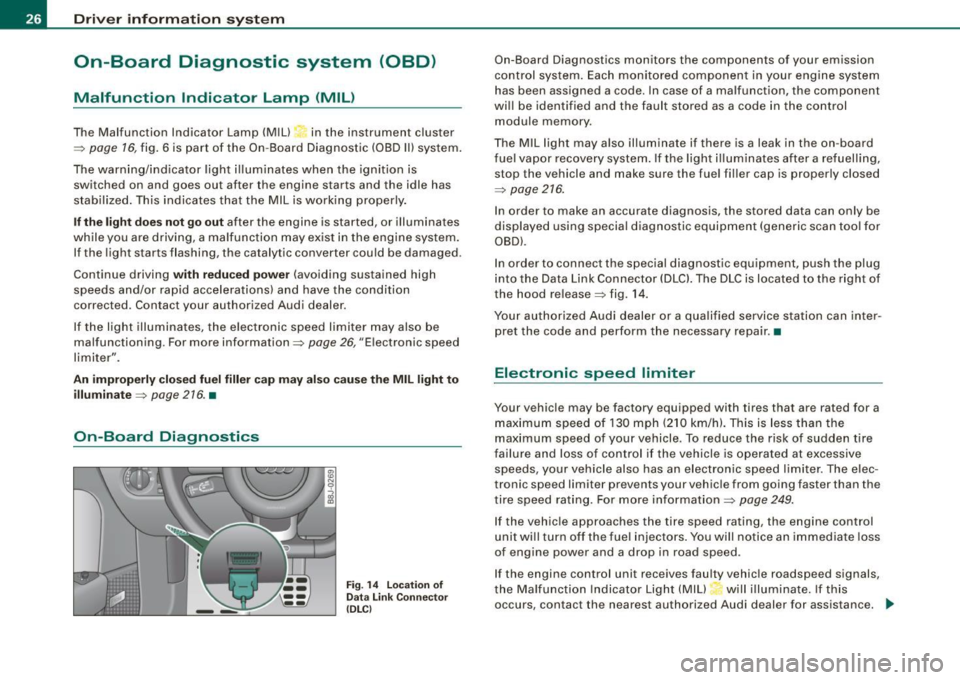
On-Board Diagnostics
F ig . 14 L ocation of
Data Link Co nnector
( DL Cl
On -Board Diagnostics monitors the components of your emission
control system. Each monitored component in your engine system
has been assigned a code. In case of a malfunction, the component
will be identified and the fault stored as a code in the control
module memory .
The MIL light may also illuminate if there is a leak in the on -board
f ue l vapor recovery system. If the light i lluminates after a refuelling,
stop the vehicle and make sure the fuel filler cap is properly closed
=:>
page 216.
In order to make an accurate diagnosis, the stored data can only be
displayed using special diagnostic equipment (generic scan too l for
OBD).
In order to connect the special diagnostic equipment, push the plug
into the Data Link Connector (DLCl. The DLC is located to the right of
the hood release =:> fig . 14.
Your authorized Audi dealer or a qualified service station can inter
pret the code and perform the necessary repair. •
Electronic speed limiter
Your vehicle may be factory equipped with tires that are rated for a
maximum speed of 130 mph (210 km/h). This is less than the
maximum speed of your vehicle. To reduce the risk of sudden tire
failure and loss of control if the vehicle is operated at excessive
speeds, your vehicle also has an electronic speed limiter . The elec
tronic speed limiter prevents your vehic le from going faster than the
tire speed rating. For more in formation=:>
page 249.
If the vehicle approaches the tire speed rating, the engine control
unit will turn off the fue l injectors. You will notice an immediate loss
of engine power and a drop in road speed .
If the engine control unit receives faulty vehicle roadspeed signals,
the Ma lfunction Indicator Light (MIU will illuminate. If this
occurs, contact the nearest authorized Audi dealer for assistance.
~
Page 29 of 316

& WARNING
Always observe the posted speed limits and adjust your speed to suit prevailing road, traffic and weather conditions. Never drive
your vehicle faster than the maximum speed rating of the tires
installed. •
Menu display
Introduction
0 ,...
"' 9 .., 00 m
Fig. 15 Wiper lever:
Controls for the menu
display
"'
"'
~ m
Fig . 16 Display: Start
menu
Some functions in your vehicle can be set, activated , and controlled
by
Menus (e.g. Acoustic Park Assist*). With these menus you can
Con tro ls and eq uip
ment
Driver information system
also select the information shown in the DIS display, which operates
only with the ignition switched on. Operation is controlled by the
I Reset) button and the rocker switch on the wiper lever::::, fig. 15.
The Start menu shows you the different display types:
Set
Check
Menu off
Each display type in the Start menu contains a submenu with addi
tional options.
Set
Check
Menu off Clock ::::, page 28
Lighting* => page 71, "Daytime
running lights (DRU
(USA
models)" =>
page 73
Computer ::::, page 28
Acoustic park assist* => page 109
Speed alarm (speed ::::, page 38
warning)
Language (6 languages) => page 28
Units (distance, fuel con-::::, page 28
sumption, temperature)
Wiper (service position) => page80
Window => page 58
Doors (Auto-lock) => page 50
Service ::::, page 25
Vehicle ID number* => page288
Engine oil temperature*
l! AII of the messages shown in vehicles without
menu display appear on the display screen.
•
Vehicle care I I Technical data
Page 31 of 316

- Press the (Reset ) button. The Start menu appears
=>
page 27, fig . 16.
- Press the rocker switch until
Set is d isplayed .
- Press the
( Reset ) button. All the menus appear.
- Press the rocker switch until the desired line is high -
lighted (cursor) =>
page 28, fig. 18.
- P ress the
( Reset ) button.
- If necessary, scroll by selecting and activating the
symbol fo r "Next page" or "Previous page".
When you have selected the Computer menu and activated it by
pressing the
I R ese t] button, two computer levels appear (compu ter
1 and computer 2). Now you have to select the level you want using
the rocker switch and activat e it with the
[Res et] but ton .•
Selecting settings (part 2)
Con tro ls and eq uip
ment
COMPUTER 1
1i oRESfl' I
. oDRIIJE Tll'IE
DISTANCE ···
-.1AV. HPH
>BACK
N 9
i
Fig. 19 D ispla y :
Co mpu ter 1 menu,
r a n ge sele cted
Dri ver in form ati on syst em
Fig . 20 Dis pla y:
Co mput er 1 menu ,
Back s elec ted
C ontinue to select your setti ngs as follows:
- Press the rocker switch until the desired line is activated
(red background) ~ fig . 19.
- Now activate or deactivate t he selected functio n (press
the
I Reset) button) by p lacing a chec k mark -(for "Yes ")
in t he box or no check mark (for "No ").
- Press the rocke r switch until
Back is selected, => fig. 20
and press the
(Reset ] button to return to a higher menu
level.
For many settings , numerical values must also be entered, e .g .
when setting the date. This is also done by using the rocker
switch .•
Auto-Check Control
Introduction
Auto-Check Cont rol automatically checks specific functions and
vehicle components for the ir status . Th is happens constantly with
t he ignition switched on and wh ile you are driving as well. .,
Vehicle care I I Technical data